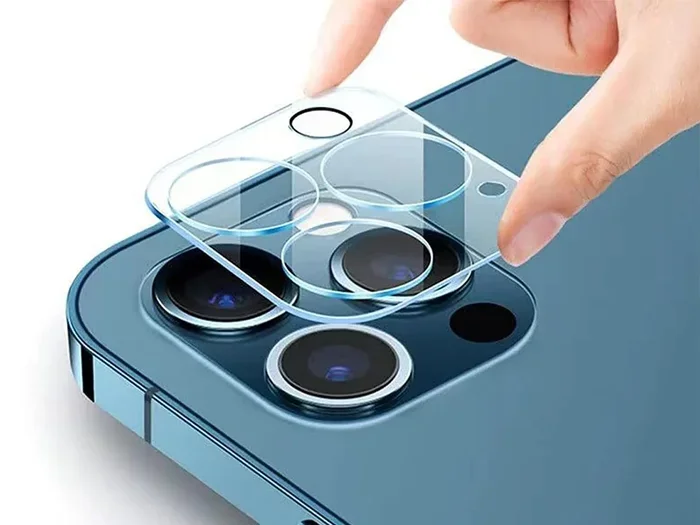
Camera Covers for Iphone 14
Protecting your iPhone 14 lenses is easier than you think. Camera covers for iPhone 14 provide a simple shield against scratches, dust, and accidental damage. Choosing the right cover ensures your photos stay sharp and your device stays safe. This guide walks you through everything you need to know about lens protection.
Key Takeaways
- Protection Matters: Camera covers prevent scratches and keep lenses clean from daily wear and tear.
- Privacy Options: Some covers block the lens physically for added privacy when not in use.
- Fit is Crucial: Ensure the cover matches your specific iPhone 14 model to avoid camera bump issues.
- Material Choices: Glass, plastic, and film options offer different levels of durability and clarity.
- Installation Tips: Clean your lens thoroughly before applying any cover to avoid bubbles or dust traps.
- Impact on Quality: High-quality covers do not distort images, but cheap ones might affect photo sharpness.
- Replacement Cycle: Check covers regularly for wear and replace them if they become cloudy or loose.
📑 Table of Contents
- Why You Need Camera Covers for iPhone 14
- Types of Camera Covers Available
- How to Choose the Right Cover for Your Model
- Installation and Maintenance Tips
- Impact on Photo Quality
- Privacy and Security Considerations
- Common Mistakes to Avoid
- Expert Insights on Lens Protection
- Final Thoughts on Protecting Your Device
Why You Need Camera Covers for iPhone 14
Your iPhone 14 is a powerful tool. It captures stunning photos and videos every day. But your camera lenses face risks constantly. Dust, keys, coins, and rough surfaces can scratch them easily. A scratched lens ruins photo quality. It creates blurry spots and light flares.
Many people overlook lens protection. They buy screen protectors but ignore the cameras. This is a big mistake. The camera module is one of the most exposed parts of your phone. When you set your phone down, the lenses touch the table first. A camera cover acts as a shield. It takes the hit instead of your actual glass.
Camera covers for iPhone 14 are small investments. They save you from costly repairs later. Replacing a camera lens is expensive. Sometimes it is not even possible. You might have to replace the whole module. Preventing damage is always cheaper than fixing it. Plus, clean lenses mean better photos. You do not want dust spots on your favorite memories.
Think about your daily habits. Do you keep your phone in a pocket with keys? Do you place it on café tables? Do you travel often? If you answered yes, you need protection. A simple cover adds a layer of safety. It gives you peace of mind. You can use your phone freely without worrying about every surface you touch.
Types of Camera Covers Available
Not all covers are the same. You need to know the options before you buy. Different materials offer different benefits. Some focus on durability. Others focus on privacy. Here are the main types you will find on the market.
Glass Lens Protectors
Glass protectors are very popular. They feel smooth and clear. They mimic the feel of the original lens. High-quality glass does not affect image quality much. It resists scratches well. However, glass can shatter if dropped hard. You need to choose tempered glass for best results. Look for options with anti-reflective coating. This helps reduce glare in your photos.
Plastic and Film Options
Plastic covers are lighter and cheaper. They are less likely to shatter. But they can scratch more easily than glass. Some people prefer thin film protectors. These stick directly onto the lens. They are almost invisible. Yet, they might reduce clarity slightly. If you choose plastic, ensure it is high-grade. Cheap plastic can look cloudy over time.
Privacy Covers
Privacy is a growing concern. Some users worry about cameras being accessed without permission. Privacy covers slide or flip over the lens. When closed, no one can see through the camera. This is great for sensitive environments. However, these covers add bulk. They might interfere with cases. You need to check compatibility before buying a privacy slider.
How to Choose the Right Cover for Your Model
iPhone 14 comes in different versions. There is the standard iPhone 14. There is also the iPhone 14 Pro and Pro Max. The camera layouts differ slightly. A cover for one model might not fit another. You must match the cover to your specific device.
Measure your camera bump. The Pro models have larger lenses. They also have more lenses in the array. A standard iPhone 14 cover might leave gaps on a Pro model. This leaves some lenses unprotected. Always check the product description. Look for mentions of your exact model number.
Consider your case too. Some thick cases cover the camera area. If your case has a raised lip around the camera, you might not need a separate cover. The case itself acts as protection. But if your case is thin or flush, a cover is wise. You want everything to fit snugly. Loose covers can fall off. Tight fits might press against the lens glass.
Read reviews from other users. They often mention fit issues. If many people say it does not fit the Pro Max, believe them. User feedback is valuable. It saves you from returning items. Look for brands that specialize in phone accessories. They usually test fitment more carefully.
Installation and Maintenance Tips
Putting on a camera cover is simple. But doing it correctly matters. Dust is the enemy during installation. A single speck of dust can create a bubble. This looks bad and might affect the photo. Follow these steps for a clean install.
- Clean the lens first: Use a microfiber cloth. Remove all oils and dust.
- Work in a clean area: Avoid carpets or dusty tables. A bathroom is often good.
- Peel carefully: Do not touch the sticky side of the cover.
- Align precisely: Match the cover with the lens edges.
- Press gently: Smooth it out from the center to the edges.
Once installed, take care of it. Clean the cover regularly. Use the same microfiber cloth. Do not use harsh chemicals. Alcohol can damage some coatings. Warm water and mild soap are safer. Dry it thoroughly before using the camera.
Check the cover often. Look for peeling edges. Check for scratches on the cover itself. If the cover is damaged, replace it. A damaged cover might scratch the actual lens underneath. It defeats the purpose of protection. Keep a spare in your bag or drawer.
Impact on Photo Quality
A common worry is image quality. People fear covers will make photos blurry. This depends on the quality of the cover. Cheap, thick plastic can distort light. It might cause hazing or color shifts. High-quality glass or thin film usually works fine.
Test your camera after installing. Take photos of high-contrast scenes. Look at text or sharp edges. Compare them to photos taken before the install. If you see a difference, the cover might be poor quality. Night photos are a good test too. Check for extra glare or flares around lights.
Camera covers for iPhone 14 should be optically clear. Reputable brands design them for this. They minimize interference. But no cover is 100% invisible to light. There is always a tiny layer added. For most users, the trade-off is worth it. The protection outweighs the tiny potential loss in quality. Just avoid very thick or cheap materials.
Privacy and Security Considerations
Privacy is a big topic today. People worry about hackers or apps using cameras secretly. A physical cover solves this. When the cover is closed, the lens is blocked. No software can see through a physical barrier. This is the ultimate privacy tool.
However, think about convenience. Sliding covers open and closed takes time. If you forget to open it, your photos will be black. You might miss a moment. Some covers are adhesive stickers. You peel them off when taking photos. This is annoying if you take photos often.
Consider your lifestyle. Do you work in sensitive areas? Do you attend private meetings? If yes, a privacy cover is smart. For most casual users, a standard protector is enough. You trust your security software mostly. But physical privacy gives extra peace of mind. It is a personal choice based on your needs.
Common Mistakes to Avoid
Many people make errors when buying or using covers. Avoid these pitfalls to get the best value.
- Buying the wrong model: Always double-check iPhone 14 vs 14 Pro.
- Ignoring case compatibility: Ensure your case fits over the cover.
- Poor installation: Dust trapped under the cover looks bad.
- Using harsh cleaners: Chemicals can strip coatings off the cover.
- Keeping damaged covers: Replace scratched covers immediately.
Another mistake is buying too many covers at once. Try one first. See how it feels. See if it affects your photos. Then buy more if you like it. Do not stock up on a brand you have not tested. Your eyes are the best judge of clarity.
Expert Insights on Lens Protection
Experts suggest a holistic approach. Do not rely on just one thing. Use a good case. Use a lens cover. Be careful with how you store your phone. A case protects the body. A cover protects the glass. Together they work best.
Some photographers recommend keeping the lens cap on when not shooting. This is hard with phones. We use phones constantly. A cover that stays on is more practical. It is always there when you need it. Just ensure it does not interfere with daily tasks.
Regular maintenance is key. Clean your lenses daily if possible. Oils from fingers build up quickly. This reduces light intake. A clean cover performs better. Make it a habit to wipe your phone before shooting. This simple habit improves photo quality instantly.
Final Thoughts on Protecting Your Device
Your iPhone 14 is an investment. It holds your memories and your work. Protecting the camera system is vital. Camera covers for iPhone 14 are a smart solution. They are affordable and effective. You do not need to be a tech expert to use them.
Choose quality over price. A good cover lasts longer. It protects better. It keeps your photos sharp. Take your time to find the right fit. Read reviews. Check compatibility. Install it carefully. Your future self will thank you when your lenses stay perfect.
Start protecting your device today. Look for reliable options online. Ensure you get the right model. Enjoy taking photos without worry. Your camera deserves care just like the rest of your phone.
Frequently Asked Questions
Do camera covers affect iPhone 14 photo quality?
High-quality covers usually do not affect quality much. Cheap or thick covers might cause slight blur or glare. Always test your photos after installing a new cover.
Can I use a camera cover with a phone case?
Yes, but you must check compatibility first. Some thick cases cover the camera area already. Ensure the cover does not make the camera bump too high for your case.
How do I clean my camera cover?
Use a soft microfiber cloth and mild soap water. Avoid harsh chemicals like alcohol or ammonia. Dry it gently before using the camera again.
Are privacy camera covers worth it?
They are worth it if you are concerned about physical privacy. They block the lens completely when closed. However, they can be inconvenient if you take photos frequently.
Will a camera cover fit the iPhone 14 Pro Max?
You need to buy a cover specifically for the Pro Max. The camera layout is different from the standard iPhone 14. Always verify the model number before purchasing.
How often should I replace my camera cover?
Replace it if you see scratches, peeling, or cloudiness. A damaged cover can scratch your actual lens. Inspect it regularly during your phone cleaning routine.