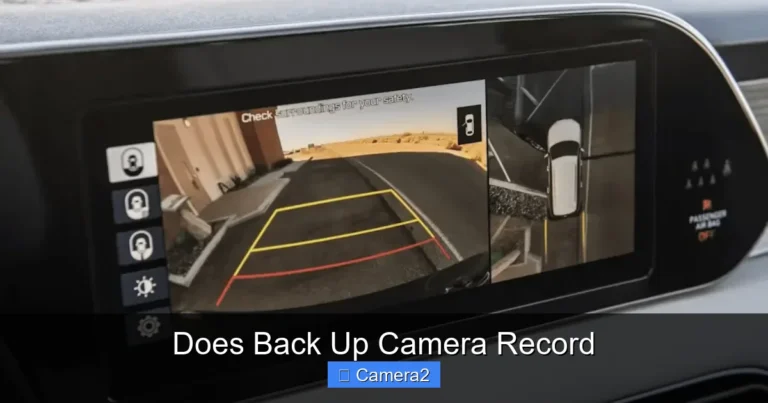
Ford F150 Back Up Camera
The Ford F150 back up camera is a vital safety feature that helps you park and avoid obstacles. When it fails, it causes stress and safety risks. This guide covers common problems like black screens and missing lines. We also explain how to fix wiring and reset the system. You will learn when to seek professional help for your truck.
Your truck is one of your most valuable assets. You use it for work, family trips, and daily chores. Safety is always the top priority when you drive. The Ford F150 back up camera is a key tool for safe driving. It helps you see what is behind you. This prevents accidents and makes parking easier. But what happens when it stops working?
A broken camera is frustrating. You might see a black screen or weird lines. Sometimes the image freezes. These issues can make you feel unsafe. You might worry about hitting something. We understand this stress. This article will help you fix it. We cover simple tricks and serious repairs.
We will walk you through every step. You will learn about wiring and fuses. We also discuss lens care. Our goal is to get you back on the road safely. Let us dive into the details of your Ford F150 back up camera.
Key Takeaways
- Common Issues: Black screens and distorted lines are the most frequent problems with the Ford F150 back up camera.
- Simple Fixes: Often, shifting the gear to reverse and back can reset the system.
- Wiring Checks: Loose connections or blown fuses are common culprits for camera failure.
- Weather Impact: Dirt and moisture can obscure the lens, making the image look poor.
- Professional Help: If internal modules fail, you may need a specialist for Ford F150 backup camera replacement.
- Safety First: Never rely solely on the camera; always check your mirrors and surroundings.
- Maintenance: Keep the lens clean and dry to ensure a clear view of the back up camera license plate area.
📑 Table of Contents
Understanding Your Ford F150 Back Up Camera
Modern trucks come with many tech features. The rearview camera is one of the most useful. It activates when you shift into reverse. The screen on your dashboard shows the view behind the truck. This helps you spot children, pets, or objects. It is especially helpful in large trucks like the F150.
The system includes a lens and a display. The lens mounts on the back. The display is on the front. They connect through wiring harnesses. Sometimes the software needs a reset. Other times the hardware fails. Knowing the parts helps you diagnose issues. You might need to check the Ford F 150 backup camera settings.
There are different model years. Newer models have better resolution. Older models might have lower quality images. Some have guidelines on the screen. These lines show you the path of the truck. If these lines disappear, the camera might be faulty. Understanding your specific model helps a lot.
How the System Activates
The camera turns on automatically. You do not need to press a button. When you shift to reverse, the signal sends to the screen. This happens in seconds. If it does not happen, there is a problem. You might need to learn how to turn on backup camera manually if your model allows it.
Some trucks have a manual override. This lets you check the camera while driving forward. This is useful for checking blind spots. However, most drivers use it only in reverse. The activation signal is key. If the signal fails, the screen stays blank.
Importance of Clear Visibility
Seeing clearly is crucial. A blurry image is dangerous. You need to see the back up camera license plate area clearly. This helps you judge distance. It also helps you align with parking spots. Dirt and mud can block the view. Cleaning the lens is a simple fix.
Weather also plays a role. Rain can cause water spots. Snow can cover the lens. Always check the lens before driving. A clear lens means a safe truck. This is part of regular vehicle maintenance.
Common Problems with the Ford F150 Back Up Camera
Many owners report similar issues. The most common problem is a black screen. You shift to reverse, but nothing shows up. Another issue is static or lines. The image might look distorted. Sometimes the camera works intermittently. It works one day and not the next.
These problems can stem from various sources. It could be a fuse issue. It could be a wiring problem. Sometimes the screen itself is bad. You need to diagnose the root cause. Do not assume the camera is dead immediately. Check the simple things first.
Black Screen Issues
A black screen is very common. It usually means no signal is reaching the display. This could be a loose cable. It could also be a blown fuse. Check your fuse box first. It is the easiest fix. If the fuse is good, check the connections.
Sometimes the camera module fails. This requires more work. You might need to look into Ford F150 backup camera replacement. But try resetting the system first. Shift the gear back and forth. This can sometimes wake up the system.
Distorted Images and Lines
Seeing lines on the screen is annoying. It makes the image hard to read. This often points to a wiring issue. The video cable might be damaged. It could be pinched or corroded. Water damage is also a possibility.
If you see missing lines on the screen, check the Ford backup camera lines missing guide. This specific issue often relates to the display processor. It might need a software update. Or the screen unit might need replacement.
Intermittent Connectivity
Sometimes the camera flickers. It turns on and off. This suggests a loose connection. Wiggle the wires near the tailgate. The tailgate moves often. This movement can loosen cables. Secure the wires tightly.
Cold weather can also affect connections. Metal contracts in the cold. This can break contact temporarily. If it works when the truck warms up, it is likely a connection issue. Tape the wires to keep them secure.
Troubleshooting Steps for Your Ford F150 Back Up Camera
You can try many fixes at home. You do not need a mechanic for every issue. Start with the basics. Check the gear shift. Ensure it is fully in reverse. Check the screen brightness. Sometimes the screen is too dim.
Next, check the fuses. Locate the fuse box. Find the camera fuse. Replace it if it is blown. This is cheap and easy. If that fails, check the wiring. Look for visible damage. Check the lens for dirt.
Resetting the System
A soft reset can work wonders. Turn the truck off. Wait a few minutes. Turn it back on. Shift to reverse. See if the image returns. This clears temporary glitches. It is like restarting a computer.
Some models allow a system reset via the dashboard menu. Check your owner’s manual. Look for display settings. Reset the rearview settings to default. This can fix software bugs. It is a safe step to try.
Checking Fuses and Wiring
Fuses protect the electrical system. A blown fuse stops the power. Find the fuse diagram. It is usually on the fuse box lid. Pull the fuse out. Look at the metal strip inside. If it is broken, replace it.
Wiring needs a careful look. Trace the wires from the camera. Look for cuts or fraying. Check the connectors. Ensure they are plugged in tight. Corrosion looks like green powder. Clean it with electrical cleaner.
If you are unsure, consult a guide on how to connect insight backup camera for general wiring tips. Proper connection ensures signal flow. Loose wires cause signal loss. Secure all connections with electrical tape.
Maintenance Tips for Longevity
Keeping your camera working is easy. Regular cleaning is the best method. Use a soft cloth. Do not use harsh chemicals. They can scratch the lens. Warm water and mild soap work well.
Check the lens frequently. Mud and grime build up fast. This blocks the view. A dirty lens looks like a broken camera. Clean it before every long trip. This ensures you see the back up camera license plate clearly.
Cleaning the Lens Properly
Use a microfiber cloth. It does not scratch glass. Wipe gently. Do not press hard. Remove all dirt and bugs. Bugs can dry on the lens. Soak them with water first. Then wipe them away.
Avoid spraying water directly. Water can seep into the housing. Use a damp cloth instead. Dry the lens after cleaning. Moisture can cause fogging. Learn how to keep backup camera clean for more detailed care tips.
Protecting from Weather
Weather harms electronics. Rain and snow are the main enemies. Water can get inside the casing. This causes short circuits. Check the seals around the camera. Replace them if they are cracked.
Winter salt is also corrosive. Wash the back of the truck often. Remove salt buildup. This protects the metal and wires. Park in a garage if possible. This reduces exposure to elements.
When to Seek Professional Help
Some problems need a pro. If you check everything and it still fails, call a technician. Internal module failure is hard to fix. You might need a new part. Wiring inside the tailgate is tricky. It requires disassembly.
If you are not comfortable with electronics, seek help. Safety is paramount. A wrong repair can cause more issues. Professional installers have the right tools. They can diagnose complex faults quickly.
Replacement Options
Sometimes replacement is the only option. You can buy an aftermarket camera. Or you can use OEM parts. OEM parts fit perfectly. Aftermarket parts might be cheaper. Compare the costs before deciding.
Look into 2018 Ford F150 backup camera replacement if you have that model. Parts availability varies by year. Newer models might have better support. Older models might need universal parts. Ensure compatibility before buying.
Warranty and Support
Check your warranty status. Some repairs are covered. Ford might cover camera defects. Contact your dealer. They can check the VIN. This saves you money. Do not pay for covered repairs.
Keep your records safe. Show them to the technician. This helps them understand the history. It speeds up the repair process. Good communication helps everyone.
Safety Considerations and Best Practices
Never trust the camera 100%. It is a tool, not a guarantee. Always look over your shoulder. Use your mirrors too. The camera has blind spots. It cannot see directly behind the bumper always.
Teach your family how to use it. Show them how it activates. Explain its limits. This keeps everyone safe. A Ford F150 back up camera is great, but human eyes are better. Use both for maximum safety.
Understanding Blind Spots
Cameras have limits. They do not see high objects well. They might miss low obstacles. Shadows can hide things. Always walk around the truck before backing up. This is the safest habit.
Large trucks have large blind spots. The camera helps reduce this. But it does not eliminate it. Be extra careful with kids. They are hard to see. Slow down when backing up.
Using Guidelines Effectively
Many cameras show guide lines. These lines move as you turn. They show the path of the truck. Use them to steer. But do not rely on them solely. They are estimates. Real space might differ.
Adjust the lines if possible. Some systems let you calibrate them. This makes them more accurate. Check your manual for calibration steps. Accurate lines help parking greatly.
Key Takeaways
- Regular Cleaning: Keep the lens free of dirt to maintain a clear view.
- Check Fuses: A blown fuse is a common and easy fix for camera failure.
- Inspect Wiring: Loose connections in the tailgate are a frequent cause of issues.
- System Reset: Turning the truck off and on can resolve software glitches.
- Professional Repair: Complex electrical issues may require a specialist.
- Safety Habits: Always combine camera use with manual checks and mirrors.
- Model Specifics: Know your truck’s year to find the right replacement parts.
Frequently Asked Questions
Why is my Ford F150 back up camera showing a black screen?
A black screen usually means a lost signal. Check the fuse first. It might also be a loose wire. Try resetting the system by turning the truck off.
How do I clean the lens on my backup camera?
Use a soft microfiber cloth. Wipe gently with mild soap and water. Avoid harsh chemicals. Do not spray water directly on the camera.
Can I replace the camera myself?
Yes, if you are handy. It involves removing the tailgate trim. You need basic tools. If unsure, hire a professional to avoid damage.
What causes lines to appear on the camera display?
Lines often indicate wiring damage. The video cable might be pinched. It could also be a screen processor issue. Check the connections first.
Does the camera record video?
Most standard factory cameras do not record. They are for viewing only. Some aftermarket systems add recording features. Check your specific model specs.
Where is the fuse located for the backup camera?
The fuse is usually in the interior fuse box. Check the diagram on the lid. It is often labeled as “camera” or “reverse”. Consult your owner’s manual for exact location.
=== CONCLUSION ===
Your Ford F150 back up camera is a vital safety tool. It helps you navigate tight spaces. It protects your truck and others. When it breaks, do not panic. Follow the steps in this guide. Check the fuses and clean the lens. Reset the system if needed.
If simple fixes fail, seek help. Professional repair ensures safety. Keep your lens clean for the best view. Always double-check your surroundings. Technology is helpful, but caution is key. Drive safely and enjoy your truck.
Maintaining your camera is easy. It saves money and stress. A working camera makes driving better. Take care of your Ford F150 back up camera today. Your future self will thank you.