What Do the Colors Mean on the Rca Cables
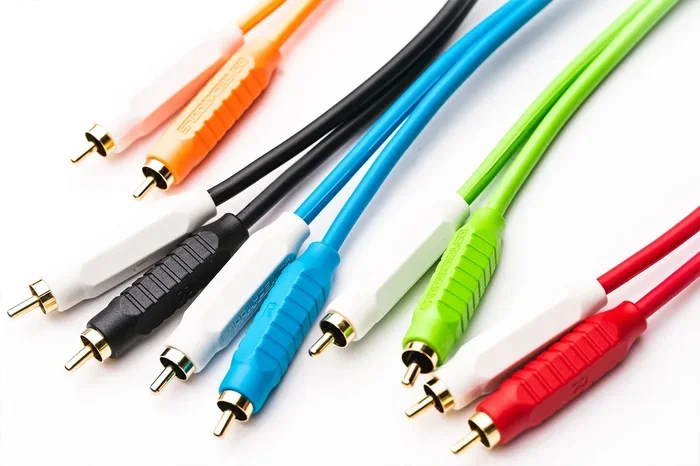
RCA cables use color coding to help you connect audio and video devices the right way. The yellow cable carries composite video, while red and white handle right and left audio channels. Understanding these colors saves time and prevents connection mistakes.
This is a comprehensive guide about What Do The Colors Mean On The Rca Cables.
Key Takeaways
- Yellow RCA: Carries composite video signals for older devices
- Red and White RCA: Red handles right audio and white handles left audio for stereo sound
- Component Video Cables: Use red, green, and blue for higher-quality video signals
- Color Matching Matters: Matching the correct colors to the right ports ensures proper signal transfer
- RCA Cables Still Matter: Even in the digital age, RCA connections remain common in home theater setups
[FEATURED_IMAGE_PLACEHOLDER]
What Do the Colors Mean on the RCA Cables
RCA cables have been around for decades. You find them behind almost every TV, stereo system, and home theater setup. But if you have ever stared at a bundle of colored cables and wondered what each one does, you are not alone. The colors on RCA cables are not random. Each color serves a specific purpose. It tells you exactly what type of signal that cable carries.
Understanding these colors makes setting up your devices a breeze. You will never have to guess which cable goes where again. This guide breaks down every color you will encounter. We will also share tips to help you get the best audio and video quality from your setup.
Whether you are connecting an old DVD player, a soundbar, or a vintage stereo, this guide has you covered. Let us dive in and decode the rainbow behind your entertainment center.
The Basics of RCA Cables
RCA cables are analog connectors. They were invented by the Radio Corporation of America in the 1940s. Back then, they were the standard way to connect audio and video equipment. Even today, many devices still use them. You will find RCA ports on TVs, amplifiers, receivers, and older gaming consoles.
The design is simple. Each cable has a single pin surrounded by a ring. You push it into a matching port. The tight fit keeps the connection secure. Most RCA cables come in a set of three or more. Each one is a different color. This color system helps you identify what each cable does at a glance.
Why Colors Matter
Colors act as a universal language for cable connections. You do not need to read a manual. You just match the colors. This system works across brands and devices. A yellow RCA cable from Sony connects the same way as a yellow RCA cable from Samsung. The colors keep things simple and consistent.
When you mix up the colors, you can run into problems. You might get no picture, no sound, or poor quality on both. That is why learning the color code is so important. It takes just a few minutes to learn. And it saves you a lot of frustration later.
Red and White RCA Cables: The Audio Channels
The red and white RCA cables handle audio. These two cables work together to deliver stereo sound. Stereo sound means you get audio from two separate channels. This creates a more immersive listening experience compared to single-channel audio.
The white RCA cable carries the left audio channel. When you watch a movie, the dialogue and sounds on the left side of the screen come through this cable. The red RCA cable carries the right audio channel. Sounds on the right side of the screen travel through this one.
Here is a quick look at how these two cables work together:
- White RCA Cable: Left audio channel. Handles sounds panned to the left.
- Red RCA Cable: Right audio channel. Handles sounds panned to the right.
- Together: They create stereo sound for a richer audio experience.
Remember the rule: red goes to red, white goes to white. The ports on your devices are usually color-coded too. You will see a red port and a white port on the back of your TV or receiver. Match the cable color to the port color. It is that easy.
If you only have one audio cable, you will usually get mono sound. That means the same audio plays through both speakers. But with both red and white cables, you get true stereo separation. The difference is noticeable, especially in home theater setups.
Yellow RCA Cable: The Composite Video Signal
The yellow RCA cable carries the composite video signal. This is the video portion of your connection. When you plug in a yellow RCA cable, you are sending picture information from your source device to your display.
The yellow cable carries all the video information in a single signal. This includes brightness, color, and sync data. It is called composite because it combines all these elements into one cable. This is different from component video, which splits the signal into multiple cables.
Composite video through a yellow RCA cable was the standard for many years. VCRs, older gaming consoles, and DVD players all used this connection. The video quality is decent for standard definition content. But it does not match the clarity of HDMI or component connections.
Here are some common devices that use the yellow RCA cable:
- Older DVD and Blu-ray players
- Retro gaming consoles like the NES or SNES
- VCRs and camcorders
- Some older streaming devices
If you are setting up a retro gaming station or connecting an older device, the yellow cable is essential. Just remember that it only carries video. You still need the red and white cables for audio. All three work together to deliver a complete picture and sound experience.
Other RCA Cable Colors You Might Encounter
Beyond red, white, and yellow, you may see other colors on RCA cables. These colors serve specific purposes in more advanced setups. Let us explore what they mean.
Green, Blue, and Red: Component Video
Component video cables use three separate cables for better video quality. The green cable carries the brightness signal, also called luminance. The blue cable carries the blue color difference signal. The red cable carries the red color difference signal.
Component video provides a much clearer picture than composite video. You will often find these cables on HD TVs and projectors. They support resolutions up to 1080p. If you want better picture quality than what yellow composite offers, component video is the way to go.
These cables look similar to the audio cables but serve a completely different purpose. The green, blue, and red component cables are for video only. You still need separate audio cables for sound.
Orange RCA: Digital Audio
An orange RCA cable is used for digital audio. This is called a coaxial digital audio cable. It carries a digital signal instead of an analog one. The orange color helps you distinguish it from the analog audio cables.
Digital audio through an orange RCA cable delivers surround sound. You will often see this connection on home theater receivers and soundbars. It supports formats like Dolby Digital and DTS. This gives you a much richer sound experience compared to the basic red and white analog cables.
If your devices support digital audio output, using the orange cable can significantly improve your sound quality. It is a simple upgrade that makes a big difference in movies and music.
Other Color Variations
Some RCA cable sets include additional colors. You might see gray, purple, or even black cables. These are usually additional audio channels for more advanced surround sound setups. For example, a purple cable might be the right surround channel. A gray cable might be the left surround channel.
In a 5.1 or 7.1 home theater system, you need more than just left and right audio. The extra colored cables connect to the rear surround speakers. They create the immersive sound experience you feel in a movie theater. If you have ever wondered what speakers do theaters use, the answer is a multi-channel setup that often relies on color-coded cables like these.
Common RCA Cable Setups and How to Connect Them
Now that you know what each color does, let us look at common setups. This will help you understand how everything comes together in real-world use.
Basic Audio Setup
The simplest setup uses just red and white RCA cables. Connect the white cable to the white port on your source device and the white port on your speaker or receiver. Do the same with the red cable. This gives you stereo audio from one device to another.
This setup works great for connecting a phone or tablet to a speaker system. It is also common for connecting a CD player to an amplifier. The key is matching colors exactly. Red to red, white to white.
Full AV Setup with Video and Audio
A full AV setup uses all three main cables. You need the yellow cable for video and the red and white cables for audio. Plug each cable into the matching colored port on both devices.
This is the standard setup for connecting a DVD player to a TV. It is also common with older gaming consoles and VCRs. The yellow cable sends the picture to your screen. The red and white cables send the sound to your speakers or TV audio system.
One quick tip: always plug the cables in firmly. A loose connection can cause static, flickering, or no signal at all. Give each cable a gentle tug after plugging it in to make sure it is secure.
Home Theater with Component and Digital Audio
For the best quality setup, you combine component video cables with digital audio. Use the green, blue, and red component cables for video. Use the orange coaxial cable for digital audio. This setup supports high-definition video and surround sound.
This type of setup is common in dedicated home theater rooms. It delivers the best picture and sound quality without using HDMI. If you have an older projector or TV that does not have HDMI inputs, this is a great alternative.
Common Mistakes to Avoid with RCA Cables
Even though RCA cables are simple, people still make mistakes. Here are some common errors and how to avoid them.
Mixing up the audio channels. This is the most common mistake. Plugging the red cable into the white port and vice versa swaps your left and right audio. You might not notice it with music, but with movies, dialogue will sound off.
Using composite for high-definition content. The yellow RCA cable only supports standard definition. If you try to watch HD content through composite, the picture will look blurry or stretched. Use component or HDMI for HD content.
Ignoring cable quality. Cheap RCA cables can cause signal loss and interference. Look for cables with good shielding and gold-plated connectors. They cost a little more but deliver much better performance.
Not checking for damage. Over time, RCA cables can wear out. The tips can bend, and the insulation can crack. If you notice static or a weak signal, inspect your cables. Replacing a damaged cable often solves the problem instantly.
Forgetting the ground connection. RCA cables rely on a proper ground to work well. If the connection is loose or corroded, you can get humming or buzzing sounds. Keep your cable tips clean and make sure they fit snugly in the ports.
Quick Tips for Better RCA Cable Performance
Want to get the most out of your RCA cables? Follow these simple tips. They will improve your audio and video quality without any extra cost.
- Keep cables short: Shorter cables carry a stronger signal. Try to keep RCA runs under 10 feet when possible.
- Avoid running cables near power cords: Power cords can cause electromagnetic interference. Keep audio and video cables away from them.
- Label your cables: Use colored tape or labels to identify each cable. This makes troubleshooting much faster.
- Clean your ports regularly: Dust in the RCA ports can cause connection issues. Use a dry cloth or compressed air to clean them.
- Store cables properly: Coil them loosely and store them in a cool, dry place. Tight coiling can damage the internal wiring over time.
Are RCA Cables Still Relevant Today?
With HDMI and wireless connections dominating the market, you might wonder if RCA cables are still useful. The answer is yes. Many devices still include RCA outputs. Vintage audio equipment, car stereos, and older gaming consoles all rely on them.
RCA cables also have an advantage. They are simple and reliable. There are no compatibility issues or handshake problems like with HDMI. You plug them in, and they work. For many casual setups, RCA cables are more than enough.
If you are setting up a retro gaming station or connecting older audio equipment, RCA cables are your best friend. They deliver consistent performance without any fuss. Plus, they are inexpensive and widely available.
Even modern devices sometimes include RCA outputs as a backup option. Having a set of RCA cables on hand is always a good idea. You never know when you will need to connect an older device to a newer display.
Final Thoughts
The colors on RCA cables are not just for decoration. Each color has a specific job. The yellow cable carries video. The red and white cables carry left and right audio. The green, blue, and red component cables carry high-quality video. The orange cable carries digital audio.
Once you know what each color means, setting up your devices becomes second nature. You will save time, avoid frustration, and get better results from your equipment. Keep this guide handy for quick reference whenever you need to connect something new.
RCA cables may be an older technology, but they remain essential in many setups. Understanding their color coding gives you confidence and control over your audio and video connections. So the next time you reach for a bundle of cables, you will know exactly what each one does.
FAQs
Can I use a red RCA cable for both audio and video?
No, each RCA cable carries a specific signal. The red cable is for the right audio channel. Using it for video will not work. Always match the cable color to its intended purpose for the best results.
What happens if I plug the white and red audio cables in reverse?
Your left and right audio channels will be swapped. You might not notice this with music, but dialogue in movies will sound off. Always connect white to white and red to red for proper stereo sound.
Can RCA cables carry surround sound?
Yes, but only with additional cables. Basic RCA setups support stereo sound. For surround sound, you need extra cables for the rear and center channels. Some systems use an orange coaxial cable for digital surround sound audio.
Are RCA cables the same as auxiliary cables?
No, they are different. RCA cables use separate connectors for each channel. Aux cables use a single 3.5mm jack. RCA cables carry analog signals and are commonly used for home audio and video equipment.
Do RCA cables affect video quality?
Yes, they can. Composite RCA cables (yellow) support standard definition only. Component RCA cables (green, blue, red) support high definition up to 1080p. The type of RCA cable you use directly impacts your picture quality.
How long can an RCA cable be before signal loss occurs?
RCA cables work best when kept under 10 feet. Longer cables can experience signal degradation. If you need a longer run, consider using an amplifier or switching to a different connection type like HDMI or digital optical.
Frequently Asked Questions
What is What Do The Colors Mean On The Rca Cables?
What Do The Colors Mean On The Rca Cables is an important topic with many practical applications.