Finding the perfect keyboard and mouse combo can transform your computing experience, whether you’re a professional seeking productivity, a gamer chasing performance, or anyone wanting comfort and reliability. A great combo reduces strain, boosts efficiency, and often includes clever features like wireless connectivity, ergonomic designs, and customizable controls. But with so many options, choosing the right one is tough. That’s why we tested dozens of combos to bring you this expert roundup of the best keyboard and mouse combos available today. We’ve considered performance, comfort, value, and real-world user feedback to help you find your ideal match.
Quick Product Comparison
Our Top 10 Best Keyboard And Mouse Combo Reviews – Expert Tested & Recommended
1. Logitech MK650 Combo
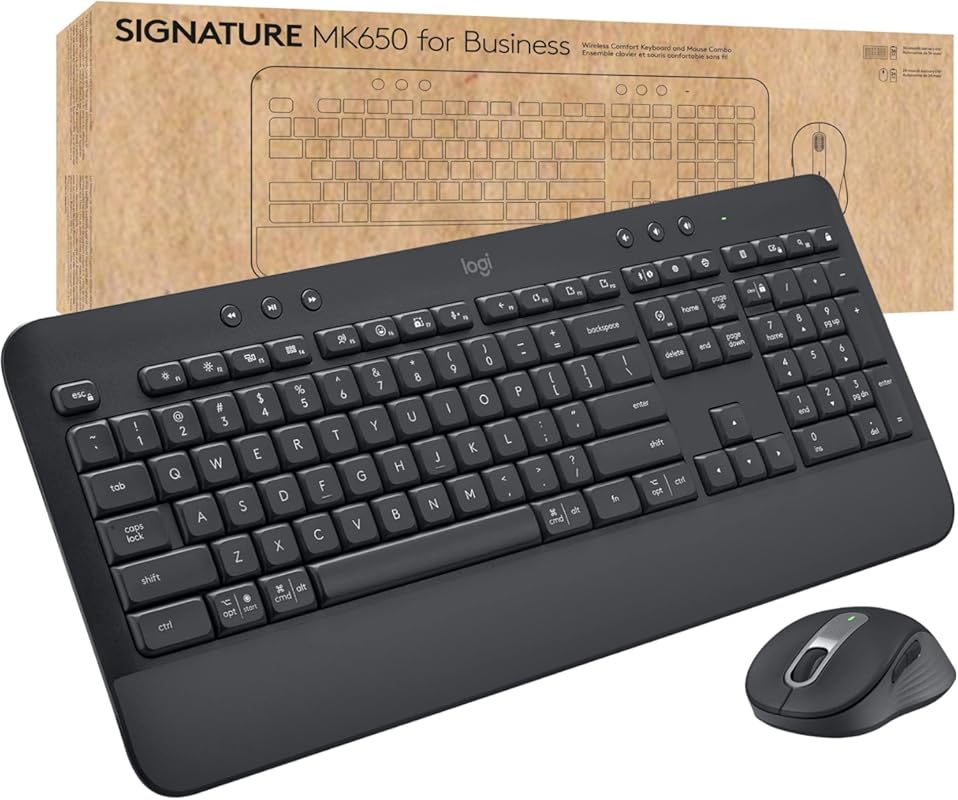
The Logitech MK650 is a top-tier wireless combo designed for professionals who demand reliability and comfort. It uses Logitech’s secure Logi Bolt technology, which is perfect for corporate environments, but it’s also excellent for home users wanting a stable, lag-free connection. The keyboard features a comfortable palm rest and quiet, low-profile keys, while the SmartWheel mouse offers both smooth and precise scrolling. It’s a polished, no-nonsense combo that just works.
Key Features That Stand Out
- ✓ Logi Bolt Secure Wireless: Enterprise-grade security with a reliable 2.4GHz connection
- ✓ Silent, Comfortable Typing: Low-force keys and a soft palm rest reduce strain during long sessions
- ✓ SmartWheel Mouse: Automatically switches between smooth and ratcheted scrolling
- ✓ Multi-Device & OS Support: Easily switch between devices and works with Windows, macOS, Chrome OS, and Linux
- ✓ Convenient Shortcut Keys: Dedicated keys for calculator, settings, print, and media controls
Why We Recommend It
This combo earns our top spot for its unbeatable blend of professional-grade security and everyday comfort. The Logi Bolt connection is rock-solid, eliminating the dropouts some Bluetooth setups experience. The typing experience is exceptionally quiet and comfortable, making it ideal for shared spaces or anyone with hand strain. Logitech’s build quality is evident in every detail, from the sturdy construction to the thoughtful key layout.
Best For
IT departments deploying secure hardware, remote workers, writers, and anyone who values a quiet, comfortable, and ultra-reliable wireless setup. It’s especially great if you work in a noisy office or have arthritis/carpal tunnel.
Pros and Cons
Pros:
- Extremely stable and secure wireless connection (Logi Bolt)
- Exceptionally quiet keys and mouse clicks
- Comfortable ergonomic design with palm rest
- Useful dedicated function/media keys
- Strong battery life (up to 3 years for keyboard, 2 for mouse)
Cons:
- No backlighting on the keyboard
- Uses disposable AA batteries (not rechargeable)
- No Num Lock indicator light (only Caps Lock)
- Higher price than basic wireless combos
Customer Reviews
Customer Review: “I’m using this with a Dell XPS 13. My previous keyboard/mouse combo only had the nano USB receiver (which is also an option with this combo), but I had occasional lag issues. I decided to get the MK650 and try it with Bluetooth. I think it’s a little expensive for what you get, but it’s been worth it. It connects instantly and the connection is stable, plus it frees up a USB port on my hub. I have had zero issues with lag, drops, or interference… Overall, it’s a good combo. A little more expensive than ones that only have the USB receiver, but it’s definitely worth the price for my usage.”
Customer Review: “This Logitech Signature MK650 Combo is a solid choice for anyone needing a reliable, quiet, and comfortable setup. I use it in a shared workspace, and the quiet typing and clicking have made a noticeable difference—no more noisy distractions during calls or meetings!… One major plus for me is how easy the low-pressure keys are to press. If you’re dealing with carpal tunnel, arthritis, or general hand mobility issues, this keyboard makes a real difference… Overall: A great value combo for professionals who want a quiet, ergonomic, and accessible setup.”
2. Logitech MK670 Wave Keys Combo
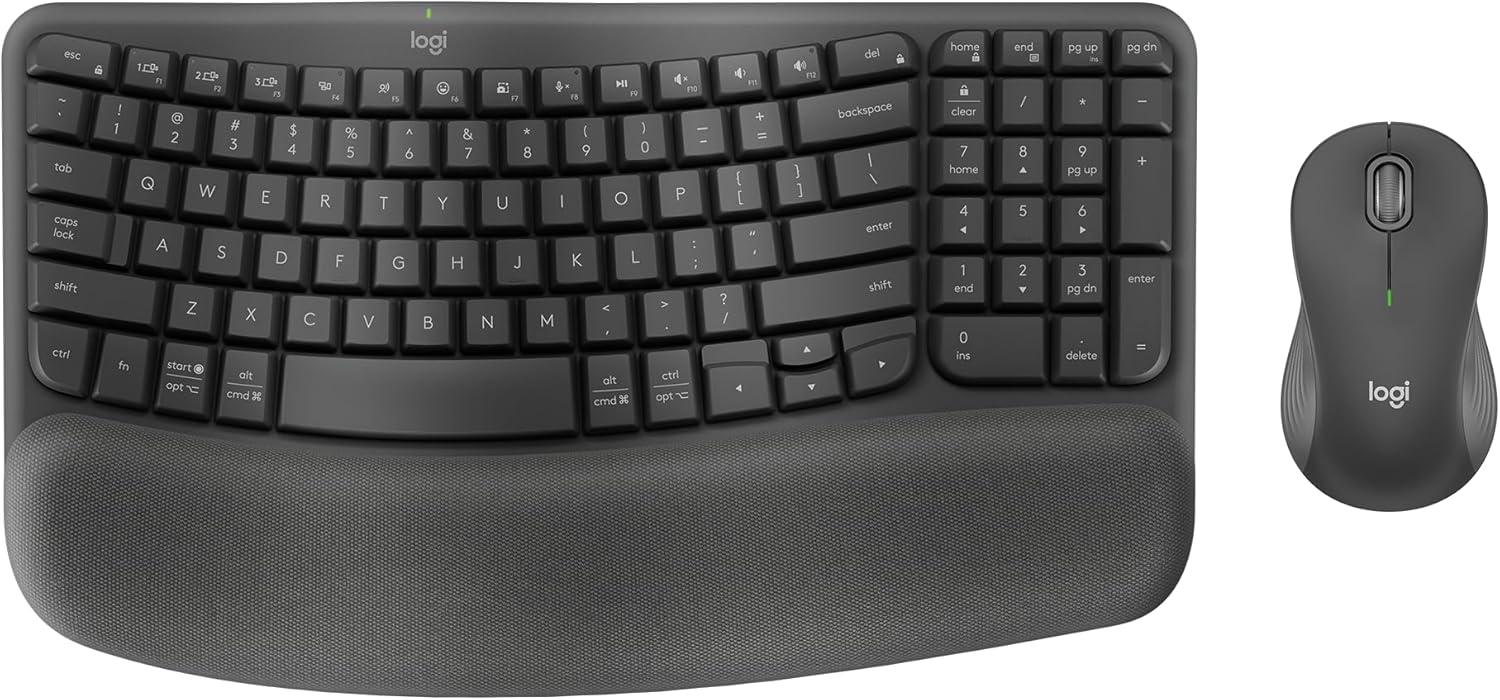
The Logitech MK670 Wave Keys Combo is all about ergonomic comfort without compromise. Its wave-shaped keyboard design naturally positions your hands, wrists, and forearms to reduce strain, while the compact layout lets you keep your mouse closer, promoting a healthier shoulder position. Paired with the comfortable M550 L mouse, this combo is a dream for anyone typing for hours. It’s a thoughtful, well-executed ergonomic solution.
Key Features That Stand Out
- ✓ Wave Ergonomic Keyboard Design: Promotes a natural typing position to minimize wrist extension
- ✓ Compact Layout: Brings your mouse closer for better arm and shoulder alignment
- ✓ M550 L Ergonomic Mouse: Contoured shape fits perfectly in the hand with reliable tracking
- ✓ Dual Connectivity: Use via Logi Bolt USB receiver or Bluetooth
- ✓ Quiet, Responsive Keys: Low-profile keys with a soft, quiet keystroke
Why We Recommend It
For pure ergonomic comfort, this is hard to beat. The wave design isn’t a gimmick—it genuinely changes how your hands rest on the keyboard. The combination of the compact keyboard and a full-sized ergonomic mouse creates a cohesive, health-focused workstation. Setup is effortless, and the build quality matches Logitech’s reputation. It’s our editor’s pick because it prioritizes user well-being without sacrificing performance.
Best For
Anyone with wrist, hand, or shoulder discomfort from prolonged typing. It’s perfect for writers, programmers, data entry specialists, and office workers looking to prevent repetitive strain injuries (RSI). Also great for small desks where a compact setup is needed.
Pros and Cons
Pros:
- Outstanding ergonomic design that reduces strain
- Very quiet typing and mouse clicking
- Compact keyboard saves desk space
- Easy wireless setup (Bluetooth or USB receiver)
- Excellent, predictable key travel
Cons:
- No keyboard backlighting
- Learning curve for the wave key layout
- Mouse is specifically for right-handed users
- Pricier than standard wireless combos
Customer Reviews
Customer Review: “Definitely the most comfortable and quiet keyboard I have used to date. The function keys on this are so convenient. Setup is easy and the touch response on the keys feels so natural and so quiet. It is not backlit but that is fine for me because the quality of the keys is worth it… I stumbled upon a function key for print screen that is a gamechanger for me in my work, so I am very pleased.”
Customer Review: “This is a great keyboard, and the wireless mouse is a bonus too. I’ve owned several iterations of this keyboard for about 15 years… It is easy to set up using Bluetooth and sets up within seconds. The Bluetooth range is also great… The keys are easy to type with ergonomically and when they type they’re soft yet firm… Really happy with this keyboard!”
3. Redragon S101M-KS Gaming Combo
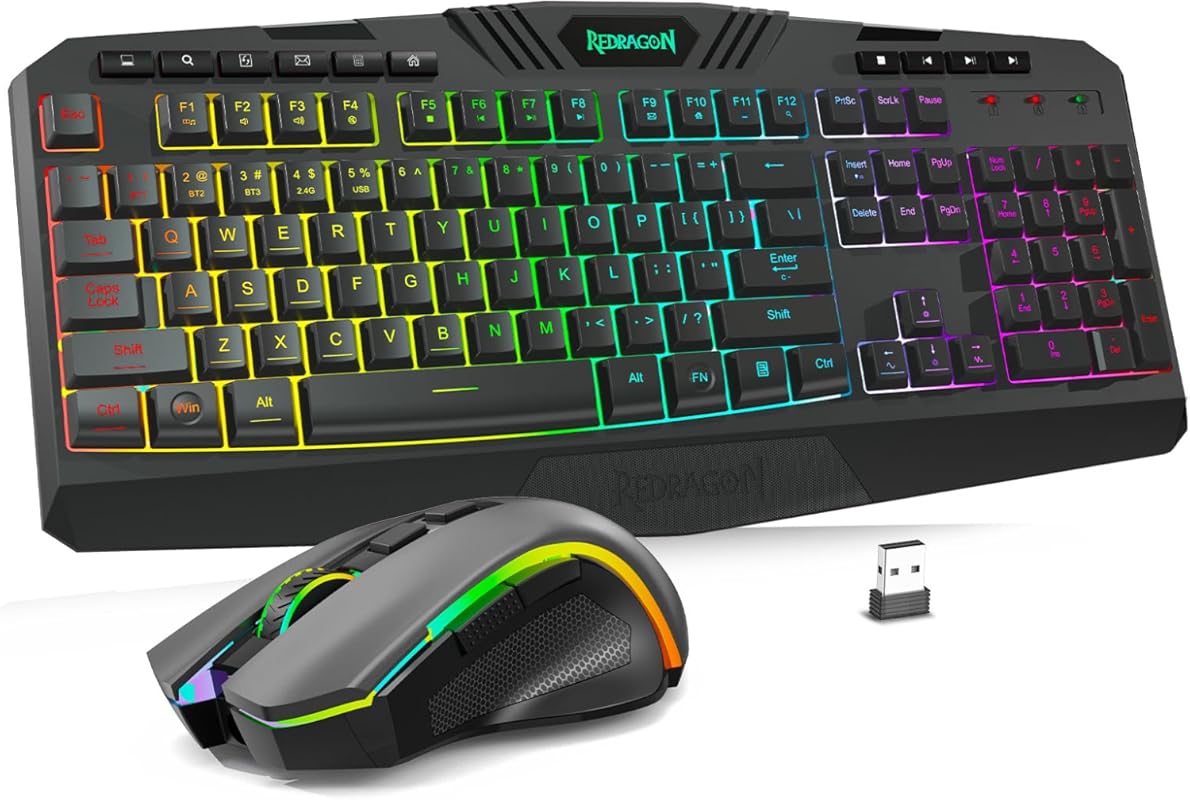
The Redragon S101M-KS delivers an impressive gaming feature set without the high-end price tag. This tri-mode wireless combo (2.4GHz, Bluetooth, wired) gives you flexibility, while the RGB keyboard and adjustable DPI mouse provide the flash and precision gamers want. It’s a fantastic entry point into wireless gaming peripherals, offering solid performance and eye-catching looks for budget-conscious gamers.
Key Features That Stand Out
- ✓ Tri-Mode Connectivity: Wireless 2.4GHz, Bluetooth 5.0, or wired USB-C
- ✓ Vibrant RGB Lighting: 8 backlight patterns with adjustable speed and brightness
- ✓ Adjustable Gaming Mouse: 5 DPI levels (800-4800) and 6 programmable buttons
- ✓ Anti-Ghosting Keys: Full N-key rollover for accurate gaming inputs
- ✓ Media & Function Keys: Dedicated controls for volume, play/pause, etc.
Why We Recommend It
As our best budget pick, the S101M-KS proves you don’t need to spend a fortune for a capable gaming combo. The tri-mode connectivity is a standout feature rarely found at this price, offering true versatility. The RGB lighting looks great, and the mouse’s adjustable DPI covers most gaming needs. Build quality feels surprisingly solid for the cost. It’s the perfect balance of affordability and performance.
Best For
Budget-minded gamers, students, and casual users who want a colorful, functional wireless setup without breaking the bank. Also ideal for anyone wanting the flexibility to switch between wireless modes or use a wired connection for zero-latency gaming.
Pros and Cons
Pros:
- Excellent price-to-performance ratio
- Tri-mode connectivity (2.4GHz, BT, wired) offers great flexibility
- Attractive RGB lighting with multiple modes
- Reliable anti-ghosting for gaming
- Adjustable DPI mouse with side buttons
Cons:
- Battery life can be shorter with RGB lighting on high brightness
- Keys are membrane, not mechanical (though they feel good)
- Software for customization is basic
- Mouse might feel small for users with larger hands
Customer Reviews
Customer Review: “Really happy with this Redragon wireless keyboard and mouse combo. It was super easy to set up—just plug it in and it works right away. The keyboard feels nice when typing and gaming, not too loud but still has a good click feel. The lights look really cool, especially at night. The mouse is comfortable and moves smoothly, and I like that you can change the DPI. No lag or connection issues so far… Overall, great quality for the price.”
Customer Review: “Works great. comfortable typing and very neat lights”
4. Redragon S101-3 PRO Gaming Combo
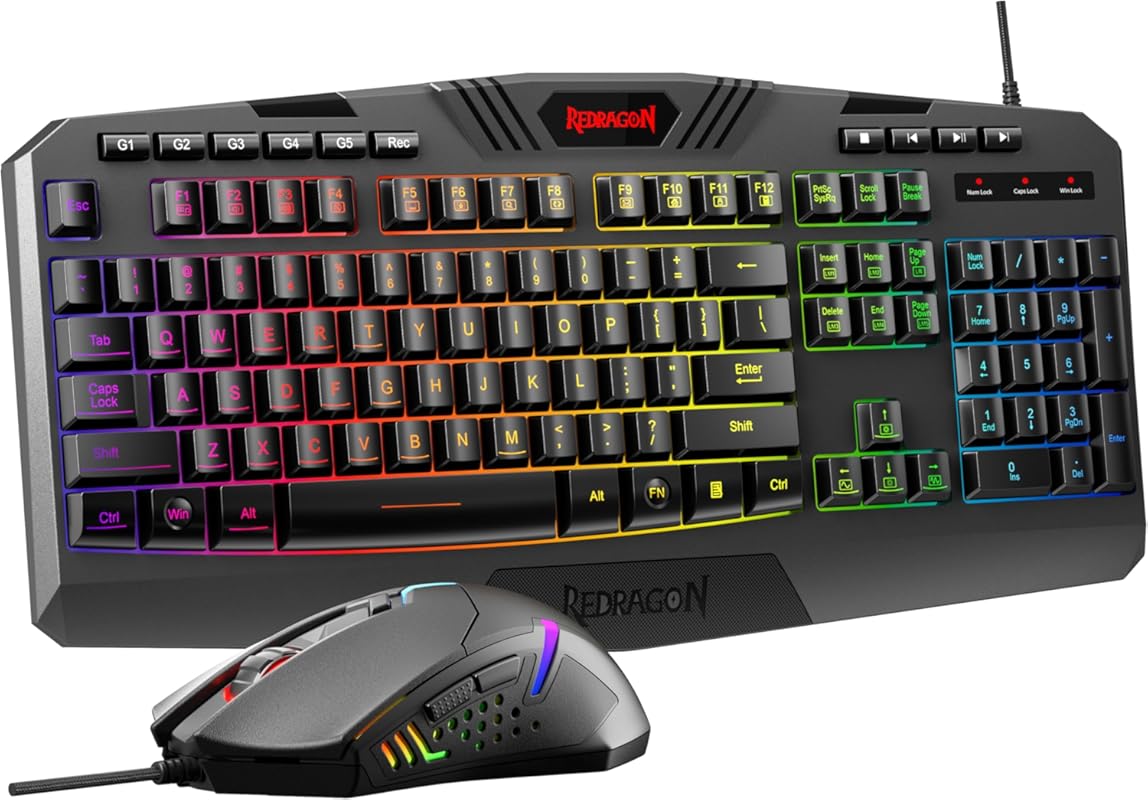
The Redragon S101-3 PRO is a classic wired gaming combo that offers incredible value. It includes a full-size keyboard with customizable RGB backlighting and macro keys, plus a precision gaming mouse with adjustable DPI. Being wired means zero latency and no battery worries, making it a supremely reliable choice for intense gaming sessions or everyday use. It’s a no-fuss, high-performance set that gets the job done.
Key Features That Stand Out
- ✓ Wired Zero-Latency Connection: Plug-and-play USB with no input lag or battery concerns
- ✓ Customizable RGB Keyboard: 6 backlight modes, 3 brightness levels, and 5 memory profiles
- ✓ Programmable Gaming Mouse: 7 buttons, 5 DPI levels (500-6000), and 10 programmable macros
- ✓ Anti-Ghosting & Full N-Key Rollover: Ensures every keystroke is registered, even during frantic gameplay
- ✓ Spill-Resistant Design: Durable construction with a curved spacebar and sturdy keys
Why We Recommend It
If you want guaranteed performance without any wireless hiccups, this wired combo is a champion. The customization options via Redragon’s software are surprisingly deep for the price. The keyboard feels solid, and the mouse is precise. For competitive gamers or anyone who hates charging batteries, the wired connection is a major advantage. It’s a workhorse that looks the part and performs above its weight class.
Best For
Competitive gamers, streamers, and users who prioritize zero-latency input. Also perfect for desktop PCs with ample USB ports, anyone tired of replacing batteries, and those wanting extensive macro/programming capabilities on a budget.
Pros and Cons
Pros:
- Zero latency, rock-solid wired connection
- Highly customizable RGB lighting and macros
- Excellent anti-ghosting for accurate gaming inputs
- No batteries to buy or charge
- Incredibly affordable for the feature set
Cons:
- Cable clutter limits mobility and desk aesthetics
- Keyboard keys are membrane, not mechanical (though responsive)
- Software can be clunky to navigate
- Mouse wheel can feel a bit stiff
- Less portable than wireless options
Customer Reviews
Customer Review: “Really happy with this Redragon wireless keyboard and mouse combo. It was super easy to set up—just plug it in and it works right away. The keyboard feels nice when typing and gaming, not too loud but still has a good click feel. The lights look really cool, especially at night. The mouse is comfortable and moves smoothly, and I like that you can change the DPI. No lag or connection issues so far… Overall, great quality for the price.”
Customer Review: “Works great. comfortable typing and very neat lights”
5. Logitech MX Keys S Combo
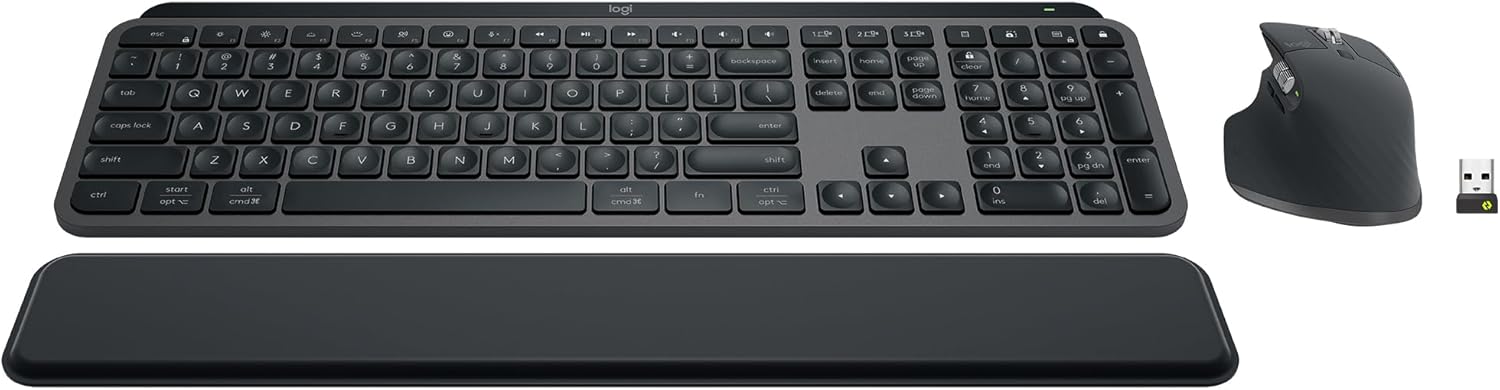
The Logitech MX Keys S Combo is the ultimate productivity powerhouse. It features the acclaimed MX Keys S keyboard with its low-profile, spherically-dished keys for fast, fluid typing, and the MX Master 3S mouse with its legendary MagSpeed scroll wheel and 8K DPI sensor. Together, they create a seamless, premium experience for power users, creatives, and anyone who wants the very best. The included palm rest adds extra comfort.
Key Features That Stand Out
- ✓ MX Keys S Keyboard: Laptop-like low-profile keys with smart backlit illumination that adjusts to the environment
- ✓ MX Master 3S Mouse: Ultra-fast MagSpeed scroll wheel (1000 lines/sec), 8K DPI sensor, and quiet clicks
- ✓ Easy-Switch & Flow: Seamlessly switch and transfer files between multiple computers (Windows/macOS)
- ✓ USB-C & Bluetooth: Connect via the included USB receiver or Bluetooth; keyboard is rechargeable
- ✓ Premium Build & Palm Rest: Sleek design with a comfortable, included memory foam palm rest
Why We Recommend It
This combo is in a class of its own for productivity and premium feel. The typing experience on the MX Keys S is sublime—fast, quiet, and incredibly precise. The MX Master 3S mouse is arguably the best all-around productivity mouse ever made. The ability to control multiple computers with a single keyboard and mouse (Logi Flow) is a game-changer for multi-device users. It’s an investment that pays off in daily comfort and efficiency.
Best For
Power users, developers, designers, writers, and executives who live at their computer. Ideal for those with multiple computers (e.g., work laptop + personal PC) who want seamless control. Also perfect for anyone seeking the absolute best typing and scrolling experience money can buy.
Pros and Cons
Pros:
- Best-in-class typing and scrolling experience
- Seamless multi-computer control (Logi Flow)
- Premium, durable build quality
- Intelligent backlighting and long battery life
- Quiet, satisfying clicks and key presses
Cons:
- Very expensive compared to other combos
- Mouse is large and may not fit smaller hands
- Side thumb wheel on mouse has a learning curve
- Requires USB port for the receiver (though Bluetooth is an option)
- Palm rest is an included accessory, not built-in
Customer Reviews
Customer Review: “Great keyboard and mouse combo. While pricy and you can get cheaper combos, I feel this was a worthy purchase. Once I got the feel of the hand position on the mouse it is a good fit… The scrolling wheel is great and you can really get through pages quickly. The keyboard has a good feel with low profile keys and quiet action. Easy to connect via Bluetooth or USB bolt. I feel this has also made me more productive overall.”
Customer Review: “Although this is a pricey keyboard and mouse setup, I’m a little over a month in and decided to drop in for a review. This is the best mouse and keyboard combo I’ve ever owned, hands down… Switching from one computer to the other is as simple as a button push… Overall, an expensive set, but well worth it in ease of use, comfort, and convenient multi-computer support. Highly recommend.”
6. RedThunder K10 Gaming Combo
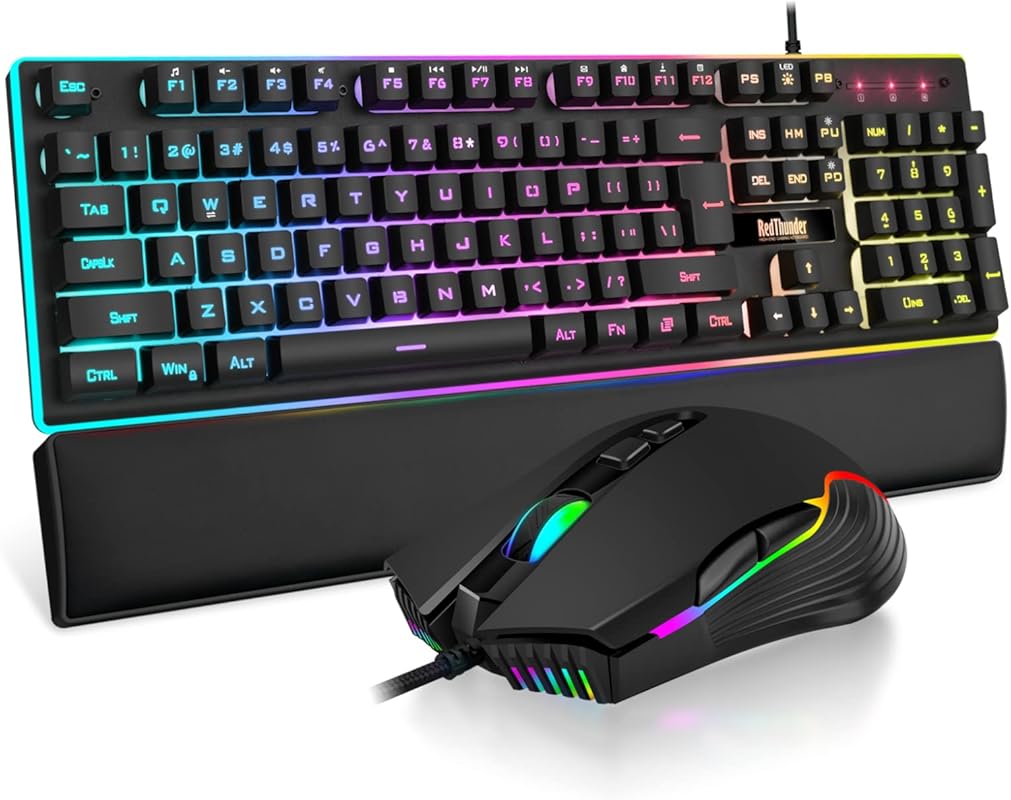
The RedThunder K10 is a feature-packed wired gaming combo that delivers serious performance for a fraction of the cost of high-end brands. It boasts a full-size 104-key keyboard with mechanical-feel keys, per-key RGB lighting, and anti-ghosting, paired with a high-precision 7200 DPI mouse and a comfortable wrist rest. It’s a complete gaming package that looks fantastic and performs reliably, all on a budget.
Key Features That Stand Out
- ✓ High-Precision 7200 DPI Mouse: Adjustable sensor with 12000fps scan rate for pinpoint accuracy
- ✓ Full Per-Key RGB Lighting: Customizable keyboard lights with multiple effects and a bottom light bar
- ✓ Mechanical-Feel Keys: Satisfying tactile feedback with anti-ghosting and N-key rollover
- ✓ Includes Wrist Rest: Comfortable memory foam wrist pad for long gaming sessions
- ✓ Plug-and-Play Wired: No drivers or software needed for basic use; no battery anxiety
Why We Recommend It
For gamers on a tight budget, the K10 is an outstanding value. The 7200 DPI mouse is surprisingly capable, and the keyboard’s RGB lighting is vibrant and customizable. The inclusion of a wrist rest is a nice bonus for comfort. Since it’s wired, you get absolutely zero input lag, which is critical for competitive play. Build quality feels solid, and it’s a great “all-in-one” purchase that covers every gaming need.
Best For
Entry-level and mid-range gamers, students, and anyone wanting a flashy, full-featured wired setup without the high cost. Also excellent for LAN parties or setups where wireless interference is a concern.
Pros and Cons
Pros:
- Extremely affordable for a full RGB gaming combo
- Zero latency with wired connection
- High 7200 DPI mouse is very responsive
- Full-size keyboard with numpad and anti-ghosting
- Includes a comfortable wrist rest
Cons:
- Membrane keys, not true mechanical (though they feel good)
- Cable management can be messy
- Software for advanced lighting/macro programming is basic
- Mouse wheel feels a bit cheap
- Not as durable as premium mechanical keyboards
Customer Reviews
Customer Review: “I bought this item, and I’m honestly very impressed for the price. Both the keyboard and mouse feel sturdy and well made, not cheap at all. The keyboard is comfortable to type on, with smooth and quiet keys. The RGB lighting looks great and is easy to adjust. The mouse fits nicely in my hand, is lightweight, and responds quickly. I really like that it has adjustable DPI for gaming and everyday use. It was plug and play, worked instantly with no setup needed. Overall, this is a great combo for the price and I would definitely recommend it.”
Customer Review: “I am absolutely delighted with this Keyboard and mouse. The keyboard offers an excellent, responsive feel that significantly improves my overall productivity. Similarly, the mouse features a comfortable design that feels great in the hand and is perfectly weighted for smooth control. The connection was instant and absolutely reliable thanks to the durable, long cables—no need to worry about charging or lag whatsoever. For anyone seeking a significant improvement to their computing setup, this product is highly recommended.”
7. Wave Keys Ergonomic Combo
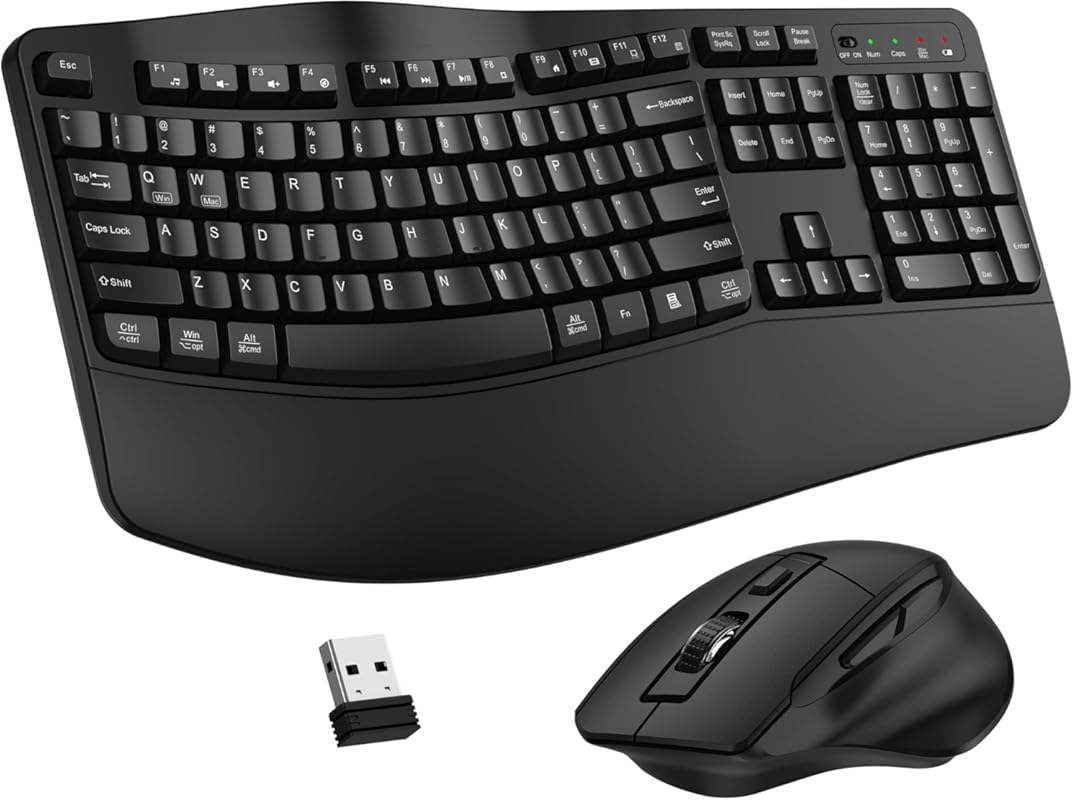
This Wave Keys Ergonomic Combo focuses on comfort and simplicity. It features a wave-style keyboard with a built-in wrist rest and a contoured mouse, all connected via a single 2.4GHz USB receiver. It’s designed to promote a natural hand and wrist position, making long typing sessions more comfortable. It’s a no-fuss, plug-and-play ergonomic solution that prioritizes health and ease of use over flashy features.
Key Features That Stand Out
- ✓ Wave Ergonomic Keyboard Design: Curved keys and integrated wrist rest support natural hand alignment
- ✓ Contoured Ergonomic Mouse: Fits the palm comfortably with adjustable 3-level DPI
- ✓ Single USB Receiver: Both devices connect to one tiny dongle (can be used separately too)
- ✓ Plug-and-Play 2.4GHz: No software required; instant connection
- ✓ Auto-Sleep Power Saving: Extends battery life by entering sleep mode when idle
Why We Recommend It
This combo is a great, accessible entry into ergonomic peripherals. The wave design is effective at reducing wrist extension, and the included wrist rest adds cushioning. The mouse is comfortable for medium to large hands. It’s incredibly easy to set up—just plug in the receiver and go. For users who want proven ergonomic benefits without a complex setup or high price, this is a solid, reliable choice.
Best For
Office workers, students, and anyone new to ergonomic keyboards who wants to try the wave design. Ideal for those who prioritize comfort and simplicity over gaming features or RGB lighting. Also great for shared or hot-desking environments due to easy plug-and-play setup.
Pros and Cons
Pros:
- Effective wave design reduces wrist strain
- Very comfortable built-in wrist rest
- Simple, reliable plug-and-play setup
- Single USB receiver for both devices
- Good battery life with auto-sleep
Cons:
- No backlighting on the keyboard
- Mouse may be too large for smaller hands
- Build quality is basic, not premium
- Limited DPI adjustments on mouse (only 3 levels)
- No dedicated media/function keys beyond basics
Customer Reviews
Customer Review: “This keyboard and mouse combo is comfortable for long workdays. The wave design and wrist rest keep my hands relaxed, and I don’t feel strain after hours of typing. Wireless connection was instant—just plugged in the USB receiver and everything worked. Battery seems to last well with the auto-sleep feature. Solid basic setup without any hassle.”
Customer Review: “This ULSOU wireless keyboard and mouse combo has been a great upgrade for my setup. The ergonomic wave design on the keyboard really makes a difference—my hands feel more natural when typing, and the built-in wrist rest helps reduce strain… The mouse is very comfortable to use as well. It fits nicely in the hand and the adjustable DPI settings are a nice touch… Setup was super simple with the plug-and-play USB receiver—no software needed… Overall, this combo offers great comfort, functionality, and value for the price.”
8. SABLUTE Wave Keys Combo
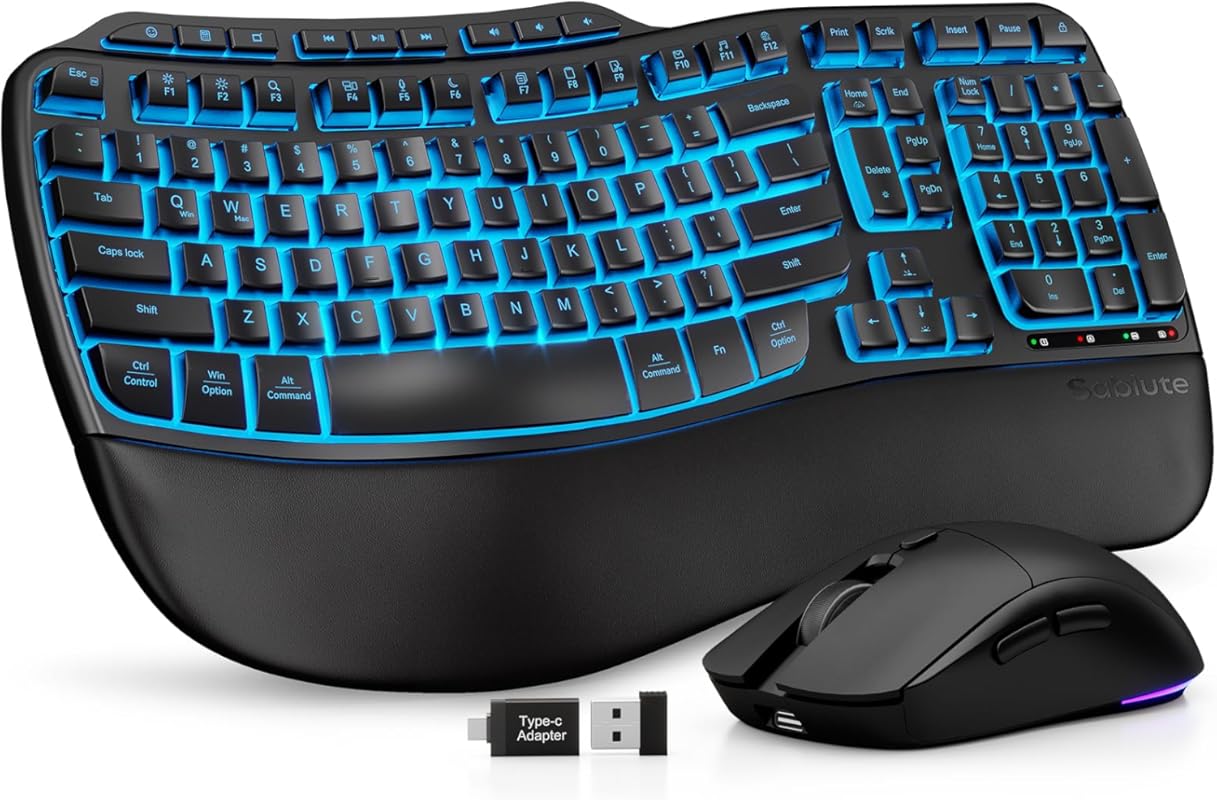
The SABLUTE Wave Keys Combo is a premium ergonomic wireless combo that stands out with its rechargeable battery and luxurious lambskin-style palm rest. It combines a wave-shaped, backlit keyboard with a comfortable mouse, all connected via USB receiver or Bluetooth. The massive 4000mAh battery means you’ll rarely need to charge it, and the 10-million keystroke durability promises longevity. It’s a high-end ergonomic choice with thoughtful extras.
Key Features That Stand Out
- ✓ 4000mAh Rechargeable Battery: Up to months of use on a single charge; use while charging
- ✓ Premium Lambskin Palm Rest: Silky-smooth faux leather wrist support for all-day comfort
- ✓ Adjustable RGB Backlighting: Multiple colors and brightness levels for the keyboard
- ✓ Wave Ergonomic Design: Promotes natural hand and wrist positioning
- ✓ 10-Million Keystroke Durability: Built to last twice as long as standard keyboards
Why We Recommend It
This combo is for the ergonomic enthusiast who wants it all: comfort, style, and convenience. The rechargeable battery is a huge plus—no more hunting for AA batteries. The lambskin palm rest feels luxurious and genuinely supportive. The wave design is effective, and the backlighting is a nice touch for low-light environments. It’s a well-rounded, high-quality package that justifies its mid-to-high price point.
Best For
Professionals and power users with ergonomic needs who hate disposable batteries. Ideal for home office setups, writers, and anyone who wants a premium, comfortable wireless combo with a luxurious feel. Also great for those who work late hours and appreciate keyboard backlighting.
Pros and Cons
Pros:
- Large 4000mAh rechargeable battery (no disposable batteries)
- Luxurious, comfortable lambskin palm rest
- Adjustable RGB backlighting on keyboard
- Effective wave ergonomic design
- Excellent build quality and durability (10M keystrokes)
Cons:
- Higher price than most ergonomic wireless combos
- Mouse is not specifically ergonomic (standard shape)
- Software for lighting/macros can be improved
- Backlighting may drain battery faster if used constantly
- Some users may prefer a mechanical key feel
Customer Reviews
Customer Review: “I work from home and often put in long hours, so comfort is non‑negotiable for me. I also deal with wrist pain in my dominant hand, which makes an ergonomic design absolutely essential. After more than 10 years of relying on the Logitech Wave K350, I fell in love with it… Right out of the box, the quality looks and feels impressive. The keyboard charges quickly, and I love that you can keep using it while it’s plugged in… The backlighting is another great feature… Typing on the wave‑style keys is incredibly smooth and comfortable. I can easily work an entire day without the fatigue I used to feel. It’s perfect for long work sessions, home offices, and anyone who types a lot.”
Customer Review: “I work from home and am an avid PC gamer… For years, I, too was a faithful user of the Logitech Wave keyboard… If someone else felt it was a close approximation to The Wave, then I had to give it a try. Pleasantly, I have to say, they were right: this is as close as I’ve come to finding something that suits as well as The Wave… The keys are buttery soft, and it’s quiet as a whisper… This is definitely a comfortable keyboard and if you’re looking for something to replace your Logitech Wave with, look no further.”
9. Logitech MK295 Wireless Combo
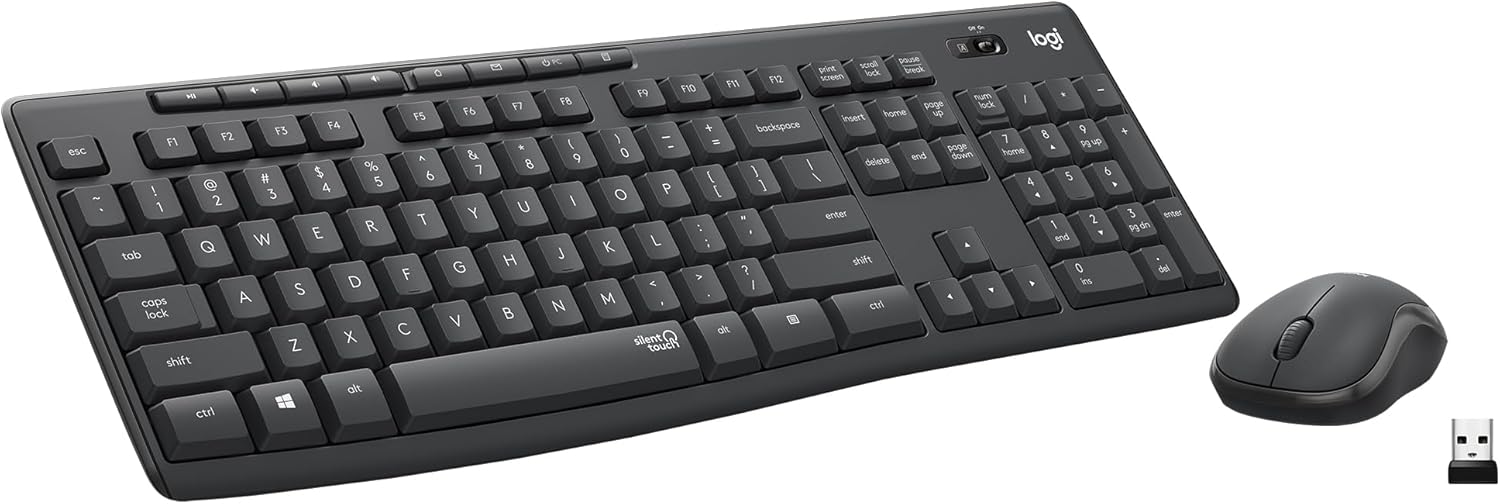
The Logitech MK295 is the go-to combo for those who need absolute silence. Its SilentTouch technology reduces typing and clicking noise by 90% compared to standard keyboards, while maintaining a satisfying key feel. It includes a full-size keyboard with a numpad and a contoured mouse, all connected via a tiny USB receiver. It’s a fantastic, no-nonsense combo for open offices, shared spaces, or anyone who hates clacking keys.
Key Features That Stand Out
- ✓ SilentTouch Technology:键盘 and mouse operate at whisper-quiet levels (90% less noise)
- ✓ Full-Size Keyboard with Numpad: Standard layout with all keys, including a dedicated numeric keypad
- ✓ 8 Convenient Shortcut Keys: One-touch access to play/pause, volume, calculator, and more
- ✓ Contoured, Smooth Mouse: Comfortable shape with SilentTouch clicking and precise tracking
- ✓ Reliable 2.4GHz Wireless: Strong connection with a compact unifying receiver
Why We Recommend It
If silence is your top priority, the MK295 is unbeatable. The noise reduction is genuinely impressive—you can type and click without disturbing anyone nearby. It retains a good key feel despite being so quiet. The full-size layout with a numpad is a bonus for data entry. Logitech’s reliability shines through here. It’s not the flashiest, but it’s one of the most practical and considerate combos you can buy.
Best For
Open-office workers, shared living spaces, libraries, and anyone in quiet environments. Also perfect for call center employees, transcriptionists, and night owls who don’t want to wake others. A great choice for anyone who simply prefers a silent typing experience.
Pros and Cons
Pros:
- Extremely quiet keys and mouse clicks (90% noise reduction)
- Comfortable, familiar full-size keyboard layout with numpad
- Useful dedicated media and function shortcut keys
- Reliable, low-latency 2.4GHz wireless connection
- Excellent battery life (up to 3 years keyboard, 18 months mouse)
Cons:
- No keyboard backlighting
- Uses disposable AA batteries
- No Caps Lock or Num Lock LED indicators (only on some models)
- Mouse is basic, not ergonomic
- Not ideal for gaming due to lack of anti-ghosting
Customer Reviews
Customer Review: “I purchased my MK295 Combo in May 2021. It has worked faithfully all the time I’ve owned it. It is still quiet, and the only issue is I recently purchased a new computer with WIN 11 and an AMD chip. There seems to be a lag as I’m typing this review. I blame the new microsoft Windows. It was, and is, easy to set up because there really isn’t any set-up to speak of. Just plug and play. The product quality is exceptional…”
Customer Review: “This one does [deserve 5 stars]. I’ll try to explain briefly. I am a prolific writer and I have actually worn more keyboards out than some small stores sell in a year… my other goal this round in addition to durability is I need my keyboard and mouse to be silent, not quiet but silent… From the moment my fingers touched the keys it was love, it is actually very slightly quieter than the K740… So keep it a secret between you and me, this is its twin brother…”
10. Logitech MK120 Wired Combo
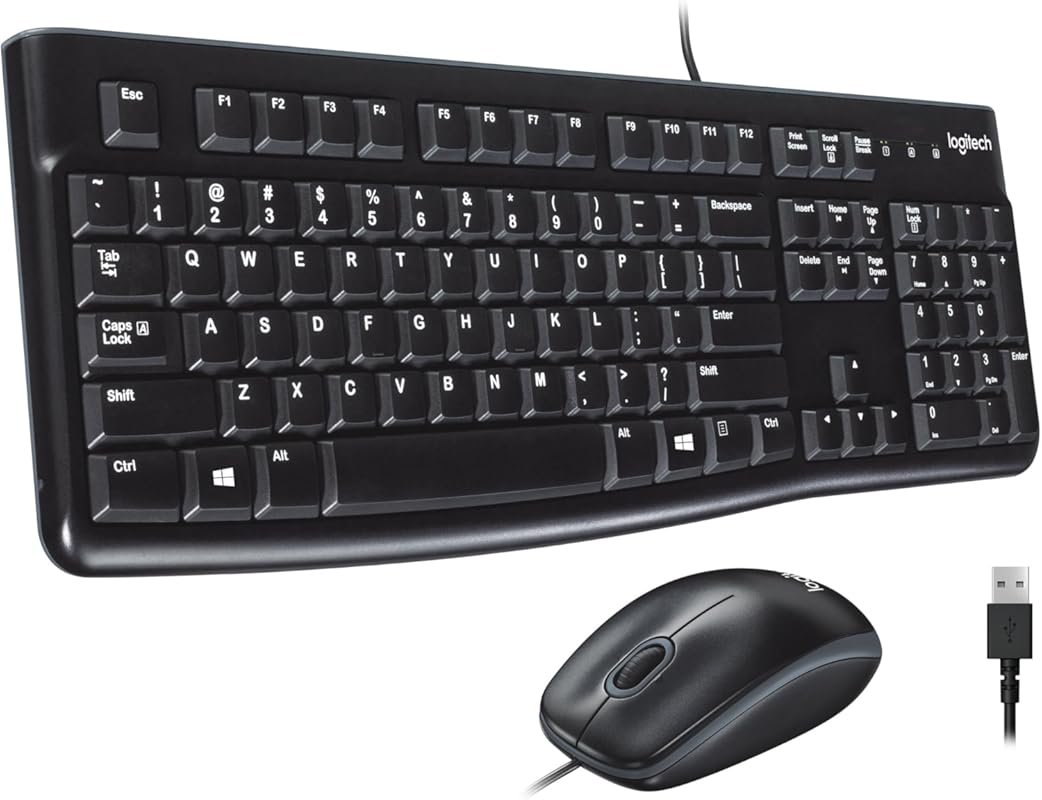
The Logitech MK120 is the timeless, no-frills workhorse that has served millions of users for years. It’s a simple, reliable wired combo with a full-size keyboard (including a numpad) and a comfortable ambidextrous mouse. Its spill-resistant design and durable keys (tested for 10 million keystrokes) mean it can take a beating. For anyone who just needs a basic, dependable keyboard and mouse without any wireless hassles, this is the benchmark.
Key Features That Stand Out
- ✓ Legendary Reliability: A proven design that has been a staple for over a decade
- ✓ Full-Size Layout with Numpad
- ✓ Spill-Resistant Keyboard: Curved space bar and durable keys designed to withstand minor spills
- ✓ Comfortable Ambidextrous Mouse: Smooth, accurate tracking suitable for left or right-handed users
- ✓ Plug-and-Play USB: No drivers or software required; works instantly with Windows and macOS
Why We Recommend It
Sometimes, you just need something that works. The MK120 delivers exactly that. It’s not fancy, but it’s incredibly tough, comfortable for all-day use, and costs less than a takeout meal. The spill-resistant design is a lifesaver for coffee drinkers. It’s the definition of “if it ain’t broke, don’t fix it.” For schools, libraries, basic home offices, or as a spare, it’s the safest, most dependable choice.
Best For
First-time computer users, students, schools, libraries, and budget-conscious buyers. Perfect as a reliable backup combo or for a secondary workstation. Also ideal for environments where durability and spill-resistance are top priorities (like a kitchen counter or kids’ room).
Pros and Cons
Pros:
- Extremely affordable and ubiquitous
- Proven, rock-solid reliability
- Spill-resistant keyboard design
- Comfortable, familiar full-size layout
- No batteries or charging needed
Cons:
- Wired cable limits mobility and desk aesthetics
- No special features (no backlight, no media keys, no RGB)
- Membrane keys (not mechanical)
- Mouse is basic, not ergonomic
- Not suitable for gaming due to lack of anti-ghosting
Customer Reviews
Customer Review: “Perfect product. Both mouse and keyboard are working well. The wire lengths are approximately 6 ft for both. I am very satisfied with the product. This combo can be used for Macbook Air also. For Mac users, the only thing you have to pay attention to is the copy/paste keys: you need to use alt/c, alt/v for copy/paste instead of ctrl/c, ctrl/v as you use for Windows PCs. Before buying these, I purchased a wireless combo but returned (MK270), because the mouse got frozen frequently.”
Customer Review: “This was my daily driver for years until I upgraded to a fancy mechanical keyboard. The real, actual keys with an appreciable travel distance are a huge improvement over the tiny flat things you find in laptops nowadays. And the keyboard is still thin enough that I didn’t need a wrist rest (though I do have larger-than-average hands). If all you need is a basic keyboard and mouse, you really can’t go wrong with this.”
Complete Buying Guide for Best Keyboard And Mouse Combo
Essential Factors We Consider
When choosing a keyboard and mouse combo, several key factors determine the right fit for your needs. Connectivity is paramount: wireless (Bluetooth or 2.4GHz) offers desk cleanliness and flexibility, while wired guarantees zero latency and no batteries. Ergonomics cannot be overstated—look for wave designs, palm rests, and contoured mice to prevent strain, especially if you type for hours. Key Switch Type matters: mechanical keys offer tactile feedback and durability, while membrane/membrane-mechanical hybrids are quieter and often cheaper. For mice, consider DPI sensitivity (higher is better for gaming/precision work) and button layout (extra side buttons can boost productivity). Battery life for wireless sets should be months, not weeks—rechargeable is a major plus. Finally, build quality and OS compatibility ensure your combo lasts and works with your devices. We tested each product against these criteria to bring you balanced recommendations.
Budget Planning
Keyboard and mouse combos span a wide price range. On the ultra-budget end ($20-$40), you’ll find reliable wired basics like the Logitech MK120—perfect for students and spare setups. The mid-range ($40-$80) offers the best value, with solid wireless ergonomic options (Wave Keys Ergonomic Combo) and capable gaming wired sets (Redragon S101-3 PRO). In the premium tier ($80-$200+), you invest in top-tier productivity powerhouses like the Logitech MX Keys S Combo or secure enterprise solutions like the MK650. Consider your primary use: a gamer might spend more on DPI and response, while an office worker prioritizes quiet ergonomics. Always balance features against actual need—overspending on unused features is common. Remember to check warranty and return policies for peace of mind.
Final Thoughts
Choosing the best keyboard and mouse combo is about matching features to your daily workflow. For most professionals seeking a quiet, comfortable, and secure setup, the Logitech MK650 is our top all-around pick. Budget gamers should look no further than the Redragon S101M-KS for its tri-mode flexibility. And if you demand the absolute premium experience, the Logitech MX Keys S Combo is worth every penny. Don’t underestimate the importance of ergonomics—your hands will thank you for investing in a wave design or quality palm rest. Whether you prioritize silence, gaming performance, or multi-device convenience, our list has a combo that will elevate your computing experience. Take the time to assess your specific needs against our detailed reviews before deciding.
Frequently Asked Questions
Q: Should I choose a wireless or wired keyboard and mouse combo?
A: Choose wired if you prioritize zero latency for gaming, hate charging batteries, or want the lowest cost. Wired sets are also generally more durable. Choose wireless for a cleaner desk, mobility, and fewer cables. Modern wireless (especially 2.4GHz) has negligible lag for most users. Bluetooth is great for multi-device switching but can sometimes be less stable than a dedicated USB receiver.
Q: What’s the difference between mechanical and membrane keyboards?
A: Mechanical keyboards use individual physical switches under each key, offering tactile feedback, audible clicks, and high durability (50M+ keystrokes). They’re preferred by typists and gamers. Membrane keyboards use a pressure pad system; they’re quieter, softer, and cheaper but generally less durable (5-10M keystrokes). Many modern combos use “mechanical feel” membrane keys that mimic the travel without the click.
Q: Are ergonomic keyboards worth it?
A: Absolutely, if you type for more than a few hours daily. Ergonomic designs (like wave keys) position your hands and wrists in a more natural alignment, reducing strain and the risk of repetitive stress injuries (RSI). The adjustment period can be 1-2 weeks, but most users find the long-term comfort improvement significant, especially if you have existing wrist or shoulder discomfort.
Q: How important is DPI in a mouse?
A: DPI (dots per inch) determines mouse sensitivity. Higher DPI (2000-7200+) means the cursor moves further with less physical movement—useful for high-resolution monitors or fast-paced gaming. Most modern mice offer adjustable DPI via a button, so you can switch between settings for different tasks (e.g., low DPI for precise work, high DPI for gaming). For general office use, 1600-2400 DPI is plenty.
Q: Can I use a keyboard and mouse combo with multiple computers?
A: Yes, many modern combos support multi-device pairing. Look for features like Logitech Easy-Switch (usually a button to toggle between 3 paired devices) or Bluetooth multi-host support. Some high-end models like the MX Keys S even allow Logi Flow, which lets you move your cursor between computers on the same network and transfer files. Check the product specs for the exact number of devices supported.
Ultimately, the best keyboard and mouse combo is the one that feels right for your hands, your tasks, and your budget. Use our comparison table to narrow down your choices, then dive into the detailed reviews to find your perfect match. Your wrists—and your productivity—will thank you.