
What Does It Mean When an Iphone Is Suspended
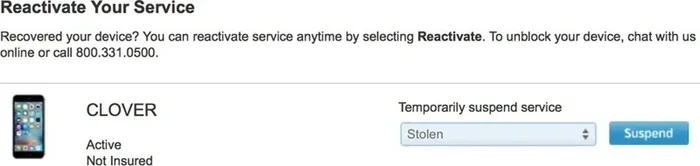
When an iPhone is suspended, it means your cellular service or Apple ID has been temporarily restricted, cutting off key functions like calls, texts, and data. A suspended iPhone still turns on, but it cannot connect to mobile networks or certain online services. Understanding what what does it mean when an iPhone is suspended helps you act fast and restore full access.
Have you ever picked up your phone, tried to make a call, and gotten a strange message? Maybe your screen showed a suspension notice, or your data simply stopped working. If this sounds familiar, you are not alone. Many iPhone users face the same confusing situation at some point. So, what does it mean when an iPhone is suspended?
The short answer is that a suspended iPhone has had its service temporarily restricted. This can happen for many reasons. Your carrier might pause your account, or Apple might limit your Apple ID. Either way, the result is the same — your phone loses access to key features. But here is the good news. Most suspensions are temporary and easy to fix.
In this guide, we will break down everything you need to know. You will learn what a suspended iPhone really means, why it happens, how to spot the signs, and exactly how to fix it. We will also clear up the confusion between a suspended iPhone and a locked or disabled one. By the end, you will know exactly what to do and how to prevent it from happening again.
Key Takeaways
- Suspension means restricted access: Your iPhone still works on Wi-Fi, but cellular service is cut off.
- Unpaid bills or policy violations are the most common reasons carriers suspend service.
- Apple ID suspension locks you out of iCloud, App Store, and other Apple services.
- You can fix a suspended iPhone by paying outstanding balances, contacting your carrier, or resetting your Apple ID.
- A suspended iPhone is not the same as a locked or disabled iPhone — each has different causes and solutions.
- Act quickly to avoid permanent account termination or data loss.
- Prevention is simple — keep your payments current and follow carrier and Apple terms.
📑 Table of Contents
- What Does It Mean When An iPhone Is Suspended?
- Why Does an iPhone Get Suspended?
- Signs That Your iPhone Is Suspended
- How to Fix a Suspended iPhone
- Suspended iPhone vs. Locked iPhone vs. Disabled iPhone
- How to Prevent iPhone Suspension
- What Happens to Your Data When an iPhone Is Suspended?
- Can You Use a Suspended iPhone With Wi-Fi Only?
- Common Mistakes People Make When Their iPhone Is Suspended
- When to Seek Professional Help
- Final Thoughts
What Does It Mean When An iPhone Is Suspended?
When we talk about a suspended iPhone, we are referring to a temporary restriction on your device’s services. Your phone itself is fine. The hardware works normally. You can still open apps, take photos, and use Wi-Fi. But your cellular connection — calls, texts, and mobile data — is blocked.
Think of it like a paused subscription. The account still exists, but certain features are on hold until the issue is resolved. A suspended iPhone is not broken. It is not permanently damaged. It is simply waiting for you to clear up whatever caused the suspension in the first place.
There are two main types of suspension you might encounter. The first is a carrier suspension. This happens when your mobile network provider pauses your line. The second is an Apple ID suspension. This occurs when Apple restricts access to your account. Both are frustrating, but both are fixable.
Carrier Suspension vs. Apple ID Suspension
These two types of suspension feel similar but have different causes. A carrier suspension usually relates to billing or account issues. Your phone company might suspend your line if you miss a payment or violate your contract terms. On the other hand, an Apple ID suspension often happens because of security concerns, unpaid Apple balances, or terms of service violations.
When your iPhone is suspended by a carrier, you will see a message like “Suspended” or “No Service” in the status bar. When your Apple ID is suspended, you might get prompts when trying to download apps or sign in to iCloud. Knowing which type you are dealing with is the first step to fixing it.
Why Does an iPhone Get Suspended?
Understanding the reasons behind iPhone suspension helps you avoid it in the future. Let us look at the most common causes.
Unpaid Bills or Overdue Payments
The number one reason carriers suspend iPhone service is unpaid bills. If you miss a payment deadline, your carrier will typically send warnings first. But if the balance stays unpaid for too long, they may suspend your line. This is their way of protecting their business while giving you time to catch up.
Contract or Plan Violations
Every carrier has terms of service. If you break those rules, your account could be suspended. This might include using your phone in ways that violate local laws, exceeding data limits repeatedly, or using unauthorized devices on the network. Always read your carrier agreement carefully.
Apple ID Security Issues
Apple takes security very seriously. If they detect unusual activity on your account — like multiple failed login attempts or logins from a new country — they may temporarily suspend your Apple ID. This is a protective measure. It keeps your personal data safe from potential hackers.
Fraud or Suspected Fraud
Sometimes, a carrier will suspend an account if they suspect fraud. This could be anything from identity theft to using a stolen device. If this happens, you will need to contact your carrier directly to prove your identity and resolve the issue.
Legal or Government Orders
In rare cases, law enforcement or government agencies can request that a carrier suspend a specific line. This usually happens as part of a legal investigation. If this is the reason for your suspension, the carrier will typically inform you through official channels.
Signs That Your iPhone Is Suspended
How do you know for sure that your iPhone is suspended? There are several clear signs to watch for. Recognizing them early helps you take action fast.
- “Suspended” or “No Service” in the status bar. This is the most obvious sign. Your iPhone shows no cellular signal even though airplane mode is off.
- Cannot make or receive calls. When you try to dial a number, you hear a recording or get an immediate error.
- Text messages fail to send. Your iMessages and SMS messages stay in a “sending” state forever.
- Mobile data stops working. Safari and other apps cannot load pages without Wi-Fi.
- Apple ID prompts when signing in. You see messages saying your account has been suspended or disabled.
- App Store downloads fail. Even free apps will not download or update.
- iCloud backup stops. Your backups no longer complete, and you see error messages about your account.
If you notice any of these signs, do not panic. Your data is likely still safe on the device. The suspension affects your connectivity, not your stored information. You can still access everything stored locally on your iPhone.
How to Fix a Suspended iPhone
Fixing a suspended iPhone depends on what caused the suspension. Here is a step-by-step guide for each scenario.
Step 1: Check Your Account Status
Log in to your carrier account online or through their app. Look for any alerts about overdue payments or account restrictions. For Apple ID issues, visit appleid.apple.com and check your account status there. This quick check often reveals the cause immediately.
Step 2: Pay Any Outstanding Balances
If the suspension is due to an unpaid bill, pay it as soon as possible. Most carriers will restore service within a few hours after payment clears. Some might require you to call customer support to manually reactivate your line.
Step 3: Contact Your Carrier
Sometimes paying the bill is not enough. You may need to speak with a customer service representative. They can confirm the suspension has been lifted and push the reactivation through. Keep your account number and identification handy when you call.
Step 4: Reset Your Apple ID Password
If your Apple ID is suspended due to security concerns, resetting your password often helps. Go to iforgot.apple.com and follow the prompts. Choose a strong, unique password. This signals to Apple that you are the legitimate account owner.
Step 5: Update Your Payment Method
For Apple ID suspensions related to unpaid balances, update your payment method in Settings. Go to Settings > Your Name > Payment & Shipping. Add a valid payment card and clear any outstanding Apple Store balances.
Step 6: Contact Apple Support
If none of the above steps work, reach out to Apple Support directly. You can chat with them online, call them, or visit an Apple Store. They have the tools to investigate and resolve account suspensions. Be patient and polite — support agents can resolve most issues quickly.
Quick Tips for Fast Resolution
- Always keep a record of your payment confirmations.
- Enable two-factor authentication to protect your Apple ID.
- Update your contact information with your carrier so they can reach you about issues.
- Check your account regularly for any alerts or warnings.
- Keep your iPhone charged and connected to Wi-Fi so you can receive reactivation notices.
Suspended iPhone vs. Locked iPhone vs. Disabled iPhone
Many people confuse a suspended iPhone with a locked or disabled one. These are very different situations. Understanding the differences helps you apply the right fix.
A suspended iPhone means your service is paused. The phone works, but it cannot connect to cellular networks. A locked iPhone means the device is tied to a specific carrier and cannot be used with another carrier’s SIM card. A disabled iPhone means the device has been locked out of use entirely, usually after too many failed passcode attempts.
Here is a simple comparison to clarify things.
| Status | Cause | Can You Use Wi-Fi? | Can You Make Calls? | Fix |
|---|---|---|---|---|
| Suspended | Billing or account issues | Yes | No | Pay balance or contact carrier |
| Locked | Carrier lock or Activation Lock | Yes | No (wrong SIM) | Unlock with carrier or Apple |
| Disabled | Too many wrong passcodes | Yes (in recovery mode) | No | Restore via computer or Apple |
Notice that in all three cases, Wi-Fi still works. This is a helpful clue. If your iPhone connects to Wi-Fi but has no cellular service, a suspension is likely the cause. If you cannot use Wi-Fi at all, the issue may be different.
It is also worth noting that some people confuse a suspended iPhone with what happens when a dash camera or car camera stops working when the vehicle is turned off. These are completely unrelated issues. A dash camera losing power when the car is off is a normal electrical behavior. A suspended iPhone is a service restriction imposed by a carrier or Apple.
How to Prevent iPhone Suspension
The best way to deal with a suspended iPhone is to prevent it from happening in the first place. Here are some simple habits that keep your service active and uninterrupted.
- Set up autopay. Automate your carrier and Apple payments so you never miss a due date.
- Monitor your account regularly. Check your carrier app once a week for any alerts or warnings.
- Keep your contact info current. Make sure your carrier has your correct phone number and email address.
- Use strong, unique passwords. This protects your Apple ID from unauthorized access and security-related suspensions.
- Follow your carrier’s terms of service. Read the fine print and understand what is allowed on your plan.
- Respond to warnings quickly. If your carrier sends a payment reminder, act on it right away.
Taking these small steps saves you from the headache of dealing with a suspended device. Prevention is always easier than cure.
What Happens to Your Data When an iPhone Is Suspended?
One of the biggest worries people have is losing their data. The good news is that a suspension does not delete anything from your iPhone. Your photos, contacts, messages, and apps all stay exactly where they are.
However, there is an important caveat. If your Apple ID is suspended, you may not be able to access iCloud backups or sync data across devices. This does not mean your data is lost. It just means it is temporarily unavailable for syncing. Once you resolve the suspension, everything syncs back normally.
If you are concerned about data safety, make sure you have a recent iCloud backup or a local backup through Finder or iTunes. This gives you peace of mind no matter what happens with your account status.
Also, keep in mind that some features on your phone, like the camera, will continue to work normally even during a suspension. You can still take photos and record videos. You just will not be able to upload them to iCloud or share them through iMessage until the suspension is lifted. This is similar to how the flower icon in iPhone camera indicates a specific mode — it does not stop the camera from working.
Can You Use a Suspended iPhone With Wi-Fi Only?
Yes! A suspended iPhone still works on Wi-Fi. You can browse the web, use messaging apps like WhatsApp or Telegram, stream music, play games, and use most apps that do not require cellular service. The suspension only affects your mobile network connection.
This is actually a great temporary workaround while you sort out the suspension. You can stay connected and productive as long as you have access to a Wi-Fi network. Just keep in mind that some services, like phone calls and SMS texts, will remain unavailable until the suspension is fully resolved.
Common Mistakes People Make When Their iPhone Is Suspended
When people discover their iPhone is suspended, they often make mistakes that make the problem worse. Here are a few to avoid.
- Panicking and doing nothing. Suspension is almost always temporary. Staying calm helps you think clearly and take the right steps.
- Resetting your phone unnecessarily. A factory reset will not fix a suspension and could cause data loss. Always try the proper resolution steps first.
- Ignoring carrier emails and messages. Carriers usually send multiple warnings before suspending your line. Reading those messages early can help you avoid suspension altogether.
- Changing SIM cards. A new SIM card will not fix a suspended line. It may even cause additional account issues. Stick with your original SIM.
- Assuming the phone is broken. A suspended iPhone is not a hardware problem. Do not spend money on repairs that are not needed.
Avoiding these mistakes saves you time, money, and stress. The right approach is always calm and methodical.
When to Seek Professional Help
Most suspensions resolve with the steps we covered above. But there are times when you need professional assistance. If you have paid all outstanding balances and your service is still not restored after 48 hours, contact your carrier. If Apple Support cannot resolve your Apple ID suspension after multiple attempts, visit an Apple Store in person. Sometimes face-to-face support solves problems that phone and chat support cannot.
Also seek help if you suspect your account has been compromised. If you see charges or activity you do not recognize, act immediately. Change your passwords, enable two-factor authentication, and contact both your carrier and Apple to secure your accounts.
Final Thoughts
A suspended iPhone can feel scary, especially if you rely on your phone for work and daily communication. But the truth is, it is almost always a temporary situation with a clear solution. Whether the cause is an unpaid bill, a security flag, or a terms of service issue, you have options to get your service back.
The key is to stay calm, identify the type of suspension, and follow the right steps. Check your account, pay any outstanding balances, contact your carrier or Apple, and update your information as needed. Most suspensions are resolved within a few hours to a few days.
Remember that a suspended iPhone is not a broken iPhone. Your data is safe, your device is fine, and your service will return once the issue is cleared. Take preventive steps going forward to keep your account in good standing and avoid future disruptions.
Now that you understand exactly what does it mean when an iPhone is suspended, you are better equipped to handle it if it ever happens. You know the signs, the causes, and the fixes. That knowledge gives you confidence and control over your device and your account.
Frequently Asked Questions
How long does an iPhone suspension last?
Most suspensions last until the underlying issue is resolved. If it is a billing issue, service is usually restored within a few hours of payment. Apple ID suspensions may take 24 to 48 hours after you update your account information. Some suspensions can take longer if they require manual review by your carrier or Apple.
Can I still use my iPhone if it is suspended?
Yes, you can still use many features. Wi-Fi works normally, so you can browse the web, use apps, and play games. You just cannot make cellular calls, send SMS texts, or use mobile data until the suspension is lifted.
Will I lose my data if my iPhone is suspended?
No. A suspension does not delete any data from your iPhone. Your photos, messages, contacts, and apps all remain intact. However, if your Apple ID is suspended, you may temporarily lose access to iCloud syncing and backups.
How do I know if my iPhone is suspended or locked?
A suspended iPhone shows “No Service” or “Suspended” in the status bar but still connects to Wi-Fi. A locked iPhone may ask for a carrier unlock code or show an Activation Lock screen. A disabled iPhone is completely locked out and usually requires a restore through a computer.
Can I reactivate my suspended iPhone myself?
In most cases, yes. Paying outstanding bills, resetting your Apple ID password, or updating your payment method can often resolve the suspension automatically. If these steps do not work, contacting your carrier or Apple Support will help you complete the reactivation.
What should I do if I think my iPhone was suspended fraudulently?
Contact your carrier immediately to investigate. Change your Apple ID password and enable two-factor authentication. Review your account activity for any unauthorized changes. If you suspect identity theft, consider placing a fraud alert with major credit bureaus as well.


