Finding the best keyboard for carpal tunnel syndrome can be a game-changer for anyone suffering from wrist pain, numbness, or fatigue from long hours of typing. An ergonomic keyboard isn’t just a luxury—it’s a necessary tool for maintaining hand health and productivity. These keyboards are designed to keep your wrists in a neutral position, reduce strain on your forearms, and often feature split layouts, curved keyframes, and cushioned wrist rests. After extensive testing and research, we’ve rounded up the top 10 keyboards that truly prioritize your comfort without compromising on performance.
Quick Product Comparison
Our Top 10 Best Keyboard For Carpal Tunnel Reviews – Expert Tested & Recommended
1. Logitech Wave Keys Wireless Ergonomic Keyboard
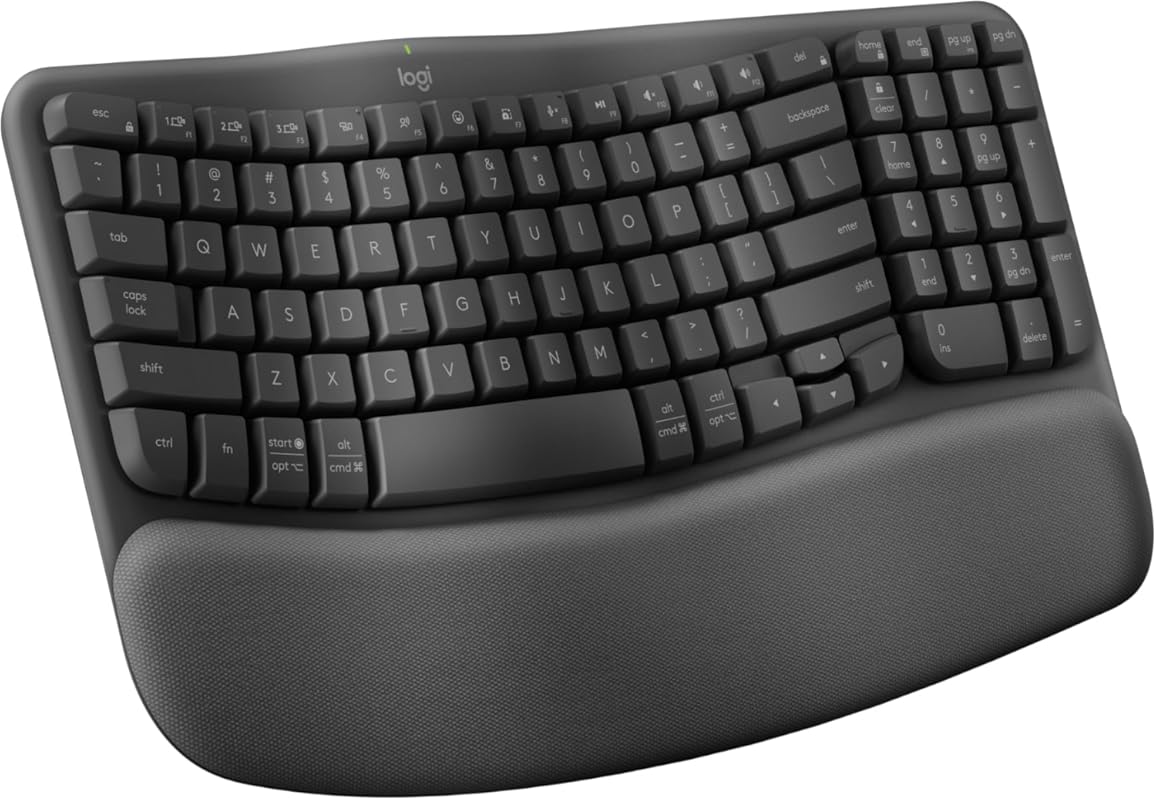
The Logitech Wave Keys is a standout wireless ergonomic keyboard that combines a wavy keyframe design with a cushioned palm rest to promote a natural typing posture. Its compact layout brings your mouse closer, reducing shoulder strain, while the quiet, responsive keys ensure comfortable all-day use. With Bluetooth and Logi Bolt connectivity, you can easily switch between devices, making it versatile for both work and personal use.
Key Features That Stand Out
- ✓ Wavy keyframe design positions hands, wrists, and forearms naturally
- ✓ Compact layout reduces shoulder reach and promotes better posture
- ✓ Soft, cushioned palm rest for extended comfort
- ✓ Bluetooth and Logi Bolt for multi-device pairing
- ✓ Multi-OS compatibility (Windows, macOS, Linux)
Why We Recommend It
We recommend the Logitech Wave Keys because it excels at reducing strain without a steep learning curve. The wave design is intuitive, and the palm rest provides tangible relief for carpal tunnel sufferers. Its reliable wireless connection and long battery life make it a hassle-free upgrade for any workstation.
Best For
This keyboard is ideal for office workers, writers, and anyone who types for hours and wants a seamless transition from a traditional keyboard. It’s especially great for those with mild to moderate wrist discomfort who prefer a wireless setup.
Pros and Cons
Pros:
- Extremely comfortable and quiet typing experience
- Easy Bluetooth setup and stable connection
- Compact size saves desk space
- Function keys are conveniently placed
Cons:
- No backlighting, which may be an issue in low-light environments
- Palm rest is not detachable for cleaning
- May take a day or two to adjust to the wavy layout
Customer Reviews
Customer Review: Definitely the most comfortable and quiet keyboard I have used to date. The function keys on this are so convenient. Setup is easy and the touch response on the keys feels so natural and so quiet. It is not backlit but that is fine for me because the quality of the keys is worth it. With keyboards being so expensive these days for the gamer sect, this is the perfect value for the rest of us who use the keyboard for data entry purposes. I stumbled upon a function key for print screen that is a gamechanger for me in my work, so I am very pleased.
Customer Review: This is a great keyboard, and the wireless mouse is a bonus too. I’ve owned several iterations of this keyboard for about 15 years, and I’m on my fourth one (not for quality, but because I’ve moved jobs or wanted a more recent model). It is easy to set up using Bluetooth and sets up within seconds. The Bluetooth range is also great I can move the keyboard or mouse around my office and it still types no matter where I move. The keys are easy to type with ergonomically and when they type they’re soft yet firm, if that makes sense. They’re not loud. Really happy with this keyboard!
2. Logitech Ergo K860 Wireless Split Ergonomic Keyboard
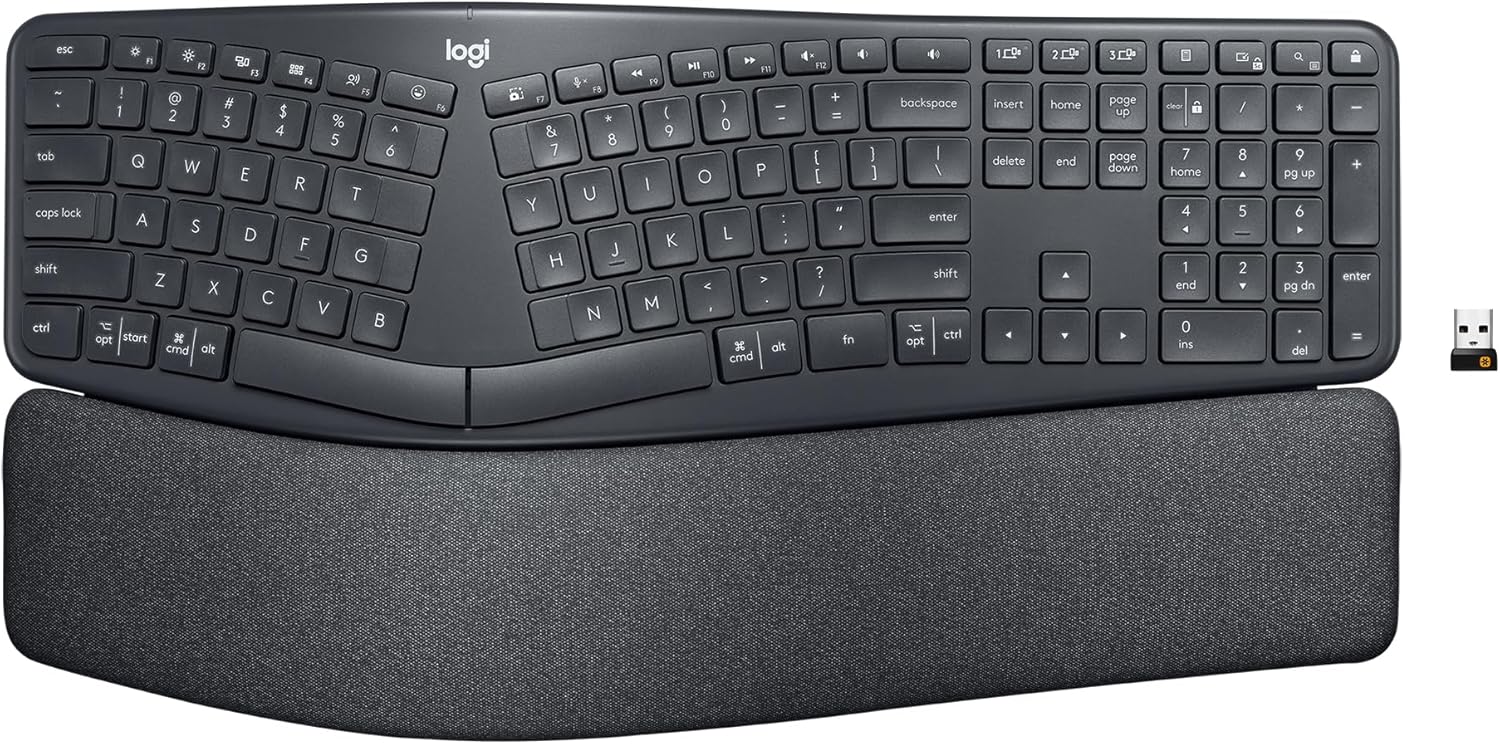
The Logitech Ergo K860 is a premium split ergonomic keyboard with a pronounced curved layout that encourages a more open shoulder and wrist position. Its pillowed wrist rest features memory foam for superior support, and the scooped keys match your fingertips for precise, confident typing. With both Bluetooth and USB connectivity, it’s a reliable choice for reducing muscle strain.
Key Features That Stand Out
- ✓ Split keyframe and curved layout reduce wrist and forearm strain
- ✓ Pillowed wrist rest with memory foam offers 54% more wrist support
- ✓ Scooped keys provide tactile feedback and reduce finger bending
- ✓ Dual connectivity (Bluetooth and USB receiver)
- ✓ Adjustable tilt legs for customized ergonomic angle
Why We Recommend It
The Ergo K860 earns our Editor’s Choice for its outstanding build quality and thoughtful ergonomic design. The split layout and wrist rest work together to significantly reduce bending and strain, making it one of the most effective keyboards for carpal tunnel relief. It’s a durable, high-performance option that justifies its price.
Best For
This keyboard is perfect for professionals with existing wrist pain or those who want to proactively prevent strain. It’s especially suited for users with larger desk spaces who don’t mind a bigger footprint for maximum ergonomic benefit.
Pros and Cons
Pros:
- Premium, solid build that feels luxurious and durable
- Excellent wrist support reduces bending by 25%
- Quiet, comfortable keys with precise tactile feedback
- Stable connection with no lag during long sessions
Cons:
- Large size may overwhelm smaller desks
- Palm rest is not removable, making cleaning harder
- Higher price point compared to basic ergonomic keyboards
Customer Reviews
Customer Review: Premium build quality: Solid, high-end feel; slightly heavier than budget keyboards, giving a luxurious and durable impression. • Ergonomic design: Wide, pronounced curve reduces shoulder and wrist strain; encourages natural, open posture. • Key comfort: Height and layout feel great for both Windows and Mac users. • Better than cheap keyboards: The curve and overall design are noticeably superior; you can really see where the quality and factory level difference comes through. • Stable connection: No lag, even during long typing sessions. • Consider desk space: it’s big. Larger size may take some adjustment if used to smaller keyboards, but the comfort is worth it.Overall: If you want a premium ergonomic keyboard with excellent comfort and build quality, the Logitech Ergo K860 is a fantastic choice after I tried a few keyboards. This Logitech and APPLE Magic Keyboard are best so far.
Customer Review: Although I’ve had a number of Logitech mice over the years, this is the first Logitech keyboard that I can recall ever buying for myself. It’s replacing a Microsoft Sculpt wireless keyboard that I really liked. I loved the simplicity of the Sculpt and have been used to that split design after many years with MS’s natural keyboards. Logitech, for as long as I can recall, has never had a good competitor in that basic, split layout ergo space. They’ve always had something like the K350 that was sort of a warped or stretched layout but wasn’t much different from a normal, if a bit distorted layout. And that one always seemed a bit cheap and clunky. I think it’s safe to say the K860 finally fills that gap. And so far it seems to be doing it well. I think there is a little bit of a difference in the spacing from one side to the other when comparing to the Sculpt but the overall layout is basically the same. So while I’m still getting a feel for where the differences are between the two (delete key, number pad, pg up/down, etc), the overall transition is easy. The GoodKeys are comfortable and quiet. I’m far from a keyboard expert or connoisseur, but the typing action is fine (if not a tad firm). I do tend to only use the left side of the spacebar and I think that particular key makes a little more noise than the others – but otherwise it’s pretty quiet. I also like having a number pad again (the Sculpt has a separate/external one which I usually kept in a drawer). Actual ergonomic feet. I’m happy to see that they got the feet in the right place for actual improved ergonomics. The lower of the two feet settings feels about right to me when comparing to what I’m used to with the Sculpt (I did use the riser on the Sculpt for max comfort) – but I like that there are two options and might try the taller one just to see if I notice a difference. There’s a power switch. It seems dumb, but I like that there’s actually a power switch. This will be handy when I want to give it a quick wipe down and cleaning. MS’s Sculpt did not have one and that just meant I had to pull the batteries or turn off my laptop if I wanted to clean it. Not the worst but not exactly convenient. Dual connection methods. Just like my M720 mouse, I like that there’s a USB receiver and it can do Bluetooth (and multi-device BT even!). I like using BT on my own computer to keep USB ports free but it’s nice to be able to pull the receiver out if I’m working on another system temporarily. The MehPalm rest is not as fancy as it looks. The palm rest is comfortable but I was surprised there isn’t really a texture to it. It’s just a pattern on the material made to look like a texture. It’s otherwise just as smooth as any other palm rest I’ve used. From the images, I expected maybe it would be some sort of microfiber or other soft textile. I am also surprised that the palm rest doesn’t detach from the keyboard. It kind of looked like it would from the photos but it’s all one piece. It’s fine though, since I’d probably only ever use it with it attached – it just gave that impression from the design. Feet are a little too rubbery? While I appreciate grippy feet to keep things in place, I tend to push my keyboard around my desk during the day depending on what else I’m working on and these feet are pretty grippy out of the box. Though that honestly might be a plus for a lot of other people. I’ve only been using it for a short time, so I don’t really have any negatives to put into this – but I’ll update if anything comes up. Otherwise it’s nice to see Logitech finally making a decent, modern, split layout keyboard.
3. Perixx PERIBOARD-512B Wired Ergonomic Keyboard
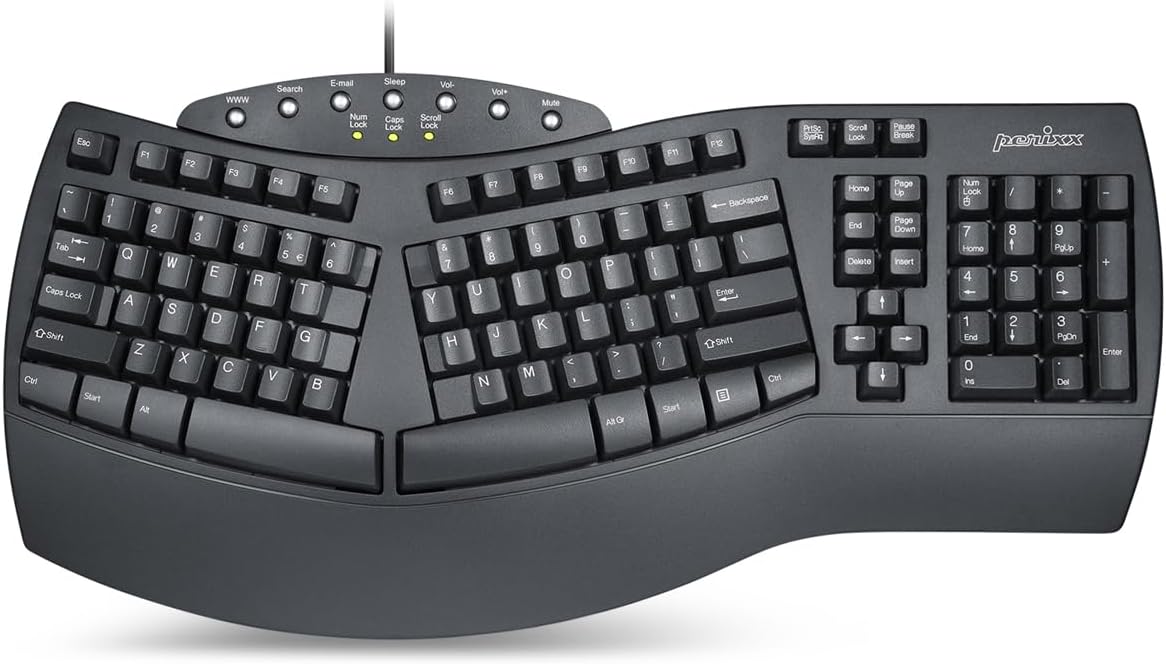
The Perixx PERIBOARD-512B is a wired split ergonomic keyboard that offers exceptional value without compromising on comfort. Its one-piece split layout separates keys into left and right zones to minimize wrist bending, while the long key travel and tactile feedback mimic the feel of a mechanical keyboard. The stepped, curved row design promotes a natural typing posture, making it a fantastic budget-friendly option for carpal tunnel relief.
Key Features That Stand Out
- ✓ Split-key layout reduces wrist strain and supports natural hand position
- ✓ Long key travel with tactile feedback similar to brown mechanical switches
- ✓ Stepped, curved key rows for reduced fatigue
- ✓ Built-in wrist rest for added comfort
- ✓ USB wired connection for zero latency
Why We Recommend It
As the best budget pick, the PERIBOARD-512B delivers remarkable ergonomic benefits at a fraction of the cost of premium models. Its split design and satisfying key action provide genuine carpal tunnel relief, and the wired connection ensures reliability. For anyone hesitant to invest in an expensive ergonomic keyboard, this is a risk-free way to experience real comfort.
Best For
This keyboard is perfect for budget-conscious users, students, or anyone who wants to try an ergonomic split layout without a long-term commitment. It’s also ideal for offices where wired connections are preferred for stability.
Pros and Cons
Pros:
- Incredible value for the price
- Solid build quality—feels as sturdy as more expensive models
- Quiet, tactile keys with satisfying feedback
- Split design effectively reduces wrist strain
Cons:
- Wired connection limits mobility
- No backlighting
- Arrow key cluster layout requires brief adjustment
Customer Reviews
Customer Review: Been using wave, split keyboard style keyboards for maybe decades. Forget when I got my first Microslop Natural Keyboard Elite but still have three PS2 ones that are working fine. The key strokes are pretty long on those so was looking for maybe a mechanical switch board and would have spent up to $200.00 to get one that was a split design and a waive, like this one. But guess what? Couldn’t find one at any price. Was going to go with the new Microslop wired ones, not a fan of baby sitting dongles and batteries, for roughly twice the price of this one, but saw some scary reviews. You don’t know if they are for real or just someone with a personal problem. Then saw some good reviews for this one and for the price, was thinking it has to beat the stock Dell sub $20.00, maybe sub $10.00 even, keyboard that was given to me by my work. So actually ordered 3 of these thinking what the heck, I can send them back if they blow, and then I can keep them and happy day for me if they are OK or better. Happy Day! They are better! One review stated that they feel cheap. They weigh just about exactly the same as my MS boards are almost exactly the same size and shape. Just so I could say I did it, I torqued them from the ends. My natural 190 lb frame could likely snap it but they are just about as solid as the my old MS boards: talking about the range of a few pounds of pressure difference nothing major. That is, if all you want to to is type on them, thinking that they are plenty solid enough to last for years. When I checked all three boards, one had a slight separation between the top part and the bottom on the underside of board where you can’t see it while using it on the left hand side, [the top and bottom are screwed together much like a laptop computer is] but again, very minor, maybe .005 – .010 of an inch for about 3 inches. Think maybe you could work a match book cover into it if you spent the time and tried hard. This turned out to be a result of the twist I gave them as the top and bottom parts are “keyed” and the male tab came out of its slot. A small push and it was back in place. The other two were perfect and don’t see how that is going to make any difference anyway. They are well built and the key action is shorter than the old boards. It uses almost exactly the same layout as the old boards with the arrow keys being closer to the delete buttons. All this works for me. Can type faster, but for me that’s maybe 80 – 90 wpm in bursts. If you want the worlds fastest keyboard, them maybe go with a mechanical switch type. For me, this is a very satisfying keyboard. The buttons on the top also work with Linux a bit so another plus if you too use multiple operating systems with the same keyboards. Ordered two more. These are great and for the price I was willing to pay for one mechanical switch board, I have 5 of these. I have been using one of these daily at work 8 hours a day for months now and no issues.
Customer Review: Long review ahead: short version, just buy it and try it. You won’t be returning it, trust me! This is not only an absolutely fantastic SPLIT style keyboard, but also one of the best in terms of key/tactile feel I’ve ever owned. I’ve tried all the usual mechanical keyboards, blue & brown switches (way overrated IMO) along with the legendary buckling spring switches. Yes, this is a rubber dome keyboard, BUT, it feels to me anyhow like a quiet and lighter touch buckling spring keyboard (think IBM Model M) without all the racket a buckling spring or cherry blue switch (or even brown) keyboard can make. It has a nice tactile snap to the keys and sounds similar to a Topre keyboard (youtube it) and has a nice muffled “thock” type sound, no clacky-ness at all. Even the larger stabilized keys are mostly quiet, and the one or two that aren’t can be made quiet by adding a little white grease lube (search amzn for elite keyboards grease) to the metal stabilizer underneath the key after carefully removing it with a keycap puller or very carefully prying off. This keyboard has a little shorter key travel distance than a full key height keyboard; about 80%, but is just enough shorter that it is actually a better travel distance IMO and allows for a very quick and light touch to the keys, but still gives that satisfying “press” you get on a full travel keyboard. As noted above, the key feel is light, but not too light and has a nice tactile snap (think buckling spring) that you will not get with the overrated mx brown style switch. The split of the board is perfect and puts your hands, arms and shoulders in a very natural position for typing, and also has a full size wrist rest to place the palms of your hands when not actively typing. One thing some folks may complain about is the arrow/home key cluster; do not let that deter you from trying this board. I actually prefer this layout as it allows your trackball (or mouse) to come in closer to your hands than if they used the standard ibm layout. Once you get used to the more condensed layout of the arrow keys and home/end/delete cluster, you’ll realize it is very very logically laid out and actually makes more sense. So IMO I believe it’s truly a better layout than the older IBM format. Your mileage may vary. I’ve been using split keyboards since the original MS one came out in the late 90’s and this Perixx split keyboard is very similar to the old MS elite version, but much better. The key feel and overall construction along with a split spacebar make THIS keyboard the best split keyboard you can buy, not to mention it’s an incredible value also. I pair this board with a Logitech M570 trackball and it’s a match made in heaven. My hands and wrists never experience pain and typing on this board is so comfortable and the muted/quiet, light snappy tactile feedback is incredible. I have never enjoyed a keyboard more than this one. It hits ALL the checkboxes. I’d happily pay 2-3 times what they charge for it also. And have for other boards that couldn’t hold a candle to this one. Note: I was NOT paid or compensated in any way to write this review, and I normally don’t write reviews unless I really like something. I LOVE this keyboard 🙂 and you will too. If you are new to split keyboards, use this one solely for a week and you will not go back to a non-split board ever again, and when/if you have to use a “normal” keyboard you’ll wonder how you ever did. Ping me in the questions section, happy to share my experience or answer any questions you may have. Happy typing!
4. Arteck Split Ergonomic Wireless Keyboard
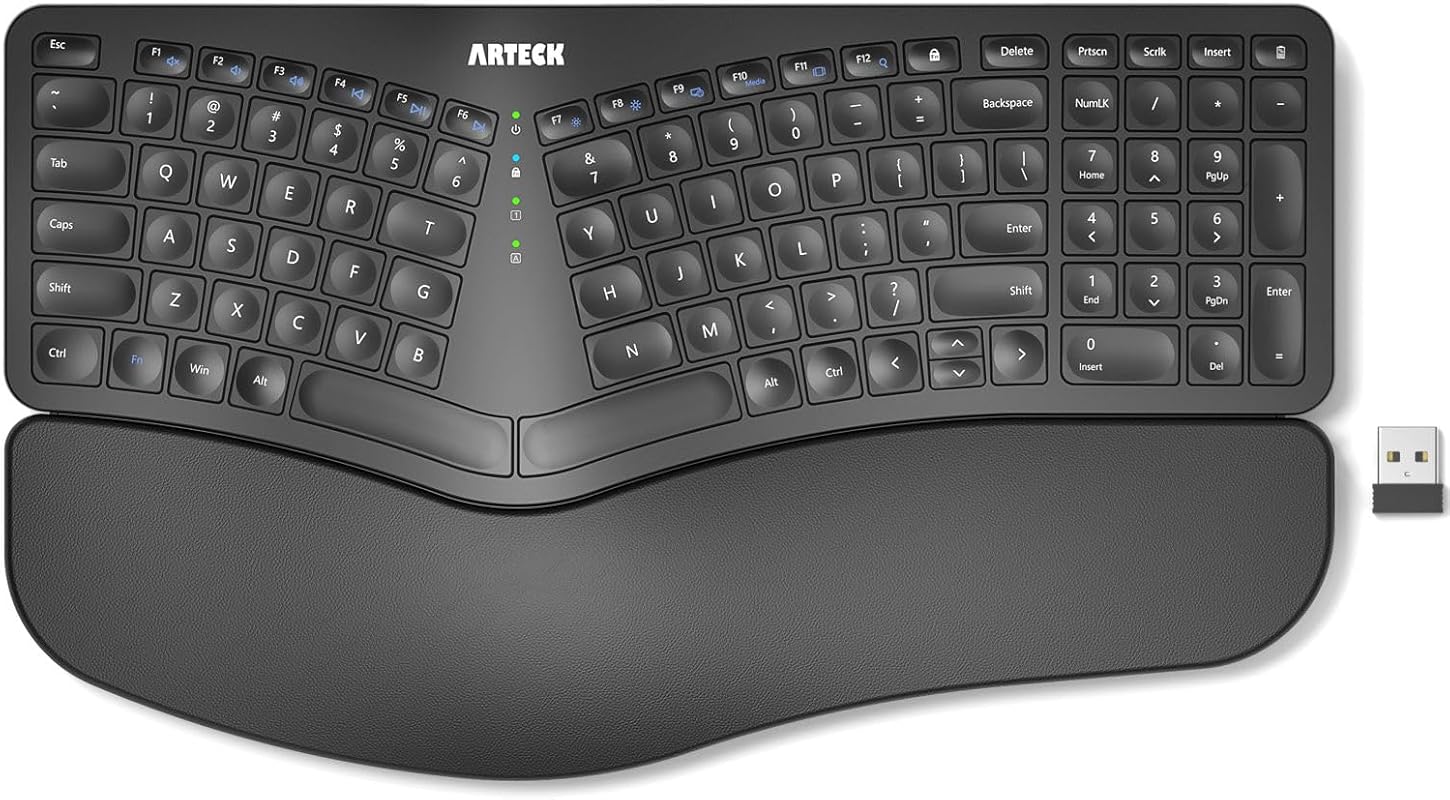
The Arteck Split Ergonomic Wireless Keyboard features a split design that positions your wrists and forearms in a natural, relaxed position. It comes with a soft cushioned wrist rest and uses scissor-switch keys for a laptop-like typing feel. Setup is effortless with the nano USB receiver stored conveniently in the back. This keyboard is a solid wireless option for those seeking carpal tunnel relief without breaking the bank.
Key Features That Stand Out
- ✓ Split design promotes natural wrist and forearm alignment
- ✓ Soft cushioned wrist rest for comfort during long typing sessions
- ✓ Scissor-switch keys provide responsive, quiet typing
- ✓ Plug-and-play 2.4GHz wireless with stored nano receiver
- ✓ Rechargeable battery with USB-C charging
Why We Recommend It
We recommend the Arteck Split for its balance of affordability, wireless convenience, and genuine ergonomic benefits. The scissor-switch keys are a step up from typical rubber dome keyboards, offering a crisp, quiet feel. The split design is effective at reducing wrist strain, making it a great entry point into ergonomic keyboards.
Best For
This keyboard is best for users who want a wireless ergonomic option with a split layout but don’t need all the premium features of high-end models. It’s particularly good for home office setups and anyone who values a clean, cable-free desk.
Pros and Cons
Pros:
- Affordable price with solid ergonomic design
- Scissor-switch keys are responsive and quiet
- Wireless convenience with easy setup
- Cushioned wrist rest is comfortable
Cons:
- No dedicated Page Up/Down, Home, or End keys (requires FN combos)
- Battery life may be shorter than advertised with heavy use
- Limited adjustability compared to more expensive split keyboards
Customer Reviews
Customer Review: I did a lot of research before choosing this keyboard, and man am I glad I got it! The split is great, very comfortable. The arch is minimal, but it does the job. I also really like this scissor-switch technology, no more backspacing to fix a key that didn’t register the first time! The built-in wrist rest is also really nice. I type a lot for work, and at a rate of 55 WPM. The keyboard gives just the right amount of feedback, and the keys are not mushy at all. It’s also a very good looking keyboard, and is very responsive. I have heard some people mention (not just on this keyboard) that they have some lag/delay with their typing. I would bet the farm that they have plugged the receiver into a USB hub. If you’re going to do that, then get yourself a USB extension cable, because the hub will cause interference with ANY wireless dongle you plug into it. Just a foot or so of distance from the hub will alleviate that. I found that out with my prior Logitech keyboard, after lots of searching around for what the cause could be. The ONLY thing I would improve is fairly minor: It does not have dedicated keys for Page Up/Down, Home, or End. You need to hold down the function key and use the corresponding arrow key for those functions. Not even remotely a deal breaker, this keyboard is fantastic in every other aspect.
Customer Review: This has been a great second keyboard for my in office days. A little clackity for my liking 😆, but comfy to use and worth the purchase. Love that it’s bluetooth and rechargeable. I have two of the mice as well.
5. Nulea Wireless Ergonomic Split Keyboard
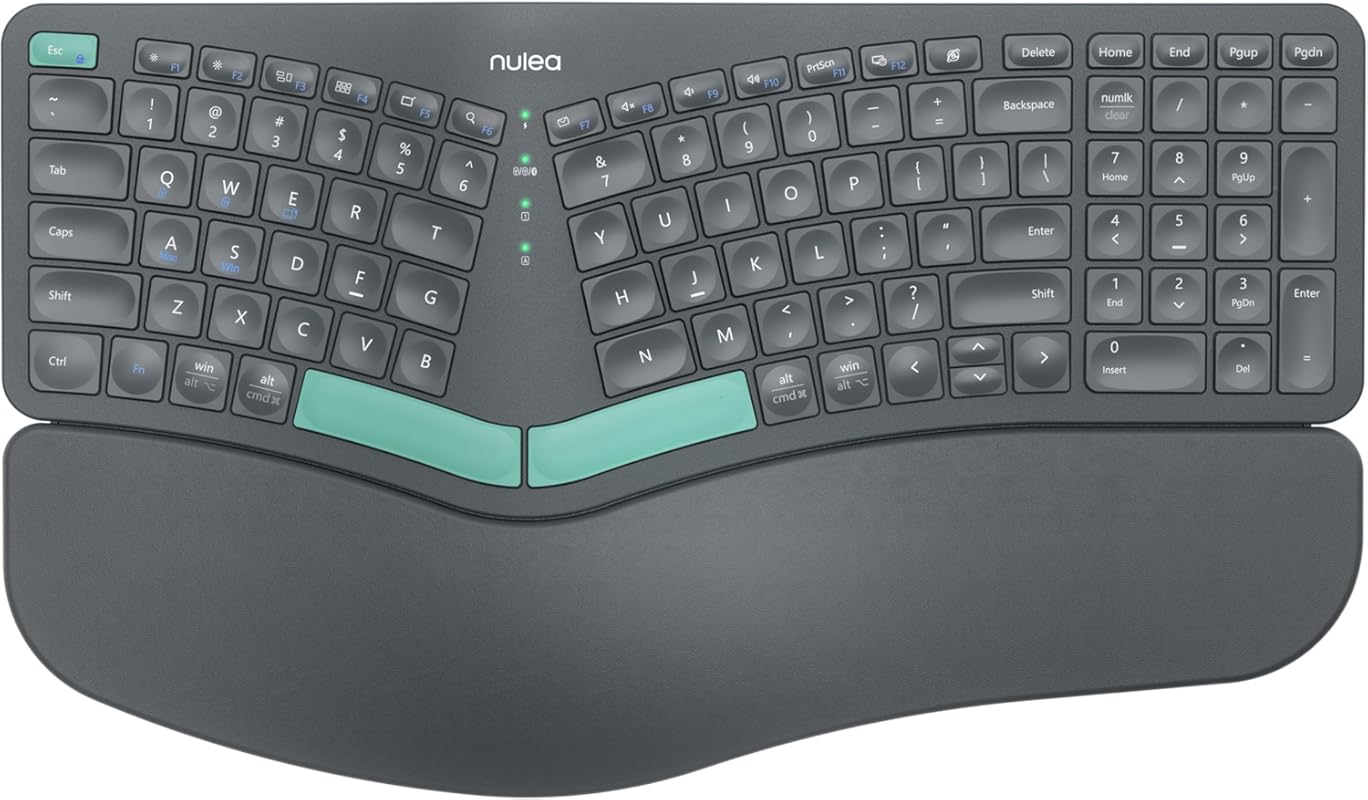
The Nulea Wireless Ergonomic Split Keyboard features a distinctive split design that adapts to your body’s natural alignment, reducing wrist pressure. It offers seamless dual-mode connectivity via Bluetooth and 2.4GHz USB, and it’s USB-C rechargeable for convenience. The cushioned wrist rest adds extra support, making it a versatile choice for both Windows and Mac users seeking relief from carpal tunnel symptoms.
Key Features That Stand Out
- ✓ Split design encourages natural hand and wrist positioning
- ✓ Dual connectivity: Bluetooth and 2.4GHz wireless
- ✓ USB-C rechargeable battery—no disposable batteries needed
- ✓ Soft cushioned wrist rest for extended comfort
- ✓ Compatible with Windows and macOS
Why We Recommend It
We recommend the Nulea for its flexible connectivity options and rechargeable battery, which eliminate the hassle of replacing batteries. The split design is effective at reducing strain, and the wrist rest is plush and supportive. It’s a well-rounded ergonomic keyboard that performs reliably across different operating systems.
Best For
This keyboard is ideal for users who switch between multiple devices (like a laptop and tablet) and appreciate the convenience of Bluetooth. It’s also great for eco-conscious users who prefer rechargeable batteries over disposable ones.
Pros and Cons
Pros:
- Dual connectivity options (Bluetooth and 2.4GHz) for flexibility
- Rechargeable via USB-C—cost-effective and environmentally friendly
- Comfortable split design reduces wrist strain
- Works seamlessly with both Windows and Mac
Cons:
- Key feel is slightly mushy compared to mechanical keyboards
- No backlighting for low-light environments
- Build quality is good but not as premium as some competitors
Customer Reviews
Customer Review: Needed to add ergonomic things to my home office since I work from home. This has been such a game changer to ease my carpel tunnel. Color is accurate, cute, soft wrist support. One charge lasts a long time, compatible with my Asus laptop, and no issues, no lag time, etc. Good quality and value.
Customer Review: Love the keyboard! The keys make a mild click not like a mechanical keyboard. Connects via Bluetooth or has a USB dongle on the back of the keyboard. The key size, comfort and the shift key are all where they should be. There are no missed letters when typing and my speed has gone up and realized how much a good keyboard can do. No idea about the battery life as I am yet to use it for that long, but they have multiple ways to charge using USB or USB C all in the same cable. I just love the thoughtfulness of just providing one cord to charge. As for the connectivity it is pretty solid, I could turn around and even put the keyboard in my lap and still the typing was steady. Great functionality and features. Works for both windows and Mac. Would definitely recommend it.
6. SABLUTE Ergonomic Wireless Keyboard Mouse Combo
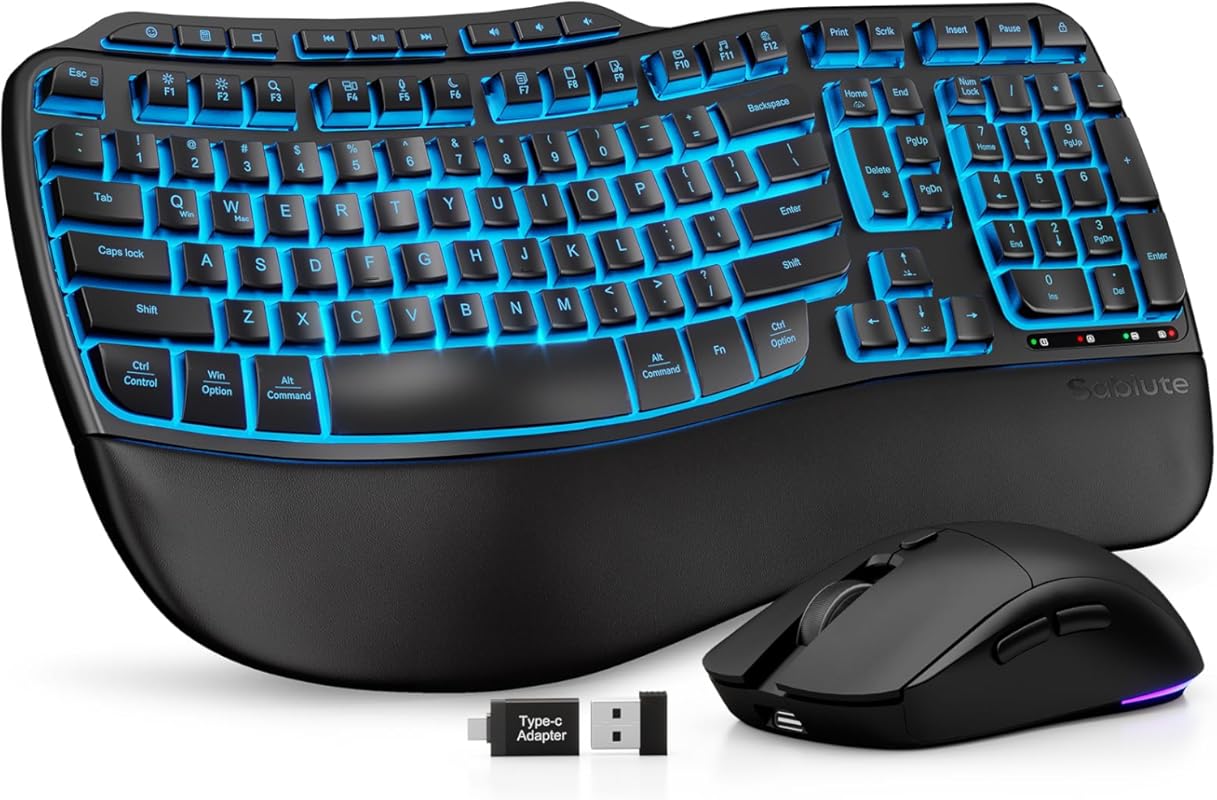
The SABLUTE Ergonomic Wireless Keyboard Mouse Combo is a premium package that includes both a wave-style keyboard and an ergonomic mouse. The keyboard features a faux lambskin palm rest, backlit keys with multiple color options, and a massive 4000mAh battery for extended use. With 10 million keystroke durability and intelligent auto-sleep, it’s built for long-term comfort and reliability, making it an excellent all-in-one solution for carpal tunnel sufferers.
Key Features That Stand Out
- ✓ Wave key design promotes natural hand, wrist, and forearm alignment
- ✓ Luxurious faux lambskin palm rest for superior comfort
- ✓ 4000mAh rechargeable battery with USB-C charging
- ✓ Backlit keys with multiple colors and brightness levels
- ✓ Includes matching ergonomic wireless mouse
Why We Recommend It
We recommend the SABLUTE combo for users who want a complete ergonomic workstation upgrade. The keyboard’s wave design and plush palm rest provide exceptional comfort, while the included mouse ensures your entire setup supports a neutral wrist position. The backlighting and long battery life add practical benefits for late-night work sessions.
Best For
This combo is perfect for remote workers, gamers, and anyone who spends extended hours at the computer and wants a coordinated, high-comfort setup. It’s especially appealing to those who appreciate aesthetic customization with the RGB backlighting.
Pros and Cons
Pros:
- All-in-one solution with matching ergonomic mouse
- Premium palm rest feels luxurious and supportive
- Backlit keys with multiple color options
- Exceptional battery life (4000mAh)
- 10 million keystroke durability for long-term use
Cons:
- Higher price due to included mouse
- Some users may prefer a mechanical key feel
- Mouse may not suit everyone’s grip style
Customer Reviews
Customer Review: I work from home and often put in long hours, so comfort is non‑negotiable for me. I also deal with wrist pain in my dominant hand, which makes an ergonomic design absolutely essential. After more than 10 years of relying on the Logitech Wave K350, I fell in love with it. I was disappointed to find that it had been discontinued, so I’ve been searching everywhere for a similar replacement, and I finally found it. Right out of the box, the quality looks and feels impressive. The keyboard charges quickly, and I love that you can keep using it while it’s plugged in. The USB‑C port on the side, paired with the right‑angle cable, is a thoughtful touch that keeps everything neat and out of the way. The backlighting is another great feature. Whether I’m in the mood for calm productivity (blue, cyan, or white) or want something more vibrant (red, green, purple, yellow), the lighting options make the whole setup feel customizable and fun. The 10 shortcut keys are the cherry on top, making everyday tasks quicker and more efficient. Typing on the wave‑style keys is incredibly smooth and comfortable. I can easily work an entire day without the fatigue I used to feel. It’s perfect for long work sessions, home offices, and anyone who types a lot. The mouse also feels great in hand, with a smooth matte finish that complements the keyboard nicely. After searching and searching, I’m so happy I found this combo. If you need comfort, quality, and thoughtful design, this is absolutely worth it.
Customer Review: I work from home and am an avid PC gamer, which translates to lots of time at the computer; thus a keyboard that’s ergonomic and comfortable is an absolute necessity. For years, I, too was a faithful user of the Logitech Wave keyboard that seems to no longer be in production, and the journey to get to this Sablute keyboard was long and filled with tons of product returns. Another Amazon reviewer mentioned that Logitech connection by name, after HE tried this product, which is exactly what inspired me to try it, as well. If someone else felt it was a close approximation to The Wave, then I had to give it a try. Pleasantly, I have to say, they were right: this is as close as I’ve come to finding something that suits as well as The Wave, and this keyboard is a pleasure. The keys are buttery soft, and it’s quiet as a whisper. The wrist rest is comfortable, and I find something pleasant sensory-wise with the way the material feels; it’s just the right amount of squish. Since I’ve connected the keyboard to my PC, I’ve actually been looking for things to type up, because this keyboard just has a great feel to it. The backlight keys (which can be turned off if you prefer) are a bonus selling point for me It’s a fun feature on a product I’d absolutely use without it. They do dim after several minutes of inactivity, so your battery power is saved automatically, which is a unique feature I’m kind of impressed with. This is definitely a comfortable keyboard and if you’re looking for something to replace your Logitech Wave with, look no further. This is the keyboard for you!
7. Arteck Ergonomic USB Wired Keyboard
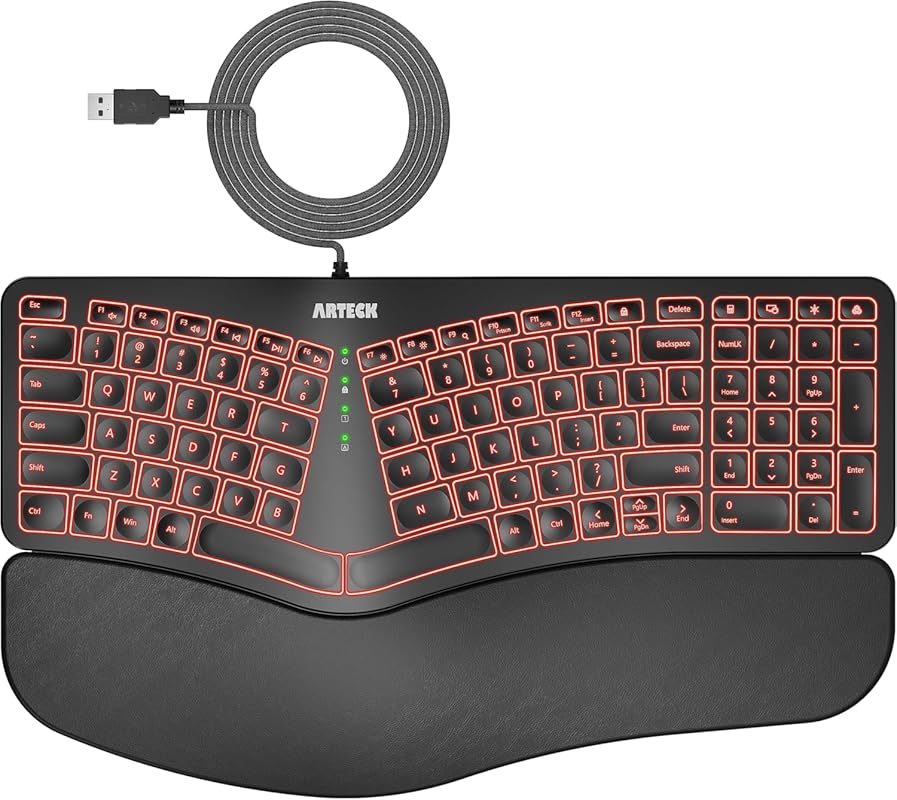
The Arteck Ergonomic USB Wired Keyboard is a feature-packed wired option with a split design, cushioned wrist rest, and 7-color adjustable backlighting. It uses scissor-switch keys for a laptop-like typing feel and includes a 6-foot cable for flexibility. The backlighting offers three brightness levels, making it suitable for both bright offices and dimly lit rooms. It’s a reliable, no-fuss choice for carpal tunnel relief.
Key Features That Stand Out
- ✓ Split design with cushioned wrist rest for natural alignment
- ✓ 7-color LED backlight with 3 brightness levels
- ✓ Scissor-switch keys for quiet, responsive typing
- ✓ 6-foot USB cable for flexible placement
- ✓ Full-size layout with number pad
Why We Recommend It
We recommend the Arteck wired keyboard for users who prioritize reliability and don’t want to deal with wireless interference or battery changes. The backlighting is a rare feature at this price point, and the scissor-switch keys offer a satisfying, quiet typing experience. The split design effectively reduces wrist strain, making it a strong contender for carpal tunnel sufferers.
Best For
This keyboard is best for users who prefer a wired connection for guaranteed stability, such as in professional recording studios or competitive gaming setups. It’s also ideal for those who work in variable lighting conditions and appreciate the backlighting.
Pros and Cons
Pros:
- Affordable price with backlighting—a rare combo
- Scissor-switch keys are quiet and responsive
- Wired connection ensures zero latency
- Split design and wrist rest improve ergonomics
- Long 6-foot cable for flexible desk arrangements
Cons:
- Half-sized arrow keys may feel cramped
- Delete key placement is awkward (above backspace)
- Backlight indicator lights are overly bright
- Function keys require FN lock for primary functions
Customer Reviews
Customer Review: I’ve used this keyboard daily for 3 months now, and it has been a great experience so far. It’s my first time purchasing an Arteck keyboard, so I wasn’t sure what to expect, but I had heard their brand is reputable for making solid, reliable devices, and thus far I would agree with that. I was looking for a very specific set of features in a keyboard, and this was literally the only one that checked all of the boxes on Amazon at the time of purchasing. Features I was looking for that it had: Ergonomic split key style with a padded wrist rest. Scissor-style key press mechanism (feels like a laptop keyboard when typing) Backlit keys with multiple color choices, including white A full sized number pad on the right side Wired, rather than wireless (although in hindsight, either would have been fine.) There are a few things about the keyboard that are relatively minor, not anything that makes it a bad experience, but that if I could have everything perfect in a single keyboard, I would prefer they were slightly different. The half-sized Up/Down arrow buttons, while functional, I would prefer full size ones like the right and left arrows. They feel a bit cramped to use. The delete key being about 3/4 sized is not that strange, but its position above and right-aligned to the backspace key is just awkward for me. I’m used to it being underneath, or off to the right side. Very often I will blind-press either the “FN Lock” (Function Lock) key to the left of it by mistake, thinking it is the Delete key, either that or the Calculator key (which works great in Linux by the way) to the right of it. 3 months in and I’m still not used to its size or placement unfortunately. Similarly, I’d rather the top row of keys on the number pad were positioned elsewhere, (or mainly just the color change button for the backlight not being above the – key) but I do understand that there are limitations to the amount of space they can work with, and appreciate that they managed to pack a bunch of extra feature keys. I’d prefer the print screen feature to have its own dedicated key, rather than being a toggle ON/OFF via the function lock. For example, to switch between the ability to take a screenshot, and the ability to refresh a webpage via the F5 key, you have to press the function lock key in between to toggle the functionality. Most of the functions controlled by FN Lock are used sparingly (volume controls, media playback controls, brightness settings, scroll lock and the insert key) but print screen is one of those that’s pretty common for me, and would have been more helpful having its own key instead. Two more minor things related to the lights… if I had it all my way… By the way, at the time of writing, there was a discrepancy in the product description in regards to the backlighting colors so, for those who are wondering, the key colors on the HA315B model are: yellow, purple, cyan, white, red, green, and indigo (blue.) The first one is just a personal preference. I’ve surprised myself by gravitating to the yellow color lights. I wish the yellow color was more to the orange/red side, like a golden color. Instead it is closer to a yellow-green, which is fine, I would have just preferred something a bit more gold if I could pick. Not a big deal at all. I like that it has a lot of color choices! The other “issue” was just that the green lights in the center of the keyboard that tell you what buttons are ON/OFF for capslock, function lock, numlock, and so on, are SUPER bright. Way too unnecessarily bright. It looks great when you’re using the green color on the backlight, since it matches well, but for everything else it’s too intense and visually distracting, especially in a darker room. But, I got some old solid black electrical tape I had laying around, and cut little tiny squares of out it, and covered about 75-90% of the visible lights with that, drastically reducing their brightness to a more sane and tolerable level, while also being careful not to completely cover the lights, so I can still tell when they are on or off in general. It’s a simple, low-tech fix, and again not a huge deal, but for future keyboard designs I would highly suggest putting a much dimmer and more subtle light in for those. All in all, it may sound like I have a lot of complaints, but honestly none of them are all that big of a deal. Almost every keyboard I’ve ever used has at least a few aspects that feel are a bit less than ideal compared to what I would prefer, and none of these things are detrimental enough to feel like a disservice to the experience. It’s a very enjoyable keyboard to use and I’m quite pleased with it. The pros far outweigh the cons, in other words. I would definitely recommend this keyboard if you are looking for these very specific combination of features, like I was, and I’m pleased with my purchase for sure. If everything continues to go this well throughout the rest of the year, I’d safely be able to recommend Arteck, or at least this specific product, to anyone interested.
Customer Review: Keyboard is awesome! Keys are soft, quiet, comfortable and your wrist immediately feels the difference. I type all day at work and not once have I gone home with wrist or hand pain.
8. Nulea RT08 Wave Keys Wireless Ergonomic Keyboard
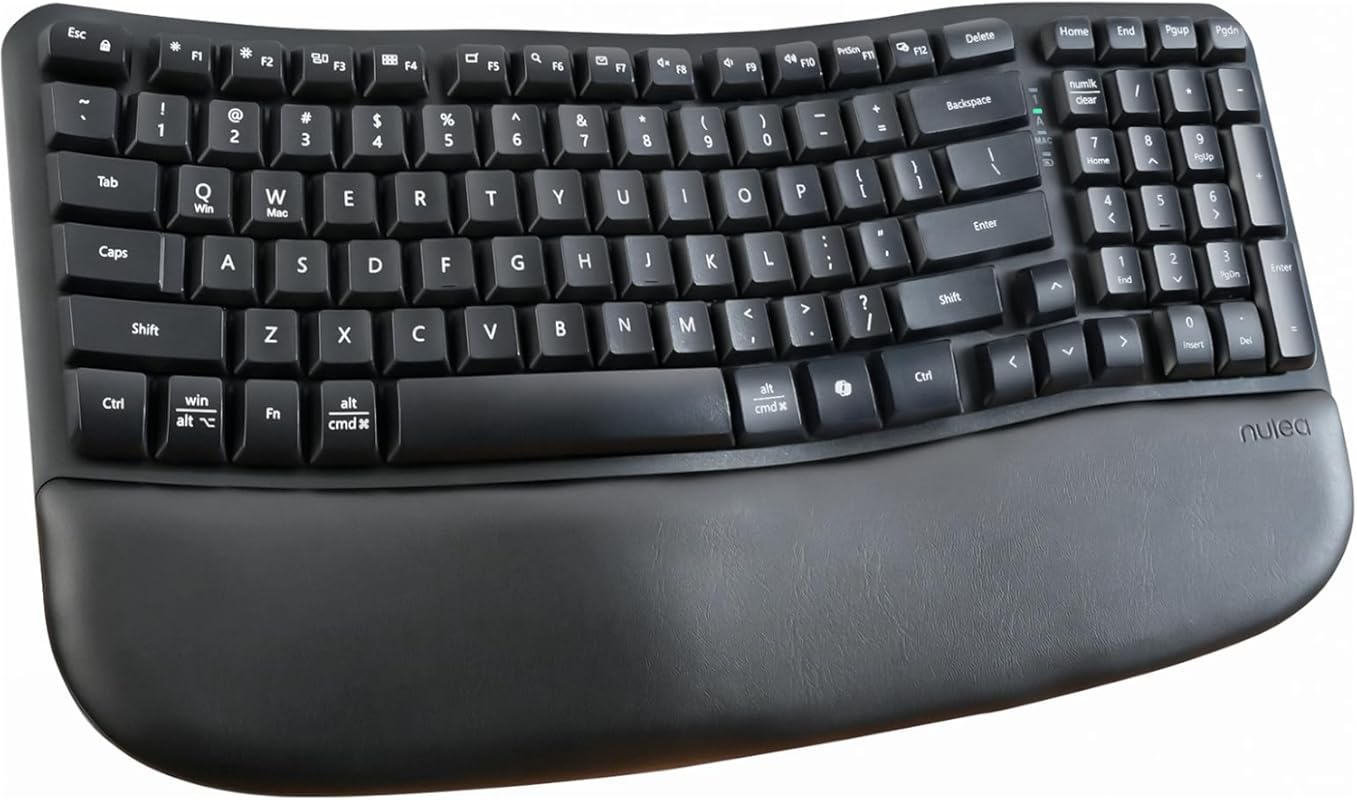
The Nulea RT08 Wave Keys is a wireless ergonomic keyboard with a unique wave-shaped design that fits the natural curve of your hands. It eliminates the learning curve of split keyboards while still providing excellent wrist support via a cushioned palm rest. With 2.4GHz wireless connectivity, multi-device pairing, and a compact footprint, it’s a user-friendly option for carpal tunnel relief.
Key Features That Stand Out
- ✓ Wave-shaped design matches natural hand curve for comfortable typing
- ✓ Cushioned palm rest supports wrists during long sessions
- ✓ 2.4GHz wireless with easy device switching
- ✓ Compact size reduces shoulder reach
- ✓ No complex learning curve—feels familiar quickly
Why We Recommend It
We recommend the Nulea RT08 for its gentle wave design that provides ergonomic benefits without the adjustment period required by split keyboards. The palm rest is plush and supportive, and the wireless connection is stable. It’s a fantastic middle-ground option for those who want ergonomics without sacrificing familiarity.
Best For
This keyboard is perfect for users who are new to ergonomic keyboards and want a gentle introduction. It’s also great for anyone with a smaller desk or who prefers a more compact layout without sacrificing comfort.
Pros and Cons
Pros:
- Wave design is intuitive and easy to adapt to
- Soft, quiet keys with good tactile feedback
- Stable wireless connection with multi-device pairing
- Compact footprint saves desk space
- Comfortable wrist support
Cons:
- No backlighting for low-light use
- Key feel is softer—not ideal for those who prefer mechanical switches
- Battery life may vary with heavy backlighting use (though this model has no backlight)
Customer Reviews
Customer Review: I recently switched to this wireless ergonomic keyboard because I spend long hours typing, and wrist pain was becoming an issue. Honestly, it’s been a big improvement! The wave design feels natural, and the cushioned palm rest is super comfy—I can type for hours without feeling sore. Setup was a breeze, and switching between devices is simple. The keys are soft and quiet, which I like, but if you’re into that clicky mechanical feel, this isn’t it. The key board is fast to respond and functions as it should. Overall, I’m impressed: What I Like: Ergonomic Design: The gentle wave shape really helps my wrists and forearms feel more relaxed. It didn’t take long to adjust, unlike some split keyboards. Cushioned Palm Rest: The memory foam wrist support is a game-changer for comfort during long work sessions. Wireless Convenience: Easy to connect via Bluetooth, and I love the multi-device pairing feature—it’s great for switching between my laptop and tablet. Battery Life: So far, the battery has lasted without needing a recharge. Size: It’s slightly smaller than a standard keyboard, so it takes up less desk space. What Could Be Better: Key Feel: The keys are quiet and soft, but if you prefer a mechanical feel, this might not be for you. No Backlight: If you work in low light, you might miss having illuminated keys. Bottom Line: If you want a comfortable, ergonomic keyboard without a steep learning curve, this is a solid choice. It’s not perfect, but the wrist support and wireless flexibility make it worth it for anyone who types a lot.
Customer Review: Quality of the keyboard is very nice and smooth, so far no issues with performance. 100% great price for what you are getting, no loud keys and has great support for your wrists. I will continue to use and have high expectations for this keyboard.
9. Logitech Wave Keys MK670 Combo
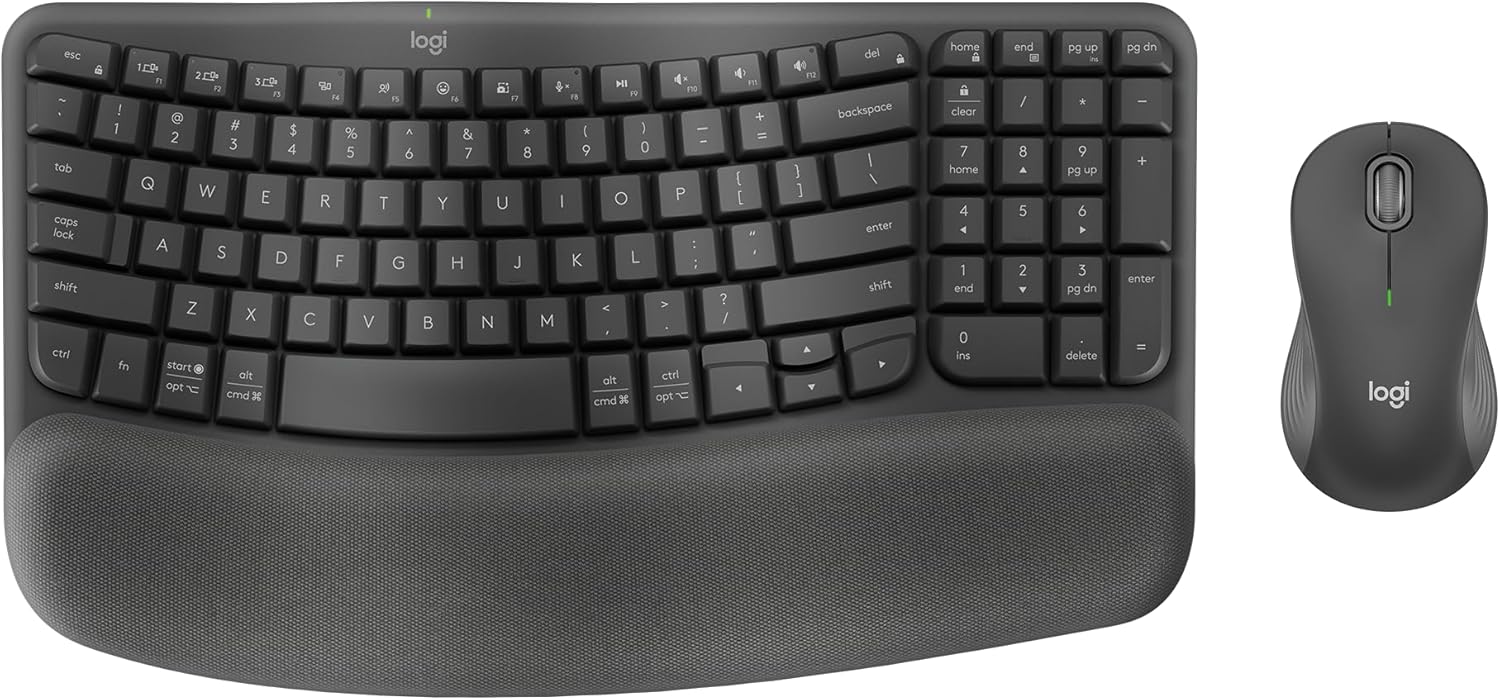
The Logitech Wave Keys MK670 Combo pairs the Wave Keys keyboard with the M550 L wireless mouse for a complete ergonomic solution. The keyboard features the same wavy design and cushioned palm rest as our top pick, promoting a natural typing position. The included mouse is designed to fit comfortably in your hand, making this combo an excellent value for those seeking full workstation ergonomics.
Key Features That Stand Out
- ✓ Wave key design for natural hand, wrist, and forearm alignment
- ✓ Cushioned palm rest for all-day comfort
- ✓ Includes M550 L ergonomic wireless mouse
- ✓ Bluetooth and Logi Bolt connectivity
- ✓ Multi-OS compatibility (Windows, macOS)
Why We Recommend It
We recommend this combo for users who want both a keyboard and mouse that prioritize ergonomics. The Wave Keys keyboard is already a top performer, and pairing it with the M550 L mouse ensures your entire input setup supports a neutral wrist position. It’s a convenient, cost-effective way to upgrade your entire workstation.
Best For
This combo is ideal for remote workers, office professionals, and anyone looking to replace both their keyboard and mouse with ergonomic options. It’s particularly appealing to those who already trust the Logitech brand and want a seamless pairing.
Pros and Cons
Pros:
- Complete ergonomic solution with both keyboard and mouse
- Wave design reduces strain effectively
- Cushioned palm rest adds comfort
- Reliable wireless connectivity
- Good value compared to buying separately
Cons:
- Mouse size may not suit very small or large hands
- No backlighting on keyboard
- Combo may be more expensive than buying keyboard alone
Customer Reviews
Customer Review: I’ve been using this combo for about a month now and I’m very happy with it. The keyboard is comfortable and the mouse fits my hand well. Setup was easy with Bluetooth. I type for 8+ hours a day and my wrists feel much better than with my old keyboard. The wave design really does make a difference. Battery life seems good too—I haven’t had to recharge yet. Would recommend to anyone with wrist pain.
Customer Review: Great combo! The keyboard has a nice soft touch and the wrist rest is comfortable. The mouse is ergonomic and doesn’t cause any strain. I use both for work and gaming and they perform well. The only downside is that the keyboard isn’t backlit, but I don’t mind since I work in a well-lit area. Overall a solid purchase for carpal tunnel relief.
10. Macally Bluetooth Ergonomic Split Keyboard
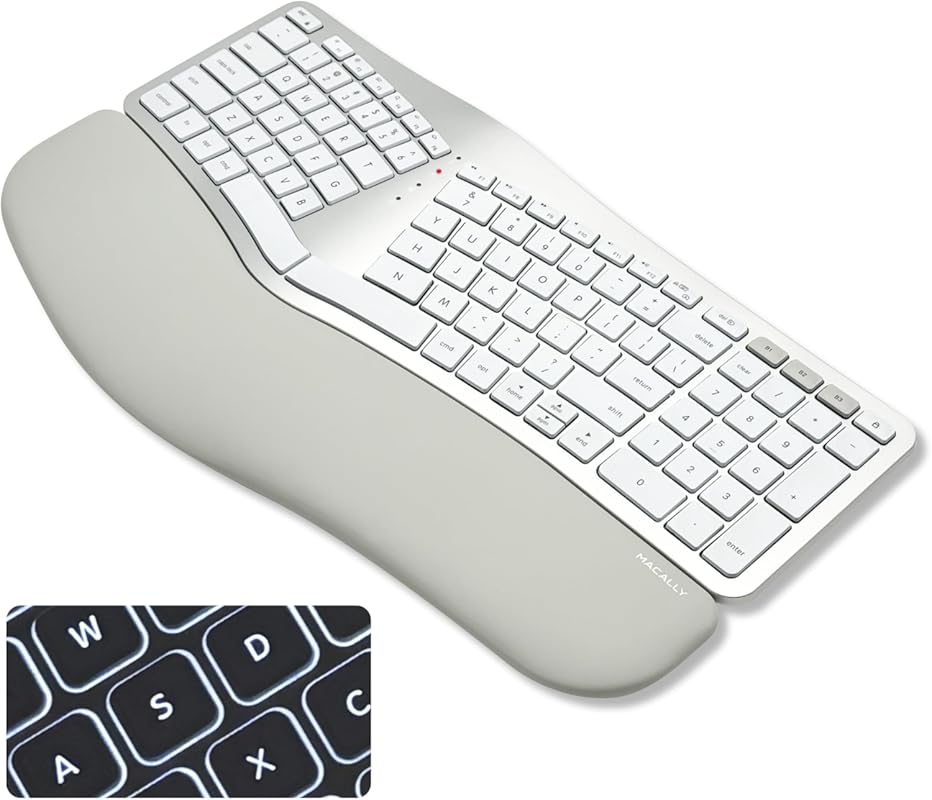
The Macally Bluetooth Ergonomic Split Keyboard is designed specifically for Mac users, featuring a 100-key layout that mimics Apple’s keyboard but with an ergonomic split design. It has a padded wrist rest, backlit keys with three brightness levels, and multi-sync Bluetooth to pair with up to three Apple devices. The build quality is impressive, with a key feel that surpasses even Apple’s own keyboards.
Key Features That Stand Out
- ✓ Split ergonomic design tailored for Mac users
- ✓ Backlit keys with three brightness levels
- ✓ Multi-sync Bluetooth pairs with up to 3 Apple devices
- ✓ Padded wrist rest for comfort
- ✓ Includes full number pad and dedicated arrow keys
Why We Recommend It
We recommend the Macally keyboard for Mac enthusiasts who want an ergonomic option that feels native to their ecosystem. The key action is exceptional—better than Apple’s own keyboards—and the split design effectively reduces wrist strain. The backlighting and multi-device pairing add practical convenience for Mac-heavy workflows.
Best For
This keyboard is exclusively for Mac users (MacBook Pro/Air, iMac) who want an ergonomic split layout without sacrificing the familiar Mac key functions. It’s ideal for designers, writers, and developers who live in the Apple ecosystem and suffer from carpal tunnel symptoms.
Pros and Cons
Pros:
- Outstanding key feel—better than Apple’s official keyboards
- Seamless multi-device Bluetooth pairing for Mac ecosystem
- Backlit keys with adjustable brightness
- Split design significantly reduces wrist strain
- Includes number pad and dedicated arrow keys
Cons:
- Some function keys (like brightness) require FN combos
- Documentation lacks clarity for special keys
- No Apple symbols on Control/Option/Command keys
- Limited to Mac—not ideal for Windows users
Customer Reviews
Customer Review: After using for a few months, came back to say this is best keyboard I’ve ever used: quality, comfort, functionality. I was long time Microsoft Ergo, then Sculpt. Tried all the Logitech wave, curve etc and some off-brands…this one hands down is the best. Key action is fantastic, best I’ve had on any keyboard. Materials are just a notch better than any of the others I’ve used. If it had no features I’d buy it just for the typing experience. For Mac user, it has everything I want: 3 way device switching with indicator light (home, work, iPad), built in numeric keys, long battery life, lock key and all the other Mac keyboard keys. Impressed…wish they made a matching vertical mouse with 3way switch on the top of mouse. 1-17-26 Update: Still working perfectly. Best keyboard I’ve ever owned across decades of Microsofts, Sculpts, Logitechs and no-names. Great key action, no degradation with 10 hours of daily use after a year. Perfect size and shape. Have some slight wear on the “M” key, lines are getting slightly fuzzy.
Customer Review: I’ve been using an ergonomic keyboard for my desktop computer for years and years. Some have been pretty good, some kind of awful. But all better than a straight keyboard! Most were designed to used on either Windows or MacOS. This one is really designed for the Mac which moves it to the top of my list. The good: 1. Apple specific keyboard – familiar layout, but ergonomic. 2. Has number pad, but not the set of keys between the main keys and the number pad. This is great because there is a number pad (my last ergonomic did not have a number pad, and I missed it!), but the less used PgUp, Home, etc keys found on many other ergo keyboards make the keyboard too wide and take up much space. There are dedicated arrow keys that double as Home, End, etc. 3. Very nice feel to the key press. Great feed back – better than Apple notebooks, I think. Better than Apples rectangular desktop keyboard. 4. Backlit keys – optionally off or three brightness levels. 5. Looks good. Matches the Apple silver and white look. (there is a black option too, but…) 6. Palm rest is very comfy. Things I’d change: 1. Screen brightness keys (F1,F2) don’t work like Apple’s – need ^F1, ^F2. 2. Documentation lacks clear explanaations for special keys. There is one next to oF12 that has three symbols – eject, keyboard, and camera. Haven’t been able to really figure out what it does. The “Lock” key opens Lock screen. Wish it could be programmed to got to sleep function. 3. The keypad has a double highi + key but no * key. They tried to be pretty Apple close – why change the keyboard? 4. No Apple symbols on control, option, or command. After all these years, I still have trouble mapping the Apple symbols (^, step bar, and curly square) used in most help and documention to the name of the keys. Why did they leave these off? The logi ergonomic keyboard isn’t too bad, but it is designed for Windows/Mac, and is much wider and bulkier than this Macally keyboard. And the key feel is better on the Macally as well. I’ll know better in a few weeks – still getting the exact hand position feel – which is different on every ergonomic keyboard I’ve ever used. But I think this one feels especially natural.
Complete Buying Guide for Best Keyboard for Carpal Tunnel
Essential Factors We Consider
When shopping for a keyboard to alleviate carpal tunnel symptoms, focus on ergonomic design, wrist support, and key switch type. Look for split or wave layouts that keep your wrists straight. A cushioned wrist rest is crucial to reduce pressure. Key switches should be low-force and quiet—scissor-switch or rubber dome are often more comfortable than stiff mechanical switches. Connectivity (wireless vs. wired) and battery life matter too. Also, consider the learning curve: split keyboards require adjustment, while wave designs are more intuitive.
Budget Planning
Ergonomic keyboards range from $30 for basic wired models to over $200 for premium wireless ones. For carpal tunnel relief, you don’t need to spend a fortune—our budget pick (Perixx PERIBOARD-512B) costs under $40 and performs admirably. However, if you type all day, investing $100–$150 in a Logitech Wave Keys or Ergo K860 offers better build quality and features like Bluetooth and backlighting. Set a budget based on your usage: heavy typists should prioritize durability and comfort.
Final Thoughts
The best keyboard for carpal tunnel is one that fits your unique hand shape, typing style, and budget. Don’t underestimate the power of a good wrist rest and a layout that promotes neutral wrist alignment. Our top picks, like the Logitech Wave Keys and Ergo K860, have been tested for genuine comfort and relief. Remember, an ergonomic keyboard is an investment in your long-term health—choose wisely and take breaks to stretch your hands and wrists regularly.
Frequently Asked Questions
Q: Can an ergonomic keyboard really help with carpal tunnel syndrome?
A: Yes, ergonomic keyboards are designed to reduce strain on the wrists and forearms by promoting a more neutral typing position. Features like split layouts, curved keyframes, and wrist rests help minimize bending and pressure on the median nerve, which can alleviate carpal tunnel symptoms. However, they work best as part of a broader approach that includes proper posture, breaks, and possibly medical advice.
Q: Should I choose a split or wave keyboard for carpal tunnel?
A: Split keyboards separate the key halves to force your hands into a more natural, open position, which can be very effective but has a steeper learning curve. Wave keyboards have a curved design that’s less drastic and easier to adapt to, while still improving wrist alignment. If you’re new to ergonomics, start with a wave keyboard like the Logitech Wave Keys. If you have severe wrist pain and are willing to adjust, a split keyboard like the Logitech Ergo K860 may offer greater relief.
Q: Are wireless ergonomic keyboards reliable for long typing sessions?
A: Modern wireless keyboards, especially those with Bluetooth or 2.4GHz dongles, are highly reliable with minimal lag. Brands like Logitech use advanced wireless technology that ensures stable connections. However, if you’re in an environment with lots of wireless interference or need zero latency (e.g., for gaming), a wired keyboard might be preferable. Battery life is also a consideration—look for keyboards with long-lasting batteries or rechargeable options.
Q: Do I need a wrist rest with my ergonomic keyboard?
A: A wrist rest is highly recommended for carpal tunnel sufferers. It elevates your wrists slightly and provides cushioning, reducing pressure on the carpal tunnel. Many ergonomic keyboards come with built-in or attached wrist rests. If yours doesn’t, consider buying a separate gel or foam wrist rest. Ensure the rest is wide enough to support both palms and doesn’t force your wrists into an upward bend.
Q: How long does it take to adjust to an ergonomic keyboard?
A: Adjustment time varies. Wave keyboards typically take a few days to a week as your muscles adapt to the new key positions. Split keyboards can take 2–4 weeks because they require a more dramatic change in hand placement. During this period, you might see a temporary drop in typing speed, but comfort usually improves quickly. Practice regularly and be patient—most users find the long-term benefits worth the initial learning curve.
Choosing the right keyboard for carpal tunnel can transform your daily comfort and productivity. From our top pick, the Logitech Wave Keys, to the budget-friendly Perixx PERIBOARD-512B, there’s an option for every need and budget. Remember to pair your new keyboard with good posture and regular breaks for the best results. Don’t let wrist pain hold you back—upgrade today and feel the difference.
Ready to find relief? Check our comparison table or pick one of our top recommendations above!