Crucial Vs Kingston Vs Samsung Server Ram Showdown

Choosing the right server RAM can make or break your system’s performance. This Crucial vs Kingston vs Samsung server RAM showdown compares the top three brands on speed, capacity, compatibility, and price. You will learn which brand is best for your server needs and how to make the smart choice.
Key Takeaways
- Crucial server RAM offers excellent reliability and strong compatibility with a wide range of server platforms.
- Kingston server memory delivers solid performance at competitive prices, making it a great budget-friendly option.
- Samsung server RAM leads in speed and cutting-edge technology, especially with DDR5 server modules.
- All three brands offer ECC and non-ECC options, but your server’s motherboard dictates which type you need.
- Capacity, speed, and latency are the three most important specs to compare when choosing server RAM.
- Proper cooling and compatibility checking can prevent common server memory issues.
📑 Table of Contents
- Crucial Vs Kingston Vs Samsung Server Ram Showdown
- Why Server RAM Matters More Than You Think
- Crucial Server RAM: Overview and Performance
- Kingston Server RAM: Overview and Performance
- Samsung Server RAM: Overview and Performance
- Head-to-Head Comparison Table
- How to Choose the Right Server RAM for Your Needs
- Common Mistakes When Buying Server RAM
- Expert Tips for Server RAM Installation
- Final Verdict: Which Brand Wins?
- Conclusion
Crucial Vs Kingston Vs Samsung Server Ram Showdown
Server RAM is the backbone of any data center or enterprise system. It handles everything from running virtual machines to hosting databases. When it is slow or unreliable, your entire operation suffers. That is why picking the right brand matters so much.
In this guide, we put three of the biggest names head-to-head: Crucial vs Kingston vs Samsung server RAM. Each brand brings something different to the table. We will break down performance, compatibility, pricing, and reliability. By the end, you will know exactly which brand fits your server setup best.
Why Server RAM Matters More Than You Think
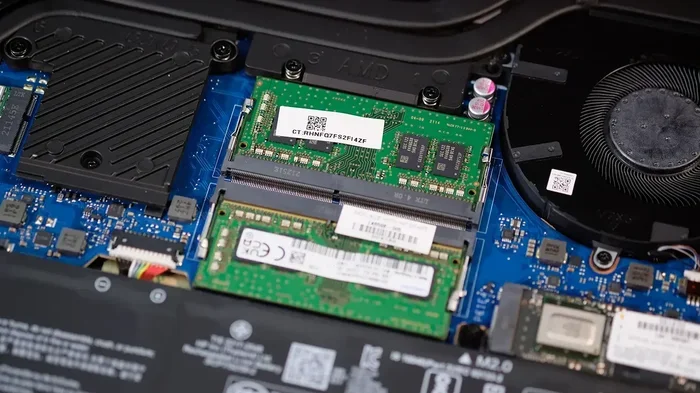
Server RAM is not the same as the memory in your laptop or desktop. Servers run 24/7 workloads. They handle hundreds or even thousands of requests at the same time. The memory in a server needs to be stable, fast, and built for constant use.
Most server RAM uses ECC technology, which stands for Error-Correcting Code. This feature detects and fixes memory errors on the fly. It prevents crashes and data corruption. Consumer RAM does not have this capability. That is one reason server-grade memory costs more.
When you are shopping for server memory, you need to pay attention to a few key specs:
- Capacity — How much data the RAM can hold (measured in GB).
- Speed — How fast data moves in and out (measured in MT/s).
- Latency — The delay before data transfer begins (measured in CAS latency).
- ECC vs Non-ECC — Whether the module corrects errors automatically.
- Registered vs Unbuffered — How the memory communicates with the CPU.
Getting any of these wrong can cause compatibility issues or poor performance. That is exactly why this brand comparison is so useful.
Crucial Server RAM: Overview and Performance
Crucial is a trusted name in the memory world. They make both consumer and server-grade RAM. Their server memory line is designed for enterprise use and offers strong reliability.
Crucial Server RAM Strengths
Crucial server RAM comes in a wide range of capacities. You can find modules from 8GB all the way up to 128GB per stick. This makes Crucial a great choice for servers that need lots of memory.
Their DDR4 ECC registered modules are very popular in mid-range servers. They offer solid speeds of 2666 MT/s and 3200 MT/s. For most business workloads, this is more than enough.
Crucial also has a strong reputation for compatibility. Their memory is tested across many server platforms. If you are building or upgrading a Dell, HP, or Lenovo server, Crucial often has a verified part number. This makes the buying process much easier.
Where Crucial Falls Short
Crucial is not the fastest brand when it comes to the latest DDR5 server RAM. While they do offer DDR5 options, brands like Samsung are pushing the speed envelope further. If you need cutting-edge DDR5 performance, Crucial might not be the first choice.
Another consideration is price. Crucial server RAM sits in the mid-range. It is not the cheapest, but it is not the most expensive either. You get good value for what you pay.
For more on how Crucial memory compares to other brands in the broader memory space, you can check out our Kingston Fury DDR5 Laptop RAM review for a related brand perspective.
Kingston Server RAM: Overview and Performance
Kingston is one of the oldest names in memory. They have been making RAM for decades. Their server memory division, Kingston Server Premier, is well-respected in the enterprise world.
Kingston Server RAM Strengths
Kingston server RAM is known for its affordability. If you are on a tight budget, Kingston often has the lowest prices per GB. This makes it very attractive for large deployments where you need many modules.
Kingston offers both ECC registered and ECC unbuffered options. Their DDR4 server modules come in speeds up to 3200 MT/s. They also have some DDR5 options available now, though the selection is smaller than Samsung’s.
One thing Kingston does really well is consistency. Their modules are built to last. They go through rigorous testing before they ship. Many IT admins trust Kingston for their server builds because of this track record.
Where Kingston Falls Short
Kingston is not the flashiest brand. Their DDR5 server RAM lineup is still growing. If you want the absolute fastest speeds and latest tech, Kingston may lag behind Samsung.
Also, Kingston does not always have the widest range of verified server part numbers compared to Crucial. You may need to double-check compatibility more carefully before purchasing.
For a broader look at RAM capacity decisions, see our guide on 8GB RAM vs 16GB RAM Laptop which covers important memory scaling concepts.
Samsung Server RAM: Overview and Performance
Samsung is a powerhouse in the semiconductor world. They manufacture memory chips used by many brands, including Crucial and Kingston. But Samsung also sells their own branded server RAM, and it is excellent.
Samsung Server RAM Strengths
Samsung leads the pack in DDR5 server RAM. Their modules offer some of the highest speeds available, reaching up to 4800 MT/s and beyond. If you need top-tier performance for demanding workloads like AI training or large database operations, Samsung is hard to beat.
Samsung also invests heavily in quality control. Their server modules undergo extensive testing. They use premium chips and advanced manufacturing processes. The result is very low failure rates and excellent long-term reliability.
Another advantage is Samsung’s innovation. They are often first to market with new memory technologies. Their DDR5 modules feature improved power efficiency and better thermal performance. This matters a lot in dense server environments where cooling is a challenge.
Where Samsung Falls Short
Samsung server RAM comes at a premium. It is generally more expensive than Crucial or Kingston for comparable capacities. If budget is a major concern, Samsung might not be the most cost-effective choice.
Availability can also be an issue. Samsung DDR5 server modules sometimes have longer lead times due to high demand. If you need memory fast, you may need to wait for stock.
For related storage comparisons, check out our Samsung 980 Pro NVMe SSD review to see how Samsung performs across different product categories.
Head-to-Head Comparison Table
Here is a quick side-by-side look at how the three brands stack up:
- Crucial: DDR4 and DDR5 options, mid-range pricing, excellent compatibility, strong reliability, wide capacity range (8GB to 128GB).
- Kingston: DDR4 and limited DDR5, budget-friendly pricing, consistent quality, good reliability, solid capacity range (8GB to 64GB).
- Samsung: DDR4 and cutting-edge DDR5, premium pricing, top-tier speed and innovation, excellent reliability, wide capacity range (16GB to 128GB).
Each brand has its sweet spot. Crucial is the all-rounder. Kingston is the budget pick. Samsung is the performance leader. Your choice depends on what matters most to you.
How to Choose the Right Server RAM for Your Needs
Now that you know how each brand compares, let us talk about how to make the right choice for your specific situation.
Consider Your Server Workload
What is your server doing? If it runs light workloads like file sharing or email, you do not need the fastest RAM. Kingston or Crucial DDR4 modules will serve you well. But if you are running virtual machines, video rendering, or AI workloads, you want the fastest DDR5 modules. Samsung would be the best fit here.
Check Your Motherboard Compatibility
Not all server RAM works with all motherboards. Check your server’s documentation first. Look for supported speeds, capacities, and memory types. Some servers only accept registered ECC RAM. Others support unbuffered ECC. Buying the wrong type will not work, period.
Think About Future Upgrades
Plan ahead. If you think you will need more memory in the future, buy modules with room to grow. It is often cheaper to buy fewer larger modules now than to fill every slot and need more later. Also, consider DDR5 if your server supports it. DDR5 is the future of server memory.
Balance Price and Performance
You do not always need the most expensive RAM. For many business servers, mid-range Crucial or Kingston DDR4 ECC modules provide everything you need. Save the premium Samsung DDR5 modules for workloads that truly demand the extra speed.
Common Mistakes When Buying Server RAM
Avoid these common pitfalls when shopping for server memory:
- Mixing RAM brands — This can cause compatibility issues. Stick to one brand per server.
- Ignoring ECC requirements — Non-ECC RAM will not work in servers that require ECC modules.
- Overlooking latency — Speed numbers look impressive, but high latency can hurt real-world performance.
- Buying used server RAM — Server memory is often used in enterprise environments. Used modules may have degraded performance.
- Not checking voltage requirements — Different server platforms need different voltages. Mismatched voltage can damage components.
These mistakes are easy to avoid with a little research. Take the time to verify specs before you buy.
Expert Tips for Server RAM Installation
Once you have chosen the right RAM, proper installation matters too:
- Always power down and unplug the server before touching any components.
- Ground yourself to prevent static discharge. A simple anti-static wrist strap works great.
- Match modules by speed and capacity when installing multiple sticks. This ensures balanced performance across memory channels.
- Check your server’s manual for the correct slot configuration. Some servers require specific slot pairs to enable dual-channel mode.
- After installation, run a memory stress test. Tools like MemTest86 can verify that everything is working correctly.
Taking these extra steps can save you hours of troubleshooting later. A proper installation is a smooth installation.
Final Verdict: Which Brand Wins?
The Crucial vs Kingston vs Samsung server RAM debate does not have a single winner. Each brand excels in different areas.
Crucial wins for overall balance. It offers great compatibility, solid performance, and reasonable prices. It is the safest choice for most server builds.
Kingston wins for budget-conscious buyers. If you need a lot of RAM without breaking the bank, Kingston delivers strong value.
Samsung wins for performance and innovation. If you need the fastest DDR5 server RAM and have the budget, Samsung is the clear winner.
Think about what matters most for your setup. Compatibility, price, or speed? Whatever your priority, one of these three brands has you covered.
Conclusion
Choosing between Crucial, Kingston, and Samsung server RAM comes down to your specific needs. All three brands offer reliable, high-quality memory for servers. Crucial gives you the best all-around value. Kingston keeps costs low without sacrificing quality. Samsung pushes the boundaries of speed and technology.
Take the time to check your server’s requirements. Compare specs carefully. And do not forget to factor in your budget. With the right RAM, your server will run faster, smoother, and more reliably. That is a win for everyone.
Ready to upgrade your server? Pick the brand that fits your workload and start building a faster, more reliable system today.
Frequently Asked Questions
Can I mix Crucial, Kingston, and Samsung RAM in the same server?
Technically, you can mix RAM from different brands if the specs match. However, it is not recommended. Mixing brands can cause compatibility issues, instability, and performance problems. Always stick to one brand and one model for the best results.
Is DDR5 server RAM worth the upgrade over DDR4?
Yes, if your server supports DDR5. DDR5 offers higher speeds, better power efficiency, and improved bandwidth. For demanding workloads like databases, virtualization, and AI processing, the upgrade is well worth it. For lighter workloads, DDR4 is still perfectly fine.
What is the difference between ECC and non-ECC server RAM?
ECC RAM has extra memory chips that detect and correct data errors in real time. This prevents crashes and data corruption. Non-ECC RAM does not have this feature. Servers that handle critical data almost always require ECC memory for reliability.
How much server RAM do I actually need?
It depends on your workload. A basic file server needs around 16GB to 32GB. A virtual machine host may need 64GB to 128GB or more. A database server or AI workstation can benefit from 128GB or higher. Assess your usage and plan for future growth.
Does server RAM speed really matter?
Yes, but it matters more for some workloads than others. For tasks that process large datasets or run many virtual machines, faster RAM can significantly improve performance. For simple file serving or web hosting, speed matters less. Focus on capacity first, then speed.
How long does server RAM last?
Server RAM is designed for continuous operation and can last 5 to 10 years or more. However, technology advances quickly. If your server is more than 5 years old, consider whether an upgrade to newer DDR4 or DDR5 modules would improve performance and efficiency.