Is 8 Gb Ram Good for a Laptop
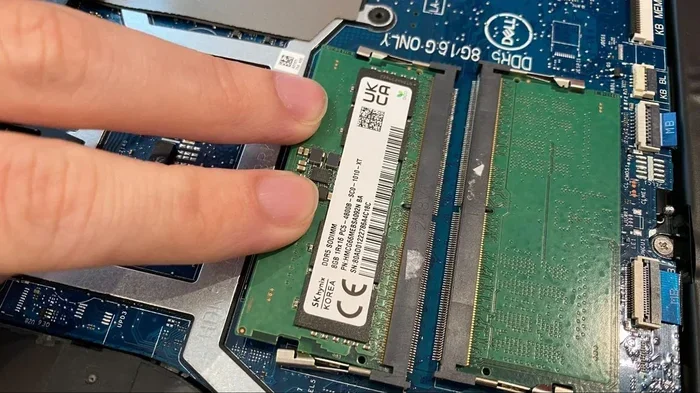
8 GB RAM is good for a laptop if you handle everyday tasks like browsing, streaming, and office work. It strikes a solid balance between performance and value for most users. However, heavy users who game, edit video, or run multiple apps at once may need more memory. This guide breaks down exactly when 8 GB is enough and when you should consider an upgrade.
Is 8 GB RAM good for a laptop? The short answer is yes — for most people, it is. Eight gigabytes of memory handle the daily tasks that the average user relies on every single day. You can browse the web, watch videos, check email, and work on documents without a hitch.
But “good” depends on what you do with your laptop. A student writing essays and taking notes has different needs than a gamer running the latest AAA title. This article walks you through everything you need to know about 8 GB RAM, so you can make a smart decision. Let us break it all down in simple terms.
Key Takeaways
- 8 GB RAM handles everyday tasks well: web browsing, email, streaming, and light office work run smoothly with 8 GB.
- It may fall short for demanding workloads: video editing, gaming, and heavy multitasking often benefit from 16 GB or more.
- Your laptop usage determines the right amount: casual users and students find 8 GB perfectly sufficient.
- DDR4 and DDR5 are common RAM types in modern laptops: understanding them helps you choose the right memory.
- Upgrading RAM is often possible: many laptops allow you to add or replace memory sticks for better performance.
- Windows 11 runs fine on 8 GB: but closing background apps can free up memory and boost speed.
- Price matters: 8 GB laptops offer great value, making them a smart choice for budget-conscious buyers.
📑 Table of Contents
- What Does 8 GB RAM Mean for Your Laptop?
- When Is 8 GB RAM Good Enough?
- When Is 8 GB RAM Not Enough?
- How Does 8 GB RAM Compare to Other Amounts?
- Can You Upgrade RAM on a Laptop?
- What Type of RAM Should You Look For?
- Quick Tips to Get the Most Out of 8 GB RAM
- Is 8 GB RAM Good for a Laptop in 2024 and Beyond?
- Common Mistakes People Make With Laptop RAM
- Expert Insight
- Final Thoughts
What Does 8 GB RAM Mean for Your Laptop?
RAM stands for Random Access Memory. Think of it as your laptop’s short-term workspace. When you open an app or a browser tab, it loads into RAM so your processor can access it quickly. The more RAM you have, the more apps you can keep open at the same time.
Eight gigabytes is the most common RAM size found in budget and mid-range laptops today. It has become the go-to standard for everyday computing. But what does that actually mean in real life? Let us look closer.
How RAM Affects Computer Performance
RAM directly affects how fast your laptop responds. When your memory fills up, your system starts slowing down. It may even use your hard drive as temporary storage, which is much slower. This causes lag, freezes, and frustrating delays.
With 8 GB of RAM, you can comfortably run several apps at once. You might have a browser with a dozen tabs open, Spotify playing, and a Word document side by side. For most people, that is more than enough.
However, if you push your laptop hard, you will notice the limits. Opening a heavy application while streaming video might cause stuttering. The key is understanding your own habits and needs.
When Is 8 GB RAM Good Enough?
Not everyone needs a massive amount of memory. In fact, many users will never need more than 8 GB. Here are the situations where 8 GB RAM is more than sufficient.
Everyday Browsing and Streaming
If your laptop time revolves around browsing social media, watching YouTube, or streaming Netflix, 8 GB handles all of that with ease. You can keep multiple tabs open without running into problems. Modern browsers use a fair amount of memory, but 8 GB manages them well.
Office Work and School Tasks
Students and office workers will find 8 GB perfectly capable. Writing papers in Microsoft Word, building spreadsheets in Excel, and making presentations in PowerPoint all run smoothly. These applications do not demand much memory, even when you have several open at once.
Light Photo Editing
Basic photo editing in programs like Canva or even Adobe Photoshop works fine with 8 GB. You can crop, resize, and apply filters without major slowdowns. Just avoid working with extremely large files or dozens of layers at the same time.
Casual Gaming
Many popular games run well on 8 GB RAM. Titles like Minecraft, Fortnite, and indie games perform nicely. You might need to lower some graphics settings for smoother frame rates, but the experience remains enjoyable.
When Is 8 GB RAM Not Enough?
There are definitely scenarios where 8 GB falls short. If any of the following apply to you, you should seriously consider more memory.
Heavy Gaming
Modern AAA games like Cyberpunk 2077 or Red Dead Redemption 2 recommend 16 GB of RAM. Running these titles on 8 GB can lead to stuttering, long load times, and crashes. If gaming is your main laptop use, 16 GB is a much better choice.
Video Editing and Animation
Editing video in Premiere Pro or DaVinci Resolve eats up memory fast. Even short clips can push 8 GB to its limits. You will experience lag, slow rendering, and frequent freezes. For any serious video work, 16 GB or even 32 GB makes a huge difference.
Running Multiple Heavy Apps
If you routinely run a browser with 30+ tabs, a video call, and a heavy application simultaneously, 8 GB will struggle. The system will constantly swap data to your storage drive, which slows everything down significantly.
Professional Creative Work
Graphic designers, 3D modelers, and music producers often work with large files and complex software. These tasks demand more memory than 8 GB can reliably provide. Investing in 16 GB or higher will save you from constant frustration.
How Does 8 GB RAM Compare to Other Amounts?
Understanding where 8 GB sits in the bigger picture helps you decide. Here is a quick comparison of common RAM sizes.
| RAM Size | Best For | Performance Level |
|---|---|---|
| 4 GB | Basic browsing, very light tasks | Limited |
| 8 GB | Everyday use, students, office work | Good |
| 16 GB | Gaming, creative work, multitasking | Excellent |
| 32 GB | Professional editing, heavy workloads | Premium |
| 64 GB | Server use, intensive 3D rendering | Overkill for most |
As you can see, 8 GB sits in a sweet spot. It costs less than 16 GB but delivers far better performance than 4 GB. For the average laptop user, it hits the right balance between price and capability.
Can You Upgrade RAM on a Laptop?
Many laptops allow you to upgrade your memory. This is great news if you buy a laptop with 8 GB now but think you might need more later. However, not all laptops support upgrades.
Check Your Laptop’s Memory Slots
Some laptops have two RAM slots, which makes upgrading easy. You can add a second 8 GB stick for a total of 16 GB. Other laptops have soldered RAM, meaning you cannot upgrade at all. Check your laptop’s specifications before purchasing.
How to Check Your Current RAM
You can check how much RAM your laptop has in just a few steps. On Windows, open the Task Manager and click the Performance tab. It shows your total memory and how much you are using. On a Mac, click the Apple menu, then About This Mac, and look at the Memory section.
If you find your laptop supports upgrades, adding RAM is one of the best ways to breathe new life into an older machine. It costs much less than buying a whole new laptop.
What Type of RAM Should You Look For?
Not all RAM is the same. Modern laptops use either DDR4 or DDR5 memory. Understanding the difference helps you make a better choice.
DDR4 vs DDR5
DDR4 has been the standard for several years and still offers solid performance. It is affordable and widely available. DDR5 is the newer generation and offers faster speeds and better efficiency. However, DDR5 laptops tend to cost more.
For most users, DDR4 with 8 GB is perfectly fine. You do not need the latest DDR5 unless you are doing very demanding work or want the absolute best performance.
RAM Speed Matters Too
RAM speed, measured in megahertz, also plays a role. Higher speed RAM can improve performance slightly, especially in games and heavy applications. But the difference is not huge for everyday tasks. Focus on capacity first, then speed.
Quick Tips to Get the Most Out of 8 GB RAM
Even with 8 GB, you can squeeze better performance out of your laptop with a few simple habits. These tips help you stay within your memory limits and keep things running smoothly.
- Close apps you are not using: Background apps eat up memory even when you are not actively using them.
- Limit browser tabs: Each open tab uses RAM. Bookmark pages you want to return to instead of keeping them all open.
- Use lightweight apps: Choose lighter alternatives to heavy software when possible. For example, use a simple text editor instead of a heavy word processor for quick notes.
- Restart your laptop regularly: This clears out temporary data and frees up memory that apps leave behind.
- Disable startup programs: Many apps launch automatically when you turn on your laptop. Disable the ones you do not need right away.
- Keep your system updated: Software updates often include memory optimization improvements that help your laptop run better.
Is 8 GB RAM Good for a Laptop in 2024 and Beyond?
The short answer is still yes for most users. Eight gigabytes remains the standard for everyday computing in 2024. Operating systems like Windows 11 and macOS run comfortably with 8 GB of memory.
That said, software keeps getting more demanding. Web browsers use more memory with each update. Apps are becoming heavier. So what is considered “good” today might feel tight in a few years. If you want your laptop to stay fast longer, 16 GB gives you a bigger safety margin.
For now, though, 8 GB RAM is a solid choice for anyone who does not push their laptop to its limits. It offers great value, smooth performance for daily tasks, and a price point that fits most budgets. Just be honest about your usage habits and plan accordingly.
Common Mistakes People Make With Laptop RAM
Avoid these common pitfalls when thinking about your laptop’s memory.
- Assuming more RAM is always better: If you only browse and check email, 16 GB or 32 GB is wasted money. Buy only what you need.
- Ignoring RAM speed: Capacity matters most, but speed can affect performance in certain tasks. Do not completely overlook it.
- Not checking upgrade options before buying: A laptop with soldered RAM might seem cheap now, but you cannot improve it later.
- Confusing RAM with storage: RAM and storage are different. Storage holds your files; RAM handles active tasks. Both matter, but they serve different purposes.
- Thinking 8 GB is outdated: For the vast majority of users, 8 GB is still perfectly capable and relevant.
Expert Insight
From a practical standpoint, most laptop buyers should target 8 GB as a minimum. It covers the broadest range of use cases without overspending. If your budget allows, stepping up to 16 GB gives you headroom for future needs. But if you are choosing between a lower-priced 8 GB laptop and a more expensive 16 GB model, the 8 GB option often makes the most sense for casual and moderate users.
The best way to decide is to think about what you actually do on your laptop. Write down your daily tasks and compare them against what 8 GB can handle. You will quickly see whether it meets your needs or whether you should look at higher-capacity options.
Final Thoughts
So, is 8 GB RAM good for a laptop? Absolutely. For the everyday user, student, office worker, and casual gamer, 8 GB delivers reliable and smooth performance. It is the most popular RAM size for a reason — it works well and costs reasonably.
Heavy users who game at high settings, edit videos professionally, or run resource-intensive software should look at 16 GB or more. But for the majority of laptop buyers, 8 GB hits the perfect balance between price and performance.
Before you buy, consider your usage habits, check your laptop’s upgrade options, and keep the quick tips in mind to maximize your current setup. Whether you are shopping for a new laptop or upgrading an existing one, understanding your memory needs puts you in the best position to make a smart choice.
Frequently Asked Questions
Is 8 GB RAM enough for a laptop in 2024?
Yes, 8 GB RAM is still enough for most laptop users in 2024. It handles browsing, streaming, office work, and light creative tasks with ease. Only power users who game heavily or do professional video editing should consider more.
Can I upgrade from 8 GB to 16 GB RAM?
Many laptops allow RAM upgrades, but it depends on your model. Check if your laptop has open memory slots or soldered RAM. If it has upgradeable slots, adding a second 8 GB stick is usually straightforward and affordable.
What is the difference between 8 GB and 16 GB RAM?
The main difference is how much you can do at once without slowdowns. 8 GB handles everyday tasks well, while 16 GB excels at multitasking, gaming, and creative work. Think of it as having more workspace on your desk.
Does RAM type matter for laptop performance?
Yes, the RAM type matters. DDR4 and DDR5 are the two main types used in laptops today. DDR5 is faster and more efficient, but DDR4 with 8 GB still delivers solid performance for most users. Capacity matters more than type for everyday use.
Will 8 GB RAM slow down my laptop over time?
Software becomes more demanding over time, so 8 GB may feel slower in a few years. However, for current use, 8 GB is perfectly fine. You can extend its usefulness by closing unused apps and keeping your system optimized.
Is 8 GB RAM good for a laptop for students?
Absolutely. Students who write papers, browse the web, take notes, and stream content will find 8 GB more than sufficient. It is a cost-effective choice that handles all typical student workloads without any issues.