1tb M 2 Nvme Ssd
A 1tb M 2 NVMe SSD is one of the best ways to boost your computer’s speed and storage. These drives use the NVMe protocol over PCIe to deliver blazing fast read and write speeds. Whether you are upgrading a laptop or building a new desktop, a 1TB M 2 NVMe SSD gives you plenty of space and performance. In this guide, we break down everything you need to know, from speeds and prices to the top models on the market.
A 1tb M 2 NVMe SSD is a storage drive that combines a compact M 2 form factor with the ultra-fast NVMe protocol. Unlike old spinning hard drives, these solid state drives have no moving parts. They use flash memory to store data, which means faster boot times, quicker file transfers, and a much more responsive computer overall.
If you have ever waited minutes for your PC to start up, or felt frustrated by slow load times in games, an upgrade to a 1TB M 2 NVMe SSD can be a total game changer. These drives are now affordable and widely available, making them one of the best upgrades you can make to any computer.
In this article, we will cover everything you need to know. You will learn what makes these drives so fast, which models are worth buying, how to install one, and how they compare to other storage options. By the end, you will have all the information you need to make a smart decision.
Key Takeaways
- Speed: A 1tb M 2 NVMe SSD can reach read speeds of 3,500 MB/s or higher, making it much faster than a traditional hard drive.
- Form Factor: The M 2 shape is small and fits directly onto the motherboard, saving space inside your PC.
- Price Range: Prices for a 1TB NVMe M 2 SSD range from around $60 to $120, depending on the brand and generation.
- Use Cases: These drives work great as boot drives, gaming storage, and general everyday storage.
- Compatibility: Make sure your motherboard supports M 2 NVMe slots before buying a drive.
- Top Brands: Kingston, Crucial, Samsung, and WD offer reliable 1TB M 2 NVMe options.
📑 Table of Contents
What Is a 1TB M 2 NVMe SSD?
Let us break this down term by term. 1TB means the drive holds 1 terabyte of data. That is about 1,000 gigabytes, which is plenty of room for your operating system, programs, games, and files.
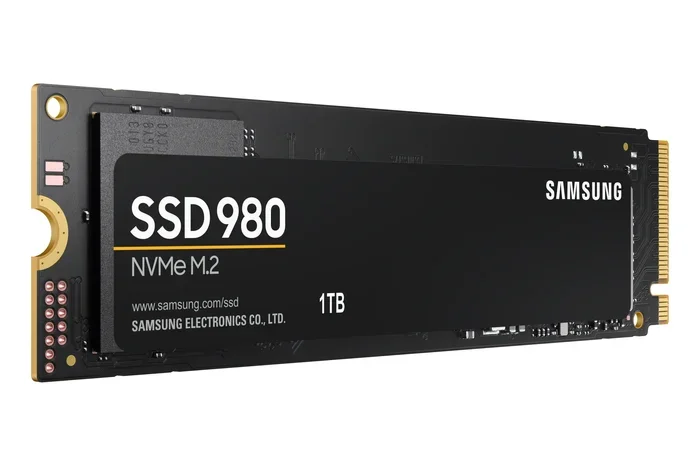
M 2 refers to the physical shape and size of the drive. M 2 drives are small, flat sticks that look like pieces of gum. They plug directly into a slot on your motherboard, which saves a lot of space inside your computer case.
NVMe stands for Non-Volatile Memory Express. This is the communication protocol the drive uses to talk to your computer. NVMe was designed specifically for flash storage, and it is much faster than the older AHCI protocol used by SATA drives.
So when you put it all together, a 1tb M 2 NVMe SSD is a compact, high speed storage drive that connects directly to your motherboard through a PCIe lane. This connection allows for much higher data transfer speeds compared to traditional SATA SSDs.
How NVMe Technology Works
The NVMe protocol was created to take full advantage of modern flash memory. Traditional SATA III SSDs max out at around 550 MB/s because the SATA interface itself is the bottleneck. NVMe drives bypass this limitation by connecting through the PCIe bus.
PCIe Gen3 NVMe drives typically reach speeds of 3,500 MB/s or more. The newer PCIe Gen4 drives can push past 7,000 MB/s. And PCIe Gen5 drives are now hitting speeds above 10,000 MB/s. This massive jump in speed makes a noticeable difference in everyday use.
When you boot your operating system, open large applications, or load a heavy game, the 1TB NVMe M 2 SSD handles these tasks with ease. File transfers that took minutes on a hard drive now take seconds.
Why Choose a 1TB M 2 NVMe SSD?
There are many reasons to choose a 1TB M 2 NVMe SSD for your computer. Let us look at the biggest benefits.
Blazing Fast Speeds
The most obvious advantage is speed. A 1tb M 2 NVMe SSD can read and write data many times faster than a traditional hard drive or even a SATA SSD. This means your computer boots in seconds, applications open instantly, and large files copy quickly.
For gamers, this speed translates to faster game loading times and smoother performance. For content creators, it means quicker rendering and file exports. For everyday users, it simply makes the whole computer feel faster and more responsive.
Compact Size
The M 2 form factor is incredibly small. These drives are typically about 22mm wide and 80mm long. They weigh almost nothing and take up very little space inside your PC case. This makes them perfect for small form factor builds and laptops where space is limited.
Because the drive mounts directly onto the motherboard, there are no cables to manage. This keeps your build clean and improves airflow inside the case.
No Moving Parts
Unlike traditional hard disk drives, SSDs have no spinning platters or moving read/write heads. This means they are more durable and less likely to fail from physical shock. A 1TB M 2 NVMe SSD can handle drops and bumps much better than an old hard drive.
They also run cooler and use less power, which can help extend laptop battery life.
Great Value at 1TB
One terabyte strikes a nice balance between capacity and price. 500GB drives can fill up quickly, especially if you store games or large media files. 2TB drives cost significantly more. At 1TB, you get enough space for most users without breaking the bank.
You can find a quality 1TB NVMe M 2 SSD for between $60 and $120, depending on the brand and features. This makes it one of the best value upgrades you can make.
Top 1TB M 2 NVMe SSDs to Consider
Not all 1TB M 2 NVMe SSDs are created equal. Different brands and models offer different speeds, features, and price points. Here are some of the best options to consider.
Kingston NV2 1TB M 2 NVMe SSD
The Kingston 1tb M 2 NVMe SSD is a popular budget-friendly option. It offers solid sequential read speeds of up to 3,500 MB/s. The NV2 uses a Phison E controller and QLC NAND, which keeps costs low while still delivering good everyday performance.
This drive is an excellent choice for users who want a reliable boot drive and general storage without spending too much. It is one of the most affordable ways to upgrade to NVMe speed.
Crucial P310 1TB PCIe Gen4 NVMe 2280 M 2 SSD
The Crucial P310 1TB PCIe Gen4 NVMe 2280 M 2 SSD is another strong contender. It uses a single-sided design, which makes it compatible with more systems, especially thin laptops and mini PCs. The P310 delivers sequential read speeds up to 7,000 MB/s thanks to PCIe Gen4 support.
Crucial is a well trusted brand in the storage world, and the P310 comes with a limited warranty. It is a great pick if you want Gen4 speeds at a reasonable price point.
Other Notable Options
Beyond these two, there are many other great drives in the 1TB M 2 NVMe category. The SSD 1TB M 2 NVMe 2 lineup from various manufacturers continues to grow. WD Black and Samsung also offer excellent options for users who want top tier performance and are willing to pay a premium.
When comparing models, look at sequential read speeds, write speeds, endurance ratings (TBW), and warranty length. These factors tell you how fast and how long the drive will last.
How to Install a 1TB M 2 NVMe SSD
Installing a 1tb M 2 NVMe SSD is one of the easiest PC upgrades you can do. Most modern motherboards have at least one M 2 slot. Here is a simple step by step guide.
Step 1: Check Compatibility
Before you buy, check your motherboard manual. Look for the M 2 slot specifications. Make sure it supports NVMe drives and the correct key type (usually M key). Some older boards only support SATA M 2 drives, not NVMe.
Step 2: Gather Your Tools
You will need a small Phillips head screwdriver. Some motherboards come with M 2 screws included, so check your motherboard box first.
Step 3: Locate the M 2 Slot
Open your PC case and find the M 2 slot on the motherboard. It is usually located near the CPU socket or along the bottom edge of the board. There is often a small heatsink covering the slot.
Step 4: Insert the Drive
Hold the M 2 SSD at a 30 degree angle and insert it into the slot. Press it down gently until it is seated. Then use the small screw to secure the drive in place. Do not overtighten the screw.
Step 5: Initialize and Format
Once the drive is physically installed, boot into Windows. Open Disk Management and initialize the new drive. Format it with NTFS, and it is ready to use. You can now set it as your boot drive or use it for additional storage.
1TB M 2 NVMe SSD vs Other Storage Options
To understand why a 1tb M 2 NVMe SSD is such a great choice, it helps to compare it to other storage options.
vs. Traditional Hard Disk Drives (HDD)
HDDs are the old school storage drives with spinning magnetic platters. They are cheap per gigabyte but very slow. A typical HDD has read speeds of 100 to 200 MB/s. A 1TB M 2 NVMe SSD is 10 to 30 times faster.
If you are still using an HDD as your main drive, upgrading to an NVMe SSD will feel like getting a new computer. The difference is night and day.
vs. SATA SSDs
SATA SSDs are faster than HDDs but much slower than NVMe drives. A SATA III SSD tops out at about 550 MB/s. A PCIe Gen3 NVMe drive can reach 3,500 MB/s or more. That is a sixfold improvement in speed.
The 1TB NVMe M 2 SSD form factor is also more compact than a 2.5 inch SATA SSD, which is another advantage for modern builds.
vs. Higher Capacity NVMe Drives
2TB and 4TB NVMe drives cost more but give you more space. If you work with large video files or have a massive game library, a larger capacity drive might be worth it. But for most users, 1TB is the sweet spot between price and capacity.
Common Mistakes to Avoid When Buying a 1TB M 2 NVMe SSD
Buying an SSD seems simple, but there are a few common mistakes people make. Avoiding these will save you time and money.
Not Checking Motherboard Compatibility
The biggest mistake is buying a drive without checking if your motherboard supports it. Some older boards do not have M 2 slots at all. Others only support SATA M 2 drives, not NVMe. Always double check your motherboard specifications before purchasing.
Ignoring the PCIe Generation
PCIe Gen4 and Gen5 NVMe drives are faster than Gen3, but they require a compatible motherboard and CPU. If your system only supports PCIe Gen3, buying a Gen4 drive will not give you any speed benefit. A 1tb M 2 NVMe SSD at Gen3 speeds is still incredibly fast for most users.
Forgetting About Cooling
NVMe drives can generate heat, especially under heavy workloads. Some drives come with heatsinks included. If your motherboard M 2 slot does not have a heatsink, consider buying a drive with one or adding an aftermarket M 2 heatsink.
Overlooking the Warranty and Endurance
Not all SSDs are built the same. Check the TBW (terabytes written) rating and warranty length. A higher TBW rating means the drive can handle more data over its lifetime. Reputable brands like Kingston and Crucial offer warranties of 3 to 5 years on their NVMe drives.
Expert Insights on 1TB M 2 NVMe SSD Performance
Storage experts agree that NVMe SSDs are the present and future of PC storage. The 1TB M 2 NVMe SSD has become the standard upgrade for both new builds and existing systems.
Real world performance gains are most noticeable in boot times, application loading, and file transfers. Even the most affordable NVMe drives outperform the best SATA SSDs in almost every scenario.
If you are on the fence about upgrading, here is a quick tip. Try timing how long it takes your current system to boot up and open a few of your most used applications. After installing a 1TB NVMe M 2 SSD, time those same tasks again. The improvement will speak for itself.
For users in markets like Brazil, checking local pricing for ssd nvme 1tb prec o brasil can help you find the best deals. Many online retailers offer competitive prices on popular 1TB NVMe models.
Conclusion
A 1tb M 2 NVMe SSD is one of the best upgrades you can make to any computer. It offers incredible speed, a compact design, and great value for the price. Whether you are a gamer, a content creator, or just someone who wants a faster PC, this type of drive delivers real results.
The technology is mature, prices are competitive, and the performance difference over older storage is dramatic. With models from Kingston, Crucial, and other trusted brands widely available, there has never been a better time to make the switch.
Take the time to check your motherboard compatibility, choose a drive that fits your budget and needs, and enjoy the speed boost. Your computer will thank you every single time you turn it on.
Frequently Asked Questions
What is a 1TB M 2 NVMe SSD used for?
A 1TB M 2 NVMe SSD is used as a primary boot drive, gaming storage, or general purpose storage for your computer. It is ideal for storing your operating system, frequently used applications, and large game libraries. The fast speeds make everything on your PC feel quicker and more responsive.
Is a 1TB M 2 NVMe SSD enough storage?
For most users, 1TB is more than enough. It can hold your operating system, dozens of applications, and hundreds of games. If you work with very large video files or have an enormous media collection, you might consider a 2TB drive. But for everyday use, 1TB strikes a great balance between capacity and cost.
How fast is a 1TB M 2 NVMe SSD?
Most 1TB M 2 NVMe SSDs offer sequential read speeds between 3,500 MB/s and 7,000 MB/s, depending on the PCIe generation. Write speeds are typically a bit lower but still much faster than traditional hard drives or SATA SSDs. These speeds translate to noticeably faster boot times and application loading.
Can I install a 1TB M 2 NVMe SSD in any computer?
Not every computer supports M 2 NVMe SSDs. You need a motherboard with an M 2 slot that supports NVMe protocol. Many modern desktops and laptops do support them, but older systems may not. Check your motherboard or laptop manual to confirm compatibility before buying.
Do I need a heatsink for my 1TB M 2 NVMe SSD?
It depends on your workload. For everyday use and light gaming, most NVMe drives run cool enough without a heatsink. However, if you do heavy data transfers, video editing, or sustained workloads, a heatsink can help prevent thermal throttling. Many M 2 NVMe SSDs come with heatsinks included.
How much does a 1TB M 2 NVMe SSD cost?
Prices vary by brand and model, but a quality 1TB M 2 NVMe SSD typically costs between $60 and $120. Budget options like the Kingston NV2 offer great value, while higher end drives from brands like Samsung or WD Black may cost a bit more but offer better sustained performance and endurance ratings.