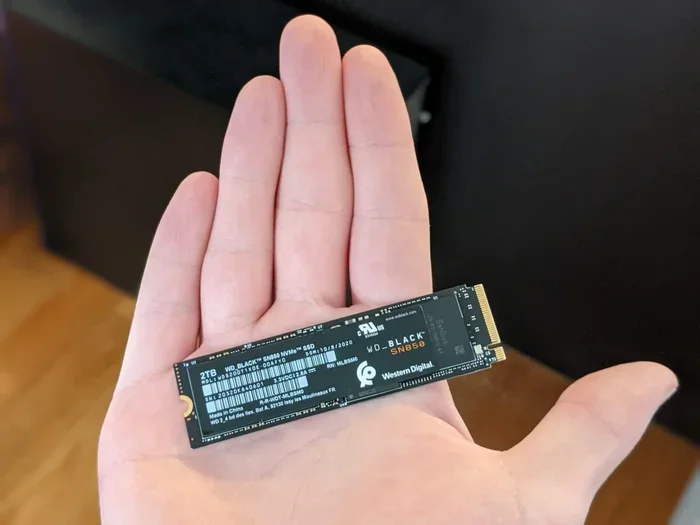
2tb M 2 Nvme Ssd
A 2TB M.2 NVMe SSD delivers lightning-fast storage with plenty of space for games, creative work, and everyday use. These drives use the NVMe protocol over PCIe for speeds far beyond traditional hard drives. Whether you are upgrading a laptop or building a new PC, this guide covers everything you need to know.
A 2TB M.2 NVMe SSD is one of the best upgrades you can make to any computer. Whether you are a gamer, a content creator, or someone who simply needs more fast storage, this type of drive changes everything. Gone are the days of waiting minutes for files to copy or games to load. With a solid-state drive like this, your system feels instantly responsive.
The M.2 NVMe form factor has become the standard for modern PCs. These small, slim drives slot directly into your motherboard and deliver incredible performance. A 2TB NVMe M.2 SSD gives you both speed and generous capacity in one compact package. In this guide, we break down everything you need to know before buying.
If you have been searching for the right storage upgrade, you are in the right place. We will cover speeds, compatibility, top picks, pricing, and common mistakes to avoid. By the end, you will know exactly which 2TB M.2 NVMe SSD is the best fit for your setup.
Key Takeaways
- Speed Advantage: A 2TB M.2 NVMe SSD offers sequential read speeds up to 7,000 MB/s or more, making it vastly faster than any HDD or SATA SSD.
- Form Factor Matters: The 2280 M.2 shape is the most common and fits most modern desktops and laptops.
- PCIe Gen4 and Gen5: Newer PCIe Gen5 NVMe drives push speeds even higher, though Gen4 remains the sweet spot for value.
- Price Range: Expect to pay between $120 and $250 for a quality 2TB NVMe M.2 SSD depending on the brand and generation.
- Compatibility Check: Always confirm your motherboard or laptop supports M.2 NVMe before purchasing.
- Use Cases: Ideal for game storage, video editing, boot drives, and large media libraries.
📑 Table of Contents
- What Is a 2TB M.2 NVMe SSD?
- Why Choose a 2TB M.2 NVMe SSD?
- How to Choose the Right 2TB M.2 NVMe SSD
- Top 2TB M.2 NVMe SSD Options to Consider
- Price Range and Value Guide
- Common Mistakes to Avoid When Buying a 2TB M.2 NVMe SSD
- How to Install a 2TB M.2 NVMe SSD
- 2TB M.2 NVMe SSD vs Other Storage Types
- Who Should Buy a 2TB M.2 NVMe SSD?
- Final Thoughts
What Is a 2TB M.2 NVMe SSD?
Let us start with the basics. An M.2 NVMe SSD is a type of solid-state drive that connects directly to your motherboard using the M.2 slot. Unlike traditional hard drives, there are no moving parts. This means faster speeds, lower power use, and no noise.
The “2TB” part simply means the drive holds two terabytes of data. That is roughly 2,000 gigabytes. For most users, this is plenty of space for your operating system, favorite games, large video files, and everyday documents.
The “NVMe” stands for Non-Volatile Memory Express. It is a communication protocol designed specifically for flash storage. Traditional SATA SSDs use an older protocol that limits their speed. NVMe SSDs use the PCIe lane on your motherboard, which allows much faster data transfer. This is the key reason why a 2TB M.2 NVMe SSD outperforms older drive types by a wide margin.
M.2 Form Factor Explained
The M.2 standard defines the physical size and shape of the drive. The most common size is the 2280 format. This means the drive is 22 millimeters wide and 80 millimeters long. Most modern motherboards and laptops support this size. Other sizes exist, like 2260 or 22110, but 2280 M.2 is what you will find in almost every 2TB NVMe M.2 SSD on the market today.
Why Choose a 2TB M.2 NVMe SSD?
There are many reasons to choose a 2TB M.2 NVMe SSD over other storage options. Let us look at the biggest advantages.
Blazing Fast Speeds
The most obvious benefit is speed. A typical 2TB M.2 NVMe SSD delivers sequential read speeds between 5,000 and 7,400 MB/s on PCIe Gen4. The newest PCIe Gen5 NVMe drives push even higher, reaching speeds above 10,000 MB/s in some cases. Compare this to a standard SATA SSD, which maxes out around 550 MB/s, and you can see the massive difference.
What does this mean in real life? Your operating system boots in seconds. Games load almost instantly. Large files transfer in a fraction of the time. If you work with video or photo editing, your workflows become much smoother.
Plenty of Storage Space
Two terabytes gives you room to breathe. Modern PC games can easily take up 50 to 150 GB each. With a 2TB M.2 NVMe SSD, you can store 15 to 30 large games without worrying about running out of space. You also have plenty of room for your operating system, applications, and personal files.
Compact and Clean Build
Because M.2 NVMe SSDs are so small, they do not take up much space inside your PC case. There are no cables to manage. No drive bays needed. This makes your build cleaner and improves airflow, which helps keep everything cool.
Energy Efficiency
Solid-state drives use less power than traditional hard drives. This can extend laptop battery life and reduce heat output in desktops. A 2TB NVMe M.2 SSD runs cool and quiet, making it perfect for any environment.
How to Choose the Right 2TB M.2 NVMe SSD
Not all 2TB M.2 NVMe SSDs are the same. Here are the key factors to consider before you buy.
PCIe Generation
The PCIe generation determines the maximum speed potential. PCIe Gen4 is the current mainstream standard and offers excellent real-world performance. PCIe Gen5 is newer and faster, but it also costs more. For most users, a PCIe Gen4 NVMe SSD provides the best value.
If you want the absolute fastest speeds, look for PCIe Gen5 NVMe M.2 SSDs. The Crucial T705 2TB PCIe Gen5 NVMe M.2 SSD is a great example of a top-tier option. However, for everyday tasks like gaming and general use, Gen4 drives deliver more than enough speed.
DRAM Cache
Some NVMe SSDs include a DRAM cache chip, while others do not. A DRAM cache helps the drive manage its data more efficiently. Drives with DRAM tend to perform better during sustained read and write operations. If you plan to work with large files or run many applications simultaneously, a DRAM-equipped 2TB M.2 NVMe SSD is the better choice.
Brand Reliability and Warranty
Stick with trusted brands like Samsung, Crucial, Corsair, Kingston, and Western Digital. These manufacturers offer solid reliability and generous warranties, often ranging from three to five years. Checking reviews and endurance ratings (TBW — terabytes written) helps you pick a durable drive that lasts.
Thermal Management
Fast NVMe drives can generate heat. Some 2TB M.2 NVMe SSDs come with built-in heatsinks. Others work fine with the motherboard’s built-in thermal pad. If you are running demanding workloads for long periods, consider a drive with a heatsink or add an M.2 NVMe heatsink separately.
Top 2TB M.2 NVMe SSD Options to Consider
Here are some of the best 2TB M.2 NVMe SSDs available right now. Each one offers a great balance of speed, reliability, and value.
- Crucial T705 2TB PCIe Gen5 NVMe M.2 SSD: One of the fastest consumer drives on the market. It delivers incredible read speeds and is perfect for enthusiasts who want the latest technology.
- Corsair MP600 Core XT M.2 NVMe SSD: A strong Gen4 option with a compact design and reliable performance. Great for gamers and creators who want quality without breaking the bank.
- Samsung 970 EVO Plus NVMe M.2 SSD: A well-known and trusted drive with solid speeds and excellent endurance. A reliable choice for a 2TB NVMe M.2 SSD upgrade.
- Kingston NV2 2TB M.2 NVMe SSD: A budget-friendly option that still delivers fast NVMe speeds. Perfect for those who want a 2TB M.2 NVMe SSD without spending a premium.
Each of these drives fits into a different price range and use case. Think about what matters most to you — raw speed, price, endurance, or brand trust — and pick accordingly.
Price Range and Value Guide
The price of a 2TB M.2 NVMe SSD varies depending on the brand, generation, and features. Here is a general idea of what to expect:
- Budget Options (around $120-$150): Drives like the Kingston NV2 or budget Crucial P3 models offer solid NVMe performance at an affordable price. Great for general use and gaming.
- Mid-Range Options ($150-$200): The Corsair MP600 Core XT and Crucial P3 Plus fall into this range. They offer a good mix of speed, reliability, and features.
- Premium Options ($200-$250+): The Crucial T705 and similar Gen5 drives sit here. These are for users who want the absolute fastest speeds available.
As 2TB NVMe M.2 SSDs become more popular, prices continue to drop. What cost $250 two years ago can now be found for around $140-$160. This makes the 2TB M.2 NVMe SSD an incredibly affordable upgrade for almost any computer.
Common Mistakes to Avoid When Buying a 2TB M.2 NVMe SSD
Even experienced builders sometimes make mistakes when choosing storage. Here are a few pitfalls to watch out for.
Not Checking Motherboard Compatibility
This is the most common mistake. Not every motherboard supports NVMe M.2 SSDs. Some only support SATA M.2 drives. Before buying, check your motherboard manual or specs page to confirm it has an M.2 NVMe PCIe slot. You can also use an M.2 NVMe enclosure if you need an external connection, but for internal use, compatibility is essential.
Ignoring the Drive’s Width
Most 2TB M.2 NVMe SSDs use the 2280 size. However, some laptops have shorter M.2 slots that only accept 2242 or 2230 drives. Always double-check your device specifications before ordering.
Overlooking Thermal Performance
High-speed NVMe drives can get hot, especially in compact cases. If your motherboard does not have a heatsink on the M.2 slot, your drive might thermal throttle, which slows it down. A simple M.2 heatsink solves this problem and keeps your 2TB NVMe M.2 SSD running at full speed.
Skipping the Driver Update
After installing a new NVMe M.2 SSD, it is a good idea to update the driver. For example, if you install a WD Blue NVMe M.2 SSD, downloading the latest WD Blue NVMe driver can improve stability and performance. Most brands offer free driver updates on their websites.
How to Install a 2TB M.2 NVMe SSD
Installing a 2TB M.2 NVMe SSD is surprisingly simple. You do not need years of technical experience. Here is a quick overview of the process.
- Find the M.2 slot on your motherboard. It is usually labeled and located near the CPU or chipset area.
- Remove the small screw that secures the M.2 slot bracket.
- Align the notch on the M.2 NVMe SSD with the key in the slot. Gently insert the drive at a slight angle.
- Press the drive down flat and secure it with the screw.
- Boot into your BIOS or operating system. The drive should be detected automatically.
- If needed, initialize and format the drive through Disk Management (Windows) or Disk Utility (Mac).
That is it. In less than ten minutes, you can have a blazing-fast 2TB M.2 NVMe SSD up and running. If you want to use the drive externally, you can also connect it through an NVMe M.2 SSD enclosure for portable fast storage.
2TB M.2 NVMe SSD vs Other Storage Types
Still not sure if a 2TB M.2 NVMe SSD is right for you? Here is how it compares to other common storage options.
| Feature | 2TB M.2 NVMe SSD | 2TB SATA SSD | 2TB HDD |
|---|---|---|---|
| Sequential Read Speed | 5,000 – 7,400 MB/s | ~550 MB/s | ~150-200 MB/s |
| Sequential Write Speed | 3,500 – 6,000 MB/s | ~520 MB/s | ~150-200 MB/s |
| Form Factor | M.2 2280 (tiny) | 2.5-inch | 3.5-inch |
| Power Use | Low | Low | High |
| Price (Approx.) | $120 – $250 | $130 – $260 | $50 – $80 |
| Best For | Speed and performance | Reliable fast storage | Bulk storage on a budget |
As you can see, the 2TB M.2 NVMe SSD wins on speed and form factor by a wide margin. The only area where an HDD beats it is raw cost per gigabyte. But for most users, the speed advantage of a 2TB NVMe M.2 SSD is worth every penny.
Who Should Buy a 2TB M.2 NVMe SSD?
A 2TB M.2 NVMe SSD is a great choice for many types of users. Here are some examples:
- Gamers: Store dozens of modern games and enjoy near-instant load times. A 2TB M.2 NVMe SSD transforms your gaming experience.
- Content Creators: Video editors and photographers benefit from fast read and write speeds when working with large files.
- General Users: If your current system uses an HDD or a small SSD, upgrading to a 2TB M.2 NVMe SSD makes everything feel faster and more responsive.
- Professionals: Programmers, engineers, and data analysts who work with large datasets appreciate the speed and capacity of a 2TB NVMe M.2 SSD.
- Laptop Upgraders: Many modern laptops support M.2 NVMe SSDs. Adding one can breathe new life into an older machine.
No matter who you are, a 2TB M.2 NVMe SSD is a smart investment. It improves your daily computing experience in ways that are easy to notice every single day.
Final Thoughts
A 2TB M.2 NVMe SSD is one of the most impactful upgrades you can make to any computer. The combination of massive speed, generous storage, and compact size makes it the go-to choice for modern storage needs. Whether you pick a PCIe Gen4 or PCIe Gen5 NVMe drive, you will notice the difference immediately.
Take your time to find the right model for your budget and needs. Check compatibility, consider thermal management, and do not forget to update your drivers after installation. With the right 2TB NVMe M.2 SSD, your computer will feel faster, smoother, and more capable than ever before.
Start your upgrade today and experience the real benefit of modern solid-state drive technology. You will wonder how you ever managed without it.
Frequently Asked Questions
What is the difference between M.2 SATA and M.2 NVMe SSDs?
The main difference is the interface. An M.2 SATA SSD uses the older SATA protocol and maxes out around 550 MB/s. A 2TB M.2 NVMe SSD uses the PCIe bus and NVMe protocol, delivering speeds five to ten times faster. Always check which type your system supports before buying.
Can I use a 2TB M.2 NVMe SSD as a boot drive?
Absolutely. In fact, using a 2TB NVMe M.2 SSD as a boot drive is one of the best ways to speed up your computer. Your operating system, applications, and games will load much faster than on a traditional hard drive.
Do I need a heatsink for a 2TB M.2 NVMe SSD?
It depends on your workload and case airflow. For everyday use and gaming, most 2TB M.2 NVMe SSDs run fine without one. If you do heavy video editing or sustained data transfers, adding an M.2 NVMe heatsink helps prevent thermal throttling and keeps speeds consistent.
How much does a 2TB M.2 NVMe SSD cost?
Prices range from around $120 for budget models to $250 for premium PCIe Gen5 NVMe drives. The current market offers excellent value, with most quality 2TB M.2 NVMe SSDs falling in the $140-$200 range.
Will a 2TB M.2 NVMe SSD work in any laptop?
Not all laptops support M.2 NVMe SSDs. Some older or budget laptops only have M.2 SATA slots or 2.5-inch drive bays. Check your laptop’s specifications or manual to confirm it has an M.2 PCIe NVMe slot before purchasing.
What is TBW and why does it matter for a 2TB NVMe M.2 SSD?
TBW stands for Terabytes Written. It measures how much data you can write to the drive over its lifetime before potential failure. A higher TBW means better endurance. Most 2TB M.2 NVMe SSDs have a TBW rating of 600TB or more, which is more than enough for typical home and office use.