Essential Digital Marketing Tools
Looking to supercharge your online presence? This guide breaks down the essential digital marketing tools every SaaS business needs, from SEO to social media automation. Learn how to pick, use, and integrate each tool for maximum impact.
Key Takeaways
- All‑in‑one platforms: HubSpot and similar suites combine CRM, email, and analytics for seamless workflow.
- SEO fundamentals: Tools like Ahrefs and SEMrush reveal keyword gaps and backlink opportunities.
- Content creation made easy: AI writers and design apps speed up blog posts, videos, and graphics.
- Social scheduling saves time: Buffer, Hootsuite, and Later let you plan weeks of posts in minutes.
- Data‑driven decisions: Google Analytics 4 and heat‑mapping software turn raw numbers into actionable insight.
- Automation bridges gaps: Zapier and Make (Integromat) connect apps without code, reducing manual work.
- Continuous testing: A/B testing tools ensure every campaign is optimized before you spend ad dollars.
📑 Table of Contents
- Introduction: Why the Right Toolbox Matters
- 1. SEO & Keyword Research Tools
- 2. Content Creation & Design Tools
- 3. Email Marketing & Automation Platforms
- 4. Social Media Management & Scheduling
- 5. Analytics & Conversion Optimization
- 6. No‑Code Integration & Workflow Automation
- 7. Choosing the Right Stack for Your SaaS
- Conclusion: Turn Tools Into Results
Introduction: Why the Right Toolbox Matters
If you’ve ever felt overwhelmed by the sheer number of apps promising to “grow your traffic,” you’re not alone. The digital marketing landscape changes faster than a trending TikTok challenge. For SaaS companies, the stakes are even higher—your product’s success often depends on how quickly you can attract, nurture, and convert leads.
That’s why having a curated set of essential digital marketing tools is more than a convenience; it’s a competitive advantage. The right tools automate repetitive tasks, surface insights you’d otherwise miss, and free up mental bandwidth for creative strategy. In this article we’ll walk through the categories you can’t ignore, spotlight the best‑in‑class options, and share practical tips for getting the most out of each.
1. SEO & Keyword Research Tools
Search engine visibility remains the foundation of inbound growth. Even the most compelling SaaS demo won’t be seen if it’s buried on page three of Google.
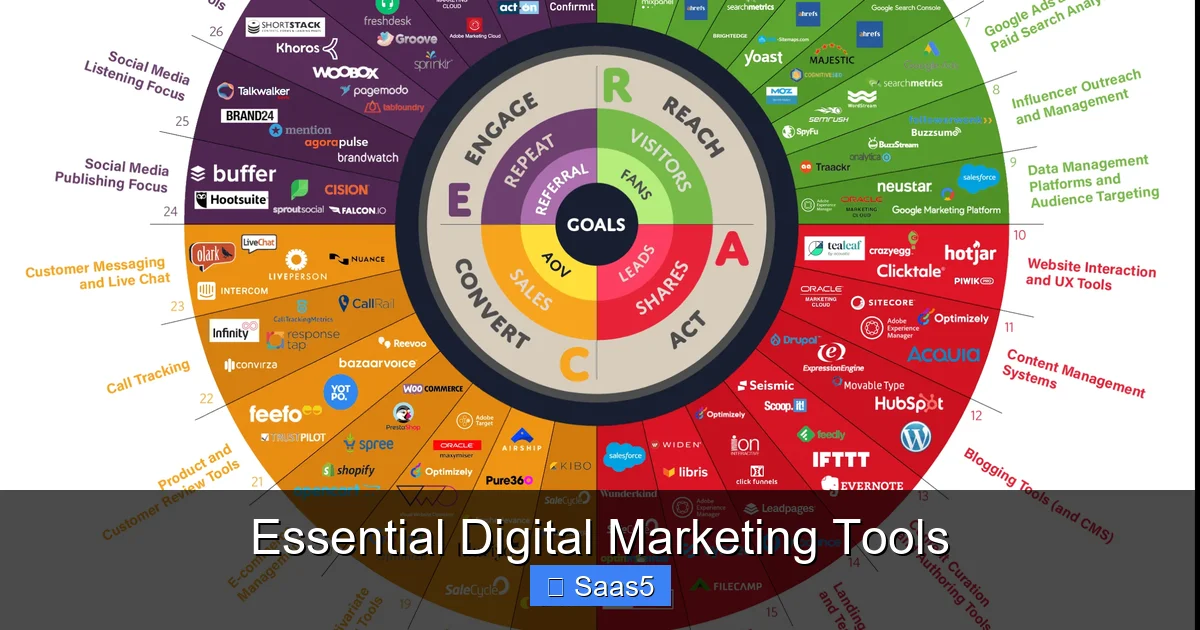
Visual guide about Essential Digital Marketing Tools
Image source: odaijinipet.com
Why SEO Still Rules
Organic traffic offers the highest ROI because you’re not paying per click. A solid SEO strategy also builds brand authority—users trust businesses that rank high for relevant queries.
Top Picks
- Ahrefs: Offers a massive backlink index, keyword explorer, and site audit. Great for spotting link‑building opportunities.
- SEMrush: Known for competitive analysis and content gap reports. Its “Position Tracking” feature monitors keyword rankings daily.
- Ubersuggest: A budget‑friendly alternative that still provides keyword ideas, traffic estimates, and SEO audit tools.
Practical Tip
Start with a “content gap” analysis in SEMrush. Identify keywords your top three competitors rank for that you don’t, then create a targeted blog series around those terms. Track progress with Ahrefs’ “Site Explorer” to see how your new pages acquire backlinks over time.
2. Content Creation & Design Tools
Content is still king, but creating it doesn’t have to be a kingdom of endless toil. Modern AI‑powered writers and design platforms let you produce high‑quality assets in minutes.
Visual guide about Essential Digital Marketing Tools
Image source: dentistry-eng.kku.ac.th
Writing Assistants
- Jasper AI: Generates blog outlines, ad copy, and even email sequences based on simple prompts.
- Copy.ai: Ideal for short‑form content like social captions and meta descriptions.
Graphic & Video Design
- Canva Pro: Drag‑and‑drop editor with templates for everything from LinkedIn banners to infographics.
- Descript: Edit video and audio like a word document; perfect for creating tutorial videos without a film crew.
Practical Tip
Combine Jasper AI with Canva’s brand kit. Write a blog post in Jasper, then pull key quotes into Canva graphics that match your brand colors. This creates a cohesive content package ready for blog, email, and social sharing.
3. Email Marketing & Automation Platforms
For SaaS, email remains the most reliable channel for lead nurturing and upselling. The right platform should handle segmentation, personalization, and robust analytics.
Visual guide about Essential Digital Marketing Tools
Image source: smartinsights.com
Best-in-Class Solutions
- HubSpot: An all‑in‑one inbound suite that integrates CRM, email, landing pages, and analytics. See HubSpot: The Power of Inbound Marketing for a deeper dive.
- ActiveCampaign: Strong automation builder with conditional splits and predictive sending.
- Mailchimp: User‑friendly interface, especially for small teams just getting started.
Automation Example
Set up a trigger: when a prospect signs up for a free trial, automatically add them to a “Trial Users” list, send a welcome email, and schedule a series of educational emails over the next 7 days. Use HubSpot’s workflow editor to map each step without writing a line of code.
Practical Tip
Always A/B test your subject lines. Even a 5% lift in open rate can dramatically increase downstream conversions.
4. Social Media Management & Scheduling
Social platforms are where your brand personality shines, but posting manually is a time sink. Scheduling tools let you batch‑create content and analyze performance from one dashboard.
Top Tools
- Buffer: Simple queue system, ideal for small teams.
- Hootsuite: Supports multiple accounts, advanced reporting, and social listening.
- Later: Visual planner for Instagram and Pinterest, with a drag‑and‑drop calendar.
Integrating Social with SEO
When you publish a new blog post, schedule teaser snippets across LinkedIn, Twitter, and Facebook using Buffer’s “Content Inbox.” Include your target keyword and a compelling call‑to‑action to drive traffic back to your site.
Practical Tip
Use a “social pillar” strategy: create one long‑form piece (e.g., an industry report), then break it into 10‑15 micro‑posts. This maximizes the content’s lifespan and keeps your channels active.
5. Analytics & Conversion Optimization
You can’t improve what you don’t measure. Modern analytics tools go beyond page views—they reveal user intent, drop‑off points, and revenue attribution.
Core Analytics Platforms
- Google Analytics 4 (GA4): Event‑based tracking, cross‑device reporting, and predictive metrics.
- Hotjar: Heatmaps, session recordings, and feedback polls to understand on‑page behavior.
- Mixpanel: Product‑focused analytics for SaaS, tracking user journeys and cohort retention.
Conversion Rate Optimization (CRO)
Implement A/B testing with tools like VWO or Optimizely. Test headline variations, button colors, and form lengths. Even a small tweak can boost conversion rates by 10‑20%.
Practical Tip
Start with a “one‑click” test: duplicate your pricing page, change the CTA button text from “Start Free Trial” to “Get Started Now,” and run the test for two weeks. Analyze results in GA4’s “Experiments” report.
6. No‑Code Integration & Workflow Automation
Most SaaS teams lack deep engineering resources, yet they still need their tools to talk to each other. No‑code automation platforms fill that gap.
Popular Choices
- Zapier: Connects 5,000+ apps with simple “If this, then that” logic.
- Make (formerly Integromat): Visual scenario builder for more complex multi‑step workflows.
- Parabola: Handles data transformations and bulk uploads without code.
Real‑World Example
When a new lead fills out a Typeform questionnaire, Zapier can automatically:
- Add the lead to HubSpot CRM.
- Tag them based on the product interest they indicated.
- Send a personalized Slack notification to the sales rep.
- Enroll them in a drip email campaign in ActiveCampaign.
This entire flow takes minutes to set up and eliminates manual data entry.
Practical Tip
Map out a “lead‑to‑revenue” flow on paper first. Identify every app involved, then build the Zapier workflow step‑by‑step, testing each trigger before moving to the next.
7. Choosing the Right Stack for Your SaaS
Every SaaS product is unique, so there’s no one‑size‑fits‑all toolbox. Here’s a quick decision matrix to help you prioritize.
Factors to Consider
- Team size: Small teams benefit from all‑in‑one suites; larger teams may prefer best‑of‑breed tools.
- Budget: Free tiers (e.g., Google Analytics, Mailchimp) are great for startups; enterprise plans unlock advanced features.
- Integration needs: Ensure your core tools have native connectors or Zapier support.
- Growth stage: Early‑stage SaaS should focus on acquisition (SEO, social); later stages invest in retention (email automation, CRO).
Sample Stack for a 10‑person SaaS Startup
- SEO: Ahrefs (free trial) → transition to SEMrush.
- Content: Jasper AI + Canva Pro.
- Email: HubSpot Free CRM + Email Marketing.
- Social: Buffer (free plan) + Later for Instagram.
- Analytics: GA4 + Hotjar (basic plan).
- Automation: Zapier (free tier) for lead syncing.
Scaling Up
As revenue grows, replace free tiers with paid plans, add a dedicated CRO tool like VWO, and consider a full‑fledged data warehouse (e.g., Snowflake) for deeper insights.
Conclusion: Turn Tools Into Results
The digital marketing world is noisy, but you don’t have to chase every new app that lands on your radar. By focusing on the essential digital marketing tools outlined above, you create a lean, powerful stack that drives traffic, nurtures leads, and converts customers—all while keeping your team’s workload manageable.
Start small, measure relentlessly, and iterate. The tools are only as good as the strategy behind them. Pick the ones that fit your SaaS’s current stage, integrate them thoughtfully, and watch your metrics climb.
Frequently Asked Questions
What are the most important digital marketing tools for a SaaS startup?
The core tools include an SEO platform (Ahrefs or SEMrush), an email marketing system (HubSpot or ActiveCampaign), a social scheduler (Buffer or Hootsuite), analytics (GA4), and a no‑code automation tool (Zapier).
Do I need an all‑in‑one platform or separate best‑of‑breed tools?
Small teams often benefit from all‑in‑one suites like HubSpot for simplicity, while larger teams may prefer specialized tools that offer deeper features in each category.
How can I automate lead capture without a developer?
Use Zapier to connect your lead forms (Typeform, Google Forms) directly to your CRM and email platform. No coding required—just set up triggers and actions.
Is it worth paying for premium SEO tools?
Yes, if you rely heavily on organic traffic. Premium tools provide more accurate data, larger backlink indexes, and advanced competitor analysis that free tools often lack.
What’s the best way to test landing page variations?
Implement A/B testing with VWO or Optimizely. Test one element at a time (headline, CTA, image) and run the test for at least two weeks to gather statistically significant results.
How often should I review my analytics data?
Set a weekly review for high‑level metrics (traffic, conversions) and a monthly deep dive for cohort analysis, funnel drop‑offs, and attribution modeling.