Macbook Soldered Ram Ssd List And Compatible Models
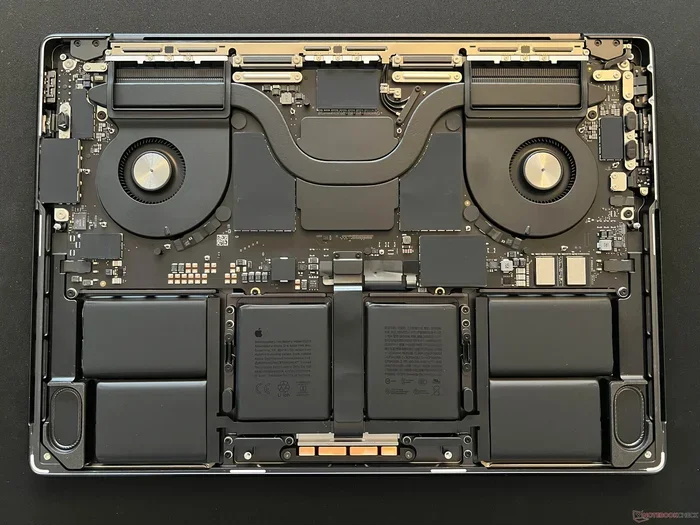
The Macbook soldered RAM SSD list covers models where memory and storage are permanently attached to the motherboard. This guide breaks down every compatible MacBook model, explains why Apple uses soldered components, and shares practical upgrade tips. Whether you own a MacBook Pro or MacBook Air, this list helps you understand your options clearly.
Key Takeaways
- Soldered RAM and SSD mean no upgrades: Most modern MacBooks have memory and storage fixed to the board.
- Older models still offer some flexibility: Certain pre-2015 MacBooks allow RAM and SSD swaps.
- Know your model first: Always check your exact MacBook model number before buying any parts.
- External storage works as a workaround: You can add external SSDs to boost space on soldered MacBooks.
- Windows laptops offer more upgrade paths: If upgradability matters, consider laptops with 16GB RAM and SSD instead.
- Apple Silicon changed the game: M1, M2, and M3 MacBooks use unified memory that is fully soldered.
- Plan before you buy: Choose the right RAM and SSD size upfront for your MacBook.
📑 Table of Contents
- What Is a MacBook Soldered RAM and SSD?
- Complete Macbook Soldered RAM SSD List
- How to Check Your MacBook’s RAM and SSD Configuration
- Why MacBooks Use Soldered RAM and SSD
- Upgrade Options for MacBooks With Soldered RAM and SSD
- Macbook Soldered RAM SSD List: Quick Reference Table
- Should You Buy a MacBook With Soldered RAM and SSD?
- Common Mistakes When Buying a MacBook
- Final Thoughts
What Is a MacBook Soldered RAM and SSD?
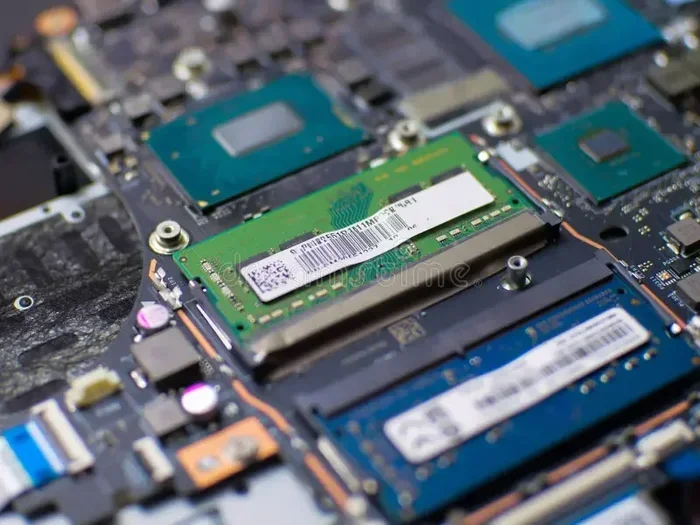
When we say a MacBook has soldered RAM and SSD, we mean the memory and storage chips are glued directly to the motherboard. You cannot remove or swap them out like you would in a traditional laptop. Apple started using this design to make MacBooks thinner, lighter, and faster.
The soldered approach has pros and cons. On the plus side, your MacBook gets better performance and a sleeker design. On the downside, you lose the ability to upgrade memory or storage later. This is why knowing the Macbook soldered RAM SSD list before buying matters so much.
Soldered components are now standard across almost all modern MacBooks. If you want flexibility, you need to pick the right specs at the time of purchase. Let us look at why Apple made this choice.
Why Apple Chose Soldered Components
Apple uses soldered RAM and SSD for several key reasons. First, it saves internal space. Second, it improves power efficiency. Third, it boosts data transfer speeds. The soldered design lets Apple create laptops that are incredibly thin yet powerful.
However, this design locks you into your initial purchase choices. You cannot add more memory or swap in a bigger SSD later. That is why checking the Macbook soldered RAM SSD list is so important before you spend your money.
Complete Macbook Soldered RAM SSD List
The Macbook soldered RAM SSD list covers a wide range of models. Apple has used soldered memory and storage in many of its laptops over the years. Here is a detailed breakdown of the most common models.
MacBook Air Models With Soldered RAM and SSD
Every MacBook Air since the early 2010s has featured soldered RAM and SSD. Here are the key models:
- MacBook Air 2010-2017: These models use soldered SSD but some older ones had removable RAM. The 2015 and later models have fully soldered memory.
- MacBook Air 2018 and newer: All memory and storage are soldered. You get options like 8GB, 16GB, or 24GB RAM with 128GB, 256GB, 512GB, or 1TB SSD.
- MacBook Air M1 (2020): Uses unified memory soldered to the board. Options include 8GB or 16GB RAM with 256GB, 512GB, or 1TB SSD.
- MacBook Air M2 (2022) and M3 (2024): All models have soldered unified memory. RAM options go up to 24GB with SSD choices up to 2TB.
MacBook Pro Models With Soldered RAM and SSD
The MacBook Pro lineup also uses soldered components across most of its range:
- MacBook Pro 13-inch (2016 and newer): Fully soldered RAM and SSD. You can choose 16GB, 32GB, or 64GB RAM with SSD options from 256GB to 4TB.
- MacBook Pro 14-inch and 16-inch (2018 and newer): All memory and storage are soldered. These models offer up to 64GB unified memory and 8TB SSD.
- MacBook Pro M1 Pro and M1 Max (2021): Soldered unified memory with 16GB, 32GB, or 64GB options.
- MacBook Pro M2 Pro and M3 Pro/Max (2023-2024): Fully soldered with RAM up to 128GB and SSD up to 8TB.
How to Check Your MacBook’s RAM and SSD Configuration
If you already own a MacBook, you need to check what you have. Apple makes this easy with built-in tools. Follow these simple steps to find your exact configuration.
Step-by-Step Guide
- Click the Apple logo in the top left corner of your screen.
- Select About This Mac. A window will pop up with your model details.
- Look at the Memory line. It shows your RAM size and type.
- Check the Storage line. It displays your SSD capacity.
- Note the Model Identifier. This helps you look up the full Macbook soldered RAM SSD list for your specific machine.
You can also use System Information for more detailed specs. Go to Applications, then Utilities, and open System Information. This gives you every detail about your memory and storage chips.
Why MacBooks Use Soldered RAM and SSD
Apple made a design choice that changed the laptop industry. Soldering RAM and SSD directly to the board brings real benefits. But it also comes with trade-offs. Let us look at both sides.
The Benefits of Soldered Components
- Thinner and lighter design: Soldered chips take up less space inside the laptop.
- Faster performance: Direct soldering improves data transfer speeds.
- Better power efficiency: Soldered components use less battery.
- Improved durability: No loose connections means fewer failure points.
- Sleeker internal layout: Apple uses the freed-up space for bigger batteries.
The Drawbacks of Soldered Components
- No future upgrades: You cannot add more RAM or swap in a bigger SSD.
- Higher upfront cost: You must pay for the largest config you might ever need.
- Shorter lifespan for storage: SSDs can fill up over time with no option to expand internally.
- Limited repair options: If the motherboard fails, the entire unit may need replacement.
Upgrade Options for MacBooks With Soldered RAM and SSD
You cannot upgrade the RAM or SSD inside a modern MacBook. But you are not completely stuck. There are several practical workarounds that can help you get more performance and storage.
Use External Storage
An external SSD is the best way to add more storage. You can plug in a fast USB-C or Thunderbolt drive and use it for large files, backups, and media. This keeps your internal SSD free for your operating system and apps.
Optimize Your Current Storage
Before buying a new laptop, try these tips to free up space:
- Delete unused apps and large files.
- Move photos and videos to cloud storage.
- Use Apple’s built-in storage management tools.
- Clear your browser cache and downloads folder.
- Use an external drive for Time Machine backups.
Consider a Different Laptop With Upgradeable Parts
If upgradability is important to you, a Windows laptop might be a better fit. Many Windows laptops let you swap out RAM and SSD easily. For example, you can find a laptop with 16GB RAM 1TB SSD Windows 11 that lets you upgrade later. You can also explore laptop i7 16GB RAM 512GB SSD options that give you room to grow.
Some popular choices include models from Dell, HP, and ASUS. These brands often use standard SO-DIMM RAM slots and M.2 SSD slots. This means you can upgrade memory and storage yourself without any special tools or skills.
Cloud Storage as a Supplement
Cloud services like iCloud, Google Drive, and Dropbox offer another way to manage storage. You can offload files you do not use every day. This keeps your MacBook running fast even with a smaller SSD.
Macbook Soldered RAM SSD List: Quick Reference Table
Here is a quick reference of the most popular MacBook models and their soldered specs. This table helps you find your model fast.
- MacBook Air M1 (2020): 8GB or 16GB soldered RAM, 256GB to 1TB SSD
- MacBook Air M2 (2022): 8GB to 24GB soldered RAM, 256GB to 2TB SSD
- MacBook Air M3 (2024): 8GB to 24GB soldered RAM, 256GB to 2TB SSD
- MacBook Pro 14 M1 Pro (2021): 16GB to 64GB soldered RAM, 512GB to 8TB SSD
- MacBook Pro 14 M2 Pro (2023): 16GB to 64GB soldered RAM, 512GB to 8TB SSD
- MacBook Pro 16 M3 Pro (2023): 18GB to 128GB soldered RAM, 1TB to 8TB SSD
- MacBook Pro 16 M3 Max (2023): 32GB to 128GB soldered RAM, 1TB to 8TB SSD
Always double-check the exact model number on Apple’s website. The Macbook soldered RAM SSD list can vary slightly between region-specific models and special configurations.
Should You Buy a MacBook With Soldered RAM and SSD?
This is the big question many buyers face. The answer depends on your needs and how long you plan to keep your laptop. Let us break it down.
If you plan to keep your MacBook for 3 to 5 years, buying more RAM and SSD upfront makes sense. Choose at least 16GB of RAM and 512GB of SSD. This gives you enough headroom for everyday tasks, light creative work, and multitasking.
If you are on a tight budget, consider a laptop 32GB RAM 512GB SSD instead. Windows laptops in this range often cost less and let you upgrade later. You get the best of both worlds: solid performance now and room to grow later.
On the other hand, if you value build quality, battery life, and the macOS ecosystem, a MacBook is still a great choice. Just make sure you pick the right specs from the start.
Common Mistakes When Buying a MacBook
Many buyers make the same mistakes when choosing a MacBook. Avoid these pitfalls to get the best value.
- Skimping on RAM: 8GB works for basic tasks, but 16GB is the sweet spot for most users.
- Choosing the smallest SSD: 256GB fills up fast. Go for at least 512GB if you can.
- Ignoring the soldered nature: Always assume you cannot upgrade later. Plan for your future needs.
- Not checking the model number: Different model numbers have different specs. Always verify before buying.
- Overlooking refurbished options: Apple Certified Refurbished MacBooks come with warranties and savings.
Final Thoughts
The Macbook soldered RAM SSD list shows that Apple has fully committed to soldered components in its modern laptops. This design brings great performance and sleek form factors. But it also means you need to choose wisely at the time of purchase.
Before you buy, ask yourself what you need. How much RAM will you use? How much storage will you need? How long will you keep the laptop? Answering these questions helps you pick the right configuration.
If upgradability matters to you, do not overlook Windows laptops. Many models from brands like Dell, HP, and ASUS offer upgradeable RAM and SSD at competitive prices. You can find great options like laptop with 16GB RAM 1TB SSD Windows 11 that give you freedom to grow later.
Whether you choose a MacBook or a Windows laptop, the key is to match the specs to your real-world needs. Check the Macbook soldered RAM SSD list, compare your options, and make a confident choice. Your future self will thank you.
Frequently Asked Questions
Can I upgrade the RAM in a modern MacBook?
No, modern MacBooks have soldered RAM that cannot be upgraded. Apple uses soldered memory chips in all MacBooks from 2015 onward, including M1, M2, and M3 models. You must choose the right RAM amount when you buy the laptop.
Which MacBook models still have upgradeable SSD?
Only older MacBook models from before 2015 have removable SSDs. Models like the MacBook Pro 2012 and earlier allow SSD swaps. All modern MacBooks use soldered SSD storage that cannot be replaced or upgraded.
How much RAM do I need for a MacBook?
For everyday tasks like browsing and office work, 8GB works fine. For multitasking, photo editing, or video work, 16GB is the sweet spot. Power users and professionals should consider 32GB or more. Since you cannot upgrade later, always plan ahead.
Can I use an external SSD with a MacBook?
Yes, external SSDs work great with MacBooks. You can use USB-C or Thunderbolt drives to expand your storage. This is a smart workaround for soldered MacBooks that need more space. External drives are fast and easy to connect.
Are MacBooks with soldered RAM worth buying?
Yes, if you pick the right specs upfront. MacBooks offer excellent build quality, battery life, and performance. The soldered design helps keep them thin and fast. Just make sure you choose enough RAM and SSD for your needs from the start.
What is the difference between MacBook RAM and regular laptop RAM?
Modern MacBooks use unified memory instead of traditional RAM. This means the memory is shared between the CPU and GPU. It is soldered directly to the Apple Silicon chip. This design delivers faster performance but cannot be upgraded later.