SaaS applications revolutionize how businesses operate by delivering powerful software over the internet. Instead of hefty upfront investments and complex installations, companies pay a predictable subscription for access to tools that are always up-to-date, secure, and available anywhere. This model drastically reduces IT overhead, enhances collaboration, and allows organizations to scale resources instantly with their needs, making enterprise-grade technology accessible to everyone from startups to large corporations.
Key Takeaways
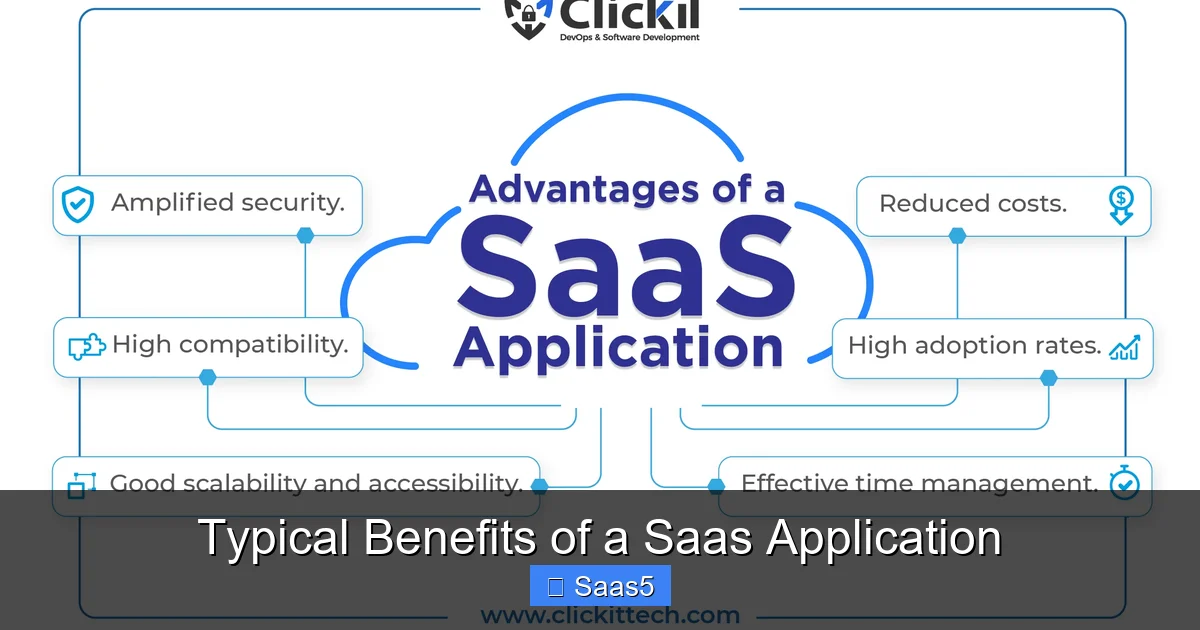
- Radical Cost Efficiency: Eliminates large capital expenditures on hardware and licenses, converting IT costs into predictable operational expenses with a pay-as-you-go model.
- Instant Scalability & Flexibility: Easily add or remove users and features as your business grows or contracts, without the need for new infrastructure or complex re-deployments.
- Universal Accessibility & Collaboration: Access applications from any device with an internet connection, enabling remote work and real-time teamwork across global teams.
- Automatic Updates & Maintenance: The provider handles all software updates, security patches, and maintenance, ensuring you always use the latest, most secure version without any effort.
- Enhanced Security & Reliability: Reputable SaaS vendors invest heavily in enterprise-grade security, compliance, and redundant data centers, often offering better protection than a single company could afford on its own.
- Faster Deployment & Innovation: Get up and running in hours or days, not months. Rapid deployment means faster access to new features and a shorter path to realizing ROI.
- Seamless Integration Ecosystem: Modern SaaS applications are built to connect with other tools via APIs, creating a unified tech stack that automates workflows and eliminates data silos.
📑 Table of Contents
- Introduction: The Software Revolution in Your Browser
- 1. The Financial Game-Changer: Unprecedented Cost Efficiency
- 2. Agility in Action: Instant Scalability and Flexibility
- 3. Anywhere, Anytime: The New Era of Accessibility and Collaboration
- 4. Peace of Mind: Automatic Updates, Maintenance, and Security
- 5. The Power of Connection: Integration and Ecosystem
- 6. Strategic Advantage: How to Choose and Implement SaaS Wisely
- Conclusion: The Future is Service-Oriented
Introduction: The Software Revolution in Your Browser
Remember the days of bulky software boxes, lengthy installation CDs, and IT departments scrambling to configure new servers? That traditional model of software delivery is rapidly becoming a relic. Today, a quiet revolution is powering businesses of all sizes: the Software as a Service (SaaS) application. At its core, a SaaS application is a cloud-based solution you access via a web browser or lightweight app, rather than installing it on your own computer or server. You simply log in, and the software is ready to use.
This shift from product to service has fundamentally changed the economics and logistics of business technology. The typical benefits of a SaaS application extend far beyond mere convenience; they represent a strategic advantage. By offloading the immense burden of infrastructure, maintenance, and upgrades to a specialized provider, organizations can redirect precious time, talent, and capital toward their core mission. Whether you’re a solopreneur using a project management tool or a multinational corporation adopting a full ERP suite, the SaaS model offers a compelling value proposition. In this article, we will unpack the concrete, transformative benefits that make SaaS the default choice for modern business software.
1. The Financial Game-Changer: Unprecedented Cost Efficiency
Let’s start with the bottom line, because for most businesses, this is the most immediately tangible benefit. The traditional software model required a significant capital expenditure (CapEx). You paid a large sum upfront for licenses, then invested in servers, networking gear, and perhaps even specialized IT staff to manage it all. A SaaS application flips this script entirely, converting those daunting capital costs into manageable, predictable operational expenses (OpEx).
Visual guide about Typical Benefits of a Saas Application
Image source: thesaasmonster.com
No More Upfront Licensing or Hardware Costs
The most obvious saving is the elimination of the initial license fee. Instead of a five-figure check for a software suite, you pay a monthly or annual subscription per user. This “pay-as-you-go” model is incredibly democratizing. It means a startup can access the same powerful CRM or accounting software as a Fortune 500 company, simply by subscribing to the appropriate tier. There’s no need to purchase, house, power, or cool physical servers. The provider hosts everything in their secure, efficient data centers, and you consume the computing resources as a service.
Practical Example: A small marketing agency needs a professional design tool. The traditional desktop version might cost $2,000 per license plus require a high-end workstation. The SaaS version of the same tool might be $50/user/month. For a team of five, that’s $250/month versus a $10,000+ upfront investment. The SaaS option frees up cash for hiring or marketing spend.
Drastic Reduction in IT Overhead
Beyond the direct software cost, consider the hidden costs of ownership: the time and salary of your IT staff. With on-premise software, a significant portion of your IT team’s effort goes toward installation, configuration, applying patches, monitoring performance, and troubleshooting. With a SaaS application, the provider’s team does all of that. Your internal IT staff can shift from being “plumbers” fixing infrastructure to “strategists” focusing on projects that directly drive business value, like data analysis or digital transformation initiatives.
- Tip: When evaluating a SaaS product, calculate the Total Cost of Ownership (TCO) by adding your estimated internal IT management time to the subscription cost. It will almost always still be lower than on-premise TCO.
2. Agility in Action: Instant Scalability and Flexibility
Businesses are not static. They grow, they shrink, they launch new projects, and they pivot. Your technology must be able to keep pace. This is where the typical benefits of a SaaS application shine with unmatched agility.
Scaling Resources in Real-Time
Need to add ten new sales reps next quarter? With a traditional license model, you’d need to purchase and install ten new software licenses, a process that could take weeks. With a SaaS CRM, your administrator can likely add those users in minutes through a web portal, and they’ll have access immediately. The reverse is also true. If a project team disbands, you can remove those user seats and stop paying for them at the next billing cycle. This elasticity ensures you only pay for what you use, eliminating wasted capacity.
This scalability isn’t just about user counts. It also applies to data storage, processing power, and feature sets. Most SaaS platforms offer tiered plans (Basic, Professional, Enterprise) that bundle different levels of functionality. As your needs evolve, you can upgrade your plan to access advanced analytics, automation tools, or increased storage limits.
The Freedom to Experiment and Switch
The commitment to a SaaS application is typically a subscription, not a decade-long marriage to a monolithic system. This lower barrier to entry encourages experimentation. A marketing team can pilot a new SEO tool for three months with minimal risk. If it doesn’t deliver, they can cancel. This culture of “try before you fully commit” fosters innovation. Furthermore, because your data is already in the cloud and many SaaS applications use standard APIs, the perceived “vendor lock-in” is often less daunting than the immense project of migrating from one deeply customized on-premise system to another.
- Example: An e-commerce business experiences a massive holiday spike. Their SaaS inventory management system automatically scales to handle the surge in transactions and data volume without a single phone call to their IT provider. In January, as traffic normalizes, their usage—and bill—naturally scales back down.
3. Anywhere, Anytime: The New Era of Accessibility and Collaboration
The internet has untethered work from a physical desk. A SaaS application is the perfect software companion for this mobile, distributed workforce. Because the application lives in the cloud and is accessed via a browser or app, the only requirement is an internet connection.
Visual guide about Typical Benefits of a Saas Application
Image source: images.clickittech.com
True Remote and Hybrid Work Enablement
This is non-negotiable in the post-pandemic world. Employees working from home, a coffee shop, or a different country can access the exact same tools, with the same data, as someone in the headquarters office. There is no “version mismatch” because the single, cloud-hosted application is the only version that exists. This ensures consistency, reduces confusion, and empowers truly flexible work arrangements that help attract and retain top talent globally.
Real-Time Collaboration, Not Just File Sharing
SaaS applications are built from the ground up for collaboration. Think beyond simply storing a document in a shared folder. In a SaaS design tool like Figma, multiple designers can work on the same prototype simultaneously, seeing each other’s cursors and changes in real-time. In a SaaS CRM like Salesforce, a sales rep can @mention their manager in a deal note, triggering an instant notification. In project management tools like Asana or ClickUp, teams see task updates, comments, and file attachments live. This real-time, contextual collaboration breaks down silos, accelerates decision-making, and creates a single source of truth for every project and customer interaction.
- Tip: Leverage the commenting and @mention features in your SaaS tools rigorously. They transform asynchronous communication from a series of disjointed emails into a threaded, trackable conversation directly linked to the work.
4. Peace of Mind: Automatic Updates, Maintenance, and Security
One of the most cherished, yet often overlooked, benefits of a SaaS application is the complete abdication of responsibility for software maintenance. In the old world, updating critical software was a major project. It required scheduling downtime, testing compatibility with other systems, training users on new interfaces, and rolling out the update manually—all while hoping nothing broke.
Visual guide about Typical Benefits of a Saas Application
Image source: leeddev.io
Seamless, Continuous Innovation
With SaaS, updates happen automatically, incrementally, and often. The provider tests and deploys new features, performance improvements, and bug fixes to their entire customer base in the background. You wake up one morning, log in, and there’s a new button or a faster report generation time. There is no upgrade project, no downtime (or minimal, planned maintenance windows), and no retraining on a completely new version every few years. Updates are continuous and evolutionary. This means your business is always leveraging the latest capabilities, keeping you competitive without any internal project management overhead.
Enterprise-Grade Security by Default
A common initial concern about SaaS is security: “Is my data safe in someone else’s cloud?” The reality is that for the vast majority of small and medium-sized businesses, a top-tier SaaS provider offers far superior security than they could ever build or afford themselves. These providers employ teams of dedicated security experts, implement robust encryption (both in transit and at rest), maintain compliance with stringent standards like SOC 2, ISO 27001, and GDPR, and operate multiple geographically redundant data centers to ensure uptime and disaster recovery.
They are the constant target of security probes and attacks, meaning their defenses are continually stress-tested and improved. For the customer, this translates to built-in security, compliance, and reliability. Your data is protected by world-class infrastructure and protocols, not by an overworked in-house IT generalist.
- Example: A regional healthcare clinic uses a SaaS Electronic Health Record (EHR) system. The SaaS provider is HIPAA-compliant, handles all encryption, audit logs, and access controls, and undergoes regular third-party security audits. The clinic avoids the immense cost and liability of building and certifying its own secure, compliant system from scratch.
5. The Power of Connection: Integration and Ecosystem
No business runs on a single piece of software. You have a CRM, an email marketing tool, an accounting system, a project manager, and an HR platform. The danger is creating a “swivel chair” nightmare, where employees manually re-enter data from one system into another, leading to errors, wasted time, and a single version of truth that doesn’t exist.
APIs: The Digital Glue
Modern SaaS applications are designed with integration in mind. They provide robust Application Programming Interfaces (APIs) that allow different software systems to communicate and share data automatically. A new lead captured in your web form (via a SaaS tool like Typeform) can automatically create a contact in your CRM (like HubSpot), trigger a welcome email in your marketing automation platform (like Mailchimp), and create a task in your project management tool. This automation streamlines operations, eliminates manual data entry, and ensures data consistency across your entire organization.
Thriving Marketplaces and Pre-Built Connectors
Beyond custom API development, most major SaaS platforms have vibrant marketplaces. These offer pre-built, one-click integrations with hundreds of other popular business applications. For example, Salesforce has an AppExchange, Microsoft’s Power Platform connects to countless services, and Slack has a massive directory of bots and tools. This ecosystem means you can often connect your core SaaS applications without writing a single line of code, using user-friendly interfaces to set up the data flow between tools.
- Tip: Before selecting a new SaaS tool, investigate its integration capabilities first. Check for a marketplace, native integrations with your existing stack, and the quality of its API documentation. A tool that doesn’t play well with others can become an isolated data silo.
6. Strategic Advantage: How to Choose and Implement SaaS Wisely
With so many clear benefits, it’s tempting to adopt SaaS for everything. However, a successful SaaS strategy requires thoughtful selection and management to avoid pitfalls like hidden costs, poor user adoption, or data migration headaches.
Evaluating Vendors: Look Beyond the Feature List
Don’t just compare feature checkboxes. Assess the vendor’s stability, their service level agreement (SLA) for uptime and support, their data portability policy (how easy is it to export your data if you leave?), and their security/compliance certifications. Read reviews from current customers, especially those in your industry. A slightly more expensive tool with a better reputation for support and reliability is often a smarter long-term investment.
Managing the Subscription Sprawl
One hidden challenge of the ease of SaaS adoption is “subscription sprawl.” Different departments can independently sign up for tools with corporate credit cards, leading to redundant applications, unused licenses, and a fragmented tech stack with no central oversight. To combat this, establish a SaaS procurement and management process. Designate a person or team (often IT or a “Revenue Operations” function) to oversee software purchases, negotiate enterprise agreements, manage user provisioning/deprovisioning, and regularly audit all active subscriptions for usage and necessity.
- Practical Tip: Use a SaaS management platform (SMP) tool. These platforms integrate with your accounting and identity providers to automatically discover all SaaS subscriptions in use across the company, track spending, and identify underutilized licenses.
Conclusion: The Future is Service-Oriented
The typical benefits of a SaaS application—cost efficiency, scalability, accessibility, automated maintenance, security, and integration—are not just incremental improvements. They represent a paradigm shift in how businesses consume technology. This model lowers the barrier to entry for sophisticated software, democratizing innovation and allowing companies of all sizes to operate with the agility and tools of a much larger enterprise. It frees leadership from the burden of managing complex IT infrastructure and allows them to focus on strategy, customers, and growth.
While careful vendor selection and governance are crucial to avoid new challenges, the trajectory is clear. The future of business software is not in boxes or on private servers; it is in the cloud, delivered as a seamless, ever-evolving service. Embracing a SaaS application strategy is no longer a cutting-edge option—it is the foundational bedrock of a modern, efficient, and competitive business operation. The question is no longer *if* you should use SaaS, but *how* you can leverage its full potential to transform your organization from the inside out.
Frequently Asked Questions
Is my data really safe in a SaaS application?
Yes, for the vast majority of businesses, data is safer with a major SaaS provider. These vendors employ dedicated security teams, use enterprise-grade encryption, maintain compliance certifications (like SOC 2), and operate secure, redundant data centers—resources that few individual companies can match on their own. Always verify a vendor’s security and compliance documentation before signing.
Can I customize a SaaS application to fit my unique business processes?
Most SaaS applications offer significant configuration options through settings, workflows, custom fields, and no-code automation builders. While deep, code-level customization can be limited compared to on-premise software, modern SaaS platforms are highly flexible. You can often tailor the user experience, data structures, and business logic without touching the core code. For very niche needs, APIs allow for custom integrations.
How difficult is it to migrate my existing data to a new SaaS application?
Migration complexity varies. Many SaaS vendors provide tools, templates, and professional services to import data from common formats (CSV) or other platforms. For simple data like contacts or products, it can be straightforward. For complex, historical data from a legacy system, it may require significant cleanup and a phased approach. Always plan for data migration during the evaluation phase and ask the vendor about their specific process and support.
What happens if we lose our internet connection?
Since SaaS applications require an internet connection, offline work is a genuine concern. Some providers offer limited offline modes or mobile apps with cached data for specific functions. The best mitigation is reliable internet, often with a backup connection like a mobile hotspot. For critical, always-on operations, consider the business impact and discuss offline capabilities with the vendor during selection.
Are there any hidden costs with SaaS I should watch for?
Yes. Beyond the per-user subscription fee, watch for costs related to exceeding data storage limits, premium support tiers, required add-on modules, training services, and costs associated with integrations or custom development. Also, be mindful of “subscription sprawl” where unused licenses accumulate. A thorough TCO analysis and a clear SaaS management policy are essential to control these hidden expenses.
How do I avoid getting “locked in” to a single SaaS vendor?
Choose vendors who support open data standards and provide robust APIs for easy data export and integration. Regularly export your critical data to a neutral format. Prioritize vendors with a strong reputation and a large ecosystem, as this indicates stability and interoperability. Before signing, review the contract’s data portability and termination clauses to ensure you can leave if necessary, and understand the process and cost of doing so.