The core difference between SaaS (Software as a Service) and traditional software lies in delivery and ownership. Traditional software is a one-time purchase installed on local hardware, requiring the buyer to manage maintenance, updates, and infrastructure. SaaS is a cloud-based subscription model where the vendor hosts, maintains, and updates the software, accessed via a web browser. This shift from a capital expense (CapEx) to an operational expense (OpEx) model fundamentally changes cost structure, scalability, and IT responsibility for businesses of all sizes.
Remember the days of heading to a store, buying a giant software box with dozens of CDs, and then spending hours—or even days—installing it on your computer? That was the traditional software journey. Today, you simply open a web browser, log in, and start working. That’s SaaS. This shift isn’t just a technical upgrade; it’s a complete rethinking of how businesses acquire, use, and pay for critical applications. Understanding the difference between SaaS and traditional software is no longer just for IT departments—it’s essential for every business owner, manager, and decision-maker. It impacts your budget, your team’s agility, your data security, and your long-term growth strategy. Let’s break down these two fundamental models, layer by layer.
Key Takeaways
- Delivery Model: Traditional software is installed on-premise or on local servers; SaaS is hosted remotely in the cloud and accessed over the internet.
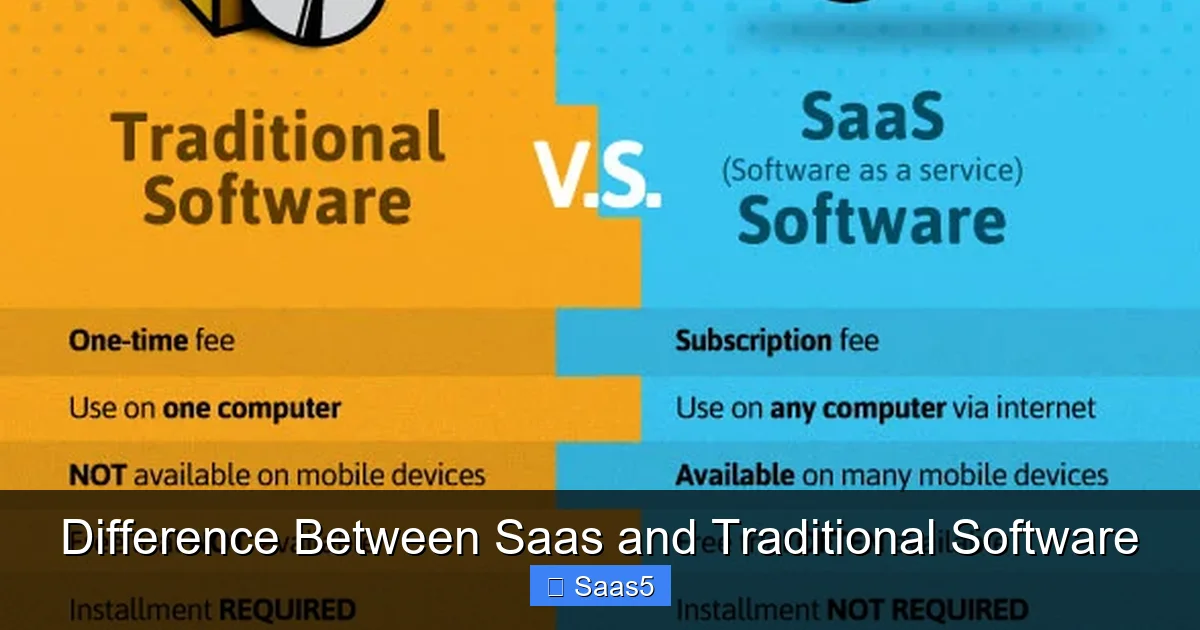
- Cost Structure: Traditional software involves high upfront licensing fees and hardware costs (CapEx); SaaS uses a predictable monthly or annual subscription fee (OpEx).
- Maintenance & Updates: With traditional software, the customer is responsible for installing patches, upgrades, and security; the SaaS provider handles all maintenance automatically.
- Customization & Control: Traditional software offers deeper customization and full data control; SaaS typically offers configuration within set parameters, with data residing on the vendor’s servers.
- Scalability & Access: SaaS allows easy, instant scaling of users or features and access from anywhere; scaling traditional software often requires new licenses and hardware procurement.
- Implementation Speed: SaaS solutions can be live in hours or days; traditional software deployments can take months or years due to installation and integration complexity.
- Vendor Relationship: SaaS is an ongoing service relationship governed by a service level agreement (SLA); traditional software is a one-time sale with optional, costly support contracts.
📑 Table of Contents
The Foundation: What is Traditional Software?
Traditional software, often called “on-premise” or “perpetual license” software, is the model that dominated the landscape for decades. You purchase a license to use the software, which is then installed and runs on your own hardware—whether that’s a desktop computer, a server in your office closet, or a data center you lease.
The One-Time Purchase & Ownership Mindset
The transaction is straightforward: you pay a large, upfront fee for the license. This fee grants you the right to use a specific version of the software indefinitely. You own that copy, in a sense. However, this “ownership” comes with significant responsibilities. You are now the proud owner of a complex piece of technology that requires a home (your servers) and constant care. This model treats software as a tangible asset, similar to buying a vehicle. You buy the car, but you’re still on the hook for fuel, insurance, maintenance, and repairs.
Consider a classic example: Microsoft Office. For years, you’d buy a box containing a product key. You’d install it on your PC. That copy was yours. If a new version came out, say Office 2019, you’d have to buy another box if you wanted the latest features. The software itself lived and died on your machine.
The Infrastructure Burden
This model creates a cascade of additional costs and requirements. First, you need adequate hardware. If you’re deploying enterprise resource planning (ERP) software like a legacy version of SAP or Oracle for 100 employees, you need powerful, reliable servers. That’s a capital expense. Then, you need IT staff to install, configure, secure, and manage that infrastructure. You’re responsible for power, cooling, physical security, and network bandwidth. The total cost of ownership (TCO) extends far beyond that initial license fee. It’s a commitment to building and sustaining your own private computing environment for that application.
The Update & Support Cycle
Updates are a discrete, often painful event. The vendor releases a new version—maybe with critical security patches or new features. Your IT team must then plan the deployment: testing for compatibility, scheduling downtime, rolling it out to all users, and troubleshooting issues. Many businesses, to avoid this headache, stay on older, unsupported versions for years, creating security vulnerabilities and missing out on efficiency gains. Support is typically an additional, annual fee (often 15-22% of the license cost) and may be limited to certain versions or require you to troubleshoot basic issues before escalating.
Think of it like owning a classic car. You have complete control. You can modify the engine, repaint it, and decide exactly when and how to service it. But you also bear all the costs, risks, and responsibilities of that ownership. The car (software) only runs when and where you have it physically located (your hardware).
The Cloud Revolution: What is SaaS?
SaaS, or Software as a Service, flips this entire paradigm on its head. Instead of buying a thing, you subscribe to a service. The software application is hosted, managed, and maintained by a third-party provider on their cloud infrastructure. You access it entirely over the internet, typically through a web browser or a lightweight app. You don’t install it on your local machines (beyond perhaps a simple client). You simply log in and use it.
Visual guide about Difference Between Saas and Traditional Software
Image source: blog.freightpop.com
The Subscription Economy
The financial model is the most obvious shift. There is no large upfront license fee. Instead, you pay a recurring subscription—monthly, quarterly, or annually—per user, per feature tier, or based on usage metrics. This transforms software from a capital expenditure (CapEx), requiring budget approval and asset depreciation, into an operational expenditure (OpEx), which is a predictable line item in your monthly overhead. This is a game-changer for startups and large enterprises alike, improving cash flow and making enterprise-grade tools accessible without a massive initial outlay.
Popular examples are everywhere. Salesforce for CRM, Slack for team communication, Zoom for video conferencing, and Google Workspace for productivity suites. You don’t own a copy of Salesforce; you pay for the right to use their platform, which lives on their servers in Amazon Web Services (AWS) or similar data centers.
The Vendor-Managed Ecosystem
With SaaS, the provider is responsible for the entire stack: the application software, the underlying operating system, the servers, storage, networking, and physical data center security. They handle uptime, backups, disaster recovery, and compliance certifications (like SOC 2, ISO 27001, GDPR). You, the customer, are essentially renting a fully staffed, state-of-the-art IT department for that specific application. Your primary concerns are your data, your users, and your business processes within the tool.
This is like hailing a ride with Uber or Lyft. You don’t own the car, insure it, maintain it, or worry about its depreciation. You pay for the service of transportation from point A to B. The provider handles all the complexity of the asset. Your relationship is with the service quality, not the machinery.
Head-to-Head: Key Differences Explained
Now let’s dive into the nitty-gritty. Where do these models diverge in practice? We’ll compare them across the most critical dimensions for any business.
Visual guide about Difference Between Saas and Traditional Software
Image source: thesaasmonster.com
Deployment and Access: On Your Ground vs. Anywhere
Traditional: Deployment is a project. It involves procuring and setting up servers, installing the software, configuring it for your network, and often, a lengthy process of data migration and user training. Access is typically limited to the office network or via a clunky, expensive VPN setup for remote workers. If the server goes down, the software is unavailable until it’s fixed on-site.
SaaS: Deployment is activation. Once you subscribe, you can usually create an account and start using the core features within minutes. Access is universal—any device with a modern web browser and an internet connection can run the application. This enables true remote and hybrid work models inherently. The provider’s infrastructure is built for high availability, often with uptime guarantees of 99.9% or higher in their SLA. If your office loses power, you can work from your phone on a cellular network.
Pricing and Financial Impact: Big Upfront vs. Steady Stream
Traditional: The pricing model is high initial cost (license fees) plus ongoing, often unpredictable, costs for maintenance, support, upgrades, and internal IT staff. Budgeting is lumpy. You might spend $100,000 one year on a new system and $20,000 the next on support, then another large sum in 5-7 years for the next version. It’s a significant capital investment that must be justified over a long period.
SaaS: Pricing is subscription-based and predictable. You know exactly what your monthly or annual cost will be per user. This makes forecasting easy and aligns costs directly with active usage (e.g., you add a new employee, cost goes up; one leaves, cost goes down). However, over a long period (5-10 years), the cumulative subscription fees can exceed the one-time cost of traditional software. The trade-off is forgoed ownership for flexibility and reduced hidden costs.
Maintenance, Updates, and Innovation: Your Job vs. Their Job
This is the single biggest operational difference and a major driver for SaaS adoption.
Traditional: Maintenance is your responsibility. This includes applying security patches, bug fixes, and major version upgrades. These are disruptive, resource-intensive projects that require testing, scheduling, and retraining. Innovation is slow; you only get new features when you decide to purchase and deploy a new version, which can be years apart. Many businesses run on outdated, insecure software simply to avoid the upgrade pain.
SaaS: Maintenance is invisible. The provider rolls out updates, patches, and new features seamlessly, often in the background. Users might log in one day to find a new button or improved workflow. This continuous delivery model means all customers are on the latest, most secure version at all times. You benefit from innovation immediately without any project overhead. The provider’s business depends on constantly improving the product to retain subscribers.
Customization and Integration: Deep Control vs. Guided Configuration
Traditional: You have the code (or often, the source code). With skilled developers, you can customize the software to an extreme degree, altering core workflows, building deep integrations with other internal systems, and creating unique functionality. This is powerful but comes with high costs, complexity, and a major downside: every customization must be re-tested and potentially re-coded after every major vendor upgrade, creating a heavy technical debt.
SaaS: Customization is typically limited to configuration through admin panels, point-and-click tools, and APIs (Application Programming Interfaces). You can tailor fields, workflows, and reports to fit your business processes. You can integrate with other SaaS apps (like connecting your CRM to your marketing automation tool) via pre-built connectors or APIs. However, you cannot change the core, underlying code of the application. This is a trade-off: you lose some bespoke flexibility but gain stability and the guarantee that your configurations will survive automatic updates. The best SaaS platforms offer extensive, well-documented APIs to enable powerful, supported integrations.
Security, Compliance, and Data: Your Vault vs. Their Fortress
Security perceptions are a common point of debate. The reality is nuanced.
Traditional: You have physical and logical control. Your data resides on your servers, behind your firewall. You are solely responsible for securing it—from physical access to network security to application patching. This is ideal for organizations with extreme regulatory requirements (some government agencies, defense contractors) or those with massive, dedicated security teams. The liability and risk are entirely yours. A breach on your watch is your problem.
SaaS: Security is a shared responsibility. The provider is responsible for the security *of* the cloud infrastructure—the servers, network, and application itself. You are responsible for security *in* the cloud—your user access controls (strong passwords, MFA), data classification, and how you use the application. Reputable SaaS vendors invest far more in security personnel, technology, and compliance certifications than all but the largest enterprises could afford on their own. They employ dedicated security operations centers (SOCs), undergo rigorous third-party audits, and build redundancy across global data centers. The key is due diligence: you must review the provider’s security documentation, certifications, and terms and conditions to understand their commitments and your obligations. For most small to mid-sized businesses, a top-tier SaaS provider’s security posture is vastly superior to what they could build themselves.
Advantages and Disadvantages: A Balanced View
No model is perfect for every scenario. Let’s weigh the pros and cons clearly.
Visual guide about Difference Between Saas and Traditional Software
Image source: lh7-us.googleusercontent.com
Traditional Software: The Case For and Against
Pros:
- Maximum Control & Customization: Full access to modify the software to exact, unique specifications.
- Data Sovereignty: Data physically resides on your premises, which can be a strict regulatory or policy requirement.
- Perpetual Use: After the initial purchase, you can theoretically use that version forever without further licensing fees (though support costs continue).
- No Ongoing Vendor Lock-in (in the short term): You own the license; you can often choose to stop paying for support and continue using the software as-is.
Cons:
- High Initial Cost: Major barrier to entry for smaller businesses.
- Significant IT Overhead: Requires dedicated staff and infrastructure, increasing TCO.
Stuck on old versions unless you fund another major upgrade project. - Long Deployment Cycles: Months to years to get fully operational.
- Disaster Recovery is Your Responsibility: Building and testing backups and failover systems is complex and costly.
SaaS: The Case For and Against
Pros:
- Low Barrier to Entry: Start using powerful tools with minimal upfront cost.
- Predictable Operating Expenses: Simple, per-user monthly billing aids financial planning.
- Zero Maintenance: The provider handles all updates, security, and infrastructure.
- Instant, Universal Access: Work from anywhere, on any device.
- Rapid Innovation: Benefit from continuous feature releases and improvements.
- Effortless Scalability: Add or remove users with a few clicks.
- Built-in Resilience: Enterprise-grade uptime and disaster recovery are included.
Cons:
- Ongoing Cost: Subscription fees never stop; long-term costs can surpass a perpetual license.
- Limited Customization: You must adapt your processes to the software’s core functionality to a greater degree.
- Vendor Lock-in & Data Gravity: Migrating data and processes to a new provider can be difficult and expensive. Your data lives on their servers.
- Dependence on Vendor Health & Internet: If the vendor goes out of business or has an outage, your business is directly impacted. You need reliable internet.
- Less Control Over Roadmap: You are subject to the vendor’s priorities for feature development.
How to Decide: A Practical Guide for Your Business
The choice isn’t about which model is “better” in an absolute sense. It’s about which is better *for your specific context*. Ask yourself and your team these questions.
Assess Your Core Needs and Constraints
Start with business requirements, not technology. What problem are you solving? How critical is this application to daily operations? How many users need it? What is your budget—both initial and ongoing? Do you have a skilled internal IT team, or are you a lean startup? A small marketing agency with 10 employees has vastly different needs and resources than a 50-year-old manufacturing company with 500 employees and legacy systems.
Evaluate Your Need for Control and Customization
Be brutally honest. Do you have truly unique, proprietary business processes that *must* be embedded in your software? If yes, traditional software or a highly customizable SaaS (like a Platform-as-a-Service/PaaS) might be necessary. For most standard business functions—CRM, HR, accounting, project management—modern SaaS applications offer enough configurability. Often, the cost of deep customization in a traditional model is so high that it forces a business to change its processes anyway, making the SaaS “out-of-the-box” approach a better fit.
Analyze Total Cost of Ownership (TCO) Over 5-7 Years
Don’t just compare the sticker price. Build a simple model. For traditional software: license cost + 3 years of support (18-22% annually) + estimated hardware/upgrade costs + internal IT staff time for maintenance (a huge, often forgotten cost). For SaaS: (monthly fee x user count x 60 months) + any one-time implementation/setup fees. You’ll often find SaaS wins on TCO for small to mid-sized businesses when you factor in the hidden IT burden.
Scrutinize Security and Compliance Requirements
What industry regulations govern you (HIPAA, GDPR, PCI-DSS, SOX)? Does your data contain state secrets? If you have strict data residency laws requiring data to stay within a specific country or region, you must verify the SaaS provider has data centers in that location. Always review the provider’s security whitepaper, compliance certifications, and terms of service to understand their security practices and your liability. For the vast majority of businesses, a reputable SaaS vendor offers superior security. For a handful with extreme, specific controls, traditional may be the only path.
Consider Your Long-Term Strategy and Agility
How fast does your business move? Are you in a high-growth or high-churn environment where team sizes fluctuate? SaaS’s elasticity is perfect here. Are you planning major mergers or acquisitions? Integrating disparate traditional systems can be a nightmare; modern SaaS platforms often have easier integration marketplaces. Think about your future state, not just today.
The Future of Software Delivery: Convergence and Choice
The lines are blurring. We now see “hybrid” and “multi-cloud” strategies. Some traditional software vendors (like Microsoft with its Azure-hosted virtual desktops offering Windows and Office) are offering their products in a hosted, SaaS-like manner. Conversely, SaaS providers are offering more advanced configuration tools and even limited on-premise “air-gapped” versions for highly regulated industries. The future is likely a continuum of options, with businesses using a mix: core, stable systems might be traditional, while customer-facing, collaborative tools are SaaS. The key is understanding the fundamental trade-offs—control vs. convenience, upfront cost vs. operational flexibility—and making informed choices for each workload.
Conclusion
The difference between SaaS and traditional software is a tale of two philosophies: ownership versus access, control versus convenience, and capital investment versus operational agility. Traditional software offers the deep customization and data control that some complex, highly regulated organizations still require, but at a tremendous cost in time, money, and internal resources. SaaS democratizes access to world-class applications, shifting the burden of infrastructure and innovation to specialists, allowing businesses to focus on their core competencies. For the overwhelming majority of companies today, the SaaS model provides a faster, more cost-effective, and more secure path to the software they need. The decision should be a strategic one, based on a clear-eyed assessment of your business’s unique needs, resources, and trajectory, not simply on habit or legacy infrastructure. The cloud isn’t the future; it’s the present, and understanding its models is fundamental to modern business success.
Frequently Asked Questions
Is SaaS always cheaper than traditional software?
Not necessarily over a very long period. SaaS eliminates high upfront costs and hidden IT expenses, making it cheaper initially and for most SMBs long-term. However, for large enterprises with stable user counts and existing IT infrastructure, the perpetual nature of a traditional license can be cheaper over 10+ years. A full TCO analysis is essential.
Can I customize SaaS software as much as traditional software?
No. SaaS customization is generally limited to configuration (changing settings, fields, workflows) and using APIs for integrations. You cannot alter the core source code. If you need to deeply modify the application’s fundamental logic, traditional software or a PaaS (Platform as a Service) offering is required.
Is my data safe in a SaaS application?
For most businesses, yes—often safer than on their own servers. Leading SaaS providers invest billions in security, compliance, and global redundancy. However, security is a shared responsibility. You must manage user access, passwords, and data handling. Always review the provider’s security certifications and service agreements to understand their protocols and your obligations.
What happens if I stop paying for a SaaS subscription?
Your access is terminated. Typically, you have a grace period to retrieve your data. Reputable providers offer data export tools and will hold your data for a defined period after cancellation. You must have a data exit strategy before signing up. With traditional software, you own a perpetual license to the version you purchased, even if you stop paying for support.
Can SaaS software work offline?
Most modern SaaS applications have limited offline capabilities through progressive web apps (PWAs) or mobile apps that cache data for temporary use. However, full functionality almost always requires an internet connection. Traditional software, installed locally, is inherently offline-capable, though features like real-time collaboration may be limited.
How do I choose between SaaS and traditional for my business?
Evaluate based on: 1) Budget (CapEx vs. OpEx), 2) IT resources (do you have a team to manage it?), 3) Need for customization, 4) Security/compliance requirements, 5) Scalability needs, and 6) Desired innovation speed. For most businesses without extreme customization or data residency needs, SaaS is the pragmatic, modern choice. Always conduct a detailed TCO and requirements analysis before deciding.