Kittl Ai Design Tool for Students
Kittl is a revolutionary AI-powered design platform built specifically for students. It eliminates the steep learning curve and high cost of traditional software, offering an intuitive interface, thousands of templates, and powerful AI features. Students can effortlessly create stunning posters, social media graphics, presentations, and portfolio pieces for academic projects, club events, and personal branding, all while building in-demand digital skills for their future careers.
Let’s be honest. Being a student today is a masterclass in juggling a million different tasks. You’re writing papers, studying for exams, working part-time, maybe leading a club, and trying to have a social life. Then, a project comes up that needs something visual—a poster for a fundraiser, an infographic for a biology presentation, a cool Instagram graphic for your student organization, or even a portfolio piece for an internship application. Your brain panics. You open Canva, but it feels a bit generic. You think about Photoshop, but the learning curve is a mountain and the subscription cost is a stomach punch. What if you had a tool that felt like it was built for you? A tool that understood the student hustle, the tight budget, and the need for speed and quality? Enter Kittl, the AI design tool that’s quietly becoming the secret weapon for students everywhere.
Kittl isn’t just another design app. It’s a complete creative ecosystem powered by artificial intelligence, designed to strip away the complexity and get you from a blank page to a polished, professional design in minutes. It combines the ease-of-use of modern web apps with the raw creative power of AI, all wrapped in a package that’s surprisingly affordable. In this guide, we’re going to dive deep into exactly how Kittl works for students, why it’s a game-changer, and how you can use it to ace your visual projects, boost your extracurriculars, and build a standout portfolio. Forget the anxiety of design. Let’s get creative.
Key Takeaways
- Democratizes Design: Kittl makes professional graphic design accessible to every student, regardless of prior experience or artistic skill.
- AI-Powered Efficiency: Tools like AI Image Generator and AI Text Effects dramatically speed up the creative process, turning ideas into visuals in seconds.
- Template-Centric Workflow: With thousands of student-relevant templates (for posters, infographics, resumes), starting a project is fast and frustration-free.
- Cost-Effective Solution: It offers a robust free tier and affordable Pro plans, removing the financial barrier of expensive software like Adobe Suite.
- Builds Real-World Skills: Using Kittl helps students develop practical visual communication and digital literacy skills valued by employers across all industries.
- Seamless Collaboration: Cloud-based features allow for easy sharing and group work on design projects, ideal for student clubs and team assignments.
- Versatile Output: Create print-ready PDFs, optimized web graphics, and social media assets for any platform, all from one tool.
📑 Table of Contents
- Why Students Need a Specialized Design Tool (And Why Kittl Fits the Bill)
- Diving Deep: Kittl’s Core Features That Empower Students
- Practical Applications: From Lecture Hall to Boardroom
- Tips & Tricks to Master Kittl as a Student
- The Bigger Picture: How Kittl Builds Skills for Your Future
- Conclusion: Your Creativity, Unlocked
Why Students Need a Specialized Design Tool (And Why Kittl Fits the Bill)
Before we talk about the “how,” let’s talk about the “why.” Why isn’t a general-purpose tool like Canva or a professional one like Illustrator the perfect fit for the average student? The answer lies in the unique context of student life: constraints.
The Student Design Trilemma: Time, Money, and Skill
Students operate under three major constraints. First, time. You have minutes, not hours, to create that event flyer after a long day of lectures. Second, money. Your budget is allocated to rent, textbooks, and coffee. A $20/month (or more) software subscription is a non-starter. Third, skill. You might be a biology genius or a coding whiz, but you never took a graphic design class. You don’t know what a kerf is (it’s a spacing unit, by the way) and you’re intimidated by layers and paths.
Traditional design tools fail on at least two of these fronts. The Adobe Creative Cloud is powerful but expensive and has a notoriously steep learning curve. Basic online tools are cheap but often lack the power and polish for more serious projects. Kittl was built to solve this trilemma. It’s fast (thanks to AI), it’s affordable (with a generous free plan), and it’s intuitive (drag-and-drop meets smart automation). It’s designed for the student who needs to look professional without becoming a professional designer.
From Assignment to Achievement: The High Stakes of Visuals
Think visual projects are just about making things “look pretty”? Think again. A well-designed infographic can make complex data understandable and memorable, directly impacting your grade. A professional-looking poster for a club event can double attendance. A sleek, modern portfolio can be the difference between landing an internship and getting passed over. In a digital world, visual communication is communication. Kittl gives you the ability to communicate more effectively, persuasively, and memorably. It’s not an art project; it’s a strategic tool for academic and professional success.
Diving Deep: Kittl’s Core Features That Empower Students
Okay, so Kittl promises the world. What does it actually do? Let’s break down the feature set and see exactly how each component serves a student’s needs.
Visual guide about Kittl Ai Design Tool for Students
Image source: aivyx.com
1. The AI Engine: Your 24/7 Design Assistant
This is Kittl’s crown jewel. The AI isn’t a gimmick; it’s woven into the fabric of the tool.
- AI Image Generator: Stuck on a concept? Type “a futuristic cityscape for a computer science club poster” or “a minimalist icon for a sustainability initiative,” and Kittl generates unique, high-quality images in seconds. Need a background, a hero image, or an abstract pattern? The AI has you covered, eliminating the need to search for stock photos (which can be generic or expensive).
- AI Text Effects & Background Remover: Want text that looks like it’s carved from ice or made of glowing neon? The AI text effects let you apply complex, professional styles with one click. The AI-powered background remover is shockingly good, letting you isolate people or objects from photos for collages or custom graphics without the tedious manual work.
- AI Vectorizer & Upscaler: Have a low-resolution logo or sketch? The AI vectorizer converts it into a clean, scalable vector graphic. The AI upscaler can enhance the quality of an image without losing sharpness. These are pro-level features made effortless.
2. A Treasure Trove of Student-Ready Templates
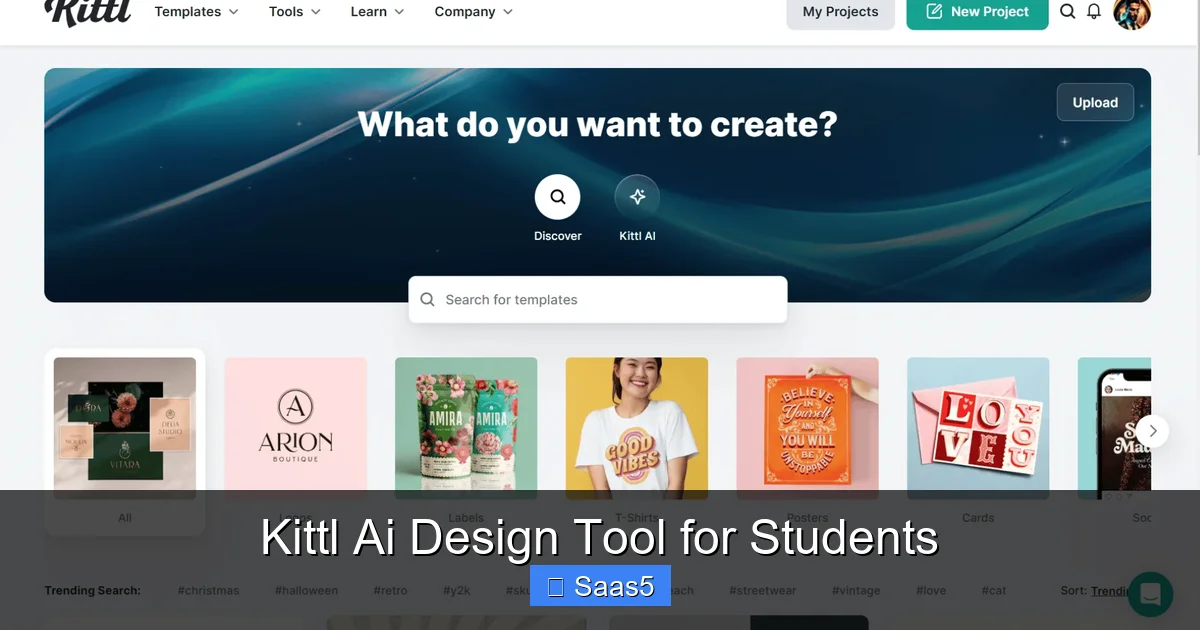
Starting from a blank page is the biggest creativity killer. Kittl’s template library is where you start, and it’s brilliantly curated. You’ll find categories for:
- Academic: Poster sessions, scientific infographics, thesis defense slides, research flyers.
- Student Life: Event promotions (parties, fundraisers, club fairs), Instagram stories & reels, YouTube thumbnails, spirit week graphics.
- Professional: Modern resumes, LinkedIn banners, portfolio covers, business cards.
- Personal: Birthday invitations, holiday cards, motivational quote graphics.
Each template is fully customizable. Change colors to match your school’s branding, swap out text, replace images with your own or AI-generated ones. It’s a launchpad, not a cage.
3. Intuitive Design Canvas That Just Makes Sense
The workspace is clean, uncluttered, and logical. The left panel holds your pages, layers, and assets. The top toolbar has all your essential tools. The right panel is where the magic happens—this is where you adjust properties, apply effects, and access AI features. You can pin it open or hide it for a distraction-free view. The drag-and-drop functionality is smooth, and snapping guides make alignment a breeze. You don’t need a tutorial to figure out how to add a text box or upload an image. It feels familiar if you’ve ever used any modern web app.
4. Robust Asset Library & Brand Kits
Beyond templates, Kittl provides a massive library of icons, illustrations, and graphics (many with a modern, trendy aesthetic students love). You can also upload your own assets—your university logo, photos from a campus event, your personal signature. The Brand Kit feature is a pro move for student organizations. You can save your club’s color palette, fonts, and logos. Then, any time you create a new graphic, you can apply your brand kit with one click, ensuring every flyer, Instagram post, and email banner looks cohesive and professional.
Practical Applications: From Lecture Hall to Boardroom
Theory is great, but let’s get concrete. Here’s how Kittl translates into real-world wins for a student.
Visual guide about Kittl Ai Design Tool for Students
Image source: toolpilot.ai
Academic Projects That Stand Out
That 20-page research paper is mandatory. The accompanying poster presentation? That’s where you can shine. Use Kittl to design a visually striking poster that clearly charts your methodology, highlights key data with custom infographics (made with their shape and chart tools), and presents your conclusion in a bold, memorable way. Professors notice. For group presentations, use the collaboration features to let each member design a slide or section, maintaining a unified theme. You can even create custom handout layouts or study guide sheets that are easier to digest than plain text.
Elevating Student Organizations & Clubs
If you’re in a club, you’re already a marketer, event planner, and content creator. Kittl streamlines all of it. Design a consistent series of Instagram posts to promote weekly meetings using a template and your club’s brand kit. Create a professional eventbrite banner and Instagram story template for your annual conference. Design a sleek sponsorship packet PDF to send to local businesses. The ability to produce high-quality, on-brand materials in-house saves your club’s budget and projects an image of seriousness and competence that attracts members and partners.
Building a Personal Brand & Portfolio
Your LinkedIn profile, your personal website, your Instagram—these are your digital billboards. Kittl helps you curate them. Design a custom LinkedIn banner that says “Computer Science Student @ University X | Passionate about AI.” Create a series of cohesive Instagram post templates to document your project journey or share industry insights. Most importantly, use Kittl to build the visuals for your portfolio website. Whether you’re an artist, a writer, an engineer showing off CAD designs, or a business student with case competition slides, Kittl helps you create beautiful portfolio covers, project thumbnails, and “about me” graphics that tell your story with style.
Tips & Tricks to Master Kittl as a Student
You could just use the templates, but to truly unlock Kittl, use these pro-tips tailored for a student’s workflow.
Visual guide about Kittl Ai Design Tool for Students
Image source: toolpilot.ai
Start with a Template, Then Make It Your Own
Don’t just change the text. Go deeper. Use the “Replace Image” feature to swap in your own photos. Play with the “Effects” panel on text and shapes—a subtle drop shadow or gradient overlay can add huge depth. Adjust the color palette entirely using the color picker to match your specific project’s vibe. The goal is to start with a professional structure and infuse it with your unique personality or project’s theme.
Leverage AI for the Heavy Lifting, Not the Final Touch
Use the AI Image Generator as your brainstorming partner and for creating base elements. Generate a background, then layer your own text and graphics on top. Use it to create a unique icon when you can’t find the perfect one in the library. But remember, the AI is a starting point. Your critical thinking—choosing the right image, pairing it with the right message, adjusting the composition—is what makes the final design effective. Let AI handle the “what,” you handle the “why” and “how.”
Master the Export Settings
This is a crucial skill. For print (like posters or flyers), export as a high-resolution PDF or PNG (300 DPI). For web and social media, use the preset dimensions (e.g., 1080×1080 px for Instagram square) and export as JPG or PNG. Kittl’s “Resize” feature is a lifesaver—create your design once, then use it to instantly generate versions for Instagram, LinkedIn, and a Twitter header without starting from scratch. Always check the platform’s current recommended sizes.
Organize with Pages and Layers
For multi-page projects like a magazine, a zine, or a multi-slide handout, use the “Pages” panel. It works like a mini InDesign. Label your pages clearly (“Cover,” “Page 1,” “Back Cover”). Use the Layers panel to group related elements (e.g., all text on a header, all icons in an infographic). This makes editing later much faster. You can lock layers you don’t want to move accidentally.
The Bigger Picture: How Kittl Builds Skills for Your Future
Using Kittl isn’t just about getting this one assignment done. It’s about skill-building. In today’s economy, visual literacy is a fundamental skill, regardless of your major.
Learning by Doing: Implicit Design Education
As you use Kittl, you’ll unconsciously absorb design principles. You’ll learn about hierarchy by making your title bigger and bolder than your body text. You’ll understand color theory when you experiment with complementary color palettes from the color wheel tool. You’ll grasp balance and spacing by using the alignment guides. It’s a hands-on, low-stakes way to develop an eye for what makes communication clear and appealing.
A Portfolio Piece in Itself
Here’s a meta idea: your proficiency with a modern, AI-augmented design tool is a skill worth showcasing. On your resume or LinkedIn, you can list “Proficient in Kittl (AI-powered graphic design)” alongside “Microsoft Office.” In an interview, you can say, “For my student organization, I used Kittl to design all our marketing assets, which increased event attendance by 30%.” You’re not just showing you made a poster; you’re showing you’re adept at using contemporary tools to solve communication problems efficiently.
Bridging the Gap to Professional Tools
While Kittl is simpler than the Adobe Suite, the core concepts transfer. You’re still working with layers, text boxes, shapes, and color palettes. You’re still thinking about composition and audience. If you later need to learn Illustrator or Photoshop, the mental model is already there. Kittl serves as the perfect on-ramp to professional design thinking without the professional-level intimidation and cost.
Conclusion: Your Creativity, Unlocked
Kittl is more than software; it’s a creative democratizer. For students, it removes the traditional barriers to entry in the world of visual design—cost, complexity, and time. It hands you a powerful set of AI-assisted tools and a universe of templates, then trusts you to bring your ideas to life. Whether you’re creating a last-minute poster for a dorm event, crafting a polished infographic for a final project, designing a suite of assets for your club’s rebrand, or building the visuals for your first professional portfolio, Kittl provides the platform to do it with confidence and quality.
Your ideas are valuable. Your projects deserve to be seen and understood. Don’t let a lack of technical skill or budget hold your visuals back. Sign up for the free tier, play with the AI tools, browse the templates, and experience the shift from “I can’t design” to “I made this.” In the toolkit of a modern student, Kittl isn’t just another app—it’s an essential instrument for making your mark, both in the classroom and beyond. Your future self, with a fuller portfolio and sharper skills, will thank you.
Frequently Asked Questions
Is Kittl really free for students?
Yes, Kittl offers a very capable free plan that includes access to thousands of templates, basic AI features (with a monthly credit limit), and standard exports. This is often more than enough for individual student projects and club work. For heavier usage, their Pro plan is very affordable at around $12/month when billed annually, which unlocks unlimited AI credits, premium assets, and advanced features.
How does Kittl compare to Canva? Is it better?
Kittl and Canva serve similar audiences but have different strengths. Canva has a slightly larger template library and more built-in photo editing tools. Kittl often wins on AI-powered features (its image generator and text effects are considered more advanced and stylistic), its vector-based editing (which allows for cleaner scaling), and its modern, design-forward aesthetic. For students wanting cutting-edge AI tools and a more “prosumer” feel, Kittl has a distinct edge.
Can I use Kittl offline or only in a web browser?
Kittl is primarily a cloud-based web application, meaning you need an internet connection to use it. This allows for seamless saving, collaboration, and access to its AI features and asset library from any computer. There is currently no dedicated offline desktop application.
What about copyright? Can I use the graphics I create for commercial purposes?
Yes, generally. For assets created with your own Kittl account—whether from templates, your own uploads, or the AI generator—you typically own the rights and can use them for both personal and commercial projects. However, you must comply with Kittl’s Terms of Service. It’s always wise to double-check their current license agreement, especially regarding AI-generated content, which can have nuances.
Is Kittl difficult to learn for someone with zero design experience?
Not at all. This is one of its core strengths. The interface is clean and intuitive, similar to other modern web apps. Starting from a template is the easiest way to learn. The drag-and-drop functionality is straightforward. The AI features require no skill—just a descriptive text prompt. Most students can create a polished graphic within the first 10-15 minutes of exploring the tool.
What kinds of file formats can I export my designs as?
Kittl supports all the essential formats. You can export as PNG (with transparent background option), JPG (for photos/web), PDF (for print and multi-page documents), and SVG (for scalable vector graphics, perfect for logos). The “Resize” feature also allows you to quickly adapt a single design to multiple standard social media and print dimensions.