16 Gb Ram for Gaming Laptop
16 gb ram is the sweet spot for most gamers in 2024. It handles modern titles smoothly and leaves room for streaming or background apps. Whether you are building new or upgrading, this guide breaks down everything you need to know about 16 gb ram for gaming laptops.
If you are shopping for a gaming laptop, you have probably seen 16 gb ram listed as a standard option. And for good reason. This amount of memory hits the perfect balance between price and performance. Most modern games run beautifully with 16 GB, and you still have enough left over for streaming, browsing, or running background apps.
But is 16 GB always the right choice? Does it future-proof your setup? And what should you look for when buying a laptop with this much memory? Let us dive into everything you need to know about 16 gb ram for gaming laptop setups.
Key Takeaways
- 16 GB is the gold standard: Most modern games run perfectly with 16 GB of system memory.
- DDR4 and DDR5 both work: DDR5 offers faster speeds, but DDR4 is still reliable and affordable.
- Upgradeability matters: Check if your laptop has spare RAM slots before buying.
- Speed and dual-channel setup boost performance: Matching RAM sticks in pairs makes a real difference.
- 16 GB handles multitasking well: You can game, stream, and browse without slowdowns.
- Future-proof your rig: 16 GB gives you solid headroom for upcoming game releases.
📑 Table of Contents
Why 16 GB of RAM Matters for Gaming
Random access memory, or RAM, is the short-term memory your laptop uses while running programs. When you launch a game, it loads textures, maps, and physics calculations into RAM. The more memory you have, the smoother everything runs.
Here is why 16 GB of system memory has become the standard for gaming laptops:
- Modern games demand more memory. Titles like Cyberpunk 2077, Hogwarts Legacy, and Starfield recommend 16 GB as a minimum.
- Multitasking becomes effortless. You can game while having Discord, Chrome, and Spotify open without lag.
- Streaming works in the background. Running OBS or Twitch software alongside a game needs extra memory.
- Future games will need even more. 16 GB gives you a comfortable buffer for upcoming releases.
With only 8 GB, you will notice stuttering in newer titles. With 32 GB, you are paying extra for memory you may not fully use yet. That is why 16 GB hits the sweet spot for most gamers.
How RAM Affects Your Gaming Experience
Think of RAM like a desk. A bigger desk lets you spread out more papers at once. If your desk is too small, you keep shuffling papers in and out of a filing cabinet. That shuffling causes delays. In gaming terms, those delays show up as frame drops or slow load times.
When your laptop RAM is too small, the system has to constantly swap data to your storage drive. This creates bottlenecks. With 16 GB, most gamers will never hit that wall.
DDR4 vs DDR5: Which RAM Type Should You Choose?
Not all 16 GB memory is created equal. The two main types you will encounter are DDR4 and DDR5. Both work well for gaming, but they have key differences.
DDR4 RAM: The Reliable Workhorse
DDR4 has been the standard for years. It is stable, widely available, and affordable. Most 16 gb ram gaming laptop models on the market today use DDR4. Here is what you need to know:
- Speed: Typically ranges from 3200 MHz to 3600 MHz.
- Price: More budget-friendly than DDR5 options.
- Compatibility: Works with most current-gen laptops and motherboards.
- Performance: More than enough for 1080p and 1440p gaming.
DDR4 still delivers excellent gaming performance. If you are on a budget or building a cost-effective setup, it is a solid choice.
DDR5 RAM: The New Generation
DDR5 is the newer standard. It offers higher speeds and better efficiency. Here is what makes it stand out:
- Speed: Starts at 4800 MHz and can go well beyond 6000 MHz.
- Bandwidth: Handles more data per clock cycle than DDR4.
- Power Efficiency: Uses less voltage, which can help with laptop battery life.
- Future-Proofing: Newer laptops increasingly come with DDR5 support.
However, DDR5 16 gb ram for laptop options tend to cost more. The performance gain in gaming is real but not dramatic yet. If you are buying a new laptop today, DDR5 is a nice bonus but not a must-have.
| Feature | DDR4 | DDR5 |
|---|---|---|
| Base Speed | 3200 MHz | 4800 MHz |
| Max Speed (Common) | 3600 MHz | 6000 MHz |
| Price Range | Lower | Higher |
| Gaming Performance | Excellent | Slightly Better |
| Availability | Widespread | Growing |
| Power Efficiency | Standard | Better |
Both types deliver great gaming performance. Your choice should depend on budget and laptop compatibility.
How to Choose the Best 16 GB RAM Laptop for Gaming
Not every laptop with 16 GB of memory is created equal. There are several factors you should check before making a purchase. Let us walk through what matters most.
Check if the RAM Is Upgradeable
This is one of the most important things people overlook. Some laptops have soldered RAM, meaning you cannot add or replace it later. Others have open slots where you can install additional memory.
Before buying, check the laptop specifications. Look for terms like “upgradeable memory” or “dual RAM slots.” If you plan to eventually move to 32 GB, having a spare slot is essential.
Dual-Channel vs Single-Channel
Laptops with two RAM sticks running in dual-channel mode perform better than a single stick of the same total capacity. Dual-channel doubles the data pathway between RAM and the processor.
For example, two 8 GB sticks (16 GB total) in dual-channel will outperform one 16 GB stick in single-channel. This is a simple but impactful detail that many buyers miss.
RAM Speed Matters Too
Faster RAM speeds can improve frame rates in some games, especially with AMD processors. Look for kits rated at 3200 MHz or higher for DDR4, and 5600 MHz or higher for DDR5.
That said, the difference is modest. Do not pay a huge premium just for a few extra megahertz. Focus first on capacity and dual-channel configuration.
Brand and Reliability
Stick with trusted brands like Corsair, Kingston, Crucial, and G.Skill when buying laptop memory. These companies offer reliable modules with solid warranties. Cheap, no-name RAM can cause stability issues and crashes.
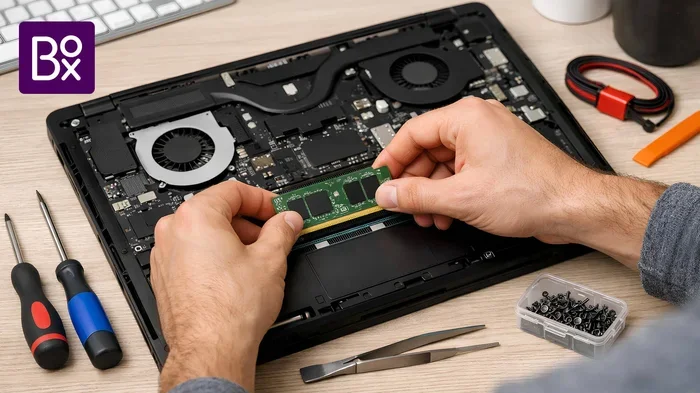
Can You Upgrade Laptop RAM to 16 GB?
Many people buy laptops with 8 GB of memory and later wonder if they can upgrade. The answer depends on your specific model.
Here is a quick guide:
- Check your laptop manual or the manufacturer’s website for RAM specifications.
- Look for free RAM slots. Some laptops have one slot occupied and one open.
- Use a tool like Crucial’s scanner to find compatible modules for your model.
- Open the back panel and install the new stick carefully.
- Test your system after installation to confirm the upgrade was recognized.
Upgrading to 16 GB of laptop RAM is one of the most affordable ways to breathe new life into an older machine. It costs far less than buying an entirely new laptop.
However, some ultrabooks and thin gaming laptops have memory soldered to the motherboard. In those cases, you cannot upgrade. Always verify before purchasing.
Best Use Cases for 16 GB of RAM in a Gaming Laptop
16 GB of memory covers a wide range of use cases. Here is where it shines the most:
1080p Gaming
This is the most common gaming resolution, and 16 GB handles it with ease. You will experience smooth frame rates in virtually every modern title at medium to high settings.
1440p Gaming
At 1440p, your GPU does most of the heavy lifting. 16 GB of system memory is still more than enough. You may only notice RAM limitations in extremely open-world games with massive environments.
Streaming and Content Creation
If you like to stream your gameplay on Twitch or YouTube, 16 GB gives you the headroom to run OBS, Chrome, and your game simultaneously. For light video editing or graphic design work, this amount of memory is also sufficient.
Casual and Competitive Gaming
Even competitive titles like Valorant, Fortnite, and Apex Legends run perfectly on 16 GB. You will not experience lag or stuttering during intense matches.
Common Mistakes People Make When Buying Gaming Laptop RAM
Avoid these pitfalls to get the most out of your 16 gb ram for gaming laptop setup:
- Buying mismatched RAM sticks. Always use identical sticks for dual-channel performance.
- Ignoring laptop compatibility. Not all RAM works with all laptops. Check the DDR generation and form factor.
- Overlooking BIOS updates. Sometimes a BIOS update is needed for new RAM to run at its rated speed.
- Assuming more GB always means better. 16 GB is plenty for gaming. Going to 32 GB offers diminishing returns for most players.
- Skipping the warranty. Always buy RAM with a manufacturer warranty for peace of mind.
Final Thoughts
16 GB of RAM remains the best choice for most gamers in 2024. It delivers smooth performance in modern titles, handles multitasking without breaking a sweat, and offers good value for your money. Whether you are buying a new gaming laptop or upgrading an existing one, 16 GB is the sweet spot.
If you want to explore current options, check out our guide on 16 Gb Ram Laptop Deals to find the best prices. And if you are curious about what RAM size truly fits your needs, our How Much Ram For Laptop guide breaks it all down.
For those specifically looking at pre-built options, we also cover 16 Gb Ram Gaming Laptop configurations in detail. Whatever your path, 16 GB of memory will serve you well for years to come.
Invest wisely, game hard, and enjoy every moment of your gaming experience with a setup that keeps up.
Frequently Asked Questions
Is 16 GB RAM enough for gaming in 2024?
Yes, absolutely. 16 GB is the recommended minimum for most modern games in 2024. It handles titles like Cyberpunk 2077, Hogwarts Legacy, and Baldur’s Gate 3 without issues. You will also have enough memory left for streaming or running background apps while gaming.
Can I use 16 GB RAM for video editing and gaming?
Yes, 16 GB works well for both gaming and light to moderate video editing. You can edit 1080p footage smoothly while keeping your gaming performance intact. For heavy 4K editing, you may want 32 GB, but 16 GB covers most creative tasks comfortably.
Does RAM speed affect gaming performance?
RAM speed has a modest impact on gaming performance. Faster speeds can improve frame rates slightly, especially with AMD processors. However, capacity and dual-channel configuration matter more. Focus on getting 16 GB in dual-channel before chasing higher speeds.
Should I buy a laptop with 16 GB or 32 GB of RAM?
For most gamers, 16 GB is the better value. 32 GB is great for heavy multitasking, professional content creation, or future-proofing. But for pure gaming, 16 GB delivers excellent performance at a lower price point.
Can I upgrade my laptop RAM to 16 GB later?
It depends on your laptop model. Some laptops have upgradeable RAM with free slots, while others have soldered memory. Always check the specifications before buying. If upgradeability matters to you, look for laptops with accessible RAM slots.
What is the difference between 8 GB and 16 GB RAM for gaming?
The difference is significant. 8 GB is the bare minimum and can cause stuttering in modern games. 16 GB provides smooth performance, allows multitasking, and future-proofs your setup. For any serious gaming, 16 GB is the recommended amount.