Most Reliable Hard Drives
Finding the most reliable hard drives means choosing the right storage for your needs. This guide covers the best HDDs and SSDs, compares their durability, and shares expert tips to help you pick a drive that lasts. Whether you need speed, capacity, or value, we have you covered.
When it comes to storing your important files, photos, and games, nothing beats a dependable storage device. The most reliable hard drives give you peace of mind because they keep your data safe day after day. Whether you are a gamer, a creative professional, or just someone who wants to back up family memories, choosing the right drive matters a lot.
In this guide, we break down what makes a hard drive trustworthy. We share top picks, compare different types, and give you practical tips to avoid common pitfalls. By the end, you will know exactly what to look for when shopping for storage.
If you have ever lost files because of a drive crash, you know how frustrating it can be. That is why focusing on hard drive reliability from the start is so important. Let us dive in and explore the best options available today.
Key Takeaways
- Reliability Matters Most: A dependable hard drive protects your data and saves you from costly replacements.
- HDD vs SSD: SSDs are generally more reliable due to having no moving parts, but HDDs still excel in bulk storage.
- Warranty Is Key: Top brands offer strong warranties that signal confidence in their hard drive reliability.
- Consider Your Use Case: Gaming, professional work, and casual use all demand different levels of durability and speed.
- Watch for Warning Signs: Knowing the signs of a failing drive helps you prevent data loss early.
- Brand Reputation Counts: Established brands tend to offer more consistent quality and better customer support.
📑 Table of Contents
What Makes a Hard Drive Reliable?
Not all storage devices are built the same way. Some last for years without a single issue, while others fail within months. Understanding what drives reliability helps you make a smarter purchase.
Build Quality and Components
The inside of a hard drive matters more than most people think. A drive with high-quality platters, a stable motor, and good read/write heads will naturally last longer. For SSDs, the type of NAND flash memory and the controller chip play a huge role in hard drive durability.
Cheap components might save money upfront, but they often lead to early failures. That is why trusted brands invest in better materials and testing processes. Look for drives that use advanced error correction and wear-leveling technology, especially for SSDs.
Warranty and Manufacturer Support
A strong warranty tells you a lot about a manufacturer’s confidence in their product. Most reliable hard drives come with at least a three-year warranty. Premium models from top brands may offer five years or even longer.
Good customer support matters too. If something goes wrong, you want a company that responds quickly and makes the replacement process easy. Brands like Western Digital, Seagate, Samsung, and Crucial are known for solid support teams.
Endurance Ratings
For SSDs, the TBW (Terabytes Written) rating is a key measure of endurance. It tells you how much data you can write to the drive over its lifetime before it is expected to wear out. Higher TBW numbers mean a longer-lasting drive.
For HDDs, the Mean Time Between Failures (MTBF) rating gives you a sense of expected lifespan. However, real-world reliability also depends on how you use and maintain the drive.
Top Reliable Hard Drives Reviewed
Now let us look at some of the best options on the market. These drives have earned strong reputations for dependability and performance.
Best Internal HDDs
If you need a lot of storage for less money, an internal HDD is a great choice. Here are some of the most trusted options:
- Seagate Barracuda: A popular choice for everyday storage. It offers up to 4TB of capacity and a solid five-year warranty. This drive is perfect for storing media files and backups.
- Western Digital Blue: Known for quiet operation and consistent performance. The Blue series is a reliable workhorse for general use and fits well in most desktop PCs.
- Toshiba X300: A strong performer with good speed and reliability. It is a great option if you need dependable storage without breaking the bank.
Best External Hard Drives
External drives are handy for backups and portable storage. Here are some reliable picks:
- WD Elements Portable: Simple, reliable, and affordable. It comes in various capacities and works right out of the box with most computers.
- Seagate Backup Plus Slim: A slim, lightweight design with good build quality. It also includes backup software to help you keep your data safe.
Best SSDs for Long-Term Reliability
SSDs are the go-to choice if you want speed and durability. Since they have no moving parts, they are less likely to fail from physical shocks.
- Samsung 870 EVO: One of the most trusted SSDs on the market. It offers excellent endurance, fast speeds, and a five-year warranty.
- Crucial MX500: A strong performer with good value. It includes hardware encryption and a generous warranty, making it a smart pick for most users.
- Samsung 980 Pro: If you want top-tier speed, this NVMe drive delivers. It is ideal for gaming and professional workloads where performance matters most.
HDD vs SSD: Which Is More Reliable?
This is one of the most common questions people ask. The answer depends on your needs and how you use your storage.
SSDs have no moving parts, which makes them more resistant to physical damage. If you drop a laptop while the SSD is running, the chances of data loss are much lower compared to an HDD. This is a big advantage for hard drive durability.
HDDs have spinning disks and moving read/write heads. Over time, these mechanical parts can wear out. However, modern HDDs are built very well and can last many years with proper care. They are also less likely to suffer from firmware issues that sometimes affect SSDs.
For a deeper look at how modern storage technology compares, check out our guide on PCIe NVMe M.2 SSD drives to understand the latest in high-speed storage.
| Feature | HDD | SSD |
|---|---|---|
| Moving Parts | Yes | No |
| Average Lifespan | 3-5 years | 5-7+ years |
| Shock Resistance | Low | High |
| Speed | Slower | Much Faster |
| Price per TB | Lower | Higher |
| Best For | Bulk storage, backups | OS, gaming, fast workloads |
Overall, SSDs tend to be more reliable for everyday use. But HDDs still hold their ground when you need large amounts of affordable storage. Many people use both: an SSD for the operating system and programs, and an HDD for files and backups.
Common Hard Drive Failures and How to Prevent Them
Even the best drives can fail eventually. But knowing what causes failures helps you take preventive steps.
Physical Damage
Dropping an HDD while it is running is one of the fastest ways to kill it. The spinning platters inside are extremely sensitive. Even a small bump during operation can cause a head crash, which destroys data.
To prevent this, always handle your drives carefully. If you use a laptop, avoid moving it while the HDD is active. For desktops, make sure the drive is securely mounted to reduce vibration.
Overheating
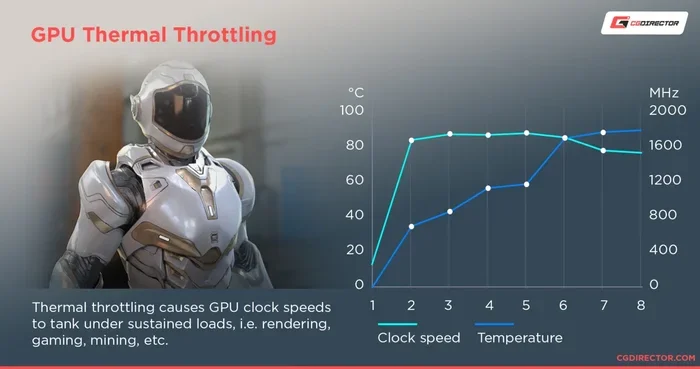
Heat is the enemy of electronics. A hard drive that runs too hot for too long will wear out faster. Make sure your computer has good airflow, and keep the drive in a well-ventilated area.
If you use an external drive, do not leave it in a hot car or in direct sunlight for long periods. Simple habits like these can significantly extend your drive’s lifespan.
Firmware Bugs
Sometimes the problem is not physical but software-related. Firmware bugs can cause drives to slow down, disconnect, or stop working altogether. Manufacturers regularly release firmware updates to fix these issues.
Always check the manufacturer’s website for the latest firmware for your drive. Keeping your drive updated is an easy way to avoid unexpected problems.
Power Surges and Electrical Issues
Sudden power loss or electrical surges can corrupt data or damage the drive’s electronics. Using a surge protector or an uninterruptible power supply (UPS) is a smart investment.
This is especially important for desktop setups. A simple UPS can protect not just your hard drive but your entire computer from electrical damage.
Signs Your Hard Drive Is Failing
Being able to spot early warning signs can save you from a total data loss. Here are the most common red flags:
- Unusual clicking or grinding noises: This is often called the “click of death” and usually signals a mechanical issue with an HDD.
- Frequent file corruption: If files keep becoming damaged or unreadable, your drive may be struggling.
- Slow performance: A sudden drop in speed can indicate that the drive is failing or has bad sectors.
- Repeated crashes or freezes: If your system crashes every time it tries to access certain files, the drive could be the culprit.
- Bad sectors warnings: Your operating system may flag bad sectors. Take this seriously and back up your data immediately.
If you notice any of these signs, stop using the drive and back up your data right away. The longer you wait, the more likely it is that the drive will fail completely.
How to Choose the Most Reliable Hard Drive
Choosing the right drive comes down to understanding your needs. Here are the key factors to consider.
Consider Your Use Case
Think about what you will use the drive for. If you are a gamer, you need fast load times and consistent performance. For that, an SSD is the clear winner. You can also check out our best hard drive for gaming PC guide for more tailored recommendations.
If you are a content creator working with large video files, you need both speed and high capacity. A combination of an SSD for active projects and an HDD for archived files works well.
For simple backups and file storage, a reliable external HDD is often all you need. These are affordable and easy to set up.
Check the Warranty
Always look at the warranty before you buy. A longer warranty period usually means the manufacturer trusts their product. Most reliable drives come with at least a three-year warranty. Premium drives may offer five years or more.
Read Reviews and Benchmarks
Do not just rely on the manufacturer’s claims. Read independent reviews and benchmarks from trusted sources. Look for real-world reliability data, not just speed tests.
Pay attention to what other users say about long-term durability. A drive that performs well on day one but fails after a year is not truly reliable.
Understand Technical Terms
Storage terminology can sometimes feel overwhelming. If you find terms like “sectors,” “clusters,” or “controller” among the hard English words for Spanish speakers to learn, do not worry. These concepts become simple once you see them in context. The key is to understand what each term means for your actual use, not to memorize every technical detail.
Focus on the practical differences: speed, capacity, durability, and price. Once you know what matters most for your situation, the rest falls into place naturally.
Buy from Trusted Sellers
Counterfeit and refurbished drives can be a real problem. Always buy from authorized retailers or directly from the manufacturer’s official store. This ensures you get a genuine product with a valid warranty.
If a deal seems too good to be true, it probably is. Extremely low prices on popular drives are often a red flag for counterfeit products.
Expert Tips for Extending Hard Drive Lifespan
Even the most reliable hard drive benefits from good care. Here are some expert tips to help your drive last longer:
- Keep your drive cool: Ensure proper airflow in your computer case. Heat is one of the biggest enemies of storage devices.
- Avoid frequent power cycles: Turning your computer on and off constantly puts stress on the drive. Use sleep mode when possible.
- Run regular diagnostics: Most operating systems have built-in tools to check drive health. Use them periodically to catch issues early.
- Back up your data: Even the most reliable drive can fail. Follow the 3-2-1 backup rule: three copies of your data, on two different types of media, with one stored offsite.
- Keep firmware updated: Manufacturers release updates that fix bugs and improve performance. Check for updates every few months.
- Handle with care: Especially for HDDs, avoid moving or bumping the drive during operation.
These simple habits can add years to your drive’s life and keep your data safe in the process.
Final Thoughts on the Most Reliable Hard Drives
Choosing the most reliable hard drives comes down to balancing your needs with the right type of storage. If you want speed and durability, an SSD is the way to go. If you need lots of space at a lower price, a quality HDD still holds strong.
Remember to check warranties, read real-world reviews, and watch for early warning signs of failure. Taking a proactive approach to storage health saves you time, money, and stress in the long run.
Your data is valuable. Investing in a dependable hard drive is one of the best decisions you can make. Use the tips in this guide to find the perfect drive, and you will enjoy peace of mind for years to come.
Frequently Asked Questions
What is the lifespan of a reliable hard drive?
Most reliable hard drives last between three and five years on average. SSDs tend to outlast HDDs because they have no moving parts. However, proper care and maintenance can extend any drive’s lifespan significantly.
Are SSDs more reliable than HDDs?
Generally, yes. SSDs are more resistant to physical shock and have fewer mechanical parts that can fail. However, both types of drives can last a long time if you use them properly and keep them in good conditions.
How can I tell if my hard drive is failing?
Look for signs like unusual noises, slow performance, frequent file corruption, and system crashes. Most operating systems also offer built-in tools to check your drive’s health and flag potential problems early.
Should I buy a hard drive with a longer warranty?
A longer warranty is a good sign that the manufacturer trusts their product. It also gives you peace of mind and protection if something goes wrong. Always check what the warranty covers before making a purchase.
Can I use an external hard drive for backups?
Absolutely. External hard drives are one of the most affordable and convenient backup solutions. Just make sure to safely eject the drive before disconnecting it to avoid data corruption.
What is the best hard drive for everyday use?
For most everyday users, the Western Digital Blue or Seagate Barracuda HDDs offer great reliability at an affordable price. If you want faster performance, the Samsung 870 EVO SSD is an excellent choice that balances speed and dependability.
=== CONCLUSION ===
Finding the most reliable hard drives does not have to be overwhelming. With the right knowledge, you can choose a drive that fits your needs and keeps your data safe for years. Focus on build quality, warranty, and real-world reviews to make a confident decision.
Whether you pick an HDD for bulk storage or an SSD for speed, the key is to take care of your drive and back up your data regularly. Use the tips and recommendations in this guide, and you will be well on your way to a storage setup you can trust.