M 2 Nvme Ssd with Heatsink
An M 2 Nvme Ssd with heatsink keeps your solid-state drive running cool under heavy workloads. These drives combine blazing-fast PCIe speeds with a metal heatsink to prevent thermal throttling. Whether you are a gamer, creator, or professional, a NVMe M.2 SSD with a heatsink delivers reliable speed and long-term durability.
Your computer works hard. Whether you are gaming, editing video, or running heavy software, your storage drive takes a beating. Heat is the silent killer of performance. That is exactly why an M 2 Nvme Ssd with heatsink has become such a popular choice for PC builders and upgraders alike.
A NVMe M.2 SSD with a heatsink does two things at once. It gives you lightning-fast storage speeds, and it keeps your drive from overheating. If you have ever noticed your PC slowing down during a heavy workload, your drive might be thermal throttling. This means the drive gets too hot and intentionally slows itself down to avoid damage. A heatsink solves this problem completely.
In this guide, we will walk through everything you need to know about M.2 NVMe SSDs with heatsinks. We will cover how they work, why they matter, which ones to buy, and how to install them. By the end, you will know exactly whether a heatsink-equipped NVMe SSD is the right move for your setup.
Key Takeaways
- Better Cooling: A heatsink prevents your M 2 NVMe SSD from overheating during intense tasks like gaming or video editing.
- Consistent Speeds: With a heatsink, your NVMe M.2 SSD maintains peak performance instead of slowing down when it gets hot.
- Easy to Install: Most M.2 NVMe SSDs with heatsinks are simple to mount on modern motherboards without extra tools or skills.
- Longer Drive Life: Keeping temperatures low extends the lifespan of your solid-state drive significantly.
- Widely Available: Popular brands like Corsair, Samsung, and Crucial offer NVMe SSDs with built-in heatsinks at various price points.
- Gen4 and Gen5 Support: The latest M.2 NVMe SSDs with heatsinks support the fastest PCIe generations available today.
📑 Table of Contents
- What Is an M 2 Nvme Ssd with Heatsink?
- Benefits of Using an M 2 Nvme Ssd with Heatsink
- How Does a Heatsink Work on an M 2 Nvme Ssd?
- Top M 2 Nvme Ssds with Heatsink to Consider
- How to Install an M 2 Nvme Ssd with Heatsink
- Common Mistakes to Avoid
- Do You Really Need an M 2 Nvme Ssd with Heatsink?
- Final Thoughts
What Is an M 2 Nvme Ssd with Heatsink?
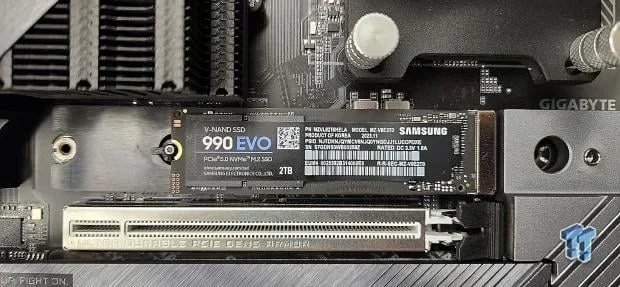
Let us break this down in simple terms. An M 2 Nvme Ssd with heatsink is a solid-state drive that fits into the M.2 slot on your motherboard. It uses the NVMe protocol over PCIe lanes to deliver incredibly fast read and write speeds. On top of the drive, there is a metal heatsink that absorbs and dissipates heat.
The M.2 form factor is small and compact. These drives look like a stick of gum. They connect directly to the motherboard without cables. The NVMe interface is much faster than older SATA SSDs. But speed comes with heat. The faster the drive, the more heat it generates. That is where the heatsink comes in.
A heatsink is usually made of aluminum or copper. It sits on top of the drive and draws heat away from the flash memory and controller. Some heatsinks come with a thermal pad already attached. This pad helps transfer heat from the drive to the metal fins more efficiently.
Why Does Heat Matter for NVMe SSDs?
Heat is the number one enemy of electronics. When an M 2 NVMe SSD runs hot, several bad things can happen. First, your read and write speeds drop. This is called thermal throttling. Second, sustained high temperatures can reduce the lifespan of your drive. Third, in extreme cases, an overheated drive can cause system instability or crashes.
Modern NVMe M.2 SSDs can reach temperatures of 70 to 80 degrees Celsius under heavy load. Without a heatsink, they may climb even higher. A good heatsink for M.2 NVMe SSD can bring those temperatures down by 10 to 20 degrees. That difference is huge for maintaining consistent performance.
Benefits of Using an M 2 Nvme Ssd with Heatsink
There are many real-world benefits to adding a heatsink to your NVMe M.2 SSD. Let us go through them one by one.
- Steady Performance: Your drive stays fast even during long gaming sessions or large file transfers. No more mystery slowdowns.
- Longer Lifespan: Cooler operating temperatures mean less wear on the NAND flash memory. Your drive will last longer.
- Quieter System: When your SSD does not overheat, your fans do not need to spin up as much. Your whole PC stays quieter.
- Better for Small Cases: Compact PC cases have limited airflow. A M.2 NVMe SSD with heatsink helps keep temperatures manageable in tight spaces.
- Future-Proofing: Newer drives like the Corsair MP600 Core XT M 2 NVMe SSD and Crucial T705 PCIe Gen5 NVMe M 2 SSD run hot by design. A heatsink keeps them in their safe operating range.
If you are looking at options like a 512GB NVMe M 2 SSD or a 1TB NVMe M 2 SSD, many of the latest models come with a heatsink included. Brands have realized that users want cool-running, high-performance storage. That is why heatsinks are becoming standard rather than optional.
How Does a Heatsink Work on an M 2 Nvme Ssd?
The science behind a heatsink for NVMe M.2 SSD is straightforward. Heat moves from hot objects to cooler ones. The heatsink is made of metal, which is a great conductor of heat. When the drive gets warm, the heat flows into the heatsink through a thermal pad or thermal interface material.
Once the heat enters the heatsink, it spreads across the metal fins. These fins have a large surface area. The bigger the surface area, the more heat the heatsink can release into the air. Some users even add a small M 2 NVMe SSD fan to blow air across the fins for even better cooling.
Here is a quick look at how the cooling process works step by step:
- The NVMe SSD generates heat during read and write operations.
- The heat transfers to the thermal pad on top of the drive.
- The thermal pad passes the heat into the metal heatsink.
- The heatsink spreads the heat across its fins.
- Airflow from your PC case carries the heat away from the heatsink.
Some M 2 NVMe SSDs come with the heatsink pre-attached. Others require you to install it yourself. Both approaches work well. The key is making sure the thermal pad makes good contact with the drive and the heatsink.
Thermal Pads vs. Thermal Glue
Not all heatsinks use the same method to stick to the drive. Some use a thermal pad, which is a soft, sticky sheet. Others use thermal glue, which is a more permanent bond. Thermal pads are easier to remove if you need to replace the drive. Thermal glue provides a stronger bond and better heat transfer. Check what your specific M.2 NVMe SSD with heatsink uses before installing it.
Top M 2 Nvme Ssds with Heatsink to Consider
The market for M 2 NVMe SSDs with heatsinks has grown a lot in recent years. Here are some of the best options you should look at right now.
Corsair MP600 Core XT
The Corsair MP600 Core XT M 2 NVMe SSD is one of the most popular choices. It comes with a sleek aluminum heatsink already attached. It supports PCIe Gen4 and delivers read speeds up to 7,000 MB/s. The heatsink design is low-profile, so it fits in most cases without blocking other components.
Samsung 970 EVO Plus
The Samsung 970 EVO Plus NVMe M 2 SSD is a well-known performer. While the base model does not include a heatsink, Samsung sells a version with one. It offers excellent read and write speeds and is very reliable for everyday use and gaming.
Crucial T705
The Crucial T705 PCIe Gen5 NVMe M 2 SSD is a newer option that pushes the limits of speed. It supports the latest PCIe Gen5 standard. Because Gen5 drives run hotter, having a heatsink is almost essential. Crucial has designed this drive to work well with a heatsink for sustained performance.
| Drive Model | Capacity Options | Heatsink Included | PCIe Gen | Read Speed |
|---|---|---|---|---|
| Corsair MP600 Core XT | 500GB, 1TB, 2TB | Yes | Gen4 | 7,000 MB/s |
| Samsung 970 EVO Plus | 250GB, 500GB, 1TB, 2TB | Optional | Gen4 | 3,500 MB/s |
| Crucial T705 | 1TB, 2TB, 4TB | Optional | Gen5 | 12,400 MB/s |
When choosing between a 512GB NVMe M 2 SSD and a larger capacity like a 2TB NVMe M 2 SSD or 4TB NVMe M 2 SSD, keep in mind that larger drives tend to run slightly cooler under load. They also give you more room for games, projects, and files.
How to Install an M 2 Nvme Ssd with Heatsink
Installing an M 2 NVMe SSD with a heatsink is easier than most people think. You do not need to be a PC building expert. Here is a simple walkthrough.
Step 1: Check Your Motherboard
First, make sure your motherboard has an M 2 slot. Most modern motherboards have at least one. Look for a slot that looks like a small slit with a screw hole next to it. Check your motherboard manual to confirm the slot supports NVMe PCIe M 2 SSDs.
Step 2: Remove the Old Drive (If Applicable)
If you are replacing an existing M 2 SSD, use a screwdriver to loosen the screw that holds it in place. Gently pull the drive out at an angle. Be careful not to touch the gold contacts on the bottom.
Step 3: Install the New Drive
Take your NVMe M 2 SSD with heatsink out of the box. If the heatsink is already attached, make sure the thermal pad is making contact with the drive. Insert the drive into the M 2 slot at a 30 to 40 degree angle. Push it down gently until it sits flat. Secure it with the screw. Do not overtighten.
Step 4: Enable the Drive in BIOS
Boot up your computer and enter the BIOS. Make sure the M 2 slot is enabled. Some motherboards let you choose between different modes. Select NVMe or PCIe mode for the best performance. Save and exit.
Step 5: Initialize and Format
Go to Disk Management in Windows. Find your new drive. Initialize it as GPT. Format it with NTFS. Your M 2 NVMe SSD with heatsink is now ready to use.
Quick Tip: If you are using a Samsung 970 EVO Plus NVMe M 2 SSD or a similar model, download the manufacturer’s software tool. Samsung Magician, for example, lets you update firmware, monitor health, and optimize performance.
Common Mistakes to Avoid
Even though installing an M 2 NVMe SSD with heatsink is straightforward, people still make mistakes. Here are a few to watch out for.
- Overtightening the Screw: This can crack the drive or the motherboard. Tighten the screw just until it is snug.
- Ignoring Thermal Pad Contact: If the thermal pad is not touching the drive properly, the heatsink will not work. Check this before you screw everything down.
- Blocking RAM Slots: Some large M 2 NVMe SSD heatsinks can interfere with nearby RAM modules. Check your clearance before buying a heatsink.
- Using the Wrong M 2 Slot: Not all M 2 slots support NVMe. Some only support SATA. Check your motherboard manual to avoid confusion.
- Skipping BIOS Settings: If you do not enable the NVMe mode in BIOS, your drive may not show up or may run at slower speeds.
Another common mistake is buying a 2TB SSD M 2 NVMe or 1TB M 2 SSD NVMe without checking whether your case has enough airflow. A heatsink helps, but good case airflow always helps more.
Do You Really Need an M 2 Nvme Ssd with Heatsink?
This is the question many people ask. The honest answer is: it depends on your use case. If you use your PC for light tasks like browsing, watching videos, and office work, a NVMe M.2 SSD without a heatsink will probably be fine. These drives do not generate much heat under light loads.
But if you are a gamer, a content creator, or someone who runs heavy workloads regularly, a heatsink is a smart investment. Here is a quick guide to help you decide:
- Gaming: Yes, a heatsink helps. Modern games load large assets constantly. Your drive stays busy and generates heat.
- Video Editing: Absolutely. Editing 4K or 8K video puts sustained read and write demands on the drive. A heatsink keeps speeds consistent.
- General Use: Optional. For everyday tasks, a 512GB M 2 NVMe SSD without a heatsink will work just fine.
- Workstations and Servers: Strongly recommended. These systems run for long hours under heavy loads. Cooling is critical.
If you are building a new PC or upgrading an existing one, consider pairing your M 2 NVMe SSD with a heatsink from the start. It is much easier to install it correctly the first time than to add one later.
For those who want even more flexibility, an M 2 NVMe SSD enclosure can turn your internal drive into an external one. This is great for backing up data or transferring large files between computers. Some enclosures like the Ugreen M 2 NVMe SATA SSD enclosure even come with their own cooling fans.
Final Thoughts
An M 2 Nvme Ssd with heatsink is one of the best upgrades you can make for your PC. It combines the speed of NVMe technology with practical cooling that keeps your drive performing at its best. Whether you are a casual user or a power user, the benefits are clear. You get faster speeds, longer drive life, and more consistent performance.
Brands like Corsair, Samsung, and Crucial have made it easier than ever to find a NVMe M.2 SSD with a heatsink that fits your budget and needs. From a 512GB NVMe M 2 SSD for a budget build to a 4TB NVMe M 2 SSD for a high-end workstation, there is an option for everyone.
Take the time to choose the right drive, install it properly, and enjoy the difference. A cool drive is a fast drive. And a fast drive makes everything on your PC feel quicker and more responsive.
Frequently Asked Questions
Do all M 2 Nvme Ssds need a heatsink?
Not all of them do. Slower NVMe SSDs or drives used for light tasks may not need extra cooling. However, faster drives like PCIe Gen4 and Gen5 models generate more heat. A heatsink helps them maintain top speeds and prevents thermal throttling.
Can I add a heatsink to an M 2 Nvme Ssd that does not have one?
Yes, you can. Aftermarket M 2 NVMe SSD heatsinks are widely available. They are easy to install and usually come with a thermal pad. Just make sure the heatsink fits your drive and does not block other components on your motherboard.
Will a heatsink slow down my M 2 Nvme Ssd?
No, it will not slow it down. A heatsink actually helps your drive maintain its full speed. Without cooling, an NVMe SSD may slow itself down when it gets too hot. The heatsink prevents this from happening.
What is the best capacity for an M 2 Nvme Ssd with heatsink?
It depends on your needs. A 1TB NVMe M 2 SSD is a popular sweet spot for most users. Gamers may want a 2TB or 4TB NVMe M 2 SSD for large game libraries. Creators working with large files should also consider higher capacities.
Are M 2 Nvme Ssds with heatsinks more expensive?
They can be slightly more expensive than drives without heatsinks. But the price difference is usually small. Considering the benefits of better cooling and longer drive life, the extra cost is worth it for most users.
Can I use an M 2 Nvme Ssd with heatsink in a laptop?
Some laptops support M 2 NVMe SSDs, but heatsink compatibility depends on the available space inside the laptop chassis. Most laptops do not have room for a bulky heatsink. Check your laptop manual or look for thin-profile heatsink options designed for portable systems.
=== CONCLUSION ===
An M 2 Nvme Ssd with heatsink is a smart choice for anyone who wants the best performance from their solid-state drive. The heatsink keeps temperatures in check, which means your drive stays fast and lasts longer. Whether you are upgrading for gaming, content creation, or everyday use, the benefits are real and noticeable.
Take a look at popular options like the Corsair MP600 Core XT, Samsung 970 EVO Plus, or Crucial T705. Pick the capacity that fits your needs, install it correctly, and enjoy a cooler, faster PC. Your NVMe M.2 SSD with a heatsink will thank you for it.