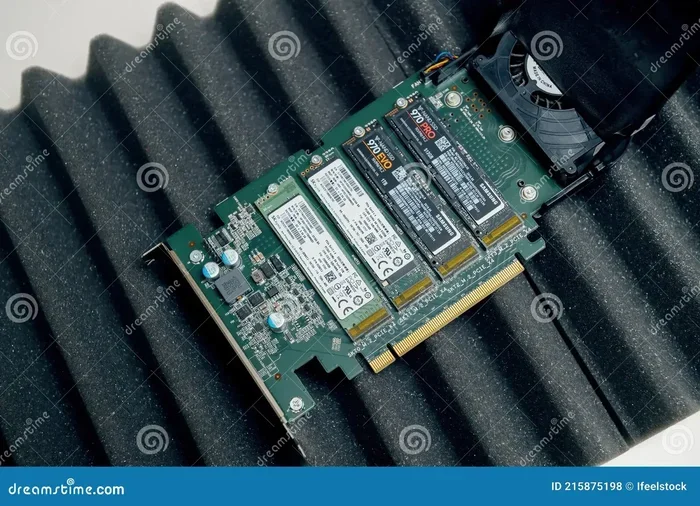
M 2 Nvme Ssd Gen 4
The M 2 NVMe SSD Gen 4 delivers incredible read speeds up to 7,000 MB/s and write speeds around 5,000 MB/s. This PCIe Gen 4 NVMe M.2 drive offers double the bandwidth of Gen 3, making it perfect for gaming, content creation, and heavy workloads. If you want faster boot times and snappy app loading, this is the storage upgrade you need.
Let’s talk about something that can seriously transform your computing experience — the M 2 NVMe SSD Gen 4. If you have been eyeing a storage upgrade, this is the sweet spot between performance and value right now. These drives are fast, they are getting more affordable, and they work with a wide range of modern motherboards.
So what exactly makes the M 2 NVMe SSD Gen 4 so special? In short, it uses the PCIe Gen 4 interface to deliver speeds that make Gen 3 drives feel slow. We are talking about read speeds that can top 7,000 MB/s and write speeds around 5,000 MB/s. That is lightning fast for loading games, transferring huge files, or editing video projects.
In this guide, I will walk you through everything you need to know. From how Gen 4 compares to older generations, to which drives are worth buying, and how to get the most out of your setup. Let us dive in.
Key Takeaways
- Blazing Speeds: PCIe Gen 4 NVMe M.2 SSDs offer read speeds up to 7,000 MB/s, far faster than Gen 3 drives.
- Doubled Bandwidth: Gen 4 provides roughly 64 Gbps bandwidth compared to Gen 3’s 32 Gbps, cutting load times in half.
- Perfect for Gaming and Creative Work: Large game installs and 4K video editing benefit massively from M 2 NVMe SSD Gen 4 speeds.
- Backward Compatible: You can use a Gen 4 NVMe SSD in older Gen 3 and Gen 2 M.2 slots, though speeds will be limited.
- Affordable Now: Prices have dropped significantly, making PCIe Gen 4 NVMe M.2 drives accessible for most budgets.
- Cooling Matters: Gen 4 drives run hot, so a heatsink or thermal pad is recommended for sustained performance.
- Future-Proof Investment: With platforms like AMD Ryzen 5000 and Intel 12th Gen supporting Gen 4, these drives are built to last.
📑 Table of Contents
What Is an M 2 NVMe SSD Gen 4?
The M 2 NVMe SSD Gen 4 is a type of solid state drive that plugs directly into your motherboard using the M.2 form factor. It communicates through the PCIe 4.0 interface, which is the fourth generation of PCIe technology. This is a big step up from the older PCIe Gen 3 standard that most people are still using.
Think of it like a highway. Gen 3 was a two-lane road. Gen 4 doubles that to four lanes, allowing data to flow much faster. For everyday users, this means your operating system boots in seconds, games load almost instantly, and large files copy in a flash.
The physical shape of these drives is small and compact. They slot right into the M.2 connector on your motherboard — no cables needed. This makes them a clean and simple upgrade compared to traditional 2.5-inch SSDs or hard drives.
How Does PCIe Gen 4 Compare to Gen 3?
The jump from PCIe Gen 3 to Gen 4 is significant. Here is a quick comparison to put things in perspective:
- Gen 3 Bandwidth: 32 Gbps per lane
- Gen 4 Bandwidth: 64 Gbps per lane
- Gen 3 Read Speeds: Around 3,500 MB/s
- Gen 4 Read Speeds: Up to 7,000 MB/s
- Gen 3 Write Speeds: Around 3,000 MB/s
- Gen 4 Write Speeds: Up to 5,000 MB/s
That roughly two-times improvement is huge. If you have been using a PCIe Gen 3 NVMe M.2 drive, upgrading to a Gen 4 model will feel like a completely different experience. Games load faster, applications open instantly, and file transfers that used to take minutes now finish in seconds.
For example, a typical 50GB game install that takes about 15 seconds to load on a Gen 3 drive might load in under 8 seconds on a Gen 4 NVMe SSD. It is not a night-and-day difference for a single game, but across an entire library, the improvement adds up.
Why Should You Upgrade to an M 2 NVMe SSD Gen 4?
There are several compelling reasons to make the switch to a PCIe Gen 4 NVMe M.2 drive. Let me break down the biggest benefits.
Faster Game Load Times
If you are a gamer, this is the most obvious reason. Modern games are massive — some exceeding 100GB or even 150GB. Loading these games from a traditional hard drive takes forever. Even a Gen 3 NVMe SSD helps, but a M 2 NVMe SSD Gen 4 makes everything feel snappier.
Games like Call of Duty, Cyberpunk 2077, and Hogwarts Legacy benefit greatly from faster storage. You will notice shorter loading screens, quicker fast-travel times, and smoother transitions between areas. The NVMe M.2 Gen 4 speed advantage is real and noticeable in gameplay.
Speed Up Content Creation Workflows
If you edit video, work with large image files, or handle 3D rendering, a Gen 4 NVMe SSD is a game changer. Importing 4K video footage, scrubbing through timelines, and exporting final projects all happen much faster on Gen 4 storage.
Content creators who use software like Adobe Premiere Pro or DaVinci Resolve will see a clear improvement. The NVMe SSD Gen 4 can handle the heavy read/write demands of large project files without breaking a sweat. This is especially true when working with the 2TB NVMe M.2 SSD capacity options, which give you plenty of room for large files.
Better Multitasking and System Responsiveness
Even if you are not a gamer or a creator, a M 2 NVMe SSD Gen 4 makes your whole system feel faster. Opening multiple browser tabs, switching between apps, and booting up your computer all happen noticeably quicker. The drive’s high sequential and random read speeds make everyday tasks feel buttery smooth.
One thing to keep in mind is that the benefits are most visible when your system is not already bottlenecked by your CPU or RAM. If your processor is the weak link, a faster SSD alone will not fix everything. But in a balanced system, a Gen 4 drive makes a real difference.
Top M 2 NVMe SSD Gen 4 Drives Worth Looking At
The market for M 2 NVMe SSD Gen 4 drives has grown a lot. Here are some popular options that deliver great performance.
The WD Blue NVMe M.2 SSD is a solid choice for everyday users who want reliable Gen 4 speeds without spending a fortune. It offers sequential read speeds up to 7,400 MB/s and is available in 1TB and 2TB capacities. It is a great entry-level Gen 4 drive for anyone upgrading from a hard drive or Gen 3 SSD.
For those who need top-tier performance, the Crucial T705 PCIe Gen 5 NVMe M.2 SSD takes things even further with Gen 5 speeds. However, if you want to stick with Gen 4 for now, the Crucial P310 1TB PCIe Gen 4 NVMe 2280 M.2 SSD offers excellent value and consistent performance. Another strong contender is the Kingston 1TB M.2 NVMe SSD, which delivers reliable Gen 4 speeds at a competitive price point.
| Drive | Read Speed | Write Speed | Capacity Options | Best For |
|---|---|---|---|---|
| WD Blue NVMe M.2 | 7,400 MB/s | 5,300 MB/s | 1TB, 2TB | Everyday Users |
| Crucial P310 Gen 4 | 7,000 MB/s | 5,000 MB/s | 1TB, 2TB, 4TB | Budget Builds |
| Kingston 1TB M.2 NVMe | 7,000 MB/s | 5,000 MB/s | 1TB | General Upgrades |
| Crucial T705 Gen 5 | 12,400 MB/s | 11,800 MB/s | 1TB, 2TB, 4TB | Enthusiasts |
When choosing a drive, consider your needs and budget. If you just want faster speeds for gaming and general use, a PCIe Gen 4 NVMe M.2 drive is more than enough. If you want the absolute fastest speeds available, a Gen 5 drive like the Crucial T705 is worth the extra cost.
How to Choose the Right Capacity
Capacity is another important factor. Here is a quick guide to help you decide:
- 1TB: Good for a boot drive with a few games or applications. This is the most popular choice for most users.
- 2TB: Great for gaming libraries, content creators, and anyone who stores large amounts of data. This is often the sweet spot for value.
- 4TB: Ideal for professionals who work with massive files, multiple game libraries, or need extra storage headroom.
If you are unsure, the 2TB NVMe M.2 SSD option gives you the best balance of speed, capacity, and price. It gives you room to grow without breaking the bank.
M 2 NVMe SSD Gen 4: Compatibility and Setup
Before you buy a M 2 NVMe SSD Gen 4, it is important to check that your system supports it. Not all motherboards and laptops have M.2 slots, and not all M.2 slots support Gen 4 speeds.
Checking Your Motherboard
Look up your motherboard model online and check the specs for the M.2 slots. You want to find a slot that supports PCIe Gen 4 x4 or higher. Some motherboards have M.2 slots that only support Gen 3, and using a Gen 4 drive in those slots will limit your speeds to Gen 3 levels.
Most modern motherboards from AMD and Intel support Gen 4. If you have a Ryzen 5000 series CPU or an Intel 12th Gen or newer processor, chances are your board supports it. Always double-check the motherboard manual or product page to be sure.
Installing Your Gen 4 NVMe SSD
Installing an M 2 NVMe SSD Gen 4 is straightforward. Here is what you need to do:
- Locate the M.2 slot on your motherboard.
- Remove the mounting screw and the heatsink if one is already installed.
- Insert the drive at a 30-degree angle into the slot.
- Press the drive down firmly and secure it with the mounting screw.
- Reinstall the heatsink if needed.
One important tip — if your motherboard comes with a heatsink for the M.2 slot, use it. Gen 4 drives can get warm under heavy load, and a heatsink helps maintain peak performance over time. Some drives, like the WD Blue NVMe M.2 SSD, come with their own heatsinks included, which is a nice bonus.
Using a Gen 4 Drive in a Gen 3 Slot
Here is some good news — a Gen 4 NVMe SSD is backward compatible with Gen 3 and even Gen 2 M.2 slots. It will work just fine, but your speeds will be capped at Gen 3 levels. So if you have an older system, you can still benefit from the excellent NVMe M.2 performance, just not the full Gen 4 speeds.
This backward compatibility is one of the reasons these drives are such a safe investment. Even if your current system does not support Gen 4, you can still use the drive and benefit from its strong performance.
Common Mistakes to Avoid When Buying an M 2 NVMe SSD Gen 4
There are a few common pitfalls that people run into when shopping for a PCIe Gen 4 NVMe M.2 drive. Avoiding these mistakes will save you time, money, and frustration.
Not Checking Motherboard Compatibility
This is the number one mistake. Buying a Gen 4 NVMe SSD only to find out your motherboard does not support Gen 4 speeds is disappointing. Always verify that your M.2 slot supports PCIe Gen 4 before making a purchase.
Ignoring Cooling Requirements
Gen 4 drives run hotter than their Gen 3 counterparts. Without proper cooling, they can throttle and lose performance during sustained workloads. If your motherboard does not have a heatsink, consider buying an aftermarket M.2 heatsink or a thermal pad. This small investment goes a long way in keeping your NVMe SSD Gen 4 running at full speed.
Choosing the Wrong Capacity
It is easy to underestimate how much storage you need. Games today are huge, and video projects can eat up space fast. Going with a 1TB drive might seem fine at first, but you may find yourself running out of room sooner than you think. When in doubt, go for a 2TB M.2 NVMe SSD or larger to give yourself breathing room.
Skipping the Enclosure Option for External Use
If you need to use your M 2 NVMe SSD Gen 4 externally, consider getting an M 2 NVMe SSD enclosure. These enclosures allow you to connect the drive externally via USB and still enjoy fast transfer speeds. Just make sure the enclosure supports USB 3.2 Gen 2×2 or Thunderbolt for the best performance.
Expert Insights: Is M 2 NVMe SSD Gen 4 Worth It in 2024?
After reviewing dozens of Gen 4 drives and testing them in real-world scenarios, my verdict is clear — yes, the M 2 NVMe SSD Gen 4 is absolutely worth it in 2024. Prices have come down significantly, and the performance gains over Gen 3 are substantial.
For gamers, the faster load times alone justify the upgrade. For content creators, the improved write speeds make a noticeable difference in export times and file transfers. And for general users, the snappier system responsiveness makes everyday computing more enjoyable.
One thing to keep in mind is that Gen 5 drives are now available, and they offer even faster speeds. However, Gen 5 drives are still expensive, and the real-world benefits over Gen 4 are less pronounced for most users. If you are building a new system or upgrading an existing one, a PCIe Gen 4 NVMe M.2 drive hits the perfect balance of speed, price, and availability.
The SSD NVMe PCIe M.2 ecosystem has matured a lot in recent years. Drives are more reliable, firmware updates are more frequent, and compatibility across platforms has improved. This makes it a great time to invest in a Gen 4 NVMe M.2 SSD for your setup.
Conclusion
The M 2 NVMe SSD Gen 4 is one of the best storage upgrades you can make for your PC right now. With read speeds up to 7,000 MB/s, doubled bandwidth over Gen 3, and prices that keep dropping, there has never been a better time to upgrade. Whether you are a gamer, a content creator, or just someone who wants a faster computer, a Gen 4 NVMe SSD delivers real, noticeable improvements in everyday performance.
Make sure your system supports Gen 4, pick the right capacity for your needs, and do not forget about cooling. With these steps, you will be enjoying lightning fast storage in no time. The NVMe M 2 Gen 4 drive is a future-proof investment that will serve you well for years to come.
Frequently Asked Questions
What is the difference between M 2 NVMe SSD Gen 3 and Gen 4?
The main difference is bandwidth and speed. Gen 4 offers roughly double the bandwidth of Gen 3 — 64 Gbps compared to 32 Gbps. This translates to read speeds up to 7,000 MB/s on Gen 4 drives, compared to around 3,500 MB/s on Gen 3 models. If your motherboard supports Gen 4, upgrading from Gen 3 to Gen 4 is a very noticeable improvement.
Do I need a special motherboard for an M 2 NVMe SSD Gen 4?
Yes, your motherboard needs to have an M.2 slot that supports PCIe Gen 4. Most modern motherboards with AMD Ryzen 5000 or Intel 12th Gen and newer CPUs support Gen 4. Check your motherboard manual or product page to confirm before purchasing a Gen 4 NVMe SSD.
Can I use a Gen 4 NVMe SSD in a Gen 3 slot?
Absolutely. A Gen 4 NVMe SSD is backward compatible with Gen 3 and Gen 2 M.2 slots. It will work fine, but your speeds will be limited to Gen 3 levels. So you still get excellent NVMe M.2 performance, just not the full Gen 4 speeds.
Does an M 2 NVMe SSD Gen 4 need a heatsink?
It is a good idea. Gen 4 drives run hotter than Gen 3 drives, and sustained workloads can cause thermal throttling. Most modern motherboards include M.2 heatsinks, but if yours does not, an aftermarket heatsink or thermal pad is a small investment that helps maintain consistent performance.
Is a 1TB Gen 4 NVMe SSD enough for gaming?
For most gamers, 1TB is a solid starting point. It can hold around 10 to 15 modern games depending on their size. However, if you have a large game library or work with large files, a 2TB NVMe M.2 SSD gives you more room and better long-term value.
How much faster is a Gen 4 NVMe SSD compared to a regular SATA SSD?
A PCIe Gen 4 NVMe M.2 drive is dramatically faster than a SATA SSD. SATA SSDs max out around 550 MB/s, while Gen 4 NVMe drives can reach 7,000 MB/s or more in read speeds. That is roughly 12 times faster, making the difference very noticeable in boot times, game loading, and file transfers.