Do I Need Hdmi or Displayport for 165hz
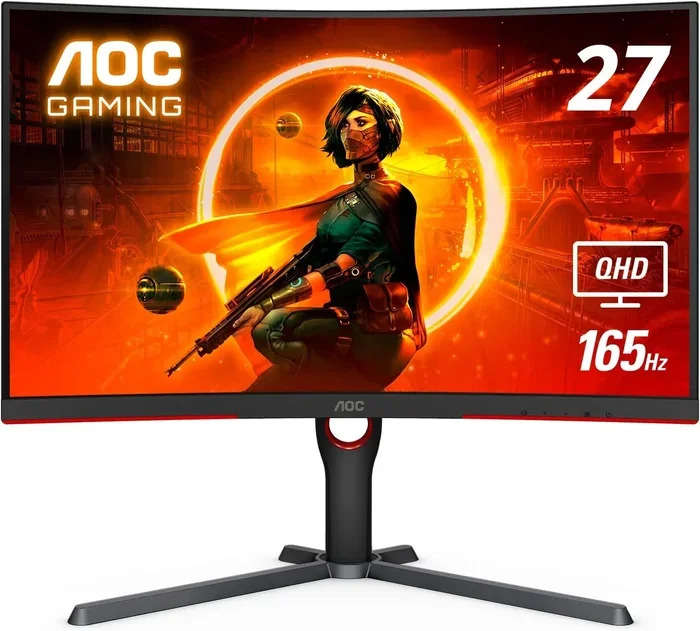
Choosing between HDMI and DisplayPort for 165Hz can be confusing, but the right cable makes all the difference. DisplayPort is generally the better choice for high refresh rate gaming, offering more bandwidth and better feature support. However, HDMI 2.0 or newer can also handle 165Hz at certain resolutions, making it a solid option depending on your setup.
When you are setting up a 165Hz monitor, one of the most important decisions you will make is choosing the right cable. The connection between your PC and your monitor affects everything from image quality to smooth gameplay. Many gamers and tech enthusiasts find themselves stuck asking the same question: do I need HDMI or DisplayPort for 165Hz?
The short answer is that DisplayPort is usually the better option for 165Hz, but HDMI can work too depending on the version and your resolution. Both cables have their strengths, and understanding them helps you get the most out of your high refresh rate setup. In this guide, we break down everything you need to know so you can make the right choice with confidence.
Whether you are a competitive gamer chasing every frame or a casual user who wants a smoother experience, the cable you pick matters. Let us dive into the details and clear up the confusion once and for all.
Key Takeaways
- DisplayPort 1.4 is the go-to choice: It handles 165Hz at 1080p and 1440p with ease and supports adaptive sync features.
- HDMI 2.0 works for 165Hz too: You can get 165Hz at 1080p and even 1440p with HDMI 2.0, but with some limitations.
- Check your GPU and monitor: Both your graphics card and monitor must support the connection and version you choose.
- Bandwidth matters most: Higher resolutions at 165Hz need more bandwidth, which DisplayPort delivers more efficiently.
- Adaptive sync is a game-changer: Features like G-Sync and FreeSync work better over DisplayPort in most cases.
- Do not use old cable versions: HDMI 1.4 and older DisplayPort versions cannot reliably support 165Hz.
📑 Table of Contents
What Is 165Hz and Why Does It Matter
Refresh rate refers to how many times your monitor updates the image on screen every second. A 165Hz monitor refreshes the picture 165 times per second, which is noticeably smoother than the standard 60Hz displays most people use. When you move your mouse or turn your head in a game, the motion looks much more fluid and natural at 165Hz.
Understanding Refresh Rate
Every monitor has a fixed refresh rate. A 60Hz display shows 60 frames per second at most. A 165Hz display can show up to 165 frames per second. This difference is huge in fast-paced games where every millisecond counts. The higher your refresh rate, the smoother the motion and the more responsive your experience feels.
But here is the thing: your monitor can only reach 165Hz if your cable and GPU can handle the data. That is where HDMI and DisplayPort come in. The wrong cable can bottleneck your setup and prevent you from getting the full 165Hz experience.
Why 165Hz Is Popular for Gaming
165Hz has become a sweet spot for gaming monitors. It sits right between 144Hz and 240Hz, offering a great balance of smooth motion and affordable pricing. Most modern GPUs can push 165 frames per second at 1080p and 1440p resolutions, making this refresh rate very accessible for a wide range of setups.
Many gamers also wonder if they need 32GB of RAM for gaming at high refresh rates. While RAM does not directly control your refresh rate, having enough memory ensures your system runs smoothly alongside your high refresh rate monitor.
Quick Tips
- Always check your monitor’s manual for the maximum refresh rate at each resolution.
- Make sure your GPU can output 165 frames per second before buying a 165Hz monitor.
- Use the latest cable versions to get the best performance.
HDMI vs DisplayPort: The Basics
Before we get into which cable works best for 165Hz, let us understand what each connection is and how it works. Both HDMI and DisplayPort are digital video interfaces, but they were designed with different purposes in mind.
What Is HDMI
HDMI stands for High-Definition Multimedia Interface. It is the most common cable type found on TVs, consoles, and many monitors. HDMI carries both video and audio signals through a single cable, which makes it very convenient. Most people already have HDMI cables lying around from their TVs or game consoles.
HDMI has gone through several versions over the years. HDMI 1.4, HDMI 2.0, and HDMI 2.1 each offer different levels of bandwidth and support for higher refresh rates and resolutions. For 165Hz, you need at least HDMI 2.0, which provides enough bandwidth for 1080p and 1440p at high refresh rates.
What Is DisplayPort
DisplayPort was designed specifically for computer displays and PCs. It offers higher bandwidth than most HDMI versions and is built with PC users in mind. DisplayPort also supports features like daisy-chaining multiple monitors from a single port and adaptive sync technologies.
DisplayPort 1.2, 1.4, and 2.1 are the main versions you will encounter. DisplayPort 1.4 is the most common version found on modern monitors and GPUs, and it handles 165Hz at 1080p and 1440p with ease. If you are building a gaming setup, DisplayPort is almost always the better choice.
If you are using a laptop and wondering about your overall setup, you might also want to check how much RAM you need on your laptop to ensure your system can keep up with your high refresh rate monitor.
Which Cable Version Do You Need for 165Hz
The version of your cable matters just as much as the type. An old cable version simply cannot carry the amount of data needed for 165Hz at higher resolutions. Let us break down what each version can do.
HDMI Versions and 165Hz Support
HDMI 1.4 maxes out at 1080p at 120Hz or 144Hz. It cannot reliably deliver 165Hz, so you should avoid it for this purpose. HDMI 2.0 is the minimum you need for 165Hz. It supports 1080p at 240Hz, 1440p at 165Hz, and even 4K at lower refresh rates.
HDMI 2.1 is the newest version and offers the most bandwidth. It can handle 4K at 165Hz and even 8K at high refresh rates. However, HDMI 2.1 cables and ports are still not as widely available as HDMI 2.0.
DisplayPort Versions and 165Hz Support
DisplayPort 1.2 can handle 1080p at 240Hz and 1440p at 144Hz, but it may struggle with 165Hz at 1440p. DisplayPort 1.4 is the sweet spot for 165Hz gaming. It supports 1080p at 240Hz, 1440p at 165Hz, and even 4K at 120Hz with compression.
DisplayPort 2.1 is the latest version and offers massive bandwidth improvements. It can handle 4K at 165Hz and beyond with no problem. However, DisplayPort 2.1 monitors and GPUs are still relatively new and expensive.
| Cable Version | 1080p at 165Hz | 1440p at 165Hz | 4K at 165Hz |
|---|---|---|---|
| HDMI 1.4 | No | No | No |
| HDMI 2.0 | Yes | Yes | No |
| HDMI 2.1 | Yes | Yes | Yes |
| DisplayPort 1.2 | Yes | Borderline | No |
| DisplayPort 1.4 | Yes | Yes | Yes (compressed) |
| DisplayPort 2.1 | Yes | Yes | Yes |
As you can see from the table, DisplayPort 1.4 is the most versatile option for 165Hz gaming. It covers all common resolutions and delivers excellent performance without compression artifacts.
Do I Need HDMI or DisplayPort for 165Hz: A Head-to-Head Comparison
Now that you know what each cable can do, let us compare them directly for 165Hz use. This will help you decide based on your specific setup and needs.
Bandwidth Comparison
Bandwidth is the amount of data a cable can carry per second. Higher bandwidth means higher resolutions and refresh rates. DisplayPort 1.4 offers about 32.4 Gbps of bandwidth, while HDMI 2.0 provides about 18 Gbps. This difference is significant when you are pushing 165Hz at higher resolutions.
DisplayPort also uses a packet-based protocol that is more efficient at transferring data. This means it can squeeze more performance out of the same cable length compared to HDMI.
Feature Support
DisplayPort has a clear advantage when it comes to features. It natively supports adaptive sync technologies like G-Sync and FreeSync, which reduce screen tearing and stuttering. DisplayPort also supports daisy-chaining, which lets you connect multiple monitors in a chain from a single port on your PC.
HDMI supports ARC (Audio Return Channel) and eARC, which are useful if you are connecting to a TV or sound system. But for pure PC gaming at 165Hz, these features are less relevant.
Expert Insights
Most professional esports players and tech reviewers recommend DisplayPort for 165Hz gaming setups. The higher bandwidth, better adaptive sync support, and lower input lag make it the preferred choice. If you are serious about competitive gaming, DisplayPort 1.4 is the way to go.
If you are also considering upgrading your PC components for the best 165Hz experience, you might want to check whether you should upgrade your CPU or GPU first to make sure your system can actually push 165 frames per second.
Ease of Use and Availability
HDMI cables are everywhere. You can find them in any electronics store, and most devices come with HDMI ports. DisplayPort is less common on TVs and consoles but is standard on PC monitors and graphics cards. If you already have an HDMI cable, it can work for 165Hz at 1080p with HDMI 2.0, but you may want to invest in a DisplayPort cable for the best experience.
Common Mistakes to Avoid
Even experienced users make mistakes when setting up a 165Hz monitor. Here are the most common ones and how to avoid them.
Using the Wrong Cable Version
The biggest mistake is using an old cable version that cannot handle 165Hz. If you plug in an HDMI 1.4 cable to a 165Hz monitor, you will be stuck at 144Hz or lower. Always check the cable version on the packaging or the cable itself before purchasing.
Similarly, using a DisplayPort 1.1 cable instead of DisplayPort 1.4 can limit your refresh rate. Make sure your cable matches or exceeds the version your monitor supports.
Ignoring Your GPU’s Capabilities
Your GPU must be powerful enough to render games at 165 frames per second. A high refresh rate monitor is useless if your graphics card cannot keep up. Before buying a 165Hz monitor, check the benchmarks for your GPU at your target resolution and game settings.
Forgetting to Enable 165Hz in Settings
This sounds obvious, but many people buy a 165Hz monitor and never change the refresh rate in their display settings. Go to your display settings and make sure 165Hz is selected. If it is not available, your cable or GPU may not support it.
Final Verdict: Which Should You Choose
So, do you need HDMI or DisplayPort for 165Hz? For most users, the answer is clear: DisplayPort 1.4 is the best choice. It offers the bandwidth, features, and compatibility you need for a smooth 165Hz gaming experience at 1080p and 1440p resolutions.
HDMI 2.0 is a solid alternative if your GPU or monitor only has HDMI ports. It can deliver 165Hz at 1080p and 1440p, though it lacks some of the advanced features of DisplayPort. HDMI 2.1 is the future, but it is not yet widely available on all GPUs and monitors.
If you are on a budget and already have an HDMI 2.0 cable, you do not need to rush out and buy a DisplayPort cable. You can still enjoy 165Hz at 1080p with HDMI 2.0. But if you are building a new setup or want the best possible experience, invest in a DisplayPort 1.4 cable.
Do I need HDMI or DisplayPort for 165Hz? The bottom line is that DisplayPort gives you more headroom, better features, and future-proofing. HDMI works fine for now, but DisplayPort is the smarter long-term investment for any serious gamer or PC enthusiast.
Frequently Asked Questions
Can I use HDMI 2.0 for 165Hz at 1440p?
Yes, HDMI 2.0 can support 165Hz at 1440p resolution. However, you may not get access to advanced features like adaptive sync that DisplayPort offers. Make sure your GPU and monitor both support HDMI 2.0 before expecting 165Hz at 1440p.
Do I need DisplayPort 2.1 for 165Hz?
No, DisplayPort 1.4 is more than enough for 165Hz at 1080p and 1440p. DisplayPort 2.1 is designed for higher resolutions like 4K at 165Hz and beyond. For most gamers, DisplayPort 1.4 is the perfect choice.
Can I use an HDMI to DisplayPort adapter for 165Hz?
Active adapters can sometimes support 165Hz, but they may introduce input lag or reduce image quality. Passive adapters will not work for 165Hz. If possible, connect your monitor directly with the native cable type to get the best performance.
Why does my 165Hz monitor show 144Hz instead?
This usually means your cable or GPU does not support 165Hz at your current resolution. Check that you are using HDMI 2.0 or DisplayPort 1.4 or newer. Also make sure the 165Hz refresh rate is selected in your display settings.
Is DisplayPort better than HDMI for gaming?
For most gaming setups, yes. DisplayPort offers higher bandwidth, better adaptive sync support, and lower input lag compared to HDMI at the same version level. This makes it the preferred choice for competitive and high refresh rate gaming.
Does the length of the cable affect 165Hz performance?
Cable length can affect signal quality, especially with longer runs. For best results, keep your HDMI or DisplayPort cable under 2 meters. If you need a longer cable, look for one that is specifically rated for high bandwidth and 165Hz support.