Is Micro Hdmi the Same as Hdmi D
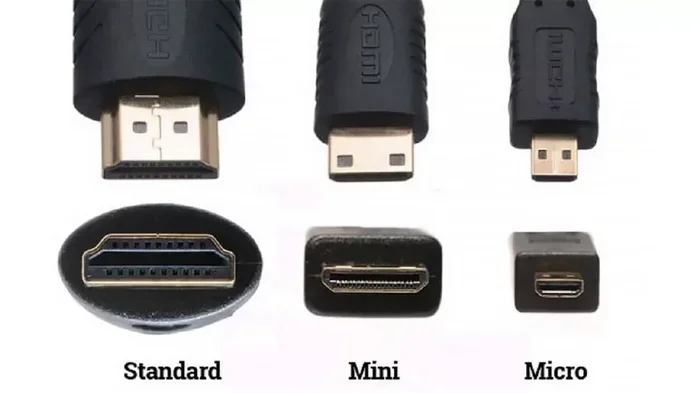
Micro HDMI and HDMI D are the same connector — HDMI Type D is the official name for the Micro HDMI port found on many compact devices. This guide explains the differences between Micro HDMI, Mini HDMI, and Standard HDMI, so you can choose the right cable and adapter for your setup.
If you have ever held a tiny HDMI plug in your hand and wondered what it is, you are not alone. The world of HDMI connectors can be confusing, especially when you see terms like Micro HDMI and “HDMI D” floating around. Many people assume these are two different things, but here is the truth: they are the same connector.
Micro HDMI is officially known as HDMI Type D in the HDMI specification. The letter D simply refers to the type designation within the HDMI standard. So when someone says “HDMI D,” they are talking about the Micro HDMI connector. Understanding this difference matters because using the wrong cable or adapter can lead to frustration, wasted money, and even damaged ports on your devices.
In this guide, we will break down everything you need to know about Micro HDMI and HDMI Type D. You will learn how it differs from other HDMI connector types, which devices use it, and how to pick the right accessories for your setup. Whether you are connecting a smartphone, action camera, or portable media player, this article has you covered.
Key Takeaways
- Micro HDMI and HDMI D are identical — HDMI Type D is the official specification name for the Micro HDMI connector.
- There are three main HDMI connector types — Standard HDMI (Type A), Mini HDMI (Type C), and Micro HDMI (Type D), each with different sizes and use cases.
- Micro HDMI carries the same high-definition signal as larger HDMI connectors, supporting 4K resolution and multi-channel audio when using the right cable.
- You need the correct adapter to connect Micro HDMI devices to Standard HDMI displays like TVs and monitors.
- Cable quality and HDMI version matter — choosing the right HDMI version ensures you get the best resolution and refresh rate for your setup.
- Common mistakes include forcing the connector and using cheap adapters that cause signal loss or compatibility issues.
📑 Table of Contents
What Is Micro HDMI (HDMI Type D)?
Micro HDMI is a compact version of the standard HDMI connector. It was introduced by the HDMI Forum to support smaller portable devices that still need high-definition video and audio output. The connector is tiny, measuring just 6.4 mm by 2.8 mm, which makes it about half the size of a standard HDMI Type A plug. Despite its small size, it delivers the same high-quality digital signal.
The official HDMI specification names this connector Type D. The naming follows a simple pattern across the HDMI family:
- Type A — Standard HDMI, the large connector found on TVs and monitors
- Type C — Mini HDMI, a mid-sized connector for tablets and cameras
- Type D — Micro HDMI, the smallest connector for compact devices
So when you see “HDMI D” on a spec sheet or product description, it means the device has a Micro HDMI port. There is no separate “HDMI D” standard that differs from Micro HDMI in any way. They are one and the same, and both refer to the Type D connector defined in the HDMI specification.
Why the Naming Confusion Exists
The confusion around “Micro HDMI” vs “HDMI D” comes from how different manufacturers label their products. Some brands list the connector as “Micro HDMI” in their marketing materials because it is more consumer-friendly. Others use the technical designation “HDMI Type D” or simply “HDMI D” because that is what the specification calls it.
This naming inconsistency is not unique to HDMI. Many tech standards have both a consumer-friendly name and a technical designation. For example, USB Type C is also known as USB-C, and Thunderbolt 3 uses the same connector shape. The key takeaway is that you should always look at the physical connector shape and the specifications rather than relying solely on the name printed on a product box.
Micro HDMI vs Mini HDMI vs Standard HDMI
Not all HDMI connectors are created equal. There are three main types you will encounter in consumer devices, and each serves a different purpose. Understanding the differences helps you avoid buying the wrong cable or adapter for your setup.
Size and Physical Differences
The most obvious difference between these three HDMI types is their size. Here is a quick breakdown of each connector type:
Standard HDMI (Type A) is the largest of the three. It measures 13.9 mm by 4.45 mm and is the connector you find on TVs, monitors, gaming consoles, and most desktop computers. This is the connector you have likely plugged into the back of your television hundreds of times. It is also the most common connector type in home entertainment setups.
Mini HDMI (Type C) is smaller than Standard HDMI but larger than Micro HDMI. It measures 10.42 mm by 2.42 mm. Mini HDMI was designed for devices that are smaller than a typical TV but still have enough space for a slightly larger port. You will often find Mini HDMI on some tablets, digital cameras, and portable media players. Some older laptops also used Mini HDMI as a video output option.
Micro HDMI (Type D) is the smallest of the three. At just 6.4 mm by 2.8 mm, it is designed for the most compact devices where every millimeter of space matters. This connector is commonly found on smartphones, action cameras, and some portable media players. The tiny size makes it easy to lose, so always keep your cables and adapters in a safe place.
Compatibility and Use Cases
Each HDMI type carries the same core signal — high-definition video and multi-channel audio. The difference is purely physical. A Micro HDMI cable can carry the same 4K resolution and surround sound as a Standard HDMI cable, provided both ends of the cable and the devices support the same HDMI version.
However, you cannot plug a Micro HDMI cable directly into a Standard HDMI port. You need an HDMI adapter or a cable with different connector types on each end. Similarly, you cannot plug a Mini HDMI cable into a Micro HDMI port without the right adapter. Always double-check the connector type on both devices before purchasing a cable.
When shopping for cables, always check what type of HDMI ports your devices have. If your phone has a Micro HDMI port and your TV has a Standard HDMI port, you need either a Micro HDMI to Standard HDMI cable or a Micro HDMI to Standard HDMI adapter. Getting the right match ensures a clean, reliable connection every time.
Devices That Use Micro HDMI
Micro HDMI is not as common as Standard HDMI, but it still appears on a variety of portable devices. Knowing which gadgets use this connector can save you time and money when shopping for accessories.
Smartphones and Tablets
A few smartphone manufacturers have adopted Micro HDMI as a way to deliver video output without relying on wireless casting. Some older Android phones featured Micro HDMI ports alongside standard USB charging ports. This allowed users to connect their phones directly to a TV or monitor for a larger screen experience. It was especially useful for sharing photos and videos with a group or giving presentations on the go.
Tablets also occasionally included Micro HDMI ports, especially models designed for media consumption or business presentations. However, as wireless display technologies like Miracast and Chromecast have become more popular, the need for a physical video output port has decreased on many mobile devices. Still, if you own a device with a Micro HDMI port, having the right cable is essential.
Portable Cameras and Drones
Action cameras and compact digital cameras are among the most common devices that still use Micro HDMI. Brands like GoPro and various drone manufacturers have used Micro HDMI ports for live viewing and footage transfer. If you own an action camera or a small drone, there is a good chance it uses a Micro HDMI connection.
If you are looking to connect your camera to an external display or recorder, make sure you have the right Micro HDMI cable. For more tips on choosing the right accessories for your devices, check out our guide on when is the best time to purchase a laptop, which covers general buying advice for tech accessories too.
Other Portable Devices
Some portable media players, handheld gaming devices, and even certain medical or industrial equipment use Micro HDMI connectors. The port is ideal for any device that needs to output high-definition video but has limited space for a larger connector. If you are shopping for a used or refurbished device, always check the port specifications to make sure you have the right cables and adapters on hand.
It is also worth noting that the RAM and overall performance of a device do not affect its HDMI port type. For example, knowing what the RAM on a laptop is helps you understand performance, but it does not determine whether the device uses Micro HDMI, Mini HDMI, or Standard HDMI. These are separate hardware specifications.
How to Choose the Right HDMI Cable
Selecting the correct HDMI cable involves more than just matching the connector type. You also need to consider the HDMI version, cable quality, and what you plan to use it for. A poor-quality cable can lead to signal issues even if the connector type is correct.
Adapter Solutions
Adapters are essential when your devices have different HDMI port types. A Micro HDMI to Standard HDMI adapter lets you connect a phone or camera to a TV or monitor. These adapters are small, affordable, and widely available online and in electronics stores.
When choosing an adapter, look for ones that are gold-plated for better signal conductivity and durable construction. Cheap adapters can cause signal loss, flickering, or intermittent connections. If you are setting up a permanent display, consider investing in a higher-quality adapter that will last longer and perform better.
For devices that need both power and video output, some adapters also include USB charging ports. This lets you charge your device while it is connected to a display, which is especially useful during long presentations or movie watching sessions. Always check that the adapter supports the HDMI version you need for the best results.
Cable Quality Matters
Not all HDMI cables are the same, even if they have the same connector type. The HDMI version supported by a cable determines its maximum bandwidth and resolution capability.
HDMI 1.4 cables support up to 4K at 30Hz. HDMI 2.0 cables support 4K at 60Hz. HDMI 2.1 cables can handle 4K at 120Hz and even 8K resolution. If you want the best picture quality, make sure your cable supports the HDMI version your devices use. For most everyday uses like watching movies or giving presentations, an HDMI 1.4 or 2.0 cable is more than sufficient. But if you are a gamer or a content creator who needs high refresh rates, look for an HDMI 2.1 certified cable.
Micro HDMI devices benefit from high-quality cables just as much as Standard HDMI devices do. Do not assume that a smaller connector means lower performance. With the right cable, a Micro HDMI connection can deliver stunning 4K video and rich surround sound.
Common Mistakes with Micro HDMI Connections
Even experienced tech users make mistakes when working with Micro HDMI connectors. Avoiding these common pitfalls saves time, money, and frustration.
Forcing the Connector
Micro HDMI connectors are small and can be easy to misalign. If the connector does not slide in smoothly, do not force it. Check the orientation — the metal contacts should face the correct direction, and the cable should be straight. Forcing a misaligned connector can damage the port on your device.
The Micro HDMI port is especially fragile on smartphones and tablets because the port is soldered directly to the motherboard. A damaged port can be expensive to repair, so take your time and be gentle when plugging in or unplugging the cable. If the connector feels stuck, try gently wiggling it or checking for debris in the port before applying more pressure.
Using the Wrong Adapter
Not all adapters are created equal. Some cheap adapters may not support the full bandwidth of your HDMI signal, leading to reduced resolution or no signal at all. Always buy adapters from reputable brands or trusted retailers. Reading customer reviews can also help you avoid low-quality products.
Also, make sure the adapter matches the exact connector types you need. A Micro HDMI to Standard HDMI adapter will not work if you need a Mini HDMI to Standard HDMI connection. Double-check your device specifications before purchasing. When in doubt, consult the device manual or the manufacturer’s website for the correct adapter type.
Ignoring Cable Length
Longer HDMI cables can sometimes lead to signal degradation, especially with older HDMI versions. If you need a cable longer than 10 feet, consider using an active HDMI cable or a signal booster to maintain a strong connection. Passive cables work fine for short distances, but active cables amplify the signal for longer runs.
When setting up a home theater or office presentation, plan your cable lengths ahead of time. Measure the distance between your device and the display before buying a cable. Having the right length avoids the need for unnecessary adapters or extensions, which can weaken the signal.
Final Thoughts
Micro HDMI and HDMI D are the same connector, and now you know exactly why. Whether you call it Micro HDMI or HDMI Type D, this compact connector plays an important role in connecting portable devices to larger displays. Understanding the differences between Micro HDMI, Mini HDMI, and Standard HDMI helps you make smarter buying decisions and avoid common connectivity headaches.
When you are shopping for cables and adapters, always check the port type on your devices first. Choose high-quality cables that match your HDMI version needs. And if you are unsure about compatibility, refer to your device manufacturer’s specifications for the exact connector type.
If you are also exploring other tech accessories or device upgrades, understanding your device’s specifications matters. For instance, knowing what is the difference between 3-way and 2-way speakers can help you set up a better audio experience when using HDMI audio output. Similarly, understanding RAM and other specs helps you choose the right device for your needs.
With the right cable, adapter, and a little knowledge, your Micro HDMI devices can deliver stunning high-definition video wherever you go. Keep your cables organized, your adapters handy, and your devices connected with confidence.
Frequently Asked Questions
Is HDMI Type D the same as Micro HDMI?
Yes, HDMI Type D is the official specification name for Micro HDMI. They refer to the exact same connector, which measures 6.4 mm by 2.8 mm. The different names are just a result of consumer marketing versus technical naming conventions.
Can I plug a Micro HDMI cable directly into a regular TV?
No, you cannot plug a Micro HDMI cable directly into a Standard HDMI port on a TV. You need either a Micro HDMI to Standard HDMI adapter or a cable with a Micro HDMI connector on one end and a Standard HDMI connector on the other. These adapters are inexpensive and widely available.
Does Micro HDMI support 4K resolution?
Yes, Micro HDMI can support 4K resolution, but it depends on the HDMI version of the device and cable. HDMI 2.0 and HDMI 2.1 both support 4K, and Micro HDMI connectors are fully capable of carrying that signal. Make sure your cable and devices both support the HDMI version you need.
What is the difference between Micro HDMI and Mini HDMI?
The main difference is size. Micro HDMI (Type D) is the smallest at 6.4 mm by 2.8 mm, while Mini HDMI (Type C) is larger at 10.42 mm by 2.42 mm. Both carry the same high-definition video and audio signals. Micro HDMI is used on the most compact devices like smartphones and action cameras, while Mini HDMI is found on slightly larger devices like some tablets and cameras.
Are Micro HDMI adapters expensive?
Most Micro HDMI adapters are very affordable, typically ranging from a few dollars to around fifteen dollars. Premium adapters with gold-plated connectors or built-in USB charging ports may cost a bit more. Buying from a reputable brand ensures you get a reliable adapter that does not cause signal loss.
Why is my Micro HDMI connection not working?
There are several common reasons. The connector may be inserted in the wrong orientation, the adapter may not be compatible with your HDMI version, or the cable itself may be damaged. Try reinserting the connector carefully, using a different adapter, or testing with a different cable. If the problem persists, check your device settings to make sure the HDMI output is enabled.