Building a Privacy First Gaming Setup in 2026
A privacy first gaming setup keeps your personal data safe while you play. In 2026, gamers face more tracking, data harvesting, and security risks than ever. This guide covers everything you need to build a secure gaming environment with the right hardware, software, and habits.
Gaming is fun. But did you know your setup might be watching you? Every device you connect sends data somewhere. Your headset, your monitor, even your keyboard can track what you do. That is why building a privacy first gaming setup matters so much in 2026.
A privacy focused gaming environment means you control your data. You decide what gets shared and what stays private. Whether you game on a PC or a console, there are real steps you can take today. Let us walk through them together.
Key Takeaways
- Privacy starts with hardware: Choose devices that minimize data collection and offer local processing.
- Encrypted connections matter: A VPN and secure router protect your gaming traffic from prying eyes.
- Peripheral choices count: Privacy focused gaming headsets and monitors reduce data leaks.
- Software settings are critical: Disable telemetry, use privacy first browsers, and manage app permissions.
- Physical privacy tools help: Webcam covers, mic muting, and screen privacy filters add extra layers of protection.
- Small habits make a big difference: Regular updates, strong passwords, and mindful sharing keep you safe.
📑 Table of Contents
- Why Privacy Matters More Than Ever in Gaming
- Choosing Privacy Focused Gaming Hardware
- Securing Your Network and Connection
- Software and Privacy Settings for Gamers
- Physical Privacy Tools for Your Setup
- Common Mistakes That Hurt Gaming Privacy
- Expert Insights on Gaming Privacy in 2026
- Quick Tips for a Privacy First Gaming Setup
- Conclusion
Why Privacy Matters More Than Ever in Gaming
Gaming companies collect a lot of data. Your play habits, voice chats, and even your location can be tracked. In 2026, these practices have grown even more advanced. Ad networks and data brokers love gaming data because it reveals so much about you.
A privacy first gaming setup helps you fight back. It does not mean you are hiding something. It means you value your personal space. Think of it like locking your front door. You just do it because it is smart.
The Hidden Data Collection in Gaming
Many games run background processes. These collect telemetry data. They track how long you play, what you buy, and even how you react. Some peripherals send usage data back to manufacturers. A privacy conscious gamer knows this and takes action.
Here is what is commonly collected without you knowing:
- Voice chat recordings and transcripts
- In-game behavior patterns
- Hardware performance data
- Location and IP address information
- Friend lists and social connections
That is a lot of information. The good news is you can reduce this footprint with the right choices.
Choosing Privacy Focused Gaming Hardware
Your hardware choices set the foundation for a secure setup. Not all gaming gear is created equal when it comes to privacy. Some brands collect data by default. Others give you control.
Privacy Safe Gaming PCs
When picking a gaming PC, look for options that let you control data sharing. The best specs for a gaming PC in 2026 include local processing power. This means your data stays on your machine instead of going to the cloud.
Consider a best all in one gaming PC that offers offline capabilities. These systems let you game without sending constant data to external servers. Check the manufacturer’s privacy policy before you buy.
Secure Monitors and Displays
Your monitor is always watching you. It knows what you see on screen. Some smart monitors now include cameras and microphones built in. These can be privacy risks if not managed properly.
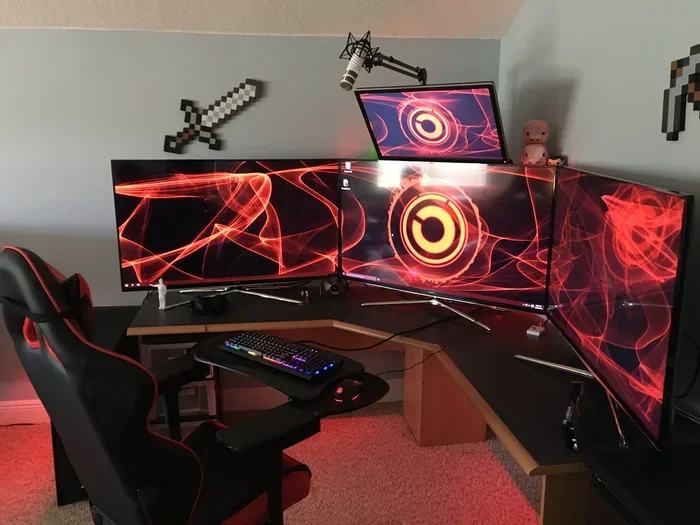
Choose a monitor from a trusted brand that does not require an always-on internet connection. If you use a 3 monitor setup, make sure each display supports local-only operation. Avoid monitors with built-in smart features you do not need.
Privacy Safe Peripherals
Your keyboard, mouse, and headset can all leak data. Wireless peripherals often connect through Bluetooth. This creates potential interception points. Choose devices with strong encryption and minimal cloud dependency.
For audio, a best in ear gaming headphone with a physical mute switch gives you real control. You can mute your mic without relying on software. That is a small but powerful privacy win.
Securing Your Network and Connection
Your internet connection is the highway your data travels on. If it is not secure, anyone can peek at what you send and receive. A secure network is essential for a privacy first gaming setup.
Use a VPN for Gaming
A VPN encrypts your internet traffic. It hides your real IP address from game servers and trackers. This makes it much harder for third parties to build a profile on you.
Not all VPNs are equal. Look for one that does not log your activity. A no-log VPN keeps your gaming data private. Some VPNs even reduce lag, which is a bonus for competitive players.
Router-Level Privacy Settings
Your router is the gatekeeper of your home network. Most people never change their router settings. This is a big mistake. Here is what you should do:
- Change the default admin password
- Enable WPA3 encryption if available
- Disable remote management
- Turn off WPS (Wi-Fi Protected Setup)
- Create a separate guest network for IoT devices
These steps take minutes. But they make a huge difference in your overall privacy.
Software and Privacy Settings for Gamers
Hardware gets a lot of attention. But software settings are just as important. Many games and platforms collect data by default. You need to go in and turn these off.
Game Platform Privacy Settings
Every major gaming platform has privacy settings. Steam, Epic Games, PlayStation, and Xbox all let you control what you share. Spend 15 minutes going through each platform’s privacy menu. Turn off everything you do not need.
Common settings to review include:
- Profile visibility to strangers
- Game activity sharing
- Location tracking
- Advertising preferences
- Voice chat recording
Disable Telemetry and Background Data
Telemetry is the data that apps send back to developers. It helps them improve products. But it also shares your personal information. Go into your game settings and disable telemetry where possible.
On Windows, use the privacy settings to limit diagnostic data sharing. On consoles, check the network privacy options. Every bit of data you block is a win for your privacy.
Privacy First Browsing for Gaming
Many gamers browse the web while gaming. Whether you check walkthroughs or watch streams, your browser can track you. Use a privacy first browser like Brave or Firefox with strict tracking protection.
Install ad blockers and tracker blockers. These tools prevent invisible scripts from collecting your data. They also make pages load faster, which is a nice bonus.
Physical Privacy Tools for Your Setup
Sometimes the simplest privacy tools are the most effective. Physical devices give you tangible control over what is captured and shared.
Webcam Privacy Covers
A webcam cover is a small sliding piece that blocks your camera lens. When you are not on a call, the cover is closed. When you need it, you slide it open. It is simple and it works.
Many laptops now come with built-in camera shutters. If yours does not, buy an external cover. They cost just a few dollars and offer real peace of mind.
Microphone Privacy Controls
Your headset mic can pick up everything in the room. Even when you are not talking, it may be listening. Use a headset with a physical mute button. This gives you instant control without relying on software.
When you are not gaming, mute your mic. If you have a desktop mic, consider using a pop filter with a physical shutter. These small steps add up over time.
Screen Privacy Filters
A screen privacy filter limits the viewing angle of your monitor. People sitting next to you cannot see what is on your screen. This is especially important if you game in shared spaces like dorm rooms or offices.
Privacy filters are cheap and easy to install. They also reduce glare, which can help with eye strain during long gaming sessions.
Common Mistakes That Hurt Gaming Privacy
Even with the best intentions, gamers often make privacy mistakes. Here are the most common ones and how to avoid them.
Using Default Settings
Default settings are designed for convenience, not privacy. Most gaming platforms and devices ship with data sharing turned on. Always review and adjust settings before you start playing.
Ignoring Software Updates
Updates fix security holes. Skipping them leaves your setup vulnerable. Enable automatic updates for your operating system, games, and drivers. Outdated software is one of the easiest ways for attackers to gain access.
Oversharing on Social Media
Posting your gaming setup or your location can give away more than you think. Avoid sharing real-time location data. Be careful about posting screenshots that show personal information on screen.
Choosing Cheap, Unknown Brands
Budget peripherals from unknown brands often have weak privacy policies. They may collect more data than name-brand alternatives. Invest in reputable brands that prioritize user privacy.
Expert Insights on Gaming Privacy in 2026
Privacy experts agree that gaming privacy is a growing concern. The average gamer uses between 3 and 5 connected devices. Each one is a potential data leak point. Experts recommend a layered approach to privacy.
“Privacy is not about hiding. It is about having control,” says digital security researcher Jane Mitchell. “A privacy first gaming setup gives you that control without sacrificing fun.”
The key is to think about privacy as a habit, not a one-time setup. Review your settings regularly. Stay informed about new privacy features. And always question what data a device or service really needs.
Quick Tips for a Privacy First Gaming Setup
Want to get started right now? Here are quick wins you can implement today:
- Turn off voice chat recording in your game settings
- Cover your webcam when not in use
- Use a VPN when gaming online
- Review privacy settings on all gaming platforms
- Choose hardware with local processing options
- Keep all software updated
- Use a privacy focused browser for gaming research
These tips take less than an hour to set up. But they provide lasting protection for your privacy.
Conclusion
Building a privacy first gaming setup in 2026 is easier than you think. You do not need to be a tech expert. Start with the hardware choices, secure your network, and adjust your software settings. Add physical privacy tools like webcam covers and mic controls for extra protection.
Your gaming setup should be a place of fun and relaxation. It should not be a source of worry about who is watching or listening. With the steps in this guide, you can game with confidence knowing your data stays yours.
Take action today. Pick one or two tips from this article and start implementing them. Privacy is a journey, and every step you take makes a real difference. Your privacy focused gaming environment is worth the effort.
Frequently Asked Questions
What is a privacy first gaming setup?
A privacy first gaming setup is a gaming environment designed to minimize data collection and maximize user control. It includes hardware choices, network security, and software settings that protect your personal information while you play.
Do gaming headsets collect data?
Some gaming headsets do collect data, especially wireless models with smart features. Choosing headsets with physical controls and minimal cloud dependency helps you maintain a privacy first gaming setup. Look for models with local audio processing and no mandatory app connections.
Is a VPN necessary for gaming privacy?
A VPN is not strictly required, but it adds a strong layer of protection. It encrypts your traffic and hides your IP address from game servers and trackers. For a truly privacy focused gaming environment, a no-log VPN is a valuable tool.
Can I build a privacy first setup on a budget?
Absolutely. Many privacy steps are free, like adjusting settings and using privacy browsers. Hardware choices like webcam covers and mic muting cost just a few dollars. You do not need expensive gear to improve your privacy.
How often should I review my gaming privacy settings?
Review your settings at least once every three months. Gaming platforms update their privacy options frequently. New features may change what data is collected. Staying on top of updates keeps your privacy first gaming setup effective over time.
Are console gaming setups less private than PC setups?
Consoles and PCs both have privacy considerations. Consoles often collect more telemetry data by default. PCs give you more control over settings and software. Either platform can be made more private with the right adjustments and choices.