Best Mini Pc for Self Hosting in 2026 the Ultimate Guide
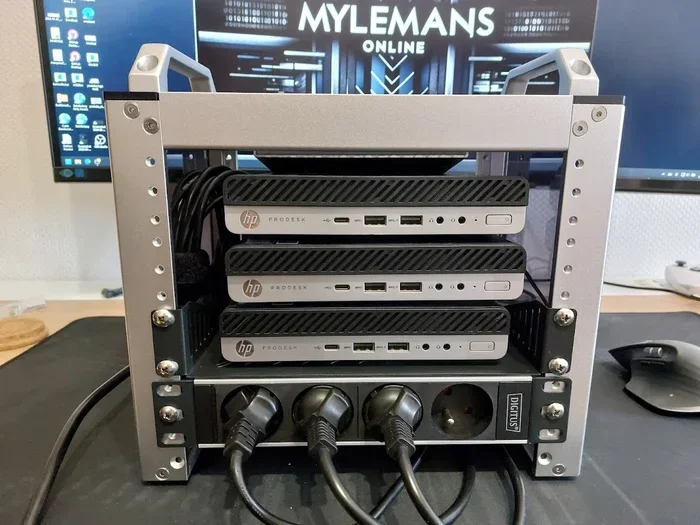
Finding the best mini PC for self hosting in 2026 is easier than ever. Whether you want to host your own media server, cloud storage, or smart home hub, a compact mini PC delivers serious power without the bulk. This guide walks you through the top models, key specs, and setup tips to get your home server running fast.
Self hosting has exploded in popularity over the last few years. People want more control over their data, more privacy, and fewer monthly bills. A mini PC for self hosting makes all of this possible without taking up a whole room. These tiny machines pack enough punch to run servers, media libraries, smart home tools, and more. In 2026, the options are better than ever, and the prices keep dropping.
If you have been thinking about dipping your toes into self hosting, you are in the right place. This guide covers everything you need to know. We will look at the best mini PCs, what to look for, and how to set things up. By the end, you will feel confident picking the right machine for your needs.
Key Takeaways
- Mini PCs are perfect for self hosting: They save space, use less power, and still handle server tasks with ease.
- Look for these key specs: RAM, storage type, CPU power, and network speed matter most for hosting.
- Top picks include Intel N100 and AMD Ryzen models: These processors offer great performance for the price.
- Self hosting saves money long term: You ditch monthly cloud fees and keep full control of your data.
- Setup is simpler than you think: With the right mini PC, you can be up and running in under an hour.
- Cooling and power matter: Choose a model with good thermal design and efficient power use for 24/7 operation.
📑 Table of Contents
Why Self Hosting with a Mini PC Makes Sense
Traditional servers take up space and make noise. They also eat up electricity. A mini PC for self hosting solves all of these problems. These machines are small, quiet, and designed to run all day long without spiking your power bill. Most mini PCs use between 10 and 30 watts, which is a tiny fraction of what a full-size server pulls.
Here are some of the biggest reasons people choose mini PCs for hosting:
- Small footprint: Mini PCs fit on a desk or shelf, not in a dedicated server room.
- Low power use: You can run a mini PC 24/7 for pennies a day.
- Quiet operation: No loud fans waking you up at night.
- Affordable: Many great options cost under $300.
- Easy to manage: Set up and maintain without a degree in IT.
Self hosting also means you own your data. No more relying on third-party services that can change their terms, raise prices, or shut down. With a mini home server, you are in charge. You decide what runs, who has access, and how your data is stored.
What to Look for in a Mini PC for Self Hosting
Not all mini PCs are built the same. Some are great for basic tasks, while others can handle heavy server workloads. Here is what matters most when choosing a best mini PC for self hosting setup.
Processor (CPU)
The CPU is the brain of your mini PC. For light hosting like a personal website or a small file server, an Intel N100 or AMD Ryzen 5000 series chip works great. These processors handle multiple tasks without breaking a sweat. If you plan to run heavier workloads like self-hosted media servers or containerized apps, look for something with more cores. The Intel Core i3 and i5 12th or 13th generation chips are solid choices.
RAM
Memory is critical for hosting multiple services at once. For most self-hosting setups, 16 GB of RAM is the sweet spot. It gives you enough headroom to run a media server, a file share, and a few other tools without slowdowns. If you are just starting out, 8 GB can work, but you will likely want to upgrade later.
Storage
Go with an NVMe SSD for the best performance. These drives are fast and reliable, which is exactly what you want for a server. If you need lots of storage for media files or backups, you can always add a larger hard drive through a USB port or a SATA connection. Some mini PCs even support multiple drives, which is perfect for building a compact home server with both fast storage and bulk storage.
Network and Connectivity
A wired Ethernet connection is a must for any hosting setup. Wi-Fi works for basic use, but a hardwired connection gives you better speed and reliability. Look for mini PCs with Gigabit Ethernet at minimum. Some models even offer 2.5GbE ports, which is a nice bonus if you transfer large files often.
Power Efficiency
Since your mini PC will likely run around the clock, power efficiency matters a lot. Look for models rated for low idle power consumption. The Intel N100 platform, for example, is known for sipping power even under load. This keeps your electricity costs low and your machine cool over long periods.
Top Mini PCs for Self Hosting in 2026
The market for mini PCs has never been stronger. Here are some of the best options for self hosting this year. Each one brings something unique to the table.
Intel N100 Mini PCs
Intel N100-based mini PCs have become the go-to choice for budget self hosting. They offer excellent power efficiency, solid performance for light to medium workloads, and incredibly low prices. Models in this category often cost between $150 and $250, making them perfect for beginners. You can run Nextcloud, Plex, Home Assistant, and more without any issues. If you want the best value, start here.
Many people pair an N100 mini PC with self-hosted media server software like Plex or Jellyfin. The N100 handles 1080p streaming with ease, and even 4K in some cases. It is a fantastic entry point for anyone new to self hosting.
AMD Ryzen-Based Mini PCs
If you need more processing power, AMD Ryzen-based mini PCs are worth a look. These machines offer multi-core performance that shines when running several services at once. They are great for hosting databases, running Docker containers, or managing a home lab with multiple virtual machines. Prices tend to be a bit higher, usually between $300 and $500, but the extra power is well worth it for serious hobbyists.
Affordable All-in-One Options
Some people prefer an all-in-one design where the screen and the computer are one unit. Best affordable all-in-one PCs can double as both a daily driver and a hosting machine. You get a display for managing your server and the compact form factor of a mini PC. These are ideal for users who want a clean desk setup without extra peripherals.
For those in Canada, there are also great options available at competitive prices. Check out the best mini PC you could buy in Canada for region-specific deals and availability.
Mini PCs for Plex and Media Hosting
Media hosting is one of the most popular use cases for self hosting. Whether you want to stream your movie collection or share music with family, a best mini PC for Plex gives you a smooth experience. These machines handle transcoding, library management, and streaming to multiple devices without breaking a sweat. Look for models with hardware-accelerated video decoding for the best performance.
Similarly, if you are interested in running emulators or game servers, the best mini PC for emulation category offers machines with enough GPU and CPU power to handle retro gaming and even some modern titles. This opens up fun possibilities beyond just file storage and media streaming.
Setting Up Your Mini PC for Self Hosting
Getting started with self hosting is simpler than most people think. You do not need to be a tech expert. Here is a basic roadmap to follow.
Step 1: Choose Your Operating System
Most mini PCs come with Windows, but for self hosting, a Linux-based OS is usually better. Options like Ubuntu Server, Debian, or Proxmox are free, lightweight, and built for running services. Proxmox is especially popular because it lets you run virtual machines and containers on one machine.
Step 2: Install Your Hosting Software
Once your OS is running, you can start installing hosting applications. Popular choices include:
- Plex or Jellyfin for media streaming
- Nextcloud for personal cloud storage
- Home Assistant for smart home automation
- Pi-hole for network-wide ad blocking
- Portainer for managing Docker containers
Each of these tools is free and open source. You can run several of them on the same mini PC without any conflicts.
Step 3: Set Up Storage and Backups
Connect external drives or set up internal storage for your data. Always plan for backups. A simple backup strategy is the 3-2-1 rule: keep three copies of your data, on two different types of media, with one copy stored offsite. Even a basic cloud backup service works for the offsite copy.
Step 4: Secure Your Setup
Security is essential when hosting services on your network. Use strong passwords, enable a firewall, and keep your software updated. If you want to access your services from outside your home, use a VPN or a secure tunnel instead of opening ports directly. This keeps your data safe from prying eyes.
Common Mistakes to Avoid
Even experienced self hosters make mistakes. Here are some common pitfalls to watch out for:
- Skimping on RAM: 8 GB works for basics, but 16 GB gives you room to grow. Do not bottleneck yourself early on.
- Ignoring cooling: Mini PCs in enclosed spaces can overheat. Make sure there is enough airflow around your machine.
- No backup plan: Hard drives fail. Always have a backup strategy in place before you trust your mini PC with important data.
- Overcomplicating things: Start with one or two services. Learn how they work before adding more. A simple setup is easier to maintain.
- Forgetting about power outages: A small UPS (uninterruptible power supply) can save your server from unexpected shutdowns.
Expert Tips for Getting the Most Out of Your Mini PC
Want to level up your self hosting game? Here are some tips from experienced home lab enthusiasts:
Use a UPS for clean shutdowns. Power outages can corrupt data. A small battery backup gives you time to shut down safely.
Monitor your temperatures. Many mini PCs have built-in temperature sensors. Use free tools to keep an eye on heat levels, especially during heavy workloads.
Start small and expand. Do not try to host everything at once. Begin with one service, learn the ropes, and add more as you grow comfortable.
Join the community. Self hosting forums and subreddits are full of helpful people. You will find guides, troubleshooting tips, and inspiration for new projects.
Consider your internet upload speed. Self hosting works best with a decent upload connection. If your upload speed is low, focus on services that do not require much bandwidth, like file storage or smart home tools.
Final Thoughts
The best mini PC for self hosting in 2026 depends on your needs and budget. For most people, an Intel N100 model offers the perfect balance of price, performance, and efficiency. If you need more power, AMD Ryzen options deliver without breaking the bank. The key is to pick a machine that matches what you want to host and gives you room to grow.
Self hosting is one of the most rewarding hobbies you can pick up. You learn new skills, save money, and take back control of your digital life. A mini PC makes it all accessible. You do not need a huge investment or a computer science degree. Start small, stay curious, and enjoy the journey. Your mini PC for self hosting is waiting to become the backbone of your personal cloud.
Frequently Asked Questions
What is the best mini PC for self hosting in 2026?
Intel N100-based mini PCs are widely considered the best for self hosting in 2026. They offer excellent power efficiency, solid performance, and affordable prices that make them ideal for running services like Plex, Nextcloud, and Home Assistant without any hassle.
How much RAM do I need for self hosting?
16 GB of RAM is the sweet spot for most self hosting setups. It gives you enough memory to run multiple services like a media server, file share, and smart home tools simultaneously without slowdowns or performance issues.
Can I use a mini PC for Plex media streaming?
Absolutely. Mini PCs with Intel N100 or AMD Ryzen processors handle Plex streaming very well. They can transcode and stream 1080p content smoothly, and many can manage 4K as well, especially when using hardware-accelerated decoding.
Is self hosting safe and secure?
Yes, self hosting is safe when you follow good security practices. Use strong passwords, enable a firewall, keep software updated, and use a VPN for remote access. These steps protect your data and keep your home network secure from unauthorized access.
How much power does a mini PC use for self hosting?
Most mini PCs use between 10 and 30 watts during regular operation. This is very low compared to full-size servers. Running a mini PC 24/7 for self hosting typically costs just a few dollars per month in electricity, making it a cost-effective choice.
Do I need technical skills to self host with a mini PC?
No, you do not need advanced technical skills. Many self hosting tools are user-friendly and have large communities with guides and tutorials. Start with one simple service, follow step-by-step instructions, and build your confidence as you go along.