What Is a X Mailer Header
An X Mailer Header is a non-standard email header field that identifies the software or mailer used to send an email. It contains the name and version of the email client or mail transfer agent. Understanding this header helps with email troubleshooting, deliverability, and security analysis.
Have you ever wondered what happens behind the scenes when you hit “Send” on an email? Your message doesn’t just fly straight to the recipient. It travels through a series of servers, picks up metadata along the way, and carries hidden information that most people never see. One of the most interesting pieces of this hidden data is the X Mailer Header. If you’ve ever wondered what that field means or why it matters, you’re in the right place.
The X Mailer Header is a small but powerful piece of email metadata. It tells you exactly which software or application was used to compose and send the email. Whether it’s Outlook, Gmail, Thunderbird, or a custom mailing system, the X-Mailer header leaves a digital fingerprint. In this article, we’ll break down everything you need to know about this email header field. You’ll learn what it is, how it works, why it matters for security, and how it affects your daily email experience.
Key Takeaways
- The X-Mailer header identifies the email software that sent a message, including its name and version number.
- It is a non-standard header field that uses the “X-” prefix to denote custom or experimental email fields.
- Spam filters and security tools analyze the X-Mailer header to detect suspicious or fraudulent email activity.
- Removing or spoofing the X-Mailer header is a common tactic used by phishers and spammers to hide their identity.
- Email deliverability can be affected by how the X-Mailer header is configured and whether it matches expected patterns.
📑 Table of Contents
- What Is an X Mailer Header?
- Why Does the X Mailer Header Matter?
- Common X Mailer Header Examples
- How to View the X Mailer Header
- The X Mailer Header in Email Marketing
- X Mailer Header and Email Spoofing
- Best Practices for Managing the X Mailer Header
- Frequently Asked Questions About the X Mailer Header
- Conclusion
What Is an X Mailer Header?
An X Mailer Header is a custom email header field that identifies the mailer software responsible for sending an email message. The “X” prefix stands for “experimental” or “non-standard.” It tells email systems and recipients that this header field goes beyond the officially defined headers in the email protocol. In simple terms, it’s a label that says, “This email was sent using [Software Name], version [Version Number].”
The X-Mailer header follows a simple format. It typically looks like this:
X-Mailer: Microsoft Outlook 16.0
Or it could look like this:
X-Mailer: Thunderbird 102.4.1
The header contains two main pieces of information. The first is the name of the email client or mailer software. The second is the version number. Together, these details create a unique identifier for the sending application. This information travels with the email from sender to recipient, passing through every server along the way.
How the X-Mailer Header Works
When you write an email and click send, your email client attaches metadata to the message. This metadata includes things like the sender’s address, the recipient’s address, the subject line, and the date. The X Mailer Header is added during this process. Your email client automatically inserts its name and version into this header field before the message leaves your device.
From there, the email moves through the Simple Mail Transfer Protocol (SMTP) servers. Each server that handles the message can read and log the X-Mailer header. By the time the email reaches the recipient’s inbox, the header has been preserved throughout the entire journey. This makes it a reliable source of information about the sending software.
X-Mailer vs. Other Email Headers
To understand the X-Mailer header better, it helps to compare it with other common email headers. Standard headers like From, To, Subject, and Date are defined by email protocols. These headers are required for every email to function properly. The X-Mailer header, however, is optional. It exists because email software developers wanted a way to identify their products.
Other non-standard headers include X-Originating-IP, X-Spam-Status, and X-Mailer. All of these use the “X-” prefix to indicate they are not part of the core email specification. But they serve important purposes. The X Mailer Header specifically focuses on identifying the sending software, while other custom headers track different aspects of the email’s journey.
Why Does the X Mailer Header Matter?
The X-Mailer header might seem like a small technical detail, but it plays a big role in several important areas of email communication. From security to deliverability, this header field has real-world impact.
Email Security and Spam Detection
Security teams and spam filters use the X Mailer Header as one of many signals to evaluate incoming email. If an email claims to come from a trusted company but the X-Mailer header shows a generic or suspicious mailer, that’s a red flag. Spam filters look for patterns in these headers to identify phishing attempts and malicious emails.
For example, if you receive an email that supposedly comes from your bank, but the X-Mailer header shows “WebMailer 2.0,” something might be wrong. Legitimate banks typically send emails through well-known, branded email clients. A mismatch between the claimed sender and the actual mailer software raises suspicion.
Email Deliverability
Your email deliverability can be influenced by the X-Mailer header. Some email providers and spam filters flag messages that come from unusual or poorly configured mailers. If your email software generates a non-standard or suspicious X-Mailer header, your messages might end up in the spam folder instead of the inbox.
Keeping your email client and mailer software up to date helps ensure that your X-Mailer header looks legitimate. This small detail can make a real difference in whether your emails reach their destination.
Troubleshooting Email Issues
When something goes wrong with email delivery, the X-Mailer header can help diagnose the problem. IT professionals and email administrators often inspect email headers to trace where a message came from and how it was sent. The X Mailer Header provides a starting point for this investigation.
If you notice that emails from a particular sender are consistently failing or getting flagged, checking the X-Mailer header can reveal whether the issue is related to the sending software. This information helps you take the right steps to fix the problem.
Common X Mailer Header Examples
The X-Mailer header can take many forms depending on the software used. Here are some common examples you might encounter:
- X-Mailer: Microsoft Outlook 16.0 – Sent from the desktop version of Outlook.
- X-Mailer: Gmail – Sent from Google’s webmail service.
- X-Mailer: Apple Mail 15.0 – Sent from the Apple Mail application.
- X-Mailer: Mozilla Thunderbird 102.4.1 – Sent from the Thunderbird email client.
- X-Mailer: PHP 8.1.0 – Sent from a server-side script using PHP’s mail function.
- X-Mailer: Mailchimp Transactional – Sent from a marketing or transactional email platform.
Each of these examples tells a different story about how the email was sent. A PHP-generated header often indicates an automated or script-based email. A Mailchimp header suggests a marketing campaign. These details help recipients and security systems understand the nature of the email.
What About Missing X-Mailer Headers?
Not all emails include an X-Mailer header. Some email clients and servers strip this field before delivery. Others never add it in the first place. When the header is missing, it doesn’t necessarily mean anything is wrong. Many modern email services prioritize privacy and remove non-essential headers to reduce tracking.
However, a missing X-Mailer header combined with other suspicious signs can still raise concerns. Security analysts look at the full picture when evaluating email authenticity. The absence of an X-Mailer header is just one piece of that puzzle.
How to View the X Mailer Header
Curious about what your own emails reveal? Viewing the X-Mailer header is straightforward. Most email clients let you access the full header information. Here’s how to find it in some popular email platforms:
- Gmail: Open the email, click the three dots in the top right corner, and select “Show original.” The full header, including X-Mailer, will appear in a new tab.
- Outlook: Open the email, go to File, then Properties. The headers will be displayed in the Internet Headers field.
- Apple Mail: View the email, then click View in the menu bar, select Message, and choose All Headers.
Once you can see the full headers, look for the line that starts with “X-Mailer.” That line contains the software name and version that sent the email. It’s a quick and easy way to learn more about any message you receive.
Using Header Analysis Tools
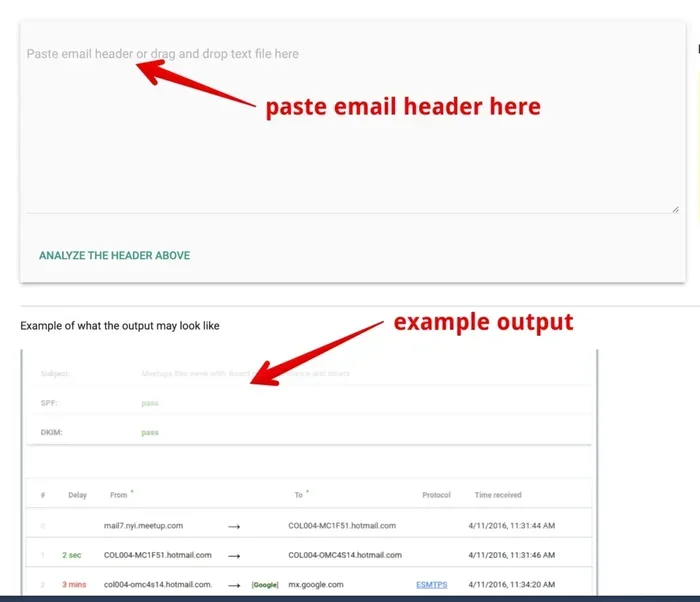
If you prefer a more automated approach, several online tools can parse email headers for you. These tools extract the X-Mailer header and present it alongside other important header fields. They can also check the email’s authentication status, including SPF, DKIM, and DMARC results. Using these tools gives you a comprehensive view of an email’s journey and origin.
The X Mailer Header in Email Marketing
For businesses that rely on email marketing, the X-Mailer header takes on additional significance. Email service providers (ESPs) and marketing platforms add their own X-Mailer headers to bulk email campaigns. These headers help identify the sending platform and ensure proper tracking and analytics.
Many companies build their email infrastructure on a what is a saas environment to manage their email campaigns at scale. SaaS-based email platforms handle the technical details, including proper header configuration, so marketers can focus on creating engaging content.
How Email Marketing Platforms Handle the X-Mailer Header
Popular email marketing tools like Mailchimp, SendGrid, and Constant Contact each use their own X-Mailer header values. When you send a campaign through these platforms, the X-Mailer header reflects the platform’s name and version. This transparency helps recipients and spam filters recognize legitimate marketing emails.
For businesses managing email marketing budgets, understanding the reasonable cost of sales for saas product helps ensure that the email platform they choose delivers good value without inflating overhead costs. Proper header configuration is part of that value proposition.
Designing Email Templates With Headers in Mind
When email designers create templates, they often start with a purpose of a mockup to plan the layout and structure before writing any code. This design phase includes considering how headers like X-Mailer will appear and function. A well-planned email template ensures that all metadata, including the X-Mailer header, is properly configured and doesn’t interfere with the message rendering.
X Mailer Header and Email Spoofing
Email spoofing is a serious threat in today’s digital landscape. Spammers and attackers often forge email headers to make messages appear as though they came from a trusted source. The X-Mailer header is not immune to this manipulation. Attackers can set a fake X-Mailer value to disguise the true origin of their messages.
This is why email authentication protocols like SPF, DKIM, and DMARC are so important. These protocols work together to verify that an email genuinely comes from the domain it claims to represent. While the X-Mailer header alone cannot prevent spoofing, it contributes valuable information when combined with other authentication checks.
Security-conscious organizations monitor the X-Mailer header as part of their broader email security strategy. An unexpected or inconsistent X-Mailer value can trigger deeper investigation and help catch spoofing attempts early.
Best Practices for Managing the X Mailer Header
Whether you’re an email user, a business owner, or an IT administrator, following best practices for the X-Mailer header can improve your email experience. Here are some practical tips:
- Keep your email client updated. Modern versions of email software generate clean, recognizable X-Mailer headers that spam filters trust.
- Don’t manually edit email headers unless necessary. Tampering with headers can break email authentication and cause delivery problems.
- Use a reputable email service provider. Established ESPs configure headers correctly, improving deliverability and trust.
- Monitor your email headers regularly. If you notice unexpected changes in the X-Mailer header, investigate the cause immediately.
- Educate your team about email security. Understanding headers like X-Mailer helps everyone recognize potential phishing attempts.
These simple steps go a long way in ensuring that your emails are delivered, trusted, and secure. The X Mailer Header might be a small piece of the email puzzle, but it plays a meaningful role in the bigger picture of email health and reputation.
Frequently Asked Questions About the X Mailer Header
Can the X-Mailer header be removed or changed?
Yes, the X-Mailer header can be modified or removed by the sending software or by intermediate mail servers. Some email services strip non-standard headers for privacy reasons. However, changing or removing this header does not guarantee anonymity, as other header fields and server logs still contain identifying information.
Is the X-Mailer header the same as the From header?
No, they are completely different. The From header shows the sender’s email address, while the X-Mailer header shows the software used to send the email. The From header is a standard, required field, whereas the X-Mailer header is optional and non-standard.
Does every email have an X-Mailer header?
No, not every email includes an X-Mailer header. Some email clients and servers omit it entirely. Others remove it during transmission for privacy or security reasons. The presence or absence of this header depends on the sending software and the configuration of the mail servers involved.
Can the X-Mailer header be used to track emails?
The X-Mailer header alone does not enable email tracking. However, it provides information about the sending software that can be logged and analyzed. When combined with other tracking mechanisms and header fields, it contributes to a fuller picture of an email’s origin and journey.
How does the X-Mailer header affect spam scores?
Some spam filters assign higher spam scores to emails with unusual or suspicious X-Mailer headers. Generic or outdated mailer software can trigger these filters. Keeping your email software updated helps ensure that your X-Mailer header looks legitimate and doesn’t negatively impact your spam score.
What is the difference between X-Mailer and User-Agent headers?
The X-Mailer header specifically identifies the email mailer software, while the User-Agent header is a more general identifier used in web protocols. In email, the X-Mailer header is the standard way to identify the sending client. The User-Agent header is more commonly associated with web browsers and HTTP requests.
Conclusion
The X Mailer Header is a small but essential part of every email’s metadata. It identifies the software used to send a message and provides valuable information for security, troubleshooting, and deliverability. Whether you’re a casual email user or a business managing large-scale campaigns, understanding this header helps you make smarter decisions about email communication.
By keeping your email software updated, using reputable service providers, and paying attention to header details, you can improve your email experience significantly. The next time you see “X-Mailer” in an email header, you’ll know exactly what it means and why it matters. Take a moment today to check your own email headers and see what they reveal about your digital footprint.