What Is Pcm in a Vizio Tv
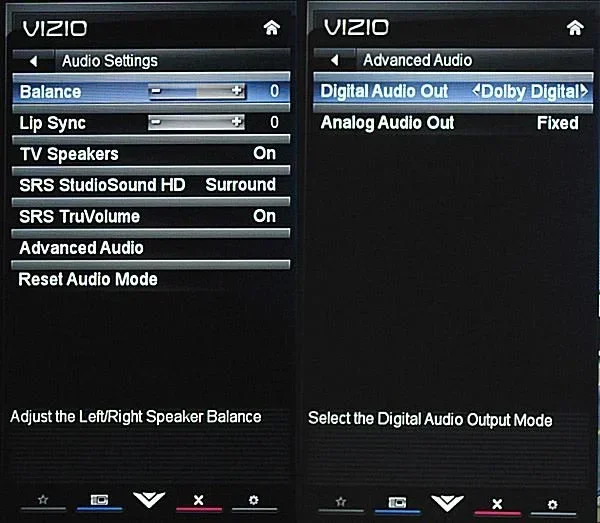
PCM stands for Pulse-Code Modulation, and it is a digital audio format found in Vizio TV settings. When you switch your Vizio TV audio output to PCM, it converts sound into a digital signal for clearer and more reliable playback. This setting is essential for connecting external speakers, sound bars, and home theater systems without audio issues.
If you have been fiddling with the audio settings on your Vizio TV, you might have noticed an option called PCM. It may look like a confusing technical term, but it is actually very simple. PCM stands for Pulse-Code Modulation, and it plays a big role in how your TV delivers sound. Whether you are using built-in speakers, a sound bar, or a full home theater setup, understanding PCM can make a huge difference in your audio experience.
Many people stumble across this setting and wonder what it does. Should you use it? When should you switch to it? Is PCM better than other audio options? In this guide, we will break it all down in plain language. You will learn exactly what PCM is, how it works on your Vizio TV, and when to use it for the best sound.
Key Takeaways
- PCM means Pulse-Code Modulation: It is a standard digital audio format used to convert analog sound into digital signals.
- PCM improves audio compatibility: Using PCM ensures your Vizio TV works smoothly with sound bars, receivers, and external speakers.
- PCM vs. Bitstream matters: PCM processes audio on the TV, while Bitstream sends raw audio to your external device for decoding.
- You can change PCM settings easily: The PCM option is found in your Vizio TV audio menu under Sound Settings.
- PCM is great for stereo audio: It delivers clean two-channel sound ideal for most everyday viewing.
- PCM may limit surround sound: If you want full Dolby or DTS surround, you may need to use Bitstream instead.
📑 Table of Contents
- What Does PCM Mean on a Vizio TV?
- Why PCM Matters for Vizio TV Audio
- PCM vs. Bitstream: Which Should You Use?
- How to Change PCM Settings on Your Vizio TV
- Common PCM Audio Issues and How to Fix Them
- When Should You Use PCM on Your Vizio TV?
- Understanding PCM Audio Quality on Vizio TVs
- Expert Tips for Getting the Best Audio from Your Vizio TV
- Final Thoughts on PCM in Vizio TVs
What Does PCM Mean on a Vizio TV?
PCM stands for Pulse-Code Modulation. It is a method used to digitally represent analog audio signals. In simpler terms, PCM takes the sound coming from your TV and turns it into a digital format that can be sent to speakers or audio devices. This process ensures that the sound stays clean and clear as it travels from your TV to your output device.
On a Vizio TV, PCM is one of the available audio output formats. When you select PCM in your TV settings, the TV handles the audio processing itself. It converts the sound into a digital signal and sends that signal to your connected device. This is different from other formats like Bitstream, where the TV sends the raw audio data and lets the external device do the decoding work.
How PCM Works in Simple Terms
Think of PCM like a translator. Your Vizio TV receives audio in different formats from movies, shows, and apps. When PCM is selected, the TV takes all that audio and converts it into one consistent digital format. This makes it easier for external speakers and sound systems to understand the signal. The result is steady, reliable sound without compatibility issues.
PCM works by sampling the audio signal at regular intervals and turning each sample into a digital value. This happens thousands of times per second. The higher the sampling rate, the better the audio quality. Most Vizio TVs use standard PCM settings that work well for everyday watching, gaming, and music.
Why PCM Matters for Vizio TV Audio
The audio output setting on your Vizio TV can change how your sound sounds and which devices it works with. PCM is important because it offers a universal format that almost all audio equipment can understand. This makes it a go-to choice for many Vizio TV owners.
Better Compatibility with External Devices
One of the biggest advantages of using PCM on your Vizio TV is compatibility. When you set your audio output to PCM, you can connect almost any external speaker or sound system without worrying about format conflicts. This includes sound bars, AV receivers, and even older audio equipment that may not support newer formats like Dolby Digital or DTS.
If you have ever connected a sound bar to your Vizio TV and experienced no sound or distorted audio, switching to PCM might fix the problem. Many audio devices simply cannot decode certain compressed audio formats. PCM bypasses that issue by sending a clean digital signal that virtually any device can handle.
Clean Stereo Sound
PCM excels at delivering high-quality stereo audio. If you primarily watch TV in two-channel stereo, PCM will give you clear and crisp sound. It preserves the audio quality without adding compression artifacts that can muddy the sound. For casual viewing, news, talk shows, and music, PCM is an excellent choice.
However, if you are a movie lover who wants full surround sound, PCM might not be your best option. PCM typically outputs stereo sound, which means you will miss out on the immersive multi-channel experience that formats like Dolby Digital or DTS offer. We will cover this more in the next section.
PCM vs. Bitstream: Which Should You Use?
This is one of the most common questions Vizio TV owners ask. Both PCM and Bitstream are audio output options, but they work in very different ways. Understanding the difference helps you choose the right setting for your setup.
What Is Bitstream?
Bitstream sends the raw, unprocessed audio data from your TV to your external device. The external device, such as a sound bar or AV receiver, then decodes the audio format itself. This means your Vizio TV does not process the audio at all. It simply passes the data along.
Bitstream is ideal when you want to use advanced audio formats like Dolby Digital, Dolby Atmos, or DTS. These formats carry surround sound information that PCM cannot transmit. If your sound bar or receiver supports these formats, Bitstream will give you a richer, more immersive audio experience.
Key Differences at a Glance
- PCM: The TV processes the audio and sends a digital stereo signal. Works with almost all devices.
- Bitstream: The TV sends raw audio data. The external device decodes it. Supports advanced surround formats.
- PCM: Best for simple setups, stereo sound, and older audio equipment.
- Bitstream: Best for home theater systems, surround sound, and modern audio devices.
For most people, PCM is the safer and easier option. It works reliably and rarely causes audio issues. If you have a more advanced setup with a surround sound system, you might want to try Bitstream for a more theatrical experience.
How to Change PCM Settings on Your Vizio TV
Changing the PCM setting on your Vizio TV is straightforward. Here is a step-by-step guide to help you find and adjust the audio output format.
Step-by-Step Instructions
- Press the Menu button on your Vizio remote.
- Navigate to the Audio or Sound Settings section.
- Look for an option called Audio Output or Digital Audio Output.
- Select the audio format option. You should see PCM and Bitstream listed.
- Choose PCM to switch to PCM mode.
- Press OK to save your selection.
Once you have changed the setting, test your audio by playing a movie or show. You should notice the sound quality and output change. If you are using a sound bar or external speakers, make sure the device is powered on and set to the correct input channel.
Quick Tips for PCM Setup
- Always check your external speaker or sound bar manual for recommended audio settings.
- If you experience no sound after switching to PCM, try restarting both your TV and the audio device.
- Some Vizio TV models may label PCM as “Digital Audio Out (PCM)” in the menu.
- Make sure your HDMI or optical cable is securely connected for the best digital audio transmission.
Common PCM Audio Issues and How to Fix Them
While PCM is a reliable audio format, you may run into some issues when using it on your Vizio TV. Here are the most common problems and simple fixes.
No Sound After Switching to PCM
If you switch to PCM and suddenly have no sound, do not panic. This usually happens because the connected device is set to expect a different audio format. Try switching your external speaker or sound bar to PCM input mode. Also, check that the volume is not muted on either the TV or the audio device.
Low Volume or Distorted Sound
PCM outputs a fixed digital signal, which sometimes results in lower volume compared to other formats. To fix this, you can adjust the volume on your Vizio TV or on your external audio device. If the sound is distorted, try using a different cable. A faulty HDMI or optical cable can cause audio problems even when the settings are correct.
PCM Does Not Support Surround Sound
This is not really an issue but a limitation. PCM sends stereo audio, so it does not carry surround sound information. If you want full surround sound, you should switch to Bitstream and use a format like Dolby Digital or DTS. This is especially important for movie nights or gaming where immersive sound adds to the experience.
When Should You Use PCM on Your Vizio TV?
Knowing when to use PCM makes a big difference in your viewing experience. Here are the best situations to switch to PCM on your Vizio TV.
- You are using a basic sound bar: Many sound bars work best with PCM input. It ensures a stable connection without format conflicts.
- You want simple stereo sound: For everyday TV watching, news, and casual viewing, PCM delivers clean and clear audio.
- You have older audio equipment: PCM is compatible with a wide range of devices, including older speakers and receivers that may not support newer formats.
- You are troubleshooting audio issues: Switching to PCM can help isolate whether the problem is with your TV or your external audio device.
- You are not interested in surround sound: If stereo sound is all you need, PCM is a straightforward and reliable choice.
On the other hand, avoid PCM if you want full surround sound or if your audio device specifically requires Bitstream for advanced formats. Always check your audio equipment specifications to determine the best setting.
Understanding PCM Audio Quality on Vizio TVs
PCM audio quality on a Vizio TV is generally very good for stereo output. The digital conversion process preserves the original audio signal without adding compression artifacts. This means you get clean, accurate sound that faithfully reproduces what is in your content.
The audio quality you get with PCM depends on a few factors. The sampling rate and bit depth of the PCM signal determine the resolution of the audio. Most Vizio TVs use standard PCM settings that are perfectly fine for regular television content. If you are listening to high-resolution music or watching content with high-quality audio tracks, you might notice that PCM does not fully capture the depth of the original recording.
For most users, the difference between PCM and other formats is not noticeable during regular TV watching. PCM provides a solid, dependable audio experience that works well in the majority of home entertainment setups.
It is also worth noting that PCM works well with Vizio’s Smart Cast platform. Whether you are streaming from Netflix, YouTube, or any other app, PCM will handle the audio output reliably. You do not need any special equipment or additional settings to get good sound with PCM.
Expert Tips for Getting the Best Audio from Your Vizio TV
Want to get the most out of your Vizio TV audio? Here are some expert tips that go beyond just the PCM setting.
Use the Right Connection Type
For the best digital audio quality, use an HDMI ARC connection or an optical audio cable. These connections carry digital audio signals with minimal loss. Avoid using auxiliary or RCA cables for digital audio, as they may not support the full quality of PCM or other digital formats.
Keep Your TV Software Updated
Vizio regularly releases firmware updates that improve audio performance and add new features. Check your TV settings for available updates periodically. An up-to-date TV ensures that all audio features, including PCM, work as intended.
Experiment with Both PCM and Bitstream
Do not be afraid to try both settings. Switch between PCM and Bitstream and listen carefully to the difference. Your personal preference, your audio equipment, and the type of content you watch all play a role in which setting sounds better for you.
Consider Your Room Acoustics
Even the best audio settings will not fix poor room acoustics. Soft furnishings, curtains, and rugs can help reduce echo and improve sound clarity. Position your speakers or sound bar at ear level for the best listening experience.
Final Thoughts on PCM in Vizio TVs
PCM is one of the most useful and reliable audio settings on your Vizio TV. It provides a universal digital audio format that works with almost any external speaker or sound system. Whether you are setting up a simple sound bar or troubleshooting audio issues, PCM is a dependable choice that delivers clean and clear stereo sound.
Remember that PCM and Bitstream each have their strengths. PCM is best for simplicity and compatibility, while Bitstream is better for advanced surround sound formats. By understanding the difference, you can choose the right setting for your specific setup and enjoy the best possible audio from your Vizio TV.
Take a few minutes to explore your Vizio TV audio settings today. Try switching to PCM and see how it changes your listening experience. Once you find the right setting, you will enjoy better sound every time you watch your favorite shows and movies.
For more information on audio and speaker specifications, check out our guide on RMS power in speakers to understand how speaker power ratings affect your setup. Also, learn more about speaker impedance and frequency response to make informed decisions about your audio equipment.
Frequently Asked Questions
What does PCM stand for on a Vizio TV?
PCM stands for Pulse-Code Modulation. It is a digital audio format that converts analog sound signals into digital data. On a Vizio TV, PCM is an audio output setting that processes and sends audio to connected devices.
Is PCM better than Bitstream on a Vizio TV?
It depends on your setup. PCM is better for simple stereo sound and maximum compatibility with external devices. Bitstream is better for surround sound formats like Dolby Digital and DTS. Choose PCM if you want simplicity and reliability.
Can I use PCM with a sound bar on my Vizio TV?
Yes, PCM works well with most sound bars. Many sound bars are designed to receive PCM input for clean and stable audio. If your sound bar has trouble decoding other formats, PCM is a great alternative.
Why is there no sound when I select PCM on my Vizio TV?
No sound on PCM usually means the connected device is set to expect a different audio format. Try switching your sound bar or speaker to PCM input mode. Also check your cable connections and make sure the volume is turned up on both devices.
Does PCM affect video quality on a Vizio TV?
No, PCM only affects audio output. It has no impact on video quality whatsoever. PCM is purely an audio format that handles how sound is processed and sent from your TV to external speakers.
Should I use PCM for gaming on my Vizio TV?
PCM is a solid choice for gaming. It provides clear and responsive audio without added latency from external decoding. If your gaming setup uses a basic sound bar or stereo speakers, PCM will deliver reliable and consistent sound.
=== CONCLUSION ===
PCM is a fundamental audio setting on your Vizio TV that makes your sound setup work smoothly. It converts audio into a digital format that almost all speakers and sound systems can understand. Whether you are watching movies, playing games, or streaming your favorite shows, PCM ensures you get dependable and clear audio every time.
Remember to try both PCM and Bitstream to find what works best for your specific setup. If you have a simple sound bar or older speakers, PCM is likely your best bet. If you have a full home theater system, Bitstream may give you the surround sound experience you want. The beauty of Vizio TVs is that you have the flexibility to choose the audio format that fits your needs.
We hope this guide has helped you understand PCM on your Vizio TV. Now you can confidently adjust your audio settings and enjoy better sound. Share this guide with friends who might be struggling with their Vizio TV audio. And remember, great sound starts with understanding your settings.