Amd Am5 Desktop Ram Compatibility And What You Should Know
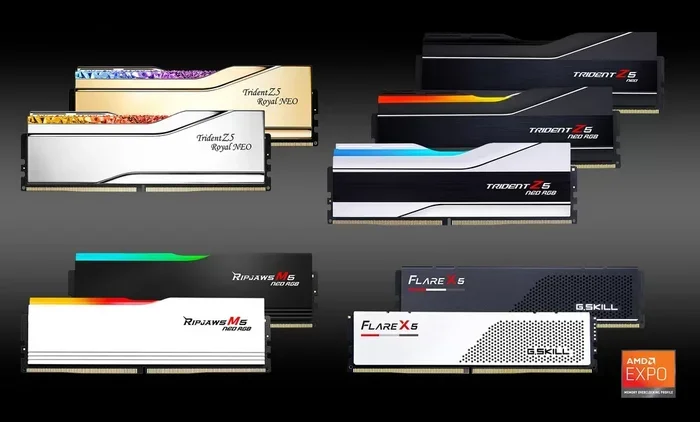
AMD AM5 desktop RAM compatibility is a key factor when building or upgrading a Ryzen 7000 system. AM5 platforms only support DDR5 memory, so you need to know the right speed, capacity, and topology for your motherboard. This guide covers everything from RAM types to common mistakes to avoid.
AMD’s AM5 platform is the latest desktop socket for Ryzen processors. If you are building a new PC or upgrading an existing one, understanding AM5 desktop RAM compatibility is essential. The platform uses DDR5 memory exclusively, and not all DDR5 modules work with every AM5 motherboard. This guide walks you through everything you need to know about choosing the right RAM for your AM5 build.
Many people assume any DDR5 stick will fit an AM5 board. That is not true. There are speed limits, capacity limits, and topology requirements you need to consider. In this article, we break down the specifics so you can make a confident purchase. We also cover common mistakes, expert tips, and real-world advice that saves you time and money.
Key Takeaways
- AM5 only works with DDR5 RAM: AMD’s new socket does not support older DDR4 memory modules.
- Check your motherboard QVL: Always verify RAM kits on the Qualified Vendor List before buying.
- Speed and capacity matter: AM5 supports DDR5 speeds from 4800 MHz up to 8000+ MHz depending on the board.
- Dual channel is essential: Using two sticks in the correct slots gives you the best performance.
- Laptop RAM won’t work: SO-DIMM modules are physically and electrically different from desktop DDR5.
- RAM cooling can help: High-speed DDR5 modules may benefit from active cooling on AM5 boards.
📑 Table of Contents
- What Is AMD AM5 and Why Does RAM Compatibility Matter?
- DDR5 RAM: The Only Option for AM5
- AM5 RAM Speed and Capacity Guidelines
- How to Check AM5 RAM Compatibility
- Common Mistakes to Avoid with AM5 RAM
- Expert Tips for Getting the Best AM5 RAM Performance
- Quick Tips for AM5 RAM Compatibility
- Frequently Asked Questions
- Conclusion
What Is AMD AM5 and Why Does RAM Compatibility Matter?
The AM5 socket replaced AMD’s older AM4 platform. It was launched alongside the Ryzen 7000 series processors. AM5 supports DDR5 memory and PCIe 5.0, making it a modern platform for gaming, content creation, and professional workloads. Because AM5 is relatively new, not all DDR5 RAM is guaranteed to work with every AM5 motherboard.
How AM5 Memory Controllers Work
AMD’s Ryzen 7000 processors have an integrated memory controller. This controller handles communication between the CPU and your RAM sticks. The controller determines which speeds, capacities, and configurations are supported. If your RAM exceeds what the controller can handle, your system may fail to boot or run unstably.
Each motherboard manufacturer adds its own memory compatibility list. This is called a Qualified Vendor List or QVL. The QVL tells you exactly which RAM kits have been tested with that specific board. Always check the QVL before buying RAM for your AM5 system.
DDR5 RAM: The Only Option for AM5
AM5 platforms do not support DDR4 memory. You must use DDR5 desktop RAM. This is a big shift from older AMD platforms. If you have DDR4 RAM from a previous build, it will not work in an AM5 motherboard.
Some people wonder whether laptop RAM can be used in desktop systems. The short answer is no. Laptop RAM uses SO-DIMM form factors, which are physically smaller and have different pin layouts. Desktop AM5 boards use standard DIMM slots for DDR5 modules only.
DDR5 vs DDR4: Key Differences for AM5
DDR5 RAM offers higher bandwidth and improved power efficiency compared to DDR4. Here is a quick comparison of what you need to know:
| Feature | DDR4 (AM4) | DDR5 (AM5) |
|---|---|---|
| Voltage | 1.2V | 1.1V |
| Base Speed | 2133 MHz | 4800 MHz |
| Max Speed (Common) | 3600 MHz | 6000-8000 MHz |
| Capacity per Stick | Up to 16GB | Up to 32GB (common), 64GB+ (rare) |
| Pins | 288-pin | 288-pin (different layout) |
| AM5 Support | No | Yes |
As you can see, DDR5 brings real improvements. But the higher speeds also mean you need to be more careful about compatibility. Not every DDR5 stick will work perfectly on every AM5 board.
AM5 RAM Speed and Capacity Guidelines
Choosing the right speed and capacity for your AM5 build depends on your use case. Here is what you should know about memory speed and RAM capacity for AM5 systems.
Speed Tiers for AM5 DDR5 RAM
AM5 motherboards support different DDR5 speed tiers. The speeds you can use depend on your specific board and CPU. Here are the common tiers:
- DDR5-4800 MHz: The base speed for AM5. This is the JEDEC standard speed and works on all AM5 boards.
- DDR5-5200 to DDR5-5600 MHz: A popular sweet spot for gaming and everyday use.
- DDR5-6000 to DDR5-6400 MHz: The sweet spot for Ryzen 7000 processors. This speed aligns well with the Infinity Fabric clock.
- DDR5-7200 MHz and above: For enthusiasts and overclockers. Not all boards support these speeds.
When you are shopping for RAM, look for kits rated at speeds your motherboard supports. DDR5-6000 CL30 is a very popular choice for AM5 builds. It balances performance, stability, and price well.
Capacity Recommendations
RAM capacity depends on what you do with your PC. Here are some general guidelines:
- 8GB: Only for basic tasks. Not recommended for gaming or creative work on AM5.
- 16GB: Good for casual gaming and everyday use.
- 32GB: The recommended amount for gaming, video editing, and multitasking.
- 64GB: Ideal for heavy workloads like 3D rendering, machine learning, and professional architecture work.
Most AM5 users will be happy with 32GB of DDR5 RAM. This gives you plenty of headroom for modern games and applications.
How to Check AM5 RAM Compatibility
Before you buy RAM, you need to verify compatibility with your specific AM5 motherboard. Here is a step-by-step process to follow.
Step 1: Find Your Motherboard Model
Check the model number on your motherboard box or PCB. Common AM5 boards include the ASUS ROG Strix X670E, MSI MAG B650 Tomahawk, and Gigabyte X670E Aorus Master. Each board has different memory support limits.
Step 2: Visit the Manufacturer’s Website
Go to the motherboard manufacturer’s support page. Look for the memory compatibility list or QVL. This page lists tested RAM kits, speeds, and capacities that are guaranteed to work.
Step 3: Match Your RAM to the QVL
Find the exact RAM kit you plan to buy. Check if it appears on the QVL. If it does, you are good to go. If it does not, it may still work, but you take a small risk of incompatibility.
Step 4: Check the RAM Topology
AM5 boards have specific rules about how RAM sticks are installed. Most boards use a dual-channel topology. You typically need to install RAM in slots A2 and B2 first. Check your motherboard manual for the correct slot configuration.
If you want to learn more about identifying your RAM type, you can check our guide on how to find RAM DDR type for helpful tips.
Common Mistakes to Avoid with AM5 RAM
Even experienced PC builders make mistakes when selecting RAM for AM5. Here are the most common errors and how to avoid them.
Buying DDR4 RAM for an AM5 Board
This is the most obvious mistake but it happens often. AM5 only supports DDR5. Do not try to use DDR4 modules. They will not fit in the DIMM slots and will not work even if they did.
Ignoring the QVL
Many people buy RAM based on speed and price alone. This can lead to compatibility issues. Always cross-reference your RAM choice with the motherboard QVL.
Mixing RAM Sticks With Different Speeds
Using mismatched RAM sticks can cause instability. If one stick runs at 5600 MHz and another at 4800 MHz, the system will downclock both to the slower speed. Worse, it may fail to boot entirely.
Forgetting About RAM Cooling
DDR5 RAM runs warmer than DDR4, especially at high speeds. Some AM5 boards include active RAM cooling. If you are running DDR5-7000 or higher, consider modules with heatsinks or check if your board has RAM cooling features. Proper cooling helps maintain stable performance.
Installing RAM in the Wrong Slots
Each AM5 motherboard has a specific recommended slot configuration for dual-channel mode. Installing RAM in the wrong slots can disable channels and reduce performance. Always refer to your motherboard manual.
Expert Tips for Getting the Best AM5 RAM Performance
Once you have compatible RAM installed, you can optimize your system for the best performance. Here are some expert tips.
Enable XMP or EXPO Profiles
Most DDR5 RAM kits come with an XMP (Intel) or EXPO (AMD) profile. This profile sets the RAM to its rated speed automatically. Go into your BIOS and enable the EXPO profile for AMD AM5 systems. Without it, your RAM will run at the base DDR5-4800 speed.
Run Memory Stress Tests
After installing your RAM, run a stress test. Tools like MemTest86 or OCCT can check for errors. A stable system should pass these tests without any issues. This step is especially important if you are using high-speed DDR5 kits.
Consider a 2x16GB Kit Over 1x32GB
For dual-channel performance, a 2x16GB kit is usually better than a single 32GB stick. Two sticks allow the memory controller to access data faster through both channels. This can improve gaming frame rates and overall system responsiveness.
If you are curious about how RAM affects performance in specific tasks, our article on does RAM affect 3D rendering speed provides detailed insights into memory performance.
Quick Tips for AM5 RAM Compatibility
- Always buy DDR5 RAM for AM5 motherboards.
- Check the QVL on your motherboard manufacturer’s website.
- Use a matched 2-stick kit for dual-channel performance.
- Aim for DDR5-6000 CL30 as a balanced speed for Ryzen 7000.
- Enable EXPO in BIOS for rated RAM speeds.
- Install RAM in the correct slots per your motherboard manual.
- Consider heatsinks for high-speed DDR5 modules.
- Run memory stress tests after installation.
If you are wondering about the difference between laptop and desktop memory, check out our detailed comparison at laptop RAM vs desktop RAM for a thorough breakdown.
Frequently Asked Questions
Can I Use DDR4 RAM in an AM5 Motherboard?
No. AM5 motherboards only support DDR5 memory. DDR4 RAM will not physically fit in AM5 DIMM slots and is not electrically compatible with the AM5 platform.
What Is the Best DDR5 Speed for AM5?
DDR5-6000 CL30 is widely considered the best speed for AM5. It aligns well with Ryzen 7000 Infinity Fabric clocks and offers excellent performance without being overly expensive.
Can I Mix Different DDR5 RAM Sticks?
It is not recommended. Mixing different sticks can cause compatibility issues, instability, and reduced performance. Always use a matched kit from the same manufacturer, speed, and capacity.
Does AM5 Support 64GB of RAM?
Yes, many AM5 motherboards support up to 64GB or more of DDR5 RAM. Check your specific motherboard manual for the maximum capacity. High-capacity kits are available but can be expensive.
Do I Need RAM Cooling for AM5?
It depends on your RAM speed. DDR5-6000 and below usually does not need active cooling. But if you are running DDR5-7000 or higher, heatsinks or active cooling can help maintain stability and longevity.
How Do I Know if My RAM Is Compatible with My AM5 Board?
Check the motherboard manufacturer’s QVL (Qualified Vendor List). This list contains tested RAM kits that are guaranteed to work with your specific board. Always cross-reference before purchasing.
If you are exploring RAM upgrades for a laptop instead, you might find our RAM upgrade for my laptop guide helpful for understanding memory options across different device types.
Conclusion
AMD AM5 desktop RAM compatibility comes down to a few key factors: DDR5 only, correct speed, proper capacity, and verified motherboard support. By checking the QVL, using matched kits, and enabling the right BIOS profiles, you can build a stable and high-performing AM5 system. The platform is designed for DDR5, and with the right memory choices, you will get excellent performance for gaming, productivity, and creative work.
Take your time when choosing RAM for your AM5 build. Read your motherboard manual, verify compatibility, and invest in a quality DDR5 kit. Your system will thank you with stable speeds and smooth performance for years to come.