Best Budget Ram Under 50 for a Faster PC Experience
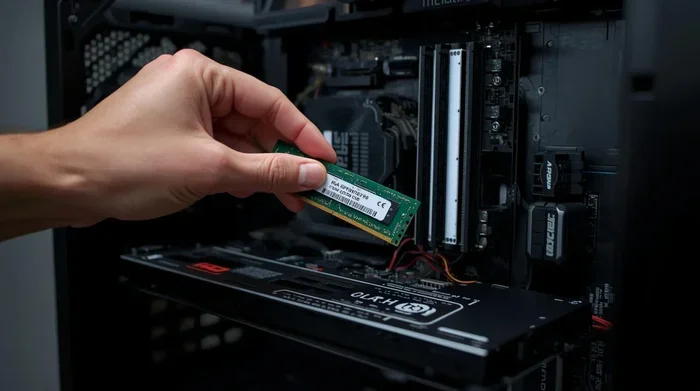
Upgrading your PC with budget ram under 50 is one of the easiest ways to boost speed and performance. Whether you are a gamer, student, or remote worker, affordable memory can transform a slow computer into a responsive machine. In this guide, we review the top cheap RAM options and help you choose the right DDR4 and DDR5 memory for your system.
If your computer feels slow, the answer might not be a brand new machine. Sometimes, all you need is a simple memory upgrade. And the good news? You do not need to spend a fortune. Budget ram under 50 can breathe new life into an older system or give a budget build the boost it needs.
Memory, also called RAM, is the short-term workspace your computer uses to handle tasks. More RAM means your PC can juggle more apps at once, load things faster, and run smoother overall. Whether you are browsing the web, editing documents, or playing games, having enough system memory makes a huge difference.
In this guide, we will walk you through the best affordable RAM options available right now. We will cover what to look for, which brands deliver the most value, and how to pick the right memory modules for your setup. By the end, you will know exactly which cheap RAM upgrade to buy.
Key Takeaways
- Affordable Upgrade: Budget ram under 50 can deliver noticeable speed improvements without breaking the bank.
- DDR4 vs DDR5: Both generations offer great options under $50, but DDR5 is the future-proof choice.
- Capacity Matters: 16GB is the sweet spot for most users, while 8GB works for basic tasks.
- Compatibility Is Key: Always check your motherboard and system type before buying.
- Speed and Timings: Higher MHz and tighter timings improve performance, especially for gaming.
- Brand Reliability: Trusted brands like Crucial, Kingston, and G.Skill offer solid budget options.
📑 Table of Contents
- Why Upgrading Your RAM Is Worth It
- Understanding RAM Types: DDR4 vs DDR5
- Top Picks for Best Budget Ram Under 50
- How to Choose the Right RAM for Your System
- Common Mistakes When Buying Budget RAM
- Where to Find the Best Deals on Cheap RAM
- Who Benefits Most from a Budget RAM Upgrade
- Installing Your New RAM: A Quick Guide
- Final Thoughts on Budget Ram Under 50
Why Upgrading Your RAM Is Worth It
Many people overlook RAM when trying to speed up their PC. They think they need a new processor or graphics card. But in most cases, adding memory is the fastest and cheapest way to improve performance. Here is why it matters:
- Faster multitasking: More RAM lets you run several programs at the same time without slowdowns.
- Quicker load times: Games, apps, and browsers open faster with more memory available.
- Smoother workflow: Video editing, music production, and coding all benefit from extra system memory.
- Better gaming: Modern games need at least 8GB, and 16GB is becoming the standard for a smooth experience.
- Low cost, high return: A cheap RAM upgrade costs less than many software subscriptions and lasts for years.
If your current PC has only 4GB or 8GB of memory, upgrading to 16GB can feel like getting a new computer. And with so many budget ram under 50 options available, there is no reason to wait.
Understanding RAM Types: DDR4 vs DDR5
Not all memory is the same. The two main types you will find in today’s market are DDR4 and DDR5. Both have excellent options in the budget ram under 50 range, but they serve different needs.
DDR4 RAM
DDR4 has been the standard for several years and remains the most popular choice. It is mature, widely compatible, and offers great value. Most desktop RAM and laptop RAM on the market today is DDR4. You can easily find 16GB DDR4 kits for under $50 from brands like Crucial, Kingston, and G.Skill.
Best for: Older motherboards, budget builds, and anyone who wants reliable performance without spending extra.
DDR5 RAM
DDR5 is the newer generation. It offers higher speeds, better efficiency, and more headroom for future needs. While it used to be expensive, prices have dropped significantly. You can now find DDR5 memory kits under $50, especially for 16GB capacities.
Best for: Newer motherboards, future-proof builds, and users who want the latest technology at an affordable price.
Comparison: DDR4 vs DDR5 on a Budget
| Feature | DDR4 | DDR5 |
|---|---|---|
| Price (16GB kit) | $30-$45 | $35-$50 |
| Speed Range | 2133-3600 MHz | 4800-6000 MHz |
| Power Efficiency | Good | Better |
| Availability | Very High | Growing |
| Compatibility | Wide | Newer boards only |
For most people, DDR4 is still the smarter buy right now. But if you are building a new system, DDR5 is worth considering. Either way, you can find solid affordable memory upgrade options in both categories.
Top Picks for Best Budget Ram Under 50
Now let us get to the fun part. Here are our top recommendations for cheap RAM that delivers great performance without emptying your wallet.
Crucial 16GB DDR4-3200 Desktop RAM
Crucial is one of the most trusted names in memory. Their 16GB DDR4-3200 kit is a reliable choice for desktop RAM upgrades. It runs at a solid speed, uses low power, and comes with a lifetime warranty. At around $35-$45, it is one of the best values in the budget ram under 50 category.
This kit works well for everyday computing, office work, and light gaming. It is also easy to install, making it a great first upgrade for beginners.
Kingston Fury Beast 16GB DDR4-3200
Kingston is another brand that delivers quality at low prices. The Fury Beast line offers DDR4 memory with tight timings and good overclocking potential. The 16GB kit typically costs between $38 and $48.
What makes this stand out is the aluminum heat spreader. It helps keep your memory cool during heavy workloads. If you are building a gaming PC on a budget, this is a strong contender.
G.Skill Ripjaws V 16GB DDR4-3200
G.Skill is known for making high-performance memory, and the Ripjaws V line brings that quality to the budget segment. This 16GB kit offers stable performance at 3200 MHz and is compatible with most Intel and AMD platforms.
Priced around $40-$50, it is a solid pick for anyone who wants system memory that can handle multitasking and casual gaming with ease.
TEAMGROUP T-Force Vulcan Z 16GB DDR4-3200
If you are looking for the absolute lowest price, the TEAMGROUP T-Force Vulcan Z is hard to beat. This 16GB kit often sells for under $35, making it one of the cheapest budget ram under 50 options available.
It may not have fancy heat spreaders or extreme overclocking headroom, but it gets the job done. For basic productivity and light use, this is an excellent choice.
How to Choose the Right RAM for Your System
Buying RAM is not just about picking the cheapest option. You need to make sure it works with your system. Here is what to consider before you buy.
Check Your Motherboard Compatibility
Every motherboard supports specific types of RAM. Older boards use DDR4, while newer ones may support DDR5. Check your motherboard manual or use a tool like CPU-Z to find out what your system needs. Buying the wrong type means the RAM will not work at all.
Desktop vs Laptop RAM
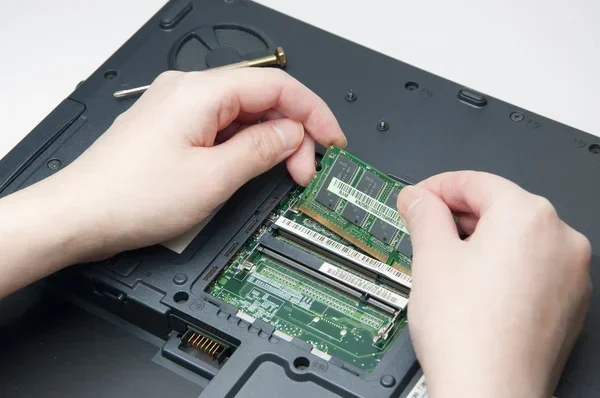
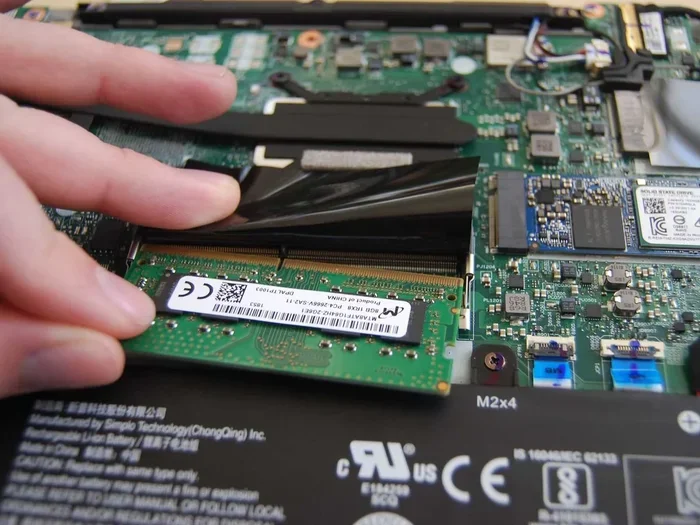
This is an important distinction. Desktop computers use standard DIMM sticks, while laptops use smaller SODIMM modules. They are not interchangeable. If you are upgrading a laptop, make sure you buy laptop RAM specifically. A laptop RAM upgrade under $50 is very achievable with 8GB or 16GB SODIMM options.
For example, if you have a budget laptop with 8GB of memory, adding another 8GB stick can double your capacity for under $30. This is especially helpful if you use a laptop under 200 with 16GB ram configuration for school or work.
Capacity: 8GB vs 16GB
8GB is the bare minimum for Windows 10 or 11 in 2024. It works for basic browsing and office tasks but will struggle with modern games and creative software. 16GB is the current sweet spot for most users.
If you are on a tight budget, 8GB can still be useful as a starting point. But for the best experience, go with 16GB whenever possible. Many budget ram under 50 kits come in 16GB configurations, so there is no reason to settle for less.
Speed and Timings
RAM speed is measured in MHz. Higher numbers mean faster data transfer. For DDR4, 3200 MHz is the sweet spot for budget builds. For DDR5, 4800 MHz or higher is ideal.
Timings, measured as CAS Latency (CL), also matter. Lower numbers mean faster response times. However, for budget builds, speed and capacity matter more than ultra-tight timings.
Dual Channel vs Single Channel
Most modern systems perform better with two RAM sticks instead of one. This is called dual channel mode. It doubles the data pathway between memory and the processor, resulting in smoother performance.
When shopping for budget ram under 50, look for kits that come in pairs (2x8GB for 16GB total). Single sticks are fine if you already have one stick installed and want to add a matching one.
Common Mistakes When Buying Budget RAM
Avoid these common pitfalls when shopping for affordable memory:
- Buying the wrong type: DDR3, DDR4, and DDR5 are not compatible with each other. Always double-check your system requirements.
- Ignoring laptop vs desktop: SODIMM and DIMM modules look similar but are not interchangeable.
- Skipping the motherboard manual: Some motherboards have RAM capacity limits or specific speed requirements.
- Choosing the cheapest brand: Ultra-cheap no-name RAM may have poor reliability. Stick with trusted brands like Crucial, Kingston, and G.Skill.
- Forgetting about used RAM: While used memory can save money, it often voids warranties and may have hidden issues.
Taking a few extra minutes to research can save you from buying the wrong memory modules. Compatibility is the single most important factor when upgrading your system.
Where to Find the Best Deals on Cheap RAM
Price fluctuations are normal in the memory market. Here are some tips for finding the best budget ram under 50 deals:
- Amazon and Newegg: These retailers often have competitive prices and fast shipping. Check for open-box deals too.
- Micro Center: If you have a physical store nearby, Micro Center frequently offers in-store-only discounts on memory.
- Black Friday and sales events: RAM prices often drop during major shopping events. Patience can save you $10 or more.
- Manufacturer websites: Brands like Crucial and Kingston sometimes offer direct discounts or rebates on their own sites.
- Refurbished options: Some sellers offer tested refurbished memory at lower prices. Just make sure there is a return policy.
Remember, a cheap RAM upgrade does not mean low quality. Many of the best-performing memory kits cost under $50 and come with solid warranties and reliable performance.
Who Benefits Most from a Budget RAM Upgrade
Almost anyone with a PC can benefit from adding more memory. Here are the groups who see the biggest improvements:
Students and Remote Workers
If you are running video calls, browsing multiple tabs, and using office apps simultaneously, 16GB of RAM makes a noticeable difference. A quick laptop RAM upgrade can turn a sluggish machine into a smooth workhorse.
Gamers on a Budget
Modern games like Cyberpunk 2077 and Hogwarts Legacy recommend 16GB of memory. If your system has 8GB, upgrading to 16GB with budget ram under 50 can improve frame rates and reduce stuttering. Pair this with a best gaming pc for under 500 dollars build and you have a solid gaming setup.
Content Creators
Video editing, photo manipulation, and audio production all demand plenty of memory. Even a modest upgrade from 8GB to 16GB can speed up render times and improve workflow responsiveness.
Owners of Older PCs
If you have an older computer that feels slow, RAM is often the bottleneck. A memory upgrade is cheaper than replacing the entire system and can extend your PC’s useful life by several years.
Installing Your New RAM: A Quick Guide
Installing RAM is one of the easiest PC upgrades you can do. Here is a quick overview:
- Power off your PC and unplug it from the wall.
- Open the case and locate the RAM slots on your motherboard.
- Release the clips on the sides of the existing RAM sticks.
- Align the new RAM with the notch on the slot and press firmly until the clips click into place.
- Close the case, plug everything back in, and power on.
- Check your system in the Task Manager or BIOS to confirm the new memory is recognized.
If you are upgrading a laptop, the process is similar but usually involves removing a bottom panel. Always consult your laptop’s manual for specific instructions.
For those building a new budget system, pairing your budget ram under 50 with a quality motherboard and a decent processor creates a well-rounded machine. Check out our guide on gaming laptop 16gb ram under 500 for more ideas on putting together a capable system without overspending.
Final Thoughts on Budget Ram Under 50
Upgrading your PC memory does not have to be expensive or complicated. With so many excellent budget ram under 50 options available, there is no reason to keep using a slow system. Whether you choose DDR4 or DDR5, 8GB or 16GB, the right memory upgrade can transform your computing experience.
Stick with trusted brands, verify compatibility before you buy, and remember that more memory almost always means better performance. A cheap RAM upgrade under $50 is one of the highest-return investments you can make for your computer.
If you are planning a full budget build, consider pairing your new memory with a solid best laptop computers under 700 or a best budget build gaming pc configuration. The right combination of components at low prices can deliver a surprisingly powerful system for work, play, and everything in between.
Take your time, do your research, and enjoy the speed boost that comes from a smart affordable memory upgrade. Your wallet and your PC will both thank you.
Frequently Asked Questions
Can I mix different RAM brands in my PC?
Yes, you can mix RAM brands, but it is not always ideal. Different brands may have different speeds, timings, and voltages, which can cause compatibility issues. For the best results, try to match the same type, speed, and capacity. If you must mix, install them in the correct slots for dual channel mode.
How do I know if my RAM is DDR4 or DDR5?
You can check your motherboard manual or use a free tool like CPU-Z to identify your current RAM type. The notches on DDR4 and DDR5 sticks are in different positions, so they physically cannot fit into the wrong slots. Always verify before purchasing new memory modules.
Is 8GB of RAM enough in 2024?
8GB is the minimum for basic tasks like web browsing and office work. However, for gaming, video editing, or multitasking with many apps open, 16GB is strongly recommended. For most users, upgrading from 8GB to 16GB with budget ram under 50 is the best value upgrade available.
Does RAM speed really matter for gaming?
Yes, but the difference is more noticeable at higher speeds and with certain processors. For budget gaming builds, DDR4-3200 or DDR5-4800 is the sweet spot. Going beyond these speeds offers diminishing returns unless you are using a high-end processor that benefits from faster memory.
Can I upgrade my laptop’s RAM?
Many laptops allow RAM upgrades, but not all do. Some modern laptops have soldered memory that cannot be replaced. Check your laptop’s specifications or manual to confirm if the RAM is upgradeable. If it is, a laptop RAM upgrade under $50 can significantly improve performance.
What is the difference between 2x8GB and 1x16GB RAM?
A 2x8GB kit runs in dual channel mode, which doubles the data bandwidth and improves performance. A single 1x16GB stick runs in single channel mode. For the best performance, always choose a dual channel kit when possible. This is especially important for gaming laptops and productivity work.
=== CONCLUSION ===
Budget ram under 50 offers one of the best returns on investment for any PC user. Whether you are upgrading an old desktop, boosting a budget laptop, or building a new system from scratch, affordable memory can make a world of difference. From reliable DDR4 kits to emerging DDR5 options, there has never been a better time to add more system memory to your machine.
Choose a trusted brand, confirm compatibility, and enjoy the speed and responsiveness that comes with a proper memory upgrade. Your PC will run faster, smoother, and handle more tasks than ever before.