Ram Speed Calculator for Picking the Right RAM Modules
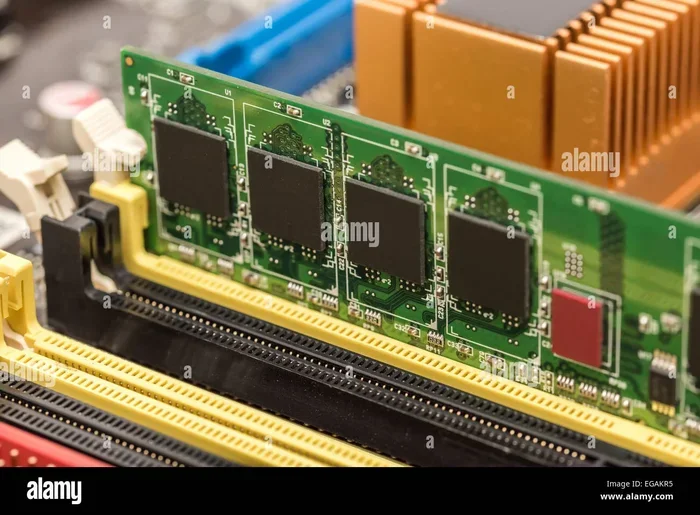
A Ram Speed Calculator helps you choose the perfect memory modules by factoring in frequency, CAS latency, and DDR type. Whether you are building a gaming PC or a workstation, picking the right RAM can make or break your system’s performance. This guide walks you through everything you need to know about using a calculator to match RAM to your needs.
Choosing RAM for your PC can feel overwhelming. There are so many numbers, speeds, and types to sort through. A Ram Speed Calculator takes the guesswork out of the equation. It helps you figure out exactly what memory modules your system needs. In this guide, we will break down everything you need to know about using a calculator to pick the right RAM. You will learn how speed, latency, and DDR type all work together. By the end, you will feel confident making the right choice for your build.
Whether you are a gamer chasing higher frame rates or a creator working with heavy software, RAM speed matters. The wrong modules can bottleneck your system. The right ones can unlock smoother performance and faster load times. Let us dive into how a Ram Speed Calculator can help you find the perfect match.
Key Takeaways
- Know Your Needs: A Ram Speed Calculator matches RAM to your specific use case, whether gaming, editing, or general use.
- Speed Matters: Higher frequency RAM boosts data transfer rates, but latency and timing also play key roles.
- DDR Type Is Critical: DDR4 and DDR5 are not interchangeable, so always confirm your motherboard supports the right type.
- Dual Channel Helps: Using two RAM sticks instead of one can significantly improve memory bandwidth.
- Overclocking Potential: Some RAM modules can run faster than their rated speed with proper XMP or DOCP profiles.
- Capacity and Speed Work Together: More RAM does not always mean better speed — balance both for the best results.
📑 Table of Contents
What Is a Ram Speed Calculator?
A Ram Speed Calculator is a tool that helps you determine the best RAM modules for your PC. It looks at several factors like frequency, latency, and DDR generation. The calculator then gives you a recommendation based on your needs. Think of it as a personal shopping assistant for memory. Instead of browsing hundreds of products blindly, you get a focused list of compatible options.
These calculators are free and easy to use. You simply input your system details and usage goals. The tool does the math for you. It considers things like your motherboard type, CPU support, and what you plan to do with your PC. The result is a clear set of RAM recommendations tailored just for you.
Why Should You Use One?
Buying RAM without a calculator is like shopping blindfolded. You might pick something that looks good on paper but does not fit your system. A Ram Speed Calculator removes all the guesswork. It ensures compatibility and helps you get the best value for your money. Here are a few reasons why using one makes sense:
- Compatibility Check: It confirms your motherboard supports the RAM type you want to buy.
- Performance Matching: It pairs RAM speed with your actual use case.
- Budget Friendly: It helps you avoid overspending on features you do not need.
- Time Saving: It cuts through the confusion of endless product listings.
How RAM Speed Works
Understanding RAM speed starts with a few basic terms. You do not need to be a tech expert to grasp the concepts. Let us keep it simple and break it down.
Frequency and MHz
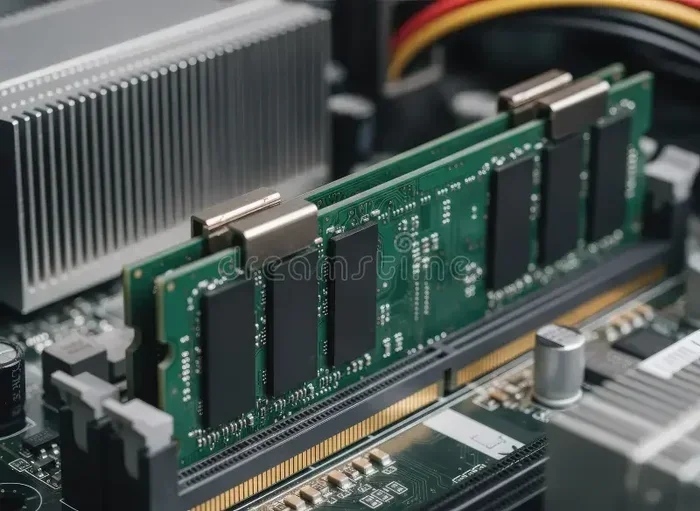
RAM frequency is measured in megahertz (MHz). It tells you how fast the memory can transfer data. A higher MHz number means faster data movement. For example, DDR4-3200 runs at 3200 MHz. This is faster than DDR4-2400, which runs at 2400 MHz. When you use a Ram Speed Calculator, frequency is one of the first inputs you will provide.
But here is the thing — higher frequency does not always mean better real-world performance. The difference between 3200 MHz and 3600 MHz may not be noticeable in everyday tasks. It becomes more important in workloads that heavily rely on memory bandwidth, like video editing or 3D rendering.
CAS Latency (CL)
CAS latency, or CL, measures the delay between a command and the RAM responding. Lower latency is better. A module with CL16 at 3200 MHz will often outperform one with CL22 at the same speed. The Ram Speed Calculator takes this into account when making recommendations. It looks at the true speed of the module, not just the MHz number.
Think of it like this. Frequency is how fast a car can go. Latency is how quickly it responds to the steering wheel. Both matter for a smooth ride.
Memory Timings
Beyond CL, there are additional timing values like tRCD, tRP, and tRAS. These control how the memory module handles data internally. Most Ram Speed Calculator tools simplify this for you. They focus on the primary metrics that matter most to everyday users. You do not need to dig into every single timing value unless you are a serious overclocker.
DDR4 vs DDR5: Which Should You Choose?
This is one of the biggest decisions when picking RAM. DDR4 and DDR5 are not the same. They use different slots and have different speed ranges. A good Ram Speed Calculator will always ask you which DDR type your motherboard supports before making a recommendation.
DDR4 RAM
DDR4 has been the standard for many years. It is reliable, widely available, and affordable. Typical speeds range from 2133 MHz to 4000 MHz for most consumer kits. If your motherboard only supports DDR4, there is no point looking at DDR5 modules. The calculator will guide you here.
For most users, DDR4-3200 or DDR4-3600 offers an excellent balance of speed and price. You can learn more about how RAM speed affects specific tasks in our article on does RAM affect 3D rendering speed.
DDR5 RAM
DDR5 is the newer generation. It offers higher frequencies, better power efficiency, and improved bandwidth. Speeds start around 4800 MHz and can go well beyond 8000 MHz for enthusiast kits. DDR5 is the way forward, but it comes at a premium price. Not all motherboards support it yet, so always check your board first.
For a deep dive into DDR compatibility, check out our guide on can I use DDR5 RAM on a DDR4 motherboard. It explains why mixing generations is not possible.
Quick Comparison Table
| Feature | DDR4 | DDR5 |
|---|---|---|
| Typical Speed Range | 2133–4000 MHz | 4800–8000+ MHz |
| Voltage | 1.2V | 1.1V |
| Price (per GB) | Lower | Higher |
| Best For | Budget builds, older systems | New builds, high-performance tasks |
| Bandwidth | Good | Excellent |
As you can see, DDR5 is faster and more efficient, but DDR4 still holds strong for most users. The Ram Speed Calculator will factor in your budget and needs to point you in the right direction.
How to Use a Ram Speed Calculator
Using a Ram Speed Calculator is straightforward. You do not need technical expertise. Just follow these simple steps and you will have your answer in minutes.
Step 1: Know Your Motherboard
First, find out what type of RAM your motherboard supports. Check the motherboard manual or look up the model online. You need to know whether it takes DDR4 or DDR5. You also need to know the maximum supported speed. This is the foundation of any good RAM choice.
Step 2: Define Your Use Case
Next, think about what you do with your PC. Are you a casual user who browses the web and watches videos? A gamer who wants smooth frame rates? A video editor working with 4K footage? Each use case has different RAM speed and capacity needs. The calculator uses this input to tailor its suggestions.
If you are a gamer, you might want to check out our article on does overclocking RAM increase FPS. It covers how memory speed can impact gaming performance.
Step 3: Enter Your Details
Now, input your information into the calculator. This typically includes:
- DDR type (DDR4 or DDR5)
- Desired frequency (MHz)
- CAS latency value
- Number of RAM sticks (single, dual, or quad channel)
- Total capacity needed (in GB)
The calculator processes these inputs and gives you a recommended RAM module or kit. Some tools even show you the estimated bandwidth and latency in nanoseconds. This helps you compare options side by side.
Step 4: Review and Purchase
Once you have the recommendation, review it against your budget. If the top pick is too expensive, look at the next option. A Ram Speed Calculator gives you a starting point, not a final verdict. You still have the final say on what you buy.
Common Mistakes When Choosing RAM
Even with a calculator, people still make mistakes. Let us go over the most common ones so you can avoid them.
Buying the Wrong DDR Type
This is the number one mistake. DDR4 and DDR5 slots are physically different. You cannot put DDR5 RAM into a DDR4 motherboard, and vice versa. Always confirm your motherboard’s RAM type before purchasing anything. The calculator will prevent this if you input the correct motherboard model.
Ignoring CAS Latency
People often focus only on MHz and ignore CL. A 3600 MHz module with CL22 will feel slower than a 3200 MHz module with CL14. The real-world speed depends on both frequency and latency working together. Always consider both numbers when comparing modules.
Overlooking Capacity Needs
Speed is important, but capacity matters too. 8 GB of fast RAM will struggle with heavy workloads. 16 GB is the sweet spot for most users today. If you work in architecture or machine learning, you may need more. Check out our guide on is 16GB RAM enough for architecture for more insight on capacity needs.
Skipping Dual Channel
Using a single RAM stick is fine for basic tasks, but it leaves performance on the table. Dual channel mode doubles the data pathway between the RAM and the CPU. For the best results, always use at least two matching sticks. The Ram Speed Calculator can help you determine the ideal configuration.
Forgetting About RAM Cooling
Fast RAM can generate heat, especially when overclocked. If you plan to push your modules beyond their rated speed, consider a heatsink or proper airflow. Our article on does RAM need cooling covers this topic in detail.
Expert Tips for Getting the Most Out of Your RAM
Once you have picked your modules using a Ram Speed Calculator, there are a few extra steps you can take to squeeze out more performance.
First, always enable XMP or DOCP profiles in your BIOS. These are pre-set configurations that let your RAM run at its advertised speed. Without them, your memory will default to a slower speed. It only takes a minute to turn on in the BIOS, and the performance gain is worth it.
Second, keep your RAM clean. Dust buildup on contacts can cause instability. If you notice random crashes or blue screens, it might be worth reseating your modules. A quick wipe with a dry cloth can sometimes solve mysterious issues.
Third, consider upgrading gradually. If you currently have 8 GB and need 16 GB, buy a matching 8 GB stick rather than a single 16 GB module. This lets you run in dual channel mode, which boosts bandwidth. Our article on can I use 4GB and 8GB RAM together explains what to watch out for when mixing modules.
Finally, stay informed about new RAM technologies. DDR5 is still evolving, and prices are dropping. What makes sense today might not make sense in a year. A Ram Speed Calculator helps you make the right call for the present moment, and that is all you can ask for.
Why RAM Speed Matters for Different Tasks
Not all tasks benefit equally from faster RAM. Let us look at how memory speed impacts different use cases.
Gaming
For gaming, RAM speed has a moderate impact. It mostly affects frame time consistency and loading speeds. If you already have a powerful GPU and CPU, faster RAM can help you squeeze out a few extra frames. Our article on do I need 32GB RAM for gaming covers how much capacity gamers really need.
Video Editing
Video editing is much more demanding on memory. Scrubbing through 4K footage or rendering timelines requires fast data access. Faster RAM with lower latency can noticeably reduce render times. For a closer look at capacity needs, check out is 12GB RAM enough for video editing.
Machine Learning and Data Science
Machine learning workloads are memory-hungry. Training models and processing large datasets depend heavily on RAM bandwidth and capacity. In these scenarios, both speed and capacity are critical. Our article on is 8GB RAM enough for machine learning explains the minimum requirements for these tasks.
General Use
For everyday tasks like browsing, streaming, and office work, RAM speed matters less. Having enough capacity is more important. 8 GB to 16 GB of any decent DDR4 kit will handle these tasks without any issues.
Conclusion
A Ram Speed Calculator is one of the best tools you can use before buying RAM. It removes confusion, ensures compatibility, and helps you get the most value for your money. By understanding frequency, latency, and DDR type, you can make a confident choice that fits your needs and budget.
Remember, the right RAM is not always the fastest or the most expensive one. It is the one that matches your system and your use case. Use the calculator, follow the tips in this guide, and you will end up with a setup that performs exactly how you need it to. Happy building!
Frequently Asked Questions
How accurate is a Ram Speed Calculator?
A Ram Speed Calculator is very accurate for compatibility and basic performance matching. It uses your motherboard specs and usage goals to give tailored recommendations. However, real-world results can vary based on your CPU, workload, and other system components.
Can a Ram Speed Calculator help me overclock my RAM?
Yes, many calculators include overclocking profiles. They show you the maximum stable speed your motherboard can handle. You can use this information to set XMP or DOCP profiles in your BIOS for a performance boost.
Does RAM speed affect FPS in games?
RAM speed can affect FPS, but the impact is usually small compared to your GPU and CPU. The biggest gains come from faster load times and smoother frame pacing. For more details, check out our article on does overclocking RAM increase FPS.
What is the best RAM speed for a gaming PC?
For most gaming setups, DDR4-3200 or DDR4-3600 with CL16 is the sweet spot. It offers great performance at a reasonable price. A Ram Speed Calculator can confirm the ideal speed for your specific CPU and motherboard combination.
Do I need a Ram Speed Calculator if I am building a laptop?
Laptops have different RAM requirements than desktops. Most laptops use SO-DIMM modules, and some have soldered RAM that cannot be upgraded. Use a calculator designed for laptops, or check your laptop’s manual for supported RAM type and maximum capacity.
How much RAM do I actually need?
For most users, 16 GB is the current sweet spot. Gamers and content creators may want 32 GB or more. The right amount depends on what you do. A Ram Speed Calculator can factor in both capacity and speed to give you a balanced recommendation.