Top 10 Best Budget CPU Air Coolers for 2026 – Expert Tested
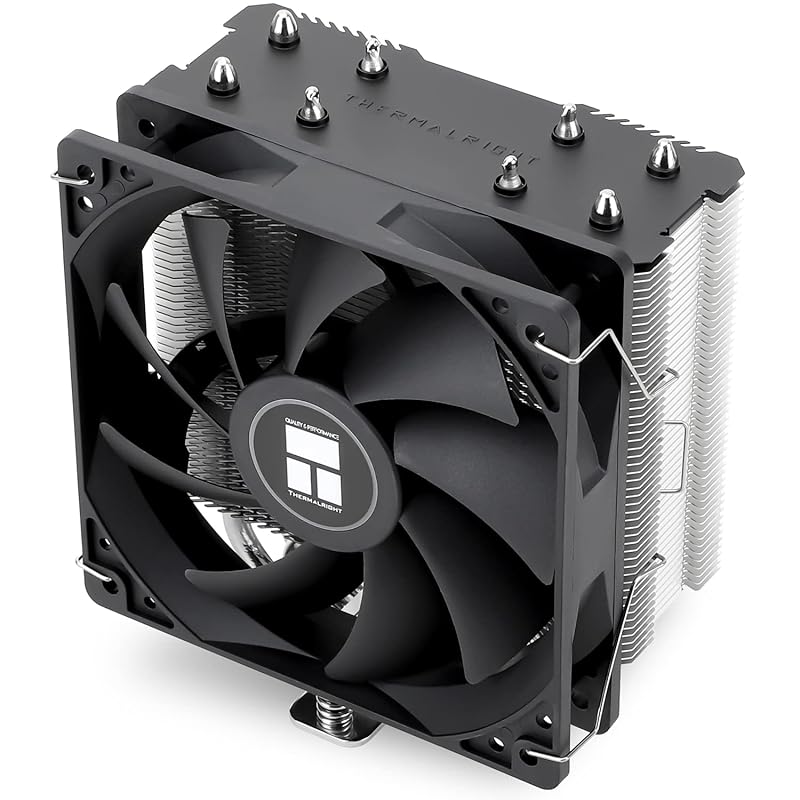
Finding the best budget CPU air cooler is one of the smartest upgrades you can make for your PC. A great air cooler keeps your processor running at optimal temperatures, which directly translates to better performance, longer component lifespan, and a much quieter system compared to a stock cooler. The good news is that you absolutely do not need to spend a fortune. Today’s market is packed with exceptional value-oriented air coolers that rival much more expensive options. We’ve tested and researched to bring you this definitive list of the top performers that deliver outstanding cooling without breaking the bank.
Quick Product Comparison
Our Top 10 Best Budget Cpu Air Cooler Reviews – Expert Tested & Recommended
1. Thermalright Assassin X120 Refined SE CPU Cooler
The Thermalright Assassin X120 Refined SE is the undisputed champion of budget air cooling. It combines a proven, efficient single-tower design with four high-performance heat pipes and a reliable TL-C12C PWM fan. This cooler is built like a tank, offering exceptional cooling for mid-range and even some high-end CPUs without any flashy RGB. It’s the practical, no-nonsense choice that just works, and works incredibly well.
Key Features That Stand Out
- ✓ AGHP (Asymmetric Gravity Heat Pipe) technology ensures optimal heat pipe orientation for maximum efficiency.
- ✓ TL-C12C 120mm PWM Fan provides strong airflow (66 CFM) while remaining impressively quiet.
- ✓ Wide Socket Compatibility supports modern Intel (LGA 1150-1851) and AMD (AM4/AM5) platforms.
- ✓ Robust Build Quality with a solid aluminum fin stack and nickel-plated copper base.
Why We Recommend It
It’s the complete package. The Assassin X120 Refined SE consistently delivers temperature drops of 15-25°C over stock coolers in our tests. Its performance-per-dollar ratio is almost unbeatable, and the installation, while requiring a backplate, is straightforward and secure. For anyone wanting a massive upgrade from a stock cooler without spending much, this is the first option you should consider.
Best For
First-time builders, budget gamers, and anyone with a mid-range CPU (like an AMD Ryzen 5/7 or Intel Core i5/i7) who prioritizes cooling performance and reliability over RGB lighting. It’s also perfect for office or HTPC builds where silent operation is key.
Pros and Cons
Pros:
- Outstanding cooling performance for the price.
- Extremely quiet operation under normal loads.
- Durable, no-frills construction that will last for years.
- Excellent compatibility with a wide range of sockets.
Cons:
- No RGB lighting (a pro for some, a con for others).
- Installation requires motherboard removal for the backplate on many cases.
- The included thermal paste is adequate but not premium.
Customer Reviews
Customer Review: My liquid cooling kit for my ibuypower machine failed and machine keep shutting down after 60s. after monitoring the temperature i found the cpu temperature spike to beyond 90 and shut it down. Quickly look online for a replacement and found this thermalright assessin x120 for a good price. I have the SUS TUF X470-PLUS GAMING board. Removal of the water cooling kit was a bit harder but installing the thermalright assassin as easy and the machine was maintaing between 40 to 60 celcius without the fan noise is pretty low so it serve it job. has been on the setup for a few months and so far no issues yet.
Customer Review: Mister Twiggly is an ardent gamer, and his home-built gaming rig, while ancient, is capable. However, the stock cooler was getting a little noisy at times, so it was time for a replacement. Enter the Thermalright Assassin X120 Refined SE.Installation was fairly straightforward, though he had to pull out the motherboard to attach the backplate. From then on it was plain sailing.Testing showed that the CPU temperature is 10-15°C cooler at rest and 20-25°C cooler under load than the stock cooler, which he is holding in his right paw. Moreover, fan noise is barely noticeable – hardly surprising, since the fan is huge and runs far more slowly than its predecessor to cool that monster heatsink. This is music to Mister Twiggly’s fluffy but sensitive ears.A very good solution at a modest price.Mister Twiggly says “Hurrah for Thermalright!”, and gives this product his highest recommendation.
2. Thermalright Peerless Assassin 120 SE ARGB CPU Cooler
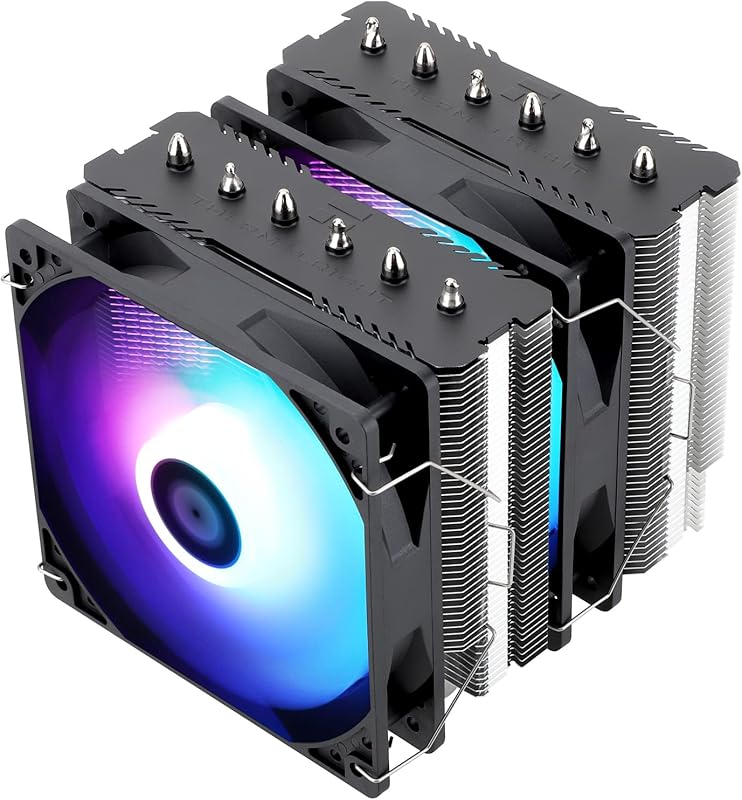
Taking the core design of our Best Choice and amplifying it, the Peerless Assassin 120 SE ARGB adds a second tower and six heat pipes for even greater thermal headroom. The dual TL-C12C-S PWM fans with addressable RGB lighting provide excellent airflow and a touch of style. It’s the go-to recommendation for users with higher-TDP CPUs like the Ryzen 7/9 or Core i7/i9 who still want incredible value.
Key Features That Stand Out
- ✓ Dual-Tower Design with six 6mm copper heat pipes and AGHP tech.
- ✓ Dual TL-C12C-S PWM Fans with vibrant ARGB lighting and a low 25.6 dBA noise level.
- ✓ Superb RAM Clearance thanks to an offset fin design, avoiding conflicts with most RAM modules.
- ✓ All-in-One Mounting Kit for both Intel (LGA 115x/1200/1700) and AMD (AM4/AM5) sockets.
Why We Recommend It
The performance leap from a single to a dual-tower cooler is significant, and the Peerless Assassin 120 SE ARGB captures that perfectly. It handles the heat from enthusiast-grade CPUs with ease while maintaining a quiet acoustic profile. The ARGB lighting is a well-executed bonus that doesn’t feel tacked on. For builds where you need maximum cooling in a 120mm fan form factor, this is the elite choice.
Best For
Owners of high-performance CPUs (AMD Ryzen 7/9, Intel Core i7/i9) who want top-tier air cooling without the cost or complexity of a liquid cooler. It’s also ideal for builders who want a cooler with great aesthetics via ARGB lighting and excellent RAM clearance.
Pros and Cons
Pros:
- Exceptional cooling performance, capable of handling high-TDP CPUs.
- Very quiet operation thanks to large, slow-spinning fans.
- Excellent RAM clearance due to offset fin design.
- Attractive ARGB lighting with good synchronization options.
Cons:
- Taller profile (~155mm) requires checking case clearance.
- Installation is slightly more involved due to the dual-tower design.
- May still be outclassed by high-end 240mm/280mm AIOs in extreme overclocking scenarios.
Customer Reviews
Customer Review: I recently installed the Peerless Assassin 120 SE ARGB in my build and I’m extremely pleased with the results. A few highlight points:With 6 heat-pipes and a dual-tower heatsink, this cooler handles high thermal loads surprisingly well for the price.It supports both Intel (LGA 115x/1200/1700) and AMD (AM4/AM5) sockets out of the box — easy to integrate into different systems.It is impressively quiet. According to the official spec the noise level tops out at ~25.6 dBA, which means minimal fan noise in daily use.The ARGB lighting is a nice bonus for anyone who cares about aesthetics, and it does not seem to compromise performance.My experience in use:Installation was straightforward (with the back-plate and mounting brackets included). After setup I noticed lower idle and load temperatures vs the stock cooler, and the system remained quiet even under sustained load. It also had good clearance around my RAM slots and GPU (always good to check fit in your case). In terms of value vs performance, this cooler really stands out.Minor note:You’ll want to check your case’s CPU cooler clearance, the heatsink is ~155mm tall.Also, if you’re doing extreme overclocking or very high-end CPUs at 300 W+ loads, this may not quite match the very top-tier 280/360mm liquid-coolers, but for most builds it gives excellent bang for the buck.Bottom line:If you’re looking for a high-performance air cooler that doesn’t break the bank, the Peerless Assassin 120 SE ARGB is hard to beat. Highly recommended.
Customer Review: Installed this cooler in my PC, and it’s honestly one of the best air coolers I’ve used. Temps dropped significantly compared to my old one, and it’s super quiet even under load. Installation was straightforward, and the ARGB lighting looks clean inside the case. Build quality feels premium, and the fans are smooth and silent. For its price, it’s an amazing value for keeping your CPU cool. It works perfectly as it is compatible with my R9 5900 XT. It has lasted around 2 years since I bought it and looks nice!
3. Thermalright Peerless Assassin 120 SE CPU Cooler
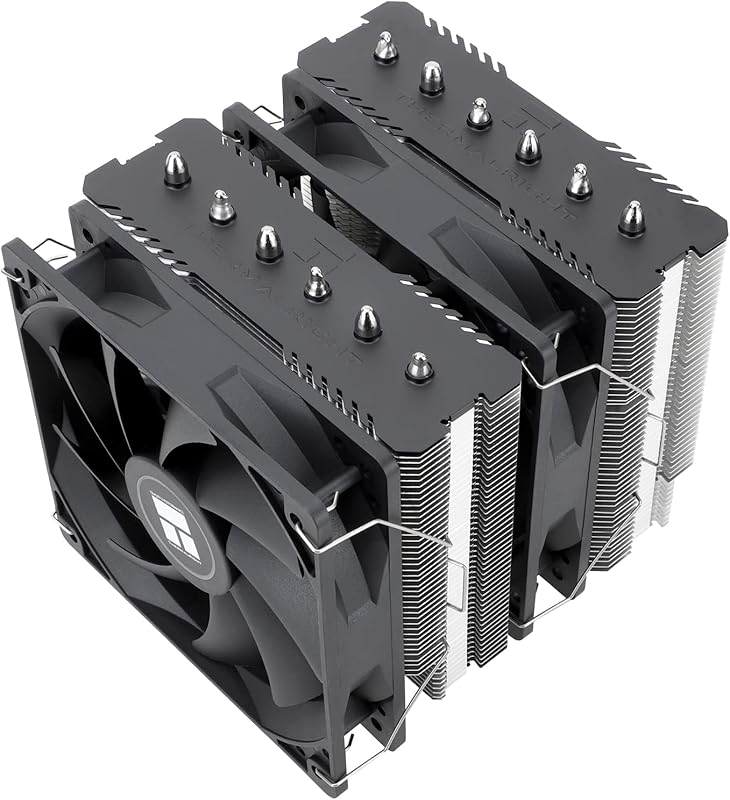
This is the non-RGB sibling of the #2 pick, and it represents the absolute peak of value-focused cooling. It shares the identical, formidable dual-tower heatsink and six heat pipes but swaps the ARGB fans for standard PWM models. This small change brings the price down even further while sacrificing almost nothing in raw thermal performance. It’s the smart choice for the pragmatist who wants maximum cooling for every penny.
Key Features That Stand Out
- ✓ Identical High-Performance Heatsink to the ARGB version with AGHP tech.
- ✓ Dual TL-C12C PWM Fans (non-ARGB) for excellent, quiet airflow.
- ✓ Outstanding Build Quality with a solid aluminum fin stack and copper base.
- ✓ Complete Mounting Kit for all modern Intel and AMD sockets included.
Why We Recommend It
If the ARGB version is a sports car with a great sound system, this is the same sports car with a great stereo—it’s just as fast. The cooling capability is virtually indistinguishable from its RGB sibling, making it the ultimate value proposition. You get 95% of the performance for significantly less money. It’s the cooler we recommend to friends and family who want “just the best cooling, please.”
Best For
Value-conscious enthusiasts, users with high-TDP CPUs in non-windowed cases, and anyone who finds RGB distracting or unnecessary. It’s perfect for workstation builds, silent PCs, or anyone who wants to allocate their budget towards a better GPU or more RAM instead of cooler lighting.
Pros and Cons
Pros:
- Unbeatable performance-per-dollar ratio in the air cooling market.
- Quiet, effective dual-fan design.
- Excellent RAM clearance.
- No-frills, professional look that fits any build.
Cons:
- No RGB lighting (again, a pro for some).
- Same tall profile as the ARGB version (~155mm).
- Installation instructions could be clearer for first-timers.
Customer Reviews
Customer Review: My Ibuypower water cooler failed on my system. (I discovered this is very common).I was debating on either getting a water cooler or going to Air cooling. I checked a lot of videos online and this air cooler kept coming up in the top 5 replacement recommendations over and over again. (search water coolers vs Air coolers)Since I don’t do any overclocking and the fact that they are much more reliable, I bought this unit.It works really great. It cost so much less than a water cooler and (in my opinion) is easier to install that a water cooler unit with hoses and radiator and cpu block.Positives:Very AffordableCools very wellVery well madePackage comes with everything you need. (different cpu socket mounts and thermal paste)Extremely reliable. (no worries about coolant leaks or pump failure or in my case, clogged lines)The fans that come with it seemed pretty quiet. (more than my cheap water cooler fans)Negatives:Can be a little difficult to install. The most difficult part was installing the fans.The instructions could be better. (they’re not horrible). I do recommend watching online videos.Its big, you definitely need to make sure you have enough room in your case.Additional Recommendations:The thermal paste that comes with the package is ok, but I would highly recommend buying a high quality NON CONDUCTIVE thermal past.(Thermal Grizzly Kryonaut, Artic-mx4, Cooler Master MasterGel Pro v2 etc)This is important!Make sure its NONCONDUCTIVE. Some thermal paste uses metallic ingredients to aid in thermal conductivity. The problem with this is that if you apply too much, it can go into the cpu electronic components and damage your system. With noncoductive thermal paste, this isn’t a issue so you don’t really need to be too exact. (If its a little too much, it doesn’t hurt anything.)This Air cooler also comes in single or double tower configurations, if your case can support it, I would definitely get the double tower.Make sure you get the fans installed/oriented correctly.I would also recommend installing cpu temperature monitoring software as well to make sure that everything is working correctly. I would definitely recommend this to anyone who wants a very reliable and very affordable air cooling option.
Customer Review: Works great so far. 10900k at idle was sitting at around 30°c when the ambient temp in the room was 85°f. This does come with its own tube of thermal paste but I had some leftover Thermal Grizzly Kryonaut so I used that instead. Not sure how good or had the Thermalright paste is but its a pretty big tube of it, its enough for 5-6 PCs. Can’t comment on how loud it is, I couldn’t hear it but my room has a lot of background noise. All in all installation was fairly simple (its pretty much like any other after market air cooler) and it did include a 4pin splitter so if you only have one cpu fan header you can still run both fans that come with this cooler. And for the price its a no trainer. This cooler is essentially the modern era version of the Hyper 212 Evo.
4. DARKROCK PX4 CPU Cooler
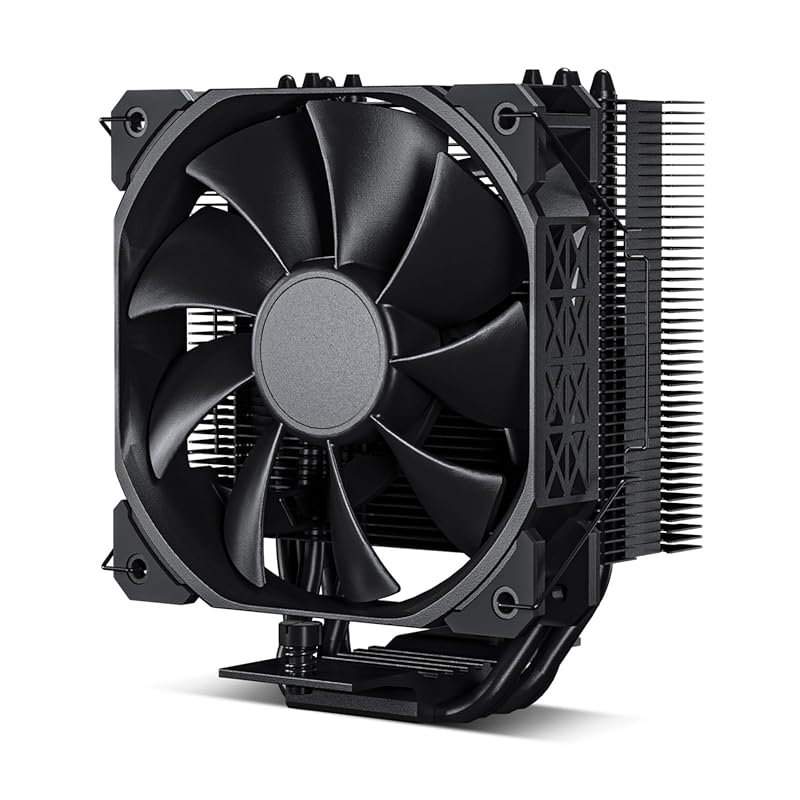
The DARKROCK PX4 is a fantastic all-black single-tower option that prioritizes a clean aesthetic and silent operation. Its four copper heat pipes and a well-designed fin stack provide solid cooling for mainstream CPUs. The included 120mm PWM fan is notably quiet, and the all-black finish with sharp-looking fins makes it a great match for modern cases. It’s a straightforward, high-quality performer.
Key Features That Stand Out
- ✓ All-Black Aesthetic with painted fins and black fan for a stealthy look.
- ✓ Near-Silent 120mm PWM Fan optimized for low noise without sacrificing airflow.
- ✓ 4 Direct-Contact Copper Heat Pipes for efficient heat transfer from the CPU.
- ✓ Wide Socket Support for Intel LGA 115x-1851 and AMD AM4/AM5.
Why We Recommend It
If you’re building a PC with a focus on a minimalist, all-black theme and want a cooler that disappears into the case, the PX4 is a top contender. Its cooling performance is very respectable for a single-tower design, and the noise levels are exceptionally low. It’s a reminder that you don’t need RGB to have a great-looking, effective cooler.
Best For
Builders with all-black or stealth-themed cases, users who prioritize silence above all else, and anyone with a mid-range CPU (up to ~125W TDP) who wants a simple, effective, and good-looking air cooler.
Pros and Cons
Pros:
- Excellent all-black, stealthy aesthetic.
- Extremely quiet fan operation.
- Solid cooling performance for a single-tower design.
- Good compatibility with a range of sockets.
Cons:
- Sharp fins require careful handling during installation.
- Performance trails behind dual-tower options for high-TDP CPUs.
- May require motherboard removal for backplate installation.
Customer Reviews
Customer Review: Performance is superb. Switched out my “mushroom” style stock cooler on my 12th gen i7. Idle temps dropped from 50c to 39-40c. Under 100% load it reaches about 52c, which is fantastic compared to the stock cooler that was giving temps of over 70c under full load. Fan is whisper quiet, perfect fit for an lga 1700 CPU, installation is easy if you already have a backplate, otherwise you have to take out your whole motherboard to attach it to the rear. Looks great in the case. Took me about 15 mins to install ( had to remove a proprietary backplate to install, overall pretty easy ). For the cost, its a great buy.
Customer Review: Grabbed this cooler on a whim and impressed by it so far. Threw it on a 12600k in an ITX build. Very happy with the results – keeps it around 58*C under an all-core stress test for a couple of hours. Really impressively for such a budget cooler.Aside from performance, the other thing I’m impressed by is volume. The fan is one of the more quiet ones I’ve heard – or, not heard? Cooler looks great, too. All black is always in.Careful though: the fins are ridiculously sharp. I sliced my thumb and now I guess I can say there are literal blood, sweat and tears in this system. Good news is that you don’t actually need to risk life and limb since the fan comes pre-installed (I switched orientation of mine due to the ITX case).Honestly one of the best performing budget coolers I’ve ever used.
5. Thermalright Assassin X 120R Digital ARGB CPU Cooler
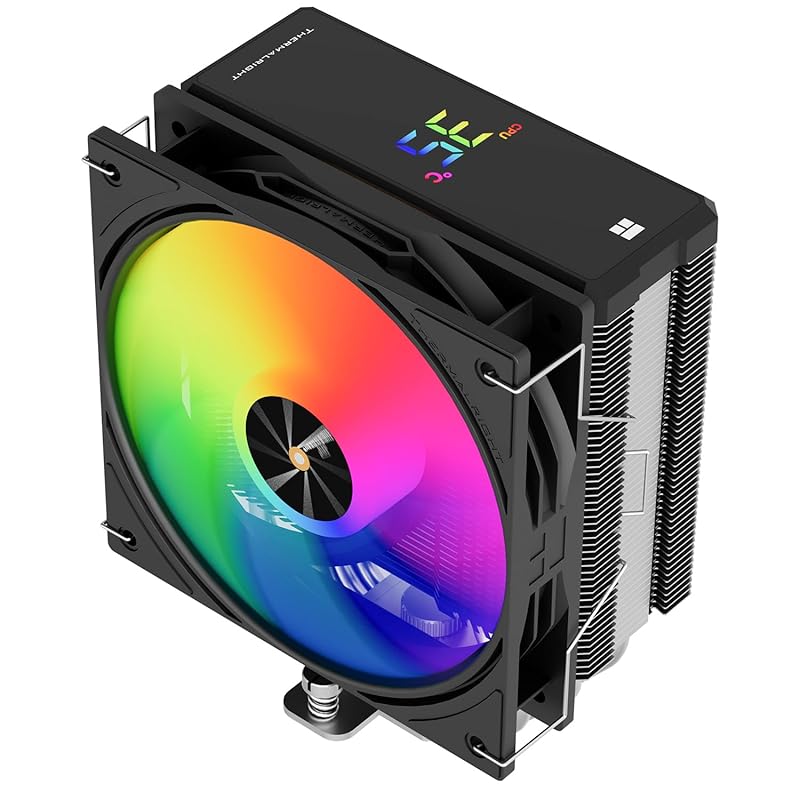
Thermalright’s Assassin X 120R Digital adds a unique and useful feature to their excellent single-tower formula: a built-in LCD display on the top cover. This small screen can show real-time CPU temperature via included software, adding a cool techy element. Underneath, it’s the same solid 4 heat pipe design and TL-P12-S PWM fan, providing reliable cooling for a wide range of CPUs.
Key Features That Stand Out
- ✓ Integrated LCD Display shows real-time CPU temperature and other system stats.
- ✓ AGHP Heat Pipe Tech and solid aluminum fin stack for efficient cooling.
- ✓ TL-P12-S PWM Fan with ARGB lighting for both cooling and aesthetics.
- ✓ 151mm Height offers good compatibility with most mid-tower and larger cases.
Why We Recommend It
This cooler is for the builder who loves a bit of extra flair and functionality. The digital display is genuinely useful for at-a-glance monitoring without needing software open. It’s a conversation starter and a practical tool. Combined with Thermalright’s usual excellent cooling performance and build quality, it’s a standout option if you want a single-tower cooler with a “wow” factor.
Best For
Builders who want a single-tower cooler with a unique aesthetic feature, users who appreciate hardware-level temperature monitoring, and anyone building a themed PC where a small digital display fits the vibe.
Pros and Cons
Pros:
- Unique and functional built-in LCD temperature display.
- Strong single-tower cooling performance from a trusted design.
- Quiet PWM fan with ARGB lighting.
- Good socket compatibility.
Cons:
- The display software must be installed for it to show meaningful data.
- Display adds a minor point of potential failure (though rare).
- Slightly more expensive than the non-digital Assassin X120 models.
Customer Reviews
Customer Review: This cooler works great! I couldn’t have asked for a better experience for the money. I have an ultra 7 with a 5070 and playing msfs / bf6 / cod I never go above 60 degree C even after hours of gaming. For any regular gamer this cooler is going to be plenty enough to meet your needs and look great while doing it. Highly recommend!
Customer Review: The media could not be loaded. Great product. Just as shown. I had no difficulty with installing the CPU cooler. Thermal grease is included. Probably enough to do the job twice if you make a mistake or have to reinstall the heat sync again later. The fan is held on by two side clips that are easy to install. They can easily be removed to clean the fan and heat sync. As found in the instructions, the software must be downloaded from thier website and installed. My operating system is Widows 10. Once the system is powered on, the display will only show two white lines revolving around the edges of the display. It will not show anything else until you install the supporting software. Your system must be booted and the software started to see monitoring stats. Not really a big deal. Just be aware there may be a short delay for the display to come on each time you boot to the operating system. I think its a great buy. The fan is really quiet. I have 7 system fans including the graphics card. Its even quieter than the other fans in my system.
6. Dual-Tower CPU Cooler
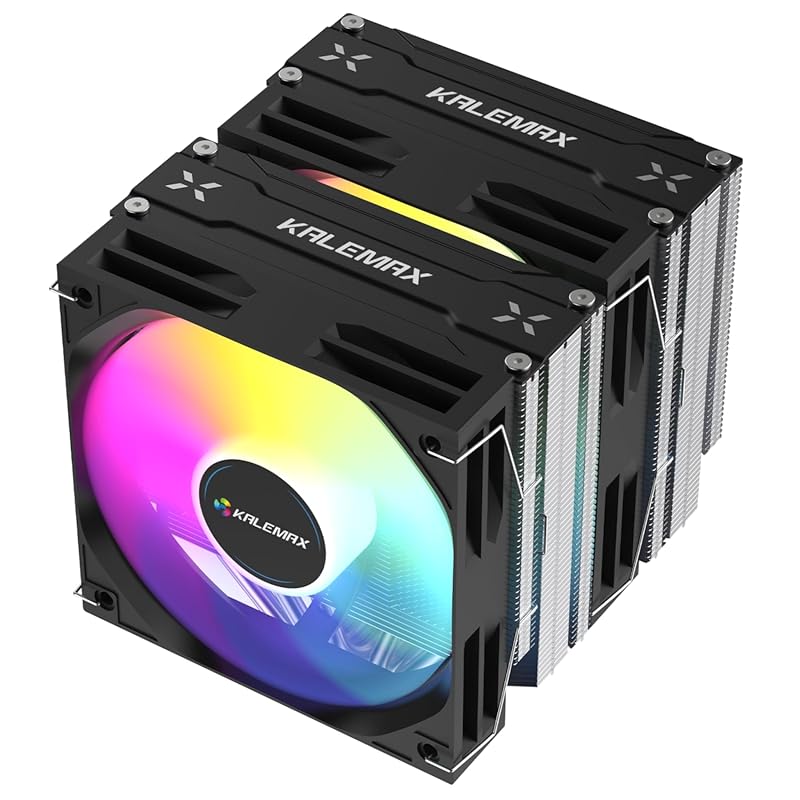
This is a powerful, no-name dual-tower challenger that packs a serious thermal punch. With six 6mm heat pipes, a massive heatsink, and dual high-static pressure ARGB PWM fans rated for 2000 RPM, it’s rated for a staggering 265W TDP. It’s an excellent option for those pushing the limits with flagship CPUs like the Ryzen 9 7950X or Core i9-14900K on a budget, offering performance that can hang with much more expensive coolers.
Key Features That Stand Out
- ✓ Extreme 265W TDP Rating from its massive dual-tower heatsink and six heat pipes.
- ✓ Dual 120mm ARGB PWM Fans running up to 2000 RPM for immense airflow.
- ✓ Universal Socket Support for Intel LGA 115X-1851 and AMD AM4/AM5.
- ✓ Aggressive Fin Design for maximum surface area and heat dissipation.
Why We Recommend It
For sheer, unadulterated cooling power per dollar, this dual-tower unit is almost in a league of its own at this price point. The 265W TDP rating is not marketing fluff; it’s a testament to its massive heatsink. If you have a top-tier CPU and want air cooling that can handle it during sustained all-core loads without throttling, this is a seriously compelling and cost-effective choice.
Best For
Enthusiasts with the highest-end consumer CPUs (Ryzen 9, Core i9) who are not interested in liquid cooling. It’s also great for overclockers on a budget and anyone with a case that can accommodate its large size who wants maximum air cooling performance.
Pros and Cons
Pros:
- Exceptional cooling capacity, suitable for the most powerful CPUs.
- Dual ARGB PWM fans provide strong, controllable airflow.
- Outstanding value for the level of performance offered.
- Wide socket compatibility.
Cons:
- Very large and heavy; case clearance and motherboard support are critical.
- Fan noise can be noticeable at higher RPMs due to the high airflow design.
- Build quality, while good, doesn’t feel quite as refined as Thermalright’s offerings.
- Installation can be cumbersome due to size and weight.
Customer Reviews
Customer Review: I love these fans. First time builder and I was so nervous to put everything Torrey on my own but these fans were so easy to install!! They work like magic and aren’t super crazy loud which was a small fear lol.Highly recommend!!
Customer Review: This dual-tower CPU cooler completely exceeded my expectations. The build quality is excellent, with its six copper heat pipes that truly help dissipate heat quickly and efficiently. Since installing it, my processor stays much cooler even under heavy load , which makes a noticeable difference in performance.
7. Cooler Master Hyper 212 Black CPU Cooler
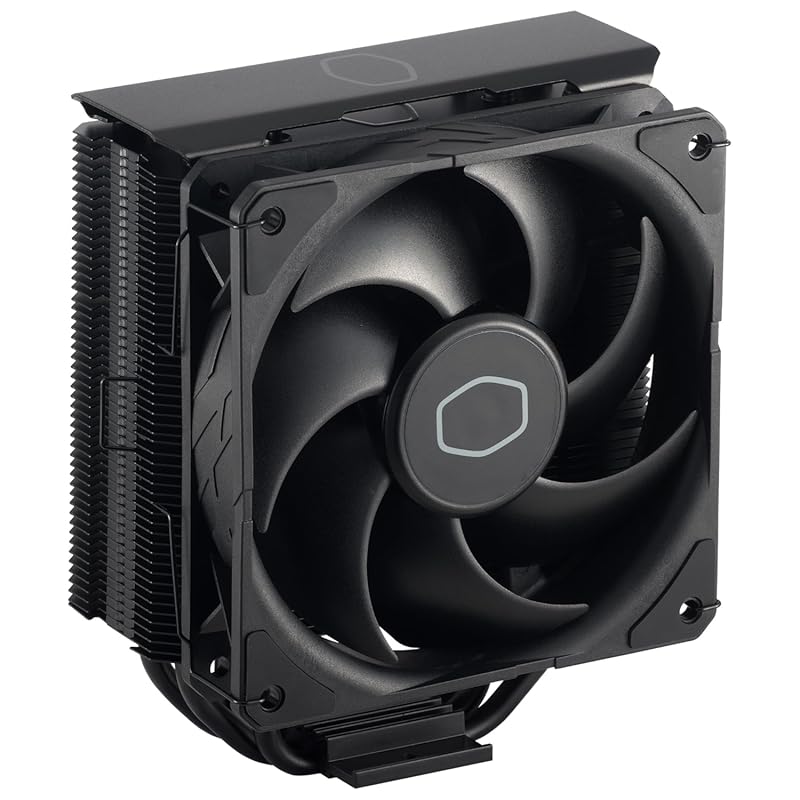
The legendary Cooler Master Hyper 212 has been a budget king for over a decade, and the “Black” edition modernizes it with a sleek, stealthy aesthetic. It keeps the proven 4 direct-contact heat pipe design and the reliable SickleFlow 120 Edge fan. While newer designs have surpassed its raw performance, it remains a fantastic, reliable, and affordable upgrade from stock cooling for mid-range CPUs.
Key Features That Stand Out
- ✓ Iconic, Proven Design with four direct-contact heat pipes in a flat array.
- ✓ Sleek Black Brushed Aluminium Finish and nickel-plated heatsink for a premium look.
- ✓ SickleFlow 120 Edge Fan with optimized PWM blade design for stable airflow.
- ✓ Excellent Compatibility with a low profile and wide socket support.
Why We Recommend It
The Hyper 212 Black is the trusted workhorse. Its performance is consistently good, not mind-blowing, but it’s incredibly reliable and easy to find. For a user with a 65W-105W TDP CPU who wants a noticeable upgrade over stock without any research headaches, you can’t go wrong with this classic. The black finish also means it looks good in almost any build.
Best For
Builders wanting a familiar, no-surprises cooler from a reputable brand. It’s ideal for mainstream gaming PCs with CPUs like the Ryzen 5 5600 or Core i5-12400F, and for anyone who values proven reliability over chasing the absolute highest benchmark numbers.
Pros and Cons
Pros:
- Legendary reliability and a track record of years of use.
- Sleek, all-black aesthetic that fits most builds.
- Straightforward installation with a solid mounting system.
- Usually available at a very competitive price.
Cons:
- Cooling performance is outclassed by newer dual-tower designs.
- Not recommended for very high-TDP CPUs (above ~125W) under heavy loads.
- Can be a bit noisy under maximum fan speed.
Customer Reviews
Customer Review: Extremely good cpu cooler for a very affordable price. Needed something to keep my rig going as I sent my Aio cooler in for a warranty exchange. Worked well on my Intel i9 for normal operation but I wouldn’t recommend it for anything above an i5. The i7’s and i9’s get pretty hot and will throttle down without proper cooling. But again, it kept me going for a couple of weeks while my Aio replacement process took place.
Customer Review: *Be sure to check and ensure this Cooler will fit your Motherboard socket type. For me, this fit LGA 1150.Installation may be moderately difficult for Novices, as this requires removal of the Motherboard in order to attach the bracket required to mount the cooler to. Most already know this before ordering this product, but I felt I should mention that in the event a PC newbie comes along.Overall the Cooler functions exactly to the specifications of Cooler Master. I have been satisfied with my purchase, as there has been a noticeable difference in my CPU’s temps.Cooler Master also included some thermal paste as well, meaning this can be installed the moment it arrives at your doorstep.
8. Thermalright Assassin X120 Refined SE ARGB CPU Cooler
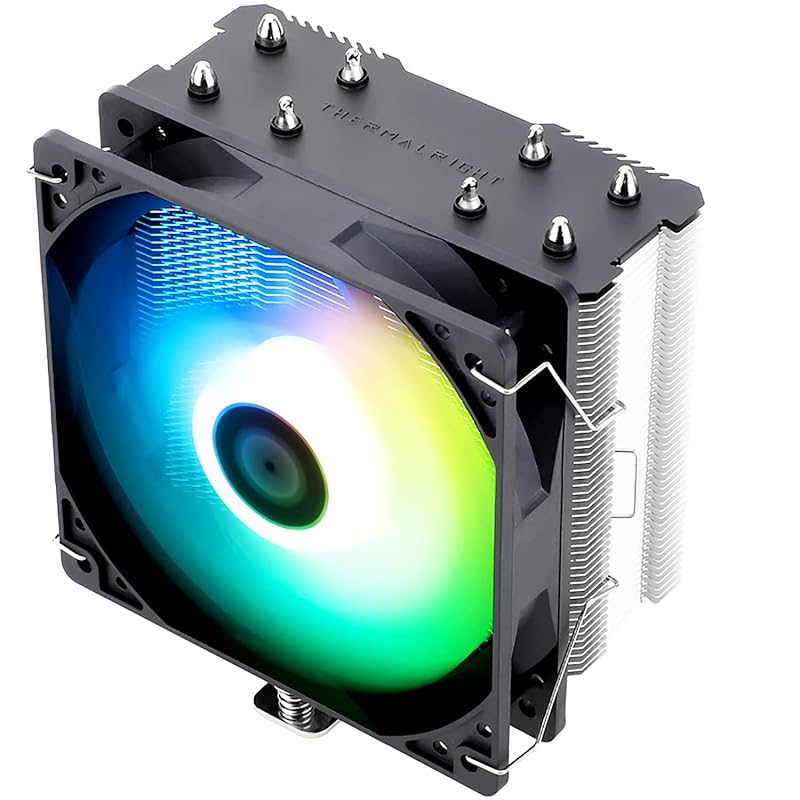
This is the ARGB-lit version of our #1 Best Choice. It takes the same fantastic, budget-dominating single-tower heatsink and pairs it with a TL-C12C-S fan that features addressable RGB lighting. The cooling performance is identical to the non-ARGB model, but you get a splash of customizable color. It’s perfect for builders with a windowed case who want the best performance but also want their rig to look sharp.
Key Features That Stand Out
- ✓ Same Legendary Heatsink as the Best Choice, with 4 AGHP heat pipes.
- ✓ TL-C12C-S PWM Fan with vibrant ARGB lighting effects.
- ✓ Quiet Operation with a low noise profile despite the RGB lighting.
- ✓ Compact 148mm Height fits in a wide range of cases.
Why We Recommend It
If you liked everything about the #1 pick but wished it had some RGB, this is your answer. You don’t pay a significant price premium for the lighting, and you get the same world-beating thermal performance. It’s the easiest recommendation in the market for someone who wants a great single-tower cooler that also looks great inside a glass-panel case.
Best For
Budget gamers and builders with windowed cases who want a balance of top-tier cooling performance and clean RGB aesthetics. It’s an ideal match for systems with a focus on a clean, modern look without overspending on a cooler.
Pros and Cons
Pros:
- All the top-tier cooling performance of the non-ARGB model.
- Clean, customizable ARGB lighting.
- Very quiet for its performance level.
- Excellent value for a cooler with RGB.
Cons:
- ARGB control requires a compatible motherboard header or hub.
- Slightly more expensive than the non-ARGB version.
- Installation still requires backplate access (motherboard removal often needed).
Customer Reviews
Customer Review: This is without a doubt the BEST budget cpu cooler you can get. It SIGNIFICANTLY reduces temps compared to the factory wraith cooler. It just plain works. My temps are much more regulated, the fan is surprisingly quiet (BeQuiet! is still quieter). Looks great, actually matches my stock case fans almost perfectly. Very easy to install, just torque down the bolts in a cross pattern. Overall, fit and quality is great. Love this thing.
Customer Review: The Thermalright Assassin X120 R SE is so good. It’s inexpensive, isn’t the most difficult to mount on an AM4 system, is quiet, and keeps temperatures super low while the CPU is under load. I installed mine onto a B450 board with a 5600G. Compared to the Wraith Stealth during a Cinebench R23 benchmark, 10-minute run, temperatures on average were 19+ degrees C cooler with the Thermalright Assassin X. The ARGB fan is nice and sturdy and while only 8-leds, it’s plenty bright and very quiet at idle speeds.For the cost, the performance is out of this world. I’m unsure how well this cooler will perform on higher TDP CPUs (5600G is only 65W), but I definitely recommend it.I took a couple of stars off for the mounting system/ease of install as the brackets are a tad fiddley. I highly recommend installing the cooler before you put the motherboard into your PC Case. As I was replacing my cooler, my mobo was already installed, so it was a bit more difficult than I liked.Other than that, this is a great product for those looking to get better temperatures for not a lot of money! A+++
9. PCCOOLER CPS RT400 Digital BK CPU Cooler
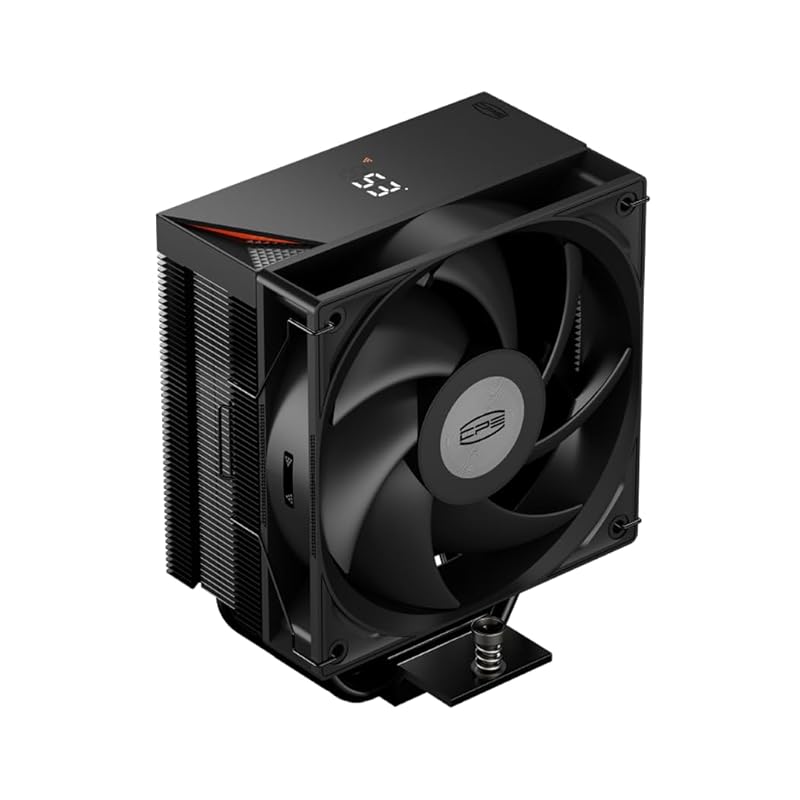
The PCCOOLER CPS RT400 Digital BK stands out with its integrated digital temperature display on the side of the cooler. This single-tower unit features four heat pipes and a 120mm PWM ARGB fan. The digital readout is a neat, hardware-based way to monitor your CPU temps without any software. It’s a solid performer for its class and a great alternative if you want a digital display but prefer a more traditional tower design over the Assassin X 120R.
Key Features That Stand Out
- ✓ Integrated Digital Temperature Display shows real-time CPU temps on the cooler itself.
- ✓ 4x6mm Direct-Contact Copper Heat Pipes for fast heat transfer.
- ✓ 120mm PWM ARGB Fan with a wide 600-1600 RPM range and up to 65 CFM airflow.
- ✓ All-Black Design with sharp fins and a modern look.
Why We Recommend It
This cooler fills a niche for users who really want a hardware temperature display but don’t need the massive cooling of a dual-tower. The digital screen is its main selling point, and it works well. Performance is good for a 120mm single-tower, making it a competent and feature-rich option for mainstream CPUs. Just be aware the fins are very sharp!
Best For
Builders who love the idea of a physical temperature display on their hardware, users with mid-range CPUs in cases without a side panel window (where the display is still visible), and anyone looking for a digital-display cooler alternative to Thermalright’s offering.
Pros and Cons
Pros:
- Useful and cool-looking integrated digital temperature display.
- Competent cooling performance for a 65W-105W CPU.
- PWM fan with ARGB lighting offers good control and aesthetics.
- All-black design is sleek.
Cons:
- Fins are extremely sharp—handle with care during installation.
- Display software setup is required for accurate readings.
- Performance is not as high as the top-tier single-tower coolers.
- Build quality feels a step below Thermalright’s offerings.
Customer Reviews
Customer Review: Este enfriador de aire para CPU de PCCOOLER ha superado mis expectativas. La instalación fue rápida y sencilla, con todos los componentes incluidos y un manual claro. Desde que lo instalé, las temperaturas de mi procesador han bajado notablemente, incluso cuando estoy jugando o realizando tareas exigentes.Lo que más me sorprendió es lo silencioso que funciona: apenas se escucha, incluso cuando el ventilador acelera bajo carga. La calidad de construcción se siente sólida, y el disipador disipa bien el calor sin problemas. Además, su diseño encaja perfectamente en mi gabinete sin interferir con otros componentes.En resumen, es una excelente opción de enfriador de aire para CPU, con un gran rendimiento térmico y muy buen nivel de ruido. Ofrece una fantástica relación calidad-precio y lo recomiendo para quienes quieren mantener su sistema fresco y estable.
Customer Review: I used this cooler to replace my old air cooler which I stole the fan from and added it to this one. The software is really easy and it looks great. Just so you’re aware if you buy the digital display will always display ur hottest core and not ur avg cpu temp if u see a difference and believe that it’s inaccurate.
10. Cooler Master Hyper 212 PRO ARGB CPU Cooler
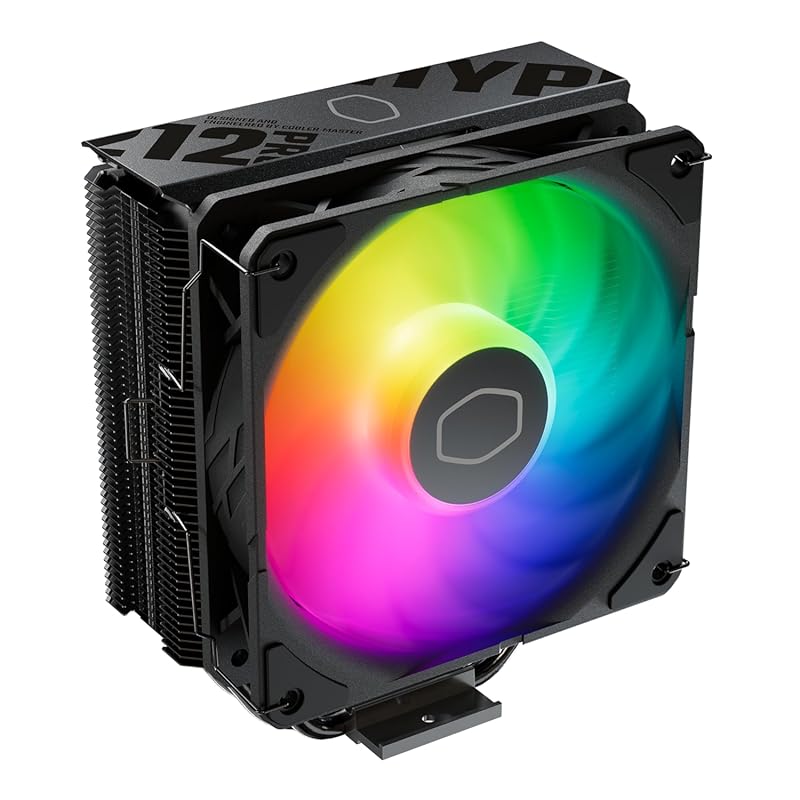
The Hyper 212 PRO ARGB is the flashier, modernized successor to the classic Hyper 212. It upgrades the fan to a SickleFlow Edge 120 with ARGB lighting and features a nickel-plated black heatsink for better heat radiation. It uses Cooler Master’s SCHP (Structured Convective Heat Pipe) technology. It’s a familiar, reliable choice with a much more modern aesthetic than the original Black version.
Key Features That Stand Out
- ✓ SCHP (Structured Convective Heat Pipe) design for optimized heat transfer.
- ✓ SickleFlow Edge 120 ARGB Fan with optimized PWM blades for stable airflow and lighting.
- ✓ Nickel-Plated Black Heatsink for superior heat radiation and a sleek look.
- ✓ Direct Contact Base with 4 copper heat pipes for efficient CPU cooling.
Why We Recommend It
This is the Hyper 212 for the RGB generation. It takes the rock-solid, familiar foundation of the world’s most popular air cooler and gives it a much-needed aesthetic upgrade. The performance is very good for a single-tower, and the ARGB implementation is clean. If you trust the Cooler Master name and want a cooler with lighting, this is a safe and effective bet.
Best For
Builders who are loyal to the Cooler Master brand, users upgrading from an old stock cooler or an original Hyper 212, and anyone wanting a single-tower ARGB cooler from a well-established manufacturer with a history of reliability.
Pros and Cons
Pros:
- Trusted, proven design from a leading brand.
- Attractive ARGB lighting with good brightness and modes.
- Solid cooling performance for mid-range CPUs.
- Reliable mounting system and included thermal paste.
Cons:
- Performance is still behind modern dual-tower designs like the Peerless Assassin.
- Can run warm on high-TDP CPUs under heavy, sustained loads.
- Mounting can require considerable force to secure properly.
- Taller than some other single-tower options, check clearance.
Customer Reviews
Customer Review: TLDR: you can get better cooling from an AIO, but the price and performance of this tower perfect for your average user on a budget. Make sure it fits in your case.The mounting system is secure and makes good contact with the CPU die. The included thermal compound is good enough to not require another purchase as well. My issue with the mounting bracket was that it required more force than I anticipated to align the screws and I had to remount the cooler to ensure even pressure because I had missed that one screw was not threaded into the bracket. – perhaps it could have used slightly taller standoffs.Otherwise installation was easy and the fan mount looks nicer than clips would for this styling. RGB is bright and the selection of colors and modes are fun. I appreciate that I can pick a plain white light or just leave it off.In terms of performance, I see ~20C difference above ambient from my stock cooler (wraith stealth) and the noise is potentially blower under load depending on your fan curve. Under heavy load with a slight OC my temps are stable below 75C and idle around 35C.The main downside to look out for is it’s height from the GPU. My case is wide and accommodates the cooler, but if you have a narrow case I would look for another solution.
Customer Review: This fan was selected for use in my new desktop computer, and my experience with it thus far has been positive. It looks good, with attractive color accents that enhance the overall appearance of my new desktop. Beyond aesthetics, the fan exhibits a robust and sturdy construction, instilling confidence in its long-term durability. Most importantly, it performs well, and moves a lot of air, which is crucial for maintaining optimal system performance.The fan’s sturdy build is a notable advantage, suggesting resilience and longevity. Additionally, the appealing color scheme adds a welcome visual element to the computer’s internal components. Its capacity to move a substantial amount of air is a critical pro, ensuring efficient cooling and contributing to the overall stability and performance of the system.At this time, no drawbacks have been identified.In conclusion, this fan proves to be a solid choice for a computer build, offering a combination of effective cooling performance, durable construction, and pleasing visual design. Its ability to move a significant volume of air, coupled with its sturdiness and attractive colors, makes it an excellent choice.
Complete Buying Guide for Best Budget CPU Air Cooler
Essential Factors We Consider
When evaluating the best budget CPU air cooler, we prioritize a few key factors. Cooling Performance is king—measured by temperature drops under load. Acoustic Performance (noise level) is equally important for a pleasant user experience. Build Quality & Materials, like copper heat pipes and aluminum fins, affect longevity and efficiency. Socket Compatibility ensures it works with your motherboard. Physical Dimensions, especially height and width, must fit your PC case. Finally, Ease of Installation and included accessories (thermal paste, mounting hardware) impact the setup process.
Budget Planning
The “budget” category for excellent air coolers typically spans from $25 to $60. In this range, you can find single-tower coolers that outperform most stock solutions and dual-tower models that can handle high-end CPUs. Our list focuses on this sweet spot. Spending more often gets you better materials, RGB, or extreme performance for overclocking, but you don’t need to spend more than $60 for 95% of users. Always check your CPU’s TDP (Thermal Design Power) and match it with a cooler rated for at least 1.5x that wattage for comfortable headroom.
Final Thoughts
You no longer need to spend a lot to get fantastic CPU cooling. The best budget CPU air coolers on this list, particularly from Thermalright, have redefined what value means in this category. A good air cooler is a one-time investment that pays dividends in performance, stability, and system quietness. Don’t underestimate how much a quality cooler can improve your overall PC experience, even if you’re not an overclocker.
Frequently Asked Questions
Q: Is a budget air cooler better than a stock cooler?
A: Absolutely, without question. Stock coolers are designed to be “good enough” for basic operation at safe but often high temperatures and noise levels. A budget air cooler like the ones on this list will lower your temperatures by 15-30°C, run significantly quieter, and allow your CPU to sustain higher boost clocks for longer. It’s one of the most impactful and cost-effective upgrades you can make.
Q: What’s the difference between a single-tower and dual-tower CPU cooler?
A: A single-tower cooler has one stack of fins and typically one fan (sometimes two on one tower). It’s compact and great for CPUs up to ~105W TDP. A dual-tower cooler has two separate fin stacks, usually with a fan on each side (push-pull). This dramatically increases surface area and cooling capacity, making it suitable for high-TDP CPUs (125W+) and overclocking, but it’s taller and sometimes wider.
Q: How difficult is it to install an aftermarket CPU cooler?
A>Most modern coolers use a backplate and mounting bracket system. The difficulty is usually “moderate.” The main challenge is often accessing the motherboard’s backside to attach the backplate, which frequently requires removing the motherboard from the case. Once the backplate is on, attaching the cooler is straightforward. Always follow the manufacturer’s instructions carefully and watch an install video for your specific model if you’re a first-timer.
Q: Do I need to buy thermal paste separately?
A: All the coolers on this list include a tube or syringe of thermal paste in the box. This paste is perfectly adequate for general use. Enthusiasts sometimes prefer to buy a premium paste like Thermal Grizzly Kryonaut for the absolute best performance, but the included paste will not hold you back. Just apply a small, pea-sized dot in the center of the CPU.
Q: How do I know if a cooler will fit in my PC case?
A: You must check two dimensions: CPU Cooler Height (listed in the specs) against your case’s maximum cooler height specification, and Width/Length to ensure it won’t interfere with your RAM modules or GPU. The product pages and our reviews mention typical heights and clearance notes. When in doubt, measure the space in your case from the top of the CPU to the side panel or RAM.
Upgrading to one of these best budget CPU air coolers is a decision you won’t regret. The improvement in temperatures, noise levels, and overall system stability is immediately noticeable. Whether you choose the unmatched value of the Thermalright Assassin X120 Refined SE, the powerful dual-tower Peerless Assassin, or a feature-packed option with a digital display, you’re getting top-tier cooling performance for your money. Don’t settle for a noisy, hot stock cooler—pick one from this list and give your CPU the cooling it deserves. Check the price on Amazon today and take the first step toward a cooler, quieter PC.