Ddr4 Ram 32gb 3200mhz Laptop
A DDR4 RAM 32GB 3200MHz laptop delivers fast speeds and smooth multitasking for work, gaming, and creativity. This guide covers specs, benefits, compatibility, and buying tips to help you choose the right setup. You will learn how to upgrade your laptop memory and get the most value from your investment.
Are you looking to speed up your laptop? A DDR4 RAM 32GB 3200MHz laptop setup can make a huge difference. Whether you game, edit videos, or run heavy software, the right memory transforms your experience. In this guide, we break down everything you need to know about this popular RAM configuration.
Memory speed and capacity affect how fast your laptop handles tasks. DDR4 RAM at 3200MHz with 32GB of capacity hits a sweet spot. It offers strong performance without breaking the bank. Let us dive into the details and help you make the best choice for your needs.
Key Takeaways
- DDR4 3200MHz offers excellent speed: This frequency strikes a great balance between performance and affordability for most users.
- 32GB is ideal for heavy tasks: Video editing, gaming, and running multiple apps at once becomes much smoother with this much memory.
- Compatibility matters: Not every laptop supports DDR4 RAM 32GB 3200MHz, so check your model before buying.
- Upgrading is straightforward: Most laptops allow RAM upgrades with basic tools and a little patience.
- Price varies by brand and seller: Shopping around can save you money without sacrificing quality.
- Dual channel boosts performance: Using two RAM sticks instead of one can improve speed significantly.
📑 Table of Contents
- What Is DDR4 RAM 32GB 3200MHz?
- Why Choose 32GB of RAM?
- Understanding 3200MHz Speed
- Benefits of a DDR4 RAM 32GB 3200MHz Laptop
- Compatibility: Does Your Laptop Support DDR4 32GB 3200MHz?
- How to Upgrade Your Laptop RAM
- Where to Buy DDR4 RAM 32GB 3200MHz for Your Laptop
- Is DDR4 RAM 32GB 3200MHz Worth It?
- Conclusion
What Is DDR4 RAM 32GB 3200MHz?
DDR4 stands for Double Data Rate 4th generation. It is the fourth version of DDR memory technology used in modern laptops and desktops. The “32GB” refers to the total memory capacity. The “3200MHz” refers to the speed, or frequency, at which the RAM processes data.
Think of RAM as your laptop’s short-term memory. When you open apps or browse files, the laptop uses RAM to keep things running fast. More RAM means you can handle more tasks at once. Faster RAM means those tasks happen quicker.
A DDR4 RAM 32GB 3200MHz laptop combines both high capacity and fast speed. This makes it great for demanding workloads. You get smooth performance whether you are working, playing, or creating content.
DDR4 vs DDR3: What Is the Difference?
DDR4 replaced DDR3 as the standard memory type. DDR4 runs faster and uses less power. It also supports higher capacity modules. Here is a quick comparison:
- Speed: DDR4 starts at 2133MHz and can go up to 3200MHz or higher. DDR3 topped out around 2133MHz.
- Power Use: DDR4 uses 1.2 volts. DDR3 uses 1.5 volts. Lower voltage means less heat and better battery life.
- Capacity: DDR4 modules can go up to 32GB per stick. DDR3 modules usually maxed out at 16GB.
- Performance: DDR4 delivers noticeably better bandwidth and lower latency than DDR3.
So if you are choosing between a laptop with DDR3 and one with DDR4, go with DDR4 every time. The performance jump is real and noticeable.
Why Choose 32GB of RAM?
Not everyone needs 32GB of memory. But for many users, it makes a big difference. Let us look at who benefits most from this amount of RAM.
Who Needs 32GB of RAM?
- Gamers: Modern games use a lot of memory. 32GB helps keep frame rates stable while running background apps.
- Video Editors: Editing 4K video requires serious memory. 32GB keeps timelines smooth and renders faster.
- Graphic Designers: Working with large files in Photoshop or Illustrator benefits from extra RAM.
- Programmers: Running virtual machines, compilers, and multiple IDEs uses up memory fast.
- Multitaskers: If you keep dozens of browser tabs open while using other apps, 32GB prevents slowdowns.
If you just browse the web and write documents, 8GB or 16GB may be enough. But if you push your laptop hard, 32GB is a game changer. It gives you room to grow and handle future software demands.
How Much RAM Do You Really Need?
Here is a simple breakdown to help you decide:
- 4GB: Basic tasks like web browsing and word processing.
- 8GB: Everyday use, light gaming, and schoolwork.
- 16GB: Solid for most users, including casual gaming and photo editing.
- 32GB: Ideal for professionals, heavy gamers, and anyone running demanding software.
- 64GB: Overkill for most users but great for 3D rendering and scientific computing.
For most people, 32GB sits in the sweet spot. It handles everything you throw at it today and is ready for tomorrow’s software updates.
Understanding 3200MHz Speed
The MHz number tells you how fast your RAM processes data. 3200MHz means the RAM can handle 3.2 billion cycles per second. That is fast. But does speed really matter?
The answer depends on what you do. For gaming, 3200MHz DDR4 is excellent. Most games do not see huge gains beyond this speed. For productivity tasks like video editing, faster RAM can cut down render times. For general use, you may not notice a big difference between 3200MHz and 2666MHz.
Here are some key things to know about RAM speed:
- Higher MHz means more data per second: This helps with bandwidth-heavy tasks.
- Latency also matters: Lower latency numbers mean faster response times. Look at both speed and latency when comparing RAM.
- Dual channel boosts real-world performance: Using two 16GB sticks at 3200MHz performs better than one 32GB stick.
When shopping for a DDR4 RAM 32GB 3200MHz laptop, check if the RAM runs in dual channel mode. This simple setup can boost performance by 10 to 20 percent in many tasks.
Benefits of a DDR4 RAM 32GB 3200MHz Laptop
Now let us talk about the real-world benefits. Why should you care about this specific configuration?
1. Faster Multitasking
With 32GB of RAM, you can run many apps at the same time without slowdowns. Have your browser open with 20 tabs, Spotify playing, a Word document running, and a Zoom call active. A 32GB setup handles all of that with ease.
2. Smoother Gaming
Modern games like Cyberpunk 2077, Hogwarts Legacy, and Call of Duty demand a lot from your system. 32GB of DDR4 RAM at 3200MHz keeps your game running smoothly. You get better frame rates and fewer stutters. Background downloads or updates will not slow your game down either.
3. Better Content Creation
If you edit videos or work with large images, 32GB makes a noticeable difference. Programs like Premiere Pro, DaVinci Resolve, and After Effects use tons of memory. More RAM means shorter export times and smoother previews.
4. Future Proofing
Software keeps getting heavier. What works fine today may struggle tomorrow. 32GB of RAM future proofs your laptop for several years. You will not need to upgrade again anytime soon.
5. Improved Battery Efficiency
DDR4 RAM uses less power than older generations. This means your laptop battery lasts longer. Combined with 3200MHz efficiency, you get performance without sacrificing battery life.
Compatibility: Does Your Laptop Support DDR4 32GB 3200MHz?
Not every laptop can use DDR4 RAM 32GB 3200MHz. Before buying, you need to check a few things.
Check Your Laptop Model
First, find out your laptop model. Look at the bottom of the laptop or check the system settings. Then search online to see what RAM it supports. Some laptops only accept up to 16GB. Others can handle 32GB or more.
Check the RAM Type
Laptops use specific RAM types. Older models may use DDR3 or DDR3L. Newer models use DDR4. Make sure your laptop supports DDR4 before buying DDR4 RAM. Mixing RAM types will not work.
Check the Maximum Speed
Even if your laptop supports DDR4, it may not support 3200MHz. Some laptops cap out at 2666MHz or 2933MHz. Check your laptop’s specifications to confirm the maximum supported speed.
Check the Number of RAM Slots
Most laptops have two RAM slots. To get 32GB, you can either use one 32GB stick or two 16GB sticks. Two 16GB sticks are usually better because they run in dual channel mode. Check how many free slots your laptop has before purchasing.
Quick Compatibility Checklist
- Does your laptop support DDR4 RAM?
- Does it accept 32GB modules?
- What is the maximum supported speed?
- How many free RAM slots are available?
- Is your laptop model listed on the RAM manufacturer’s compatibility list?
Taking five minutes to check these items saves you from buying the wrong RAM. Always double check before you order.
How to Upgrade Your Laptop RAM
Upgrading your laptop RAM is easier than you think. With the right tools and a little care, you can do it yourself in under 30 minutes.
What You Need
- A compatible DDR4 32GB 3200MHz RAM stick (or two 16GB sticks)
- A small Phillips head screwdriver
- An anti-static wrist strap (optional but recommended)
- A clean, flat workspace
Step by Step Process
- Turn off your laptop: Shut it down completely and unplug the power cable.
- Remove the battery: If possible, take out the battery to prevent any electrical issues.
- Locate the RAM slots: Check your laptop manual or look for a small panel on the bottom.
- Remove the old RAM: Push the side clips outward. The RAM stick will pop up at an angle. Gently pull it out.
- Insert the new RAM: Align the notch on the RAM stick with the slot. Press it down firmly until the clips click into place.
- Reassemble your laptop: Put the panel back on and reinsert the battery.
- Power on and test: Turn on your laptop and check the RAM in your system settings.
If you are not comfortable doing this yourself, you can visit a local repair shop. Most technicians will install RAM for a small fee. It is a quick and affordable upgrade either way.
Common Mistakes to Avoid
- Buying the wrong RAM type: DDR4 will not work in a DDR3 slot. Always verify compatibility first.
- Forgetting dual channel: Using one 32GB stick works but two 16GB sticks perform better.
- Ignoring speed limits: If your laptop only supports 2666MHz, buying 3200MHz RAM will still work but it will run at the lower speed.
- Skipping the anti-static precaution: Static electricity can damage RAM modules. Use a wrist strap or touch a metal surface before handling RAM.
Where to Buy DDR4 RAM 32GB 3200MHz for Your Laptop
You have several options when buying RAM for your laptop. Prices vary, so shopping around helps you save money.
Online Retailers
Major online stores like Amazon, Newegg, and B&H Photo carry a wide selection of DDR4 RAM. You can compare prices and read customer reviews. Look for trusted brands like Corsair, Kingston, Crucial, and G.Skill.
Manufacturer Websites
Buying directly from the RAM manufacturer ensures authenticity. Corsair and Kingston both sell RAM directly through their websites. You may also find exclusive bundles or warranties.
Check Price Before You Buy
RAM prices change frequently. A 32GB RAM price for laptop can range from around $60 to $150 depending on the brand and speed. Sign up for price alerts or check deal websites to catch discounts.
If you want to see what options are available, you can explore the 32GB RAM price for laptop options on our site. We also have a guide on laptops with 32GB of RAM that can help you find the right pre-built system. And if you want to learn more about RAM sticks, check out our 32GB RAM stick for laptop guide.
Is DDR4 RAM 32GB 3200MHz Worth It?
The short answer is yes for most power users. 32GB of DDR4 RAM at 3200MHz delivers excellent performance for gaming, content creation, and professional work. It strikes a great balance between speed, capacity, and price.
However, if you only use your laptop for basic tasks, this much RAM may be overkill. In that case, 8GB or 16GB would save you money without sacrificing much performance.
Think about your use case before buying. If you run heavy software or want your laptop to last for years, 32GB DDR4 at 3200MHz is a smart investment. It gives you headroom and smooth performance every day.
For those considering a full laptop with this configuration already built in, you might want to look at options like the laptop with 32GB of RAM and an i7 processor. These systems come ready to go without any upgrades needed.
Conclusion
A DDR4 RAM 32GB 3200MHz laptop setup delivers fast, reliable performance for demanding tasks. Whether you game, create content, or run professional software, this configuration handles it all. The combination of high capacity and fast speed gives you a smooth, responsive computing experience.
Before upgrading, always check your laptop’s compatibility. Verify the RAM type, maximum capacity, and supported speed. Follow the upgrade steps carefully, and you will have your new RAM running in no time.
Investing in the right RAM is one of the best ways to breathe new life into an older laptop. It is affordable, easy to install, and delivers noticeable improvements. Take the time to choose the right DDR4 RAM 32GB 3200MHz setup, and your laptop will thank you for years to come.
Frequently Asked Questions
Can I mix 32GB and 16GB RAM sticks in my laptop?
Yes, you can mix different sizes, but it is not ideal. When you mix RAM sizes, the system may run in single channel mode for part of the memory. This can reduce performance. For best results, use matching RAM sticks, such as two 16GB modules, to enable dual channel mode and get the full speed benefit.
Will DDR4 3200MHz RAM work in a laptop that supports 2666MHz?
Yes, it will work. The RAM will simply run at the maximum speed your laptop supports, which in this case is 2666MHz. The module will be backward compatible, so you will not waste your money. However, you will not get the full 3200MHz speed unless your laptop explicitly supports it.
How do I check my current RAM speed and type?
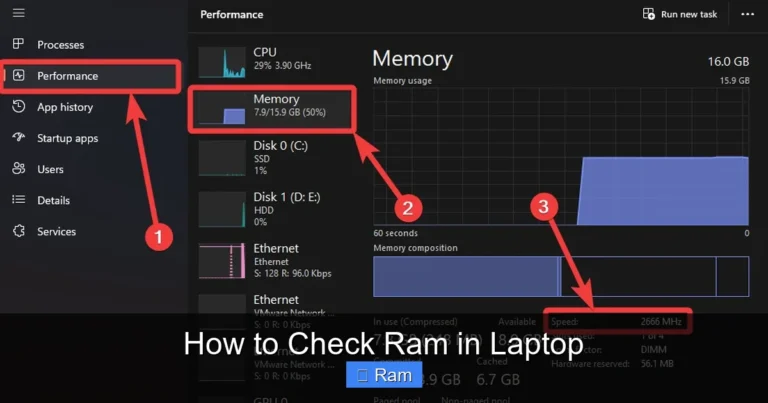
You can check your RAM details in Windows by opening Task Manager and clicking the Performance tab. Select Memory to see your RAM type, speed, and how many slots are in use. You can also use free tools like CPU-Z for more detailed information about your memory modules.
Is 32GB DDR4 RAM overkill for gaming?
For most games, 16GB is enough. However, 32GB gives you room to run games while streaming, recording, or running background apps. If you want the smoothest experience and plan to keep your laptop for several years, 32GB is a smart choice that ensures you are ready for future games that may demand more memory.
Does RAM speed affect laptop battery life?
DDR4 RAM is already power efficient compared to older generations. The difference in battery life between 3200MHz and 2666MHz is minimal. You will not notice a big change in battery performance. Overall, DDR4 RAM helps your laptop run cooler and use less power than DDR3, which is a win for battery life.
Can I upgrade my laptop RAM myself?
Yes, most laptops allow user-upgradeable RAM. You just need a small screwdriver and about 15 to 30 minutes. Make sure to check your laptop manual for the right procedure. If you are unsure, watching a tutorial video for your specific model can make the process much easier and safer.