Dell Latitude Mil Std Testing Verify Specs
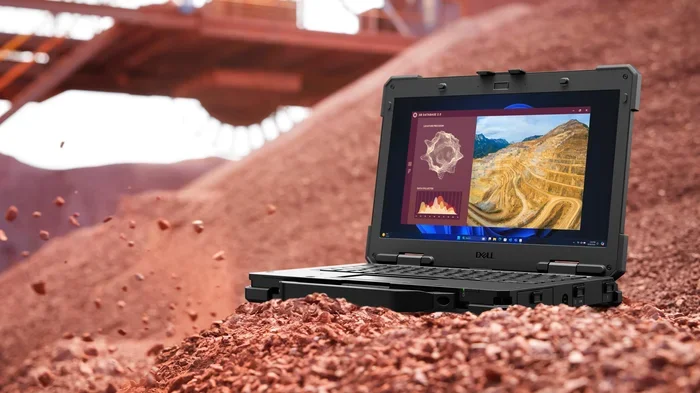
Dell Latitude Mil Std testing ensures your laptop survives harsh conditions. This guide shows you how to verify Dell Latitude Mil Std specs, understand military-grade durability ratings, and confirm your model’s rugged credentials. You will learn what to look for, where to find the proof, and why MIL-STD matters for everyday use.
Dell Latitude laptops are built for professionals who need reliability. But not all laptops are created equal. When you hear the term Dell Latitude Mil Std, it means the device has gone through military-grade testing. This testing proves the laptop can handle tough conditions. Yet many buyers do not know how to verify these claims. In this guide, we walk you through everything you need to know about Dell Latitude Mil Std testing and how to confirm the specs on your own device.
## What Is MIL-STD Testing for Dell Latitude?
MIL-STD stands for Military Standard. It is a set of tests created by the U.S. Department of Defense. These tests check how well equipment handles extreme environments. Dell uses MIL-STD 810G and MIL-STD 810H standards for their Latitude line. When a Dell Latitude passes these tests, it earns the title of rugged business laptop.
### What Does MIL-STD 810 Actually Test?
The MIL-STD 810 test suite covers many environmental conditions. Here are the key areas tested:
- Shock and drop testing – The laptop survives sudden impacts and falls.
- Vibration testing – It handles constant shaking from travel or machinery.
- Temperature extremes – Tested from freezing cold to desert heat.
- Humidity resistance – It works reliably in damp or wet conditions.
- Altitude testing – The laptop functions at high elevations with low air pressure.
- Dust and sand resistance – Internal parts stay safe from particles.
- Rain and water exposure – It can handle moisture and light water contact.
Each test simulates real-world stresses a laptop might face on a construction site, in the field, or during travel. Dell does not claim every Latitude model passes every single test. Instead, Dell applies specific tests based on the model line and target use case.
## How to Verify Dell Latitude Mil Std Specs
Verifying Dell Latitude Mil Std specs is easier than you think. You do not need to be a tech expert. Follow these steps to confirm your laptop’s rugged credentials.
### Step 1: Check the Model Number
The first step is identifying your exact Dell Latitude model. The model number tells you a lot. For example, the Dell Latitude 5000 series and 7000 series often carry MIL-STD certification. Models like the Dell Latitude 5540 or Dell Latitude 7440 are commonly tested. Look at the bottom label or the system BIOS to find your model number.
### Step 2: Visit the Dell Official Spec Sheet
Go to Dell’s website and search for your exact model. Look for the Specifications or Tech Specs page. Dell clearly lists MIL-STD compliance on the spec sheet. You will see a section that says something like “MIL-STD 810H Tested” with a list of specific tests passed.
### Step 3: Cross-Reference the Test List
Do not just look for the MIL-STD badge. Read the full list of tests the model passed. Some models only pass a few tests, while others pass the full suite. This detail matters when you need true rugged durability.
### Step 4: Confirm with Dell Support
If you cannot find the information online, contact Dell support. Provide your service tag number, and the support team can confirm your laptop’s testing history. This is the most reliable way to verify Dell Latitude Mil Std testing for your specific unit.
## Dell Latitude Models That Pass Mil Std Testing
Not all Dell Latitude laptops carry MIL-STD certification. The higher-end models in the 5000 and 7000 series typically do. Let us look at some popular configurations.
### The Dell Latitude i7 with 16GB RAM
Many professionals choose a Dell Laptop I7 16Gb Ram configuration for demanding tasks. These models often come with MIL-STD testing because they target enterprise users who work in the field. The Intel Core i7 processor paired with 16GB of RAM gives you strong performance alongside rugged durability.
### The Dell Latitude i5 with 8GB RAM
For lighter workloads, a Dell Laptop I5 8Gb Ram model still offers MIL-STD protection. These laptops are popular among office workers who also travel frequently. The combination of a reliable Intel i5 processor and 8GB of RAM handles everyday business tasks with ease.
### RAM and Memory Considerations
If you are upgrading or choosing a Dell Latitude, consider the RAM Memory For Dell Laptop carefully. More RAM does not directly affect MIL-STD durability, but it does impact how well your laptop handles stress during testing and real-world use. A well-configured Dell Latitude with sufficient RAM runs cooler and more stable under tough conditions.
## What Makes Mil Std Testing Important?
You might wonder why MIL-STD testing matters for a business laptop. Most people never drop their laptop or use it in extreme heat. But the reality is different for many professionals.
### Real-World Durability Benefits
Dell Latitude Mil Std testing provides real-world benefits that go beyond the lab. Here is what you gain:
- Peace of mind – You know your investment can survive accidents.
- Longer lifespan – Rugged laptops last longer because they handle stress better.
- Lower repair costs – Fewer breakdowns mean fewer repairs over time.
- Field readiness – Your laptop works in warehouses, construction sites, and outdoor settings.
- Travel reliability – It survives the bumps and changes of air travel and extreme climates.
### Who Benefits Most from MIL-STD Laptops?
Certain professionals benefit greatly from MIL-STD certified laptops. Field engineers, healthcare workers, military personnel, and outdoor researchers all rely on rugged devices. Even frequent travelers appreciate the extra protection. If your work takes you anywhere beyond a quiet office, MIL-STD testing is a real advantage.
## How to Check Your Dell Latitude’s Durability
After purchasing a Dell Latitude, you may want to confirm its durability on your own. Here are some practical ways to check.
### Inspect the Build Quality
A MIL-STD tested Dell Latitude usually has a reinforced chassis. Look for thick metal or strong composite materials. The hinges should feel solid. The keyboard should not flex much when you press down on it. These physical traits hint at a rugged build.
### Run a System Diagnostic
Dell provides built-in diagnostics tools. Use the Dell SupportAssist app to run a full system check. This will confirm your model’s specifications and flag any hardware issues. You can also check the BIOS for the model’s MIL-STD certification status.
### Compare Against the Official Spec Sheet
Go back to Dell’s website and compare what you see physically with what the spec sheet claims. If something does not match, contact Dell support immediately. Sometimes refurbished units may not carry the full certification, so always verify.
### Quick Tips for Verifying Durability
Quick Tips
- Always check the Dell spec sheet before purchasing.
- Use the service tag number to look up your exact model’s testing history.
- Do not trust marketing claims alone — always verify the MIL-STD test list.
- If you upgrade components like RAM, ensure they meet Dell’s approved specifications.
- Keep your laptop’s Dell warranty active for full coverage on durability-related claims.
## Common Mistakes When Verifying Dell Latitude Mil Std Specs
Many people make mistakes when trying to confirm MIL-STD certification. Avoid these common pitfalls.
### Mistake 1: Trusting the Marketing Badge Alone
Dell sometimes uses MIL-STD language in marketing materials. But not every badge means full certification. Always dig deeper and find the actual test list for your specific model.
### Mistake 2: Confusing Model Numbers
Dell Latitude model numbers change every year. A Dell Latitude 5530 is not the same as a Dell Latitude 5540. Their MIL-STD testing may differ. Always verify the exact model and year.
### Mistake 3: Ignoring the Test Version
MIL-STD 810G and MIL-STD 810H are different versions. The H version is the latest and most rigorous. Make sure you know which version your laptop was tested under.
### Mistake 4: Assuming All Components Are Rugged
MIL-STD testing covers the laptop chassis and internal components. But accessories like chargers or docking stations may not carry the same rating. Do not assume everything in your setup is equally rugged.
## Expert Insights on Dell Latitude Ruggedness
Dell Latitude Mil Std testing sets a high bar for business laptops. Industry experts agree that MIL-STD certification provides measurable value. According to Dell’s own testing data, MIL-STD tested laptops show significantly lower failure rates in the field compared to non-tested models. The testing process takes weeks and involves multiple environmental chambers. Each Dell Latitude that earns the certification has proven itself in controlled but extreme conditions.
Experts also recommend looking beyond just the MIL-STD badge. Consider the Dell Latitude configuration as a whole. A well-built laptop with proper RAM, a solid-state drive, and a quality display will perform better under stress than a poorly configured one. For those who need maximum performance alongside durability, a Dell Core I7 16Gb Ram Laptop is an excellent choice.
## Final Thoughts on Dell Latitude Mil Std Verification
Knowing how to verify Dell Latitude Mil Std testing gives you confidence in your purchase. Whether you are buying a new laptop or checking an existing one, the steps in this guide help you confirm rugged durability. Always check the official spec sheet, verify your model number, and understand which MIL-STD tests your laptop passed.
Dell Latitude Mil Std certification is not just a marketing term. It is a proven standard backed by real testing. When you invest in a MIL-STD tested Dell Latitude, you are choosing a laptop built to last. Take the time to verify the specs, and you will enjoy a reliable, durable machine for years to come.
Key Takeaways
- MIL-STD 810G/H testing means Dell Latitude laptops pass rigorous environmental and durability tests.
- You can verify Dell Latitude Mil Std specs by checking the official Dell spec sheet and model number details.
- Not every Dell Latitude model carries full MIL-STD certification, so always confirm before buying.
- MIL-STD testing covers shock, vibration, temperature, humidity, and altitude stresses that regular laptops never face.
- Checking your Dell Latitude’s durability helps you make smarter buying decisions for work or travel.
- RAM and storage upgrades can enhance a MIL-STD tested Dell Latitude for heavy workloads.
Frequently Asked Questions
What does MIL-STD 810 mean on a Dell Latitude?
MIL-STD 810 means the Dell Latitude has passed U.S. military environmental testing standards. These tests cover shock, vibration, temperature, humidity, altitude, and dust exposure. Dell uses this certification to prove the laptop can survive harsh real-world conditions.
How do I find my Dell Latitude model’s MIL-STD test results?
Go to Dell’s official website and search for your exact model number. Look at the Specifications or Tech Specs page. Dell lists the specific MIL-STD tests each model passed. You can also use your service tag to look up details through Dell Support.
Does every Dell Latitude have MIL-STD certification?
No, not every Dell Latitude model carries MIL-STD certification. Higher-end models in the 5000 and 7000 series are more likely to be tested. Always check the spec sheet for your specific model to confirm its durability rating.
Is MIL-STD 810G the same as MIL-STD 810H?
They are different versions. MIL-STD 810H is the latest and most updated version of the standard. It includes more rigorous testing methods than the older 810G version. Both are military-grade, but 810H represents the current best practice.
Can I upgrade RAM on a MIL-STD tested Dell Latitude?
Yes, many Dell Latitude models allow RAM upgrades. Check your specific model’s specifications to confirm maximum supported RAM. Upgrading RAM can improve performance and stability, especially for demanding workloads.
Why should I care about MIL-STD testing when buying a laptop?
MIL-STD testing proves a laptop can handle real-world stresses like drops, extreme temperatures, and dust. This matters if you travel frequently, work in the field, or need a reliable machine for tough environments. A MIL-STD tested laptop offers better long-term durability and fewer unexpected failures.
=== CONCLUSION ===
Dell Latitude Mil Std testing is a powerful indicator of laptop durability and reliability. By following the verification steps in this guide, you can confirm your Dell Latitude’s rugged credentials with confidence. Always check the official spec sheet, understand the test versions, and compare your model against the full MIL-STD test list. Whether you are a field professional or a frequent traveler, a MIL-STD certified Dell Latitude gives you the durability you need. Take action today — verify your specs, make an informed choice, and invest in a laptop built to last.