How Does Bluetooth Speakers Work
How does Bluetooth speakers work is a question many people ask when they want wireless music without messy cables. The short answer is that Bluetooth sends digital audio from your phone or laptop to a speaker using short-range radio signals. Inside the speaker, a small receiver turns those signals back into sound through a built-in amplifier and driver. This guide explains the whole process in simple terms, covers pairing steps, and shares practical tips for better sound and fewer dropouts.
This is a comprehensive guide about how does bluetooth speakers work.
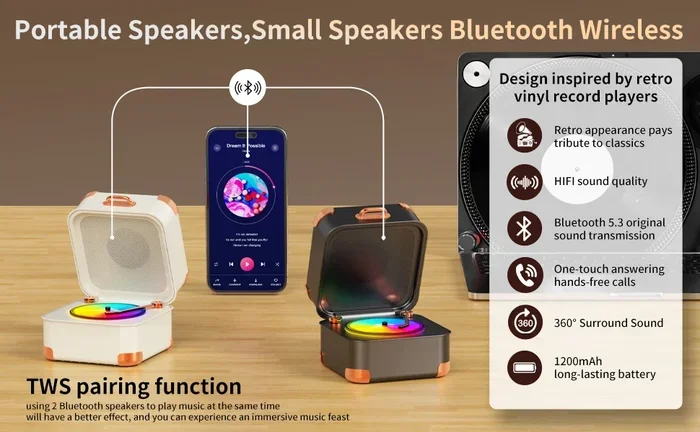
Visual guide about Bluetooth speakers wireless connection
Image source: m.media-amazon.com
Key Takeaways
- Bluetooth uses radio waves: It sends digital audio over short distances, usually up to 30 feet, without needing cables.
- Pairing creates a secure link: Your device and speaker exchange codes once, then reconnect automatically later.
- Audio gets compressed for speed: Bluetooth compresses files to move them quickly, then the speaker decompresses them for playback.
- Sound quality depends on codecs: Different audio codecs affect clarity, latency, and battery use.
- Range and interference matter: Walls, other wireless devices, and distance can weaken the signal.
- Battery and power affect performance: A weak battery can cause dropouts, static, or lower volume.
- Simple troubleshooting fixes most issues: Restarting, re-pairing, and reducing interference solve most Bluetooth speaker problems.
[FEATURED_IMAGE_PLACEHOLDER]
Introduction
Wireless music feels like magic until you stop and ask how does Bluetooth speakers work. One minute you are tapping play on your phone, and the next you hear music coming from a small box across the room. There is no cord between them, yet the sound still arrives. That convenience is why Bluetooth speakers are so popular for homes, workouts, travel, and outdoor gatherings.
The basic idea is simple. Your phone stores or streams audio. The speaker receives that audio and plays it. Bluetooth acts like the invisible bridge between the two. It carries the music as radio signals instead of using a physical wire. This makes setup easy, but it also raises questions about sound quality, range, and connection problems.
In this guide, we will walk through the whole process in plain English. You will learn what happens when you press play, how pairing works, why sound quality can vary, and what to do when your speaker acts up. If you have ever wondered why your music cuts out near a wall or why some speakers sound clearer than others, this article will help.
How Does Bluetooth Speakers Work: The Basic Wireless Audio Process
When people ask how does Bluetooth speakers work, they usually want the simple version first. Here it is. Your phone turns music into digital data. Bluetooth sends that data through radio waves. The speaker catches the data, turns it back into an audio signal, and plays it through its speaker driver.
This happens very fast. You do not notice the delay in normal music playback. The system is built to keep things smooth and easy to use. That is the main reason Bluetooth became so popular for casual listening.
What Bluetooth Actually Does
Bluetooth is a short-range wireless standard. It is made for devices that need to talk to each other without cables. In this case, your phone or laptop is the source, and the speaker is the receiver. They communicate using radio signals in a specific frequency range.
The speaker does not just receive sound like a radio picking up a station. It receives digital instructions and audio packets. Those packets tell the speaker what to play and how to play it. The speaker then rebuilds the audio and sends it to the driver, which moves air and creates sound.
From Music File to Wireless Signal
Before Bluetooth even gets involved, your music has to become data. If you stream from a service, the audio is already digital. If you play a local file, your phone reads that file and prepares the audio for output.
Then the Bluetooth layer steps in. It breaks the audio into small pieces, sends them across the wireless link, and the speaker reassembles them. Because this happens in real time, the system needs to stay steady and fast. If the data stream gets interrupted, you may hear stuttering or silence for a moment.
What Happens Inside the Speaker
Inside the speaker, a Bluetooth receiver handles the incoming signal. After that, internal electronics convert the data into an audio signal the driver can use. Many portable speakers also include an amplifier, battery management system, and sometimes extra features like buttons, microphones, or lights.
The driver is the part that actually makes sound. It moves back and forth to create pressure waves in the air. Those waves are what your ears hear as music, voices, or bass. So while Bluetooth handles the wireless part, the speaker still needs good internal components to sound good.
Bluetooth Technology Explained in Simple Terms
To really understand how does Bluetooth speakers work, it helps to know a little about Bluetooth itself. You do not need an engineering degree. You just need the big picture.
Bluetooth is designed for short-distance communication. It is not meant to send audio across a house or through many walls. It works best when the speaker and source device are close and have a clear path between them. That is why placement matters so much.
Short-Range Radio Communication
Bluetooth uses radio waves, which are a form of electromagnetic energy. These waves can pass through air, but they can be blocked or weakened by solid objects. That is why a speaker may sound fine in one room and drop out in another.
Short-range is actually helpful here. It keeps the connection focused and reduces the chance of interference from faraway devices. It also helps the speaker use less power, which matters for battery-powered models.
Why Bluetooth Is Different From Wi-Fi Audio
People sometimes confuse Bluetooth with Wi-Fi audio. They both send sound without cables, but they work differently. Wi-Fi usually needs a network and can cover a larger area. Bluetooth is more direct and usually connects one device to one speaker at a time.
Wi-Fi audio can sometimes offer higher quality or multi-room features. Bluetooth is usually easier to set up and more portable. That is why many people use Bluetooth for quick listening and Wi-Fi systems for more permanent home audio setups.
Common Bluetooth Speaker Features
Most Bluetooth speakers include a few core features:
- Wireless pairing with phones, tablets, and laptops
- Built-in battery for portable use
- Physical buttons for volume, play, and power
- Speaker drivers for sound output
- Microphones on some models for calls or voice assistants
Some speakers also add extras like water resistance, stereo pairing, or voice prompts. These features can make the speaker more useful, but the basic Bluetooth process stays the same.
Step-by-Step: How Pairing and Audio Streaming Happen
If you want to know how does Bluetooth speakers work in practice, pairing is the first real step. Pairing is the process that teaches your device and speaker to trust each other.
Once paired, the two devices can reconnect later with less effort. That is why you usually only go through the setup once. After that, you often just turn on the speaker and choose it from your device’s Bluetooth list.
Turning on the Speaker and Entering Pairing Mode
Most speakers enter pairing mode in one of these ways:
- Pressing and holding the power button
- Pressing a dedicated Bluetooth button
- Turning the speaker on for the first time
- Using a reset if the speaker has connection issues
When the speaker is in pairing mode, it usually gives a sound, light, or voice cue. That signal means it is ready to be found by a nearby device.
Connecting From Your Phone or Laptop
On your phone or laptop, you open Bluetooth settings and look for the speaker’s name. Once you tap it, the devices begin exchanging information. If the pairing is successful, the speaker often confirms it with a tone or message.
After that, your device sends audio to the speaker automatically when Bluetooth is on and the speaker is active. You do not need to repeat the full setup each time unless something resets or the connection becomes unstable.
How the Audio Stream Travels
Once connected, audio flows from the source to the speaker in a steady stream. Your device sends small packets of data. The speaker receives them, checks them, and turns them into sound. If the stream is healthy, the music feels continuous.
If the stream is interrupted, the speaker may pause, skip, or mute for a moment. That is often caused by distance, interference, low battery, or software problems on the source device. The speaker itself may be fine, but the wireless link is not steady.
Sound Quality, Codecs, and What Affects Performance
A lot of people ask how does Bluetooth speakers work and then wonder why one speaker sounds better than another. The wireless link is only part of the story. Sound quality also depends on the speaker’s hardware and the audio codec used during transmission.
A codec is a method for compressing and decompressing audio. Bluetooth uses codecs because sending raw audio would take more bandwidth than the connection usually allows. Different codecs balance quality, speed, and battery use in different ways.
Why Bluetooth Audio Is Compressed
Compression makes the audio smaller so it can travel faster and more reliably. That matters because Bluetooth is sending data in real time. If the data stream is too large or unstable, you may get dropouts.
The tradeoff is that some detail can be lost during compression. For casual listening, this is often fine. For critical listening, the difference may be more noticeable, especially on better speakers and headphones.
Codecs and Their Role in Sound
Different codecs can affect:
- Sound clarity
- Latency, or delay
- Battery drain
- Connection stability
Some codecs focus on efficiency. Others aim for better audio quality. The exact codec support depends on your phone, speaker, and device settings. In general, both devices need to support the same codec for it to be used.
Speaker Hardware Still Matters
Even with a perfect Bluetooth connection, a cheap speaker driver may sound thin or boomy. A better speaker may have stronger bass response, clearer mids, and more balanced volume. The enclosure, amplifier, and driver size all affect the final sound.
So if you are comparing speakers, do not look at Bluetooth alone. Think about the whole package:
- Driver quality
- Amplifier strength
- Battery capacity
- Speaker size and enclosure
- Feature set and durability
Range, Interference, and Real-World Connection Issues
One of the most practical parts of how does Bluetooth speakers work is understanding why the connection sometimes fails. Bluetooth is convenient, but it is also sensitive to distance and interference.
Most Bluetooth speakers perform best over a short range. If you move too far away, the signal can weaken. If there are walls, metal objects, or many wireless devices nearby, the connection may become less stable.
Typical Bluetooth Range
Bluetooth range varies by device, environment, and version. In open space, the connection can reach farther. In a crowded room or a home with many walls, the effective range is often shorter.
A good rule is to stay reasonably close to the speaker, especially if you want steady playback. If you are hosting a party or moving around a lot, placement matters even more.
What Can Interfere With the Signal
Common interference sources include:
- Other wireless devices
- Wi-Fi routers and network traffic
- Thick walls and solid furniture
- Metal surfaces and enclosures
- Crowded signal environments
Interference does not always mean the speaker stops working. It may just cause occasional skips or lower reliability. If you notice problems, try moving the speaker or source device to a clearer spot.
Battery, Power, and Volume Effects
Battery level can affect performance. A low battery may not power the speaker cleanly, which can lead to distortion or dropouts. Volume can also matter because higher output puts more demand on the speaker’s internal components.
If your speaker sounds weak or unstable, check:
- Battery charge
- Power source or charging cable
- Volume level on both devices
- Whether the speaker is overheating from long use
Common Bluetooth Speaker Problems and Easy Fixes
Even a well-designed speaker can have frustrating moments. The good news is that many Bluetooth issues are simple to fix. If you understand how does Bluetooth speakers work, you can usually narrow the problem down quickly.
Below are common issues and practical fixes.
Speaker Not Showing Up in Bluetooth List
If your speaker does not appear, try these steps:
- Make sure the speaker is in pairing mode
- Turn Bluetooth off and back on on your phone or laptop
- Move closer to the speaker
- Restart both devices
- Forget the speaker in Bluetooth settings and pair again
Audio Cutting Out or Skipping
Skipping often points to a weak or unstable link. Try:
- Reducing distance between devices
- Removing obstacles between them
- Staying away from heavy wireless interference
- Lowering volume slightly
- Checking battery level
Sound Is Low, Distorted, or Crackling
Sound problems can come from the speaker, the source, or the connection. Check:
- Volume settings on both devices
- Whether the speaker is overdriven
- Battery or power issues
- Whether the audio file or stream itself is low quality
If the speaker distorts at high volume, it may be reaching its limit. That does not always mean it is broken. It may just mean the speaker is not designed for very loud output.
Connection Keeps Dropping After Pairing
If the speaker was working and suddenly becomes unreliable, a reset often helps. Forget the device, restart both devices, and pair again. This clears old connection data that may be causing trouble.
If problems keep happening, test the speaker with another phone or laptop. That helps you tell whether the issue is with the speaker or the source device.
How to Get Better Sound and a More Reliable Connection
If you want the best experience from your Bluetooth speaker, a few simple habits help a lot. Good placement, careful pairing, and sensible volume settings can improve both reliability and sound.
Best Placement Tips
- Keep the speaker and source device relatively close
- Avoid hiding the speaker inside a cabinet or behind thick objects
- Place the speaker on a stable surface
- Try different positions if the sound feels muffled or weak
Smart Pairing Habits
- Pair in a calm environment with fewer wireless devices nearby
- Use the speaker’s normal pairing method instead of repeated resets
- Forget old connections if you no longer use them
- Update your phone or laptop if Bluetooth issues keep happening
Getting More Out of Your Speaker
- Start with moderate volume and raise it gradually
- Use quality audio sources when possible
- Keep the speaker charged if you use it often
- Store it safely when not in use
- Clean it gently if dust builds up on ports or grills
Conclusion
So, how does Bluetooth speakers work? In simple terms, it sends digital audio from your device to a speaker using short-range radio signals. The speaker receives that data, turns it back into sound, and plays it through its internal driver and amplifier. The process is fast, convenient, and easy to use, which is why Bluetooth speakers are everywhere.
The connection is only part of the story, though. Sound quality, range, battery life, and speaker hardware all matter. Interference and distance can affect reliability, and simple troubleshooting often solves most problems. If you pair carefully, place the speaker well, and keep your devices charged, you will usually get a smooth wireless listening experience.
Bluetooth speakers are not perfect, but they do an excellent job of making music easy to play anywhere. Once you understand the basics, it becomes much easier to choose the right speaker, use it better, and fix small issues when they happen.
Question?
How does Bluetooth speakers work on a phone?
Your phone turns audio into digital data and sends it through Bluetooth to the speaker. The speaker receives the data, converts it into sound, and plays it through its internal driver.
Question?
Why do Bluetooth speakers sometimes cut out?
Cutouts usually happen when the signal gets weak or unstable. Distance, walls, interference, or a low battery can all interrupt the wireless stream.
Question?
Do Bluetooth speakers need Wi-Fi to work?
No, Bluetooth speakers do not need Wi-Fi. They connect directly to a phone, tablet, or laptop using Bluetooth radio signals.
Question?
Can Bluetooth speakers connect to multiple devices at once?
Some speakers can remember several devices, but many only play audio from one source at a time. Features vary by model, so check the speaker’s instructions.
Question?
Why does my Bluetooth speaker sound worse than wired speakers?
Bluetooth audio is compressed to travel wirelessly, and speaker hardware also affects quality. A wired connection can sometimes carry more data with less delay.
Question?
What is the easiest way to fix Bluetooth speaker connection problems?
Turn Bluetooth off and back on, restart both devices, and pair again. If that does not help, move closer, reduce interference, and check the battery level.
Frequently Asked Questions
What is how does bluetooth speakers work?
how does bluetooth speakers work is an important topic with many practical applications.