Is 8 Gb of Ram Good for a Laptop
8 GB of RAM is the sweet spot for most everyday laptop users. It handles web browsing, office tasks, and light photo editing with ease. However, heavy multitaskers, gamers, and video editors may need more. This guide breaks down when 8 GB is enough and when you should upgrade to 16 GB or more.
When you buy a new laptop, one of the first things you should check is the 8 GB of RAM it comes with. RAM, or Random Access Memory, is the short-term memory your computer uses to handle tasks right now. Think of it like a desk. The bigger the desk, the more papers you can spread out and work on at the same time.
So, is 8 GB of RAM good for a laptop? The short answer is yes, for most people. But the full answer depends on what you do with your laptop every day. This guide will walk you through everything you need to know about laptop memory in 2024 and beyond.
Whether you are a student, a remote worker, a gamer, or a creative professional, your RAM requirements are different. Let us break it all down so you can make the best decision for your needs.
Key Takeaways
- 8 GB RAM is ideal for: casual browsing, office work, streaming, and light multitasking.
- 8 GB RAM struggles with: heavy gaming, video editing, 3D rendering, and running multiple apps at once.
- DDR4 and DDR5 are the two main RAM types you will find in modern laptops.
- Upgrading RAM is often affordable and can breathe new life into an older laptop.
- Your operating system uses a chunk of RAM before your apps even open.
- 8 GB is a good starting point but power users should consider 16 GB or more.
📑 Table of Contents
- What Does RAM Do in a Laptop?
- Is 8 GB of RAM Good for a Laptop?
- How Much RAM Do You Really Need?
- Types of RAM You Should Know
- Can You Upgrade Laptop RAM?
- Common Mistakes People Make with Laptop RAM
- Is 8 GB RAM Enough for Gaming?
- Expert Insights on Laptop RAM in 2024
- Quick Tips to Maximize Your 8 GB RAM
- Conclusion
What Does RAM Do in a Laptop?
RAM is the working memory of your laptop. When you open a browser, a game, or a video editor, all of that data lives in RAM while you are using it. Once you close the app, the data moves back to your storage drive.
Unlike your hard drive or SSD, RAM is extremely fast. It gives your processor quick access to the information it needs right now. More RAM means your laptop can keep more apps open at the same time without slowing down.
How RAM Affects Everyday Performance
Your laptop’s system memory directly impacts how smoothly everything runs. Here is what happens when you have enough RAM versus when you do not:
- Enough RAM: Apps open quickly, switching between tabs is smooth, and your laptop feels snappy.
- Low RAM: Apps take longer to open, your laptop freezes when you multitask, and you may see error messages.
When your RAM fills up, your laptop starts using your storage drive as temporary memory. This is called swapping or paging. It is much slower than using real RAM, and it can make your laptop feel like it is crawling.
Is 8 GB of RAM Good for a Laptop?
For most average laptop users, 8 GB of RAM is more than enough. It strikes a great balance between performance and price. Let us look at what 8 GB can handle comfortably.
What 8 GB RAM Handles Well
With 8 GB of RAM, you can easily do the following tasks:
- Browse the web with 10 to 15 tabs open
- Use Microsoft Office or Google Docs
- Stream videos on YouTube or Netflix
- Video call on Zoom or Microsoft Teams
- Edit photos with basic tools like Canva or light Photoshop work
- Run light background tasks like antivirus scans
If your daily routine looks like this, 8 GB RAM is a solid choice. You will not run into bottlenecks during normal use. Most budget-friendly laptops and mid-range models come with 8 GB of RAM for good reason.
What 8 GB RAM Struggles With
However, there are situations where 8 GB simply is not enough:
- Gaming: Modern games like Cyberpunk 2077 or Hogwarts Legacy need more than 8 GB to run smoothly.
- Video Editing: Editing 4K footage in Premiere Pro or DaVinci Resolve eats up memory fast.
- Heavy Multitasking: Running a game while streaming on Twitch and having 20 Chrome tabs open will choke 8 GB.
- 3D Rendering: Any kind of 3D modeling or animation work demands more memory.
- Programming: Running virtual machines or large codebases can push 8 GB to its limits.
If any of these sound like your use case, you should look at 16 GB RAM for laptop options instead. That is the current sweet spot for power users.
How Much RAM Do You Really Need?
The right amount of RAM depends entirely on how you use your laptop. Let us break it down by user type so you can find your match.
Light Users: 4 GB to 8 GB
If you mostly browse the web, check email, and do basic document work, 4 GB to 8 GB will serve you fine. Is 4GB of RAM good for a laptop? For very light tasks, yes. But 8 GB gives you more breathing room and a smoother experience.
Average Users: 8 GB
For the majority of people, 8 GB is the perfect middle ground. It handles everyday tasks without breaking the bank. Most laptop specs in the $500 to $800 range include 8 GB of RAM.
Power Users: 16 GB to 32 GB
If you are a gamer, video editor, or developer, 16 GB is the new minimum. For professional workloads, 32 GB or even 64 GB may be necessary. These higher memory capacities ensure your laptop stays fast even under heavy loads.
| User Type | Recommended RAM | Common Tasks |
|---|---|---|
| Light User | 4 GB – 8 GB | Browsing, email, documents |
| Average User | 8 GB | Multitasking, streaming, light editing |
| Power User | 16 GB – 32 GB | Gaming, video editing, programming |
| Professional | 32 GB+ | 3D rendering, heavy data analysis |
Types of RAM You Should Know
Not all RAM is created equal. When shopping for a laptop or planning an RAM upgrade, you will encounter different types. Here is what matters most.
DDR4 vs DDR5
DDR4 has been the standard for several years. It is reliable, affordable, and handles most tasks well. DDR5 is the newer generation. It offers faster memory speed and better memory bandwidth, which translates to smoother performance in demanding tasks.
Most laptops sold today still use DDR4 RAM. However, newer models are starting to feature DDR5. If you are buying a laptop now, check which type it uses. DDR5 laptops will last longer and perform better over time.
Single Channel vs Dual Channel
Laptops can run RAM in single channel or dual channel mode. Dual channel means two RAM modules work together, doubling the data pathway. This can improve performance by 10 to 20 percent in memory-heavy tasks.
If your laptop has 8 GB of RAM, it might be a single 8 GB stick or two 4 GB sticks. Two 4 GB sticks run in dual channel mode, which is better for performance.
Can You Upgrade Laptop RAM?
One of the best things about laptops is that many models allow you to upgrade RAM yourself. This can save you a lot of money compared to buying a whole new laptop.
How to Check Your Current RAM
Before you buy new RAM, check what you currently have. On Windows, press Ctrl + Shift + Esc to open Task Manager. Click the Performance tab and look at Memory. It will show you how much RAM you have, how fast it is, and how many slots are in use.
You can also check RAM on your laptop by going to Settings > System > About on Windows. On a Mac, click the Apple menu and choose About This Mac.
Steps to Upgrade Your RAM
- Check your laptop manual to find compatible RAM types
- Buy the right RAM modules for your model
- Power off your laptop and unplug it
- Open the back panel using a screwdriver
- Locate the RAM slots
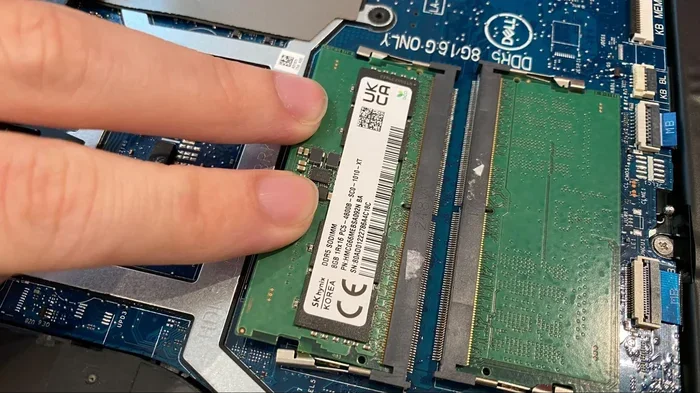
- Remove old RAM by pressing the side clips
- Insert new RAM at a 45-degree angle
- Push it down until it clicks into place
- Close the back panel and power on
If you are not comfortable opening your laptop, take it to a professional. Many repair shops can upgrade RAM for a small fee. This is a great way to boost laptop performance without spending hundreds of dollars.
Common Mistakes People Make with Laptop RAM
Avoid these common pitfalls when thinking about your laptop’s memory:
- Buying a laptop with only 4 GB: 4 GB is simply not enough for modern use. Even basic browsing can push it to the limit. If you see a deal on a laptop with 4 GB, consider upgrading or spending a bit more for 8 GB.
- Ignoring RAM speed: It is not just about capacity. Faster RAM speeds improve responsiveness, especially for gaming and creative work.
- Assuming more RAM always means better: If your laptop does not support more RAM, adding more will not help. Check your laptop’s maximum RAM capacity before buying.
- Not checking if RAM is soldered: Some thin and light laptops have RAM that is soldered to the motherboard. This means you cannot upgrade it later. Always check this before purchasing.
- Mixing RAM types: Putting DDR4 and DDR5 RAM in the same laptop will not work. Always match the RAM type and speed.
Is 8 GB RAM Enough for Gaming?
This is one of the most common questions people ask. The honest answer is: it depends on the game and the settings.
For older games or esports titles like Fortnite, League of Legends, and Valorant, 8 GB of RAM works fine at medium to high settings. These games are optimized to run on lower system memory.
However, modern AAA games like Call of Duty, Red Dead Redemption 2, and Baldur’s Gate 3 recommend 16 GB of RAM. With 8 GB, you might experience stuttering, long loading times, or crashes. If gaming is important to you, 16 GB is the better choice.
Pro tip: Close background apps before gaming. This frees up RAM and gives your game more memory to work with. You can also adjust in-game settings to lower the memory footprint.
Expert Insights on Laptop RAM in 2024
Technology experts agree that 8 GB of RAM is still a solid baseline for most laptops in 2024. However, the landscape is shifting. As operating systems and apps become more demanding, 16 GB is quickly becoming the new standard.
Microsoft Windows 11 uses more memory than Windows 10 did. Chrome browsers are getting heavier with each update. Even simple tasks now use more RAM than they did just a few years ago. This trend means that 8 GB will feel limiting sooner rather than later.
For students and professionals who plan to keep their laptop for 3 to 5 years, starting with 16 GB is a smart investment. It future-proofs your device and ensures smooth performance as software evolves.
Quick Tips to Maximize Your 8 GB RAM
If you are sticking with 8 GB for now, here are some tips to get the most out of it:
- Limit browser tabs: Keep your open tabs under 15. Each tab uses memory, even when you are not looking at it.
- Close unused apps: Shut down apps you are not actively using. They still consume RAM in the background.
- Use lightweight apps: Choose lighter alternatives to heavy software. For example, use a simple text editor instead of Microsoft Word when possible.
- Disable startup programs: Go to Task Manager > Startup and disable apps you do not need when your laptop boots up.
- Restart regularly: Restarting your laptop clears out RAM and refreshes the system. Make it a habit to restart at least once a week.
- Use a RAM cleaner: Some tools can help free up memory by closing background processes. Use these sparingly and only when needed.
These simple steps can make a noticeable difference. You might be surprised how much smoother your laptop feels with a little maintenance.
Conclusion
So, is 8 GB of RAM good for a laptop? For most everyday users, the answer is a clear yes. It handles browsing, work, streaming, and light creative tasks with ease. It is the most common and cost-effective option available today.
However, if you are a gamer, video editor, or heavy multitasker, you should consider stepping up to 16 GB. The extra memory makes a huge difference in performance and future-proofs your device.
Remember, your laptop’s RAM is one of the easiest components to upgrade. If you find 8 GB limiting down the road, a simple RAM upgrade can bring your laptop back to life. Before you buy a new laptop, check if your current model supports more memory. You might save yourself hundreds of dollars.
Take a moment to evaluate your own usage habits. Think about what apps you use most and how many you run at the same time. That will tell you whether 8 GB is enough for you or if it is time to look at higher options.
Your laptop’s performance starts with its memory. Make the right choice, and your machine will serve you well for years to come.
Frequently Asked Questions
Is 8 GB RAM enough for a laptop in 2024?
For most everyday tasks, yes. 8 GB handles browsing, office work, and streaming comfortably. However, power users and gamers may find it limiting. It depends entirely on what you use your laptop for.
Can I upgrade from 8 GB to 16 GB RAM?
In most laptops, yes. Check if your laptop has an extra RAM slot or if one of the existing sticks can be replaced. Some thin laptops have soldered RAM that cannot be upgraded. Always verify compatibility before buying new modules.
Is 8 GB RAM good for gaming?
It works for older games and esports titles at medium settings. But modern AAA games recommend 16 GB for smooth performance. If gaming is a priority, 16 GB is the better investment.
How much RAM does Windows 11 use?
Windows 11 uses about 3.5 to 4 GB of RAM at idle. This leaves roughly 4 GB for your apps with 8 GB total. That is why heavy multitasking can feel sluggish on 8 GB systems.
Does RAM speed matter?
Yes, it does. Faster RAM speeds improve performance in memory-heavy tasks like gaming and video editing. However, for basic everyday use, the difference is barely noticeable. Capacity matters more than speed for most users.
What happens when laptop RAM is full?
When RAM fills up, your laptop starts using your storage drive as temporary memory. This is called swapping. It is much slower than RAM, which causes your laptop to freeze, lag, and become unresponsive. Closing unused apps helps free up memory.