Laptops with 16gb of Ram
Laptops with 16gb of ram deliver the perfect balance of speed, multitasking power, and value for most users. Whether you are working from home, editing videos, or playing games, 16gb of ram keeps your laptop running smooth without breaking the bank. This guide covers everything you need to know, from choosing the right model to getting the most out of your setup.
If you are shopping for a new laptop, you have probably seen laptops with 16gb of ram everywhere. And for good reason. This amount of memory hits a sweet spot that works for students, professionals, gamers, and casual users alike. But what makes 16GB so popular? And how do you know if it is the right choice for you?
In this guide, we break down everything you need to know about 16gb ram laptops. We will cover what 16GB of RAM can do, which laptops to look at, how to upgrade your memory, and common mistakes to avoid. By the end, you will feel confident making the right choice.
Key Takeaways
- 16GB of RAM is the sweet spot: It handles everyday tasks, creative work, and light gaming with ease.
- DDR4 and DDR5 memory matter: Newer RAM types offer better speed and efficiency for your laptop.
- Upgrade options exist: Many laptops let you add or swap RAM modules for future-proofing.
- Pair 16GB RAM with an SSD: A solid-state drive boosts overall system responsiveness significantly.
- Check compatibility first: Not all laptops support RAM upgrades, so verify before buying.
- 16GB suits most users: From students to professionals, this amount of memory covers a wide range of needs.
📑 Table of Contents
- What Does 16GB of RAM Mean for Your Laptop?
- Who Benefits Most from 16GB of RAM?
- Best Laptops with 16GB of RAM
- How to Choose the Right 16GB RAM Laptop
- Can You Upgrade Your Laptop RAM to 16GB?
- Common Mistakes to Avoid When Buying a 16GB RAM Laptop
- How to Get the Most Out of Your 16GB RAM Laptop
- Final Thoughts
What Does 16GB of RAM Mean for Your Laptop?
RAM stands for random access memory. Think of it as your laptop’s short-term memory. When you open apps, browse the web, or edit a document, your laptop uses RAM to handle all those tasks at once. The more RAM you have, the more your laptop can juggle without slowing down.
With 16GB of RAM, you get a solid amount of memory for most daily activities. You can run multiple browser tabs, stream videos, and use office apps all at the same time without any lag. For creative work like photo editing or light video editing, 16GB provides enough headroom to work comfortably.
How RAM Affects Laptop Performance
Your laptop’s performance depends heavily on how much memory it has. Here is a simple breakdown of what different RAM amounts mean:
- 4GB RAM: Basic tasks only. Web browsing and word processing work, but you will hit limits fast.
- 8GB RAM: Enough for everyday use. Handles most apps smoothly but struggles with heavy multitasking.
- 16GB RAM: The sweet spot for most users. Great for multitasking, creative work, and casual gaming.
- 32GB RAM: Best for heavy workloads like video editing, 3D rendering, and intensive gaming.
Most people will find that laptops with 16gb of ram offer the best value. You get enough power for today’s tasks and room to grow for tomorrow’s needs.
Who Benefits Most from 16GB of RAM?
Not everyone needs the same amount of memory. Let us look at who gets the most out of a 16gb ram laptop.
Students and Remote Workers
Students and remote workers juggle many apps throughout the day. You might have Zoom running, a word processor open, several browser tabs, and a Spotify playlist all at once. A laptop with 16GB of RAM handles this workload without breaking a sweat. It keeps your system responsive and helps you stay productive.
Creative Professionals
Graphic designers, photographers, and video editors need memory to handle large files. A laptop with 16gb of ram and i7 processor gives creative professionals the power to edit photos in Photoshop or cut video clips in Premiere Pro. While heavy 4K video editing might push you toward 32GB, 16GB covers most creative workflows very well.
Casual and Mid-Range Gamers
Gamers also benefit from 16GB of memory. Many modern games recommend 16GB as the minimum for smooth gameplay. If you are into casual gaming or mid-range titles, a 16gb ram gaming laptop delivers a great experience. You will notice faster load times and smoother frame rates compared to an 8GB setup.
Best Laptops with 16GB of RAM
The market is full of options, which makes choosing the right one tricky. Here are some categories and examples of great laptop computers with 16gb ram that you should consider.
Dell XPS 15
The Dell XPS 15 is a favorite among professionals. It comes with a stunning display, powerful processor options, and 16GB of RAM as a standard configuration. The build quality is excellent, and the battery life is impressive. This laptop handles both work and entertainment with ease.
Lenovo ThinkPad E16
Lenovo ThinkPad laptops are known for their durability and keyboard quality. The ThinkPad E16 with 16gb ram for lenovo laptop configurations offers a great balance of portability and power. It is a solid choice for business users who need reliability on the go.
HP Pavilion 15
The HP Pavilion 15 is a budget-friendly option that still delivers strong performance. Many models come with 16gb ram hp laptop setups that include fast SSDs and vibrant displays. It is a great entry point for anyone who wants 16GB of memory without spending a fortune.
ASUS VivoBook 15
ASUS VivoBook laptops offer great value. The 15-inch models often come with 16GB of RAM and 512GB SSD storage. They are lightweight, stylish, and perfect for everyday use. If you want a reliable machine for school or work, the VivoBook 15 is worth a look.
How to Choose the Right 16GB RAM Laptop
Not all laptops with 16gb of ram are created equal. Here are the key factors to consider before you buy.
Processor Pairing
RAM works hand in hand with your processor. A laptop with 16GB of RAM but an older, slower processor will still feel sluggish. Look for machines paired with at least an Intel Core i5 or AMD Ryzen 5 processor. For even better performance, consider a laptop with 16gb ram and i7 processor. The i7 delivers extra speed for demanding tasks.
Storage Type and Capacity
Your laptop’s storage matters just as much as its RAM. A fast SSD makes a huge difference in how quickly your laptop boots up and loads apps. Many 16gb ram 512gb ssd laptop models offer a great balance of speed and storage space. If you need more room, look for 1TB SSD options.
RAM Type and Speed
Not all RAM is the same. Newer laptops use DDR4 or DDR5 memory. DDR5 is faster and more efficient, but DDR4 still performs very well for most users. When comparing models, check the RAM speed in megahertz. Higher numbers mean faster data transfer, which can improve overall responsiveness.
Upgradeability
One of the most important things to check is whether the laptop allows RAM upgrades. Some laptops have soldered RAM that you cannot change. Others have open slots where you can add more memory later. If you are not sure, check the manufacturer’s specs or search for how to check the ram of a laptop guides to help you figure it out.
Can You Upgrade Your Laptop RAM to 16GB?
If your current laptop has less memory, you might wonder if you can upgrade it. The answer depends on your laptop model.
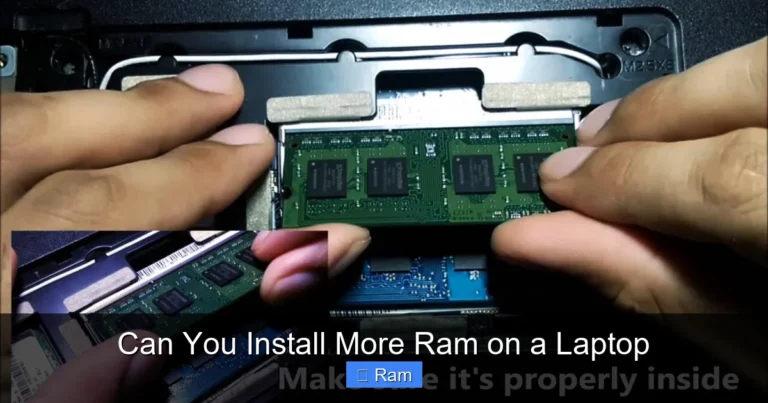
Many laptops from brands like HP, Lenovo, Dell, and ASUS allow RAM upgrades. You can often swap out an 8GB module for a 16GB one, or add a second stick to reach 16GB total. Before you buy any memory, check your laptop’s specifications. Look for the maximum supported RAM and the type of memory slots your laptop uses.
If you are not comfortable doing the upgrade yourself, you can visit a local repair shop or follow a step-by-step guide online. Searching for how to increase ram of a laptop or how to upgrade laptop ram will give you plenty of helpful tutorials.
However, some slim and lightweight laptops have RAM that is soldered to the motherboard. In those cases, you cannot upgrade the memory after purchase. This is why it is so important to choose the right amount of RAM when you buy your laptop in the first place.
Common Mistakes to Avoid When Buying a 16GB RAM Laptop
Even experienced buyers make mistakes. Here are some common pitfalls to watch out for.
- Ignoring the processor: 16GB of RAM will not help much if the processor is too slow. Always check both specs together.
- Forgetting about storage: RAM and storage work together. A laptop with 16GB RAM but a slow hard drive will still feel sluggish.
- Overlooking upgradeability: If you plan to use the laptop for years, make sure you can add more RAM later if needed.
- Buying more RAM than you need: If you only use your laptop for web browsing and documents, 16GB might be more than you need. Consider 8gb ram laptops for basic tasks.
- Skipping the SSD: Always choose a laptop with an SSD over a traditional hard drive. The speed difference is enormous.
Avoiding these mistakes will save you money and ensure you get a laptop that truly fits your needs.
How to Get the Most Out of Your 16GB RAM Laptop
Once you have your laptop with 16gb of ram, there are a few things you can do to keep it running at its best.
Keep Your Software Updated
Operating system and app updates often include performance improvements and memory optimizations. Keeping everything up to date helps your laptop use its 16GB of RAM efficiently.
Close Unused Programs
Even with 16GB of memory, running too many programs at once can slow things down. Get in the habit of closing apps you are not using. This frees up memory and keeps your laptop responsive.
Use a Lightweight Browser
Browsers like Chrome can eat up a lot of RAM when you have many tabs open. Consider using lighter alternatives or installing tab management extensions. This simple change can make a big difference in performance.
Monitor Your RAM Usage
You can check how much RAM your laptop is using at any time. On Windows, open the Task Manager and go to the Performance tab. On Mac, use the Activity Monitor. If you notice your RAM usage is consistently above 80%, you might need to close some apps or consider a different workflow.
Final Thoughts
Laptops with 16gb of ram offer an excellent combination of performance, versatility, and value. Whether you are a student, a professional, or a casual user, 16GB of memory gives you the room to work, play, and multitask without frustration. By choosing the right processor, pairing it with a fast SSD, and keeping your software updated, you can get years of reliable use from your laptop.
Take your time when shopping. Compare models, read reviews, and make sure the laptop you choose fits your specific needs. With the right 16gb ram laptop, you will enjoy a smooth and enjoyable computing experience every single day.
Frequently Asked Questions
Is 16GB of RAM enough for gaming?
Yes, 16GB of RAM is the recommended amount for most modern games. It handles casual and mid-range gaming very well. For competitive or graphically demanding titles, 16GB provides a smooth and responsive experience.
Can I run a laptop with 16GB of RAM without an SSD?
You can, but it is not recommended. An SSD dramatically improves overall system speed. Without one, even 16GB of RAM will not fully deliver its potential. Always pair your memory with a solid-state drive for the best results.
How do I check if my laptop supports 16GB of RAM?
You can check your laptop’s specifications on the manufacturer’s website or in the system settings. Look for the maximum supported RAM and the number of memory slots. You can also search for a guide on how to check the RAM of your specific model.
What is the difference between 16GB and 32GB of RAM?
16GB handles most everyday tasks and moderate workloads very well. 32GB is designed for heavy tasks like professional video editing, 3D modeling, and intensive gaming. For the average user, 16GB is more than sufficient and offers better value.
Should I buy a laptop with 16GB RAM or upgrade later?
If your laptop allows upgrades, buying 8GB now and adding 8GB later is a cost-effective option. But if your laptop has soldered RAM or no open slots, it is better to buy 16GB upfront. Always check upgradeability before you purchase.
Are laptops with 16GB of RAM worth the extra cost?
Absolutely. The price difference between 8GB and 16GB models is usually small, but the performance boost is significant. 16GB gives you headroom for future software updates and heavier workloads, making it a smart long-term investment.