Ddr5 5600 Laptop Ram 64gb
DDR5 5600 laptop RAM 64GB delivers blazing-fast multitasking and smooth gaming on modern laptops. This guide covers everything you need to know about speeds, compatibility, and choosing the right 64GB DDR5 module. Whether you are a gamer, creator, or power user, 64GB of DDR5 memory at 5600 MHz transforms your laptop experience.
DDR5 5600 laptop RAM 64GB is changing the game for anyone who demands serious performance from their portable computer. If your laptop feels slow when you open multiple apps or run demanding software, a memory upgrade might be exactly what you need. In this guide, we break down everything about DDR5 5600 MHz RAM with 64GB capacity and why it matters for your workflow.
Modern laptops come with varying amounts of memory, but 64GB of DDR5 RAM at 5600 MHz represents a sweet spot for power users. Gamers, video editors, programmers, and anyone running virtual machines benefit hugely from this combination of capacity and speed. Let us dive into what makes this spec so compelling.
Key Takeaways
- DDR5 5600 MHz offers a major speed boost over older DDR4 RAM for laptops.
- 64GB of RAM handles heavy workloads like video editing, gaming, and coding with ease.
- Not all laptops support 64GB DDR5 RAM, so check your device compatibility first.
- DDR5 SODIMM modules are the standard form factor for laptop memory upgrades.
- Dual-channel configuration doubles bandwidth and improves overall system responsiveness.
- Upgrading RAM is one of the easiest and most affordable ways to speed up a slow laptop.
📑 Table of Contents
What Is DDR5 5600 Laptop RAM 64GB?
DDR5 stands for Double Data Rate 5. It is the latest generation of laptop memory technology. The number 5600 refers to the speed, measured in megahertz (MHz). And 64GB is the total capacity of the RAM modules installed in your laptop.
DDR5 RAM replaced DDR4 as the standard for modern laptops starting around 2023. The jump from DDR4 to DDR5 brings faster data transfer rates, lower power consumption, and better overall efficiency. When you pair DDR5 technology with a 5600 MHz speed rating and 64GB of total memory, you get a laptop that flies through multitasking and heavy applications.
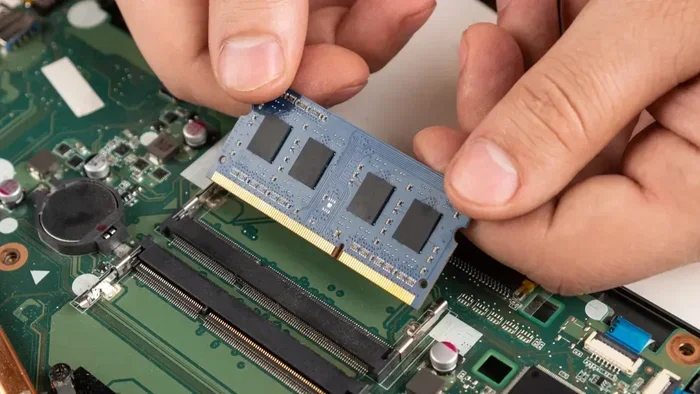
A typical DDR5 5600 setup uses two 32GB SODIMM modules in a dual-channel configuration. SODIMM stands for Small Outline Dual In-Line Memory Module. It is the smaller form factor designed specifically for laptops. This compact size does not sacrifice performance. In fact, DDR5 SODIMM modules are just as powerful as their desktop counterparts.
If you are shopping for DDR5 laptop RAM, the 5600 MHz speed is currently one of the most popular options. It strikes an excellent balance between price and performance. Higher speeds like 6400 MHz exist, but they often cost more without delivering proportional real-world gains for most users.
Why DDR5 5600 MHz Matters for Your Laptop
Speed matters when it comes to laptop memory. The MHz rating tells you how fast your RAM can process data. Higher MHz means faster data transfer between your memory and your processor. This directly impacts how smoothly your laptop runs demanding tasks.
DDR5 5600 MHz offers a significant improvement over DDR4 3200 MHz, which was the previous standard for many laptops. The data rate effectively doubles because DDR5 transfers data on both the rising and falling edges of the clock signal. This means your laptop handles more instructions per second.
Real-World Performance Gains
In practical terms, DDR5 5600 RAM makes a noticeable difference in everyday use. Here are some examples of where you will see improvement:
- Multitasking: Running 20+ browser tabs alongside video calls and background apps stays smooth.
- Video editing: Rendering 4K video timelines loads faster and previews without stuttering.
- Gaming: Open-world games load quicker and maintain stable frame rates with high-resolution textures.
- Coding and development: Compiling large codebases and running multiple virtual machines becomes effortless.
- Data processing: Working with large spreadsheets or databases responds instantly.
The 5600 MHz speed also pairs beautifully with modern processors like Intel Core i7 and i9 or AMD Ryzen 7 and Ryzen 9 chips. These CPUs have memory controllers designed to take full advantage of DDR5 bandwidth. When your processor and RAM work in harmony, your laptop feels noticeably snappier.
Benefits of 64GB DDR5 RAM in a Laptop
64GB of RAM is a substantial amount for a laptop. Most consumer laptops ship with 8GB or 16GB of memory. But 64GB opens up possibilities that lower amounts simply cannot handle. Here is why 64GB makes a difference.
Future-Proofing Your Laptop
Software keeps getting more demanding. Operating systems, creative applications, and games all consume more memory with each update. 64GB of DDR5 RAM ensures your laptop can handle tomorrow’s software demands today. You will not need to upgrade again for several years.
For professionals in fields like 3D rendering, machine learning, or scientific computing, 64GB is often the minimum workable amount. These users run simulations, train AI models, or render complex scenes that eat through memory fast. Having 64GB prevents crashes and keeps your workflow uninterrupted.
Smooth Gaming at High Settings
Modern games are incredibly memory-hungry. Titles like Cyberpunk 2077, Starfield, and Microsoft Flight Simulator recommend 16GB minimum but perform much better with 32GB or more. With 64GB DDR5 5600 RAM, you can run these games at maximum settings while streaming, recording, or running background applications without any hitches.
Gamers who also use their laptop for content creation benefit enormously from this memory capacity. Streaming gameplay on Twitch while editing videos in the background becomes a seamless experience with 64GB of fast DDR5 memory.
Creative Professionals See the Biggest Gains
If you work with Adobe Premiere Pro, After Effects, DaVinci Resolve, or Blender, you know how quickly RAM gets used up. 64GB of DDR5 5600 RAM gives you room to work with large project files, multiple timelines, and heavy effects without slowdowns. The fast 5600 MHz speed ensures your timeline scrubs remain fluid even with complex compositions.
Photographers working with RAW files in Photoshop or Lightroom also benefit from the extra capacity. Handling hundreds of high-resolution images simultaneously becomes comfortable rather than frustrating.
DDR5 5600 vs Other RAM Speeds
Not all DDR5 RAM runs at the same speed. Different laptops support different frequencies, and choosing the right one depends on your needs and budget. Here is how DDR5 5600 compares to other common speeds.
| RAM Speed | Generation | Best For | Performance Level |
|---|---|---|---|
| DDR5 4800 MHz | DDR5 | Basic productivity | Entry-level DDR5 |
| DDR5 5200 MHz | DDR5 | General use and light gaming | Solid mid-range |
| DDR5 5600 MHz | DDR5 | Gaming, content creation, multitasking | High performance |
| DDR5 6000 MHz | DDR5 | Enthusiast gaming and workloads | Premium performance |
| DDR4 3200 MHz | DDR4 | Budget and older laptops | Good but aging |
DDR5 5600 sits in a great position on this spectrum. It delivers strong performance without the premium price tag of faster modules. For most users, the difference between 5600 MHz and 6000 MHz is minimal in real-world use. The extra cost of faster RAM often does not justify the small performance gain.
Compared to DDR4 3200 MHz, DDR5 5600 offers roughly 70% more bandwidth. This translates directly into faster load times and smoother performance in memory-intensive tasks. If you are upgrading from an older laptop with DDR4 RAM, the improvement will feel dramatic.
One thing to keep in mind is that DDR5 and DDR4 are not interchangeable. They use different physical slots and have different pin configurations. You cannot install DDR5 RAM in a laptop designed for DDR4, and vice versa. Always verify your laptop’s memory compatibility before purchasing any RAM.
How to Choose the Right 64GB DDR5 5600 Laptop RAM
Buying laptop RAM might seem straightforward, but there are important details to consider. Here is a practical guide to making the right choice.
Check Your Laptop’s Maximum RAM Capacity
Not every laptop can support 64GB of RAM. Many consumer laptops max out at 16GB or 32GB. Before buying any memory, check your laptop’s specifications. Look for the maximum RAM capacity in your laptop’s manual or on the manufacturer’s website.
Some laptops have RAM soldered to the motherboard, which means you cannot upgrade them at all. Others have one or two RAM slots available for upgrades. If your laptop has one free slot and currently has 32GB installed, you can add another 32GB module to reach 64GB total.
Match the RAM Speed and Timings
DDR5 5600 MHz RAM needs to match your laptop’s supported speed. Most modern laptops that accept DDR5 RAM support speeds of 4800, 5200, or 5600 MHz. Installing a 5600 MHz module in a laptop that only supports 4800 MHz will work, but the RAM will run at the slower speed.
Timings also matter for performance. Look for CL (CAS Latency) values around 40-46 for DDR5 5600 modules. Lower CL values generally mean slightly faster response times, though the difference is small in everyday use.
Buy Matching Modules for Dual-Channel Mode
For the best performance, always install RAM in matched pairs. If you want 64GB, buy two 32GB modules rather than one 64GB stick. This enables dual-channel mode, which doubles the data bandwidth between your RAM and your processor.
Dual-channel mode improves performance in nearly every task. Your laptop will feel more responsive, applications will load faster, and multitasking will be smoother. The difference is especially noticeable in gaming and creative workloads.
Where to Buy Affordable DDR5 Laptop RAM
Price is always a factor when upgrading laptop memory. DDR5 5600 64GB kits can range in price depending on the brand and timing. Popular brands like Crucial, Kingston, Corsair, and G.Skill all offer reliable DDR5 5600 options.
If you are looking for the best deals, check multiple retailers and watch for sales. Sometimes you can find DDR5 RAM at significantly discounted prices during seasonal promotions. Just make sure you buy from reputable sellers to avoid counterfeit or incompatible modules.
Common Mistakes When Upgrading Laptop RAM
Upgrading laptop RAM is generally simple, but mistakes do happen. Here are the most common errors to avoid.
- Buying the wrong RAM type: DDR5 and DDR4 are not compatible. Always verify your laptop uses DDR5 before purchasing.
- Ignoring maximum capacity: Some laptops cannot accept 64GB of RAM even if they have free slots. Check your specs first.
- Mixing different RAM speeds: If you pair a 5600 MHz module with a 4800 MHz module, both will run at the slower speed.
- Forgetting to ground yourself: Static electricity can damage RAM modules. Touch a metal surface before handling your RAM.
- Not enabling dual-channel mode: Using mismatched modules or installing a single stick can limit your performance.
Taking a few minutes to research your laptop’s memory specifications can save you time, money, and frustration. The investment pays off with a noticeably faster and more capable machine.
Is 64GB DDR5 5600 RAM Worth It?
The short answer is yes, for most power users and enthusiasts. 64GB of DDR5 RAM at 5600 MHz provides an excellent balance of capacity and speed. It handles virtually any task you throw at it, from gaming to professional creative work to running local servers or virtual machines.
If you primarily use your laptop for web browsing, office applications, and light media consumption, 64GB might be overkill. In that case, 16GB or 32GB of DDR5 RAM would serve you well. But if you push your laptop hard, 64GB of fast DDR5 memory is one of the best upgrades you can make.
The beauty of DDR5 technology is that it is the current and future standard. Investing in DDR5 now means your laptop stays relevant for years to come. As software continues to demand more memory, having 64GB of DDR5 5600 RAM gives you a comfortable buffer.
For those wondering about specific use cases, 64GB DDR5 RAM is especially valuable for machine learning workloads, 3D rendering, and running multiple virtual machines simultaneously. These tasks chew through memory, and having ample fast RAM keeps everything running smoothly.
One final thought: always pair your RAM upgrade with other improvements when possible. Adding a fast NVMe SSD, keeping your drivers updated, and maintaining a clean operating system all contribute to the best overall laptop performance. RAM is a crucial piece of the puzzle, but it works best when combined with other optimizations.
Upgrading to DDR5 5600 laptop RAM with 64GB capacity is one of the simplest and most impactful improvements you can make. Your laptop will feel faster, more responsive, and ready for whatever demands you throw at it. Take the time to choose the right modules, install them carefully, and enjoy the performance boost.
Frequently Asked Questions
Is DDR5 5600 MHz fast enough for gaming?
Yes, DDR5 5600 MHz is fast enough for gaming and is considered one of the best speeds for gaming laptops right now. It provides excellent bandwidth for modern games and pairs well with current-generation processors. Most gamers will not notice a meaningful difference between 5600 MHz and faster speeds like 6000 MHz.
Can I install 64GB DDR5 RAM in any laptop?
No, not all laptops support 64GB of RAM. You need to check your laptop’s maximum RAM capacity and confirm it uses DDR5 memory. Many thin and lightweight laptops have soldered RAM that cannot be upgraded. Always verify your laptop’s specifications before purchasing any memory.
How much does 64GB DDR5 5600 laptop RAM cost?
Prices vary by brand and retailer, but a 64GB DDR5 5600 kit typically costs between $150 and $300. Prices have come down significantly as DDR5 becomes more mainstream. Shopping during sales or looking for open-box deals can help you save even more.
Do I need two 32GB modules or one 64GB module?
Two 32GB modules are generally recommended because they enable dual-channel mode, which doubles memory bandwidth and improves performance. Most laptops use dual-channel memory configurations, so matched pairs deliver the best results. Single 64GB modules work but may not perform as well in bandwidth-sensitive tasks.
What is the difference between DDR5 and DDR4 RAM?
DDR5 RAM is faster, more power-efficient, and has higher capacity potential than DDR4. DDR5 5600 MHz offers roughly 70% more bandwidth than DDR4 3200 MHz. DDR5 also uses lower voltage, which means less heat and better battery life on laptops. However, DDR5 and DDR4 are not compatible with each other.
Can I upgrade my laptop RAM myself?
Yes, upgrading laptop RAM is one of the easiest DIY upgrades you can do. Most laptops have a small access panel on the bottom that lets you reach the RAM slots. You simply insert the new modules at an angle and press them down until they click. Just remember to power off your laptop and ground yourself to prevent static damage.