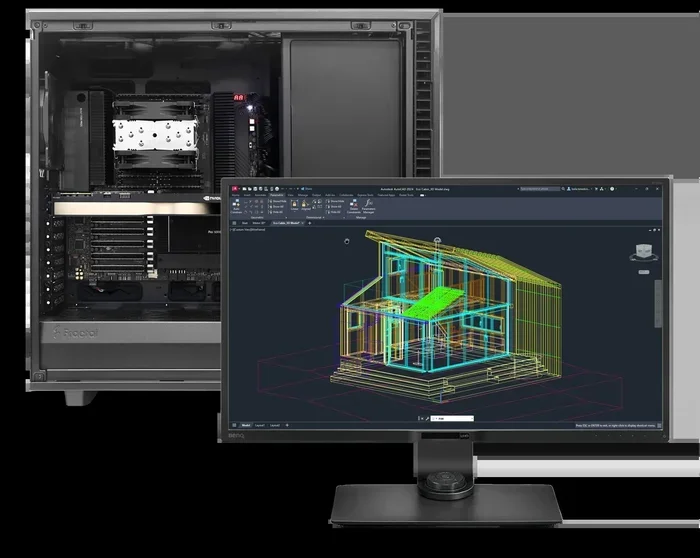
Autocad 2021 System Requirements
Autocad 2021 system requirements outline the hardware and software you need to run this powerful design tool smoothly. Meeting the minimum specs ensures basic functionality, while the recommended specs deliver a fast, lag-free experience. This guide breaks down every requirement so you can confidently prepare your PC or laptop for Autocad 2021 installation.
If you are planning to install Autocad 2021, knowing the system requirements is the first and most important step. Running this software on an underpowered machine leads to crashes, slow rendering, and endless frustration. Whether you are a student, a freelance designer, or part of a large engineering team, this guide covers everything you need to know.
Autocad 2021 system requirements are straightforward, but they do demand a decent machine. Autodesk designed this version to work well on modern hardware, and it takes advantage of improved graphics processing and faster processors. Let us walk through each requirement in detail so you know exactly what to look for.
Key Takeaways
- Operating System: Windows 10 (64-bit) or macOS 10.14+ is required to run Autocad 2021.
- Processor: A minimum of 2.5 GHz clock speed is essential for basic tasks.
- RAM: 8 GB minimum, but 16 GB recommended for large drawings and complex projects.
- Graphics Card: A dedicated GPU with at least 1 GB VRAM is strongly recommended.
- Storage: You need at least 10 GB of free disk space for a clean install.
- Display: A resolution of 1920 x 1080 or higher ensures a comfortable workspace.
- Cooling Matters: High-performance workloads demand proper cooling to prevent thermal throttling.
📑 Table of Contents
- Why System Requirements Matter for Autocad 2021
- Operating System Requirements
- Processor (CPU) Requirements
- RAM and Memory Requirements
- Graphics Card (GPU) Requirements
- Storage and Disk Space
- Display and Resolution
- Additional Software Requirements
- Common Mistakes to Avoid
- Quick Tips for Meeting Autocad 2021 Requirements
- Expert Insights on Autocad 2021 Performance
- Conclusion
Why System Requirements Matter for Autocad 2021
AutoCAD is not just a simple drawing tool. It handles complex 3D models, large datasets, and intensive rendering tasks. Without the right hardware, even basic commands can lag. Understanding the Autocad 2021 system requirements helps you avoid wasted time and money.
Think of it this way. You would not try to run a marathon in flip-flops. Your computer needs the right “gear” to handle AutoCAD workloads. The right processor, enough RAM, and a solid graphics card all work together to deliver a smooth experience.
Minimum vs. Recommended Specs
Autodesk provides both minimum and recommended specifications. The minimum specs let you open and run the software, but you may experience slowdowns with large files. The recommended specs give you a comfortable buffer for working on complex projects without any hiccups.
Always aim for the recommended specs if your budget allows. The extra investment pays off in productivity and reduced frustration.
Operating System Requirements
The operating system is the foundation of your AutoCAD experience. Autocad 2021 supports specific versions of Windows and macOS. Running an unsupported OS can lead to compatibility issues and even prevent installation entirely.
Windows Operating System
For Windows users, Autocad 2021 requires a 64-bit version of Windows 10. Windows 7 and 8 are no longer supported for this release. Make sure your Windows installation is up to date with the latest service packs and patches.
If you are unsure about your current setup, check out our guide on the best operating system for gaming PC to understand how modern OS versions impact performance for demanding software like AutoCAD.
macOS Requirements
Mac users need macOS 10.14 (Mojave) or later. Autodesk also supports specific versions of macOS with regular updates. Always check the Autodesk website for the latest macOS compatibility list before purchasing.
Processor (CPU) Requirements
The processor is the brain of your computer, and AutoCAD relies on it heavily for calculations, rendering, and command execution. The Autocad 2021 system requirements specify a minimum clock speed and core count that you should not overlook.
Minimum CPU Specs
The minimum requirement is a 2.5 GHz processor. This is adequate for simple 2D drawings and basic tasks. However, if you work with 3D models or large assemblies, this speed will feel limiting.
Recommended CPU Specs
Autodesk recommends a multi-core processor with a higher clock speed. Intel Core i7 or AMD Ryzen 7 series processors are excellent choices. These CPUs handle multitasking and heavy rendering with ease.
- Minimum: 2.5 GHz single-core processor
- Recommended: 3.0 GHz multi-core processor (Intel i7 or AMD Ryzen 7)
More cores mean better performance when running multiple applications simultaneously. If you often have Autocad open alongside a web browser, PDF viewer, and other tools, a multi-core CPU is a must.
RAM and Memory Requirements
Random Access Memory (RAM) determines how many tasks your computer can handle at once. AutoCAD uses RAM to store temporary data, load drawings, and manage complex objects in real time.
Minimum RAM
The minimum RAM for Autocad 2021 is 8 GB. This is enough for simple 2D projects and small files. You may notice slowdowns when working with larger drawings or when switching between multiple files.
Recommended RAM
For a smooth experience, Autodesk recommends 16 GB of RAM. This gives you headroom for large projects, 3D modeling, and running other applications alongside AutoCAD.
If you work in architecture or engineering, where files can be massive, consider going even higher. 32 GB of RAM ensures you never hit a bottleneck, no matter how complex your project becomes.
Graphics Card (GPU) Requirements
The graphics card handles everything you see on your screen. From line rendering to 3D model shading, the GPU plays a critical role in AutoCAD performance. This is one area where cutting corners can seriously hurt your workflow.
Minimum GPU Specs
Autocad 2021 requires a GPU with at least 1 GB of dedicated video RAM (VRAM). The card must support DirectX 11 and have a compatible driver installed. Integrated graphics can technically work for basic 2D work, but they are not ideal.
Recommended GPU Specs
For the best experience, choose a dedicated graphics card with 4 GB or more of VRAM. NVIDIA Quadro and GeForce RTX series cards are widely recommended. These GPUs handle complex 3D models and smooth navigation without breaking a sweat.
If you want to learn more about how your GPU affects overall system performance, check out our article on the best cooling system for PC to understand how thermal management impacts your graphics card and overall system stability during heavy workloads.
Storage and Disk Space
Storage space is often overlooked, but it matters. Autocad 2021 needs a certain amount of free disk space for installation, temporary files, and project storage.
Minimum Storage
You need at least 10 GB of free disk space for a basic installation. This covers the core software and essential updates. However, this does not include space for your project files, which can quickly add up.
Recommended Storage Setup
For optimal performance, use a Solid State Drive (SSD) for your operating system and AutoCAD installation. SSDs load files significantly faster than traditional Hard Disk Drives (HDDs). A 256 GB SSD is a good starting point for most users.
Consider using a secondary HDD for storing project files and backups. This setup keeps your system fast while giving you plenty of space for large design files.
Display and Resolution
You spend hours looking at your AutoCAD screen. The display quality directly affects your comfort and productivity. Autocad 2021 has specific display requirements to ensure a clear and responsive visual experience.
The minimum recommended resolution is 1920 x 1080 pixels. This Full HD resolution provides enough screen real estate for toolbars, drawing areas, and panels. Higher resolutions like 2560 x 1440 or 4K offer even more workspace and sharper visuals.
Make sure your monitor supports True Color (32-bit) for accurate color representation. This is especially important for design work where color precision matters.
Additional Software Requirements
Beyond hardware, Autocad 2021 needs certain software components installed on your system. Missing these can prevent installation or cause runtime errors.
- .NET Framework 4.8: Required for full functionality
- DirectX 11: Needed for hardware acceleration and smooth graphics
- Internet Connection: Required for activation and updates
- Browser: A modern browser for accessing Autodesk cloud features
Before installing, run the Autodesk system checker tool. It scans your PC and identifies any missing components. This simple step saves you from unexpected installation failures.
Common Mistakes to Avoid
Many users make avoidable mistakes when checking system requirements. Here are some pitfalls to watch out for.
- Ignoring the recommended specs: Minimum specs get the software running, but they do not guarantee a good experience.
- Using integrated graphics for 3D work: Integrated GPUs struggle with complex 3D models and can cause severe lag.
- Overlooking OS updates: Running an outdated version of Windows can cause compatibility issues.
- Skipping the SSD upgrade: HDDs slow down file loading and save times significantly.
- Forgetting about cooling: High-performance workloads generate heat. Without proper cooling, your system may throttle performance.
Quick Tips for Meeting Autocad 2021 Requirements
Not sure where to start? Here are some practical tips to get your system ready for Autocad 2021.
- Upgrade your RAM first: If you have 8 GB, adding another 8 GB stick is the easiest and most affordable upgrade.
- Switch to an SSD: Even a basic SSD dramatically improves load times and overall responsiveness.
- Update your GPU drivers: Always use the latest drivers from NVIDIA or AMD for the best compatibility.
- Check your Windows version: Make sure you are on Windows 10 (64-bit) before attempting installation.
- Clean up disk space: Free up at least 15 GB to be safe, including space for temporary files.
Expert Insights on Autocad 2021 Performance
Experienced CAD users know that hardware choices directly impact daily productivity. A machine that meets or exceeds the Autocad 2021 system requirements not only runs the software smoothly but also reduces wait times and improves workflow efficiency.
Many professionals recommend investing in a workstation-class machine. These systems are built with workstation-grade components that handle sustained heavy loads. They also offer better stability during long rendering sessions.
If you are on a budget, focus on the CPU and RAM first. These two components have the biggest impact on day-to-day AutoCAD performance. You can always add a better GPU later as your needs grow.
Keep your system clean and well-maintained. Regular updates, disk cleanups, and malware scans all contribute to a smoother AutoCAD experience. A well-kept system runs faster and lasts longer.
Conclusion
Meeting the Autocad 2021 system requirements is essential for a smooth and productive design experience. From the operating system and processor to RAM, GPU, and storage, every component plays a role. Use the minimum specs as a baseline and aim for the recommended specs whenever possible.
Take the time to check your current hardware against the requirements listed in this guide. Make upgrades where needed, and you will notice a significant improvement in performance. A well-prepared system means fewer crashes, faster rendering, and more time focusing on your designs.
Autocad 2021 is a powerful tool, and it deserves a machine that can keep up. Follow these guidelines, and you will be ready to create with confidence.
Frequently Asked Questions
Can I run Autocad 2021 on Windows 7?
No, Autocad 2021 does not support Windows 7. You need Windows 10 (64-bit) to install and run this version. Upgrading your operating system is the first step before installing AutoCAD.
Is 8 GB of RAM enough for Autocad 2021?
8 GB is the minimum requirement and works for basic 2D drawings. However, for larger projects and 3D modeling, 16 GB is strongly recommended for a smoother experience.
Can I use Autocad 2021 on a laptop?
Yes, you can run Autocad 2021 on a laptop as long as it meets the system requirements. Make sure your laptop has a dedicated GPU and sufficient cooling for sustained workloads.
Do I need a dedicated graphics card for Autocad 2021?
A dedicated GPU is not strictly required for basic 2D work, but it is highly recommended. Complex 3D models and large assemblies perform much better with a dedicated graphics card.
How much disk space does Autocad 2021 need?
You need at least 10 GB of free disk space for installation. Having extra space for project files and temporary data is always a good idea for optimal performance.
What is the best processor for Autocad 2021?
An Intel Core i7 or AMD Ryzen 7 processor with a clock speed of 3.0 GHz or higher is ideal. These processors handle AutoCAD calculations and multitasking with excellent performance.