1tb Nvme Ssd M 2
A 1TB NVMe M.2 SSD delivers blazing-fast storage speeds, making it the ideal upgrade for gaming, content creation, and everyday computing. This guide covers speed benchmarks, compatibility, top picks, and practical tips to help you choose the right drive. Whether you are upgrading a laptop or building a new PC, this guide has you covered.
A 1TB NVMe M.2 SSD is one of the best upgrades you can make to any computer. Whether you are a gamer, a creative professional, or just someone tired of slow boot times, this type of storage changes everything. Solid state drives have revolutionized how we use computers, and the NVMe M.2 format takes that revolution to the next level.
If you have ever waited minutes for a game to load or watched your computer crawl during heavy tasks, you know the frustration of slow storage. The 1TB NVMe M.2 SSD eliminates that waiting. These drives use the NVMe protocol over a PCIe interface, which means data moves at incredible speeds compared to older SATA drives. In this guide, we will break down everything you need to know about choosing, installing, and getting the most from a 1TB NVMe M.2 solid state drive.
We will cover speed benchmarks, compatibility checks, top product recommendations, and practical tips that save you money and headaches. By the end, you will have all the knowledge you need to make a confident decision. Let us dive in.
Key Takeaways
- Blazing Speed: A 1TB NVMe M.2 SSD offers read speeds up to 7000 MB/s, far outpacing traditional hard drives and SATA SSDs.
- Easy Installation: The M.2 form factor plugs directly into your motherboard, making upgrades simple and tool-friendly.
- Wide Compatibility: Most modern PCs and laptops support M.2 NVMe slots, but always check your motherboard manual first.
- Great Value: 1TB capacity strikes the perfect balance between storage space and affordability for most users.
- Gen4 vs Gen3 Matters: PCIe Gen4 drives are faster, but Gen3 drives still offer excellent performance at lower prices.
- Thermal Management Counts: High-speed NVMe drives can run hot, so heatsinks and proper airflow help maintain peak performance.
📑 Table of Contents
What Is a 1TB NVMe M.2 SSD?
A 1TB NVMe M.2 SSD is a type of internal storage drive that uses the M.2 form factor and the NVMe communication protocol. Let us break that down into simple terms. The M.2 part refers to the physical shape and size of the drive. It is a small, rectangular stick that plugs directly into a slot on your motherboard. Think of it like a stick of gum, but much more powerful.
The NVMe part stands for Non-Volatile Memory Express. This is the language the drive uses to communicate with your computer. NVMe was designed specifically for flash storage, which makes it much faster than older protocols like AHCI that were built for spinning hard drives. The PCIe interface connects the drive directly to the CPU, bypassing bottlenecks that slow down traditional storage.
A 1TB capacity gives you plenty of room. You can store an operating system, dozens of games, large video files, and thousands of photos without running out of space. This capacity has become the sweet spot for most users because it balances cost and storage needs perfectly.
M.2 Form Factor Explained
The M.2 form factor comes in different lengths, but the most common size for 1TB NVMe M.2 SSDs is the 2280 specification. That means the drive is 22 millimeters wide and 80 millimeters long. Most modern motherboards have slots that fit this size. Some laptops also have M.2 slots built in, making upgrades incredibly straightforward.
There are also different key notches on M.2 drives, such as B-key and M-key. The M-key slot supports PCIe NVMe drives, which is what you want for maximum speed. Always double-check your motherboard or laptop manual to confirm which type of M.2 slot you have before purchasing a drive.
NVMe vs SATA: Why It Matters
Understanding the difference between NVMe and SATA is crucial when choosing a 1TB NVMe M.2 SSD. SATA SSDs use an older protocol that caps speeds at around 550 MB/s. NVMe drives, on the other hand, can reach speeds of 3500 MB/s to 7000 MB/s depending on the PCIe generation. That is more than ten times faster in many real-world scenarios.
Here is a quick comparison to put things in perspective:
- SATA SSD: Read speeds around 500-550 MB/s. Great improvement over a hard drive, but limited by the older protocol.
- NVMe Gen3 SSD: Read speeds around 3500 MB/s. A huge leap forward for loading times and file transfers.
- NVMe Gen4 SSD: Read speeds around 7000 MB/s. The current mainstream standard for top-tier performance.
- NVMe Gen5 SSD: Read speeds exceeding 10000 MB/s. Available but still premium-priced for most users.
For most people, a PCIe Gen4 NVMe M.2 SSD offers the best mix of speed and value. Gen5 is exciting but still niche, and Gen3 drives remain perfectly capable for everyday tasks.
Benefits of Upgrading to a 1TB NVMe M.2 SSD
Upgrading your storage is one of the most impactful improvements you can make to any computer. Here is why a 1TB NVMe M.2 SSD stands out as the go-to choice.
Blazing Fast Boot and Load Times
Your operating system will boot in seconds, not minutes. Games load almost instantly, and applications open without any lag. This speed difference is immediately noticeable every single time you use your computer. If you have ever been frustrated by a spinning cursor or a loading screen, an NVMe drive will change your daily experience.
Improved Multitasking Performance
With fast read and write speeds, your computer handles multiple tasks more smoothly. You can have dozens of browser tabs open, run a video edit in the background, and download large files simultaneously without slowdowns. The 1TB capacity gives you enough headroom to keep all your important files within reach without constantly deleting things to free up space.
No Moving Parts Means Better Reliability
Unlike traditional hard drives, NVMe SSDs have no spinning platters or moving parts. This makes them more resistant to physical shocks and less prone to mechanical failure. For a laptop user who is constantly on the move, this added durability is a real advantage.
Energy Efficiency
NVMe M.2 SSDs consume less power than traditional drives, which can extend laptop battery life. They also generate less heat relative to their performance, especially when paired with proper thermal management. This efficiency contributes to a quieter, cooler-running system overall.
How to Choose the Right 1TB NVMe M.2 SSD
Not all NVMe drives are created equal. When shopping for a 1TB NVMe M.2 SSD, there are several factors to consider. Let us walk through the most important ones.
PCIe Generation
The PCIe generation determines the maximum potential speed of your drive. PCIe Gen4 is the current mainstream standard and offers excellent performance for gaming and productivity work. PCIe Gen3 drives are still very capable and often cost less, making them a solid choice for budget-conscious builders.
If your motherboard supports Gen4, you will get the best performance from a Gen4 drive. However, a Gen3 drive in a Gen4 slot will still work perfectly fine, it just caps out at Gen3 speeds. Similarly, a Gen4 drive in a Gen3 slot will run at Gen3 speeds.
Sequential Read and Write Speeds
Manufacturers often advertise the sequential read speed, which is the fastest possible speed when reading large files. For a typical 1TB NVMe M.2 SSD, expect read speeds between 5000 MB/s and 7000 MB/s on Gen4 drives. Write speeds are usually a bit lower but still very impressive. These numbers matter most when transferring huge files or working with large video projects.
Random Read and Write Performance
While sequential speeds get the headlines, random read and write speeds affect your day-to-day experience more. These numbers measure how quickly the drive handles small files, which is what happens when you open applications, boot your system, or switch between tasks. Look for drives with high IOPS (Input/Output Operations Per Second) ratings for the best real-world responsiveness.
Brand Reputation and Warranty
Stick with well-known brands like Kingston, Crucial, Samsung, WD, and Corsair when choosing your drive. These manufacturers offer reliable firmware, good customer support, and solid warranties. Most quality 1TB NVMe M.2 SSDs come with 5-year warranties, which gives you peace of mind. You can also look at user reviews and independent benchmarks to compare real-world performance between models.
Top 1TB NVMe M.2 SSD Picks for 2025
Choosing from the many options on the market can feel overwhelming. Here are some standout picks that deliver great performance at fair prices.
The Kingston 1TB M.2 NVMe SSD is a fantastic option for everyday users and gamers alike. It offers reliable Gen4 speeds, a slim design, and competitive pricing. Kingston has built a strong reputation for making dependable storage that just works. If you want a straightforward upgrade without any fuss, this is a drive worth considering.
For those who want top-tier performance, the Crucial P310 1TB PCIe Gen4 NVMe M.2 SSD is an excellent choice. It delivers fast sequential speeds and handles heavy workloads with ease. Crucial, a brand under Micron, is known for quality components and solid firmware optimization. This drive is perfect for content creators and power users who need consistent high performance.
If you are looking for a balanced option that combines speed, capacity, and value, the Corsair MP600 Core XT M.2 NVMe SSD deserves a spot on your shortlist. It features a sleek heatsink design right out of the box, which helps with thermal management in compact builds. Corsair also offers strong software support and a user-friendly warranty process.
Quick Comparison Table
| Drive | Interface | Read Speed | Key Feature |
|---|---|---|---|
| Kingston 1TB M.2 NVMe | PCIe Gen4 | ~7000 MB/s | Reliable and affordable |
| Crucial P310 1TB Gen4 | PCIe Gen4 | ~7000 MB/s | Great for heavy workloads |
| Corsair MP600 Core XT | PCIe Gen4 | ~6600 MB/s | Built-in heatsink |
These are just a few examples, and the best choice depends on your specific needs and budget. Always check your motherboard compatibility before ordering any 1TB NVMe M.2 SSD.
Installation Tips and Common Mistakes
Installing a 1TB NVMe M.2 SSD is one of the easiest PC upgrades you can do. Even if you are not a tech expert, you can complete the process in about 15 minutes. Here is a step-by-step guide along with common pitfalls to avoid.
Step-by-Step Installation
- Power off your PC and unplug it from the wall. This is non-negotiable for safety.
- Open your case by removing the side panel. Most cases have thumbscrews that make this easy.
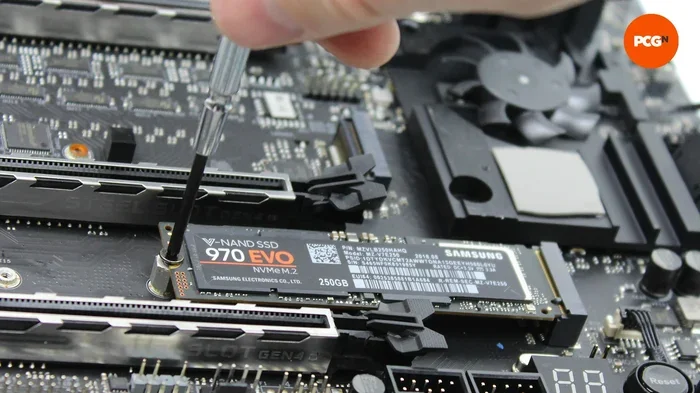
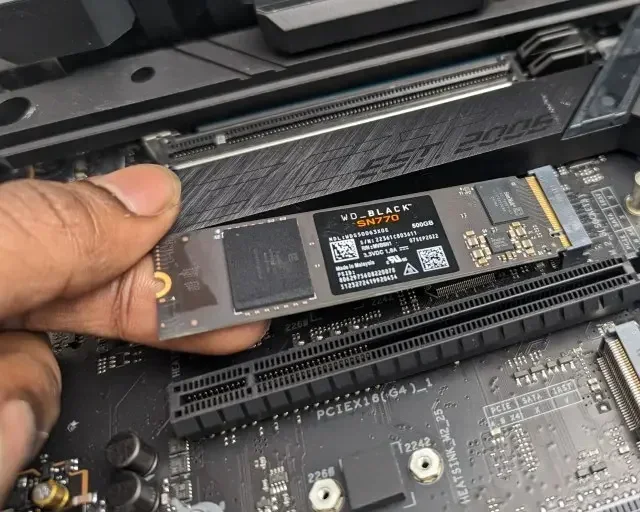
- Locate the M.2 slot on your motherboard. It looks like a small slot with a screw hole at one end. Consult your motherboard manual if you are unsure.
- Remove the M.2 screw from the slot. Keep it somewhere safe.
- Insert the SSD at a 30-degree angle into the slot. Gently press it down until it sits flat.
- Secure the drive with the M.2 screw. Do not overtighten, just snug is fine.
- Close the case, plug your PC back in, and power it on.
- Initialize the drive through Disk Management (Windows) or Disk Utility (Mac) before using it.
Common Mistakes to Avoid
- Forgetting to check compatibility: Not all motherboards support NVMe in all M.2 slots. Some slots only support SATA, and some only support PCIe. Always verify before buying.
- Skipping the BIOS update: Older motherboards may need a BIOS update to properly recognize Gen4 NVMe drives. Check the manufacturer website for the latest firmware.
- Overtightening the screw: M.2 screws only need to be hand-tight. Forcing them can damage the slot or the drive.
- Ignoring thermal management: High-performance NVMe drives can reach high temperatures under heavy load. A heatsink or proper case airflow prevents thermal throttling.
- Not cloning your OS: If you want to keep your existing system, use a disk cloning tool to transfer everything to the new 1TB NVMe M.2 SSD rather than reinstalling everything from scratch.
Expert Tips for Best Performance
Once your 1TB NVMe M.2 SSD is installed, there are a few things you can do to keep it running at its best. Enable the TRIM command in your operating system, which helps the drive maintain optimal write speeds over time. Keep your firmware updated through the manufacturer’s software utility. And make sure your BIOS is set to use the NVMe mode in the storage settings rather than legacy IDE mode.
If you are using your NVMe drive as a boot drive, make sure Secure Boot and RAID modes are configured correctly in your BIOS. These settings can affect how your operating system detects and communicates with the drive. When in doubt, the motherboard manual will have the exact settings you need.
Is a 1TB NVMe M.2 SSD Worth It?
The short answer is absolutely yes. A 1TB NVMe M.2 SSD transforms your computing experience in ways that are hard to go back from. The speed gains are immediate and noticeable across every task you perform. Whether you are booting your operating system, launching games, editing 4K video, or simply browsing the web, the improvement is dramatic.
The 1TB capacity hits a sweet spot in the market. It is enough space for most users without breaking the bank. You get room for your operating system, a healthy game library, and plenty of documents and media files. If you find you need more storage down the road, you can always add another drive or use cloud storage for overflow.
Compared to older storage options, the value proposition of a 1TB NVMe M.2 SSD is hard to beat. Traditional hard drives are slow and fragile. SATA SSDs are faster but limited by the older interface. NVMe M.2 drives offer the best of both worlds, combining compact size with cutting-edge speed and solid reliability.
For gamers, the difference is night and day. Games installed on an NVMe drive load significantly faster than on a SATA SSD or hard drive. For content creators, the fast write speeds mean less time waiting for files to save and export. For everyday users, the snappy responsiveness makes the entire computer feel faster and more enjoyable to use.
The technology continues to evolve, with PCIe Gen5 drives entering the market. But for most users right now, a Gen4 1TB NVMe M.2 SSD is the perfect balance of performance, capacity, and price. It is one of those rare upgrades where you genuinely feel the difference every single time you turn on your computer.
Conclusion
A 1TB NVMe M.2 SSD is one of the most worthwhile upgrades you can make to any computer. From blazing-fast boot times to smooth multitasking and reliable performance, these drives deliver real-world benefits that you will notice every day. The M.2 form factor makes installation simple, and the 1TB capacity gives you plenty of space for all your files and applications.
When choosing your drive, focus on PCIe generation compatibility, read and write speeds, brand reputation, and warranty coverage. Avoid common installation mistakes by double-checking your motherboard manual and taking your time during the setup process. With the right 1TB NVMe M.2 SSD, your computer will feel faster, more responsive, and more enjoyable to use for years to come.
Do not let slow storage hold you back any longer. Upgrade to a 1TB NVMe M.2 solid state drive today and experience the difference for yourself. Your computer will thank you.
Frequently Asked Questions
What does M.2 mean in SSD terminology?
M.2 refers to the physical form factor of the drive. It is a small, compact shape that plugs directly into a slot on your motherboard. M.2 drives come in different lengths, with 2280 being the most common size for 1TB NVMe M.2 SSDs. Always check that your motherboard has an M.2 slot before purchasing.
How fast is a 1TB NVMe M.2 SSD compared to a regular SSD?
A 1TB NVMe M.2 SSD is significantly faster than a standard SATA SSD. While SATA SSDs max out around 550 MB/s, NVMe drives can reach speeds of 5000 to 7000 MB/s depending on the PCIe generation. This means faster game loads, quicker file transfers, and snappier overall system performance.
Can I install a 1TB NVMe M.2 SSD in any laptop?
Most modern laptops support M.2 NVMe drives, but not all of them. You need to check your laptop’s manual or specifications to confirm it has an M.2 slot that supports PCIe NVMe. Some older or budget laptops only have M.2 slots for SATA SSDs, which will not work with NVMe drives.
Do I need a heatsink for my NVMe M.2 SSD?
It depends on your usage and case airflow. High-performance NVMe drives can generate noticeable heat under heavy workloads. If you are gaming or doing intensive tasks for long periods, a heatsink helps maintain consistent speeds. Many 1TB NVMe M.2 SSDs now come with built-in heatsinks, making this an easy decision.
What is the difference between NVMe Gen3 and Gen4?
PCIe Gen4 is roughly twice as fast as Gen3 in terms of bandwidth. Gen3 NVMe drives typically reach speeds around 3500 MB/s, while Gen4 drives can hit 7000 MB/s or higher. For most users, Gen4 offers the best value, but Gen3 drives are still excellent and often more affordable.
How long does a 1TB NVMe M.2 SSD last?
Modern NVMe SSDs are built to last many years under normal use. Most reputable brands offer 5-year warranties on their 1TB NVMe M.2 SSDs. The lifespan depends on factors like write endurance (TBW rating), usage patterns, and operating temperatures. For the average user, the drive will likely outlast the rest of the computer.