Do You Lose Quality with a Long Hdmi Cable
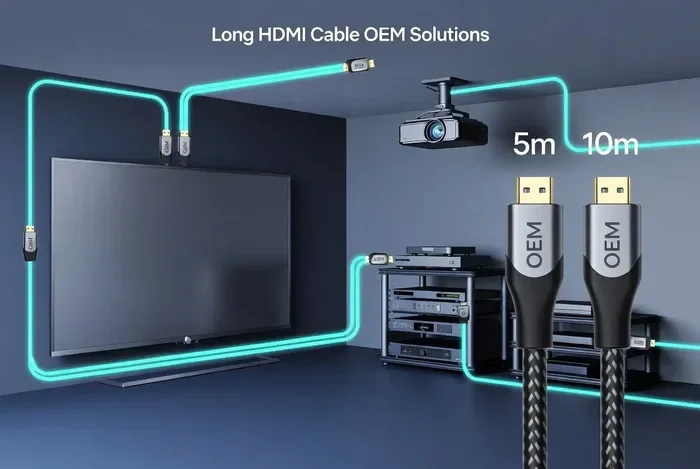
Do You Lose Quality With A Long Hdmi Cable? The answer depends on cable type, length, and your devices. Passive cables under 50 feet usually deliver great quality, but longer runs may need active cables or signal boosters. Understanding HDMI signal basics helps you avoid common problems like flickering, resolution drops, and audio sync issues.
Do You Lose Quality With A Long Hdmi Cable? This is one of the most common questions people ask when setting up a home theater, gaming station, or office display. The idea that a longer cable ruins your picture and sound feels scary, especially when you are spending good money on equipment. But the truth is more nuanced than a simple yes or no.
The reality is that HDMI signal quality does change with distance. However, modern cables and technology have made this problem much smaller than it used to be. Whether you are running a cable across a living room or through a building wall, understanding how long HDMI cables affect your display helps you make smart choices. Let us break it all down in simple terms.
Key Takeaways
- Signal Degradation Is Real: Longer HDMI cables can lose signal strength, especially beyond 50 feet.
- Active Cables Solve Distance Problems: An active HDMI cable with a built-in amplifier keeps your signal strong over long runs.
- Resolution Matters: 4K and 8K signals are more sensitive to cable length than 1080p signals.
- Quality Depends on Build: Shielding, cable gauge, and HDMI version all play a role in performance.
- You Can Fix Most Issues: Signal boosters, proper cable routing, and choosing the right cable type solve most quality problems.
- Price Does Not Always Mean Better: Expensive cables are not always necessary for every setup.
📑 Table of Contents
How HDMI Cables Transmit Signals
What Happens Inside the Cable
An HDMI cable carries digital signals from your source device to your display. Think of it like a highway for data. Your 4K content, audio tracks, and control signals all travel through tiny copper wires inside the cable. The cable sends this information as ones and zeroes. As long as the receiving device can read those ones and zeroes correctly, your picture and sound stay perfect.
Here is the key part. Digital signals are different from analog signals. An analog signal gets weaker gradually over distance, like a voice getting quieter across a room. A digital signal either arrives perfectly or it does not arrive at all. This means a short cable and a long cable can both deliver the same perfect picture, as long as the signal reaches the end without errors.
But there is a catch. Over longer distances, the signal becomes more vulnerable to interference. External factors like electromagnetic interference, poor cable shielding, and signal loss can cause those ones and zeroes to arrive incorrectly. When that happens, you get visual artifacts, audio dropouts, or a complete signal loss.
Digital Signal vs Analog Signal
Understanding the difference between digital and analog signals helps explain why long HDMI cables behave differently than old cables. Analog cables, like older VGA connections, slowly lose quality the longer they get. You might notice a fuzzy picture or ghosting effects. Digital HDMI cables do not fade gradually. Instead, they either work perfectly or stop working entirely.
This is good news for most users. It means a 25-foot HDMI cable does not give you a slightly worse picture than a 3-foot cable. It either delivers the full quality or it does not work at all. The challenge comes when the cable is so long that interference causes enough errors to disrupt the signal.
Does Cable Length Really Affect HDMI Quality?
The Short Answer
Yes and no. For most everyday setups, cable length does not noticeably affect quality. A standard passive HDMI cable up to about 25 feet works great for 1080p and even 4K content. Beyond that, things get tricky. The longer the cable, the more the signal weakens and the more likely it is to experience problems.
So if you are asking, “Do You Lose Quality With A Long Hdmi Cable?” the honest answer is: you might, but only past certain distances. And the good news is there are solutions for every situation.
What Happens When the Signal Weakens
When an HDMI signal weakens over a long cable run, several things can happen. The most common issues include:
- Flickering screen: The picture flashes or goes in and out.
- Resolution drop: Your 4K display drops to 1080p or lower.
- Audio dropouts: Sound cuts in and out or goes completely silent.
- Sparkles or dots: You see tiny white dots or color blocks on screen.
- No signal at all: The display shows a blank screen or “no input” message.
These problems do not mean your equipment is broken. They simply mean the cable length has exceeded the signal’s reliable range. This is especially true for high-resolution content like 4K at 120Hz or 8K signals, which carry much more data than standard 1080p.
Maximum Recommended HDMI Cable Lengths
Standard Passive Cables
Passive HDMI cables are the most common type. They do not have any built-in amplification. Here is a general guide for maximum lengths based on resolution:
- 1080p: Up to 50 feet with a good quality cable.
- 4K at 30Hz: Up to 25 to 30 feet.
- 4K at 60Hz: Up to 15 to 25 feet.
- 4K at 120Hz or 8K: Up to 10 to 15 feet.
These numbers assume a high-quality cable with good shielding. A cheap, thin cable will fail at much shorter distances. The cable gauge, or thickness of the internal wires, plays a huge role in how far a signal can travel without degradation.
When You Need Active Cables
Active HDMI cables have a built-in chip that amplifies the signal as it travels. Think of it like a relay runner passing a baton. The active chip boosts the signal at intervals, keeping it strong over longer distances. These cables can reliably carry 4K signals up to 50 feet or more.
If you need a run longer than 50 feet, you might want to consider an HDMI signal booster or an HDMI-over-ethernet setup with extenders. These solutions use a pair of devices to regenerate the signal at regular intervals. They are especially useful for installations in large homes, conference rooms, or commercial setups.
Passive vs Active: A Quick Comparison
| Feature | Passive HDMI Cable | Active HDMI Cable |
|---|---|---|
| Built-in Amplifier | No | Yes |
| Max Reliable 4K Length | 15-25 feet | 50+ feet |
| Power Source Needed | No | Yes (from HDMI port) |
| Cost | Lower | Higher |
| Best For | Short to medium runs | Long cable runs |
| Signal Boosting | None | Continuous |
What Causes HDMI Signal Degradation?
Cable Quality and Shielding
Not all HDMI cables are created equal. A well-built cable with thick copper wires and double shielding handles long runs much better than a thin, poorly shielded one. Cable shielding protects the internal wires from outside interference, like electromagnetic fields from power cables or appliances.
When shopping for a long HDMI cable, look for cables labeled with a higher gauge number (like 24 AWG or 26 AWG). Thicker wires mean less resistance and a stronger signal over distance. Cheap cables from unknown brands often use thin wires and minimal shielding, which makes them fail much sooner.
HDMI Version and Bandwidth
The HDMI version your cable supports also matters. HDMI 2.0 supports 4K at 60Hz and uses more bandwidth than HDMI 1.4, which maxes out at 4K at 30Hz. HDMI 2.1 takes it even further with support for 4K at 120Hz and 8K at 60Hz. Higher bandwidth means more data flowing through the cable per second, which makes the signal more sensitive to distance and interference.
If you are running a long cable for gaming or high-frame-rate content, you want the latest HDMI version you can afford. The extra bandwidth gives you headroom to maintain a stable connection over longer distances.
Environmental Factors
Where you run your cable matters more than you might think. Running an HDMI cable parallel to a power cable for several feet creates interference that can degrade your signal. Sharp bends, kinks, and tight corners also weaken the signal over time. The best practice is to keep HDMI cables at least 6 inches away from power cables and to avoid sharp bends.
Temperature can also play a role. In very hot environments, the copper inside the cable expands slightly, which can affect signal transmission. In cold environments, the cable becomes stiff and more prone to damage from bending. Keeping cables in temperature-controlled environments helps maintain long-term reliability.
How to Maintain Quality Over Long Distances
Choose the Right Cable for Your Needs
Before buying any cable, measure the distance you need. Then add a few extra feet for routing flexibility. Once you know your distance, match it to the right cable type. For runs under 25 feet, a quality passive cable works great. For runs between 25 and 50 feet, consider an active cable or a cable with a built-in signal equalizer.
For runs over 50 feet, you have two great options. You can use a pair of active HDMI cables with a repeater in the middle, or you can switch to an HDMI extender kit that uses Cat6 or fiber optic cable. Fiber optic HDMI cables are the gold standard for very long runs because they use light instead of electricity to transmit the signal. They can carry 4K signals over 300 feet or more with zero quality loss.
Use Signal Boosters When Needed
An HDMI signal booster is a small device that plugs into your cable run and amplifies the signal. You place it in the middle of a long cable run, and it regenerates the digital signal so it stays clean. These boosters are affordable and easy to install. They are a great solution when you cannot use an active cable or a fiber optic option.
Some people also ask about HDMI repeaters. These work similarly to boosters but are often used in commercial installations where signals need to travel through walls, ceilings, and long duct runs. A repeater receives the signal, cleans it up, and sends it onward at full strength.
Keep Your Connections Clean
It sounds simple, but dirty HDMI ports and connectors cause more problems than most people realize. Dust, lint, and oxidation on the connector pins can weaken the signal, even on short cables. Use a can of compressed air to clean your HDMI ports regularly. If the connector pins look corroded, a gentle wipe with isopropyl alcohol can restore a solid connection.
Also, make sure your HDMI cables click in firmly. A loose connection creates intermittent signal issues that look exactly like cable quality problems. You might think your long cable is the culprit when really it is just a loose fit.
Optimize Your Entire Setup
Sometimes the cable is not the problem at all. Your overall setup affects display quality just as much as the cable itself. Make sure your source device and display both support the same HDMI version. A device that only supports HDMI 1.4 will not output 4K at 60Hz even with the best cable in the world.
Your system’s overall performance also matters. If you are using a laptop or PC for high-resolution output, having enough memory helps everything run smoothly. You can check how much ram you need in a laptop for demanding display tasks by visiting this guide on how much RAM do you need in a laptop. A well-equipped system paired with the right cable delivers the best results.
Common HDMI Cable Mistakes to Avoid
Buying the Cheapest Cable Available
It is tempting to grab the cheapest HDMI cable you can find, especially for long runs. But cheap cables often use thin copper wires, poor shielding, and low-quality connectors. For long cable runs, this is a recipe for signal problems. Spending a little more on a reputable brand saves you from the headache of flickering and resolution drops.
Ignoring HDMI Version Compatibility
A cable cannot output a resolution that your devices do not support. If your source device only outputs HDMI 2.0, no cable will magically give you HDMI 2.1 features. Always check the HDMI version of both your source and display before buying a cable.
Running Cables Alongside Power Cables
Running an HDMI cable parallel to a power cable for more than a few feet introduces electromagnetic interference. This is one of the most overlooked causes of HDMI signal problems. Keep your HDMI cables separated from power cables by at least 6 inches, or use cables with extra shielding if you must run them close together.
Using the Wrong Cable for the Resolution
Not all cables handle all resolutions. A cable that works fine for 1080p might struggle with 4K, especially over long distances. Always check the cable specifications to make sure it supports your desired resolution and refresh rate.
Final Thoughts on Long HDMI Cable Quality
So, do you lose quality with a long HDMI cable? The answer is clear now. For most setups under 25 feet, a quality passive cable delivers perfect results. Beyond that, you need active cables, signal boosters, or fiber optic solutions to maintain the same level of quality. The key is matching your cable to your distance and resolution needs.
Do not let cable length stop you from creating the setup you want. With the right knowledge and the right equipment, you can run HDMI signals across a room, through walls, or even across a building without sacrificing a single pixel of quality. Take the time to choose the right cable, keep your connections clean, and your display will reward you with a stunning picture every time.
Remember, your setup is only as strong as its weakest link. A great display paired with a great source device still needs a reliable cable to bring it all together. Invest in quality cables, plan your cable runs carefully, and enjoy your content the way it was meant to be seen.
Frequently Asked Questions
Can a long HDMI cable cause a blurry picture?
Yes, a long HDMI cable can cause a blurry picture if the signal degrades beyond what the cable can handle. This usually happens with passive cables longer than their recommended maximum length. Switching to an active HDMI cable or adding a signal booster typically fixes the problem immediately.
What is the longest HDMI cable that works well for 4K?
For 4K at 60Hz, a quality active HDMI cable can work reliably up to about 50 feet. Passive cables usually max out around 25 feet for 4K. If you need longer runs, fiber optic HDMI cables can carry 4K signals over 100 feet or more with no quality loss at all.
Do expensive HDMI cables perform better than cheap ones?
For short runs, expensive and cheap cables perform the same because digital signals either arrive perfectly or they do not. For long runs, higher-quality cables with better shielding and thicker wires perform better because they resist interference more effectively. You do not always need the most expensive option, but avoid the cheapest cables for distances over 15 feet.
Can I use an HDMI extender instead of a long cable?
Yes, HDMI extenders are an excellent alternative to very long cables. They use Cat6 or fiber optic cable to carry the HDMI signal over much longer distances. An extender kit typically includes a transmitter and receiver unit and can send signals 100 feet or more without quality loss.
Does HDMI cable length affect audio quality?
Yes, long HDMI cables can affect audio quality in the same way they affect video. You might experience audio dropouts, static, or sync issues between audio and video. Using a high-quality cable with proper shielding helps maintain both audio and video quality over longer runs.
How can I test if my long HDMI cable is causing quality issues?
Start by swapping the long cable with a short, known-good cable. If the picture and sound improve, your long cable is likely the problem. You can also check for flickering, resolution drops, or sparkles on screen, which are all signs of signal degradation. Using an HDMI signal tester can give you a definitive answer about cable health.