Is Usb Type a or C Better

USB Type C is the modern standard with faster speeds, more power, and a reversible design. USB Type A still works well for older devices and basic peripherals. This guide breaks down every key difference so you can pick the right port without confusion.
If you have ever stood in front of a pile of cables and wondered which one goes where, you are not alone. The debate between USB Type A and USB Type C has been going on for years. Both connectors serve the same basic purpose. They transfer data and deliver power. But they do it in very different ways.
USB Type C is the newer kid on the block. It is smaller, reversible, and much faster. USB Type A is the classic rectangular port you have likely used for decades. It is reliable and still found on millions of devices. So which one is better? The answer depends on what you need it for.
In this guide, we will walk through every major difference. We will look at speed, power delivery, compatibility, and real-world use cases. By the end, you will know exactly which connector fits your needs best.
Key Takeaways
- USB Type C offers faster data transfer: It supports USB 3.2 and USB4 speeds that far outpace older USB Type A.
- USB Type C delivers more power: USB Power Delivery can charge devices up to 240W, making it versatile for laptops and phones.
- USB Type A is still widely used: Many peripherals, keyboards, and flash drives still rely on the classic USB-A connector.
- USB Type C is reversible: No more flipping the cable to get the right orientation.
- Adapters bridge the gap: You can use USB-C to USB-A adapters to connect modern and legacy devices easily.
- Future-proofing matters: Newer devices increasingly use USB Type C as the universal standard.
- Both have their place: Your choice depends on the device, use case, and what peripherals you own.
📑 Table of Contents
- What Is USB Type A?
- What Is USB Type C?
- USB Type A vs USB Type C: Speed Comparison
- Power Delivery: Which Connector Charges Faster?
- Compatibility and Adapters
- Which One Should You Choose?
- Common Mistakes People Make with USB Connectors
- Expert Insights on USB Connectivity
- Final Verdict: Is USB Type A or C Better?
What Is USB Type A?
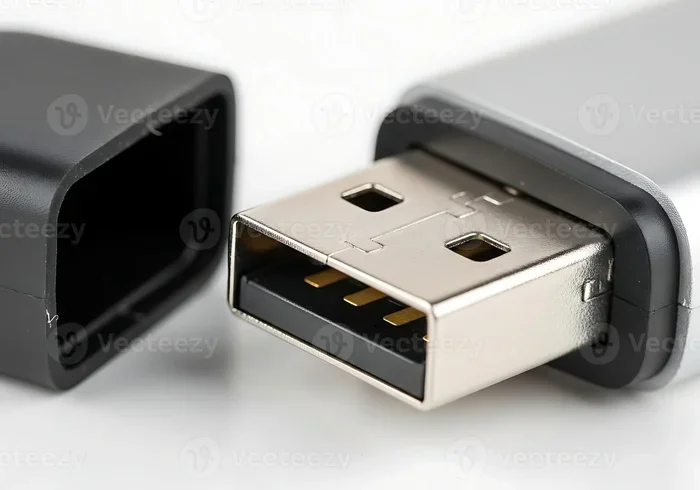
USB Type A is the original standard USB connector. It has been around since the mid-1990s. You will find it on computers, TVs, game consoles, and chargers. It has a flat, rectangular shape that only fits one way. This means you may have to flip it a few times before it plugs in.
The Shape and Design
The USB-A connector is large compared to modern standards. It measures about 12 millimeters by 4.5 millimeters. The design has not changed much over the years. This is both a strength and a weakness. It is a strength because it is universal and works with almost everything. It is a weakness because it is bulky and not very elegant.
Common Uses for USB Type A
Even though USB Type A is older, it is still everywhere. Here are common places you will find it:
- Desktop computers and laptops for connecting peripherals
- USB flash drives and external hard drives
- Keyboards and mice for wired connections
- Gaming controllers and steering wheels
- Printers and scanners for home or office use
- Wall chargers and car chargers
Many of these devices work perfectly fine with USB-A. You do not always need the latest connector. Sometimes the old standard gets the job done just as well.
What Is USB Type C?
USB Type C is the newer connector standard that has taken the tech world by storm. It is small, oval-shaped, and reversible. That means you can plug it in either direction. No more guessing which way is up. This alone is a huge quality-of-life improvement.
The Shape and Design
USB-C is about half the size of USB-A. It measures roughly 8.4 millimeters by 2.6 millimeters. The reversible design means there is no wrong way to insert it. The connector is also more durable. It is built to handle more plug cycles than the older USB-A standard.
Common Uses for USB Type C
USB Type C has become the go-to port for modern devices. You will find it on:
- Smartphones like Android phones and newer iPhones
- Laptops including MacBook Pro and Dell XPS models
- Tablets like the iPad Pro and Samsung Galaxy Tab
- External SSDs such as the Sandisk Extreme Portable 2TB External USB C NVMe SSD
- Monitors and docking stations
- Audio gear including USB Type C headphones
- Chargers and power banks
The versatility of USB-C is one of its biggest selling points. It handles data, video, and power through a single cable. This simplifies your setup and reduces cable clutter.
USB Type A vs USB Type C: Speed Comparison
Speed is one of the most important factors when comparing these two connectors. USB Type C supports much faster data transfer rates than USB Type A. Here is how they stack up.
USB Type A Speeds
USB-A has evolved over the years, but it still has limits. The most common speeds are:
- USB 2.0: Up to 480 Mbps
- USB 3.0: Up to 5 Gbps
- USB 3.1: Up to 10 Gbps
Even the fastest USB-A ports top out at 10 Gbps. That is decent for everyday tasks. But it falls behind when you need to move large files quickly.
USB Type C Speeds
USB-C can support much higher speeds depending on the USB standard it uses:
- USB 3.1: Up to 10 Gbps
- USB 3.2: Up to 20 Gbps
- USB4: Up to 40 Gbps
- USB4 Version 2.0: Up to 80 Gbps
As you can see, USB-C has a massive speed advantage. If you regularly transfer large video files or back up huge folders, USB-C is the clear winner.
Power Delivery: Which Connector Charges Faster?
Power delivery is another area where USB Type C pulls ahead. The USB Power Delivery standard works with USB-C ports and can deliver significantly more wattage than USB-A.
USB Type A Power Delivery
Standard USB-A ports deliver up to 7.5 watts at 5 volts. Some USB 3.0 ports can push 15 watts. That is enough to charge your phone slowly or power a small peripheral. But it is not enough for fast charging laptops or tablets.
USB Type C Power Delivery
USB-C with Power Delivery can go much further:
- Base USB PD: Up to 100 watts at 20 volts
- Extended USB PD: Up to 240 watts at 48 volts
This means a single USB-C cable can charge your laptop, phone, and even some monitors. The convenience is hard to beat. One cable for everything is no longer a dream. It is a reality with USB-C.
Compatibility and Adapters
One of the biggest concerns people have is compatibility. Will your old devices work with a new USB-C port? The answer is yes, with the right adapter.
Using USB-A Devices with USB-C Ports
Many newer laptops and devices only have USB-C ports. This can be frustrating if you have USB-A peripherals. The good news is that adapters are widely available and affordable. You can get a simple USB-C to USB-A adapter for just a few dollars. This lets you plug in your old flash drives, keyboards, and mice without any problem.
Using USB-C Devices with USB-A Ports
The reverse is also possible. If your new USB-C device needs to connect to an older USB-A port, you can use a USB-A to USB-C cable. Many phones and tablets still come with USB-C to USB-A cables in the box for this exact reason.
Adapters are great for bridging the gap. But they do add bulk and a small point of failure. Whenever possible, try to move your setup toward USB-C for a cleaner and more reliable experience.
The Future of USB Connectivity
The industry is clearly moving toward USB Type C as the universal standard. Apple switched entirely to USB-C with the iPhone 15. Most new laptops now feature only USB-C ports. Even many TVs and car stereos are starting to include USB-C. The writing is on the wall. USB-A is heading toward obsolescence, but it will remain in use for many years to come.
Which One Should You Choose?
The right choice depends on your specific needs. Here is a quick guide to help you decide.
Choose USB Type A If
- You use older devices that only have USB-A ports
- You need a simple, no-fuss connection for basic peripherals
- You have a collection of USB-A cables and flash drives already
- You are on a tight budget and adapters are not an option
Choose USB Type C If
- You want the fastest data transfer speeds available
- You need fast charging with high wattage
- You are buying new devices and want future-proof connectivity
- You want to reduce cable clutter with one versatile cable
- You work with large files like video or raw photos
For most people in 2024 and beyond, USB Type C is the better choice. It is faster, more powerful, and more versatile. But USB Type A is not going away anytime soon. Both connectors will coexist for the foreseeable future.
If you are looking to upgrade your setup, consider investing in USB-C accessories like cables, hubs, and chargers. They will serve you well now and for years to come. A great option is the M 2 NVMe to USB C SSD enclosure which lets you use the speed of USB-C for your storage needs.
Common Mistakes People Make with USB Connectors
There are a few mistakes that many people make when dealing with USB connectors. Avoiding these can save you time and money.
- Buying cheap cables: Cheap USB-C cables may not support fast charging or high data speeds. Always go with reputable brands.
- Assuming all USB-C cables are the same: Not all USB-C cables support the same speeds or power levels. Check the specs before buying.
- Forgetting about adapters: If you buy a new laptop with only USB-C ports, remember you may need adapters for your older devices.
- Ignoring cable length: Longer cables can reduce charging speed and data transfer rates. Keep cables as short as practical.
- Plugging in forcefully: USB-C is reversible, so there is no need to force it. If it does not fit, flip it and try again.
Expert Insights on USB Connectivity
Industry experts agree that USB Type C is the future. The Universal Serial Bus Implementers Forum (USB-IF) has been pushing USB-C as the standard for years. According to their guidelines, USB-C offers better bandwidth, more power, and greater flexibility than USB-A. The transition is already well underway across consumer electronics.
Tech reviewers also point out that the biggest advantage of USB-C is its convenience. One cable for data, video, and power eliminates the need for multiple cables and adapters. This is especially valuable for professionals who travel frequently or work with multiple devices daily.
That said, USB-A still has a role to play. It is deeply embedded in the ecosystem. Millions of devices use it every day. As long as those devices exist, USB-A will remain relevant. The smartest approach is to embrace USB-C for new purchases while keeping your USB-A cables for legacy devices.
Final Verdict: Is USB Type A or C Better?
The answer is clear. USB Type C is the better connector overall. It is faster, more powerful, reversible, and future-proof. USB Type A still has value for older devices and basic tasks, but it is slowly being phased out.
If you are building a new setup or upgrading your gear, go with USB-C wherever possible. It is the best investment for your digital life today. For the best external storage options, check out the Sandisk Extreme Portable 2TB External USB C NVMe SSD which takes full advantage of USB-C speeds.
Both connectors have served us well. But the future belongs to USB Type C. Make the switch today and enjoy the benefits of faster speeds, more power, and a simpler setup.
Frequently Asked Questions
Can I plug a USB Type A cable into a USB Type C port?
No, you cannot plug a USB-A cable directly into a USB-C port. They have different shapes and sizes. However, you can use a USB-C to USB-A adapter or cable to connect USB-A devices to USB-C ports easily.
Is USB Type C faster than USB Type A?
Yes, USB Type C supports much faster data transfer speeds. While USB-A maxes out at 10 Gbps with USB 3.1, USB-C can reach up to 80 Gbps with USB4 Version 2.0. The actual speed depends on the USB standard the cable and port support.
Can USB Type C charge laptops?
Yes, USB Type C with USB Power Delivery can charge laptops. It can deliver up to 240 watts of power, which is more than enough for most laptop models. Many modern laptops now charge exclusively through USB-C.
Are all USB Type C cables the same?
No, not all USB-C cables are the same. Some support only USB 2.0 speeds, while others support USB 3.2 or USB4. Some cables also support different power levels. Always check the specifications before purchasing a USB-C cable.
Will USB Type A become obsolete?
USB Type A is gradually becoming less common, but it is not disappearing overnight. Many devices still use USB-A ports. The transition to USB-C is happening, but it will take several more years before USB-A is fully phased out.
Do I need a USB Type C hub?
A USB-C hub is helpful if your laptop has only USB-C ports and you need to connect older USB-A devices, HDMI displays, or SD cards. It expands your connectivity options and makes your setup more versatile without needing multiple adapters.
=== CONCLUSION ===
Choosing between USB Type A and USB Type C comes down to your devices and needs. USB Type C wins in speed, power, and versatility. It is the connector that will serve you best going forward. USB Type A remains useful for older gear and simple tasks. The best approach is to use USB-C for new devices and keep USB-A adapters handy for older peripherals. Make the smart choice today and future-proof your setup with USB Type C.