Does Long Hdmi Cable Affect Quality
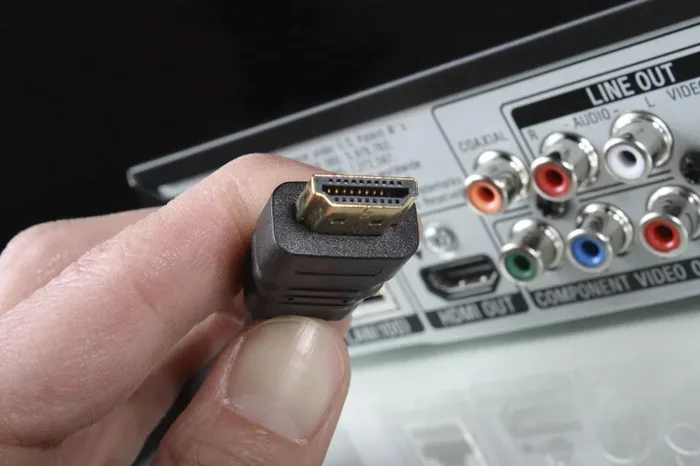
Does a long HDMI cable affect quality? The short answer is yes, it can — but only under certain conditions. Longer HDMI cables may introduce signal degradation, especially with high-resolution formats like 4K and 8K. Choosing the right cable type, gauge, and HDMI version makes all the difference in maintaining crystal-clear picture and audio quality.
Have you ever plugged in a long HDMI cable and noticed something just feels off? Maybe the picture flickers, the colors look dull, or the screen goes blank for a second. You might wonder, does long HDMI cable affect quality?
The truth is, cable length can absolutely impact your viewing experience. But it is not always a simple yes or no answer. A lot depends on the type of cable, the resolution you are using, and the quality of the materials. Let us break it all down so you never have to guess again.
In this guide, we will cover everything you need to know about HDMI cable length and quality. From signal loss to the best cable types for long runs, you will find practical tips and clear answers. Whether you are setting up a home theater, a gaming rig, or a professional display, this article has you covered.
Key Takeaways
- Signal loss increases with cable length: Longer HDMI cables can weaken the digital signal, leading to flickering or no signal at all.
- Resolution matters: Higher resolutions like 4K and 8K are more sensitive to cable length than 1080p content.
- Active cables solve distance problems: Active HDMI cables use built-in amplifiers to boost the signal over longer runs.
- HDMI version plays a role: Newer HDMI versions support higher bandwidth, which helps maintain quality over distance.
- Cheap cables are risky: Low-quality cables are more prone to signal degradation, regardless of length.
- Cable gauge matters: Thicker cables with higher AWG ratings handle longer distances better.
📑 Table of Contents
How HDMI Signals Travel Through Cables
HDMI cables carry digital signals from your source device to your display. These signals contain both video and audio data. The data travels as tiny electrical pulses through copper wires inside the cable. The faster and more reliably these pulses reach the other end, the better your picture and sound will be.
The Basics of Digital Signal Transmission
Unlike analog signals, digital signals are supposed to arrive perfectly or not at all. This is called the cliff effect. In theory, a digital signal either works completely or it does not work at all. There is no gradual fade like with old analog cables.
But here is the catch. In real-world use, long HDMI cables can still cause problems. The signal can weaken, and the receiving device may struggle to interpret it correctly. This can lead to intermittent dropouts, sparkles on screen, or a complete loss of signal.
Why Length Matters for Signal Integrity
As the HDMI cable gets longer, the electrical signal has to travel further. Along the way, the signal loses energy. This is known as attenuation. The longer the cable, the more the signal weakens. At some point, the signal may become too weak for the display to read properly.
Think of it like shouting across a room versus shouting across a football field. Your voice starts out loud, but it gets harder to hear the farther away someone is. HDMI signals work in a similar way. The signal starts strong but degrades over distance.
Does Cable Length Actually Affect Video Quality?
This is the big question. And the answer is, it depends. For shorter runs, under about 10 feet, most HDMI cables will work perfectly fine. The signal stays strong, and you will not notice any difference in video quality.
But when you start going beyond 15, 25, or even 50 feet, things change. Let us look at how length affects different aspects of your display.
Impact on Resolution
Higher resolutions need more data to be sent through the cable. A 1080p signal is relatively small and easy to transmit. But a 4K signal carries four times as much data. An 8K signal carries even more.
When you pair high resolution with a long cable, the risk of problems goes up. You might notice:
- Flickering or intermittent signal on 4K content
- Reduced refresh rate, dropping from 60Hz to 30Hz or lower
- No signal at all if the cable is too long for the resolution
- Color banding or washed-out colors
So yes, cable length can affect the quality of high-resolution content more than standard definition content.
Impact on Audio Quality
People often forget that HDMI carries audio too. A long cable can affect your sound quality as well. You might experience audio dropouts, crackling, or sync issues between video and audio. While audio problems are less common than video issues, they still happen with long or low-quality cables.
HDMI Cable Types and Their Distance Limits
Not all HDMI cables are the same. The type of cable you choose plays a huge role in how far you can run it without losing quality. Let us look at the main types.
| Cable Type | Max Reliable Length | Supports 4K? | Best For |
|---|---|---|---|
| Standard HDMI | Up to 10 feet | No (1080p max) | Short setups, basic devices |
| High Speed HDMI | Up to 15 feet | Yes (4K at 30Hz) | Home theater, moderate setups |
| Premium High Speed | Up to 25 feet | Yes (4K at 60Hz) | Gaming, 4K displays |
| Active HDMI | Up to 100+ feet | Yes (4K at 60Hz) | Long runs, commercial setups |
| Fiber Optic HDMI | Up to 300+ feet | Yes (8K possible) | Very long distances, pro use |
As you can see, the cable type matters a lot. A standard cable might work fine on your desk, but it will fail you in a large room. For longer distances, you need a cable designed for the job.
Passive vs. Active HDMI Cables
Passive HDMI cables are the standard ones you find in most stores. They have no built-in electronics. The signal just flows through copper wire. These work well for short distances but struggle beyond 15 to 25 feet.
Active HDMI cables have built-in chips that amplify the signal. They boost the signal as it travels through the cable. This makes them much better for long runs. However, they usually need external power, often through a USB port on your TV or monitor.
If you need to run a cable longer than 25 feet, an active HDMI cable is your best bet. It keeps the signal strong and maintains quality over distance.
Common Problems Caused by Long HDMI Cables
Even with a good cable, long runs can cause issues. Here are the most common problems people face.
Signal Dropouts and Intermittent Connection
This is the most annoying issue. The screen goes black for a second, then comes back. Or the picture flickers every few minutes. This usually happens because the signal is too weak to maintain a steady connection. It is especially common with 4K content on long cables.
Reduced Refresh Rate
Your TV or monitor might drop from 60Hz to 30Hz or even lower. This makes motion look choppy and unnatural. You might not notice it as much with movies, but for gaming, it is a big deal. A lower refresh rate ruins the smoothness of fast-moving action.
No Signal at All
In worst cases, the display simply shows no signal. The cable is too long, or the quality is too low, and the receiving device cannot read any data. This usually means you need a better cable or a shorter run.
Audio-Video Sync Issues
Sometimes the sound and picture get out of sync. The lips move, but the words come a split second late. This can be caused by a long cable that introduces slight delays in the signal path.
How to Choose the Right Long HDMI Cable
Shopping for a long HDMI cable can be confusing. There are so many options and price points. Here is how to make sure you pick the right one.
Check the HDMI Version
Look for the HDMI version on the packaging or product description. HDMI 2.0 supports 4K at 60Hz. HDMI 2.1 supports 4K at 120Hz and even 8K. The newer the version, the more bandwidth the cable can handle. This matters more for long cables because they need all the help they can get.
Look at the Cable Gauge
Cable gauge is measured in AWG (American Wire Gauge). A lower AWG number means a thicker cable. Thicker cables carry signals better over longer distances. For runs over 25 feet, look for a cable with a gauge of 24 AWG or lower.
Go for Certified Cables
Always look for cables that are HDMI Premium Certified. These cables have been tested to meet specific standards. They are more reliable than unbranded, no-name cables. The extra cost is worth it for the peace of mind.
Consider an HDMI Extender
If you need to run a cable over 50 feet, consider using an HDMI extender. This is a small device that boosts the signal. You run a short cable to the extender, and then a second cable from the extender to your display. This keeps the signal strong without needing one super long cable.
Some people also use HDMI over Ethernet extenders. These convert the HDMI signal to travel over network cable. It is a great option for very long runs in offices or classrooms.
Expert Tips to Maintain HDMI Quality Over Distance
Here are some practical tips that can help you get the best results from long HDMI cable runs.
- Keep the cable as short as possible. Only use the length you actually need. Every extra foot adds a little more signal loss.
- Avoid sharp bends. Bending an HDMI cable sharply can damage the internal wires and weaken the signal. Use gentle curves instead.
- Use high-quality connectors. Gold-plated connectors resist corrosion and provide a more stable connection.
- Keep cables away from power cords. Running an HDMI cable next to a power cord can cause electromagnetic interference. This can degrade your signal.
- Test your setup before installing permanently. Plug everything in and watch for a few minutes before you wall-mount or hide the cables.
- Upgrade your HDMI version when possible. If your devices support HDMI 2.1, use a cable that matches. You will get better performance and future-proofing.
These small steps can make a huge difference. They help you avoid frustration and keep your display looking its best.
The Bottom Line
So, does long HDMI cable affect quality? Yes, it can. But it does not have to be a problem. With the right cable type, proper gauge, and a little planning, you can run HDMI cables over long distances without sacrificing video or audio quality.
The key is to match your cable to your needs. Short runs are forgiving. Long runs need premium cables or active solutions. And always remember that the HDMI version and cable certification matter just as much as the length.
Take the time to choose wisely. Your eyes and ears will thank you. A great setup with the right HDMI cable delivers a smooth, clear, and immersive experience every single time.
For more tips on how different hardware components affect your display and performance, check out how RAM affects 3D rendering speed. Understanding how your system handles data can help you make better choices for your entire setup. Also, learn whether an SSD improves FPS to get the most out of your gaming or creative workflow. And if you are curious about how your GPU handles long rendering sessions, read why GPU fans always spin for insights into keeping your graphics card running smoothly.
Frequently Asked Questions
Can a 50-foot HDMI cable cause quality loss?
Yes, a 50-foot passive HDMI cable can cause quality loss, especially with 4K content. The signal weakens over long distances. Using an active HDMI cable or an extender at this length will help maintain quality.
Does HDMI cable length affect input lag?
In most cases, cable length has a minimal effect on input lag. However, a very long or damaged cable can introduce slight delays. For gaming, use a short, high-quality cable to keep input lag as low as possible.
What is the maximum recommended length for an HDMI cable?
For standard passive HDMI cables, the maximum recommended length is about 15 to 25 feet. Beyond that, you should use an active HDMI cable, a fiber optic HDMI cable, or an HDMI extender to maintain signal quality.
Do gold-plated HDMI cables reduce signal loss?
Gold-plated connectors resist corrosion and provide a more stable connection. They do not directly reduce signal loss inside the cable, but they help maintain a reliable connection at the ends, which can prevent intermittent issues.
Can I use an HDMI splitter with a long cable run?
Yes, but an HDMI splitter adds another point where signal loss can occur. Each connection and split weakens the signal slightly. For long runs, it is better to use a dedicated active HDMI cable or an extender instead of a splitter.
Does the HDMI version matter for long cable runs?
Absolutely. Newer HDMI versions like HDMI 2.0 and 2.1 support higher bandwidth. This means they handle long cable runs better because they can transmit more data efficiently, reducing the chances of signal degradation over distance.