Is a Usb C the Same as a Micro Usb

USB C and Micro USB are not the same. They differ in shape, speed, power delivery, and compatibility. USB Type-C is the newer, reversible connector that supports faster data transfer and higher wattage charging, while Micro USB is an older, smaller connector found on many legacy devices. Understanding these differences helps you choose the right cable and avoid compatibility headaches.
Have you ever grabbed a cable from your drawer, plugged it into your device, and realized it just does not fit? That frustration happens to almost everyone at some point. The confusion between USB C and Micro USB is one of the most common tech questions people ask today. These two connectors look nothing alike, but they serve a similar purpose: connecting your devices to power sources and computers.
In this article, we will break down everything you need to know about USB C vs Micro USB. We will cover their shapes, speeds, power capabilities, and which devices use each one. By the end, you will never mix them up again. Let us dive in.
Key Takeaways
- Different Connectors: USB C and Micro USB have completely different shapes and sizes and are not interchangeable without an adapter.
- Speed Matters: USB C supports much faster data transfer speeds than Micro USB, making it better for large file transfers.
- Power Delivery: USB C can deliver significantly more power, enabling faster charging for laptops and tablets.
- Reversible Design: USB C plugs in either way, while Micro USB only works one direction.
- Device Compatibility: Newer devices use USB C, while older gadgets still rely on Micro USB.
- Adapters Help: You can use adapters to connect USB C devices to Micro USB cables when needed.
📑 Table of Contents
What Is USB C?
USB Type-C, commonly called USB C, is a modern connector standard developed by the USB Implementers Forum. It was introduced around 2014 and has quickly become the go-to connector for most new devices. You will find USB C ports on smartphones, laptops, tablets, and even some gaming accessories.
The USB C connector is small, oval-shaped, and reversible. This means you can plug it in either direction, and it will work. No more flipping the cable three times trying to get the right orientation. That alone is a huge upgrade over older connector types.
Key Features of USB C
- Reversible design: Plug it in any direction without guessing.
- Fast data transfer: USB 3.1 and USB 4 standards support speeds up to 40 Gbps.
- High power delivery: USB Power Delivery can push up to 240 watts.
- Versatile: Supports data, video, and power through a single cable.
- Compact size: Smaller than a traditional USB-A connector but larger than Micro USB.
Many people wonder if USB C is the same as the connector used on an laptop mouse or other peripheral device. The answer is no. USB C is a connector type, while the device using it could be anything from a mouse to a hard drive. The M 2 NVMe to USB C SSD enclosure is a great example of how USB C connects to storage devices for fast data transfer.
What Is Micro USB?
Micro USB was the standard connector for most portable devices from about 2008 to 2018. You have probably seen it on older Android phones, Bluetooth speakers, portable chargers, and fitness trackers. It is a small, rectangular connector with a slightly tapered end.
Micro USB comes in two versions: Micro USB-A and Micro USB-B. The Micro USB-A is the standard rectangular shape you see on most cables. The Micro USB-B is slightly different and is mostly used for USB On-The-Go (OTG) connections. Both are much smaller than a regular USB-A connector.
Key Features of Micro USB
- Small form factor: Designed for compact portable devices.
- Unidirectional: Only plugs in one way, which can be annoying.
- Slower speeds: Micro USB 2.0 maxes out at 480 Mbps. Micro USB 3.0 reaches 5 Gbps but is rare.
- Lower power: Standard charging at 5 volts and 2 amps.
- Widely available: Still found on many budget devices and accessories.
Even though Micro USB is older, it is still everywhere. Many budget smartphones, smart home devices, and cheap external drives that come with legacy cables still use Micro USB for basic connectivity. The Sandisk Extreme Portable 2TB SSD uses USB C, but many similar older drives still ship with Micro USB cables.
USB C vs Micro USB: The Key Differences
Now let us get to the heart of the matter. How do these two connectors actually compare? Here is a detailed breakdown of the differences between USB C and Micro USB.
Shape and Size
The most obvious difference is the shape. USB C is oval and symmetrical. Micro USB is rectangular with beveled corners. You cannot plug a USB C cable into a Micro USB port, and vice versa. They are physically incompatible without an adapter.
USB C measures about 8.4 by 2.6 millimeters. Micro USB measures about 6.85 by 1.8 millimeters. So Micro USB is smaller, which made it ideal for slim phones and compact devices. However, USB C has largely replaced Micro USB even in small devices because of its superior capabilities.
Data Transfer Speed
Speed is where USB C really shines. Here is a quick comparison:
- Micro USB 2.0: Up to 480 Mbps
- Micro USB 3.0: Up to 5 Gbps
- USB C (USB 3.0): Up to 5 Gbps
- USB C (USB 3.1 Gen 2): Up to 10 Gbps
- USB C (USB 4): Up to 40 Gbps
As you can see, even the fastest Micro USB cannot compete with modern USB C standards. If you are transferring large files like videos or backups, USB C saves you a ton of time. The biggest NVMe SSD on the market today relies on USB C connections for its blazing fast speeds.
Power Delivery and Charging
Charging speed depends on the connector and the protocol it supports. Micro USB uses the older BC 1.2 standard, which typically delivers 5 volts at 2 amps, or 10 watts. That is fine for small devices but slow for anything larger.
USB C supports USB Power Delivery, which can go up to 240 watts at 48 volts. This means USB C can charge laptops, monitors, and even some desktop peripherals. A single USB C cable can replace multiple power bricks and cables in your bag.
| Feature | USB C | Micro USB |
|---|---|---|
| Shape | Oval, reversible | Rectangular, one-way |
| Max Data Speed | 40 Gbps (USB 4) | 5 Gbps (USB 3.0) |
| Max Power | 240W (USB PD) | 10W (BC 1.2) |
| Reversible | Yes | No |
| Common Devices | Modern phones, laptops, tablets | Older phones, budget devices, accessories |
| Connector Size | 8.4 x 2.6 mm | 6.85 x 1.8 mm |
Device Compatibility
Compatibility is the biggest practical difference. Most devices made after 2020 use USB C. Apple switched entirely to USB C with the iPhone 15 line. Most Android phones followed years earlier. Laptops from Dell, HP, Lenovo, and Apple now almost universally use USB C for charging and data.
Micro USB is still found on budget phones, older tablets, portable Bluetooth speakers, e-readers, and many smart home devices. If you buy a used or refurbished gadget, check the port type before purchasing cables.
Can You Use a USB C Cable with a Micro USB Device?
The short answer is no, not directly. The connectors are physically different. However, you can use an adapter. A USB C to Micro USB adapter is a small, inexpensive dongle that lets you plug a USB C cable into a Micro USB port. These adapters are widely available and very handy.
Here are some tips for using adapters effectively:
- Buy quality adapters: Cheap adapters can cause connection issues or slow data speeds.
- Check the adapter type: Make sure you get USB C to Micro USB, not the other way around.
- Use for charging only: Some adapters only support charging, not data transfer.
- Keep a spare: Adapters are small and easy to lose, so keep one at home and one in your bag.
If you are trying to connect a modern external drive to an older device, the adapter approach works well. Just remember that the speed will be limited by the slower port. So if your drive supports USB 3.0 speeds but your device only has Micro USB 2.0, you will only get Micro USB 2.0 speeds.
Which One Should You Choose?
For most people, the answer is simple: go with USB C. It is faster, more versatile, reversible, and becoming the universal standard. Buying USB C cables and chargers means fewer cable types cluttering your space.
However, there are a few situations where Micro USB still makes sense:
- Budget devices: Cheap gadgets and accessories often still use Micro USB.
- Older devices: If you have an older phone or tablet, it likely uses Micro USB.
- Specialized equipment: Some industrial devices and car accessories still use Micro USB.
The best approach is to have both types of cables on hand. A USB C collection for your newer devices and a few Micro USB cables for older or budget gadgets keeps you prepared for anything.
Common Mistakes People Make
Here are some mistakes to avoid when dealing with these two connector types:
- Assuming they are interchangeable: They look somewhat similar in size but are completely different plugs. Forcing a cable will damage the port.
- Buying the wrong adapter: USB C to USB-A adapters are common, but USB C to Micro USB adapters are less so. Always double-check before buying.
- Ignoring charging speeds: Using a cheap Micro USB cable on a fast-charging USB C device will not give you the speeds you paid for.
- Throwing away old cables: Keep a few Micro USB cables for older devices. You never know when you will need them.
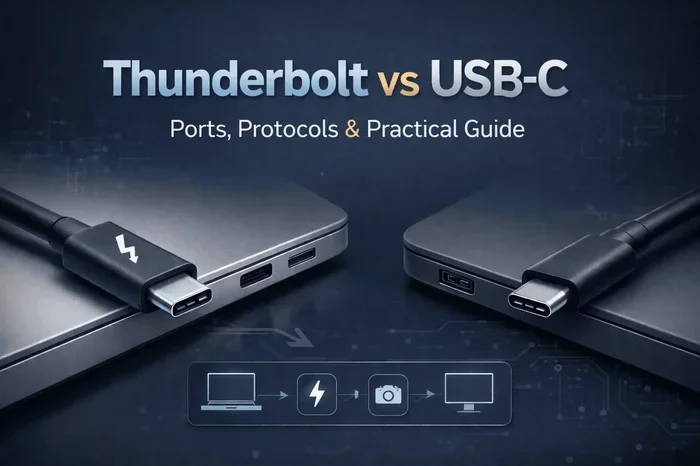
- Confusing USB C with Thunderbolt: Thunderbolt 3 and 4 use the USB C shape but are a different technology. Not all USB C cables support Thunderbolt.
The Future of USB Connectors
The industry has clearly moved toward USB C as the universal standard. The European Union even passed a law requiring USB C on all smartphones and tablets sold in the region. This means Micro USB is slowly fading out of mainstream use.
USB4, the latest USB standard, exclusively uses the USB C connector. It offers incredible speeds, power delivery, and display support through a single cable. As more devices adopt USB4, the need for any other connector type will continue to shrink.
If you are shopping for new accessories, invest in quality USB C cables and adapters. They will serve you well for years to come. Whether you are charging your phone, backing up data to an external gaming drive, or connecting peripherals, USB C handles it all.
Final Thoughts
So, is a USB C the same as a Micro USB? No, they are not the same. They are two different connectors with different shapes, speeds, and capabilities. USB C is the modern, fast, reversible connector built for today’s devices. Micro USB is the older, smaller connector still found on many legacy gadgets.
Understanding the difference saves you time, money, and frustration. You will buy the right cables, use the right adapters, and never have to deal with a connector that does not fit. Keep a mix of both types in your tech kit, and you will be ready for any device that comes your way.
Technology keeps evolving, and connectors change with it. Staying informed helps you keep up without overspending on the wrong cables. Bookmark this guide for future reference, and share it with anyone still confused about which cable goes where.
Frequently Asked Questions
Can I plug a USB C cable into a Micro USB port?
No, USB C and Micro USB have different shapes and sizes. They are physically incompatible without an adapter. You need a USB C to Micro USB adapter to connect the two.
Is USB C faster than Micro USB?
Yes, USB C is significantly faster. USB C supports speeds up to 40 Gbps with USB 4, while Micro USB 2.0 maxes out at 480 Mbps and Micro USB 3.0 reaches 5 Gbps.
Can I charge a USB C device with a Micro USB charger?
Not directly. You would need a Micro USB to USB C adapter or a USB C charger. Using the wrong connector can damage your device or the charger.
Why did USB C replace Micro USB?
USB C replaced Micro USB because it is reversible, faster, supports higher power delivery, and can carry data, video, and power through a single cable. It also became the industry standard required by regulations like the EU’s common charger law.
Are all USB C cables the same?
No, not all USB C cables are the same. Some support only charging, while others support fast data transfer and high power delivery. Check the cable specifications to make sure it meets your needs.
Do all new phones use USB C now?
Most new phones use USB C, including all iPhones from the iPhone 15 onward and nearly all Android phones made after 2020. A few budget devices may still use Micro USB, but they are increasingly rare.