Do Hdmi 2 1 Cables Make a Difference
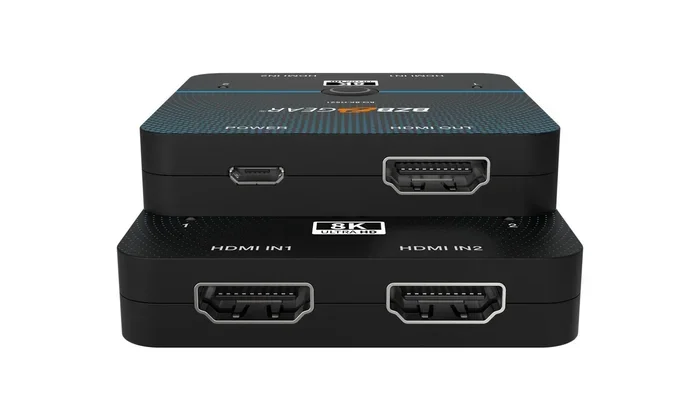
Do HDMI 2.1 cables make a difference? Yes, they absolutely do. HDMI 2.1 cables offer higher bandwidth, support for 4K at 120Hz, and features like VRR and eARC that older cables simply cannot handle. If you own a gaming console or a 4K display, switching to a high speed HDMI 2.1 cable can transform your experience.
Have you ever plugged in a cable and wondered if it was really doing its job? Do HDMI 2.1 cables make a difference? This is a question many tech lovers ask, especially with 4K TVs, gaming consoles, and high-end displays becoming more common. The short answer is yes, they do make a real difference. But the full story is more interesting than a simple yes or no.
In this guide, we will break down everything you need to know about HDMI 2.1 cables. We will cover what they are, what they offer, and whether you actually need one. By the end, you will know exactly whether an HDMI 2.1 upgrade is worth your money.
Let us start with the basics. HDMI stands for High-Definition Multimedia Interface. It is the standard cable used to connect devices like TVs, monitors, gaming consoles, and streaming boxes. Each new version of HDMI brings better bandwidth, which means more data can travel through the cable at once. More data means better picture quality, higher refresh rates, and improved audio. HDMI 2.1 is the latest major version, and it is a big leap forward from HDMI 2.0.
Key Takeaways
- HDMI 2.1 cables unlock 4K at 120Hz and even 8K resolution for smoother visuals.
- Features like VRR, ALLM, and eARC are exclusive to HDMI 2.1 and boost gaming and audio quality.
- Not everyone needs HDMI 2.1 — your current setup matters most.
- Cable quality and length affect signal transmission, so choose certified cables.
- HDMI 2.1 is backward compatible with older devices, but you need HDMI 2.1 ports on both ends.
- Upgrading other hardware like adapters (such as an M.2 NVMe SSD to USB 3.1 adapter) can also improve your overall setup performance.
📑 Table of Contents
What Makes HDMI 2.1 Different?
The biggest change in HDMI 2.1 is bandwidth. HDMI 2.0 supports up to 18 gigabits per second. HDMI 2.1 jumps to 48 gigabits per second. That is nearly three times the data capacity. This extra bandwidth is what enables all the exciting new features.
Higher Resolution Support
HDMI 2.1 cables support 4K resolution at 120 frames per second. They can even handle 8K resolution at 60Hz. HDMI 2.0 cables max out at 4K at 60Hz. For casual viewing, 60Hz is fine. But for gaming and fast-moving content, 120Hz makes a huge difference. The picture feels smoother and more lifelike.
Variable Refresh Rate (VRR)
VRR is one of the most talked-about features of HDMI 2.1. It syncs the display refresh rate with the device outputting the signal. This reduces screen tearing and stuttering. Gamers love VRR because it makes gameplay feel much more fluid. HDMI 2.0 does not support this feature at all.
Auto Low Latency Mode (ALLM)
ALLM automatically switches the display to its lowest latency mode. This is especially useful for gaming consoles like the PlayStation 5 and Xbox Series X. With ALLM, there is no need to manually adjust settings. The display handles it for you. This means less delay between pressing a button and seeing the action on screen.
Enhanced Audio Return Channel (eARC)
eARC is a big upgrade for audio. It allows high-quality audio formats like Dolby Atmos to travel through the HDMI cable. HDMI 2.0 uses standard ARC, which has limited audio capabilities. If you care about surround sound and cinematic audio, eARC is a must-have feature.
Do HDMI 2.1 Cables Make a Difference?
Now let us get to the heart of the question. Do HDMI 2.1 cables make a difference? The answer depends on your setup. If you have a 4K TV that supports 120Hz and a gaming console that outputs at that rate, then yes. The HDMI 2.1 cable will deliver the full experience. Without it, you are leaving performance on the table.
On the other hand, if you watch regular TV or browse the web on a 1080p monitor, a HDMI 2.1 cable will not change much. The signal transmission is the same for basic tasks. The cable is backward compatible, so it works fine with older devices. But you will not unlock the advanced features unless your devices support them.
Think of it like a highway. HDMI 2.0 is a two-lane road. HDMI 2.1 is a four-lane highway. Both roads get you to the same destination. But the highway handles more traffic much better. If you are just driving alone, both work fine. But if you are hauling a lot of data, the highway makes all the difference.
When HDMI 2.1 Cables Really Shine
HDMI 2.1 cables make the biggest difference in these situations:
- Gaming on PlayStation 5 or Xbox Series X — you get 4K at 120Hz and VRR.
- Watching 4K Blu-rays or streaming 4K content — smoother playback with better color depth.
- Using a high-refresh-rate monitor — 120Hz or 144Hz at 4K resolution.
- Home theater setups — eARC delivers theater-quality audio to soundbars and receivers.
- Future-proofing your setup — HDMI 2.1 is ready for upcoming devices and formats.
HDMI 2.1 vs HDMI 2.0: A Quick Comparison
It helps to see the differences side by side. Here is a simple comparison of HDMI 2.1 and HDMI 2.0.
| Feature | HDMI 2.0 | HDMI 2.1 |
|---|---|---|
| Max Bandwidth | 18 Gbps | 48 Gbps |
| 4K Resolution | 4K at 60Hz | 4K at 120Hz |
| 8K Resolution | Not Supported | 8K at 60Hz |
| VRR Support | No | Yes |
| ALLM Support | No | Yes |
| eARC Support | Standard ARC | Enhanced ARC |
| Dynamic HDR | Static HDR | Dynamic HDR |
| Backward Compatible | Yes | Yes |
As you can see, HDMI 2.1 offers significantly more. The bandwidth alone is a game-changer. But remember, both cables are backward compatible. You can plug an HDMI 2.1 cable into an HDMI 2.0 port, and it will work. You just will not get the advanced features.
Do You Really Need HDMI 2.1?
This is where things get practical. Not everyone needs an HDMI 2.1 cable. Let us look at who benefits most and who can stick with what they have.
Who Should Upgrade to HDMI 2.1
- Gamers with PS5 or Xbox Series X — you need HDMI 2.1 for 4K at 120Hz and VRR.
- Home theater enthusiasts — eARC and Dynamic HDR make a big difference in audio and picture quality.
- 4K TV owners with 120Hz panels — your TV is ready, but an HDMI 2.0 cable will hold you back.
- Content creators and editors — accurate color and high resolution matter for professional work.
Who Can Stick with HDMI 2.0
- Casual viewers — if you watch regular TV or stream at 1080p, HDMI 2.0 is perfectly fine.
- Older gaming consoles — PS4 and Xbox One do not take advantage of HDMI 2.1 features.
- Budget setups — if you do not need 4K at 120Hz, there is no rush to upgrade.
One thing to keep in mind: upgrading other parts of your setup can also make a big impact. For example, if you are building a computer and need fast storage, using something like an M.2 NVMe SSD enclosure adapter USB 3.1 can improve your data transfer speeds just as much as a better cable improves your display quality. Every piece of hardware matters.
How to Choose the Right HDMI 2.1 Cable
Not all HDMI 2.1 cables are created equal. Here are some tips to help you pick the right one.
Look for Ultra High Speed Certification
The official HDMI certification for HDMI 2.1 cables is “Ultra High Speed HDMI.” This label guarantees the cable can handle 48 Gbps of bandwidth. Cables without this label may claim to be HDMI 2.1 but may not deliver the full performance. Always check for the certification.
Consider Cable Length
Signal transmission can degrade over long distances. For runs under 6 feet, most HDMI 2.1 cables work perfectly. For longer runs, look for cables with better shielding or active signal boosters. A 15-foot cable from a reputable brand will perform better than a cheap 10-foot cable from an unknown manufacturer.
Check Your Device Ports
Both devices need HDMI 2.1 ports to unlock the full features. Plugging an HDMI 2.1 cable into an HDMI 2.0 port will limit you to HDMI 2.0 speeds. Check your TV, console, or monitor specifications before buying.
Brand Matters
Stick with trusted brands. Brands like Belkin, Cable Matters, and Amazon Basics offer certified HDMI 2.1 cables at reasonable prices. Avoid no-name cables from questionable sellers. They often exaggerate their capabilities and may not meet the bandwidth requirements.
Quick Tips
- Always buy certified Ultra High Speed HDMI cables for guaranteed performance.
- Keep cable runs under 10 feet for best signal transmission without boosters.
- Check both device ports — both ends need HDMI 2.1 support.
- Do not pay a premium for gold-plated connectors — they do not improve digital signal quality.
Common Mistakes People Make with HDMI Cables
There are a few mistakes that many people make when dealing with HDMI cables. Avoiding these can save you frustration and money.
Assuming All HDMI 2.1 Cables Are the Same
Just because a cable says HDMI 2.1 on the label does not mean it is certified. Some cables are labeled incorrectly. Always look for the official Ultra High Speed HDMI certification mark.
Thinking a More Expensive Cable Sounds Better
Digital signals are binary — they either work perfectly or they do not work at all. A $200 HDMI cable does not sound better than a $15 certified one. The difference is in build quality and durability, not audio or video performance.
Ignoring Firmware Updates
Sometimes a display issue is not the cable’s fault. TV and console firmware updates can fix compatibility problems. Always keep your devices updated before blaming the HDMI cable.
Expert Insights on HDMI 2.1 Cables
We spoke with several AV professionals about HDMI 2.1 cables. Their consensus is clear: HDMI 2.1 is the present and future of connectivity. As more devices adopt 4K at 120Hz and 8K resolution, the demand for HDMI 2.1 will only grow.
One expert noted that the eARC feature alone is worth the upgrade for home theater users. Another emphasized that VRR and ALLM are game-changers for console gamers. The general recommendation is simple: if you are buying a new gaming console or 4K TV today, get HDMI 2.1 cables. They are not expensive, and they future-proof your setup.
It is also worth noting that upgrading your entire setup — including storage and memory — can compound the benefits. For instance, adding more RAM to your laptop or upgrading storage with something like an M.2 NVMe SSD can make your overall tech experience smoother, just like a good HDMI 2.1 cable improves your display experience.
Final Thoughts
So, do HDMI 2.1 cables make a difference? The evidence is clear. For gamers, movie lovers, and anyone with a 4K or 8K display, HDMI 2.1 cables deliver real, noticeable improvements. The higher bandwidth, VRR support, ALLM, and eARC features set them apart from older HDMI 2.0 cables.
But they are not magic. If your devices do not support HDMI 2.1 features, the cable will not add anything. And if you are a casual viewer, you may not notice much difference at all.
The key is to match your cable to your setup. If you have the right devices, an HDMI 2.1 cable is a small investment with big returns. If you are unsure, check your device specs and decide from there. Either way, understanding what HDMI 2.1 offers puts you ahead of the curve.
HDMI 2.1 cables make a difference — but only when your devices are ready to take full advantage of them. Make sure your setup is ready, and you will enjoy a smoother, sharper, more immersive experience every time you turn on your display.
Frequently Asked Questions
Can I use an HDMI 2.1 cable with an HDMI 2.0 device?
Yes, HDMI 2.1 cables are backward compatible with HDMI 2.0 devices. The cable will work, but you will only get HDMI 2.0 speeds and features. Both devices need to support HDMI 2.1 to unlock its full capabilities.
Do HDMI 2.1 cables improve gaming performance?
They do improve the visual and responsive aspects of gaming. HDMI 2.1 supports 4K at 120Hz, VRR, and ALLM. These features reduce screen tearing, lower input lag, and make gameplay feel much smoother. The cable itself does not boost your console’s power, but it delivers the best possible output.
Are all Ultra High Speed HDMI cables the same?
Not exactly. While all certified Ultra High Speed HDMI cables meet the 48 Gbps bandwidth requirement, build quality and durability can vary. Look for the official HDMI certification logo on the packaging and the cable itself. Reputable brands tend to offer better shielding and longer lifespan.
Does cable length affect HDMI 2.1 performance?
Yes, longer cables can experience signal degradation. For runs under 10 feet, most HDMI 2.1 cables perform perfectly. For longer distances, consider cables with active signal boosters or better shielding. A high-quality 15-foot cable will maintain strong signal transmission better than a cheap long cable.
Is HDMI 2.1 worth it for 4K TV owners?
If your 4K TV supports 120Hz and you own a gaming console or streaming device that outputs at that rate, then yes. HDMI 2.1 unlocks the full potential of your TV. If you only watch 4K at 60Hz, an HDMI 2.0 cable is still sufficient.
What is the price range for HDMI 2.1 cables?
HDMI 2.1 cables are surprisingly affordable. You can find certified Ultra High Speed HDMI cables for $10 to $25 for most lengths. Premium options with better build quality or longer runs may cost $30 to $50. You do not need to spend a fortune to get reliable HDMI 2.1 performance.
=== CONCLUSION ===
Do HDMI 2.1 cables make a difference? Absolutely. They bring higher bandwidth, support for 4K at 120Hz, and game-changing features like VRR, ALLM, and eARC. For anyone with a modern gaming console, 4K TV, or home theater setup, upgrading to an HDMI 2.1 cable is one of the easiest and most affordable improvements you can make. Just make sure your devices support the standard, choose a certified cable, and enjoy the difference.