How Long Does Liquid Cooling Last
How long does liquid cooling last? Most liquid cooling systems last between 5 to 10 years with proper care. AIO coolers typically run 5 to 7 years, while custom loops can last a decade or more if maintained. Knowing the signs of wear and following simple maintenance steps keeps your system running cool and quiet.
Liquid cooling has become a go-to choice for PC builders who want silent operation and top-tier heat management. But here is the question everyone asks: how long does this technology actually last? Whether you are running an AIO cooler or a full custom loop, understanding the lifespan of your liquid cooling setup helps you plan upgrades and avoid surprises.
Most liquid cooling systems deliver reliable performance for several years. However, many factors play a role in determining exactly how long your cooler will keep working at its best. From the quality of the pump to the type of coolant you use, every detail matters. In this guide, we break down everything you need to know about the lifespan of liquid cooling systems.
If you have ever wondered whether your cooler will outlive your GPU or if you need to replace it every few years, you are in the right place. Let us dive into the real-world timelines, maintenance tips, and warning signs that tell you it is time for a change.
Key Takeaways
- AIO liquid coolers generally last 5 to 7 years before performance drops.
- Custom loop cooling systems can last 10+ years with regular maintenance.
- Coolant degradation and pump wear are the two biggest lifespan killers.
- Keeping your system clean and checking for leaks extends cooling life significantly.
- Knowing when to replace your cooler saves you from unexpected overheating.
- Proper installation and quality parts reduce early failure risk.
📑 Table of Contents
- What Is Liquid Cooling and Why Does It Matter?
- How Long Does Liquid Cooling Last?
- Factors That Affect Liquid Cooling Lifespan
- Signs Your Liquid Cooler Is Failing
- How to Extend the Life of Your Liquid Cooling System
- Liquid Cooling vs Air Cooling Durability
- Common Mistakes That Shorten Liquid Cooling Lifespan
- Expert Insights on Liquid Cooling Longevity
- Final Thoughts
What Is Liquid Cooling and Why Does It Matter?
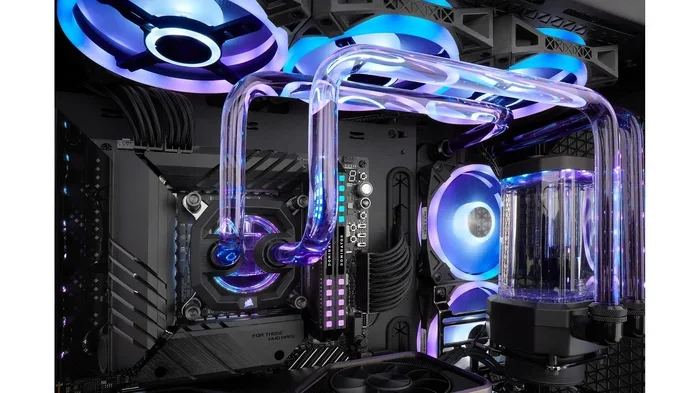
Liquid cooling uses fluid to transfer heat away from your CPU or GPU more efficiently than air cooling alone. A typical setup includes a water block, pump, radiator, fans, and tubing filled with coolant. The pump circulates the coolant, which absorbs heat from your components and carries it to the radiator where the fans dissipate the warmth into the air.
Liquid cooling lasts longer than many people expect, but it is not maintenance-free. Unlike air coolers that have no moving fluids, liquid systems have more components that can degrade over time. Understanding how each part works helps you appreciate why some coolers last longer than others.
For those wondering whether liquid cooling is worth the investment, the longevity factor plays a big role. A well-maintained setup can outlast several air coolers, making it a smart long-term choice for serious PC users.
How Liquid Cooling Systems Work
The basic principle is simple. Hot water absorbs heat from your CPU or GPU. The pump pushes this warm fluid through tubes to a radiator. Fans on the radiator cool the fluid down, and the now-cool liquid cycles back to absorb more heat. This continuous loop keeps your components at safe temperatures.
The pump is the heart of the system. It runs 24/7 whenever your PC is on. Over time, pump bearings wear out, which is one of the most common reasons liquid cooling systems fail. The radiator and fans also experience wear, though they tend to last longer than the pump itself.
Types of Liquid Cooling Setups
There are two main types of liquid cooling you will encounter. AIO (All-in-One) coolers come pre-filled and sealed from the factory. They require no maintenance and are the easiest to install. Custom loop systems use separate components that you assemble yourself. They offer better performance but demand regular upkeep.
AIO coolers generally have a shorter lifespan than custom loops because you cannot replace individual parts. Custom loops let you swap out a failing pump or replace old coolant, which extends the overall life of the system significantly.
How Long Does Liquid Cooling Last?
The honest answer depends on the type of system you have and how well you take care of it. Most AIO liquid coolers last between 5 and 7 years under normal use. Some high-end models push past 7 years with no issues. Custom loop cooling systems can last 10 years or more if you stay on top of maintenance.
But here is the thing. The number of years is not the only metric that matters. Performance degradation happens gradually. Your cooler might still run after 6 years, but it may not cool as efficiently as it did on day one. That slow decline is something every PC user should be aware of.
Average Lifespan of AIO Coolers
Most manufacturers rate their AIO coolers for about 5 to 6 years of continuous use. Some premium brands offer warranties up to 6 or even 7 years, which gives you a good sense of expected lifespan. After the 5-year mark, you might notice slightly higher idle temperatures or louder fan noise.
The sealed design of AIO coolers is both a blessing and a curse. It means you never have to refill coolant or worry about leaks during normal use. But it also means you cannot replace worn-out parts. Once the pump or radiator starts failing, you need to replace the entire unit.
Custom Loop Cooling Longevity
Custom loops give you the advantage of replacing individual components. You can swap out a dying pump, flush old coolant, and replace worn tubing. This modular approach means a well-maintained custom loop can easily last 10 years or longer.
Many enthusiasts run custom loops for 5 to 7 years before doing a full coolant change and inspection. Some push 10 years with regular maintenance. The key difference between a custom loop that lasts and one that fails early comes down to two things: maintenance frequency and component quality.
If you are curious about how long your cooling setup might last compared to other hardware, check out how long liquid cooling is worth the investment for your specific needs.
Factors That Affect Liquid Cooling Lifespan
Several factors determine how long your liquid cooling system will keep running strong. Some are within your control, while others depend on the quality of the parts you chose. Let us look at the biggest influencers.
Quality of Components
Cheap AIO coolers with low-quality pumps tend to fail faster. Premium coolers from brands like Corsair, NZXT, and Arctic use better materials and more durable pumps. The radiator thickness, fan quality, and tubing material all play a role in overall longevity.
When you invest in a quality liquid cooling setup, you are buying more years of reliable service. A $100 cooler might last 4 years, while a $150 cooler could go strong for 7 or 8. The price difference often reflects the expected lifespan.
Environmental Conditions
Where you live matters. High humidity can accelerate corrosion inside your cooling loop. Dusty environments clog radiators faster, forcing fans to work harder and wear out sooner. If you live in a hot climate, your cooling system works harder, which can shorten its overall lifespan.
Running your PC in a well-ventilated room with moderate temperatures helps your liquid cooler last longer. Keeping the ambient temperature low reduces the strain on both the radiator and the pump.
Maintenance Habits
This is the biggest variable you control. AIO coolers need very little maintenance, but custom loops benefit greatly from regular care. Flushing old coolant and replacing it every 1 to 2 years prevents buildup that can clog tubes and reduce flow rates.
For those who want to keep their system cool, it helps to understand how other components interact with cooling. For example, does your RAM need active cooling? In most cases, stock RAM runs fine without a dedicated cooler, but overclocked modules can benefit from additional airflow or even a small fan directed at the sticks.
Usage Patterns
A PC that runs 24/7 at full load puts more stress on the cooling system than a casual gaming PC that sits idle for hours. Continuous heavy use wears out pumps faster and degrades coolant more quickly. If you run demanding workloads like video rendering or 3D modeling for extended periods, expect slightly more wear on your cooling components.
Signs Your Liquid Cooler Is Failing
Catching early warning signs saves you from a sudden temperature spike that could damage your CPU or GPU. Watch for these common indicators that your liquid cooling system is on its way out.
Temperature Spikes and Performance Drops
If your CPU temperatures start creeping up for no obvious reason, the pump might be losing efficiency. A failing pump circulates coolant more slowly, which means less heat gets moved away from your processor. A rise of 5 to 10 degrees Celsius over baseline is a red flag.
You might also notice that your fans spin up more often or run louder than usual. This happens because the system is trying to compensate for reduced cooling performance. If your fans are working harder but temperatures keep climbing, it is time to investigate.
Visible Leaks and Physical Damage
Check your tubing and fittings regularly for any signs of moisture. Even a small leak can cause serious damage if it reaches your motherboard or GPU. AIO coolers rarely leak because they are factory-sealed, but custom loops have more connection points that can develop drips over time.
Corrosion on metal fittings or a milky appearance in the coolant are both signs that your loop needs attention. Cloudy coolant usually means bacteria or algae growth, which can clog tubes and reduce flow. Flushing the system and replacing the fluid often fixes this problem.
How to Extend the Life of Your Liquid Cooling System
Taking care of your liquid cooler does not require a lot of effort. A few simple habits can add years to your cooling system’s lifespan. Here are the most effective ways to keep your setup running strong.
Regular Maintenance Tips
- Check coolant levels in custom loops every 6 months. Low fluid means you have a slow leak that needs attention.
- Flush and replace coolant every 1 to 2 years. Old coolant loses its thermal conductivity and can become corrosive.
- Clean radiators and fans every 3 to 6 months. Dust buildup blocks airflow and forces your system to work harder.
- Inspect tubing for cracks or discoloration. Brittle tubing is a leak risk that should be replaced immediately.
- Tighten fittings periodically. Vibrations from daily use can loosen connections over time.
When to Replace Your Cooler
Most experts recommend replacing your AIO cooler after 5 to 7 years, even if it still seems to work. Newer models are significantly more efficient and quieter. Upgrading gives you better thermal performance and often comes with improved warranty coverage.
For custom loops, you can extend the life by replacing individual parts as they fail. Swapping in a new pump or fresh coolant can make an older loop feel like new again. This modular advantage is one of the biggest reasons enthusiasts prefer custom loops over AIOs.
If you are also thinking about other hardware upgrades, it helps to understand how long your other components will last. For instance, car speakers have a similar lifespan consideration where quality and maintenance determine longevity. The same principle applies to your PC cooling system.
Liquid Cooling vs Air Cooling Durability
Air coolers are simpler and have fewer failure points. A quality tower air cooler can last 10 to 15 years with no moving parts to wear out. The thermal paste between the CPU and cooler might need replacement every 3 to 5 years, but the cooler itself often outlasts liquid options.
Liquid cooling offers better thermal performance and quieter operation, but it comes with more components that can fail. The trade-off is clear: air cooling lasts longer with less maintenance, while liquid cooling delivers superior cooling at the cost of periodic upkeep.
For most users, an AIO cooler strikes a good balance. You get the performance benefits of liquid cooling without the complexity of a custom loop. Just remember that even the best liquid cooler will eventually need replacement, so plan your budget accordingly.
It is also worth noting that GPU cooling has its own lifespan considerations. If you are curious about how long your graphics card stays cool, understanding whether GPU fans always spin can help you gauge the health of your cooling system as a whole.
Common Mistakes That Shorten Liquid Cooling Lifespan
Avoiding these common errors can save you from premature cooler failure and expensive replacements.
- Skipping coolant replacement. Old coolant becomes acidic and corrosive. This eats away at metal fittings and can clog your loop.
- Over-tightening fittings. This cracks tubing and creates weak points that eventually leak.
- Using incompatible coolant. Some coolants react poorly with certain metals. Always check compatibility before filling your loop.
- Ignoring dust buildup. Clogged radiators force fans to spin faster and wear out prematurely.
- Running the pump at maximum speed constantly. This wears out pump bearings faster than necessary. Use a fan curve that balances noise and performance.
Expert Insights on Liquid Cooling Longevity
Experienced PC builders agree that the pump is the most likely component to fail first. Most quality pumps are rated for 50,000 to 70,000 hours of operation, which translates to roughly 6 to 8 years of continuous use. After that point, the risk of failure increases steadily.
Thermal paste is another often-overlooked factor. Even the best thermal paste degrades over time. Replacing it every 3 to 5 years ensures optimal heat transfer between your CPU and the water block. This simple step can improve cooling performance and reduce stress on your pump.
For those who also want to understand broader cooling concepts, learning about whether RAM needs cooling gives you a fuller picture of how different components interact with your cooling setup.
Final Thoughts
How long does liquid cooling last is a question with a practical answer. Most AIO coolers serve you well for 5 to 7 years, while custom loops can go 10 or more with proper care. The key is understanding that liquid cooling is not a set-it-and-forget-it solution. It rewards regular attention and quality maintenance.
By watching for early warning signs, keeping your system clean, and replacing coolant on schedule, you get the best return on your cooling investment. Whether you are a casual user or an enthusiast, taking these simple steps ensures your liquid cooling system keeps your PC running cool and quiet for years to come.
Start with the basics: check your coolant, clean your radiators, and stay alert to temperature changes. These small habits add up to a longer-lasting, more reliable cooling setup. Your future self will thank you when your PC is still running smoothly years from now.
Frequently Asked Questions
How often should I replace the coolant in my liquid cooling loop?
For custom loops, replace coolant every 1 to 2 years. AIO coolers come pre-filled and sealed, so they do not need coolant replacement. Old coolant loses effectiveness and can become corrosive, so regular changes keep your loop running efficiently.
Can a liquid cooler last 10 years?
Yes, custom loop systems can last 10 years or more with proper maintenance. AIO coolers typically last 5 to 7 years. The difference comes down to the ability to replace individual parts in a custom loop, which extends the overall system life significantly.
Is it normal for liquid coolers to make noise after a few years?
Some noise increase is normal as fans accumulate dust and bearings wear out. Pump noise can also change over time. If the noise gets louder suddenly, check for dust buildup or a failing pump. Regular cleaning helps prevent most noise issues.
What happens if my AIO cooler leaks?
AIO coolers are factory-sealed, so leaks are rare but possible. If a leak occurs, it can damage your motherboard or other components. Turn off your PC immediately and inspect the cooler. Most manufacturers cover leaks under warranty, so check your warranty terms.
Does overclocking reduce the lifespan of a liquid cooler?
Overclocking increases heat output, which puts more stress on your cooling system. This can shorten the lifespan slightly by making the pump and fans work harder. However, a quality liquid cooler handles overclocking without significant lifespan reduction if you maintain it properly.
How do I know if my liquid cooler pump is failing?
Signs of a failing pump include rising CPU temperatures, unusual grinding or rattling noises, and reduced coolant flow. If you notice any of these symptoms, inspect your cooler right away. A dead pump means the entire AIO unit usually needs replacement.
=== CONCLUSION ===
How long does liquid cooling last depends on the type of system you have, the quality of your components, and how well you maintain it. AIO coolers deliver solid performance for 5 to 7 years, while custom loops can go a decade or longer with regular care. The investment in quality parts and consistent maintenance pays off in cooler temperatures, quieter operation, and fewer surprises.
Keep an eye on temperature trends, replace your coolant on schedule, and stay proactive about cleaning. These habits ensure your liquid cooling system performs at its best for as long as possible. Whether you are building a new PC or maintaining an existing one, understanding your cooler’s lifespan helps you make smarter decisions about upgrades and replacements.