How Much Ram Do You Need for Gaming
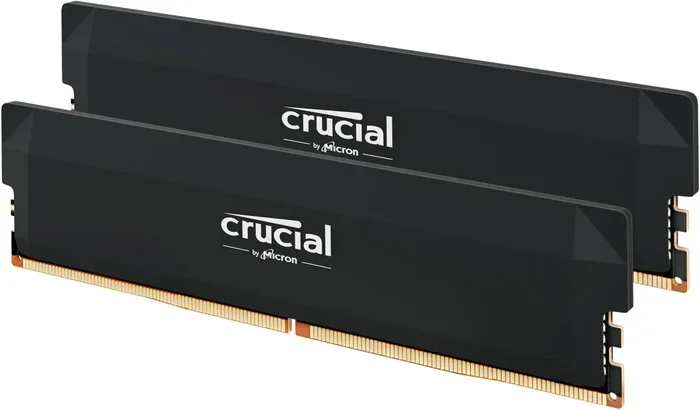
How much RAM do you need for gaming depends on the games you play and your performance goals. Most modern games run well with 16GB of RAM, while 8GB is the bare minimum for casual gaming. If you want top-tier performance with future-proofing, 32GB of RAM gives you the headroom to multitask and run demanding titles without a hitch.
If you are building or upgrading a gaming setup, how much RAM do you need for gaming is one of the first questions you should ask. Random Access Memory, or RAM, plays a huge role in how smoothly your games run. It affects load times, frame rates, and how well your system handles multitasking while you play.
Too little RAM and your games will stutter, freeze, or crash. Too much RAM and you waste money on hardware you do not actually need. The good news is that finding the right amount is simpler than you think. In this guide, we break down everything you need to know about gaming RAM requirements in plain, easy-to-understand language.
Whether you are a casual player or a hardcore enthusiast, this article will help you make the right choice. We will cover 8GB, 16GB, and 32GB options, explain what each amount can handle, and give you practical advice based on real-world gaming scenarios. Let us dive in.
Key Takeaways
- 8GB RAM: The minimum for basic gaming, but you will struggle with modern titles.
- 16GB RAM: The sweet spot for most gamers in 2024 and beyond.
- 32GB RAM: Best for enthusiasts, streamers, and those who want future-proof performance.
- RAM speed matters: Faster memory can improve frame rates in CPU-bound games.
- Dual-channel setup: Always install RAM in pairs for better performance.
- Check your games: Always review the system requirements before buying RAM.
📑 Table of Contents
- What Does RAM Do for Gaming?
- How Much RAM Do You Need for Gaming: 8GB
- How Much RAM Do You Need for Gaming: 16GB
- How Much RAM Do You Need for Gaming: 32GB
- RAM Types: DDR4 vs DDR5
- How to Choose the Right RAM for Your Gaming Setup
- Common Mistakes When Choosing Gaming RAM
- Expert Insights and Final Recommendations
- Conclusion
What Does RAM Do for Gaming?
RAM is your system’s short-term memory. When you launch a game, it loads data like textures, maps, character models, and audio into RAM so your processor can access them quickly. Without enough RAM, your system has to constantly swap data to your storage drive, which causes lag and stuttering.
Think of RAM like a desk. A bigger desk lets you spread out more papers and work on them at the same time. A small desk means you keep shuffling papers in and out of a filing cabinet, which slows you down. The same idea applies to system memory in gaming.
Your RAM capacity determines how much data your computer can hold in active use at any given moment. Your RAM speed determines how fast that data moves between the memory and your processor. Both factors matter for a smooth gaming experience, but capacity usually has a bigger impact than speed.
Why RAM Speed Matters
RAM speed, measured in megahertz (MHz), affects how quickly your memory can send data to the CPU. Faster RAM can boost frame rates in some games, especially CPU-bound titles where the processor is the main bottleneck. However, the difference is usually small compared to upgrading your GPU or adding more capacity.
For most gamers, focusing on capacity first and speed second is the best strategy. A 3200MHz kit with enough capacity will serve you better than a 5000MHz kit with too little memory.
How Much RAM Do You Need for Gaming: 8GB
Eight gigabytes of RAM is the minimum requirement for most modern games. It is the entry-level option that lets you play older titles and less demanding newer games at lower settings. If you are on a tight budget, 8GB can get you started.
However, 8GB is becoming outdated for serious gaming. Many current AAA titles list 16GB as their recommended requirement. With only 8GB, you may experience long load times, texture pop-in, and occasional frame drops, especially in open-world games with large environments.
What 8GB Can Handle
- Older games like Fortnite, League of Legends, and CS:GO at medium settings
- Indie games and less demanding titles
- Casual gaming with a few browser tabs open
What 8GB Struggles With
- Modern AAA titles like Cyberpunk 2077 and Hogwarts Legacy
- Running Discord, Spotify, and a game simultaneously
- Streaming while playing
If you are building a budget PC and can only afford 8GB right now, consider this a temporary solution. Plan to upgrade to 16GB as soon as you can. Check out our guide on how much RAM for a gaming laptop if you are working with a portable setup.
How Much RAM Do You Need for Gaming: 16GB
Sixteen gigabytes is the gold standard for gaming in 2024. This is the amount most game developers recommend and the sweet spot that balances performance with cost. With 16GB, you can run virtually any modern game at high settings without issues.
16GB also gives you plenty of headroom for multitasking. You can have Discord, Spotify, a web browser, and your game running all at once without noticeable slowdowns. For most gamers, this is the ideal amount of memory to invest in.
Who Should Choose 16GB?
- Casual and mid-core gamers
- Players who stream while gaming
- Anyone building a new gaming PC or laptop
For more details on choosing the right RAM for your laptop, check out how much RAM for a gaming laptop. This guide covers everything from capacity to compatibility.
Dual-Channel Setup Matters
When you install 16GB, always use two 8GB memory modules instead of a single 16GB stick. This creates a dual-channel configuration that doubles the data bandwidth between your RAM and CPU. The result is smoother performance and better frame rates in many games.
Most modern motherboards support dual-channel memory, and setting it up is straightforward. Just make sure both sticks are the same brand, speed, and capacity for the best results.
How Much RAM Do You Need for Gaming: 32GB
Thirty-two gigabytes of RAM is overkill for gaming alone, but it is becoming increasingly popular. If you are a content creator, a streamer, or someone who wants their system to stay relevant for years, 32GB is a smart investment.
32GB RAM for gaming gives you massive headroom. You can run the most demanding titles at max settings while streaming, recording, and running background applications without any performance hits. It is also future-proof, meaning newer games that require more memory will not slow you down.
For those interested in high-end setups, our article on 32GB RAM laptop for gaming covers how this amount performs in portable gaming machines.
Who Should Choose 32GB?
- Content creators who edit videos while gaming
- Streamers who run OBS and multiple overlays
- Hardcore gamers who want maximum future-proofing
- Professionals who use their PC for both work and play
Keep in mind that 32GB is significantly more expensive than 16GB. If you are purely a gamer and do not multitask heavily, 16GB will serve you just fine for the next several years.
RAM Types: DDR4 vs DDR5
When shopping for RAM, you will encounter two main types: DDR4 and DDR5. DDR4 RAM has been the standard for years and offers solid performance at an affordable price. DDR5 RAM is the newer generation and provides higher bandwidth and better energy efficiency.
DDR4 RAM
DDR4 is the most common and widely available type of memory. It operates at speeds between 2133MHz and 3600MHz and is compatible with most existing motherboards. For gaming, DDR4 at 3200MHz or 3600MHz delivers excellent performance and is the most cost-effective choice.
DDR5 RAM
DDR5 is the latest standard and offers faster speeds and improved efficiency. It starts at 4800MHz and can reach speeds well above 6000MHz on high-end kits. However, DDR5 is still more expensive and requires a compatible motherboard and CPU.
If you are building a new system, consider DDR5 for longevity. If you are upgrading an existing PC, DDR4 is the practical choice. For more information on RAM costs, visit our page on how much 8GB RAM costs for a laptop to get a sense of current pricing.
How to Choose the Right RAM for Your Gaming Setup
Choosing the right RAM involves more than just picking a capacity number. Several factors affect your final decision, and getting them right can make a big difference in your gaming performance.
Check Your Game Requirements
Every game lists minimum and recommended system requirements. Always check the recommended RAM amount before buying. This simple step saves you from overspending or underperforming.
Consider Your Motherboard
Your motherboard determines which type of RAM you can use and how many slots are available. Check your motherboard manual for supported RAM types, maximum capacity, and slot configuration. Most gaming motherboards have four DIMM slots, allowing up to 128GB of RAM.
Plan for Multitasking
If you like to have multiple applications running while you game, lean toward 16GB or more. Background apps like Discord, Spotify, Chrome, and streaming software all consume memory. The more you have running, the more RAM you need.
Match Your RAM Sticks
Always buy RAM in matching pairs. Mixing different brands, speeds, or capacities can cause compatibility issues and reduce performance. If you are unsure, buy a kit that includes two or four sticks designed to work together.
Upgrade Path
Think about your upgrade path. If your motherboard has four RAM slots and you currently use two 8GB sticks, you can easily add two more 8GB sticks later to reach 32GB. This flexibility lets you start with 16GB and scale up when needed.
Common Mistakes When Choosing Gaming RAM
Avoid these common pitfalls that many gamers make when buying memory for their systems.
- Buying a single stick: Always install RAM in pairs for dual-channel performance. A single 16GB stick will underperform compared to two 8GB sticks.
- Ignoring compatibility: Not all RAM works with all motherboards. Check your motherboard’s QVL (Qualified Vendor List) before purchasing.
- Overemphasizing speed: Faster RAM looks impressive on paper, but capacity matters more for gaming. Do not pay a premium for 5000MHz RAM if 3200MHz meets your needs.
- Skipping the BIOS update: After installing new RAM, update your motherboard BIOS to ensure full compatibility and stability.
- Forgetting about XMP/EXPO: Modern RAM often runs at slower default speeds. Enable XMP (Intel) or EXPO (AMD) in your BIOS to unlock the rated speed.
If you run into issues after installation, our guide on how to install RAM in a laptop can walk you through the process step by step.
Expert Insights and Final Recommendations
After reviewing hundreds of gaming benchmarks and system configurations, the consensus is clear: 16GB of RAM is the best investment for most gamers today. It delivers excellent performance in virtually every modern title and leaves room for multitasking without breaking the bank.
If you are a competitive gamer who plays titles like Valorant or Fortnite, 16GB is more than enough. If you are a streamer or content creator, consider stepping up to 32GB for the extra headroom. And if you are on a shoestring budget, 8GB will work for older or less demanding games, but plan to upgrade soon.
The bottom line is that how much RAM you need for gaming depends on your habits, your budget, and the titles you play. Start with 16GB as your baseline, and scale up or down based on your specific needs.
Remember, RAM is just one piece of the puzzle. Your GPU, CPU, and storage all play crucial roles in your overall gaming performance. Balance your upgrades wisely to get the best experience for your money.
Conclusion
Choosing the right amount of RAM for gaming does not have to be confusing. 8GB is the minimum, 16GB is the sweet spot, and 32GB is for enthusiasts and future-proofing. By understanding what each amount offers, you can make a confident decision that matches your gaming style and budget.
Take the time to check your game requirements, match your RAM sticks properly, and consider your multitasking habits. A well-chosen RAM setup will deliver smooth frame rates, fast load times, and a much more enjoyable gaming experience for years to come.
Start with the right amount of memory, and your games will thank you. Happy gaming!
Frequently Asked Questions
Is 8GB RAM enough for gaming in 2024?
8GB is the bare minimum and will work for older or less demanding games. However, most modern AAA titles recommend 16GB for optimal performance. If you can afford it, go with 16GB to avoid frustration and ensure smoother gameplay.
Will adding more RAM increase my FPS?
It depends. If you currently have less RAM than your game requires, adding more will boost your FPS significantly. But if you already have enough RAM (like 16GB), adding more will not noticeably increase your frame rates in most games.
Can I mix different RAM sticks together?
You can, but it is not ideal. Mixing different brands, speeds, or capacities can cause compatibility issues and reduce performance. Always try to use matching RAM sticks from the same kit for the best results.
Do I need 32GB RAM for gaming?
Most gamers do not need 32GB. 16GB handles virtually every modern game perfectly. However, if you stream, create content, or want your system to stay relevant for many years, 32GB is a worthwhile investment.
What is the difference between RAM capacity and RAM speed?
RAM capacity is how much data your memory can hold at once, measured in gigabytes. RAM speed is how fast that data moves, measured in megahertz. For gaming, capacity matters more than speed. Always prioritize having enough memory over having faster memory.
How do I know if my RAM is dual-channel?
If you have two or more identical RAM sticks installed in matching slots (usually slots 2 and 4), your system is running in dual-channel mode. You can verify this using tools like CPU-Z or your motherboard’s built-in diagnostic software.