Will Usb a Be Discontinued
USB-A is slowly fading out as USB-C becomes the new standard across laptops, phones, and tablets. While it is not disappearing overnight, major tech companies are pushing hard toward USB-C for faster speeds and better design. You will still find USB-A on many devices for years, but planning ahead is smart.
This is a comprehensive guide about Will Usb A Be Discontinued.
Key Takeaways
- USB-A is being phased out: Most new devices now favor USB-C over the traditional USB-A port.
- USB-C offers faster speeds: Newer USB standards deliver much higher data transfer rates and more power.
- Backward compatibility matters: Adapters let you keep using older USB-A devices even as ports disappear.
- Major brands are already switching: Apple, Google, and others have fully adopted USB-C on their devices.
- You do not need to panic: USB-A will remain available on many devices for several more years.
- Start transitioning now: Buying USB-C cables and adapters today saves money and hassle later.
[FEATURED_IMAGE_PLACEHOLDER]
Have you noticed that fewer new laptops and phones come with those wide, rectangular USB ports? That is the classic USB-A connector, and it has been a staple of computing for over two decades. But a big shift is underway. The question on many people’s minds is simple: will USB-A be discontinued?
The short answer is yes, eventually. The longer answer is that it is happening gradually, and you still have time to prepare. USB-C is taking over as the universal connector for almost everything. From smartphones to external hard drives, the industry is moving toward one slim, reversible port that does it all.
This article breaks down everything you need to know about the future of USB-A. You will learn why the change is happening, what it means for your current devices, and how to make the switch without spending a fortune.
What Is USB-A and Why Has It Been So Popular?
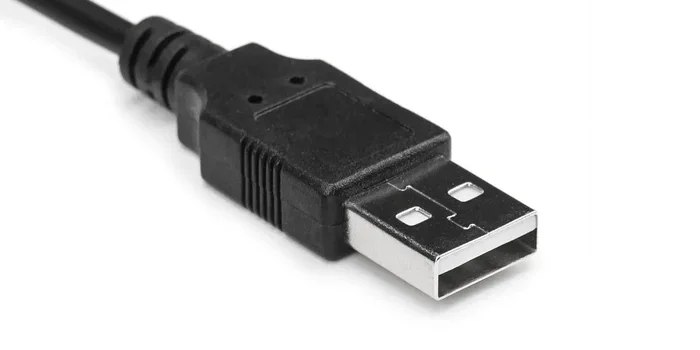
USB-A is the flat, rectangular plug that most people picture when they think of a USB cable. It has been the standard connector since the late 1990s. You have probably used it to connect a flash drive, a mouse, or a charging cable to your computer.
Over the years, USB-A went through several updates. USB 2.0 was the first widely used version, offering speeds up to 480 Mbps. Then came USB 3.0 and USB 3.1, which pushed speeds to 5 Gbps and 10 Gbps respectively. Despite these improvements, the physical connector stayed the same.
Here is why USB-A became so popular:
- Simple design: The flat shape made it easy to plug in, even in the dark.
- Wide compatibility: Almost every computer, charger, and peripheral used it.
- Cheap to produce: Manufacturers loved the low cost of USB-A ports and cables.
- Durable: The connector was built to last thousands of plug cycles.
For a long time, USB-A was the king of connectivity. But technology does not stand still. As devices got thinner, faster, and more powerful, the limitations of USB-A became harder to ignore.
Why Is USB-A Being Phased Out?
The shift away from USB-A comes down to a few key reasons. None of them are about making your life harder. Instead, they are about making your devices better.
USB-C Is Faster and More Versatile
USB-C is a completely different connector. It is small, oval-shaped, and reversible, meaning you never have to flip it to plug it in. More importantly, it supports much faster data transfer speeds and higher power delivery.
USB 3.1 Gen 2 over USB-C can reach 10 Gbps. USB 3.2 pushes that even further. And with USB4 on the horizon, speeds can hit 40 Gbps or more. USB-A simply cannot compete with these numbers.
USB-C also supports USB power delivery, which means a single cable can charge your laptop, phone, and tablet. No more carrying multiple chargers.
Device Design Demands Smaller Ports
Modern laptops, tablets, and phones are getting thinner and lighter. The USB-A port is relatively large and bulky compared to USB-C. Engineers need every millimeter of space they can get. USB-C fits perfectly into sleek, modern designs without adding bulk.
This is why companies like Apple, Dell, HP, and Lenovo have already dropped USB-A from many of their latest models. They are betting on USB-C as the future.
The Industry Wants One Universal Connector
One of the biggest frustrations over the years was having a drawer full of different cables. USB-C aims to fix that. The European Union has even passed regulations requiring USB-C as the standard for most electronics sold in the region. This push toward a single connector is a major reason USB-A is being phased out.
Will USB-A Disappear Completely?
Probably not anytime soon. But the writing is on the wall. Most new laptops and desktops now ship with only USB-C ports. Even many budget devices are following this trend.
Here is what the timeline might look like:
- Now to 2025: USB-A is still common on budget laptops, desktops, and peripherals. Most printers and external drives still use it.
- 2025 to 2028: USB-A starts disappearing from mid-range and premium devices. It becomes an afterthought rather than a standard.
- 2028 and beyond: USB-A could become rare, found mainly in legacy equipment and specialized hardware.
The good news is that backward compatibility is a huge factor. You can use USB-A devices with USB-C ports through simple adapters. This makes the transition much smoother for everyday users.
How to Prepare for the USB-A to USB-C Transition
You do not need to throw away all your USB-A cables tomorrow. But taking a few smart steps now will save you headaches later.
Get the Right Adapters
Adapters are your best friend during this transition. A simple USB-A to USB-C adapter lets you connect your older devices to new computers. They are inexpensive and widely available.
If you use external storage, consider a NVMe SSD to USB adapter that supports USB-C. This way, you get blazing fast speeds and future-proof your setup at the same time.
Upgrade Your Cables and Peripherals
When it is time to replace a cable or peripheral, go with USB-C. A USB C SSD enclosure is a great example of a smart upgrade. It lets you use modern NVMe drives with the latest connectivity standard.
Similarly, if you need to connect older M.2 NVMe drives through a USB port, look for an M.2 NVMe SSD to USB 3.1 adapter that gives you flexibility now and room to grow later.
Check What Comes With Your Next Device
Before buying a new laptop or desktop, check the port options. If you are shopping for a portable external drive, consider something like a SanDisk Extreme Portable 2TB External USB C NVMe SSD that uses the modern USB-C standard and delivers top performance.
Keep a Few USB-A Cables Just in Case
Even after USB-A becomes less common, you will still encounter it on printers, older monitors, and certain accessories. Keep a couple of USB-A cables in your bag or desk drawer. They will come in handy more often than you think.
USB-A vs USB-C: A Quick Comparison
It helps to see the differences side by side. Here is a simple breakdown of how USB-A and USB-C stack up against each other.
| Feature | USB-A | USB-C |
|---|---|---|
| Shape | Flat and rectangular | Small and oval |
| Reversible | No | Yes |
| Max Data Speed | 10 Gbps (USB 3.1) | 40 Gbps (USB4) |
| Power Delivery | Up to 15W (basic) | Up to 240W with PD |
| Common On | Older devices, printers | Modern laptops, phones |
| Future Outlook | Being phased out | Becoming the universal standard |
As you can see, USB-C wins in almost every category. It is faster, more powerful, and more convenient. The only advantage USB-A has left is its massive install base of existing devices and accessories.
Common Mistakes People Make During the Transition
Switching from USB-A to USB-C is straightforward, but a few common mistakes can cause frustration.
- Buying cheap adapters: Poor-quality adapters can cause slow speeds or connection drops. Stick to reputable brands.
- Assuming all USB-C is the same: Not all USB-C cables support the same speeds or power levels. Look for certified cables that match your needs.
- Ignoring Thunderbolt: Some USB-C ports support Thunderbolt, which offers even faster speeds. Check your device specs to take full advantage.
- Waiting too long: The longer you wait, the harder the transition becomes. Start swapping out cables and adapters now while options are plentiful and affordable.
Expert Insight: What Industry Leaders Are Saying
Major technology companies are fully committed to USB-C. Apple has used it exclusively on the iPad and MacBook lines. Google’s Pixel phones and Chromebooks rely on USB-C. Even Microsoft has shifted most of its Surface lineup to USB-C only.
The USB Implementers Forum (USB-IF), the group that sets USB standards, continues to invest in USB-C and USB4 development. Their roadmap shows no signs of bringing USB-A back as a primary connector. This is not a temporary trend. It is a permanent industry shift.
According to industry analysts, by 2028, the vast majority of consumer electronics will use USB-C as their primary connection method. USB-A will likely survive in niche applications and legacy hardware for a few more years, but its days as a mainstream connector are numbered.
Final Thoughts
The answer to the question will USB-A be discontinued is clear: yes, but gradually. The transition to USB-C is already well underway, and it is reshaping how we connect devices. From faster data transfer to universal compatibility, USB-C offers real benefits that make the change worthwhile.
You do not need to rush out and replace everything today. But being aware of the shift and making small, thoughtful upgrades now will put you ahead of the curve. Keep a few adapters on hand, choose USB-C when buying new gear, and you will be perfectly fine.
The age of USB-A is coming to a close. The age of USB-C is in full swing. Embrace the change, and your tech setup will be ready for whatever comes next.
Will USB-A Be Discontinued FAQ
Can I still use USB-A devices after USB-A is discontinued?
Yes. USB-A devices will work with USB-C ports through adapters and cables. The transition is designed to be gradual, so you will not be forced to replace everything overnight. Keep a few USB-A to USB-C adapters handy, and your existing devices will continue to work without any issues.
Is USB-C faster than USB-A?
Yes, USB-C supports much faster data transfer speeds than USB-A. While USB-A maxes out at 10 Gbps with USB 3.1, USB-C with USB4 can reach speeds up to 40 Gbps. USB-C also supports higher power delivery, making it better for charging laptops and other power-hungry devices.
Do all USB-C cables support the same speeds?
No. USB-C cables come in different versions and support different speeds. A basic USB-C cable might only support 480 Mbps like old USB 2.0, while a certified USB 3.2 or USB4 cable can handle 10 Gbps or more. Always check the cable specifications before buying to ensure it meets your speed and power needs.
Will my printer still work if it has USB-A and my computer only has USB-C?
Yes. You can use a simple USB-A to USB-C adapter or cable to connect your printer to a modern computer. Most adapters are inexpensive and work reliably. Just make sure to get a quality adapter from a trusted brand to avoid connection problems.
When will USB-A be completely gone from new devices?
There is no fixed date, but industry experts predict that by 2028, most new consumer devices will have moved away from USB-A entirely. Some premium laptops and tablets have already made the switch. Budget and legacy devices may still include USB-A for a few more years as the transition continues.
Should I buy a USB-C hub or dock right now?
If you use a laptop with only USB-C ports, a USB-C hub is a smart investment. It expands your connectivity options and lets you use older USB-A devices alongside modern ones. Look for a hub that supports data transfer, video output, and power delivery for the most versatility.
Frequently Asked Questions
What is Will Usb A Be Discontinued?
Will Usb A Be Discontinued is an important topic with many practical applications.