32gb Ram Laptop for Gaming

A 32GB RAM laptop for gaming delivers smooth gameplay, faster load times, and seamless multitasking. Whether you play modern AAA titles or stream while gaming, 32GB RAM gives you the headroom you need. In this guide, we break down the benefits, top picks, and everything else you should know.
Key Takeaways
- 32GB RAM is ideal for modern gaming: It handles AAA titles, multitasking, and streaming without breaking a sweat.
- Performance boost is real: You get faster load times, smoother frame rates, and fewer crashes.
- Not everyone needs it: Casual gamers may do fine with 16GB, but enthusiasts will love the extra power.
- Top brands offer great options: Lenovo, HP, ASUS, and others have solid 32GB gaming laptops.
- Price varies widely: Budget-friendly deals exist, but expect to pay more for premium configurations.
- Check other specs too: CPU, GPU, and storage matter just as much as RAM.
- Future-proof your setup: 32GB keeps your laptop relevant for years as games get heavier.
📑 Table of Contents
- Why a 32GB RAM Laptop for Gaming Is a Game-Changer
- What Does 32GB RAM Actually Do for Gaming?
- How 32GB RAM Compares to Other RAM Sizes
- Top Features to Look for in a 32GB RAM Gaming Laptop
- Best 32GB RAM Gaming Laptops to Consider
- Tips for Getting the Best Deal on a 32GB RAM Gaming Laptop
- Common Mistakes to Avoid When Buying a 32GB RAM Gaming Laptop
- Expert Insights on 32GB RAM for Gaming
- Quick Tips for Maximizing Your 32GB RAM Gaming Laptop
- Conclusion
Why a 32GB RAM Laptop for Gaming Is a Game-Changer
Gaming has changed a lot over the past few years. Today’s AAA titles demand more from your hardware than ever before. A 32GB RAM laptop for gaming gives you the power to handle these demanding games without a hitch.
But it is not just about gaming. If you like to stream, edit videos, or run multiple apps at once, 32GB of RAM keeps everything running smoothly. It is like giving your laptop a big, fast workspace where every app has room to breathe.
So, what makes 32GB the sweet spot? Let us dive in and find out.
What Does 32GB RAM Actually Do for Gaming?
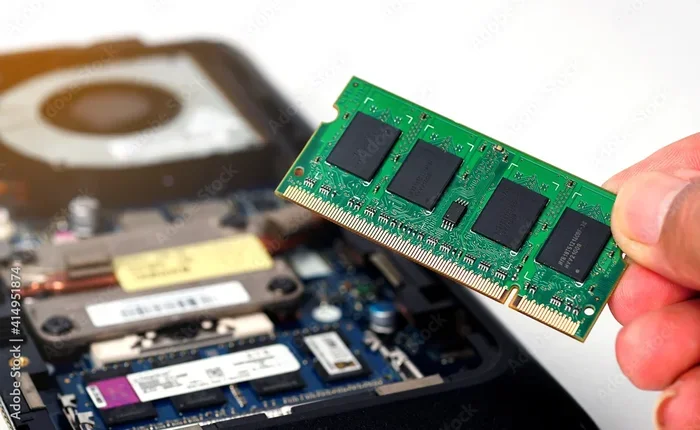
RAM (Random Access Memory) is your laptop’s short-term memory. It stores data that your games and apps need right now. The more RAM you have, the more data your laptop can access quickly.
Smoother Gameplay and Faster Load Times
When you launch a game, it loads textures, maps, and assets into RAM. With 32GB RAM, your laptop can hold all of this data without swapping to slower storage. The result? Smoother frame rates and near-instant load times.
Games like Cyberpunk 2077, Starfield, and Hogwarts Legacy eat up memory fast. A laptop with 32GB of RAM for gaming keeps up with these demands easily. You will notice fewer stutters and less lag during intense moments.
Better Multitasking
Most gamers do not just play games. They also run Discord, Chrome, Spotify, and streaming software at the same time. 16GB can feel tight when you have all these apps open. With 32GB, you get plenty of room for multitasking.
Here is what you can comfortably run alongside your games:
- Voice chat apps like Discord or TeamSpeak
- Web browsers with multiple tabs
- Game recording and streaming tools like OBS
- Background updates and antivirus scans
Future-Proofing Your Setup
Game developers keep pushing the limits of hardware. What runs great today may struggle tomorrow. A gaming laptop with 32GB RAM gives you headroom for the future. You will not need to upgrade as quickly when new games come out.
How 32GB RAM Compares to Other RAM Sizes
Not sure how 32GB stacks up against other options? Let us compare.
4GB vs 8GB vs 16GB vs 32GB
Each RAM level serves a different purpose. Here is a quick breakdown:
- 4GB: Basic tasks only. Not suitable for modern gaming.
- 8GB: Light gaming and everyday use. Struggles with newer titles.
- 16GB: Good for most games. The current sweet spot for casual gamers.
- 32GB: Excellent for heavy gaming, streaming, and professional work.
When 32GB Is Worth It
You should strongly consider a 32GB RAM laptop if you:
- Play the latest AAA games at high settings
- Stream your gameplay while playing
- Edit videos or do 3D modeling
- Run many apps at the same time
- Want your laptop to last several years without upgrades
When 16GB Might Be Enough
If you play casual or esports titles like Fortnite or League of Legends, 16GB works fine. You can always upgrade later if your needs change. But if you want a one-time investment that covers everything, go with 32GB RAM for your gaming laptop.
Top Features to Look for in a 32GB RAM Gaming Laptop
RAM alone does not make a great gaming machine. You need to consider other components too. Here is what to prioritize.
Processor (CPU)
A strong CPU pairs perfectly with 32GB RAM. Look for Intel Core i7 or i9 processors, or AMD Ryzen 7 or 9. These chips handle modern games and heavy multitasking with ease.
Graphics Card (GPU)
The GPU is the most important part for gaming. Pair your 32GB RAM laptop for gaming with at least an NVIDIA RTX 4060 or better. For ray tracing and 4K gaming, aim for an RTX 4070 or RTX 4080.
Storage
Fast storage makes a big difference. Look for laptops with NVMe SSDs. A 1TB SSD is ideal for storing several large games without constantly deleting old ones.
Display Quality
A good screen makes gaming more enjoyable. Look for:
- At least 144Hz refresh rate for smooth motion
- Full HD (1080p) or higher resolution
- Good color accuracy and brightness
Cooling System
High-performance components generate heat. A solid cooling system keeps your laptop running quietly and prevents thermal throttling. Check reviews to see how well a laptop handles heat.
Best 32GB RAM Gaming Laptops to Consider
Here are some top picks that offer 32GB of RAM for gaming at different price points.
Budget-Friendly Options
You do not have to spend a fortune. Some laptops offer 32GB RAM at reasonable prices. Look for models with AMD Ryzen 7 processors and RTX 4060 GPUs. These provide solid gaming performance without emptying your wallet.
Mid-Range Picks
For a balance of price and power, consider laptops with Intel Core i7 or Ryzen 9 CPUs paired with RTX 4070 GPUs. These machines handle modern games at high settings with ease. They also come with better displays and build quality.
High-End Powerhouses
If money is no object, go for laptops with Intel Core i9 or Ryzen 9 processors, RTX 4080 or 4090 GPUs, and stunning displays. These 32GB RAM gaming laptops deliver top-tier performance for every task. They are built for serious gamers and professionals.
Popular Brands to Trust
Several brands consistently deliver quality gaming laptops with 32GB RAM:
- Lenovo: Known for durable builds and great keyboards
- ASUS: Offers innovative cooling and high-refresh displays
- HP: Solid all-around performance and design
- Acer: Good value for the price
- MSI: Gaming-focused features and strong performance
Tips for Getting the Best Deal on a 32GB RAM Gaming Laptop
Buying a gaming laptop is an investment. You want to make sure you get the best value for your money. Here are some practical tips.
Shop During Sales Events
Major sales events offer deep discounts on gaming laptops. Keep an eye on:
- Black Friday and Cyber Monday deals
- Amazon Prime Day sales
- Back-to-school promotions
- Holiday sales around Christmas
Compare Prices Across Retailers
Do not settle for the first price you see. Check multiple retailers and online stores. Use price comparison tools to find the lowest price. Sometimes, buying directly from the manufacturer gives you better warranty options.
Check for Refurbished Options
Refurbished laptops can save you a lot of money. These are often returned items that have been tested and repaired. Look for refurbished 32GB RAM laptops for gaming from trusted sellers. Many come with warranties, so you are still protected.
Read Reviews Before Buying
Reviews give you real-world insights. Look for reviews that test gaming performance, thermals, and battery life. Watch video reviews for a closer look at build quality. Do not rely only on manufacturer specs.
Think About Upgradability
Some laptops let you upgrade components later. Check if the RAM and storage are user-upgradeable. This gives you flexibility. Even if you start with 32GB, you might want to add more storage or swap in a bigger SSD later.
Common Mistakes to Avoid When Buying a 32GB RAM Gaming Laptop
Even with good research, buyers sometimes make mistakes. Here are pitfalls to watch out for.
Ignoring the GPU
Having 32GB RAM does not guarantee great gaming if the graphics card is weak. Always check the GPU first. A laptop with 32GB RAM but a basic GPU will still struggle with modern games.
Overlooking Cooling
Some laptops look great on paper but overheat during long gaming sessions. Poor cooling leads to throttling and reduced performance. Prioritize laptops with strong cooling systems and positive thermal reviews.
Chasing Specs Over Real-World Performance
High specs do not always mean a great experience. A laptop might have 32GB of RAM for your laptop and a top CPU but a poor display or bad keyboard. Consider the whole package, not just individual parts.
Skipping the Warranty
Gaming laptops take a beating. Always check the warranty coverage. Extended warranties can save you money if something breaks. Do not skip this step, especially for expensive purchases.
Expert Insights on 32GB RAM for Gaming
We spoke with a few gaming hardware experts to get their take on 32GB RAM gaming laptops.
Is 32GB Overkill Right Now?
Most experts agree that 32GB is the sweet spot for serious gamers. While 16GB still works for many titles, 32GB ensures you are ready for what comes next. It also handles non-gaming tasks much better. Think of it as insurance for your investment.
The Sweet Spot for Performance
Experts say the real magic happens when RAM, CPU, and GPU are balanced. A laptop with 32GB RAM but a weak CPU will not reach its full potential. Make sure all components work well together for the best results.
Future-Proofing Advice
Gaming trends point toward heavier games and more demanding visuals. Investing in 32GB of RAM now means you will not need to upgrade soon. Many experts recommend this amount for anyone who wants a laptop that lasts five years or more.
Quick Tips for Maximizing Your 32GB RAM Gaming Laptop
Once you have your 32GB RAM laptop for gaming, here is how to get the most out of it.
- Keep your drivers updated: Graphics and chipset drivers improve performance and fix bugs.
- Use a performance profile: Most gaming laptops have power modes. Use the high-performance mode for gaming.
- Manage startup apps: Disable unnecessary apps that launch at startup. This frees up RAM for your games.
- Monitor your RAM usage: Use Task Manager to see how much RAM your apps use. Close what you do not need.
- Clean your laptop regularly: Dust buildup hurts cooling. Clean vents and fans every few months.
- Consider an external cooling pad: These help with heat management during long gaming sessions.
Conclusion
A 32GB RAM laptop for gaming is one of the best investments you can make. It gives you smooth gameplay, powerful multitasking, and the headroom to handle future games. Whether you are a casual player or a hardcore enthusiast, 32GB of RAM delivers a noticeable upgrade.
Remember to balance RAM with a strong CPU, GPU, and fast storage. Shop smart during sales, read reviews, and avoid common buying mistakes. With the right setup, your 32GB gaming laptop will serve you well for years to come.
Ready to level up your gaming? Start exploring your options and find the perfect 32GB RAM laptop for gaming today. Your next adventure deserves the best hardware behind it.
Frequently Asked Questions
Is 32GB RAM overkill for gaming?
Not at all. While 16GB works for many games, 32GB gives you extra headroom for heavy titles, streaming, and multitasking. It is a smart choice for serious gamers who want future-proof performance.
Can I upgrade from 16GB to 32GB RAM in a gaming laptop?
It depends on the laptop model. Some laptops have user-upgradeable RAM, while others come with soldered memory. Check your laptop specs before purchasing. If upgradeability matters to you, look for models with accessible RAM slots.
What games benefit most from 32GB RAM?
Modern AAA titles like Cyberpunk 2077, Starfield, and Alan Wake 2 benefit the most. These games use large amounts of memory for textures and assets. You also see great gains in games while streaming or running apps in the background.
Does 32GB RAM improve FPS in games?
It can, especially if your current RAM is maxed out. When games run out of RAM, they swap to storage, causing frame drops. With 32GB, your games stay in fast memory, leading to smoother FPS and fewer stutters.
What is a good price for a 32GB RAM gaming laptop?
Prices range from around $1,200 for budget models to $2,500 or more for high-end rigs. Mid-range options with strong CPUs and GPUs typically cost between $1,500 and $2,000. Watch for sales to find the best deals.
Do I need 32GB RAM if I only play esports games?
Probably not. Esports titles like Valorant, Fortnite, and League of Legends run well on 16GB. However, if you also stream or multitask heavily, 32GB can still be beneficial. It ultimately depends on your overall usage.