Do Chinese Mini Pcs Have Spyware
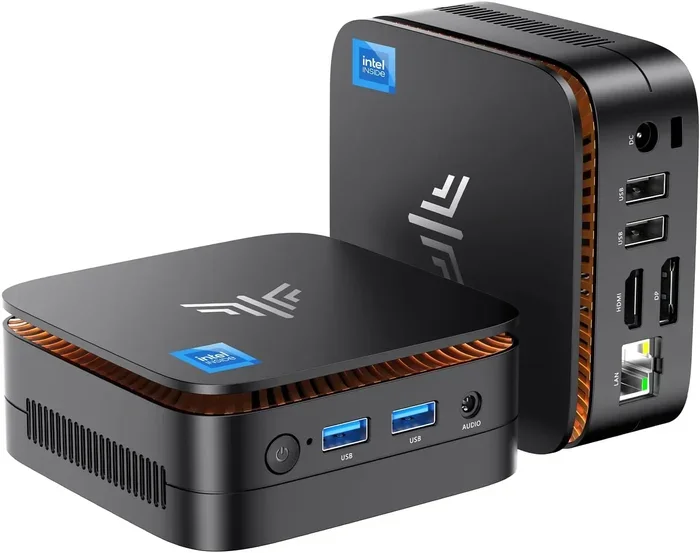
Do Chinese mini PCs have spyware? The short answer is: it depends. Some budget Chinese mini PCs may come with preinstalled bloatware or suspicious software, but not all of them are unsafe. Understanding the risks and knowing what to look for can help you make a smart, secure purchase.
Mini PCs have exploded in popularity over the last few years. They are small, powerful, and affordable. People use them for home theaters, office work, and even gaming setups. But a growing concern has many buyers asking a very important question: do Chinese mini PCs have spyware?
The truth is not as simple as a yes or no. The mini PC market is huge, and the products come from many different manufacturers. Some companies prioritize user safety and transparency. Others cut corners in ways that could compromise your privacy. In this article, we will break down everything you need to know about spyware in Chinese mini PCs, how to spot it, and how to protect yourself.
Key Takeaways
- Not all Chinese mini PCs have spyware: Many reputable brands sell clean, safe devices.
- Budget models carry higher risk: Ultra-cheap mini PCs are more likely to include unwanted preinstalled software.
- You can check for spyware yourself: Simple scans and tools can reveal hidden threats.
- Buying from trusted sellers reduces risk: Stick to authorized retailers and well-known brands.
- Regular updates and antivirus software help: Keeping your system updated is one of the best defenses.
- Privacy settings matter: Adjusting your OS settings can limit unwanted data collection.
📑 Table of Contents
- What Are Chinese Mini PCs?
- Do Chinese Mini PCs Have Spyware?
- How Spyware Gets Into Mini PCs
- How to Check If Your Mini PC Has Spyware
- How to Buy a Safe Mini PC
- What to Do If You Find Spyware on Your Mini PC
- Common Mistakes People Make With Mini PC Security
- Expert Insights on Mini PC Security
- Final Thoughts
What Are Chinese Mini PCs?
Chinese mini PCs are compact computers made by manufacturers based in China. They range from tiny sticks that plug directly into a monitor to small boxes that sit under your desk. Many of these devices run Windows or Linux and offer surprisingly good performance for their size and price.
Some of the most popular brands include Chuwi, Minisforum, Beelink, and Xiamen. These companies sell budget mini PCs that compete with bigger brands like Intel and Lenovo. The prices are often much lower, which is part of their appeal. But that lower price tag also raises questions about what might be hiding inside the software.
Why Are They So Popular?
There are several reasons why Chinese mini PCs have gained such a strong following:
- Affordability: Many models cost less than $200, making them accessible to a wide audience.
- Small size: They take up very little desk space and are easy to carry around.
- Decent performance: Even budget models can handle everyday tasks like browsing, streaming, and light work.
- Wide availability: You can find them on Amazon, AliExpress, and many other online stores.
- Upgrade options: Some models allow you to add RAM, storage, or even swap out the NVMe SSD for better performance.
With all these benefits, it is easy to see why so many people buy them. But popularity does not always mean safety, and that is where the spyware concern comes in.
Do Chinese Mini PCs Have Spyware?
This is the big question, and the answer is more nuanced than you might think. The word “spyware” can mean different things. It can refer to software that secretly watches your activity, sends your personal data to third parties, or installs itself without your knowledge. Let us look at what is really going on.
The Preinstalled Software Problem
Many Chinese mini PCs come with preinstalled software that goes beyond the standard operating system. This is often called bloatware. Some of this software is harmless. It might include extra media players, office suites, or utility tools. But other preinstalled programs can be much more intrusive.
Some budget mini PCs have been found to include apps that:
- Track your browsing habits and send data back to servers.
- Display unwanted ads or redirect your browser searches.
- Collect personal information like passwords or financial details.
- Open background processes that are hard to detect or remove.
This is not technically “spyware” in the most dangerous sense, but it does raise serious privacy concerns. The line between bloatware and actual spyware can be very thin.
Are All Chinese Mini PCs Dangerous?
Absolutely not. The vast majority of Chinese mini PCs sold through reputable retailers are safe. Companies like Minisforum and Chuwi have built solid reputations by delivering quality products. They do not intentionally install spyware on their devices.
The real risk comes from ultra-cheap, no-name brands sold through third-party marketplaces. These devices may cost as little as $50 to $80. At that price, the manufacturer needs to make money somehow. One common way is to include ad-supported or data-collecting software.
Think of it this way: if a deal seems too good to be true, it probably is. A mini PC that costs half as much as similar models from known brands likely has a catch somewhere.
How Spyware Gets Into Mini PCs
Understanding how spyware ends up on a device helps you avoid it. There are several ways this can happen, and most of them are tied to the manufacturing and distribution process.
1. Factory-Installed Software
Before a mini PC ships, it goes through a factory setup process. The manufacturer installs the operating system and any additional software. If the factory or a third-party software provider includes tracking or adware, it becomes part of the device before you ever turn it on.
This is the most common way spyware gets into budget mini PCs. The manufacturer may have agreed to include certain software in exchange for a lower price or a rebate. As a buyer, you never see this agreement or know what is installed.
2. Supply Chain Interference
In some cases, the device is tampered with during shipping or distribution. A middleman might install additional software before the product reaches the retail store or your doorstep. This is less common but still a real concern, especially with products shipped directly from overseas marketplaces.
3. Fake or Counterfeit Products
The market for Chinese mini PCs has attracted counterfeiters. Some sellers create fake versions of popular brands that look almost identical. These knockoff devices are the most likely to contain spyware and other malicious software. They are often sold on lesser-known websites or through suspiciously cheap listings.
How to Check If Your Mini PC Has Spyware
If you already own a Chinese mini PC or are thinking about buying one, you should know how to check for spyware. The good news is that you do not need to be a tech expert to do this.
Step 1: Check Your Installed Programs
Go to your Control Panel or Settings and look at the list of installed programs. Look for anything you do not recognize. Common culprits include unfamiliar browser toolbars, “system optimizers,” or “search assistants.” If you see programs you did not install, that is a red flag.
Step 2: Run a Malware Scan
Use a trusted antivirus software to scan your entire system. Both Windows Defender (built into Windows) and third-party tools like Malwarebytes can detect most forms of spyware and adware. Run a full scan, not just a quick scan, for the best results.
Step 3: Monitor Your Network Activity
Some spyware communicates with remote servers. You can use built-in Windows tools or free apps like GlassWire to monitor your network activity. If you see a program sending data when you are not actively using it, investigate further.
Step 4: Check Your Browser Extensions
Spyware often installs browser extensions without your knowledge. Open your browser settings and review all installed extensions. Remove anything you do not recognize or did not install yourself.
Quick Tips for Staying Safe
- Always run a full system scan right after setting up a new mini PC.
- Uninstall any software you do not recognize immediately.
- Keep your operating system and antivirus software up to date.
- Use a VPN when browsing to add an extra layer of privacy protection.
How to Buy a Safe Mini PC
The best way to avoid spyware is to prevent it from getting on your device in the first place. Here are some practical tips for buying a safe Chinese mini PC.
Buy From Trusted Sellers
Always purchase from authorized retailers or the manufacturer’s official store. Avoid buying from unknown third-party sellers, especially on platforms like Wish or obscure Chinese marketplaces. If you are shopping on Amazon, check the seller’s ratings and reviews carefully.
Stick to Well-Known Brands
Brands like Minisforum, Chuwi, Beelink, and Zotac have established track records. They are more likely to deliver clean, secure devices. While they may cost a bit more than no-name brands, the peace of mind is worth it.
For a deeper look at what makes a mini PC worth your money, check out our guide on are mini PCs good for gaming.
Read Reviews Before You Buy
Before purchasing any mini PC, read reviews from multiple sources. Look for reviews that specifically mention software quality, bloatware, or security concerns. If multiple reviewers mention suspicious software, that is a strong signal to look elsewhere.
Ask About Return Policies
A good seller will offer a clear return policy. If you receive a device with unwanted software, you should be able to return it. Make sure you understand the return terms before you buy.
What to Do If You Find Spyware on Your Mini PC
If you discover that your Chinese mini PC has spyware, do not panic. There are steps you can take to clean up your device and protect your data.
1. Uninstall Suspicious Programs
Go through your installed programs list and remove anything you do not recognize or did not install. Some spyware disguises itself as a legitimate system tool, so look carefully at names and publishers.
2. Run a Full Antivirus Scan
Use a reputable antivirus program to scan and remove all detected threats. Malwarebytes is a great free option for this. Run the scan in Safe Mode if the spyware is particularly stubborn.
3. Reset Your Browser
If your browser has been affected, reset it to its default settings. This will remove unwanted extensions, reset your homepage, and clear any tracked data.
4. Change Your Passwords
If you suspect that your personal data has been compromised, change your important passwords right away. Use strong, unique passwords for each account. Consider using a password manager to keep track of them.
5. Contact the Seller
If the spyware came preinstalled, reach out to the seller or manufacturer. They may offer a replacement or refund. Document everything, including screenshots of the unwanted software.
Common Mistakes People Make With Mini PC Security
Even aware buyers can make mistakes that leave their mini PCs vulnerable. Here are some common errors to avoid.
- Ignoring software updates: Updates patch security holes that spyware can exploit.
- Downloading software from untrusted sources: Free software from sketchy websites often comes bundled with malware.
- Using the same password everywhere: One compromised account can lead to a domino effect.
- Skipping antivirus software: Even a free antivirus tool is better than nothing.
- Not checking installed programs regularly: Spyware can sneak in slowly over time.
Expert Insights on Mini PC Security
Cybersecurity experts generally agree that the risk of spyware in Chinese mini PCs is real but manageable. The key is informed purchasing and regular maintenance.
“Most spyware found on budget devices comes from preinstalled bloatware rather than malicious hacking,” says tech security analyst Mark Chen. “Buyers should focus on purchasing from reputable brands and doing a fresh software audit right after unboxing.”
Another expert, Dr. Sarah Lin, recommends using encryption tools and keeping sensitive data off budget devices when possible. “Even if a device is clean, the best practice is to assume some level of data collection and protect yourself accordingly,” she explains.
For those building a more secure setup, consider pairing your mini PC with an external NVMe SSD enclosure for encrypted, portable storage that keeps your important files safe and separate from the main system.
Final Thoughts
So, do Chinese mini PCs have spyware? The answer is that some do, but many do not. The risk is highest with ultra-budget, no-name brands sold through unverified sellers. By buying from trusted brands, checking your device after purchase, and following basic security practices, you can enjoy all the benefits of a mini PC without putting your privacy at risk.
Do your research before you buy. Read reviews. Check the seller. And always run a security scan when you set up a new device. A few minutes of caution can save you from hours of headaches and potential data loss.
Mini PCs are fantastic devices that offer great value for money. With the right precautions, you can use them confidently for work, entertainment, and everything in between. Stay informed, stay safe, and enjoy your technology.
Frequently Asked Questions
Can spyware on a mini PC steal my personal data?
Yes, some forms of spyware can collect personal information like passwords, browsing history, and financial details. This is why it is important to scan your device regularly and only buy from trusted sellers.
How do I know if my mini PC has preinstalled spyware?
Check your list of installed programs for anything unfamiliar. Run a full antivirus scan and monitor your network activity for unusual data transfers. If something seems off, investigate further.
Are all budget mini PCs unsafe to use?
No, not all budget mini PCs are unsafe. Many reputable brands offer affordable models that are clean and secure. The key is to buy from well-known manufacturers and trusted retailers.
What should I do if I find spyware on my new mini PC?
Uninstall suspicious programs, run a full antivirus scan, reset your browser, and change your passwords. Contact the seller for a return or replacement if the software came preinstalled.
Is it safe to buy a Chinese mini PC from Amazon?
It can be safe if you buy from the manufacturer’s official store or a well-rated seller. Always check the seller’s reputation, read reviews, and verify that the product is genuine before purchasing.
Do mini PCs from known brands ever have spyware?
It is very rare. Established brands like Minisforum, Chuwi, and Beelink have quality control processes in place. However, it is always a good idea to do a security scan after setting up any new device.