Are Mini Pcs Good for Gaming
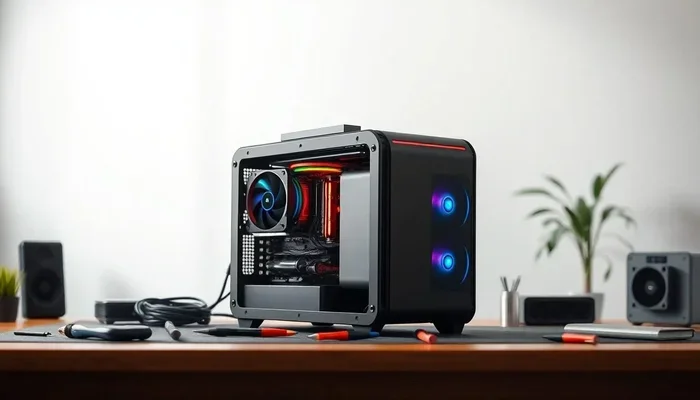
Mini PCs can absolutely handle gaming, but they come with trade-offs. A mini PC for gaming offers a compact, portable setup that still delivers solid performance for casual and moderate gaming. However, if you want top-tier graphics and ultra settings, you need to pick the right mini gaming PC with powerful hardware.
So, you are wondering if a mini PC can actually handle gaming. Maybe you have been eyeing one of those sleek, tiny machines and thinking, “Can I really play my favorite games on that?” The answer is yes, but with some important caveats. A mini PC for gaming has come a long way in recent years. These compact machines now pack enough power to run popular titles smoothly. But they are not magic boxes. You still need to pick the right model and manage your expectations.
In this guide, we will break down everything you need to know about gaming on a mini PC. We will look at what makes them tick, what they can do, and where they struggle. Whether you are a casual player or someone who wants a compact gaming PC for your desk, this article has you covered. Let us dive in.
Key Takeaways
- Mini PCs can game well: They handle casual and moderate gaming with the right specs and smart choices.
- Size is the big advantage: A compact gaming PC saves space and looks great on any desk setup.
- You still need power: Choosing the right processor and GPU matters for a smooth gaming experience.
- Upgrade options exist: Many mini PCs let you add RAM and storage later for better mini PC upgrade potential.
- They are not for everyone: Hardcore gamers who want max settings and ray tracing may need a full-size rig.
- Check our top picks: See the best mini PC for gaming guides for curated recommendations.
📑 Table of Contents
What Is a Mini PC and Why Do Gamers Care?
A mini PC is exactly what it sounds like. It is a full computer packed into a tiny chassis. Think of it as a desktop computer shrunk down to a fraction of the size. These machines often sit flat on your desk or mount behind a monitor. They are also called low profile gaming PC units because of their small footprint. A small form factor gaming setup like this is perfect for people who want power without the bulk.
How Mini PCs Work
Despite their size, mini PCs use the same core components as regular desktops. They have a processor, memory, storage, and a graphics unit. The difference is how these parts are arranged. Engineers pack everything into a tiny space using custom-designed motherboards and cooling solutions. This is why a small gaming PC build requires careful planning and smart component choices.
Most mini PCs use mini ITX gaming architecture or even smaller form factors. This means every millimeter counts. The result is a machine that takes up very little desk space but can still deliver a solid mini PC gaming experience. The key is balancing performance with thermal limits inside that tiny chassis.
Why Gamers Are Interested
Gamers love mini PCs for a few key reasons. First, they save space. If you live in a small apartment or want a clean desk setup, a compact gaming PC is a dream come true. Second, they look cool. A tiny gaming machine on your desk turns heads and starts conversations.
Third, they are portable. You can pack a portable gaming rig into a backpack and take it to a friend’s house or a LAN party. That is something a full-size tower simply cannot do. Finally, mini PCs often use less power, which means lower electricity bills and less heat in your room. A handheld gaming PC style setup gives you freedom you do not get with a big tower.
Can a Mini PC Actually Handle Gaming?
The short answer is yes. But the long answer depends on what you want to play and at what settings. A well-built mini gaming PC can handle esports titles, indie games, and older AAA releases with ease. However, pushing the latest blockbuster games at maximum settings is a different story entirely.
What Hardware Matters Most
When it comes to mini PC gaming performance, three components matter the most. The first is the processor. A strong CPU handles game logic, physics, and AI calculations. The second is the GPU or graphics unit. This is what renders the visuals on your screen. The third is RAM, which affects how smoothly your system multitasks while gaming.
For a solid mini PC for gaming, you want at least an Intel Core i5 or AMD Ryzen 5 processor. For graphics, look for integrated options like Intel Iris Xe or AMD Radeon graphics. If your mini PC has a dedicated GPU, even better. This setup gives you a great mini PC gaming setup for most titles you will encounter.
Mini PC vs Desktop Gaming: What Is the Difference?
A mini PC vs desktop gaming comparison is not about one being better than the other. It is about what you need. A full-size desktop can hold a massive graphics card and a beefy cooler. It can run any game at any setting you throw at it. A mini PC, on the other hand, has thermal and space limits.
This means a mini PC will usually run games at lower settings or frame rates compared to a high-end desktop. But for many players, the difference is barely noticeable. If you play at 1080p medium settings, a good mini PC delivers a smooth and enjoyable gaming mini PC experience. You will still have plenty of fun without spending a fortune.
The Pros and Cons of Mini PC Gaming
Every setup has trade-offs. Let us look at the real advantages and disadvantages of choosing a compact gaming PC for your gaming needs. Understanding both sides helps you make a smart buying decision.
Advantages of a Compact Gaming Setup
- Space-saving design: A mini PC fits on a small desk or even mounts behind a monitor. You reclaim valuable desk real estate instantly.
- Portability: You can carry it anywhere. Travel with your portable gaming rig and game on the go without hassle.
- Energy efficiency: Mini PCs use less power than full towers. Your electricity bill stays low every month.
- Quiet operation: Smaller fans and less heat mean a quieter gaming experience. No loud fans drowning out your game audio.
- Aesthetic appeal: A tiny gaming machine looks sleek and modern on any setup. It is a stylish alternative to bulky towers.
- Budget-friendly options: Many budget mini PC gaming models cost less than full-size gaming desktops. You get solid performance for less money.
Where Mini PCs Fall Short
- Limited GPU power: Most mini PCs cannot fit a full-size graphics card. This limits high-end gaming performance significantly.
- Thermal throttling: Small chassis mean less cooling capacity. Under heavy load, the system may slow down to stay safe. Mini PC cooling gaming is always a design challenge engineers must solve.
- Upgrade limitations: You cannot swap in a bigger GPU or add a second graphics card easily. Your options are more restricted.
- No ray tracing or ultra settings: If you want the highest visual fidelity, a mini PC may not deliver the experience you want.
- Smaller RAM slots: Some models only support one or two RAM sticks, limiting your mini PC upgrade potential over time.
What Specs Do You Need for a Mini Gaming PC?
Choosing the right gaming mini PC specs is the most important step. If you pick the wrong configuration, you will be disappointed. Here is what to look for before you buy.
Processor Requirements
Your mini PC processor for gaming is the brain of the operation. For a smooth experience, go with at least an Intel Core i5-1240P or AMD Ryzen 5 6600U. These chips handle modern games well without breaking a sweat. If you can stretch your budget, an Intel Core i7 or AMD Ryzen 7 will give you extra headroom.
Do not skimp on the CPU. A weak processor will bottleneck your mini PC graphics performance, even if the GPU is decent. Balance is key in any small gaming PC build. Think of it like a car: the engine matters just as much as the paint job.
Graphics Card Options
Most mini PCs rely on integrated graphics. Intel Iris Xe and AMD Radeon 680M are the current standouts. They can run games like Fortnite, League of Legends, and Valorant at 1080p with good frame rates. These are perfect for casual and competitive players alike.
If you want better performance, look for mini PCs with a dedicated GPU. Some models come with Nvidia GeForce MX550 or RTX 3050 graphics. These mini PCs for gaming can handle heavier titles with ease. Check out our guide to 1440p 144Hz gaming for more ideas on what to look for in a graphics setup that delivers smooth visuals.
RAM and Storage Considerations
For gaming, 16GB of RAM is the sweet spot. 8GB will work for lighter titles, but you will notice stuttering in modern games. If your mini PC allows upgrades, start with 8GB and add more later. This gives you flexibility without spending extra upfront.
Storage-wise, go for an NVMe SSD. It loads games faster and makes the whole system feel snappy. A 512GB SSD is a good starting point. If you store many games, consider 1TB or use external storage for your mini PC gaming setup. Fast storage makes a real difference in load times and overall responsiveness.
Real-World Mini PC Gaming Performance
Let us talk about what actually happens when you sit down and play. How does a mini PC for gaming perform in real scenarios? Here is a breakdown based on common gaming situations you will encounter.
Casual Gaming on a Mini PC
If you play casual games like Minecraft, Stardew Valley, or Among Us, a mini PC handles them effortlessly. These titles do not demand much power at all. Even an entry-level mini gaming computer will run them at high settings and smooth frame rates. You will not notice any lag or stutter.
For online multiplayer games like Fortnite or Rocket League, a decent mini PC delivers 60fps or more at 1080p medium settings. You will have a great time without any issues. These games are designed to run on a wide range of hardware, which works perfectly in your favor.
Competitive and Esports Gaming
Esports titles are less demanding on hardware, which works in favor of mini PCs. Games like Valorant, CS2, and Dota 2 run well on compact machines. You can even push for higher frame rates, which gives you a competitive edge in matches.
If you are serious about competitive play, make sure your mini PC gaming experience includes a fast display. Pair your mini PC with a 144Hz monitor for the smoothest gameplay. Quick reactions matter in esports, and a responsive setup helps you perform at your best.
Can Mini PCs Run AAA Titles?
The honest answer is: it depends. AAA games like Cyberpunk 2077 or Red Dead Redemption 2 are very demanding on hardware. A mini PC with integrated graphics will struggle to run these at high settings. You will need to drop to low or medium presets for playable frame rates.
However, a mini PC with a dedicated GPU like the Nvidia RTX 3050 or RTX 4060 can handle AAA titles at 1080p low to medium settings. You will get playable frame rates, though not the highest visual quality. If you want the full AAA experience with ray tracing and ultra textures, a full-size desktop is still the way to go.
Final Verdict: Should You Get a Mini PC for Gaming?
A mini PC for gaming is a great choice if you want a space-saving, portable, and efficient setup. It works best for casual gamers, esports players, and anyone who values a clean desk. You do not need to sacrifice all your gaming fun to go compact. These small machines punch well above their weight.
But if you are a hardcore gamer who wants to play every new release at max settings with ray tracing, a mini PC will leave you wanting more. In that case, a full-size gaming desktop or one of the best prebuilt gaming PCs for Fortnite might be a better fit for your needs.
Before you buy, check the best specs for a gaming PC to make sure you are getting the right configuration. And if you want a top recommendation, look at our best mini PC for gaming guide for curated picks. The right mini PC can surprise you with how much gaming fun it packs into such a small package. Do not underestimate these little machines.
Frequently Asked Questions
Can a mini PC run Fortnite smoothly?
Yes, a mini PC with at least 8GB of RAM and an Intel Iris Xe or AMD Radeon integrated GPU can run Fortnite at 1080p medium settings. For 60fps or higher, 16GB of RAM and a dedicated GPU like the RTX 3050 will give you a much smoother experience.
Is a mini PC better than a gaming laptop for gaming?
It depends on your needs. A mini PC stays on your desk and offers better cooling and upgrade options. A gaming laptop gives you portability. For a permanent setup, a mini PC often delivers better performance per dollar because it has more room for powerful components.
Can you upgrade a mini PC for better gaming?
Many mini PCs allow you to add RAM and swap out the storage drive. However, you usually cannot upgrade the GPU or CPU. This limits your mini PC upgrade potential compared to a full-size desktop where you can swap almost every component.
Do mini PCs get hot when gaming?
They can, but good designs manage heat well. Mini PCs use specialized coolers and heat pipes to keep temperatures in check. During long gaming sessions, you may notice the fans spin up, but most models stay quiet and safe. Proper ventilation on your desk helps too.
Are mini PCs worth it for casual gamers?
Absolutely. If you play casual games, indie titles, or esports games, a mini PC is more than enough. You save space, money, and energy while still getting a great gaming experience. They are one of the best values for casual players who do not need maxed-out settings.
What is the best budget mini PC for gaming?
Look for models with an AMD Ryzen 5 or Intel Core i5 processor, 16GB of RAM, and an NVMe SSD. Some budget options come with Intel Iris Xe graphics that handle most games well. Check our best mini PC for gaming guide for specific recommendations at different price points.