What Can I Do with Broken Laptop 2
A broken laptop does not have to be useless. You can repair it, harvest parts, recycle it responsibly, or even sell it for cash. Whether your screen is cracked, the RAM is faulty, or the motherboard is failing, there are plenty of practical options to explore. This guide covers every path you can take to get value from a broken laptop.
You probably have a broken laptop sitting somewhere in your house right now. Maybe the screen cracked after a drop. Maybe it simply will not turn on anymore. Whatever the reason, it is tempting to throw it in a drawer or toss it in the trash. But before you do that, let me tell you something important. A broken laptop still has value. There are many things you can do with it, and most of them are easier than you think.
In this guide, I will walk you through every option available to you. You will learn how to repair common issues, harvest useful parts, recycle responsibly, and even make some money from a device you thought was dead. Whether you are a tech beginner or a seasoned DIYer, there is something here for you. Let us get started.
Key Takeaways
- Repair First: Many common issues like RAM failure or screen damage are affordable and easy to fix yourself.
- Harvest Useful Parts: Hard drives, keyboards, and screens from broken laptops can still work in other setups.
- Recycle Responsibly: E-waste recycling keeps toxic materials out of landfills and recovers valuable metals.
- Sell for Parts: Even a non-functional laptop has resale value to buyers who need components.
- Repurpose Creatively: Turn a broken laptop into a media server, home monitoring station, or digital photo frame.
- Check Your RAM: Before giving up, verify your RAM status — a simple upgrade might bring it back to life.
📑 Table of Contents
1. Diagnose the Problem First
Before jumping into any solution, you need to figure out what is actually wrong. A broken laptop can have many different issues, and the fix depends entirely on the root cause. Spend a few minutes diagnosing the problem before you decide on a course of action.
Check if It Powers On
Plug in the charger and look for any LED lights. Do you hear a fan spinning? Does the screen flicker at all? These small clues tell you a lot. If the laptop powers on but the screen stays black, the issue might be the display cable or the LCD panel itself. If it does not power on at all, the problem could be the battery, power jack, or motherboard.
Listen for Beep Codes
Many laptops emit beep patterns when they start up. These beep codes are like a language that tells you what is wrong. For example, three short beeps often mean a memory issue. One long and two short beeps might point to a graphics card problem. Check your laptop manufacturer’s website for the specific beep code meanings.
Try an External Monitor
If your screen is cracked but the laptop seems to turn on, connect it to an external monitor. This simple test tells you whether the issue is with the screen or with the internal hardware. If the external monitor works fine, you likely just need a screen replacement.
Boot into Safe Mode
Sometimes a broken laptop is not broken at all — it has a software issue. Try booting into Safe Mode by holding the Shift key during startup. If the laptop works in Safe Mode, a driver or software conflict is probably the culprit. This is a much easier fix than replacing hardware.
2. Repair Common Issues Yourself
Many laptop problems are surprisingly easy to fix at home. You do not need to be a professional technician to handle these repairs. With a basic screwdriver set and a little patience, you can save hundreds of dollars.
Replace the RAM
Faulty RAM is one of the most common reasons a laptop acts up. If your computer freezes, crashes, or runs extremely slowly, bad memory might be the cause. The good news is that upgrading the RAM on my laptop is one of the simplest repairs you can do. Most laptops have a small access panel on the bottom. Open it, remove the old stick, and slot in a new one. Before buying new RAM, make sure to check your RAM to confirm the type and speed your laptop supports.
Here are some quick tips for RAM replacement:
- Always ground yourself before touching internal components to avoid static damage.
- Match the RAM type (DDR4, DDR5) and speed your laptop requires.
- Check how much RAM you need based on your usage — 8 GB is fine for everyday tasks, while 16 GB or more is better for gaming and video editing.
- Watch a quick YouTube tutorial for your specific laptop model before opening it up.
Fix a Cracked Screen
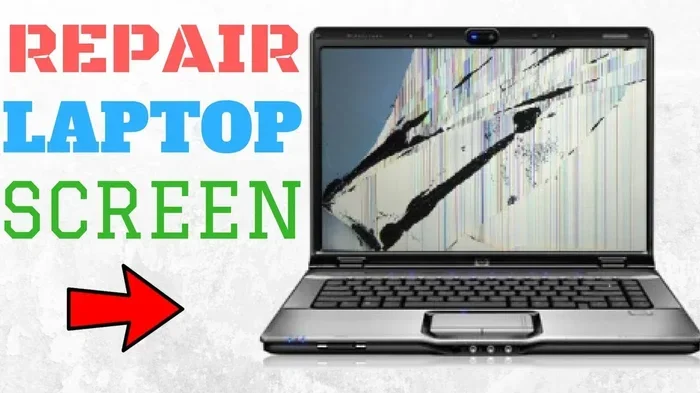
A cracked screen is the most visible sign of a broken laptop. Replacing a screen is easier than most people think. You can buy replacement panels online for as little as $40 to $100. The process involves removing the bezel, disconnecting the old panel, and connecting the new one. It usually takes about 20 minutes.
Replace the Battery
If your laptop dies within minutes of unplugging, the battery is probably shot. Replacement batteries are inexpensive and widely available. Many laptops have a removable battery, making this a five-minute fix. For sealed batteries, you may need to remove the bottom panel and disconnect the battery cable from the motherboard.
Clean the Fan and Heat Sink
Overheating causes all kinds of problems, from random shutdowns to a laptop that will not turn on at all. Dust buildup is usually the guilty party. Open the laptop, use compressed air to blow out the dust, and reapply thermal paste on the CPU. This simple maintenance can bring a sluggish or non-functional laptop back to life.
3. Harvest Parts from a Broken Laptop
Even if your laptop is beyond repair, its individual components may still be perfectly functional. Parts harvesting is a great way to get value from a dead machine and help others at the same time.
Hard Drive and SSD
The storage drive is often the most valuable part inside a broken laptop. You can remove it and connect it to another computer using a USB adapter. This lets you recover all your files, photos, and documents. If the drive is still healthy, you can also repurpose it as an external storage drive for backups.
Keyboard
A cracked laptop with a working keyboard is still useful. You can harvest the keyboard and use it as a replacement for another laptop of the same model. Keyboards are also sold online to people who need replacements for their own broken machines.
Screen Panel
Even if the laptop will not power on, the LCD panel might be perfectly fine. Many people buy broken laptops specifically for their screens. If the panel is undamaged, you can sell it separately or use it in a DIY project.
Wi-Fi Card and Speakers
Do not overlook smaller components like the Wi-Fi card, speakers, or webcam. These parts are often interchangeable between laptop models and can be sold or reused in other devices.
4. Recycle Your Broken Laptop Responsibly
If your laptop is truly dead and cannot be repaired or used for parts, recycling is the best option. Laptops contain toxic materials like lead, mercury, and cadmium that should never end up in a landfill. E-waste recycling ensures these harmful substances are handled safely.
Find a Local E-Waste Recycling Center
Many cities have dedicated e-waste recycling facilities. These centers strip laptops for valuable metals like copper, gold, and aluminum. Search online for recycling centers near you. Many electronics retailers like Best Buy also accept old laptops for free recycling.
Manufacturer Take-Back Programs
Most major laptop manufacturers offer trade-in or recycling programs. Dell, HP, Apple, and Lenovo all have options to send in your old device for responsible recycling. Some programs even offer store credit toward a new purchase.
Why Responsible Recycling Matters
When you recycle instead of throwing away a broken laptop, you help reduce electronic waste in the environment. You also allow valuable materials to be recovered and reused. It is a small action that makes a big difference over time.
5. Sell or Donate Your Broken Laptop
A broken laptop does not mean a worthless laptop. There is a whole market of people who buy damaged laptops for parts, repairs, or refurbishment. You might be surprised at how much money you can get.
Sell for Parts Online
Websites like eBay, Facebook Marketplace, and Craigslist are full of buyers looking for broken laptops at low prices. List your laptop honestly, describing what is wrong and which parts still work. Buyers who need a specific component — like a working hard drive or a compatible keyboard — will gladly pay for it.
Sell to Refurbishers
Many companies specialize in buying broken laptops, repairing them, and reselling them. These refurbishers will often offer you a quote based on the model and condition. Even if the payout is modest, it is better than letting the laptop collect dust.
Donate to Schools or Nonprofits
If your broken laptop cannot be sold, consider donating it. Many schools and nonprofit organizations accept broken electronics. They often have the resources to repair and refurbish them for students or communities in need. Organizations like World Computer Exchange and Goodwill accept laptop donations of all conditions.
6. Repurpose a Broken Laptop Creatively
Here is an idea that surprises many people — you can still use a broken laptop even if the screen or keyboard is damaged. With a little creativity, a broken machine can serve a new purpose in your home.
Turn It into a Media Server
If the laptop still turns on, you can strip away the operating system and install a lightweight server OS. Connect it to your home network and use it to stream movies and music to other devices. A broken laptop with a working hard drive makes an excellent home media server.
Use It as a Digital Photo Frame
Remove the broken screen and attach a small LCD monitor. Load it with a slideshow app, and you have a custom digital photo frame. This is a fun and easy project that gives new life to old hardware.
Convert It to a Chromebook
If your broken laptop has a working processor and memory, you might be able to install ChromeOS Flex. This free operating system from Google turns old and slow laptops into functional Chromebooks for web browsing and light tasks.
Use It as a Dedicated Home Monitoring Station
Install free security camera software on a broken laptop and connect a USB webcam. You now have a home monitoring station. It is not pretty, but it works great for keeping an eye on your home or pets.
7. Prevent Future Laptop Breakage
Once you have dealt with your broken laptop, it is worth taking steps to protect your next one. Prevention is always better than repair.
Use a Protective Case
A good laptop sleeve or hard-shell case absorbs shock from drops and bumps. This simple accessory can prevent many common screen and chassis damages.
Keep Liquids Away
Water damage is one of the leading causes of laptop failure. Keep drinks on a separate surface from your laptop, and consider using a spill-proof keyboard cover.
Handle the Battery Carefully
Avoid letting your battery drain completely every time. Charge it before it hits 20%, and do not leave it plugged in 24/7. Proper battery care extends the overall lifespan of your laptop significantly.
Keep It Clean
Dust buildup causes overheating, which damages internal components over time. Use compressed air to clean vents and fans every few months. This simple habit goes a long way in keeping your laptop healthy.
Conclusion
A broken laptop is not the end of the road. As you have seen, there are many paths you can take — from DIY repairs and parts harvesting to responsible recycling and creative repurposing. The key is to diagnose the problem first and then choose the option that makes the most sense for your situation.
If your laptop has a faulty RAM module, a simple upgrade might be all it takes. Check your memory, consider how much RAM you need, and see if a new stick brings it back to life. If the damage is too severe, you can still extract value through parts sales, recycling, or donations.
The next time you find yourself staring at a broken laptop, remember that it is not garbage — it is opportunity. Take action, get creative, and give your old device a second life.
Frequently Asked Questions
Can I fix a broken laptop myself?
Yes, many common laptop issues are fixable at home. Replacing RAM, batteries, and screens are among the easiest repairs. You just need a screwdriver, a replacement part, and a helpful YouTube tutorial for your specific model.
How much is a broken laptop worth?
The value depends on the model, age, and which parts still work. A broken laptop with a working hard drive might sell for $20 to $50 as parts. Newer models or premium brands can fetch more, especially if the screen or keyboard is undamaged.
Should I repair or replace my broken laptop?
If the repair costs less than half the price of a new laptop, repair is usually the better choice. Simple fixes like RAM replacement or screen swaps are very affordable. However, if the motherboard is fried and the laptop is several years old, replacement often makes more sense financially.
How do I recover data from a broken laptop?
Remove the hard drive or SSD and connect it to another computer using a USB adapter. If the drive is still functional, you can access all your files normally. For physically damaged drives, professional data recovery services are available, though they can be expensive.
Can I recycle a broken laptop for free?
Absolutely. Most local e-waste recycling centers accept laptops at no charge. Many electronics retailers also offer free recycling programs. Some manufacturers even pay you a small amount for trade-ins, so it costs you nothing to recycle responsibly.
What can I do with a broken laptop that will not turn on at all?
Even a laptop that will not power on still has value. You can sell it for parts, donate it to repair programs, or recycle it for e-waste recovery. The hard drive, screen, and keyboard might all be functional even if the motherboard is dead.
=== META TITLE ===
What to Do with a Broken Laptop – Fix, Recycle, Sell
=== URL SLUG ===
what-to-do-with-broken-laptop