What Is a Digitizer
A digitizer is an input device that converts physical touch or pen movement into digital signals your computer can understand. It is the technology behind touchscreens, drawing tablets, and stylus-enabled laptops. Whether you are a graphic designer, a student taking notes, or just curious about how your phone screen works, understanding digitizer tech helps you get the most from your devices.
You probably use a digitizer every day without even realizing it. Every time you tap your phone screen, sketch on a drawing tablet, or write notes with a stylus pen, a digitizer is working behind the scenes. It is one of those quiet technologies that makes modern devices feel so responsive and intuitive.
But what exactly is a digitizer? Simply put, it is a device or component that converts physical input, like a touch or a pen stroke, into digital signals your computer or phone can understand. Think of it as a translator between the physical world and the digital one.
In this guide, we will break down everything you need to know about digitizer technology. We will cover how it works, the different types, where you will find it, and why it matters for everyday use. By the end, you will have a clear picture of this essential tech component.
Key Takeaways
- A digitizer turns physical input into digital data: It captures touch, pressure, or pen movement and translates it into signals your device can process.
- There are several types of digitizers: Active digitizers, capacitive screens, and resistive touch panels all work differently.
- Artists and designers rely on digitizer tablets: Tools like Wacom and drawing tablets offer pressure sensitivity for precise digital art.
- Laptops with digitizers double as note-taking devices: A stylus pen lets you write directly on the screen for quick annotations.
- Digitizer technology is not the same as a regular touchscreen: Active digitizers offer more precision and pressure detection than basic capacitive screens.
- Knowing your digitizer type helps you choose the right device: Whether for work, art, or casual use, the right digitizer makes a big difference.
📑 Table of Contents
- What Is a Digitizer?
- Types of Digitizer Technology
- Where You Will Find Digitizers
- Digitizer vs Touchscreen: What Is the Difference?
- Benefits of Using a Digitizer
- Common Mistakes People Make with Digitizers
- How to Choose the Right Digitizer for You
- Quick Tips for Getting the Most from Your Digitizer
- The Future of Digitizer Technology
- Final Thoughts
What Is a Digitizer?
A digitizer is an input device or a component that captures physical input and converts it into digital data. This data can be anything from a simple tap on a screen to the precise pressure of a pen stroke on a drawing tablet. The digitizer reads the input and sends it to your device’s processor, which then interprets it as a specific action or command.
The word “digitizer” comes from “digital,” and that is exactly what it does. It takes real-world, analog input and turns it into digital information. This process happens almost instantly, which is why tapping a touchscreen or writing with a stylus feels so immediate and natural.
Digitizers are found in many devices you use daily. Your smartphone, your tablet, your laptop, and even some desktop monitors use digitizer technology. Without it, the way we interact with screens would be very different. You would not be able to zoom in with a pinch, draw with a pen tool, or sign a document electronically.
How Does a Digitizer Work?
Most digitizers work by detecting changes on a surface. When you touch a screen or press a pen tip against a tablet, the digitizer senses that change. It then records the location, the pressure, and sometimes the angle of the input. All of this data gets sent to your device as a digital signal.
For example, when you draw a line on a drawing tablet, the digitizer tracks the pen’s movement across the surface. It records the speed, the pressure you are applying, and the exact path of the stroke. Your device then renders that line on screen in real time. The whole process happens in milliseconds.
Some digitizers use electromagnetic signals. Others rely on capacitive or resistive technology. The method varies, but the goal is the same: to turn your physical input into accurate, responsive digital action. This is why understanding pen computing and how digitizers handle cursor movement is so important for anyone who uses these tools regularly.
Types of Digitizer Technology
Not all digitizers are the same. Different devices use different technologies depending on their purpose. Some are built for precision, while others focus on simplicity and cost. Let us look at the main types you will encounter.
Active Digitizers
An active digitizer uses a special pen or stylus that emits a signal. The digitizer panel underneath the screen detects this signal and tracks the pen’s exact position. This type of digitizer is known for its high accuracy and pressure sensitivity.
Active digitizers are common in professional drawing tablets and high-end laptops designed for creative work. They offer features like tilt detection, which lets you shade your drawings by angling the pen. Brands like Wacom are well known for their active digitizer tablets that artists and designers swear by.
If you are into digital art or graphic design, an active digitizer is the way to go. It gives you the level of control and precision that a basic touchscreen simply cannot match.
Capacitive Digitizers
A capacitive digitizer works by sensing the electrical charge from your finger or a compatible stylus. This is the technology used in most modern smartphones and tablets. When you touch the screen, your finger disrupts the electrostatic field, and the digitizer registers the touch point.
Capacitive screens are smooth, responsive, and support multi-touch gestures. You can pinch to zoom, swipe, and tap with ease. However, they do not usually support pressure sensitivity, which means they are not ideal for detailed drawing or writing.
This is why many artists prefer a dedicated digitizer tablet over a capacitive touchscreen. The active digitizer in a drawing tablet gives them the tools they need for precise work.
Resistive Digitizers
A resistive digitizer works by pressing two thin layers together. When you touch the screen, the layers make contact at that point, and the digitizer registers the input. These screens respond to any pressure, so you can use a finger, a stylus, or even a gloved hand.
Resistive digitizers were very common in older devices. You might still find them in some budget tablets, industrial equipment, and older point-of-sale systems. They are durable and work in various conditions, but they lack the clarity and responsiveness of capacitive or active digitizers.
Where You Will Find Digitizers
Digitizers are everywhere in modern tech. You might not always see them, but they are doing important work in many devices. Here are some common places you will find digitizer technology.
Smartphones and Tablets
Your phone and tablet almost certainly have a digitizer built into the screen. When you tap, swipe, or pinch, the digitizer is translating those actions into commands. Most modern phones use capacitive digitizers because they are fast, responsive, and support multi-touch.
Some tablets, especially those aimed at creatives, include active digitizers. These tablets let you use a stylus pen for note-taking, drawing, and precise navigation. If you are choosing between devices, knowing whether a tablet has an active digitizer can make a big difference for your workflow.
Laptops with Touchscreens
More and more laptops now come with touchscreens that include digitizer technology. These laptops let you interact with your screen using your fingers or a stylus. They are great for presentations, browsing, and light note-taking.
If you want a laptop that doubles as a drawing tool, look for one with an active digitizer and stylus support. Pairing a digitizer tablet with a laptop that has good RAM ensures smooth performance. For example, having at least good RAM for a laptop helps your device handle graphic-intensive tasks without lag.
Standalone Drawing Tablets
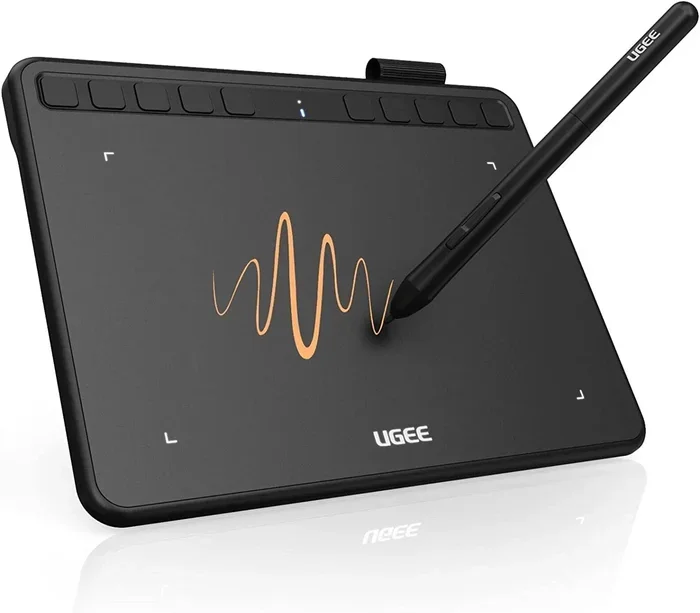
Standalone drawing tablets are devices built specifically for digital art. They do not have a built-in screen. Instead, you draw on the tablet surface while looking at your computer monitor. The digitizer in the tablet tracks your pen movements and sends them to your computer.
These tablets are a favorite among professional artists and hobbyists alike. They offer excellent pressure sensitivity, tilt support, and customizable buttons. If you are serious about digital art or graphic design, a quality drawing tablet is a worthwhile investment.
Digitizer vs Touchscreen: What Is the Difference?
People often use the words “digitizer” and “touchscreen” interchangeably, but they are not the same thing. A touchscreen is a display that you can interact with by touching it. A digitizer is the technology underneath that makes touch input possible.
Think of it this way: the touchscreen is the window, and the digitizer is the sensor behind it. Not all touchscreens use the same type of digitizer. A capacitive touchscreen uses a capacitive digitizer. An active digitizer screen uses electromagnetic technology for pen input.
The key difference comes down to precision and features. A basic capacitive touchscreen lets you tap and swipe. An active digitizer lets you draw with pressure sensitivity, detect tilt, and track the pen with pinpoint accuracy. If you are comparing devices for creative work, this distinction matters a lot.
When Does the Difference Matter?
The difference between a regular touchscreen and an active digitizer matters most for specific use cases. If you just browse the web and watch videos, a capacitive touchscreen is perfectly fine.
But if you take handwritten notes, sketch designs, or edit photos, an active digitizer gives you a much better experience. The pressure sensitivity and pen precision make a noticeable difference. You can write more naturally and draw with greater control.
Some laptops now offer both a capacitive touchscreen and an active digitizer layer. This gives you the best of both worlds. You can tap and swipe with your fingers, or switch to a stylus for more precise input.
Benefits of Using a Digitizer
Using a device with a good digitizer comes with several real-world benefits. Whether you are a student, a professional, or a creative, these advantages can improve your daily workflow.
Precision and Accuracy
Active digitizers offer incredible precision. Every pen stroke is tracked with high accuracy, which is essential for detailed work. Artists can create fine lines and subtle shading that would be impossible with a finger on a capacitive screen.
Pressure Sensitivity
One of the biggest advantages of a quality digitizer is pressure sensitivity. The harder you press, the thicker or darker the line becomes. This mimics the feel of real pen and paper, making digital drawing and writing feel much more natural.
Natural Note-Taking
For students and professionals, a digitizer-equipped laptop or tablet is a game-changer for note-taking. You can write directly on the screen, annotate PDFs, and sketch diagrams. It feels much closer to writing on paper than typing on a keyboard.
Faster Workflow
Many digitizers come with programmable buttons and shortcuts. These let you switch tools, undo actions, and zoom in with a single press. Over time, these small efficiencies add up to a much faster and smoother workflow.
Common Mistakes People Make with Digitizers
Even if you love your digitizer device, there are a few common mistakes that can hurt your experience. Knowing what to avoid helps you get the most out of your gear.
Using the Wrong Stylus
Not all stylus pens work with all digitizers. Some digitizers require a specific active stylus that emits a signal. Using a passive capacitive stylus on an active digitizer will not give you pressure sensitivity or tilt support. Always check which stylus is compatible with your device.
Ignoring Screen Protector Compatibility
Some screen protectors can interfere with digitizer input. If your screen feels less responsive after applying a protector, it might be blocking the digitizer’s signal. Look for protectors that are specifically labeled as compatible with stylus and digitizer use.
Skipping Driver Updates
Your digitizer relies on software drivers to work correctly. Outdated drivers can cause lag, inaccurate input, or missing features. Make sure you keep your device drivers up to date, especially after system updates.
Expecting a Drawing Tablet to Replace a Mouse
A drawing tablet is a great tool, but it is not always a one-to-one replacement for a mouse. The cursor movement and input feel are different. Give yourself time to adjust, and consider using both tools together for the best results.
How to Choose the Right Digitizer for You
Choosing the right digitizer depends on what you plan to use it for. Different needs call for different features. Here are some tips to help you decide.
For Artists and Designers
If your main goal is digital art or graphic design, look for a drawing tablet with an active digitizer. Prioritize pressure sensitivity levels, tilt support, and a responsive stylus pen. Wacom is a trusted brand, but there are many great options available today.
Also consider the size of the digitizer tablet. Larger surfaces give you more room to work, which can improve your comfort and precision during long sessions.
For Students and Professionals
If you need a device for note-taking and light annotation, a laptop or tablet with an active digitizer screen is a solid choice. Look for a device that supports a stylus pen and offers good handwriting recognition software.
Make sure your device has enough memory to handle your tasks smoothly. If you are shopping for a laptop, check out what 8GB of RAM can do for your multitasking needs. Having enough memory ensures your digitizer input is processed quickly and without lag.
For Casual Users
If you just want a responsive touchscreen for browsing and media, a capacitive digitizer is all you need. You do not need to invest in an active digitizer or a specialized drawing tablet. Most modern phones and tablets come with capacitive digitizers that work perfectly for everyday use.
Quick Tips for Getting the Most from Your Digitizer
- Keep your stylus pen charged if it is a battery-powered active stylus.
- Calibrate your digitizer regularly for the best accuracy.
- Use a clean, smooth surface for your drawing tablet to ensure consistent input.
- Update your digitizer drivers whenever a new version is available.
- Experiment with pressure settings in your drawing or note-taking apps.
- Store your stylus in a safe place to avoid damage to the tip.
The Future of Digitizer Technology
Digitizer technology is evolving fast. New advancements are making digitizers thinner, more responsive, and more affordable. We are already seeing ultra-thin active digitizers built directly into laptop screens and flexible displays.
In the near future, we can expect even better pressure sensitivity, faster response times, and more natural pen-on-screen experiences. The line between digital and physical input will continue to blur as digitizer technology improves.
For now, the digitizers available today are already powerful enough for most tasks. Whether you are drawing, writing, or simply navigating your device, a good digitizer makes everything feel more intuitive and natural.
Final Thoughts
A digitizer is one of those technologies that you might take for granted, but it plays a huge role in how we interact with our devices. From the smartphone in your pocket to the drawing tablet on your desk, digitizers make digital input feel close to the real thing.
Understanding how your digitizer works and what type you have helps you make better choices. You can pick the right device, use the correct stylus, and get the most out of your gear. Whether you are a creative professional, a student, or just someone who loves tech, knowing about digitizers gives you an edge.
So the next time you tap, swipe, or sketch on a screen, remember the digitizer working hard behind the scenes. It is a small component that makes a big difference.
Frequently Asked Questions
What is the difference between a digitizer and a touchscreen?
A touchscreen is the display you interact with, while a digitizer is the technology underneath that detects your touch or pen input. A touchscreen uses a digitizer to function, but not all digitizers are touchscreens. Active digitizers offer more precision and features than basic capacitive touchscreens.
Do I need a special pen for an active digitizer?
Yes, active digitizers require a compatible active stylus pen that emits a signal. A regular capacitive stylus will not work with an active digitizer. Always check your device specifications to find the right stylus.
Can I use a digitizer tablet with any laptop?
Most digitizer tablets connect via USB or Bluetooth and work with any laptop. However, for the best experience, make sure your laptop has enough processing power and memory. A laptop with at least 8GB of RAM and compatible ports will handle digitizer input smoothly.
Is a digitizer the same as handwriting recognition?
No, a digitizer captures your pen input and converts it to digital data. Handwriting recognition is a software feature that interprets that data and converts your handwriting into typed text. The digitizer provides the input, and the software does the interpreting.
What should I look for when buying a digitizer tablet?
Look for pressure sensitivity levels, tilt support, active area size, and stylus compatibility. If you are a beginner, a tablet with at least 4,096 levels of pressure sensitivity is a good starting point. Also check driver support and software compatibility with your operating system.
Can a digitizer wear out over time?
Yes, like any electronic component, a digitizer can degrade over time. Heavy use, pressure, and wear on the surface can affect accuracy. Keeping your device clean, using the right stylus, and updating drivers can help extend the life of your digitizer.